

You’ve just received an alarming email warning you about suspicious activity on your MetaMask wallet. It urges you to act immediately and activate Two-Factor Authentication (2FA) to protect your assets. The link in the email takes you to what looks like the official MetaMask website, asking you to confirm your Secret Recovery Phrase. Harmless, right? Think again.
What you’ve stumbled upon is not a security feature but a sophisticated scam. In this article, we’ll break down exactly how this phishing operation works, what you should do if you’ve already fallen victim, and how to protect yourself in the future. Stay with us—this is one article that could literally save your crypto.
Scam Overview
Phishing scams have been around for decades, but the decentralized nature of blockchain and cryptocurrencies has made them more devastating than ever. MetaMask, a popular Ethereum-based wallet with millions of users, has become a prime target. The latest trick in a scammer’s arsenal? The fake Two-Factor Authentication (2FA) activation email.
The Setup
Scammers initiate the scam by sending out a carefully crafted email designed to mimic official MetaMask communications. These emails often come with:
- Official-looking MetaMask branding and logos.
- Urgent warnings like “Suspicious Activity Detected on Your Wallet.”
- Instructions to “Activate 2FA Now.”
- A clickable link or button redirecting the user to a fraudulent website.
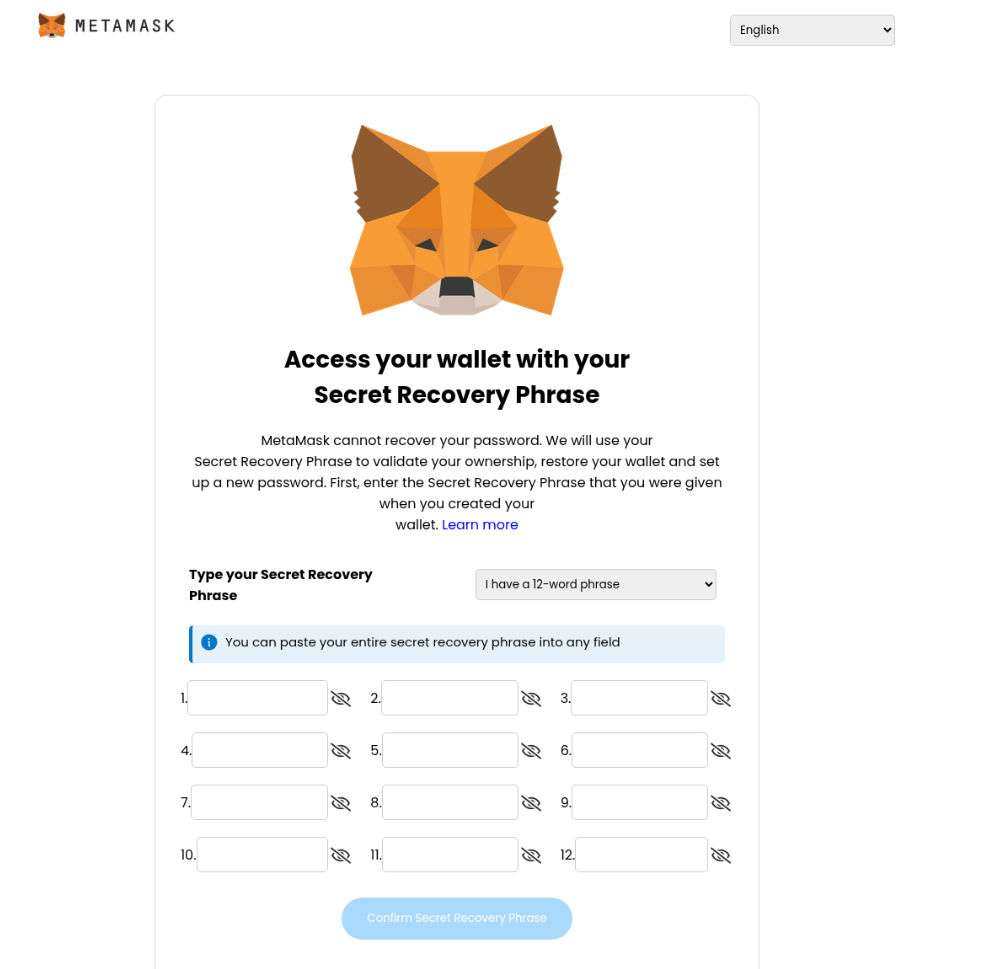
The fraudulent site is often a near-perfect replica of MetaMask’s official interface, complete with:
- A fake 2FA setup screen.
- Instructions asking users to input their 12-word Secret Recovery Phrase.
- Reassurances about “securing” the wallet.
The Psychological Manipulation
Scammers exploit several psychological principles:
- Urgency: The email suggests that immediate action is required, forcing the user into making hasty decisions.
- Fear: Nobody wants to lose their crypto, especially with stories of thefts in the news.
- Authority: The email appears official and comes from a sender like “support@metamask.io” (often spoofed).
The Consequences
Once a user enters their Secret Recovery Phrase, the scammer gains full access to their wallet. This includes:
- Transferring out all ETH and ERC-20 tokens.
- Accessing any linked DeFi platforms or dApps.
- Potentially gaining control of NFTs or staked tokens.
How The Scam Works
Let’s take a deep dive into how this phishing scam is executed, from the moment you receive the email to the tragic aftermath.
Step 1: Initial Contact
Scammers send out mass phishing emails. These emails are:
- Spoofed to appear as if they come from an official MetaMask address.
- Personalized using information from leaked databases or prior hacks.
- Timed to hit users when they are most vulnerable (e.g., during high trading activity).
Step 2: The Email Content
The email usually contains:
- A subject line like: “Urgent: Suspicious Activity Detected in Your MetaMask Wallet.”
- A message body explaining the need to activate 2FA immediately to avoid “permanent loss.”
- A CTA button: “Activate 2FA Now”.
Step 3: Redirect to Fake MetaMask Website
Clicking the button leads users to a fraudulent site such as:
- metamasksecure.io
- metamaskwallet.online
- 2fa-metamask.net
These domains are designed to look legitimate. They might even use SSL certificates (https://) to appear secure.
Step 4: The Fake 2FA Page
On this fake page, users are prompted to:
- Select if they have a 12 or 24-word Secret Recovery Phrase.
- Enter their recovery phrase in a series of input boxes.
- Click a button labeled “Confirm Secret Recovery Phrase.”
Some sophisticated sites may add a fake loading screen or “verifying 2FA setup” animation to make the experience seem legitimate.
Step 5: Theft Execution
The moment you submit your Secret Recovery Phrase:
- The data is sent directly to the scammer’s server.
- A script logs into your actual MetaMask wallet.
- Funds, tokens, and assets are immediately transferred to cold wallets owned by the attacker.
- The wallet is drained in seconds.
Step 6: Covering Tracks
Scammers often:
- Mix stolen tokens via mixers.
- Use multiple wallets and exchanges to launder the funds.
- Sell off stolen NFTs on black market platforms.
Step 7: Continued Exploitation
Once a wallet is compromised, it becomes a target:
- The victim’s email may be sold to other scammers.
- The victim may be tricked into another scam claiming to “recover” lost funds.
What to Do if You’ve Fallen Victim
If you’ve fallen for the MetaMask 2FA Activation Scam, don’t panic. Time is of the essence. Follow these steps immediately:
1. Disconnect the Wallet
- If you’re still on the fake site, close it immediately.
- Disconnect your MetaMask from all browser sessions.
2. Transfer Remaining Funds
- If any assets remain, transfer them to a new wallet that uses a newly generated seed phrase.
- Do not reuse the compromised seed phrase under any circumstance.
3. Revoke Token Approvals
- Go to Etherscan Token Approvals.
- Revoke all permissions for DeFi apps and tokens.
4. Report the Incident
- Report the phishing site to:
- MetaMask: https://support.metamask.io
- Google Safe Browsing
- PhishTank and other cybersecurity databases
5. Contact MetaMask Support (Cautiously)
- Use only official support links. Never trust DMs on Telegram or Discord.
- Note: MetaMask cannot recover stolen funds, but they can investigate and block associated scam addresses.
6. Alert Your Exchange (if linked)
- If your MetaMask wallet was linked to an exchange, notify them immediately.
- Some platforms can temporarily block outbound transactions.
7. Run a Security Check on Your Devices
- Scan for malware and browser extensions that may have captured your data.
- Reset passwords and enable real 2FA (using authenticator apps like Google Authenticator).
8. Educate Yourself and Others
- Share your experience on social media or forums.
- Help prevent others from falling for the same trick.
Frequently Asked Questions (FAQ)
1. Is MetaMask Two-Factor Authentication (2FA) real?
No, MetaMask does not currently support native Two-Factor Authentication (2FA) like you might see on centralized platforms. Any email or website claiming you need to activate MetaMask 2FA is almost certainly a scam designed to steal your Secret Recovery Phrase.
2. What is the MetaMask 2FA Activation Scam?
It’s a phishing scam where attackers send fake emails pretending to be from MetaMask. The emails claim suspicious activity has been detected on your wallet and instruct you to activate 2FA through a link. That link takes you to a fraudulent website asking for your Secret Recovery Phrase, which scammers then use to steal your funds.
3. What does a phishing email from MetaMask scammers look like?
A typical fake MetaMask email might include:
- Subject lines like: “Urgent Security Alert: Enable 2FA Now”
- Official-looking logos and formatting
- Buttons like “Activate Now” or “Secure My Wallet”
- Language designed to induce fear or urgency
Always hover over any links to verify the domain before clicking.
4. Can MetaMask recover stolen funds if I was scammed?
Unfortunately, no. Because MetaMask is a non-custodial wallet, it doesn’t have access to your private keys or recovery phrase. Once your assets are transferred out by scammers, they are generally irretrievable.
5. What should I do if I accidentally entered my Secret Recovery Phrase?
Act immediately:
- Create a new MetaMask wallet with a fresh recovery phrase.
- Transfer all remaining assets to your new wallet.
- Use Etherscan Token Approval Checker to revoke token permissions.
- Report the phishing site to MetaMask and cybersecurity services.
- Scan your device for malware and reset all passwords.
6. How do I verify if a MetaMask communication is legitimate?
- MetaMask will never email you asking for your Secret Recovery Phrase.
- Visit MetaMask’s official support page for any concerns.
- Check MetaMask’s verified social media pages or Discord announcements.
7. Why do scammers want my Secret Recovery Phrase?
The Secret Recovery Phrase is the master key to your MetaMask wallet. Anyone with access to it can:
- Access and control your wallet
- Steal all tokens, NFTs, and funds
- Drain staking contracts and DeFi interactions
- Lock you out completely
8. What does a fake MetaMask website look like?
Scam websites often:
- Mimic the official MetaMask interface
- Use domain names like metamasklogin.xyz, metamask-2fa.com, etc.
- Have SSL certificates (https://) to appear secure
- Prompt users to enter their recovery phrase “for verification”
Always type in the official URL manually: https://metamask.io
9. Can scammers still access my wallet without my seed phrase?
Typically, no. Without your Secret Recovery Phrase (seed phrase), scammers cannot directly access your MetaMask wallet. However, if you’ve approved malicious smart contracts, they might be able to interact with your wallet. Always check and revoke approvals on Etherscan.
10. How can I protect myself from future scams?
- Never click links in unsolicited emails.
- Bookmark the official MetaMask website.
- Use a hardware wallet for added protection.
- Regularly monitor and revoke token approvals.
- Stay informed about common crypto scams.
The Bottom Line
The MetaMask 2FA Activation Scam is not just a random phishing attempt—it’s a highly sophisticated operation that has fooled thousands of users. Always remember: MetaMask will never ask for your Secret Recovery Phrase.
Stay vigilant, double-check URLs, and never input your seed phrase unless you are restoring a wallet in a verified, secure MetaMask environment.
Protect your assets, stay informed, and don’t let scammers win.








