

The promise sounds simple and irresistible: type in an Instagram username, wait a few seconds, and unlock the password to anyone’s account. A site called Hacking Panel V2 claims it can do exactly that. The interface looks professional, the process looks technical, and the results appear convincing. But behind those flashing codes and progress bars lies one of the most deceptive digital scams circulating today.
The Hacking Panel V2 Instagram Scam has spread quickly across forums, YouTube videos, and social-media posts. It lures users with false guarantees of easy hacking, hides its real intent behind complex-looking animations, and funnels victims toward paid subscriptions, affiliate sales, and survey traps. What begins as curiosity often ends with financial loss, stolen personal data, or legal risk.
This in-depth article exposes how the Hacking Panel V2 scam actually works, why it’s so effective, and the concrete steps you can take to avoid or recover from it.
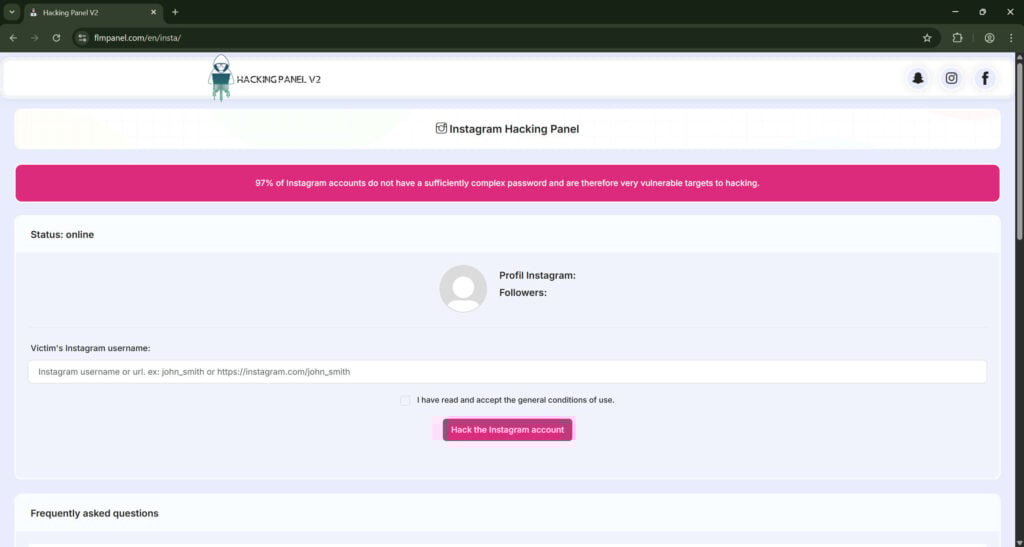
Scam Overview
What is Hacking Panel V2?
Hacking Panel V2 is a fraudulent website that claims to hack Instagram accounts instantly. The page invites visitors to enter the username of any Instagram profile. Once a name is entered, it simulates a live hacking process with terms like “injecting session codes,” “bypassing encryption,” or “configuring anonymity settings.”
After a minute or two, the page congratulates the user for a “successful hack” and displays a button to “reveal the password.” However, when users click to reveal it, the site informs them that they are using a trial version and must pay or complete an action—usually by clicking an affiliate link, completing surveys, or downloading software—to obtain full access.
Instead of delivering a password, the scam redirects users to third-party commercial offers such as monitoring apps (for example, mSpy), ebook clubs, or movie subscription services. The scammers earn a commission for every signup or sale generated through their links. No real hacking ever takes place.
Why It’s a Scam
Hacking Panel V2 uses the illusion of hacking to monetize user engagement. The operators know that many people search online for quick ways to view private Instagram profiles, recover lost passwords, or spy on others’ accounts. By offering a fake but convincing “solution,” they turn that curiosity into profit.
Several characteristics make Hacking Panel V2 unmistakably fraudulent:
- Technical impossibility.
No external website can access Instagram’s internal systems or decrypt passwords. Instagram uses strong encryption and multiple authentication layers. Any page claiming to hack an account with only a username is lying. - Deceptive interface.
The progress bars, console-style code output, and technical buzzwords are pure theater. They exist solely to persuade users that a genuine hack is taking place. - Monetization through deception.
The fake “trial” message funnels users to paid services unrelated to hacking. The scammer profits from commissions or traffic, not from selling any real capability. - Legal camouflage.
The site may include vague disclaimers like “for educational purposes only” or “use at your own risk.” These disclaimers give the illusion of legitimacy while shielding the operators from immediate takedown. - Data collection.
Some versions prompt users to enter their own Instagram credentials “for verification,” harvest email addresses through surveys, or log IP addresses for future targeting.
How Victims Find It
The scam spreads through multiple channels designed to look authentic and viral:
- Search-engine manipulation. Pages are SEO-optimized to appear for keywords such as “Instagram hack,” “Instagram password viewer,” or “Instagram account cracker.”
- Social media promotion. Fake profiles or comment bots post links claiming success stories.
- YouTube tutorials. Short videos demonstrate the fake hacking process and include the link in the description.
- Messaging apps. Links circulate in Telegram or WhatsApp groups dedicated to “tech tricks” or “Instagram tools.”
By positioning itself as a popular online tool, Hacking Panel V2 earns trust before visitors even reach the site.
The Illusion of Legitimacy
The website layout typically features:
- A sleek dashboard resembling real web-based software.
- Text such as “Server Status: Online” or “Hack Success Rate: 98%.”
- Testimonials or user counters (“15,000 accounts hacked today”).
- A fake support chat or help icon that always returns automated messages.
These touches imitate professional SaaS (Software-as-a-Service) platforms, lowering skepticism. Victims think, “It looks official—maybe it really works.”
Monetization and Affiliate Funnels
After the simulated hack, the scam displays messages like “Your trial has expired. Purchase full access.” The “purchase” button redirects through an affiliate tracking link to commercial services. Common destinations include:
- Parental monitoring apps such as mSpy or FlexiSpy.
- Survey walls requiring users to complete questionnaires.
- Subscription offers for eBooks or streaming services that start with a “free trial” but charge monthly fees.
- Software installers that bundle adware or browser extensions.
The scammer earns money each time a victim subscribes, completes a survey, or installs software. The more traffic they attract, the more profit they generate—without ever touching Instagram’s infrastructure.
Hidden Risks for Victims
While many victims “only” lose time or small amounts of money, others face greater risks:
- Financial loss. Entering credit-card details for “access fees” often results in recurring, hard-to-cancel charges.
- Privacy breaches. Surveys collect personal data like email addresses, birthdates, or phone numbers.
- Malware infection. Downloaded files may contain adware, trojans, or tracking scripts.
- Legal exposure. Attempting to hack another person’s account—even through a fake site—can be interpreted as intent to commit unauthorized access, which is illegal in most countries.
- Reputation damage. Some victims share screenshots or videos of themselves using the tool, inadvertently admitting to an unlawful act.
Why It Works So Well
Hacking Panel V2 succeeds because it blends psychology, design, and greed:
- Curiosity and temptation. People want to know if such hacks are possible.
- Low barrier to entry. The site asks only for a username, which feels safe.
- Instant gratification. Progress bars show quick results, keeping users engaged.
- Authority bias. Technical language like “packet injection” or “token bypass” makes it sound credible.
- Partial truths. Affiliate links lead to legitimate products, which tricks users into thinking the site itself is legitimate.
Who Runs Hacking Panel V2?
Most operators remain anonymous, hiding behind domain privacy services and offshore hosting. Analysis of similar scams suggests small groups or individual marketers who specialize in “gray-hat” affiliate funnels. They focus on generating clicks and sign-ups rather than stealing data directly.
Their infrastructure typically includes:
- Disposable domains. They register multiple look-alike URLs (e.g., hackingpanelv2.pro, hackingpanelv2.net) to replace any site that gets banned.
- Affiliate accounts. Each domain uses unique tracking links to maximize payouts.
- Automation. Scripts replicate the same design and fake process across dozens of websites.
- Traffic brokers. They buy cheap ad placements or social-media shoutouts to drive visits.
This decentralized model makes enforcement difficult. When one page is taken down, another appears within days.
Legal and Ethical Concerns
Hacking Panel V2 violates multiple laws and platform policies. In the United States, attempting to obtain unauthorized access to computer systems breaches the Computer Fraud and Abuse Act (CFAA). In the European Union, it contravenes the General Data Protection Regulation (GDPR) and national cybercrime statutes.
Even visiting such sites may expose users to investigation if they actively attempt to access another person’s account. Furthermore, encouraging others to use or promote these sites can constitute aiding illegal activity.
From an ethical perspective, the scam promotes the normalization of hacking behavior, erodes trust in online security tools, and misuses affiliate marketing systems.
The Broader Impact
The proliferation of sites like Hacking Panel V2 has broader consequences beyond individual victims:
- Erosion of trust. People become skeptical of legitimate cybersecurity tools.
- Affiliate abuse. Legitimate companies see their brands associated with deception.
- Search-engine pollution. SEO manipulation crowds out genuine educational resources.
- Resource waste. Authorities and cybersecurity firms spend time tracking disposable domains instead of tackling higher-impact threats.
In short, the scam exploits curiosity at scale, turning public fascination with hacking into a revenue stream.
How The Scam Works
The mechanics behind the Hacking Panel V2 Instagram scam are intentionally simple, repeatable, and highly automated. The operators focus on converting traffic into revenue, not on developing real hacking tools. Understanding the scam’s full technical and psychological flow will help you recognize it immediately and avoid falling into the same funnel. Below is a detailed, step-by-step account of how the Hacking Panel V2 scam typically operates, from initial exposure to final monetization and follow-up targeting.
Phase 1 — Traffic acquisition and credibility building
- Search-engine optimization and keyword targeting
The scam starts long before a user reaches the page. Operators research high-volume search queries such as “Instagram hack,” “Instagram password viewer,” “how to see private Instagram,” and long-tail variants that include “panel,” “v2,” and “tool.” They then optimize landing pages and link farms to rank for these terms. Because Google and other engines sometimes surface new or thin content quickly, a well-structured page with the right keywords can appear near the top of search results for a short period, attracting curious users. - Paid ads, social promotion, and comment spam
In addition to organic search visibility, criminals buy low-cost ad placements on networks with looser moderation. They also post the link in social media comments, description boxes on YouTube videos, and Telegram or Reddit threads where people ask for ways to view private profiles. These posts often include screenshots or short clips showing the “tool” working, which greatly increases click-through rates. - Fake social proof
The landing page itself is dressed with social proof: counters like “1,234 users served today,” user testimonials that are clearly fabricated, and badges that claim compatibility with multiple platforms. All of these elements are designed to reduce cognitive friction and encourage users to try the tool.
Phase 2 — Data input and initial validation
- Username-only entry
The Hacking Panel V2 interface asks for only the target’s Instagram username or profile URL. This low-friction approach encourages more people to test the tool because they feel they are not committing personal information. That single field is followed by an action button such as “Start,” “Begin Hack,” or “Check Account.” - Client-side validation and fake enrichment
To make the process appear real, the page typically performs client-side JavaScript validation. It may check that the username contains valid characters or attempt a simple request to Instagram’s public pages to fetch profile images or follower counts. This “enrichment” step provides real, verifiable public data about the target account and increases the illusion of legitimacy.
Phase 3 — The simulated attack
- Simulated logs and technical jargon
After the user submits a username, the site plays its most persuasive trick: a staged attack sequence. The page displays rapidly changing, console-like logs with technical lines such as “Establishing session proxy,” “Injecting token packet,” “Enumerating authentication vectors,” and “Brute-forcing password hash.” Those messages are fake; they are client-side animations designed to look like server responses. The goal is to create the strong illusion of a live, technical process. - Progress bars, delays, and intentional errors
Scammers add purposeful delays, flashing “server busy” messages, and steps labeled “Bypassing 2-factor” or “Decrypting database shards.” These delays make the result feel earned. Occasionally the site will display a staged error such as “Limited Trial Reached” or “Additional Verification Required” to push the user toward the next monetization step. - Partial reveals and confirmation elements
Near the end of the simulated attack, the site may display non-sensitive public information about the target: full name, profile picture, number of posts, or follower count. Displaying publicly verifiable data builds perceived trust. The page then shows a triumphant message: “Account compromised. Click reveal to get password.”
Phase 4 — The gate and monetization funnel
- The paywall, survey wall, or download prompt
The reveal button triggers the actual monetization funnel. Common mechanisms include:- A paywall requiring a one-time fee or a “premium unlock” subscription.
- A survey wall where the user must complete multiple “market research” forms.
- A download prompt for an app or installer that supposedly “completes the process.”
- A redirect to a third-party product page sold via an affiliate link.
- Affiliate redirection and conversion tracking
The Hacking Panel V2 operator rarely handles the paid transaction directly. Instead, they use affiliate tracking links that redirect users to legitimate merchants such as parental-monitoring software, subscription services, or ebook stores. The site’s owner receives a commission for every signup, trial registration, or purchase. Because the product pages are legitimate, victims might be paying for real services they did not intend to buy, which complicates chargeback and refund requests. - Survey and lead-generation networks
If the funnel uses a survey wall, the user is routed through a chain of lead-generation pages. Each completed form may pay the network between a few cents and several dollars, depending on the quality of the lead. Often the surveys never finish, loop indefinitely, or ask for more PII, leading to additional privacy risks. - PUP installers and adware distribution
When downloads are required, the installer often bundles potentially unwanted programs (PUPs), browser toolbars, or adware. These components can persist on the device, inject additional ads, collect browsing data, and open future monetization opportunities for the operator or their partners.
Phase 5 — Post-conversion exploitation and remarketing
- Data harvesting and resale
During the funnel, the scammers may harvest email addresses, phone numbers, and sometimes even payment details if users enter them on a redirected merchant’s site. Harvested data is valuable: emails and phone numbers can be sold to marketing lists or fraudsters. This creates a long-term revenue stream beyond the initial conversion. - Retargeting and subscription renewals
If a user signs up for a subscription through a redirected merchant, recurring charges may begin after a trial period. Many victims do not notice a low-cost recurring fee until months later. Also, operators can retarget users with new scam pages via email or ads, using the data captured during the funnel. - Domain rotation and takedown evasion
Operators avoid law enforcement and content moderation by rotating domains, quickly cloning the site under new URLs, and using content delivery networks and offshore hosting. When a domain is reported, a similar version appears under a different name within days. This ephemerality makes enforcement difficult.
What to Do If You Have Fallen Victim to This Scam
If you clicked through, paid, provided personal information, downloaded a file, or entered credentials into the Hacking Panel V2 Instagram scam, take action immediately. Speed matters. The following numbered steps are ordered by priority and include practical instructions, suggested resources, and what to expect when you contact providers or law enforcement. Treat this as an actionable recovery checklist and follow it step by step.
1. Close the site and disconnect the device from the network
Action: Immediately close the browser tab, then disconnect the device from Wi-Fi or unplug the network cable. For mobile devices, switch to airplane mode.
Why: Disconnecting helps prevent any remaining scripts from communicating with remote servers and stops automatic downloader processes. It also prevents real-time data exfiltration if malware was installed.
2. Change your relevant passwords from a clean device
Action:
- Use a device you are confident is clean (another computer, a smartphone not involved in the incident, or a factory-reset device) to change passwords for your Instagram account, primary email account, banking, and any other accounts that might share the same password.
- Do not change passwords from the compromised device until you have scanned for malware and confirmed it is clean.
Why: If your credentials were harvested, changing passwords immediately closes that vulnerability. Using a clean device avoids entering new passwords on a machine that may contain keyloggers.
How:
- Create strong, unique passwords using a password manager (1Password, Bitwarden, LastPass, etc.). Aim for at least 12 characters and avoid reusing passwords.
3. Enable two-factor authentication (2FA) with an authenticator app
Action:
- Turn on 2FA for Instagram, your primary email, and any financial accounts.
- Use an authenticator app (Authy, Google Authenticator, Microsoft Authenticator) or a hardware security key (YubiKey), not SMS, where possible.
Why: 2FA significantly reduces the risk of account takeovers even if your password is known.
How:
- On Instagram: go to Settings > Security > Two-Factor Authentication and follow the instructions to add an authenticator app or security key.
- On email: follow the provider’s guide (Gmail, Outlook, Yahoo, etc.) to add 2FA.
4. Revoke suspicious app access and active sessions
Action:
- On Instagram: check Settings > Security > Apps and Websites and remove any unknown connected apps.
- Log out of all active sessions on Instagram and your email account to force re-authentication.
Why: Apps or sessions left open by malicious redirects can be used to maintain access to accounts.
5. Scan your device for malware and uninstall suspicious software
Action:
- Run a full scan using updated, reputable anti-malware tools:
- Windows: Malwarebytes, Windows Defender, ESET, Bitdefender
- macOS: Malwarebytes for Mac, Bitdefender
- Android: Malwarebytes for Android, Bitdefender Mobile Security
- iOS: iOS is more restricted but check installed profiles and remove unknown configuration profiles
- Uninstall recently downloaded applications that you did not intend to install.
- Remove unfamiliar browser extensions and clear browser cookies and cache.
Why: Many Hacking Panel V2 funnels include PUPs or adware that persistently reinject malicious content. Removing them reduces the chance of re-infection.
6. Check for and stop unauthorized financial transactions
Action:
- Immediately contact your bank or credit card issuer if you entered payment details or see unexpected charges.
- Explain that you were redirected through a fraudulent website and ask your bank to block future charges and initiate a dispute or chargeback for unauthorized or deceptive charges.
- Request a new card number if necessary.
Why: Scammers commonly enroll victims in recurring subscriptions or use stolen card details for continued billing.
How:
- Have transaction dates, merchant names, and amounts ready.
- Request written confirmation of any fraud report for your records.
7. Request refunds and cancel subscriptions
Action:
- If you purchased a product via the affiliate redirect (e.g., monitoring software), contact the merchant and request a refund. Explain that you were misled by a third-party site.
- If you provided a phone number and were enrolled in SMS subscriptions, contact your mobile operator and request cancellation.
Why: Merchants sometimes honor refunds when provided with evidence of deceptive marketing. Banks can also help block future charges.
How:
- Save screenshots of the funnel, the redirect, and your receipts to support your claim.
- If the merchant refuses, escalate to your bank and file a chargeback.
8. Report the scam to platforms and authorities
Action:
- Report the fraudulent website to Google Safe Browsing via the “Report Phishing Page” form.
- Report the scam to Instagram through the Help Center and the “Report a hacked account” option if account access was affected.
- Contact local law enforcement and file a cybercrime or fraud report if you suffered financial loss or identity theft.
- If you are in the United States, file a complaint with the Federal Trade Commission at reportfraud.ftc.gov. In the U.K., contact Action Fraud. Use your local country’s consumer protection agency if outside those jurisdictions.
Why: Reporting helps authorities and service providers take action to remove the site and prevents others from becoming victims. It also creates documentation that can help with disputes and recovery.
How:
- Provide full details: URLs, timestamps, screenshots, receipts, and a timeline of actions taken.
9. Preserve evidence for investigations and chargebacks
Action:
- Save screenshots of the scam page, the affiliate links, the merchant pages you were redirected to, and any receipts or emails you received.
- Export browser history and download the raw HTML of the scam page if possible.
Why: Evidence speeds resolution with financial institutions and supports law enforcement investigations.
How:
- Use “Save page as” or developer tools to download page resources. Keep all files in a secure folder and back them up.
10. Monitor your accounts and credit for signs of identity theft
Action:
- Check your credit reports for new accounts you did not open.
- Monitor bank statements, PayPal, and card transactions for unusual charges.
- Set up alerts for large transactions and logins from new devices where possible.
Why: Harvested personal data can be used later for identity theft or fraud.
How:
- Consider placing a fraud alert or credit freeze with credit bureaus if you suspect identity theft.
- Use a credit monitoring service if you provided sensitive PII such as Social Security numbers.
Is Your Device Infected? Run a Free Malware Scan
Slow performance, constant pop-ups, or strange behavior? These are classic signs of a malware infection. The fastest way to find out is to scan your device with Malwarebytes Free — one of the most trusted malware removal tools available.
The free version detects and removes the most common threats, including:
- Adware — the cause of those annoying pop-ups
- Browser hijackers — unwanted redirects and changed homepages
- Trojans and spyware — hidden programs stealing your data
- Potentially unwanted programs (PUPs) — software you never asked for
👉 Select your device below — Windows, Mac, or Android — then follow the simple steps to download Malwarebytes, scan your system, and remove any threats it finds. The scan usually takes 5 to 20 minutes.
Run a Malware Scan with Malwarebytes for Windows
Malwarebytes is one of the most popular and trusted anti-malware tools for Windows — and it’s completely free for removing infections. It catches threats that many antivirus programs miss, including adware, browser hijackers, and trojans. Follow the steps below to scan and clean your PC in just a few minutes.
Download Malwarebytes
Click the button below to download the latest version of Malwarebytes for Windows from the official source. The free version is all you need — it will scan your computer and remove adware, browser hijackers, and other malicious software at no cost.
Download MalwarebytesOfficial installer for Windows 11 and 10. Your download starts right away.Want real-time protection? See Malwarebytes Premium Malwarebytes Free for WindowsScans and removes malware at no cost
-
Install Malwarebytes
When the download finishes, open your Downloads folder and double-click the MBSetup file. If Windows shows a User Account Control pop-up, click “Yes” to allow the installation.
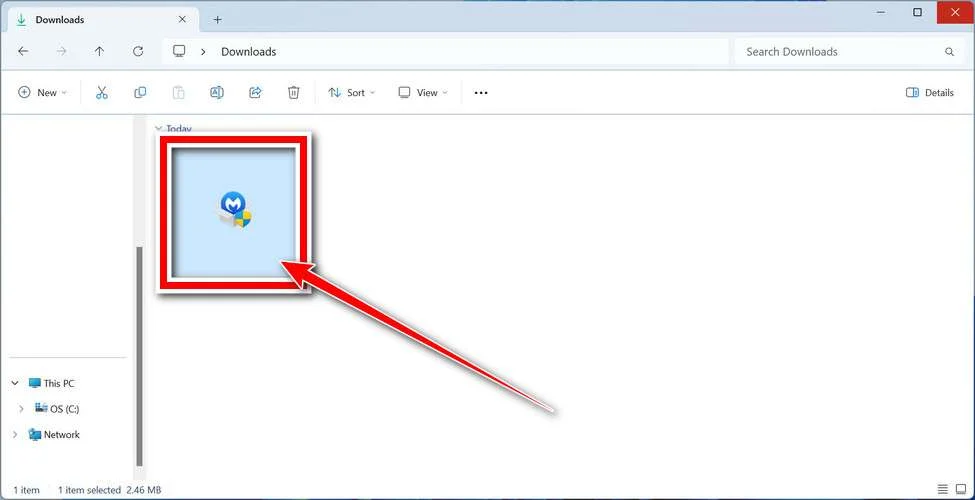
Follow the On-Screen Prompts to Install Malwarebytes
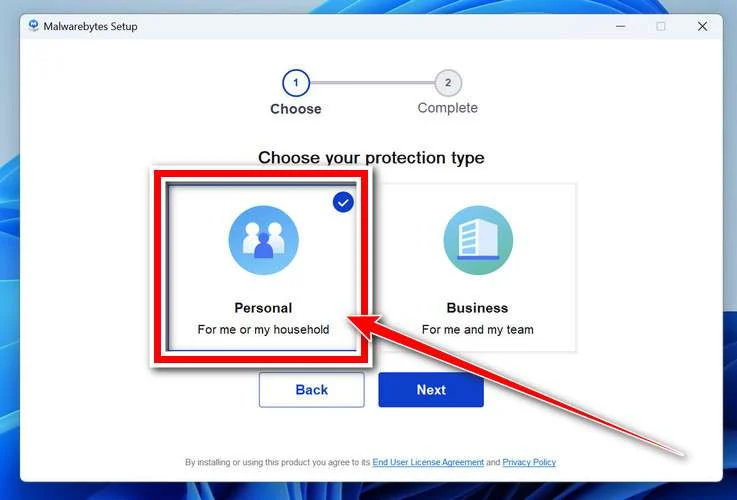
The setup wizard will walk you through a few quick screens:
-
Choose where you’re installing the program — “Personal Computer” or “Work Computer” — then click Next.
-
Malwarebytes will now install on your device. This usually takes under a minute.

-
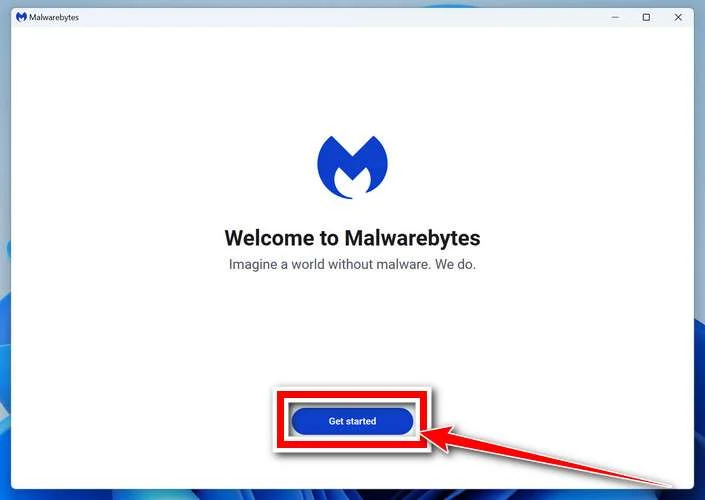
When installation is complete, the “Welcome to Malwarebytes” screen will open automatically.
-
On the final screen, click Open Malwarebytes to launch the program.

-
Enable “Scan for Rootkits”
Before scanning, turn on rootkit detection so Malwarebytes can find even the most hidden threats. Click the Settings gear icon on the left side of the screen.
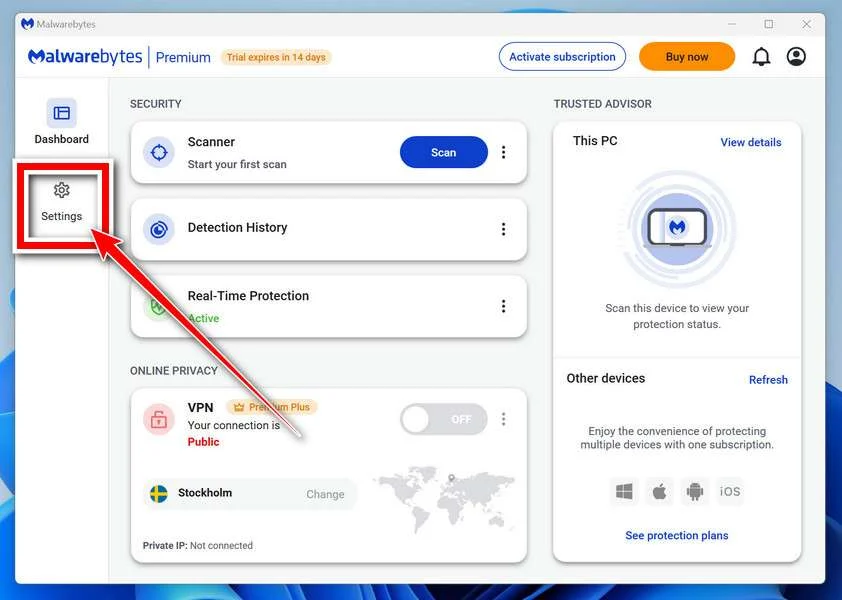
In the settings menu, find “Scan for rootkits” and click the toggle so it turns blue.

Done? Click “Dashboard” in the left pane to return to the main screen.
Start the Scan
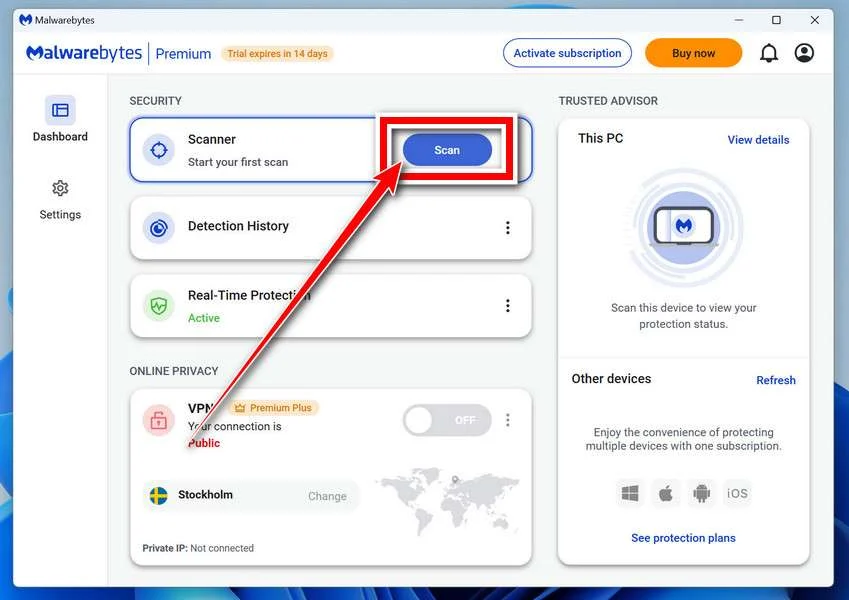
Click the blue Scan button. Malwarebytes will automatically update its virus database and start checking your computer for malware.
-
Wait for the Scan to Finish
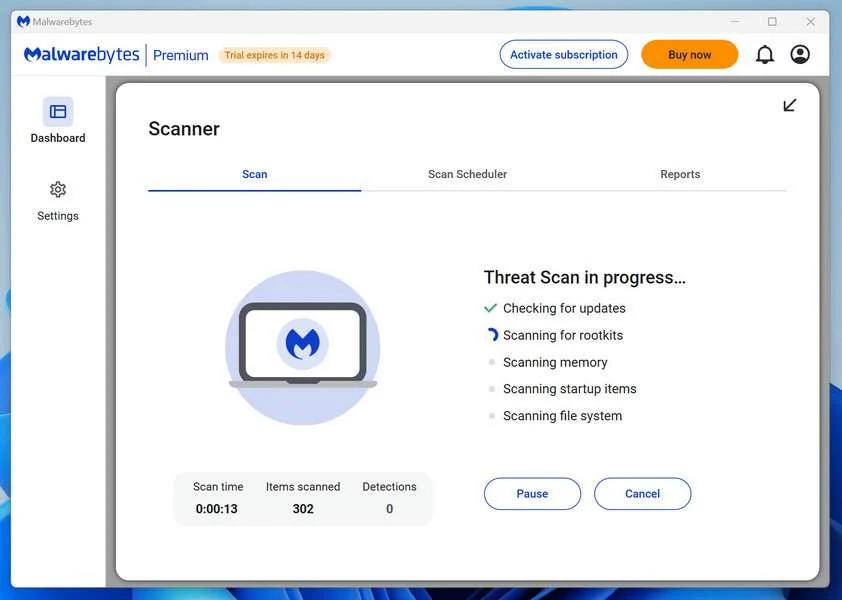
The scan checks your entire system for browser hijackers and other malicious programs, so it can take 5 to 20 minutes depending on your computer. Feel free to do something else — just check back occasionally to see the progress.
-
Quarantine the Detected Threats
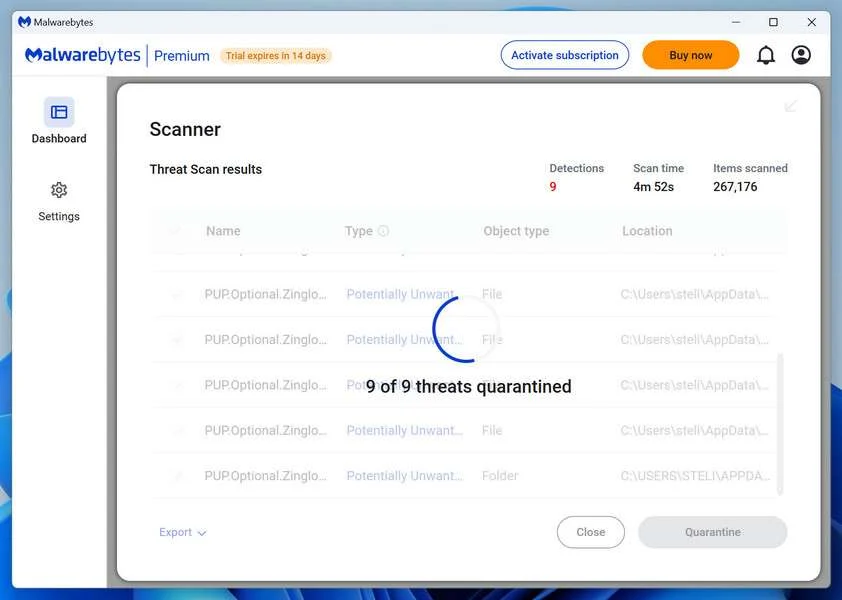
When the scan is done, you’ll see a list of everything Malwarebytes found — malware, adware, and potentially unwanted programs. Click the “Quarantine” button to remove all of them at once.
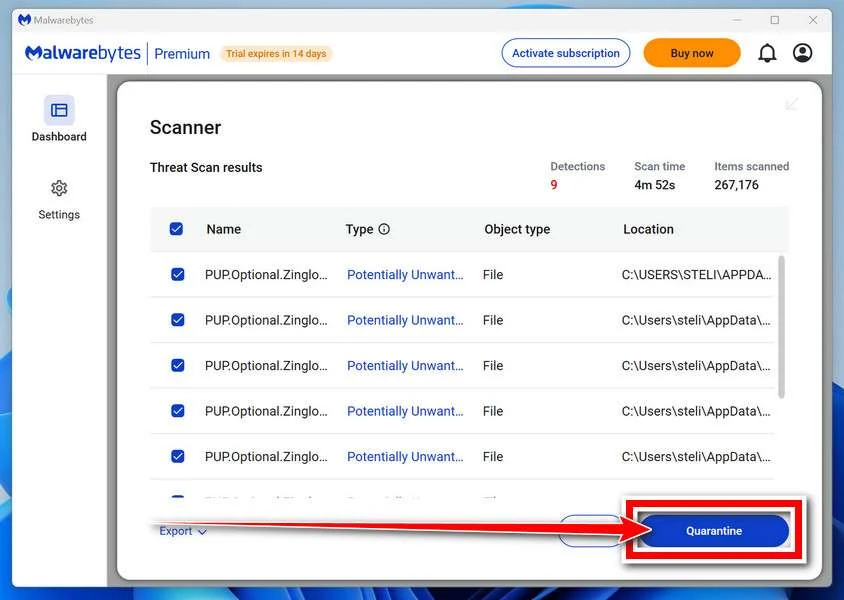
Malwarebytes will now remove the malicious files and registry entries and move them safely into quarantine.
-
Restart Your Computer
Some threats can only be fully removed after a reboot. If Malwarebytes asks you to restart, click Yes. Once you’re logged back in, Malwarebytes has finished removing the threats it found.
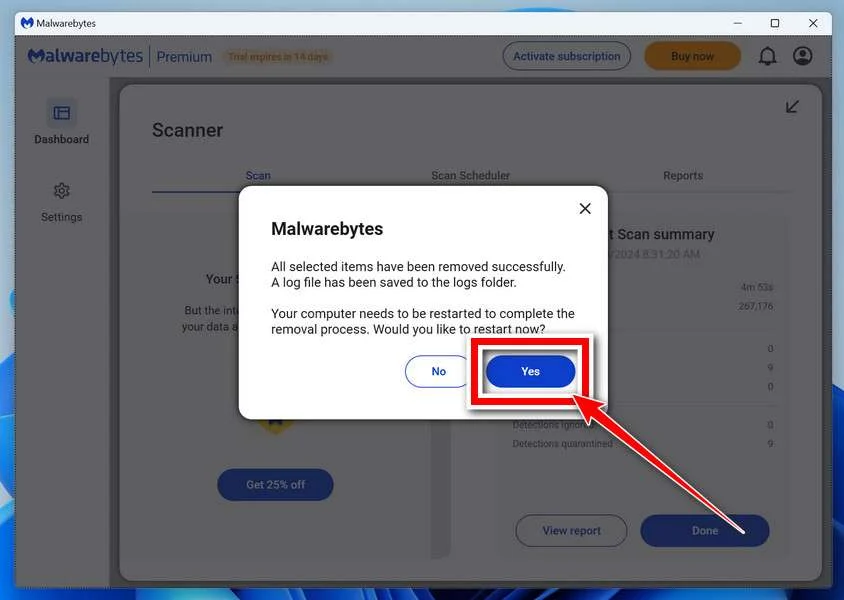
That’s it — your Windows PC is now clean of trojans, adware, and other malware, and should be back to running smoothly.
If you are still having problems with your computer after completing these instructions, then please follow one of the steps:
- Run a computer scan with ESET Online Scanner
- Ask for help in our Windows Malware Removal Help & Support forum.
Run a Malware Scan with Malwarebytes for Mac
Malwarebytes for Mac is a free on-demand scanner that removes the malware other security software tends to miss — adware, browser hijackers, and unwanted programs included. Cleaning an infected Mac with Malwarebytes has always been completely free, and it’s our go-to recommendation. Follow the steps below to scan and clean your Mac in just a few minutes.
-
Download Malwarebytes for Mac
Click the button below to download the latest version of Malwarebytes for Mac.
Download MalwarebytesOfficial installer for macOS. Your download starts right away.Want real-time protection? See Malwarebytes PremiumMalwarebytes Free for MacScans and removes malware at no cost -
Open the Malwarebytes setup file
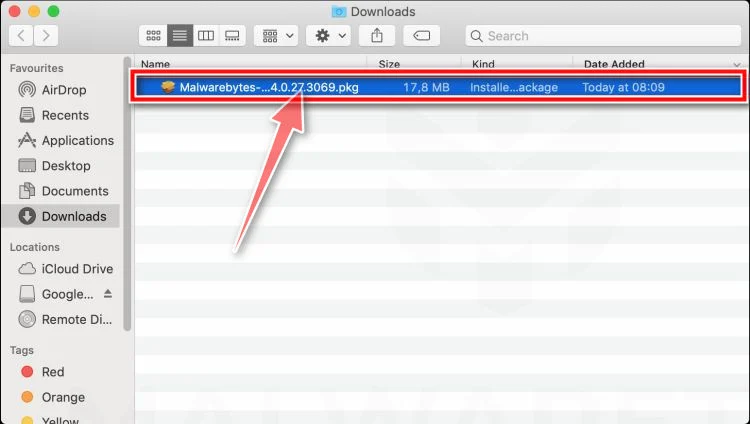
When the download finishes, open your Downloads folder and double-click the setup file to begin the installation.
-
Follow the On-Screen Prompts to Install Malwarebytes
The Malwarebytes for Mac Installer will guide you through a few quick screens. Click “Continue” and keep following the prompts until the installation completes.
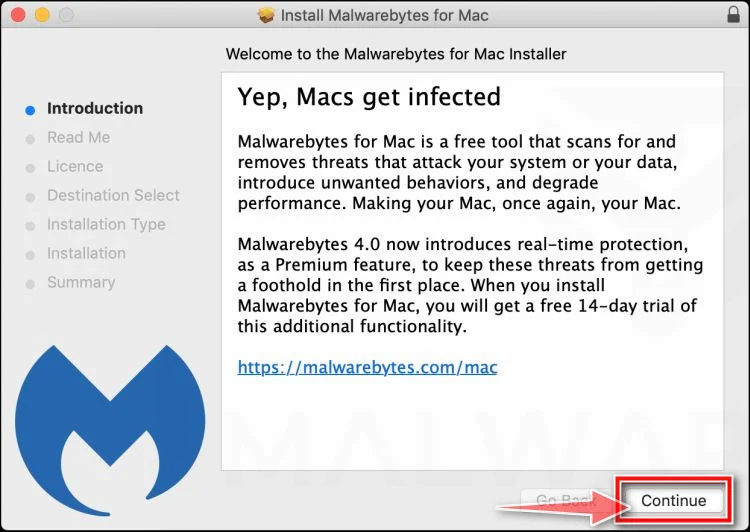
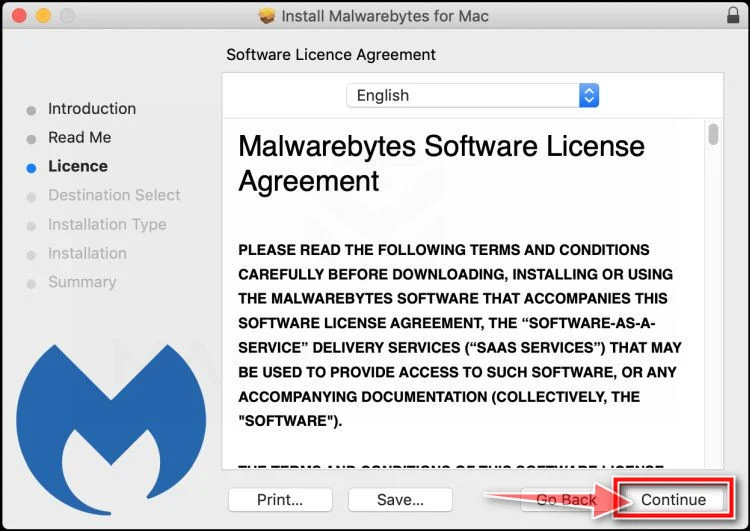
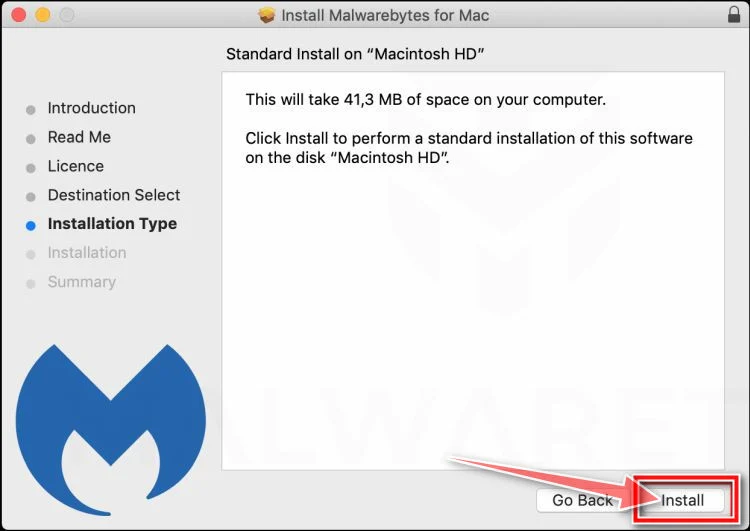
When the installation is complete, Malwarebytes opens to the Welcome to Malwarebytes screen. Click “Get started“.
-
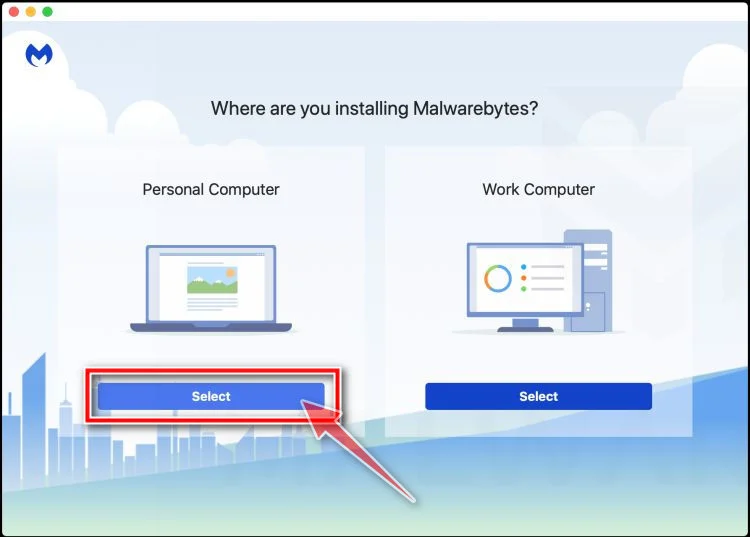
Select “Personal Computer” or “Work Computer”
Malwarebytes will ask what type of computer you’re installing it on. Click either Personal Computer or Work Computer, whichever applies.
-
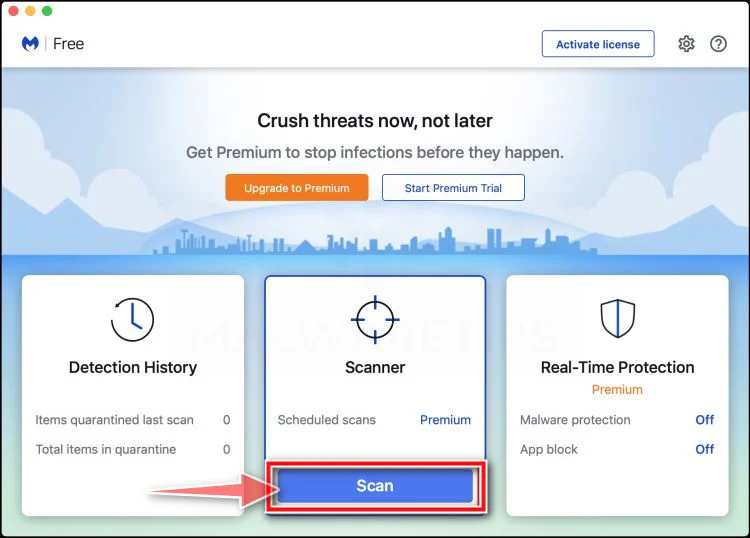
Start the Scan
Click the “Scan” button. Malwarebytes will automatically update its detection database and begin checking your Mac for malware.
-
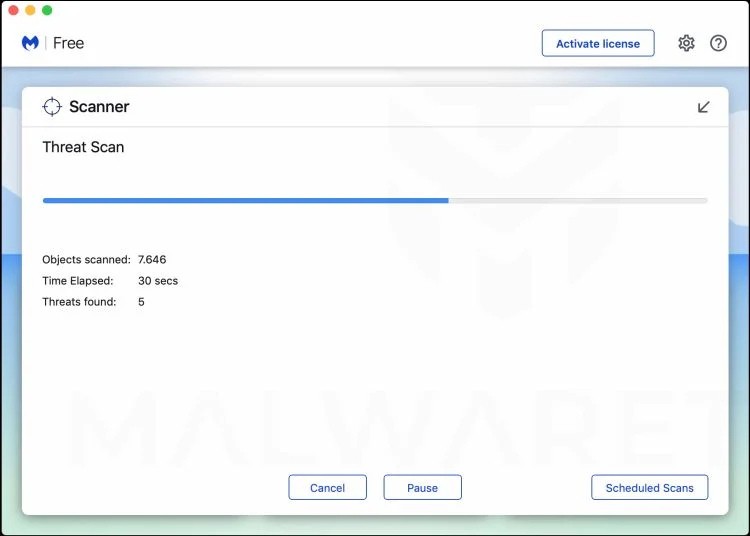
Wait for the Scan to Finish
Malwarebytes will scan your Mac for adware, browser hijackers, and other malicious programs. This can take a few minutes, so feel free to do something else — just check back occasionally to see the progress.
-
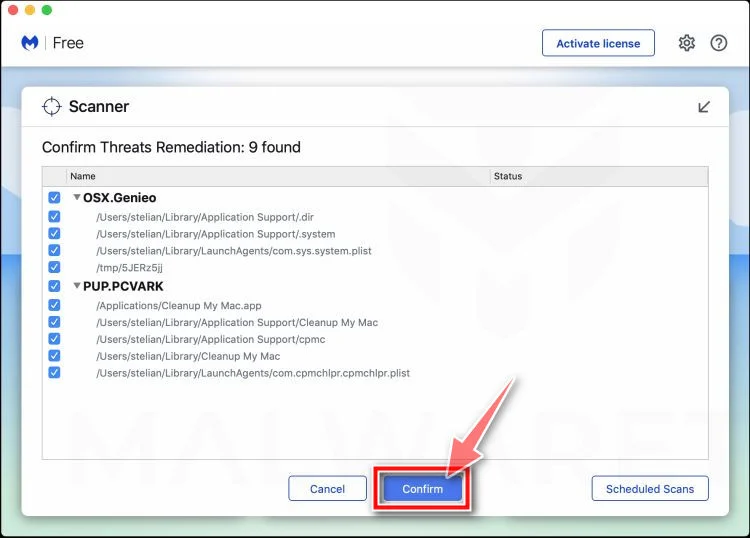
Quarantine the Detected Threats
When the scan is done, you’ll see a list of everything Malwarebytes found. Click the “Quarantine” button to remove all the threats at once.
-
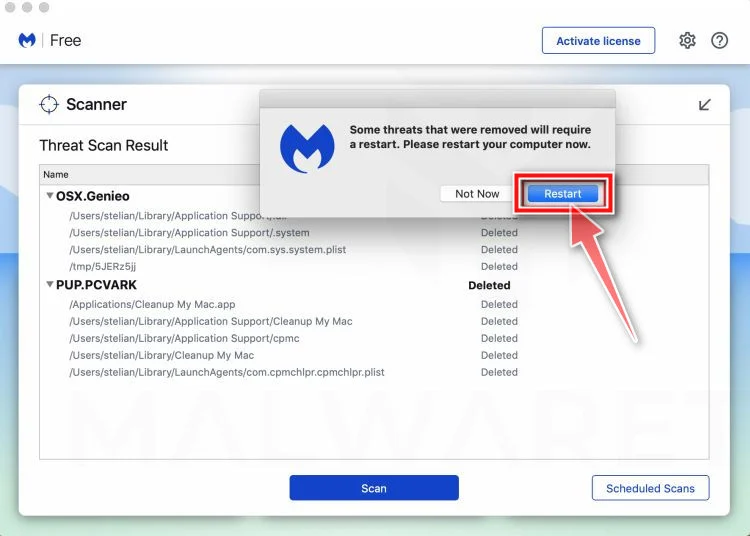
Restart Your Mac
Malwarebytes will now remove all the malicious files it found. Some threats can only be fully removed after a reboot — if Malwarebytes asks you to restart, allow it. Once you’re logged back in, your Mac is clean.
That’s it — your Mac is now free of adware, rogue browser extensions, and other potentially harmful software.
If you are still experiencing problems while trying to remove a malicious program from your computer, please ask for help in our Mac Malware Removal Help & Support forum.
Run a Malware Scan with Malwarebytes for Android
Malwarebytes for Android automatically detects and removes dangerous threats like malware and ransomware so you don’t have to worry about your most-used device being compromised. Aggressive detection of adware and potentially unwanted programs keeps your Android phone or tablet running smooth.
-
Download Malwarebytes for Android.
You can download Malwarebytes for Android by clicking the link below.
Get Malwarebytes for AndroidOpens Google Play in a new tab.Want real-time protection? See Malwarebytes Premium for AndroidMalwarebytes for AndroidScans your phone and removes malware at no cost -
Install Malwarebytes for Android on your phone.
In the Google Play Store, tap “Install” to install Malwarebytes for Android on your device.

When the installation process has finished, tap “Open” to begin using Malwarebytes for Android. You can also open Malwarebytes by tapping on its icon in your phone menu or home screen.

-
Follow the on-screen prompts to complete the setup process
When Malwarebytes will open, you will see the Malwarebytes Setup Wizard which will guide you through a series of permissions and other setup options.
This is the first of two screens that explain the difference between the Premium and Free versions. Swipe this screen to continue.
Tap on “Got it” to proceed to the next step.
Malwarebytes for Android will now ask for a set of permissions that are required to scan your device and protect it from malware. Tap on “Give permission” to continue.
Tap on “Allow” to permit Malwarebytes to access the files on your phone.
-
Update database and run a scan with Malwarebytes for Android
You will now be prompted to update the Malwarebytes database and run a full system scan.

Click on “Update database” to update the Malwarebytes for Android definitions to the latest version, then click on “Run full scan” to perform a system scan.

-
Wait for the Malwarebytes scan to complete.
Malwarebytes will now start scanning your phone for adware and other malicious apps. This process can take a few minutes, so we suggest you do something else and periodically check on the status of the scan to see when it is finished.

-
Click on “Remove Selected”.
When the scan has been completed, you will be presented with a screen showing the malware infections that Malwarebytes for Android has detected. To remove the malicious apps that Malwarebytes has found, tap on the “Remove Selected” button.

-
Restart your phone.
Malwarebytes for Android will now remove all the malicious apps that it has found. To complete the malware removal process, Malwarebytes may ask you to restart your device.
That’s it — your Android phone is now clean — no more malicious apps, adware, or browser redirects.
If you are still having problems with your phone after completing these instructions, then please follow one of the steps:
- Restore your phone to factory settings by going to Settings > General management > Reset > Factory data reset.
- Ask for help in our Mobile Malware Removal Help & Support forum.
Stay Protected: Block Ads and Malicious Sites
Now that your device is clean, keep it that way. Most infections start with a malicious ad or a fake download button — so blocking them at the source is your best defense.
We recommend AdGuard, which blocks malicious ads, phishing pages, and dangerous redirects before they can reach you.
👉 Download AdGuard and browse safely
Frequently Asked Questions
What is the Hacking Panel V2 Instagram Scam?
The Hacking Panel V2 Instagram Scam is a fraudulent online scheme that claims to hack Instagram accounts instantly. It invites users to enter an Instagram username and pretends to perform a complex hacking process. After showing fake progress animations and technical jargon such as “injecting codes” or “bypassing encryption,” the site asks the user to pay or complete an action to “reveal the password.” In truth, no hacking occurs. The scam’s purpose is to generate income through affiliate marketing, paid surveys, and fake subscriptions.
How does the Hacking Panel V2 scam work?
The scam works by combining deception, automation, and marketing psychology. It begins when users find the site through search results, social media posts, or YouTube videos. After entering a target username, the site simulates a fake hacking process using animations and progress bars. Then it tells the user the account has been “successfully hacked” but access is locked behind a payment, survey, or download. Clicking these options redirects users through affiliate links to commercial products or subscriptions, which earn the scam operator a commission.
Is the Hacking Panel V2 a real hacking tool?
No. Hacking Panel V2 is entirely fake. It cannot bypass Instagram’s encryption or security systems. Instagram passwords are stored securely and cannot be extracted by third-party websites. Any site claiming to hack an account using only a username is fraudulent. These scams use fabricated code sequences and status bars to appear technical, but no real hacking occurs behind the scenes.
Why do people fall for the Hacking Panel V2 scam?
People fall for this scam because it looks professional, uses convincing technical language, and plays on emotions such as curiosity, jealousy, or revenge. The website design mimics legitimate software, complete with statistics, fake testimonials, and realistic animations. Many users assume it’s safe because the site only asks for a username, not a password. That perceived safety lowers skepticism and increases engagement, making the scam more successful.
What happens when you enter an Instagram username?
After entering a username, the Hacking Panel V2 website simulates a “live hacking” process. It shows fake commands, moving bars, and messages like “configuring session anonymity.” The user sees a “success” message claiming the account was hacked. When clicking to reveal the password, a pop-up appears demanding payment, a survey completion, or a software download. These steps redirect to affiliate products, trial subscriptions, or potentially harmful downloads. No Instagram data is ever retrieved.
What are the risks of using Hacking Panel V2?
Using or even interacting with this site poses several risks:
- Financial risk: Users may enter payment details and face recurring charges or unauthorized transactions.
- Privacy risk: Surveys and forms may collect personal information such as emails and phone numbers for resale.
- Malware risk: Some redirected pages prompt users to download software containing adware or malicious files.
- Legal risk: Attempting to hack an account violates laws in most countries and can lead to prosecution.
- Reputation risk: Posting proof or screenshots of using the site can damage your credibility or social standing.
Is using Hacking Panel V2 illegal?
Yes. Attempting to hack or gain unauthorized access to someone else’s social media account is illegal in most jurisdictions. Even visiting or interacting with a site that promotes hacking can create legal exposure. U.S. law prohibits unauthorized computer access under the Computer Fraud and Abuse Act, and many other countries enforce similar legislation.
Can Hacking Panel V2 steal your personal data?
Yes. Although it pretends to hack Instagram, the true goal of Hacking Panel V2 is often data collection. When users complete surveys, enter emails, or provide payment details, that information can be stored and sold to marketing networks or used for targeted scams. Some versions of the scam even request users’ own Instagram credentials for “verification,” which exposes the victim’s real account to takeover attempts.
Why do scammers promote real products like mSpy?
Scammers promote legitimate products like mSpy because of affiliate marketing programs. They use fake hacking tools to drive traffic and then redirect victims to real commercial software through affiliate links. When someone signs up or purchases the product, the scammer earns a commission. The deception lies in the marketing approach, not necessarily in the product itself.
What are affiliate scams and how do they connect to this?
An affiliate scam occurs when an individual misleads users into performing an action that generates commission revenue. The Hacking Panel V2 scam is a textbook example: it promises hacking results but actually funnels users through affiliate links for legitimate merchants. Victims believe they’re paying for account access, but they’re simply purchasing unrelated services. The scammer profits, and the user gets nothing.
What should I do if I gave my credit card information?
If you entered payment information on the Hacking Panel V2 site or its redirects, contact your bank or credit card provider immediately. Report the transaction as fraudulent and request a new card. Ask the bank to block recurring charges and initiate a chargeback for any unauthorized payments. Monitor your statements closely over the following months, as small repeated charges may appear.
What if I downloaded a file from Hacking Panel V2?
Uninstall the program immediately and perform a complete malware scan using reputable security tools such as Malwarebytes, Bitdefender, or Windows Defender. Delete temporary files, clear browser cache, and reset your browser settings. For mobile devices, remove unknown apps and check permissions. These downloads often include adware or tracking software that can compromise privacy and performance.
What if I entered my Instagram password or personal details?
If you shared your Instagram credentials, change your password right away using a secure device. Then enable two-factor authentication to add an extra layer of protection. Review account activity and log out any suspicious sessions. If you used the same password elsewhere, change it across all platforms. Also, be cautious of phishing emails targeting the address linked to your Instagram account.
How can I tell if a hacking site like this is fake?
You can usually identify a fake hacking site through several red flags:
- It promises account access using only a username.
- It displays fake progress logs and animations.
- It redirects you to unrelated product pages.
- It lacks transparent contact details or policies.
- It claims high “success rates” or uses exaggerated testimonials.
- It uses vague disclaimers like “for educational purposes only.”
If a website shows any of these signs, treat it as fraudulent.
The Bottom Line
The Hacking Panel V2 Instagram scam is not a clever new hacking technique. It is a well-engineered social-engineering funnel that trades on curiosity, emotional impulses, and the appearance of technical authority to drive traffic into monetized offers. The site uses visual and textual tricks—fake logs, progress bars, and technical jargon—to create the illusion of legitimate hacking activity. In reality, the operator’s profit comes from affiliate commissions, survey payouts, PUP installations, and subscription traps.
If you encounter any site claiming to “hack” Instagram or retrieve passwords based only on a username, treat it as fraudulent. The only real outcomes from engaging with these tools are wasted time, financial loss, privacy invasion, and potential legal trouble. Protect yourself by using unique passwords, enabling two-factor authentication, verifying URLs before entering information, and avoiding any service that promises illegal access to other people’s accounts.

Join the discussion
0 commentsShare your experience or ask a question about this article.
Discussion
Start the conversation
Have a question or something useful to share? Add the first comment.