

You are expecting a package, your phone buzzes, and the message looks official enough to make your brain switch into “quick, fix this” mode.
It says USPS tried to deliver your parcel, a signature is required, and you need to reschedule right now.
There is a link, a deadline, and a small “re-delivery” fee like $4.96 or $9.95.
That is exactly how the USPS Reschedule Delivery scam hooks people. It feels routine, it feels urgent, and the dollar amount is small enough to seem harmless. But the goal is not the fee. The goal is your card details and personal information.
In this guide, you will learn what this scam is, why it works so well, how the fake sites are built, and what to do if you clicked, entered info, or paid.
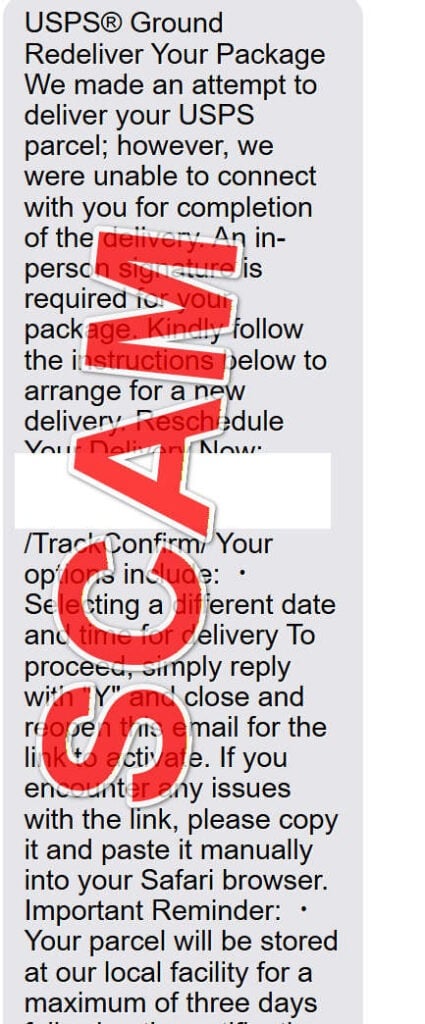
Scam Overview
The USPS Reschedule Delivery scam is a form of smishing (SMS phishing) and phishing (email-based) that impersonates USPS delivery notifications. The message claims a package could not be delivered and pushes you to “reschedule,” “redeliver,” or “confirm delivery details” through a link that leads to a lookalike website.
The scam often shows up as a text message, but it also appears via email. The content is designed to mimic real USPS language, complete with the registered trademark symbol, “USPS Ground,” and references to delivery options like choosing a new date and time.
The emotional lever is simple: you might lose your package if you do not act immediately.
The message you shared is a textbook example. It includes:
- A delivery failure story (“we were unable to connect with you”)
- A signature requirement (sounds official, adds credibility)
- A call to action (“Reschedule Your Delivery Now”)
- A link that looks like it contains USPS, but does not
- A “reply with Y” instruction, which is commonly used in smishing to increase engagement and bypass some spam filters
- A short deadline (“stored for a maximum of three days”)
- A threat (“returned to the sender”)
USPS and the U.S. Postal Inspection Service (USPIS) have publicly warned about these package tracking and delivery texts. They describe them as smishing attempts meant to steal personal and financial information, and they emphasize that USPS does not charge for tracking-related text services and will not send unsolicited texts or emails with links unless you initiated a request with a tracking number.
The Federal Trade Commission also warns that texts claiming there is an issue like unpaid postage, a missed delivery, or shipping preference updates are often scams. The link leads to a lookalike website that asks for personal or financial information, and any money you pay plus the card details you enter go straight to the scammer.
Why the “small fee” is such a powerful trick
A request for a small payment is not accidental. It is strategic.
A fee like $4.96 or $9.95 hits a sweet spot psychologically:
- It is low enough that many people do not overthink it.
- It feels plausible. People have heard of “postage due” or “redelivery fees,” even if they have never paid one.
- It encourages fast compliance. You think, “It’s only a few dollars, I’ll fix it in 20 seconds.”
But what you are actually doing is handing over the exact data criminals want:
- Your full name
- Your billing address
- Your phone number and email
- Your credit or debit card number
- Expiration date and CVV
Once they have that, the scam can shift from “small fee” to real damage: unauthorized charges, card-not-present fraud, account takeover attempts, and identity theft.
Why these messages arrive when you are not even expecting a package
One of the most unsettling parts of this scam is that it works even when the victim has not ordered anything.
Scammers do not need you to be expecting a delivery. They rely on probability.
Most people have ordered something recently, someone in the household has, or something is always “in transit” these days. Even if none of that is true, the message still creates doubt:
“What if something is coming?”
“What if someone shipped me something?”
“What if this is a gift?”
“What if it’s important?”
That uncertainty is enough to trigger a click.
The “USPS-looking” link that is not USPS at all
A key part of the scam is the URL trick.
Your example includes something like:
https://www.usps .com@serviceyuwt.sbs /TrackConfirm/
At a glance, people notice “usps.com” and feel safe. But the structure tells a different story:
- In a URL, anything before the
@can be used to mislead you. - The real domain is after the
@.
So in this example, the actual website is on serviceyuwt.sbs, not usps.com.
This is a classic phishing technique: make the beginning of the link look trustworthy, then hide the real destination in plain sight.
Why the scam site looks so convincing
Modern phishing pages are not the broken, obvious fakes from years ago.
Today’s scam pages often include:
- A clean USPS-like layout
- Tracking-style screens and progress bars
- A form that asks for your address “to verify delivery”
- A payment step framed as “redelivery,” “processing,” or “postage”
- Logos, icons, and official-sounding language
- Mobile-first design, since most victims click from a phone
They may even show a fake tracking number, a fake “local facility” notice, and a countdown-style urgency message.
The goal is to keep you moving forward without stopping to think.
What USPS and USPIS say about these scams
USPIS spells out what criminals are after: personally identifiable information and financial data like card numbers, PINs, passwords, and other sensitive details, which can be used for financial fraud. (uspis.gov)
They also explain a crucial point that helps you spot the scam quickly:
- USPS offers free tracking tools, and customers have to initiate tracking, typically by registering or requesting it and providing a tracking number.
- USPS does not send random tracking texts with links if you did not start the request. (uspis.gov)
That single idea is one of the strongest “instant red flag” rules you can use.
The scam is not only about texting
While the reschedule delivery scam is commonly delivered by SMS, email variants are widespread too.
USPIS has a dedicated warning about fake USPS emails that claim delivery failure and push people to click a button or download an attachment. They warn these can be used to steal usernames, passwords, and financial account information, and they advise forwarding USPS-related spam emails to spam@uspis.gov.
The delivery theme stays the same. The delivery channel changes.
Why scammers love “delivery problem” stories
Delivery problems are perfect bait because they are:
- Time-sensitive by nature
- Common enough to be believable
- Easy to understand without technical knowledge
- Not embarrassing (unlike romance scams or investment scams)
- Easy to personalize with fake details later
And because the message appears to come from a trusted institution, victims often treat it like a routine logistical task instead of a potential attack.
What happens after they get your card details
If a victim enters card details, a few things can happen quickly:
- A small test charge appears first (to confirm the card works)
- A larger charge follows later, sometimes in a different merchant name
- The card details are sold or shared within criminal networks
- The victim’s personal details are used for more targeted scams later
Even if you only see a $4.96 charge, you should treat it as “card details compromised,” not as “I only lost $4.96.”
Why the “reply with Y” line is included
That “reply with Y” instruction shows up constantly in delivery smishing.
It serves multiple purposes:
- It gets you to interact, which increases trust in your own mind (“I responded, so it must be a real process”).
- It may help the scam thread bypass some messaging protections.
- It conditions you to follow instructions step-by-step without verifying.
The FTC encourages people to report unwanted texts through the messaging app or by forwarding to 7726, and they emphasize not clicking links and verifying delivery information independently through your retailer account or official channels.
How The Scam Works
Below is a step-by-step breakdown of how the USPS Reschedule Delivery scam typically unfolds, including the small details that make it feel real.
Step 1: You receive a text or email that looks “official enough”
The scam begins with a message that appears to come from USPS.
Common subject lines or opening lines include:
- “USPS: Delivery Attempt Failed”
- “Reschedule Your Delivery”
- “Your package is awaiting action”
- “Unpaid postage due”
- “Address verification required”
- “Signature required for delivery”
The language is crafted to sound procedural, like an automated logistics notice, not a conversation.
Step 2: The message creates urgency without sounding dramatic
This is not usually written like a classic “YOU WON” scam.
Instead, it uses calm-sounding urgency:
- “Your parcel will be stored for a maximum of three days.”
- “Failure to reschedule will result in return to sender.”
- “Action required to complete delivery.”
It is designed to trigger the practical part of your brain, not the skeptical part.
Step 3: The link is engineered to earn trust at a glance
This is where the scam gets clever.
The link often uses one or more deception tactics:
Tactic A: The “@” trick
As in your example, the link can include:
usps.com@something-random.tld
People see “usps.com” and stop checking. But the real domain is the part after the @.
Tactic B: Lookalike domains
Scammers register domains that feel “USPS-like,” such as:
- Domains containing “usps”
- Hyphenated variations
- Random strings plus “track” or “confirm”
- Newer top-level domains that are cheap and disposable
Tactic C: Extra path padding
They add paths like:
/TrackConfirm//Delivery//Redelivery//USPS/Tracking/
These make the link look like it is part of a real USPS system.
USPIS warns that if you did not initiate tracking directly with USPS and the message contains a link, do not click it.
Step 4: The page opens to a convincing “tracking” or “delivery issue” screen
Once you click, you are taken to a phishing site that looks like a tracking page.
It typically claims one of the following:
- Delivery attempted, no response
- Address incomplete
- Postage due
- Delivery preferences need confirmation
- Signature required, reschedule needed
Often there is a prominent button:
- “Reschedule Now”
- “Continue”
- “Confirm”
- “Update Delivery”
The design goal is to keep the process moving forward.
Step 5: The site collects personal information first
Before asking for payment, many scam pages ask for:
- Full name
- Address
- City, state, ZIP
- Phone number
This serves two purposes:
- It makes the process feel legitimate (“of course they need my address”).
- It gives scammers extra data they can use later, even if you do not pay.
Sometimes the form is framed as “verify your contact details” or “confirm delivery information.”
Step 6: The small “redelivery fee” appears
After you enter details, the page reveals the fee.
The language is carefully chosen to reduce suspicion:
- “Redelivery fee”
- “Processing fee”
- “Postage adjustment”
- “Service charge”
Amounts vary, but the point is the same: small enough to seem routine.
This is the turning point where the scam shifts from “delivery problem” to “financial theft.”
The FTC describes this pattern clearly: scammers want you to click a link, land on a lookalike site, and enter personal or financial information. If you pay, both your money and your card details go to the scammer.
Step 7: The payment page harvests your card data
The payment form typically asks for:
- Card number
- Expiration date
- CVV
- Billing address (sometimes prefilled from earlier steps)
Some pages also ask for:
- Date of birth
- “Verification” codes
- Bank name
If the page asks for anything beyond standard payment fields, that is a major red flag.
Step 8: Behind the scenes, your data is captured instantly
Many victims assume, “If it was a scam, something would happen later.”
In reality, the moment you hit submit, your card details can be:
- Sent to a server controlled by criminals
- Logged into a database
- Forwarded to another group
- Used within minutes for test purchases
USPIS advises that if you already interacted with the URL, even if you did not click submit, you should notify your financial institution.
That guidance exists because simply interacting with these pages can expose you to risk, and because many victims are unsure what counts as “compromised.”
Step 9: The scam may continue with follow-up messages
Once scammers know your number is active and responsive, you may see:
- More “delivery problem” texts
- Bank or government impersonation texts
- Messages referencing your real address (if you entered it)
- Calls pretending to be fraud departments
Your details can be used for future targeting.
Step 10: The domain disappears and reappears under a new name
These scams are built to be disposable.
A domain might be used briefly, then abandoned. Another takes its place.
That is why the messages are generic, and why reporting is important. It helps platforms and carriers block active numbers and links faster.
USPIS provides reporting instructions for USPS-related smishing, including emailing spam@uspis.gov and forwarding the message to 7726.
The most common red flags, all in one place
If you only remember one checklist, make it this one:
- You did not request tracking updates, but you got a USPS text anyway
- The message contains a link and pushes you to click it
- The URL includes an
@or a strange domain - The message asks you to reply “Y” or take weird steps to “activate” the link
- You are asked to pay a fee to reschedule or redeliver
- The page asks for card details for a basic delivery action
- The message threatens return-to-sender with a very short deadline
USPIS emphasizes that USPS does not charge for tracking-related tools and will not send texts or emails with links without a customer requesting service with a tracking number.
What To Do If You Have Fallen Victim to This Scam
If you clicked or entered information, do not panic. The goal now is to reduce risk quickly and document what happened.
Here is a calm, practical checklist you can follow.
- Stop interacting with the scam immediately
- Do not click again.
- Do not reply further.
- Do not fill out additional forms.
- If you entered card details, contact your bank or card issuer right away
- Tell them your card details were entered on a phishing site.Ask to lock the card, cancel it, or issue a replacement.Ask what they recommend for disputing any charges.
- Check your recent transactions carefully
Look for:- Small “test” charges
- Charges from unfamiliar merchant names
- Multiple attempts close together
- Turn on alerts for transactions
Enable:- Instant purchase alerts
- Card-not-present alerts (if available)
- Low-balance alerts (for debit accounts)
- If you used a debit card, monitor your bank account extra closely
Debit card fraud can impact real money in your account. If you can, ask the bank about additional protections, temporary holds, or account monitoring options. - If you entered personal details, watch for identity-related risks
If you gave your address, phone, and name, be cautious about:- Follow-up scams that reference your real details
- Fake calls claiming to “confirm” your identity
- Password reset attempts on your email or major accounts
- If you reused a password anywhere on that page, change it now
Even if the form looked like it only asked for delivery info, some scam pages also ask for account logins.If you entered any password:- Change it immediately wherever it was used
- Change your email password too
- Turn on 2FA for important accounts
- Run a basic security check on your phone
This scam is usually data theft, not malware, but it is still smart to:- Update your phone OS
- Update your browser
- Remove any unknown profiles or apps you do not recognize
- Consider a reputable mobile security scan if you installed anything
- Report the scam to the right places
Reporting helps carriers and investigators block active numbers and domains.USPIS recommends:- Reporting USPS-related smishing by emailing spam@uspis.gov with a copy of the message and a screenshot showing the sender number and date. Forwarding the smishing text to 7726.
- The FTC at ReportFraud.ftc.gov (FTC encourages reporting these scams).
- The FBI’s IC3 (USPIS lists IC3 as a reporting option for smishing).
- Keep screenshots and notes
Save:
- The full text or email
- The sender number or email address
- The link (do not click it again)
- Any confirmation page or amount shown
- The time and date
This helps if you need to dispute charges, file reports, or prove what happened.
- If you are expecting a real package, verify it safely
Do this instead of using the link:
- Go directly to USPS.com in your browser (type it yourself)
- Check the retailer’s order page for the tracking number
- Use the tracking number on the official site
FTC recommends verifying delivery information independently through the retailer or your account, not through links in texts.
- Tell family members, especially those most likely to click
These scams hit hardest when someone is busy, tired, or rushing. A quick heads-up can prevent the next click.
The Bottom Line
The USPS Reschedule Delivery scam works because it feels like a normal delivery hiccup: a missed drop-off, a signature requirement, a small fee, and a fast deadline.
But USPS and consumer protection agencies warn that unsolicited delivery texts with links are a common smishing tactic designed to steal personal and financial information. If you did not initiate tracking and the message contains a link, do not click. If you already interacted with it, contact your financial institution and report the message.
If you have already entered your information, you are not powerless. Act quickly, lock down payment methods, monitor accounts, and report it. The faster you respond, the more likely you are to prevent larger losses.
And going forward, one habit will save you again and again: never manage deliveries through links in unexpected texts. Type the official site yourself, verify through your retailer, and keep your card details off “delivery problem” pages entirely.
FAQ: USPS Reschedule Delivery Scam
What is the USPS Reschedule Delivery scam?
It’s a phishing scam sent by text message or email that pretends to be USPS. It claims your package could not be delivered and asks you to “reschedule” delivery using a link. The link leads to a fake website that tries to steal your personal info and credit card details.
Is USPS really asking people to pay a re-delivery fee like $4.96 or $9.95?
In these scam messages, the small “re-delivery” or “processing” fee is the trap. The fee amount is intentionally small so you do not hesitate, but the real goal is to capture your card number, expiration date, and CVV so the scammers can make unauthorized purchases.
How can I tell if a USPS delivery text is fake?
Look for these red flags:
- You were not expecting a package, or the text is vague and has no real tracking context
- It pressures you with a short deadline like “3 days” or “returned to sender”
- It asks you to reply “Y” and reopen the message for the link to “activate”
- It contains a link that is not clearly usps.com
- It asks for payment details to “reschedule” or “release” a package
The link shows “usps.com” inside it. Doesn’t that mean it’s real?
Not necessarily. Scammers often insert “usps.com” inside a longer link to trick your eyes. A common trick is using an @ symbol, where the real domain is actually after the @. If the domain is not usps.com, it is not USPS.
What happens if I clicked the link but did not enter any information?
If you only clicked and closed it, you likely avoided the main damage, but you should still be cautious:
- Do not go back to the page
- Clear your browser tab and consider clearing site data for that page
- Watch for more scam texts since scammers now know your number is active
- If you downloaded anything or installed a profile or app, remove it immediately and run a security scan
What if I entered my name and address, but not my credit card?
That still matters. Your name, address, phone number, and email can be used for:
- More targeted phishing attempts
- Fake “delivery support” calls
- Identity-related scams that sound more believable because they include your real details
Be extra skeptical of follow-up messages and calls.
What if I entered my credit card details on the scam site?
Treat your card as compromised.
Do this right away:
- Call your bank or card issuer and explain you entered card details on a phishing site.
- Ask them to block the card and issue a replacement.
- Review recent transactions for small test charges and larger follow-up charges.
- Turn on transaction alerts so you catch any activity immediately.
Why do scammers want a small fee instead of trying to steal more money right away?
Because the small fee is “frictionless.” It gets you to comply quickly. Once scammers have your card details, they can:
- Run test charges
- Attempt larger purchases later
- Sell the card details to other criminals
Can this scam steal my USPS account password?
Some versions are purely about card theft. Others try to collect login credentials or enough personal data to help with account takeover attempts later. If you entered any password on a page you reached from a suspicious message, change it immediately anywhere you used it, and enable 2FA.
I am actually waiting for a USPS package. Could the message still be a scam?
Yes. That is why these scams work so well. If you are expecting a package, verify it safely:
- Do not use the link in the message
- Type usps.com manually in your browser or use the official USPS app
- Use the tracking number from your purchase receipt or retailer account, not from the text
How do I verify a real USPS delivery issue safely?
Use one of these safe methods:
- Log into the store where you ordered and check tracking there
- Type the official USPS website address yourself and enter the tracking number manually
- If you have USPS Informed Delivery, check inside your real account, not through a text link
Should I reply “Y” to activate the link like the message says?
No. That instruction is a common smishing tactic. Replying confirms your number is active and more likely to be targeted again. It also nudges you into following steps without thinking.
What should I do with the scam text or email?
Best practice:
- Do not click any links
- Take a screenshot showing the sender and message
- Report it through your phone’s “Report Junk” or “Report Spam” option
- Forward the text to 7726 (SPAM) if your carrier supports it
- If it’s an email, mark it as spam and do not open attachments
Can I get my money back if I paid the fee?
Often, yes, but it depends on the payment method and how fast you act.
- Credit card: You can usually dispute unauthorized charges with your issuer.
- Debit card: You should report it immediately because the money leaves your account directly.
- Wallet apps or wire transfers: Recovery can be harder, but report it anyway.
Why do these scam websites change so often?
Because scammers register cheap domains, run the scam until the site gets blocked, then move to a new domain and repeat. The message stays almost identical, only the link changes.
Is there any scenario where USPS asks for payment via a random link in a text?
A random, unexpected text that pushes a link and demands payment is a major warning sign. If payment is truly needed for something shipping-related, you should be able to confirm it through your official retailer account, official carrier channels, or in-person notices, not through a surprise link.
What are the most common scam phrases I should watch for?
These are very common:
- “We were unable to deliver your parcel”
- “Signature required”
- “Reschedule your delivery now”
- “Your parcel will be returned to the sender”
- “Reply Y to activate the link”
- “Unpaid postage fee” or “delivery fee required”
How can I protect my family from falling for this?
A simple household rule helps a lot:
- Never pay for delivery issues from a link in a text.
- Always verify through the retailer account or by typing the official carrier website manually.
If you want, I can also write a short “warning box” you can paste into your article (2 to 4 lines, very scannable) plus a quick checklist graphic-style section for mobile readers.








