

CoolCove AC is advertised as the appliance people wish existed: a tiny plug-in device that can cool a hot room, warm it in winter, use very little electricity and eliminate the cost and installation of a real air conditioner. The sales pages say it can transform a room within minutes.
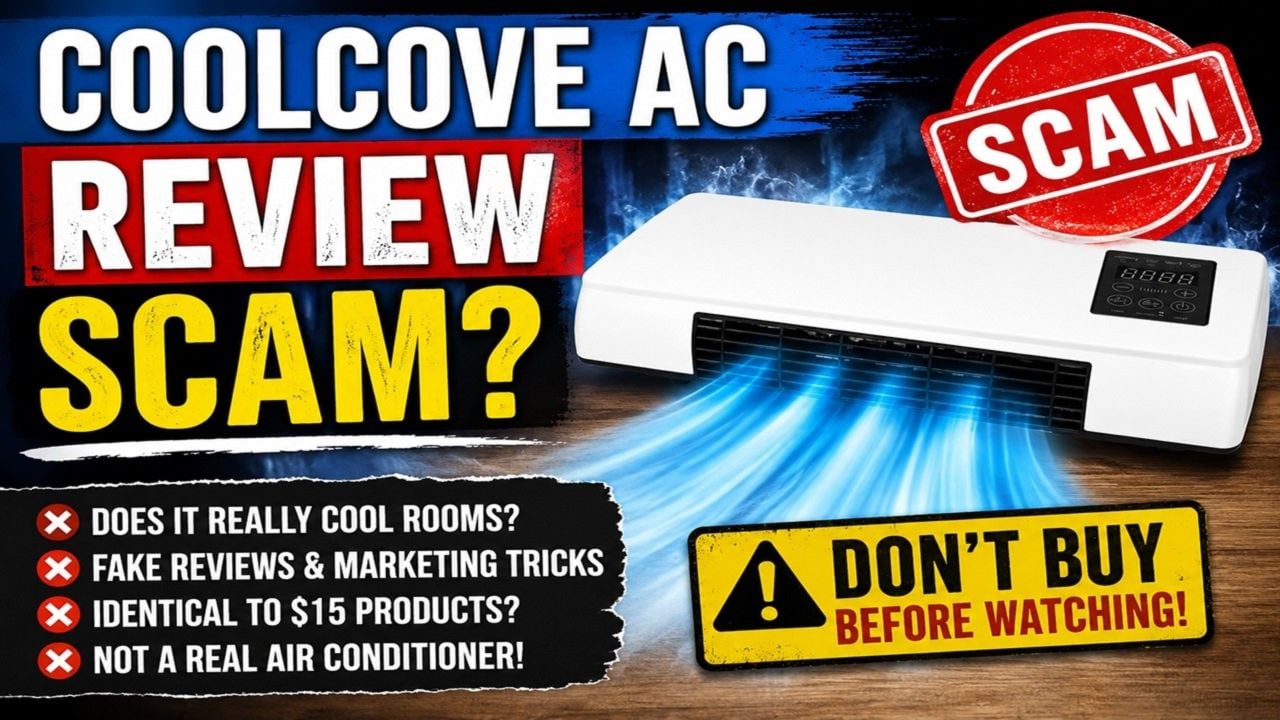
The hardware shown in the ads tells a different story. CoolCove resembles a common wall-plug ceramic space heater sold under many generic names. A resistance heater can warm nearby air, but it cannot operate as an air conditioner. It has no visible compressor, refrigerant loop, outdoor exhaust or evaporative water system capable of removing heat from a room.
The websites selling it are extremely new, several domains promote the same device, and thousands of glowing on-site reviews cannot be independently verified. The product is wrapped in fake scarcity, massive discounts and contradictory guarantee language.
Our verdict: avoid CoolCove AC. This appears to be a cheap generic plug-in heater sold at a large markup using physically implausible cooling claims. Buyers may receive a small heater, but they should not expect the air-conditioning performance shown in the ads, and returns may be far harder than the “risk-free” language suggests.
Overview
CoolCove is promoted as a two-in-one portable heater and air conditioner. Current sales pages use names such as RapidCool airflow and PTC ceramic heating, claim that a room can feel comfortable within minutes and advertise savings of up to 70%.
The offer is sold through several domains rather than one established appliance manufacturer. One investigative review found a CoolCove domain registered only days before the campaign began, a trust score of 1 out of 100 and no independent Trustpilot history despite claims of thousands of satisfied customers.
The product may generate heat. Small PTC ceramic heaters are real and widely available. The deception lies in presenting this class of hardware as an air conditioner and implying that it can cool a room in the same way as a compressor-based appliance.
What buyers are actually being sold
- The hardware resembles a compact ceramic heater: the vents, plug-in body and controls match generic devices sold for localized heat—not room-scale refrigeration.
- There is no visible cooling system: a true air conditioner needs a compressor, refrigerant loop and a way to move heat outside the room.
- The marketing supplies the missing “technology”: vague language about instant cooling is used without credible specifications for BTU capacity, power draw or heat exhaust.
- The same generic form can be rebranded repeatedly: a new name and polished landing page do not turn low-cost commodity hardware into an engineering breakthrough.
- The return promise is not consistent: conflicting guarantee periods make an already difficult cross-border return even less predictable.
The likely outcome is not a secret miniature air conditioner. It is a small plug-in appliance that may blow air or produce heat while failing to reduce the room temperature as advertised. That mismatch is central to the offer: shoppers are invited to compare CoolCove with expensive AC units even though the product category and physical components are fundamentally different.
Why CoolCove Cannot Work Like a Real Air Conditioner
Air conditioning must move heat somewhere
A real air conditioner absorbs indoor heat and releases it outdoors through a refrigerant cycle. Window units have an outdoor section, split systems connect to an exterior compressor, and portable units use an exhaust hose. Heat cannot simply disappear inside a sealed room.
A fan only moves existing air
Airflow can make skin feel cooler because it improves evaporation, but it does not significantly lower the room’s air temperature. Calling a fan or blower an AC creates expectations the hardware cannot meet.
A heater adds heat to the room
PTC ceramic elements convert electricity into heat. If CoolCove contains the heater shown in the marketing, switching that element on necessarily warms the room. The same element cannot reverse itself and pump heat outdoors without entirely different components.
The size and power claims do not add up
Cooling a room requires substantial energy and heat exchange. A device small enough to hang from a wall socket cannot contain the compressor, condenser, evaporator and airflow path of a real room AC. Advertising cannot overcome those physical requirements.
What the Ads Claim Versus What the Hardware Shows
Some CoolCove pages claim the unit can cool a bedroom in two to five minutes, replace a window appliance and reduce electricity bills dramatically. Those statements are not accompanied by room size, starting temperature, humidity, test duration, wattage in cooling mode or measurements from an independent laboratory. Without a reproducible test, the numbers are advertising.
The product images show a compact wall-mounted device with an intake, fan outlet, digital display and remote. That layout is typical of plug-in ceramic heaters. There is no hose carrying hot air outdoors and no water reservoir visible for evaporative cooling. The page therefore asks buyers to accept a result that the displayed hardware cannot explain.
Even a genuine evaporative cooler would have limits. It cools air by evaporating water, works best in dry climates and raises indoor humidity. It does not provide compressor-style cooling and cannot perform without water. CoolCove’s strongest pages skip these distinctions and use “AC” as though every form of moving air were equivalent.
The Generic Product and Markup Pattern
Devices with almost identical housings, displays and remote controls are widely sold through low-cost marketplaces and wholesale catalogs as plug-in heaters. Branding, box design and a new landing page can turn the same commodity hardware into a supposedly innovative climate system.
The markup pays for advertising rather than a new cooling technology. The campaign adds a memorable name, dramatic before-and-after temperature claims and invented-sounding feature labels. Buyers are not shown independent engineering data that distinguishes CoolCove from generic heaters.
This is the same pattern seen with mini air-cooler campaigns: a basic fan, humidifier or heater is renamed, paired with stock footage and sold as a disruptive alternative to expensive HVAC equipment. The cheap hardware may function within its ordinary category while completely failing the headline promise.
How the CoolCove Sales Funnel Works
Step 1: The ad targets heatwave anxiety
The viewer sees a hot bedroom, high utility bill or renter who cannot install a window unit. The ad presents CoolCove as the immediate solution before the customer compares specifications.
Step 2: A tiny device is presented as a breakthrough
The landing page uses technical-sounding terms and claims that traditional air conditioners are unnecessarily expensive. The lack of a compressor is reframed as innovation instead of the reason the device cannot provide real cooling.
Step 3: On-site reviews manufacture confidence
Testimonials describe rooms cooling within minutes and electricity bills falling. The site does not show a transparent third-party review process, order verification method or independent test supporting those stories.
Step 4: Scarcity blocks comparison shopping
Countdowns, “only 47 units left” notices and today-only discounts tell buyers that checking other stores could cost them the deal. These counters often reset and do not demonstrate real inventory.
Step 5: Bundles increase the order value
Because one device supposedly covers only one room, the buyer is encouraged to purchase several. A cheap generic heater becomes a much larger card transaction before its performance is known.
Step 6: The guarantee moves the risk to the buyer
If the device does not cool, the customer must obtain return authorization, pay attention to the correct domain and meet the merchant’s conditions. Shipping a bulky electrical product back can consume much of the possible refund.
Red Flags We Found
- New sales domains: the campaign has almost no operating history.
- Multiple official websites: several domains promote the same product and create confusion about the seller.
- Impossible category claim: the pictured plug-in heater lacks the components of an air conditioner.
- Unverified reviews: thousands of on-site ratings are not matched by an independent customer record.
- Contradictory guarantees: one page advertises 90 days while its own FAQ mentions 30 days.
- Fake scarcity: stock counters and midnight deadlines pressure immediate payment.
- Generic hardware: nearly identical devices are available cheaply under other names.
- Weak corporate identity: the landing pages emphasize the invention story more than an accountable appliance manufacturer.
Electrical Safety Concerns
A wall-plug heater draws substantial current directly from the socket. Cheap housings, weak plugs, damaged outlets or poor temperature control can create overheating and fire risks. Never use an unknown heater through an extension cord, power strip or loose outlet.
Look for a certification that can be verified in the certifier’s database, not just a logo printed on the product page. Stop using the device if the plug, wall plate or casing becomes unusually hot, if you smell melting plastic or if the unit discolors the outlet.
How to Shop for Real Cooling Instead
Start with the mechanism, not the product name. A compressor air conditioner should state cooling capacity in BTU or watts and show how hot air is exhausted. An evaporative cooler should disclose water-tank size, airflow and suitable humidity range. A fan should be sold honestly as a fan.
Buy from a retailer that publishes the manufacturer, model number, electrical certification, warranty provider and complete return address. Compare the same specifications across stores. If a seller substitutes testimonials for BTU ratings and engineering details, the product is not ready for a serious cooling claim.
Is CoolCove AC a Scam or Legit?
CoolCove may arrive and may produce heat, so the physical device is not imaginary. But the central sales proposition is still deceptive: the product is promoted as an air conditioner even though the pictured hardware cannot remove heat from a room like an AC.
That is enough for a firm recommendation. Do not buy CoolCove for cooling, and do not pay a premium for an unknown heater whose certification, manufacturer and long-term reliability are unclear.
What to Do If You Already Ordered CoolCove
1. Save the exact advertisement
Capture the cooling claims, temperature promises, guarantee, package quantity and checkout total. Pages can change after complaints appear, so preserve what influenced your purchase.
2. Identify the merchant
Check the card descriptor, receipt and return address. Multiple CoolCove domains exist, and contacting the wrong site can waste the refund period.
3. Test only within safe limits
Do not leave the device unattended or use it near curtains, bedding or water. If the outlet or plug becomes hot, disconnect it and stop testing. Do not open the casing.
4. Request the refund in writing
State that the product does not perform the advertised cooling function and ask for the return authorization, address and refundable amount. Keep all replies and tracking.
5. Document the return
Photograph the device, packaging, serial markings and parcel. Use tracked shipping and retain the delivery confirmation until the money is back in the account.
6. Escalate unresolved charges
If the seller ignores the written guarantee or charges for quantities you did not authorize, contact the payment provider promptly with the advertisement, receipt, messages and return proof.
The Bottom Line
CoolCove uses the appearance of a generic ceramic heater to sell the fantasy of a miniature air conditioner. The device can move air and may create heat, but it cannot make indoor heat vanish without the machinery and exhaust path found in real cooling equipment.
The new domains, unverifiable reviews, extreme discounts and return uncertainty make the offer even worse. Skip CoolCove AC. For cooling, buy a properly specified fan, evaporative cooler where the climate suits it, or certified compressor-based air conditioner from a retailer with clear returns.








