

An Amazon box for a roughly $700 RTX 5070 can look untouched, feel the right weight and still contain no graphics card. In a documented case, the buyer opened the package and found a DVD drive, mouse pad and part of an old Kenwood receiver.
This is a return-swap scam: someone keeps the real GPU, sends weighted junk back for a refund, and leaves the next buyer fighting to prove what arrived.
Before opening expensive hardware, record the seals and one continuous unboxing. That evidence can decide whether a refund claim succeeds.
Overview of the Amazon RTX 5070 Return Scam
The RTX 5070 return scam is a form of retail return fraud that can turn an expensive graphics-card delivery into a box of worthless electronics. A criminal orders the real GPU, removes it, replaces it with older hardware or weighted junk, reseals the package and sends it back for a refund. If the returned box passes a rushed inspection, it can be placed back into inventory and shipped to an innocent buyer.
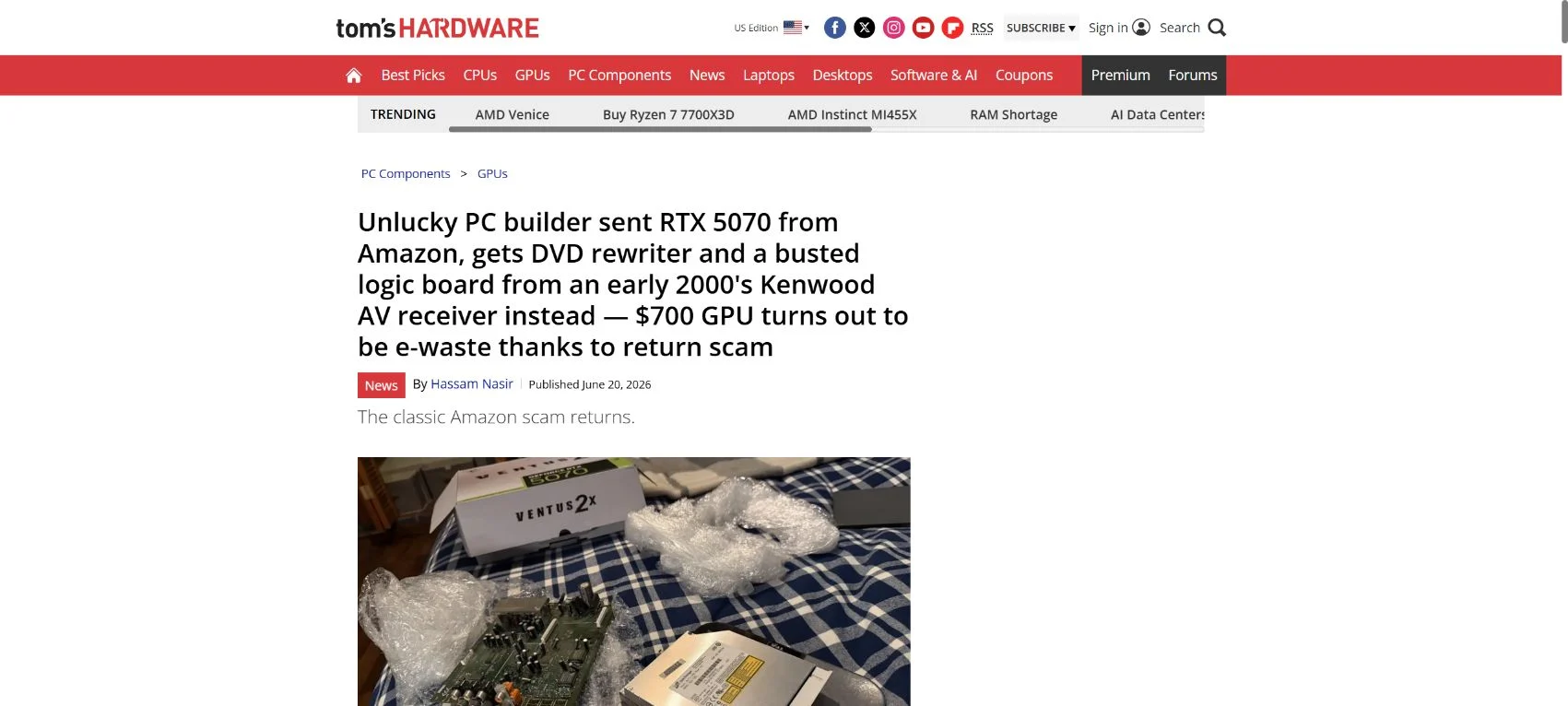
A widely reported case involved an MSI RTX 5070 purchased for roughly $700 from a listing sold and shipped by Amazon. Instead of the graphics card, the customer found a DVD drive, a mouse pad and part of an old Kenwood receiver. The substitute items were apparently chosen to imitate the expected package weight, which is one reason a basic warehouse check may fail.
The retailer is not necessarily the scammer. The fraud is usually committed by a previous buyer or an organized return-swap operation. The serious problem for the new customer is proving that the wrong contents were already inside the sealed package. Expensive electronics are attractive targets because one successful swap can produce a profit of $700 or more.
The best defense begins before opening the shipping carton. Record the delivery label, all sides of the package, the factory seals and a continuous unboxing video. Compare serial numbers on the card, retail box and invoice. If anything is missing or replaced, stop handling the contents, preserve every piece of packaging and report the issue to the retailer immediately.
A discount does not reliably identify the risk. Swapped packages may appear as new stock, open-box inventory or warehouse returns, and the listing can still use the retailer’s normal product photos. Pay more attention to the condition of the exact package you receive, the chain of custody shown on the order and the quality of your documentation.
How the RTX 5070 Return-Swap Scam Works
Step 1: The scammer buys a genuine graphics card
The fraud starts with a real order from a retailer that accepts returns. The buyer receives the genuine RTX 5070, records the packaging and studies how the seals, inserts and accessories are arranged. Some scammers target stock sold directly by the retailer because later customers are more likely to trust it.
Step 2: The valuable hardware is removed
The criminal takes the graphics card and may also remove adapters, manuals or promotional codes. In more technical swaps, a person can keep the cooler and housing while replacing the circuit board or removing the GPU and memory chips. A quick visual check can miss those changes.
Step 3: Junk is added to imitate the weight
Old electronics are not random filler. A DVD drive, receiver board or obsolete GPU can bring the package close to the expected shipping weight. Automated warehouse checks may confirm only that the box is present and within a broad weight range.
Step 4: The package is resealed and refunded
The retail box and outer carton are closed carefully. Replacement tape, heat, glue or reused stickers can make a disturbed seal appear ordinary. The return is then processed as unopened, unused or defective, allowing the scammer to recover the purchase price while keeping the real card.
Step 5: The compromised return goes back into stock
If inspection does not reach the actual product, the package may be graded as sellable. It can then be shipped as new, warehouse stock or an open-box bargain. The next buyer discovers the fraud after the original returner has already disappeared with the GPU and refund.
Step 6: The innocent buyer must prove a negative
The new customer reports that the card was missing, but the retailer’s system shows the correct item moved through its warehouse. Without photos or video, the case can resemble return fraud by the new buyer. That reversal of suspicion is what makes the scheme especially damaging.
Why “Sold and Shipped by Amazon” Is Not a Complete Guarantee
Buying directly from a large retailer reduces marketplace-seller risk, but it cannot eliminate a poisoned return. Inventory systems are designed to move millions of ordinary packages efficiently. A well-prepared swap exploits the difference between scanning a box and inspecting every expensive component inside it.
This does not mean Amazon is intentionally selling e-waste or that every returned GPU is unsafe. It means the “sold and shipped by” label answers who handled the sale, not whether a previous customer manipulated that exact unit. Similar return scams can affect other retailers with generous return policies.
Warning Signs Before You Open the Box
- Shipping tape looks doubled, cut, wrinkled or different on opposite sides.
- Factory seals are crooked, cloudy, lifted or covered by a second sticker.
- The serial-number label appears reattached or does not match the invoice.
- The package weight differs noticeably from the manufacturer’s specifications.
- The retail box has fingerprints, torn inserts or accessories arranged incorrectly.
- A product sold as new carries a warehouse, liquidation or return-processing label.
- The outer carton is intact but the branded inner box shows unexplained wear.
None of these signs proves a swap by itself. Shipping damage and ordinary packaging variation happen. Several signs together, especially on a high-value item, justify recording the opening in detail and contacting support before discarding anything.
How to Protect Yourself When Buying an Expensive GPU
Record one continuous unboxing video
Start recording before the shipping carton is opened. Show the shipping label, all sides, tape and visible damage. Keep the label readable but do not post personal details publicly. Continue without pausing until the product, accessories and serial numbers are visible.
Verify every serial number
Compare the serial number on the GPU with the retail box and invoice. If the manufacturer offers warranty registration or a serial lookup, use it. A mismatch is strong evidence that parts were substituted or the wrong unit entered the box.
Inspect the card itself
Check screws, warranty labels, connector covers, protective film and the PCIe edge. A “new” card should not show dust packed into the heatsink, scratches near screws, bent brackets or marks from prior installation. Confirm that the model printed on the card matches what you ordered.
Keep all packaging until testing is complete
Do not throw away the outer carton, plastic bags, foam, anti-static bag, inserts or shipping label. Those materials may contain lot codes, warehouse labels and weight information that support an investigation. Keep them until the return window closes and the card has passed stress testing.
What to Do If You Receive E-Waste or the Wrong GPU
Stop and document the condition
Do not rearrange the box to make the photos look cleaner. Photograph the contents exactly as found, including the position of filler items, seals, labels and packaging damage. Save the original unboxing video in more than one location.
Contact the retailer immediately
Use the official order page or customer-service number, not a link from an email advertisement. State clearly that a high-value item was missing on arrival and the box contained substituted electronics. Ask for a case number and written confirmation of every instruction.
Do not send evidence only through a temporary chat
Chat transcripts can vanish when the session closes. Download or screenshot the conversation and follow up by email when possible. Record dates, names and reference numbers. If support asks you to return the box, photograph it again before sealing it.
Build a complete evidence package
- The order confirmation, invoice and original product listing.
- The delivery tracking page and the carrier’s recorded package weight.
- A continuous unboxing video showing the unopened carton and contents.
- Clear photographs of seals, labels, serial numbers and substituted items.
- Saved support chats, emails, case numbers and return instructions.
- The tracked return receipt and a photograph of the resealed package.
Request escalation if the first response is automated
An ordinary return workflow may incorrectly classify the item as “wrong product returned.” Ask for a specialist handling high-value missing-item or return-fraud cases. Explain that you are reporting a compromised prior return, not buyer’s remorse or a compatibility problem.
Use payment protection if the retailer refuses
If a documented claim is rejected, contact the card issuer and ask about a chargeback for merchandise not received as described. Provide the invoice, tracking, unboxing evidence and support history. Chargeback deadlines vary, so do not let a long internal investigation consume the entire filing window.
Report suspected organized fraud
For a substantial loss, consider a police report or a report to the appropriate consumer-protection agency. The report will not guarantee recovery, but it creates a dated record and may help if the same return chain affected multiple buyers.
Can You Test Whether the Card Is Genuine?
If a card is present but looks suspicious, verify it before relying on it. Compare the printed model and device identifiers, install drivers only from NVIDIA or the board manufacturer, and inspect the hardware with a reputable utility such as GPU-Z. Counterfeit firmware can mislabel older GPUs, so performance and device details should agree.
Do not repeatedly power a visibly damaged or modified board. Missing components, liquid residue, loose screws or a burnt smell can threaten the rest of the computer. Photograph the condition and seek return instructions instead.
The Bottom Line
The RTX 5070 return scam is real retail fraud: a previous buyer keeps the expensive GPU, returns a carefully weighted substitute and leaves the next customer to discover it. Even a listing sold and shipped by a major retailer can be affected when a manipulated return re-enters inventory.
Record the opening of high-value electronics, match serial numbers and keep every piece of packaging. If the box contains e-waste, report it immediately and preserve a written evidence trail. Fast, organized documentation gives you the best chance of receiving a refund instead of inheriting someone else’s fraud.

Reviews & discussion
0 commentsShare a firsthand experience, or ask a question.
Community reviews
Amazon RTX 5070 Return
Moderated reader experiences, not an editorial verdict.
Start the conversation
Have a question or something useful to share? Add the first comment.