

A small portable hotspot can be useful when it comes from a known manufacturer and is paired with a legitimate mobile-data plan. The 2026 Pocket WiFi advertisements blur that simple reality by suggesting that a one-time gadget purchase provides fast internet almost anywhere without a monthly fee.
The offer has appeared under names including YAGOO Pocket WiFi, TI World, and Ecovox, and on rotating storefronts such as Minibvuyy.com and Dealhivea.com. MalwareTips does not recommend ordering it.
Overview
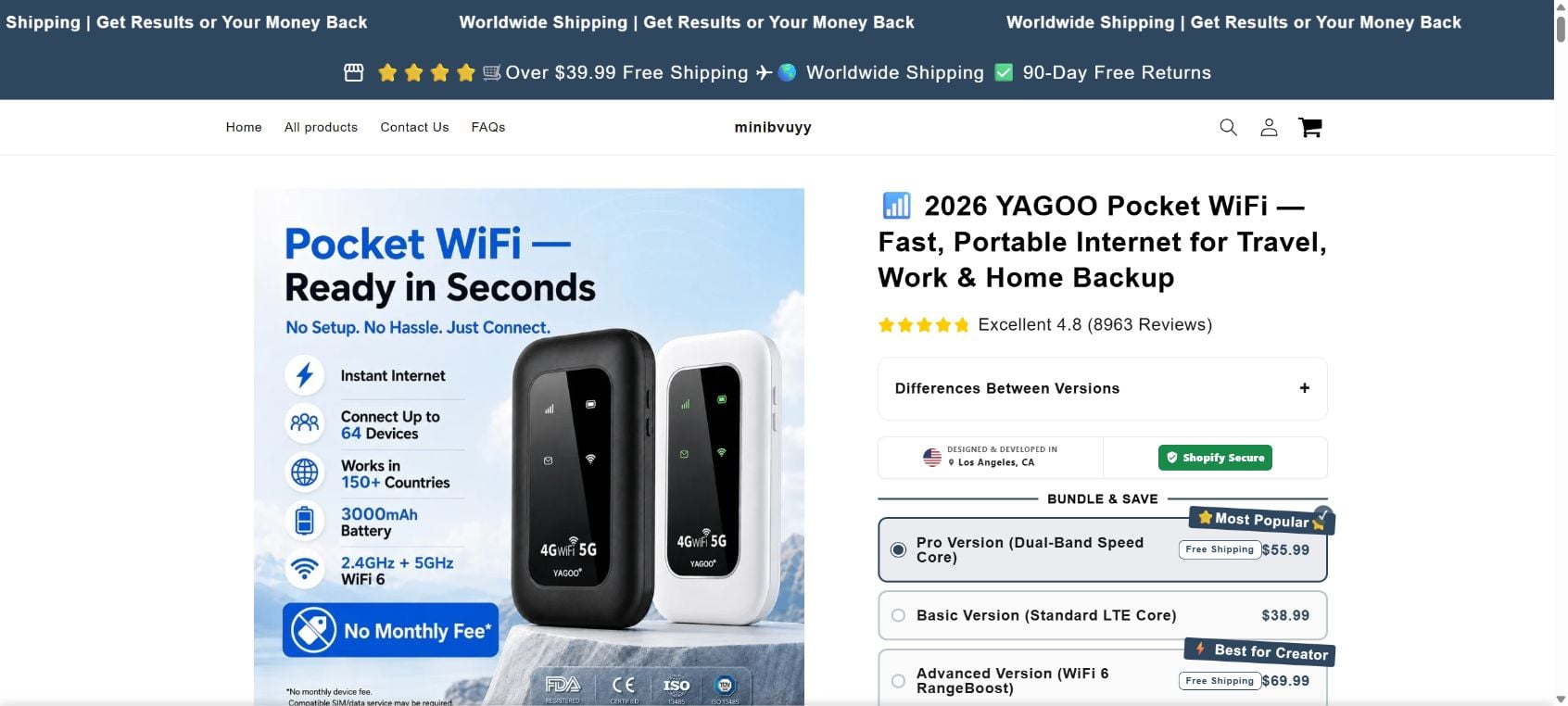
The 2026 Pocket WiFi is presented as a compact mobile hotspot for travel, remote work, emergencies, and home internet backup. The product page shows a glossy black or white device with status icons, a large battery, and labels for 4G, 5G, and WiFi 6.
On August 10, 2026, MalwareTips captured a live Minibvuyy.com listing titled “2026 YAGOO Pocket WiFi.” The page offered four versions priced from $38.99 to $89.99.
The listing claimed the device could connect up to 64 devices, work in more than 150 countries, provide instant internet, and operate without a monthly fee. It also displayed an “Excellent 4.8” score based on 8,963 reviews.
Those claims create the impression that the customer is buying internet service, not merely a router. Yet a portable hotspot cannot manufacture a connection to a cellular network.
A hotspot receives mobile data through a SIM, eSIM, or another carrier arrangement, then shares that connection over WiFi. The hardware and the service are separate. Buying a hotspot does not entitle the owner to free access to mobile towers in 150 countries.
The product image contains revealing fine print below the large “No Monthly Fee” banner. It says there is no monthly device fee and that compatible SIM or data service may be required.
That qualification changes the meaning of the main claim. A device may have no subscription charged by the gadget seller while still requiring the buyer to purchase a carrier plan, prepaid data, roaming package, or local SIM.
Calling this “No Monthly Fee” is therefore highly misleading when the page does not clearly explain which networks work, what service is included, what a compatible plan costs, or whether the advertised 4G and 5G bands operate in the buyer’s country.
There is no magic source of free mobile data
Every mobile internet session uses network capacity supplied by a carrier. Someone pays for that capacity through a monthly plan, prepaid allowance, bundled agreement, employer account, or another commercial arrangement.
A battery-powered hotspot performs the same basic role as the hotspot feature on a smartphone. It takes an existing cellular connection and shares it with laptops, tablets, cameras, or other devices.
The router can influence local WiFi range, battery life, supported bands, antenna performance, and the number of connected devices. It cannot bypass carrier billing or provide worldwide coverage by itself.
The YAGOO listing offers versions with names such as Dual-Band Speed Core, Standard LTE Core, WiFi 6 RangeBoost, and MaxConnect MIMO System. The page does not present full radio specifications that would allow a buyer to verify carrier compatibility.
A proper hotspot listing should identify the exact modem, supported LTE and 5G bands, SIM format, eSIM support, carrier locks, WiFi standard, maximum theoretical speed, real-world limitations, battery certification, charging standard, regulatory identifiers, warranty provider, and responsible manufacturer.
Marketing icons saying FDA, CE, ISO, or another acronym do not answer those questions. In particular, the FDA is not the agency consumers rely on to certify ordinary WiFi routers as proof of free internet performance.
The storefront uses unverified trust signals
The Minibvuyy page says the product was designed and developed in Los Angeles. It also displays 8,963 reviews, secure-shopping labels, a countdown, stock warnings, recent-sales numbers, and claims involving QVC and Facebook.
MalwareTips found no independent review platform linked to the 8,963-review figure. The rating is displayed inside the seller’s own page, where the operator controls the number, text, and presentation.
The countdown began at roughly two hours during our visit. The page also said only 79 units remained, 83 people were currently viewing the product, 121 had sold in 24 hours, and only 4% of inventory was left.
These numbers are not independently verifiable from the page. They are classic urgency elements that encourage visitors to pay before researching the model, seller, or service requirements.
Dealhivea.com and Minibvuyy.com use closely matching store templates, navigation, claims, policies, and trust sections. Products can disappear from the public collection while remaining accessible through direct or search-generated links.
This rotating-store structure makes accountability difficult. An advertisement can point to one domain this week and another next week while using the same product images and copy.
The return policy does not fit the product
The top of Minibvuyy.com advertises “90-Day Free Returns.” The product area separately says dissatisfied customers can receive a fast refund within 15 days.
The store’s actual Return & Refund Policy says beauty or health products may be returned within 30 days. It does not clearly explain the process for a portable electronic hotspot.
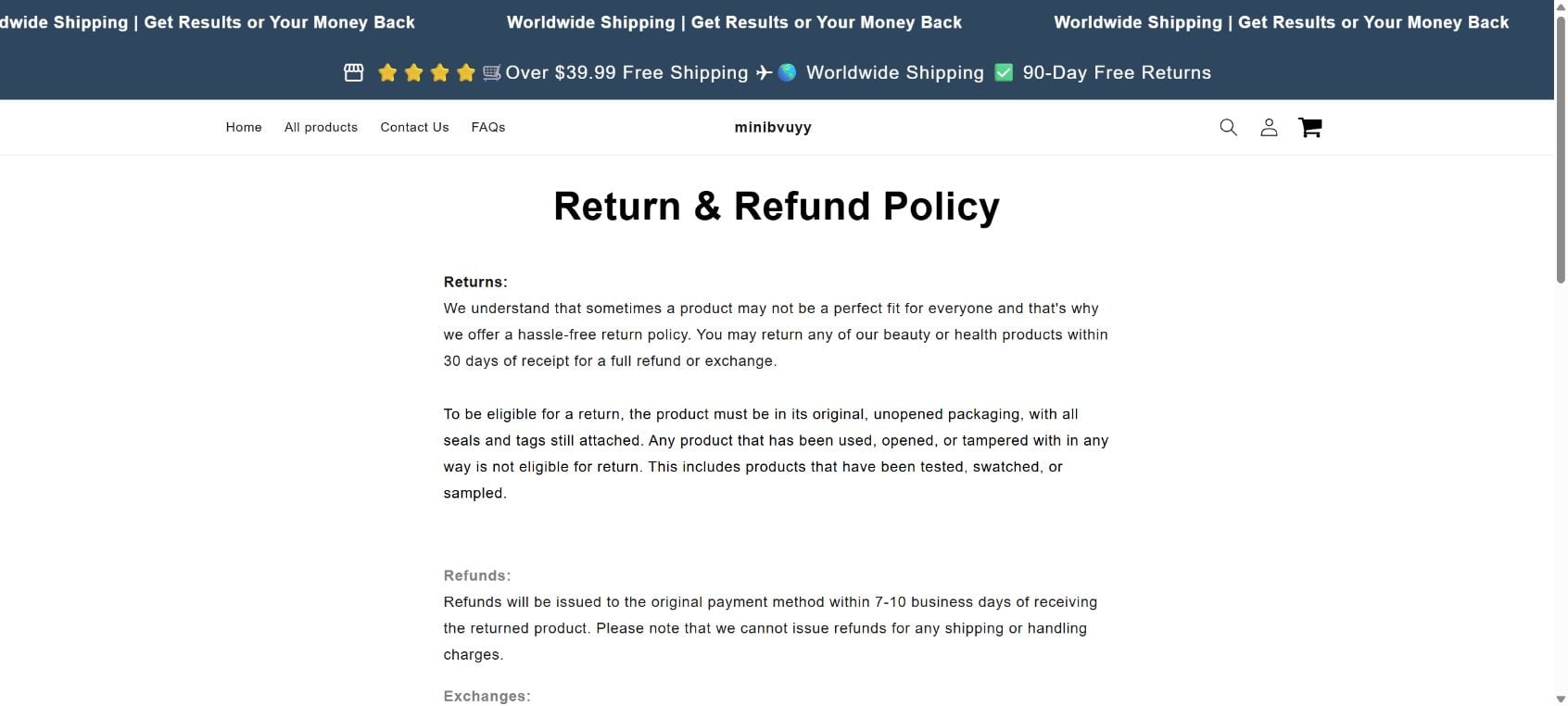
The policy requires original, unopened packaging with seals and tags attached. A customer normally has to open, charge, and configure a hotspot to discover whether it accepts a SIM, connects to a carrier, supports local bands, or performs as advertised.
The same policy says discounted or clearance items are final sales that cannot be returned or exchanged. The YAGOO page uses limited-time deal language and bundle pricing, creating uncertainty about whether the seller considers the order discounted.
These conflicting promises matter. A bold guarantee encourages the purchase, while narrower policy language can later be used to resist a refund after the product has been opened and tested.
Quick 2026 Pocket WiFi warning signs
- The ad suggests a gadget provides internet without a monthly fee.
- Fine print says a compatible SIM or data service may be required.
- No carrier plan, included allowance, or roaming agreement is clearly identified.
- The page claims operation in more than 150 countries without listing radio bands.
- Four versions use impressive names without detailed modem specifications.
- The product claims up to 64 simultaneous connections at a very low price.
- A seller-controlled rating cites 8,963 reviews without an independent record.
- Stock, visitor, sales, and countdown numbers create pressure.
- The page claims Los Angeles design without identifying a verifiable manufacturer.
- Multiple lookalike stores have promoted the same product.
- The header promises 90-day free returns.
- The product area mentions a separate 15-day refund.
- The formal policy discusses beauty and health products, not electronics.
- The formal policy requires unopened packaging and excludes discounted items.
How The Operation Works
The 2026 Pocket WiFi operation takes a real product category, a portable hotspot, and removes the part consumers least want to pay for: mobile service. The advertisement sells the fantasy of permanent internet for the price of a small gadget.
1. A social media video targets travelers and remote workers
The campaign begins with situations where connectivity matters: airports, road trips, hotels, remote jobs, camping, power outages, or unreliable home broadband. These scenarios make a backup connection feel practical and urgent.
Short videos may show a compact device instantly connecting several phones and laptops. AI-generated scenes, product renders, and scripted testimonials make it inexpensive to produce many variations for different audiences.
2. The ad turns hardware into a service promise
The phrase “No Monthly Fee” is the central hook. Viewers naturally interpret it to mean they can use the internet without paying a carrier.
The seller can later rely on the distinction between a device fee and a data fee. The large print sells free connectivity, while the tiny print admits that SIM and data service may be necessary.
3. Technical labels create a premium ladder
The product page offers Basic, Pro, Advanced, and Ultimate versions. Each name adds terms such as dual band, LTE, WiFi 6, range boost, or MIMO.
This structure encourages customers to pay more to avoid choosing an inferior version. Yet the page does not supply enough detailed specifications to compare the actual modem, bands, antennas, or throughput.
4. A large review count removes doubt
A 4.8 score and 8,963 claimed reviews imply that thousands of buyers have already solved the compatibility question. The visitor may feel there is no need to inspect the fine print because so many others supposedly succeeded.
Seller-controlled ratings should never be treated as independent evidence. A legitimate review history should let consumers read critical submissions, verify dates, and see whether comments concern the exact model.
5. Badges borrow authority from familiar organizations
The page displays official-looking icons and statements involving Los Angeles, secure checkout, QVC, Facebook, FDA, CE, and ISO. Together they create a visual impression of regulation and approval.
A badge can be copied into an image. Buyers should verify any certification through the responsible organization and match it to the exact legal manufacturer and model number.
6. Artificial urgency pushes the visitor toward payment
The countdown, low-stock percentage, current-viewer total, and recent-sales figure make delay feel costly. The buyer is told that the offer or inventory may vanish soon.
This pressure discourages the most important check: asking a mobile carrier whether the device supports its network and what plan is required.
7. The checkout captures payment and contact details
The customer selects a version and enters a name, address, phone number, email, and payment details. Even if a device arrives, the operator now has valuable information for future offers.
Buyers should watch the final total for shipping, insurance, warranty, multiple quantities, and recurring services. A preselected bundle can increase the charge beyond the price shown in the ad.
8. The customer discovers the missing service later
After delivery, the buyer may learn that a SIM is not included, the device does not support the local carrier, the advertised 5G is unavailable, or a separate data plan is required.
That discovery occurs only after opening the package. The seller can then point to an unopened-condition rule, a final-sale clause, or return shipping costs.
9. The campaign moves to another store
If complaints accumulate, the same images and product description can be moved to another Shopify store. The brand may change from YAGOO to TI World, Ecovox, or a new generic name.
Consumers searching one domain may find it empty and assume the problem has ended. In reality, the offer can continue through direct links, hidden product pages, and fresh domains.
If You Have Bought This
If you ordered a 2026 Pocket WiFi device, document the transaction before testing it. The seller’s unopened-condition language makes evidence especially important.
- Capture the sales page now. Save the “No Monthly Fee” claim, fine print, supported-country claim, model selected, review total, guarantee, and final price. Product pages and domains can change quickly.
- Save the packaging before opening it. Photograph every side, label, seal, model number, regulatory identifier, sender address, and customs declaration. Record an unboxing video if you decide to open it.
- Check the order total. Compare the receipt with the statement and verify the quantity, shipping, insurance, warranty, and any later charge.
- Ask the seller for the exact service requirement. Request the supported carriers, frequency bands, SIM type, activation process, included data allowance, and recurring cost in writing.
- Do not insert your main SIM immediately. First verify the device, manufacturer, firmware, and compatibility. An unknown router may expose traffic or have insecure administration settings.
- Do not reuse a password. If the hotspot requires an account, create a unique password. Change the default WiFi and administrator passwords before connecting sensitive devices.
- Request a refund promptly. Cite the guarantee shown when you ordered and explain any mismatch involving service fees, compatibility, specifications, or delivery. Ask for a return authorization and address.
- Use tracked return shipping only after approval. Keep photographs of the item and package, the tracking receipt, delivery confirmation, and all messages. Do not send it to an address found only through an unrelated search.
- Contact the card issuer if the seller refuses. If the item never arrived, differs materially from the ad, or a charge was unauthorized, ask about a dispute. Do not let slow support push you past the issuer’s deadline.
- Monitor for additional charges. Watch the payment method for subscriptions, memberships, or separate merchants. Report any transaction you did not authorize.
- Report the seller and advertisement. U.S. consumers can use ReportFraud.ftc.gov. Also report the social media ad to the platform.
The FTC’s online shopping guidance recommends checking return terms, paying by credit card when possible, and keeping receipts, messages, and the seller’s promises.
If you need a legitimate hotspot, start with your mobile carrier. Ask which certified devices support its bands and plans. Your phone’s built-in hotspot may already provide the same basic function without buying unfamiliar hardware.
The Bottom Line
The 2026 Pocket WiFi offer uses “No Monthly Fee” to imply that a cheap device provides internet by itself. The page’s own fine print admits that compatible SIM and data service may be required, while the store’s conflicting return promises make a failed purchase harder to unwind.
Do not order the YAGOO, TI World, Ecovox, or similarly advertised versions from rotating social media storefronts. Buy a carrier-approved hotspot with clearly documented bands, service costs, warranty coverage, and a return policy written for electronics.








