

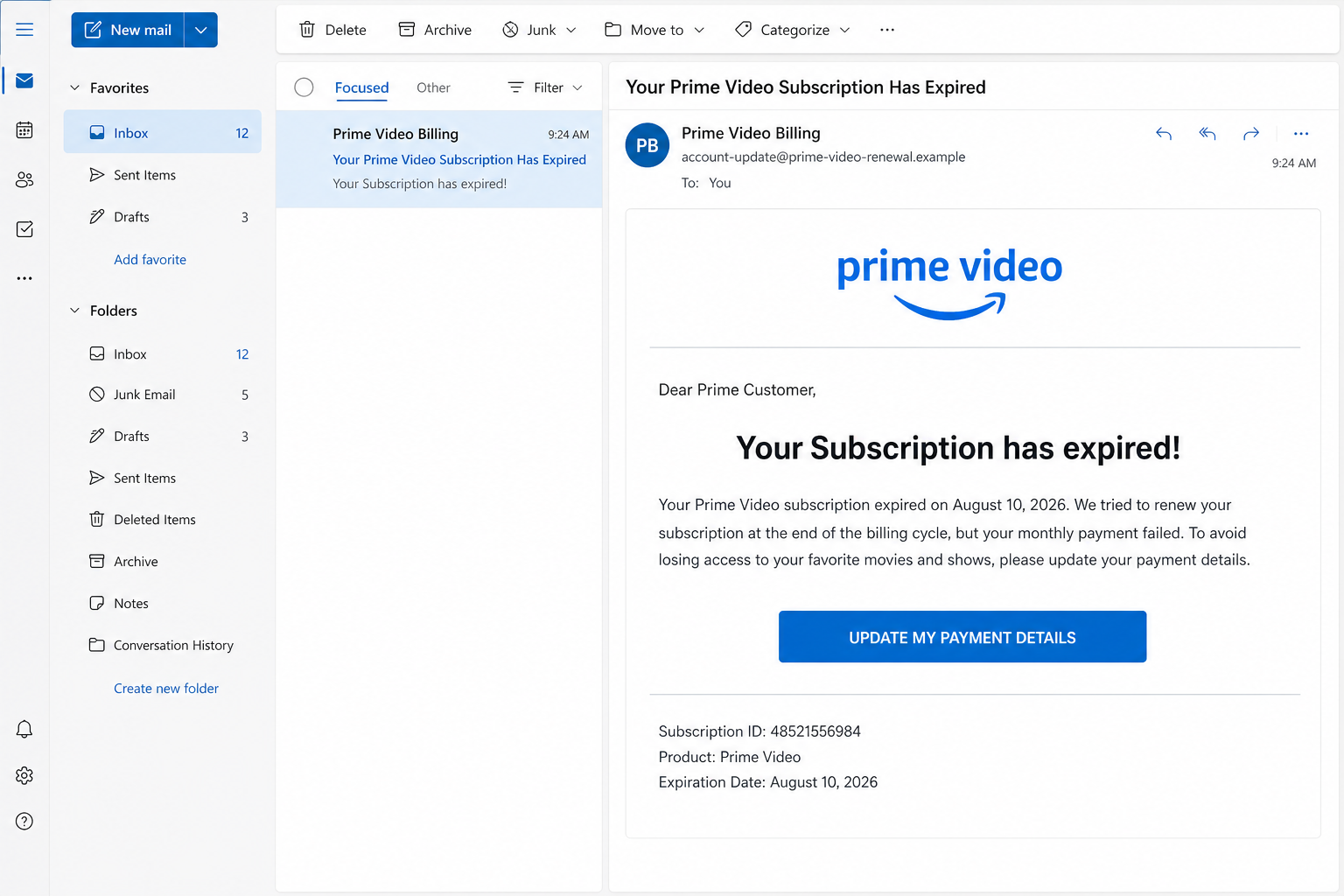
An email claiming that your Prime Video subscription has expired can look like an ordinary billing notice. It may use familiar colors, a Prime Video logo, a subscription number, and a button asking you to update your payment details.
Do not use that button. The message is part of a phishing scam designed to send recipients to a fake Amazon page, collect their account password, and steal their credit or debit card information.
Overview
The Prime Video Subscription Expired email scam begins with a believable problem. The message says Amazon tried to renew a Prime or Prime Video subscription, the monthly payment failed, and the subscription was canceled or placed on hold.
A large button marked “Update My Payment Details,” “Renew Subscription,” or “Reactivate Prime Video” appears to offer an immediate solution. Clicking it does not safely update an Amazon account. It opens a phishing website controlled by scammers.
The fake website may closely copy an Amazon login page. It can use the Amazon logo, familiar fonts, a password field, a “Keep me signed in” checkbox, and links that appear to lead to account recovery or customer support.
If the victim enters an Amazon email address and password, the scammers can capture those credentials. The next page commonly requests a name, billing address, telephone number, card number, expiration date, and security code under the pretense of restoring the subscription.
The supposed expiration notice is therefore only the opening story. The real objective is to steal enough information to access the victim’s Amazon account, make unauthorized purchases, test the card elsewhere, or commit identity fraud.
What the fake Prime Video email says
The exact wording changes, but one circulating version follows this structure:
Subject: Your Prime Video Subscription Has Expired
Dear Prime Customer,
Your Subscription has expired!
Your subscription for Prime expired on [date]. We tried to renew your subscription at the end of the billing cycle, but your monthly payment failed. We therefore had to cancel your subscription.
If you wish to renew your subscription, click on the link below.
UPDATE MY PAYMENT DETAILS
Subscription ID: [number]
Product: Prime Video
Expiration Date: [date]
The message often uses a generic greeting such as “Dear Prime Customer” because the sender does not know the recipient’s real Amazon profile name. Random subscription numbers and dates are added to make the notice appear specific.
Some copies contain awkward grammar, inconsistent capitalization, or an expiration date that makes little sense. Others are polished and almost error-free. Good spelling is not evidence that an email is genuine.
Common variations of the email
Scammers continually change the subject line and opening sentence to avoid spam filters. The following versions lead into the same payment-update phishing funnel:
- “Your Prime Membership Has Been Suspended”
- “Prime Video Payment Failed”
- “Action Required: Update Your Prime Billing Information”
- “Your Amazon Prime Account Is on Hold”
- “Renew Your Prime Video Subscription Today”
- “Your Membership Expires in 24 Hours”
- “We Could Not Process Your Prime Payment”
- “Prime Video Access Will Be Disabled”
- “Your Free Trial Has Ended: Confirm Payment”
- “Unusual Billing Activity Detected on Your Prime Account”
One version may threaten immediate cancellation, while another offers a discount or extra month for renewing. Some claim the recipient can receive a refund by confirming billing information. The emotional direction changes, but the requested action remains the same: click a link and enter sensitive information.
The campaign can also arrive by text message. An SMS may say, “Prime renewal failed. Update your card now to prevent account closure,” followed by a shortened link. The shorter format removes many clues that would otherwise reveal a fake email.
Why the message can feel convincing
Prime Video is used by millions of people, and subscription payments occasionally do fail for legitimate reasons. Sending the same message to a large list gives scammers a good chance of reaching someone who actually has Prime Video.
The email also uses a low-pressure form of urgency. It does not claim the police are coming or that the victim has won an impossible prize. It presents a familiar inconvenience and offers a familiar solution.
Recipients may click automatically because they do not want to lose access in the middle of a series. Others may worry that a family member changed the account or that an expired card caused the problem.
The safest response is to separate the message from the account. Do not use anything inside the email. Open the Amazon application or type Amazon’s address into a new browser tab and check the subscription directly.
Warning signs inside the email
- The sender address does not belong to Amazon. The display name can say “Prime Video,” but the actual address may use an unrelated domain.
- The greeting is generic. “Dear Prime Customer” can indicate that the sender has only a list of email addresses.
- The message creates a deadline. It says access has expired or will disappear unless payment is updated immediately.
- The button hides the destination. Hovering over it may reveal a domain unrelated to Amazon.
- The subscription details cannot be confirmed. A random ID is displayed, but it does not correspond to anything in the Amazon account.
- The email requests payment information through its link. Billing should be managed from the official Amazon account, not from an unexpected message.
- The dates or wording may be inconsistent. Some emails list a future date as an expiration date or switch between Prime and Prime Video.
How The Operation Works
1. Scammers distribute the expiration notice
The campaign sends large numbers of emails to addresses collected from old data breaches, marketing databases, compromised websites, and other sources. The scammers do not need to know whether each recipient uses Prime Video.
Because Amazon and Prime Video are so widely recognized, even an untargeted mailing can produce victims. The email may be sent from a newly registered domain, a compromised mail server, or an address that has been visually spoofed.
2. The email creates a believable billing problem
The message claims that an automatic renewal failed. This provides a reason for the account to be restricted and explains why the recipient must supply payment details again.
Urgent language prevents careful checking. Phrases such as “subscription expired,” “access suspended,” and “update now” encourage the reader to solve the problem before opening the Amazon app independently.
3. The payment button opens a lookalike website
The button can lead directly to a fake Amazon page or pass through several redirect domains first. Redirects make the final destination harder to recognize and allow the operator to replace a blocked phishing page without changing every email.
The fake page may use HTTPS and display a padlock. HTTPS means the connection to that website is encrypted. It does not mean Amazon owns the website or that the page is safe.
4. A copied Amazon login captures the password
The first form normally asks for an email address or mobile number, followed by the Amazon password. Information entered into a form hosted on an unrelated domain can be transmitted directly to the scammer.
The page may deliberately report that the first password was incorrect and ask for it again. This helps the operator collect multiple password candidates and makes the interruption feel like an ordinary typing mistake.
5. The victim is asked for card and identity details
After the login stage, the website claims a new payment method is required. It may request the cardholder name, card number, expiration date, security code, billing address, date of birth, and telephone number.
Some versions submit a small $1 or $1.99 authorization attempt to test whether the card is active. Others use the details for larger fraudulent transactions or sell the complete information to other criminals.
6. A one-time security code may be requested
If the stolen card or Amazon account is protected by an additional security step, the phishing page may ask for the code sent by SMS, email, or an authentication application.
The page can label this step “Confirm your identity” or “Complete renewal.” In reality, the attacker may be using the stolen information at that exact moment. A security code should never be entered into a page reached through an unexpected email.
7. The victim is redirected to reduce suspicion
Once the forms are completed, the site may show “Subscription restored” or redirect to the real Prime Video homepage. The real page loads normally, leading the victim to believe the update succeeded.
By the time the person notices that no account change occurred, the credentials and card information may already have been used.
8. The stolen account can be exploited
An Amazon account can expose order history, saved addresses, gift card balances, stored payment methods, household information, and other personal details. Attackers may place orders, add addresses, buy digital goods, or attempt to conceal activity by archiving orders.
If the Amazon password was reused, the same combination may be tested against email, streaming, shopping, and financial accounts. This process is known as credential stuffing.
How to check a Prime Video notice safely
Close the email and open Amazon or Prime Video independently. Sign in through the official app or a manually typed address, then review memberships, subscriptions, payment settings, and the Amazon Message Center.
Amazon advises customers to use its official site or app to confirm account issues. Messages sent by Amazon can also appear in the account’s Message Center. If the alleged warning is absent and the subscription is active, do not interact with the email.
What To Do If You Clicked the Link
Accidentally opening a phishing page does not automatically mean the scammers obtained everything. The response depends on what you entered, approved, or downloaded.
- Close the page. Do not submit additional information, contact any telephone number displayed there, or download a file supposedly needed to restore Prime Video.
- Change your Amazon password. Use the official Amazon app or type Amazon’s address yourself. Choose a strong password that is not used for any other account.
- Enable two-step verification. Turn it on from Amazon’s official security settings. Review registered authenticator applications and telephone numbers.
- Check recent Amazon activity. Review orders, archived orders, digital purchases, addresses, payment methods, gift card activity, devices, and account profile changes.
- Sign out unfamiliar devices. Remove sessions or devices you do not recognize and secure connected household accounts when necessary.
- Contact the card issuer immediately. If you entered card details, call the trusted number printed on the card or statement. Ask the issuer to block the card and monitor or dispute unauthorized transactions.
- Change reused passwords. Update every important account that shared the compromised Amazon password, beginning with email and financial services.
- Protect the email account. Review recent sign-ins, recovery options, forwarding rules, and connected applications. Email access can help an attacker reset other passwords.
- Watch for follow-up scams. The criminals may call or email while pretending to be Amazon, a bank, or a fraud investigator. Do not share security codes or install remote-access software.
- Scan the device if anything was downloaded. Run a full scan with reputable security software if the page delivered a file, extension, or application.
- Report the email. Use the mail provider’s “Report phishing” option and report the communication through Amazon’s official scam-reporting page.
If you only opened the email
Reading the message without clicking, replying, downloading an attachment, or entering information normally does not compromise an Amazon account. Mark it as phishing and delete it.
If you clicked but entered nothing, close the page and clear any browser notification permission it requested. Remain cautious of downloads or new tabs, but a simple page visit does not reveal an Amazon password by itself.
If you entered only your password
Change the Amazon password immediately and replace it anywhere else it was used. Review the account for changes even if two-step verification is enabled, because a real-time phishing page can also attempt to capture a security code.
If you entered card information
Do not wait for a fraudulent charge to appear. Contact the issuer, explain that the full card details were entered on a phishing site, and follow its instructions for replacement and transaction monitoring.
The Bottom Line
The Prime Video Subscription Expired email is not a harmless renewal reminder. Its payment-update button leads into a phishing process built to steal Amazon credentials, card details, and security codes.
Do not renew through the email. Open Amazon independently, check the subscription from the official account, and report the message. A real billing problem can be resolved inside Amazon without trusting a link delivered by an unexpected sender.

Join the discussion
0 commentsShare your experience or ask a question about this article.
Discussion
Start the conversation
Have a question or something useful to share? Add the first comment.