

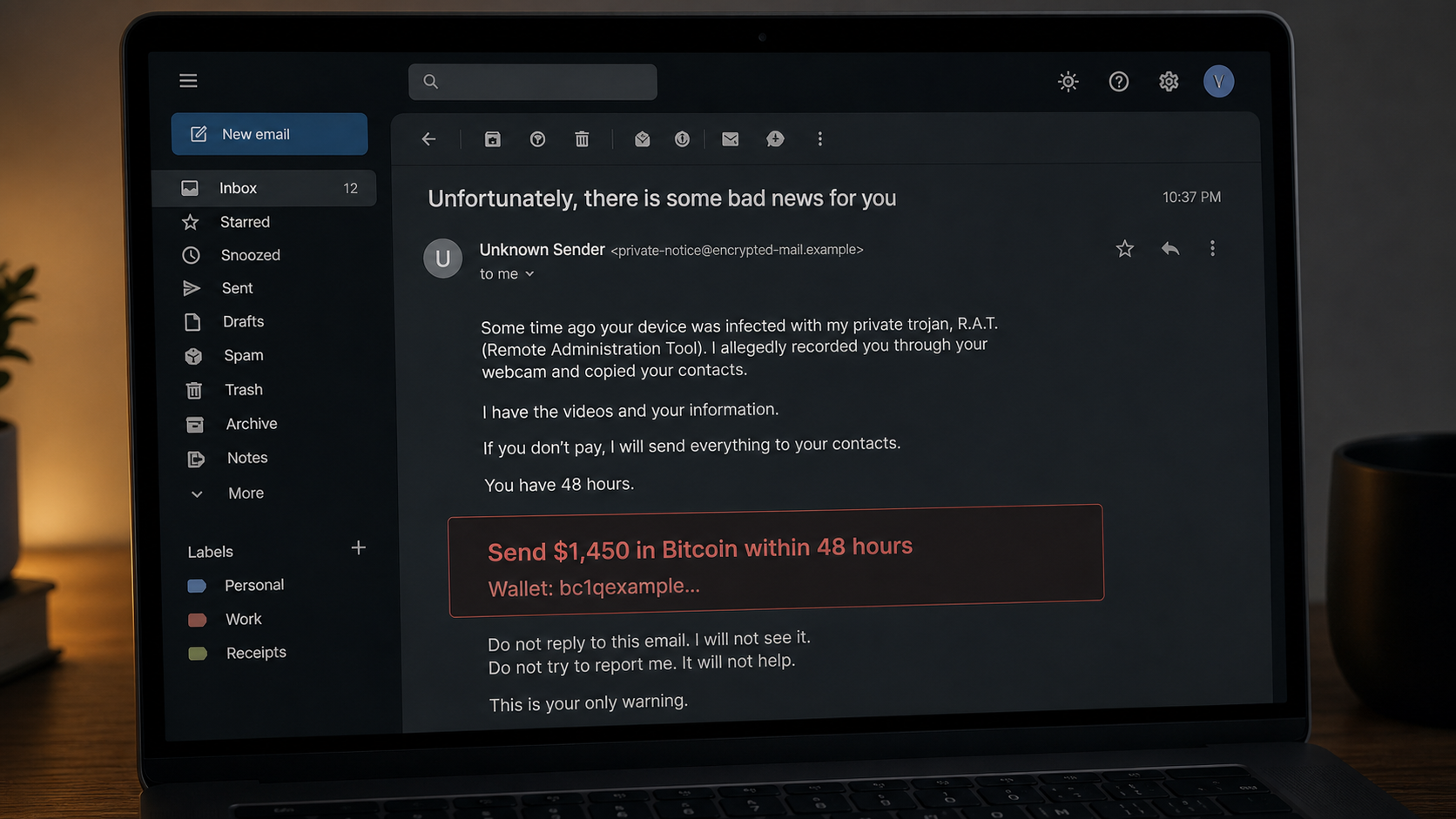
An email beginning “Unfortunately, there is some bad news for you” may claim that your device was infected with the sender’s private trojan, R.A.T., or Remote Administration Tool. The sender says they recorded your webcam, copied your contacts, and will release an intimate video unless you pay Bitcoin within 48 hours.
This is a mass-produced sextortion scam. The threatening text is not evidence that a trojan is installed, a video exists, or the sender controls your camera. Do not pay or reply.
Overview
The Private Trojan R.A.T. message is a version of Bitcoin blackmail that has circulated under many names for years. It accuses the recipient of visiting adult websites, claims malware recorded both the screen and webcam, and threatens to send a video to family, friends, and coworkers.
The word R.A.T. gives the story a technical foundation. Real remote access trojans do exist, and legitimate remote administration applications can be abused. However, a generic email using the term does not demonstrate that this sender infected this device.
The campaign succeeds through scale and emotion. The same text is sent to thousands or millions of addresses. A small percentage of frightened recipients can make the operation profitable because cryptocurrency transfers are difficult to reverse.
The message may appear to come from the recipient’s own email address. That can result from sender spoofing, where the From field is forged. It does not automatically mean the mailbox was used to send the message.
Some versions include an old password. Scammers obtain email and password combinations from historic third-party data breaches and insert them into templates. The password proves that data leaked somewhere, not that the sender has live control of the computer.
What the email may say
Subject: Unfortunately, there is some bad news for you
Some time ago your device was infected with my private trojan, R.A.T. (Remote Administration Tool). I gained access to your camera, microphone, files, and contacts.
I recorded you while you visited adult websites. I created a video showing your screen and webcam. If you do not pay, I will send it to everyone in your contacts.
Send $1,450 in Bitcoin to my wallet. You have 48 hours. Do not reply because I sent this email from your own account.
Amounts range from a few hundred dollars to several thousand. Deadlines commonly range from 24 to 72 hours. The wallet address changes, and some campaigns include a QR code.
Common variations of the email
- “Unfortunately, there is some bad news for you”
- “Your device was infected with my private trojan R.A.T.”
- “I am a professional hacker and accessed your operating system”
- “Pegasus spyware was installed on all your devices”
- “I recorded you through your webcam”
- “I downloaded your contacts and browser history”
- “This email was sent from your own account”
- “I know your password” followed by an old credential
- “Pay Bitcoin within 48 hours or the video will be released”
- “Do not contact police because I monitor your device”
- “Opening this email started my timer”
New versions mention Pegasus, keyloggers, zero-click exploits, artificial intelligence, or remote desktop software. The technical label changes to match current news, while the demand and absence of proof remain the same.
Why the message feels personal
Sextortion targets privacy, reputation, and shame. The recipient may panic before noticing that the email contains no name, no real contact, no specific website, no screenshot, and no sample from the alleged recording.
Statements such as “I know you read this” and “my pixel started the timer” create the illusion of monitoring. Email tracking can sometimes indicate that a message was opened, but it does not prove webcam access or malware installation.
An old password is the strongest psychological prop. If it is familiar, the sender appears to know a secret. Data breaches make old credentials available in large lists, allowing automated messages to include them at scale.
Signs this is a mass blackmail email
- No evidence is provided. The sender does not show a frame, file name, device identifier, or verifiable sample.
- The accusations are generic. They are designed to fit many recipients.
- Payment is demanded in cryptocurrency. Bitcoin lets the operator receive irreversible international payments without normal refund protections.
- A short deadline prevents calm verification. The threat becomes less effective when the recipient asks for evidence and advice.
- The sender claims replying is impossible. This discourages checks and hides the use of spoofed addresses.
- An old password may come from a breach. It is not proof of a current session or infection.
- The same wording appears online. Searching a distinctive sentence often reveals many recipients with the identical threat.
How The Operation Works
1. Operators obtain email and breach data
Addresses come from marketing lists, scraped websites, malware logs, prior scams, and public data breaches. Some lists pair an email with an old password or telephone number.
The operator does not need to hack each recipient. A mail-merge tool inserts available data into a standard threat.
2. The message invents a believable infection story
The sender claims a visit to an adult website triggered a trojan. They describe access to the camera, microphone, screen, keyboard, and contacts, then say the malware is invisible to antivirus software.
Those claims are structured to explain away every possible check. If no alert appeared, the trojan was supposedly undetectable. If the camera light never turned on, it was supposedly disabled.
3. Technical terms create authority
R.A.T., keylogger, remote desktop, zero-day, encryption, and Pegasus are used without specific technical evidence. The sender may describe a split-screen video showing the alleged adult content beside a webcam recording.
Real incident reporting includes observable indicators. A generic list of capabilities only describes what malware might do in theory.
4. Spoofing makes the sender look powerful
Email protocols historically allowed the visible From address to differ from the system that transmitted the message. Providers use authentication controls to detect this, but a spoofed message may still appear in spam.
Viewing full message headers often reveals that the delivery path did not originate from the recipient’s account. Review of sent mail and recent sign-ins provides additional evidence.
5. A breached password adds false proof
The scammer inserts a password that may have been used years earlier. The recipient assumes a current device was monitored, but the data can be purchased or downloaded from an unrelated breach.
If the password remains active anywhere, it should be changed immediately. That security need is real even though the webcam story is fabricated.
6. Shame and urgency discourage consultation
The threat says disclosure will happen within 48 hours and warns against police, antivirus scans, or talking to anyone. Isolation makes the victim more likely to pay.
The operator has little incentive to provide proof because a real sample would create information that investigators could analyze. Vagueness is safer for the scammer.
7. Bitcoin payment completes the fraud
The email includes a wallet string or QR code and may explain how to buy Bitcoin. The recipient is warned that the wallet is monitored and partial payment will not stop distribution.
Paying does not create leverage over an anonymous blackmailer. The operator can demand more, sell the payer’s address as responsive, or repeat the threat from another wallet.
8. Follow-up campaigns reuse responsive victims
A victim who replies or pays confirms that the address is active and the threat worked. Later emails may demand another payment or claim investigators can recover the Bitcoin for a fee.
Recovery scammers cannot guarantee reversal of a cryptocurrency transfer. Upfront payment for a guaranteed recovery is another warning sign.
Could a real infection still exist?
Any device can have an unrelated security problem, and a cautious scan is reasonable. The key point is that the email itself does not prove one. Treat security hygiene and the blackmail demand as separate questions.
Evidence of a real compromise would include unfamiliar logins, malicious software detections, altered settings, unknown remote tools, unauthorized account activity, or an actual sample tied to the device. Seek professional help if such evidence exists.
How to distinguish spoofing from a mailbox takeover
First review the Sent folder and recent account activity through the email provider’s official site. If the message is absent from Sent and no unfamiliar login appears, spoofing is more likely than a takeover.
Full email headers can show which servers transmitted the message and whether sender-authentication checks failed. Most users do not need to interpret every line. The provider’s phishing-reporting function or a knowledgeable administrator can review them.
If an unfamiliar session, forwarding rule, recovery address, or application permission is present, treat that as a real account-security incident even though the sexual recording claim may still be false.
Why paying does not buy safety
The sender is anonymous, has offered no verifiable file, and is already acting dishonestly. There is no mechanism that forces deletion after a cryptocurrency payment.
Payment can instead identify a victim who responds to blackmail. The operator may demand a second amount, claim the first transfer was short after fees, or sell the address to another extortion group.
Reasonable security checks after the email
- Update the operating system, browser, and installed applications.
- Run a complete scan with trusted, current security software.
- Review installed applications and browser extensions for anything unfamiliar.
- Check camera and microphone permissions for applications that do not need them.
- Review email, social, cloud, and financial account sign-ins.
- Replace reused passwords and store new unique ones in a password manager.
These steps are sensible maintenance, not confirmation that the extortionist’s story is true. Avoid factory-resetting devices or destroying data solely because a generic email told you to panic.
What To Do If You Received This Email
- Do not pay. Payment does not confirm deletion and can lead to additional demands.
- Do not reply. A reply confirms the mailbox is active and gives the operator another channel for pressure.
- Save evidence before deleting. Preserve the message, full headers, wallet address, amount, deadline, and any password shown.
- Change any listed password that is still in use. Replace it everywhere it was reused and start with email and financial accounts.
- Enable multifactor authentication. Review recent sign-ins, devices, recovery details, and forwarding rules.
- Check whether the message was actually sent from your account. Review Sent mail and account activity. A matching From address can be spoofed.
- Run a trusted full security scan. Update the operating system, browser, and security software first. Remove unknown remote-access tools and extensions.
- Covering a webcam is optional reassurance, not incident response. It can protect privacy, but password security and device review remain necessary.
- Report the extortion. File a report with the FBI’s IC3 or the relevant national cybercrime authority and report the message to the email provider.
- Seek support if the message causes distress. Show it to a trusted person. The scam relies on isolation and embarrassment.
If the email includes genuinely private content, current credentials, or evidence that could only come from a device, stop direct contact and seek professional incident-response and law-enforcement advice. Do not negotiate alone.
Do not click a link or attachment that claims to contain the recording. A mass sextortion message can become a real malware incident if the recipient opens a malicious file while trying to inspect supposed proof.
Keep the wallet address intact for reporting, but never send a test payment. Blockchain activity can help investigators connect campaigns, while a payment exposes the victim to further extortion.
The Bottom Line
The “Private Trojan R.A.T.” email describes a technically possible kind of malware but supplies no proof that the sender used it. Spoofed addresses and old breached passwords are props in an automated Bitcoin blackmail campaign.
Do not pay. Secure any reused password, enable multifactor authentication, review account activity, run a trusted scan, preserve the message, and report the extortion. Calm verification removes the power from a threat built almost entirely from fear.

Join the discussion
0 commentsShare your experience or ask a question about this article.
Discussion
Start the conversation
Have a question or something useful to share? Add the first comment.