

An unexpected email says someone tried to change the phone number and home address on your Social Security record. The warning sounds personal, serious, and urgent, especially if you receive benefits or rely on Social Security notices.
But the message is not a genuine account alert. The “Social Security Administration – Contact Information” email is a phishing lure that pushes recipients toward an unsafe download or a fake sign-in page. Here is how to recognize it, what may happen after a click, and how to protect yourself if you already interacted with it.
Overview
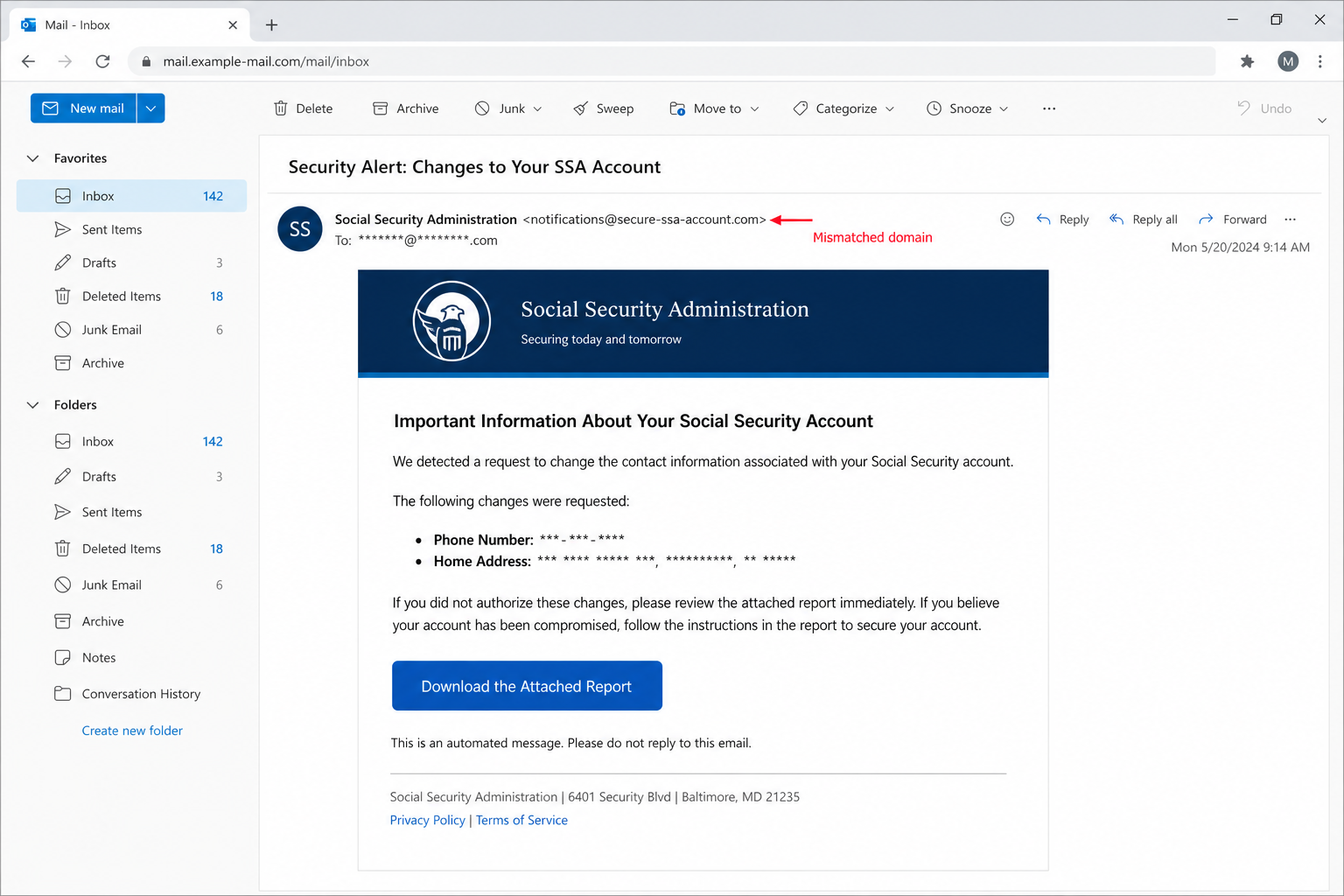
The Social Security Administration Contact Information email scam impersonates the SSA and claims that recent requests were made to update the recipient’s phone number and home address.
The message warns that unauthorized changes could affect how the recipient receives important benefit notices. It then presents a button labeled “Download the Attached Report” and says the report contains details about the requested updates.
This story is designed to create an immediate fear: someone may have taken control of your Social Security record, and waiting could make the problem worse. That fear is what the scammers use to make an unfamiliar download feel necessary.
What the fraudulent email claims
The email usually arrives with a subject similar to “Security Alert: Changes to Your SSA Account.” Inside, it may list a partly masked phone number and street address that the recipient does not recognize.
It then says a complete account-activity report is available as a file. The recipient is told to download it, review every change, and follow the instructions inside if the updates were not authorized.
The campaign examined by security researchers used real SSA contact details and the agency’s Baltimore address in the footer. Those details are public and easy to copy. Their presence does not prove that the email was sent by the government.
What is actually known about the link
The destination associated with the examined campaign was no longer active when it was analyzed. That means it is not possible to state with certainty what every recipient would have received after pressing the button.
There are two realistic risks. The link may lead to a file that attempts to install malware, or it may open a phishing page that imitates an SSA, Login.gov, ID.me, Microsoft, or email sign-in screen.
Both outcomes can be serious. Malware may steal passwords, record keystrokes, or create remote access to the device. A phishing page may collect an email password, an SSA account login, a Social Security number, a date of birth, or other identity information.
The safest response is therefore the same even when the final payload is unavailable: do not click the button, do not download the report, and do not use contact information supplied by the message.
Why this email can look convincing
The scam borrows the language of a normal security notification. Real services do alert customers to account changes, and a masked phone number or address is exactly the kind of detail people expect to see in a legitimate warning.
The email also mixes urgency with reassurance. It says no action is needed if the changes are familiar, which makes the message sound measured rather than openly threatening.
Official-looking branding, a government address, and the real SSA customer-service number can lower a recipient’s guard. Scammers often copy accurate public information precisely because readers use those surface details as shortcuts for trust.
Warning signs that expose the scam
A polished design cannot fix the inconsistencies underneath it. Look for the following warning signs:
- The message was unexpected. You did not request a contact-information change or ask the SSA to send an account report.
- The sender domain is not an official government domain. A display name can say “Social Security Administration” while the actual address belongs to an unrelated domain.
- The email pushes a download. The supposed solution is hidden behind an “Attached Report” button instead of directing you to sign in independently.
- The warning creates pressure. It suggests your benefit notices may be affected unless you review the report quickly.
- The link destination does not clearly belong to SSA. Hovering over the button may reveal a shortened, unrelated, misspelled, or compromised address.
- The message asks you to trust the email itself. A genuine security check should still be verified through a bookmarked government site or a known phone number.
The SSA advises people not to respond to suspicious messages or use links inside them. If you need to review your contact details, type ssa.gov/myaccount into your browser yourself and access your account through the official sign-in process.
How The Scam Works
Step 1: The attackers choose a problem that feels personal
The scam begins with a believable account-security event: a request to change a phone number and home address. These details matter because they control where account alerts, benefit notices, and recovery messages may be delivered.
A recipient who does not recognize the masked information may immediately assume that an identity thief is already inside the account. The scammers do not need to prove that a change occurred. They only need to introduce enough uncertainty to make the recipient investigate.
Step 2: A government identity is used to borrow trust
The email adopts the name and visual language of the Social Security Administration. It may include an agency-style header, official-sounding departments, a government address, and real customer-service numbers.
None of those elements are difficult to copy. Email display names are not identity checks, logos can be downloaded, and public addresses can be pasted into a footer.
The meaningful details are the underlying sender address, the authentication results available in the message headers, and the actual domain behind the button. Those are the areas impersonators struggle to hide.
Step 3: The message creates fear without looking hysterical
Rather than threatening immediate arrest or demanding money, this email uses a quieter form of pressure. It warns that unauthorized contact changes could interfere with important benefit communications.
That approach is effective because it feels plausible. A recipient may think, “I should at least open the report to see what changed.” The button becomes framed as a protective action rather than a risky download.
Step 4: The “Attached Report” button hides the real destination
The report is the pivot point of the operation. The button may point to an attacker-controlled domain, a compromised website, a redirect service, or a cloud-hosted file.
Links can also be changed during a campaign. One recipient may be sent to a fake sign-in page, while another receives a ZIP archive, PDF, HTML file, Office document, or executable.
This flexibility is why the wording stays vague. “Download the Attached Report” prepares the victim to accept almost any file or webpage that appears next.
Step 5: One path leads to credential phishing
In a phishing version, the recipient lands on a page that claims authentication is required before the account report can be viewed.
The page may imitate a familiar provider and ask for an email address and password. It may then request an SSA-related identifier, date of birth, phone number, address, or a multi-factor authentication code.
Information submitted to that page goes to the attackers. A common trick is to display an error after the first submission and ask the victim to try again. This can help criminals capture a corrected password if the first entry contained a typo.
The page may eventually redirect to the real SSA website. That final redirect does not make the earlier form legitimate; it simply creates the impression that a temporary sign-in problem occurred.
Step 6: Another path may deliver a malicious file
If the link downloads a file, the attack still needs the recipient to open or run it. The file may be presented as a PDF report even when its true type is different.
Windows can hide known file extensions, allowing a name such as SSA_Account_Report.pdf.exe to appear less suspicious at a glance. Archives may conceal scripts or shortcut files, while Office documents may ask the user to enable editing, macros, or other active content.
A normal PDF can also contain a link that opens a phishing page. The fact that a file opens successfully does not mean every button or link inside it is safe.
Step 7: Stolen access is expanded beyond one account
If the attackers capture an email password, they may use the inbox as a map of the victim’s digital life. Email access can reveal financial notices, identity documents, tax records, benefit correspondence, and password-reset messages.
Criminals may search for conversations involving banks, payroll, health insurance, government services, and family members. They can also request password resets for other accounts connected to the compromised mailbox.
If the same password was reused elsewhere, automated credential-stuffing attempts may expose shopping, social media, cloud storage, or financial accounts as well.
Step 8: Identity information may be monetized
A Social Security-themed campaign is especially dangerous because victims expect to discuss sensitive identity details. A convincing follow-up page or phone call may ask for information people would reject in an ordinary email.
Collected data can support account takeover, tax fraud, benefit fraud, new-account fraud, or more targeted impersonation. Partial information may be combined with data from previous breaches to create a more complete identity profile.
Stolen records may also be sold to other criminals. As a result, follow-up scams can arrive weeks or months after the original email and may reference details that make the caller sound informed.
Step 9: The scammers try to remain unnoticed
After taking over an email account, attackers may create forwarding rules, add recovery methods, register new devices, or hide security alerts in archive and trash folders.
They may not change the password immediately. Quiet access is often more valuable because it lets them monitor messages and wait for an opportunity involving money or sensitive documents.
This is why changing the password alone is not enough after suspected phishing. Sessions, recovery settings, forwarding, and inbox rules also need to be reviewed.
How to Verify a Real SSA Account Concern Safely
Do not use the button, attachment, phone number, or reply address in the suspicious message. Open a fresh browser window and type ssa.gov yourself.
From there, use the official “my Social Security” account link to review your profile and recent alerts. The SSA’s contact-information guidance explains that email details can be updated from the account’s Profile and Security area.
If you prefer to speak with someone, obtain the number from SSA’s official website or a trusted government document you already possess. The agency currently lists 1-800-772-1213 and TTY 1-800-325-0778, but checking the official site yourself protects you if contact details ever change.
Remember that a real problem with your record does not require you to trust an unexpected email. Independent verification is the safest response whether the warning is genuine or fraudulent.
What to Do If You Have Fallen Victim to This Scam
Your response should match what happened. Merely opening the email is usually less serious than downloading a file, entering a password, sharing identity information, or approving a login.
- Stop interacting with the message. Close the page or document, do not press additional buttons, and do not call numbers presented in the email or downloaded report.
- Disconnect a device if a suspicious program ran. If you launched an executable, enabled macros, or noticed unexpected system activity, disconnect the device from Wi-Fi or Ethernet. This can interrupt remote access or further data theft while you arrange a security scan.
- Change exposed passwords from a trusted device. Start with the email account because it can be used to reset other passwords. Create a new, unique password that has not been used on another service.
- Sign out of existing sessions. Use the account’s security settings to revoke active sessions, unfamiliar devices, app passwords, and connected applications. A password change does not always terminate every stolen session.
- Review recovery methods and mailbox rules. Remove unfamiliar forwarding addresses, filters, delegates, recovery emails, phone numbers, and trusted devices. Check Archive, Deleted, Spam, and RSS folders for hidden security messages.
- Secure your official Social Security account. Go directly to ssa.gov/myaccount, review your profile, and confirm that your contact and direct-deposit information is correct. Use the official recovery process if you cannot sign in.
- Respond to exposed identity information. If you submitted your Social Security number, date of birth, address, or document images, visit IdentityTheft.gov to create a recovery plan. Consider a fraud alert or credit freeze with the major credit bureaus.
- Contact financial institutions when necessary. If bank, card, or direct-deposit details were exposed, call the institution using a number on its official website or the back of your card. Ask about blocking transfers, replacing affected credentials, and monitoring transactions.
- Scan every affected device. Use reputable, updated security software. A scan is particularly important if a file was downloaded or opened, but remember that pure phishing can steal a password without installing malware.
- Change reused passwords. If the stolen password was used anywhere else, replace it on every affected account. Begin with banking, cloud storage, government, tax, payroll, shopping, and social media services.
- Enable multi-factor authentication. Prefer an authenticator app, passkey, or hardware security key where available. If you approved a fraudulent prompt or shared a one-time code, revoke sessions before setting up fresh authentication methods.
- Save evidence and report the campaign. Preserve the original email, sender address, message headers, screenshots, filenames, and the time of the incident. Report Social Security impersonation through the SSA Office of the Inspector General and phishing through ReportFraud.ftc.gov.
Frequently Asked Questions
Does SSA ever send email?
Yes, the SSA can send legitimate email notifications and subscription messages. The existence of real SSA email does not validate a particular message. Verify unexpected alerts by navigating to SSA.gov independently rather than pressing an email button.
Can opening the email alone infect my computer?
In most common campaigns, the larger risk begins when a recipient clicks a link, downloads a file, opens an attachment, enables active content, or enters information. Still, keeping your email client, browser, and operating system updated reduces the risk from uncommon software vulnerabilities.
Is the email genuine if it contains the real SSA phone number?
No. Scammers routinely copy legitimate phone numbers, addresses, employee names, and branding from public websites. Check the sender and links, then verify through a channel you found independently.
What if I clicked but did not enter information?
Close the page and do not download anything. Review the browser’s downloads, remove any unexpected file without opening it, and run a security scan if a download occurred. If the page merely loaded and no information or permissions were provided, the risk is generally lower.
Should I reply and tell the sender that the changes were not mine?
No. Replying confirms that your address is active and may invite more targeted messages. Report the email as phishing and contact SSA through its official website if you need to verify your account.
The Bottom Line
The Social Security Administration Contact Information email scam turns an invented account change into a reason to download an unsafe “report.” The message may look professional and may even include real government contact details, but its purpose is to move you away from trusted channels.
Do not use the button or attachment. Visit SSA.gov yourself, review your account through the official sign-in process, and report the email. If you entered information or opened a suspicious file, secure your email and SSA accounts first, inspect the affected device, and take identity-theft precautions without delay.








