

A forwarded-looking workplace thread says your payroll details need to be reviewed and reconciled. The task seems small: press Confirm so your information remains current before the next pay cycle.
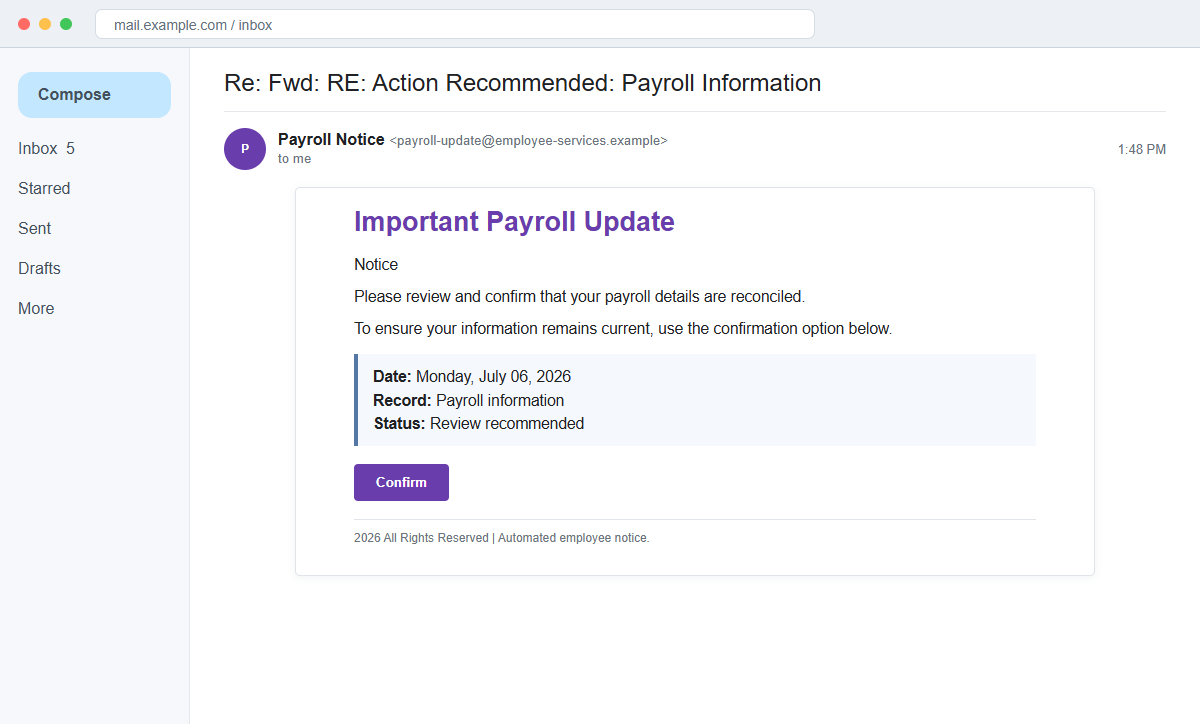
The Important Payroll Update email scam uses that routine request to open a fraudulent HR or payroll page. The destination may seek a work password, personal information, or direct-deposit details.
The message is especially dangerous because stolen credentials can become more than an account problem. Criminals may use payroll access to replace the employee's bank account and redirect the next paycheck.
Do not confirm payroll through an unexpected email button. Open the normal employee portal independently and contact payroll through the company directory before changing any financial information.
Overview
The subject imitates a forwarded internal conversation
The subject begins Re: Fwd: RE: Action Recommended: Payroll Information, creating the impression that managers or departments already discussed the issue. In reality, the message can be the first and only contact.
A reply-chain prefix is plain text. It does not prove that an earlier conversation exists in the recipient's mailbox or that any internal employee forwarded it.
A simple confirmation hides a high-risk request
The body says payroll details must be reviewed and reconciled, then provides a single Confirm button. It does not identify the payroll provider, affected field, change request, or employee record.
The vague wording encourages the employee to open the page for details. The login or bank form appears only after the click, when the recipient is already committed to completing the task.
Payroll access can be converted into missing wages
A fake portal may collect employee credentials and direct-deposit information. Attackers can then access a real payroll system, change the routing account, and hide alerts using compromised email.
The employee may not discover the diversion until payday. Recovery becomes harder once the deposit reaches an attacker-controlled prepaid or bank account and is moved again.
- The subject contains Re, Fwd, and RE prefixes.
- The heading says Important Payroll Update.
- A date such as Monday, July 6, 2026 is displayed.
- Payroll details supposedly need review and reconciliation.
- A Confirm button is the only action.
- The employer and payroll provider may be unclear.
- The message does not identify which detail changed.
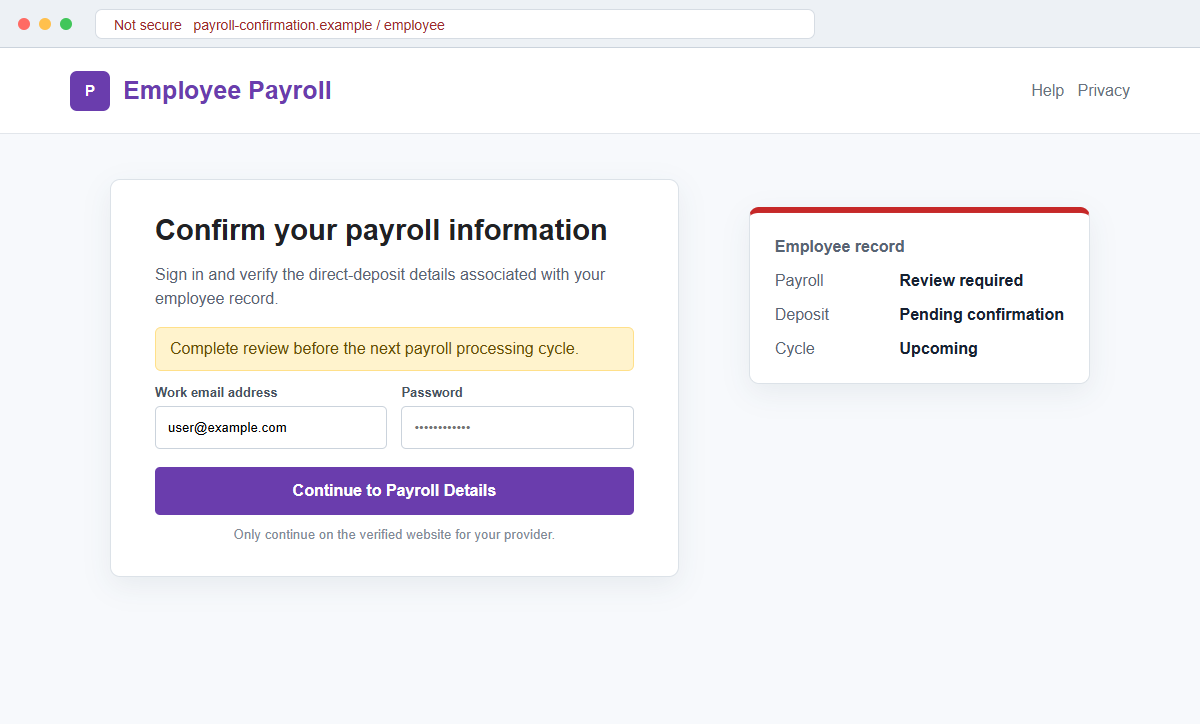
- The destination may request both work credentials and banking information.
Why Payroll Confirmation Requests Deserve Extra Care
Employees expect occasional tax, benefit, and direct-deposit tasks. A short administrative notice can therefore feel more credible than a dramatic account warning.
Payroll deadlines create natural urgency. People know that a late change may affect the next check, so they may act before asking which department issued the message.
The forwarded subject provides social proof without naming anyone. It suggests the issue has already passed through internal hands and that the recipient is simply the last step.
Payroll systems hold valuable data, including addresses, tax forms, salary details, bank accounts, and identity information. A successful login can support payroll diversion and broader identity theft.
The lack of specifics is not a harmless formatting choice. A legitimate change request should identify the employer, provider, affected record, effective date, and a secure route already known to employees.
A genuine payroll correction also leaves an audit trail. Employees can ask who initiated it, when it becomes effective, and which account ending is currently approved without revealing a full bank number by email.
How Payroll Diversion Follows a Stolen Employee Login
The FBI's Internet Crime Complaint Center has documented phishing campaigns that capture employee payroll credentials. Attackers use those credentials to enter real payroll accounts and replace direct-deposit information.
Criminals may also add email rules that hide alerts about account changes. This can keep the employee unaware until the expected deposit fails to arrive.
IC3 recommends using a secondary channel or multi-factor authentication to verify account-information changes, scrutinizing destination URLs, and never supplying login credentials or personal information in response to email.
Employers should apply heightened review to bank-account changes and monitor unusual logins. Employees should watch for missing deposits and report irregularities before funds move through additional accounts.
A payroll portal may be protected by multi-factor authentication, but a live phishing page can relay a one-time code to an attacker.
The code request must be judged by the page's domain and the action described in the real alert.
The link associated with the observed campaign was not active during later review, so the exact form may vary. Work credentials, personal details, and banking information should be treated as possible targets based on what the replacement page requests.
How the Important Payroll Update Email Scam Works
Step 1: A forwarded-looking payroll notice arrives
The subject uses multiple reply and forward markers to resemble an established internal thread. The body is brief enough to look like a routine automated notification.
There may be no matching earlier message in the conversation history. The prefixes are part of the lure, not evidence of an actual exchange.
Step 2: The employee is told that details need reconciliation
The message avoids naming the supposed discrepancy. The recipient must click Confirm to discover which information is outdated.
A real payroll team can explain the affected field and processing deadline without demanding that the employee first authenticate through an unknown link.
Step 3: Payday pressure discourages verification
Even without an explicit threat, the employee may worry that wages will be delayed. A date near a payroll cutoff can make immediate action seem prudent.
That anxiety should trigger a call to payroll, not a shortcut around the normal employee portal.
Step 4: Confirm opens a copied HR or payroll page
The destination may reuse an employer logo or mimic a known provider. It can also display the employee's email address because the value was included in the link.
The registered domain often reveals that the page belongs to neither the employer nor the payroll service. A padlock cannot correct that mismatch.
Step 5: Credentials and personal details are collected
The form can request a work username and password, employee ID, date of birth, address, telephone number, or partial tax information. A second screen may ask for bank routing and account numbers.
Each field supports a different abuse. Credentials open the real system, identity data helps impersonation, and bank details can be used in further financial fraud.
Step 6: The attacker changes the real deposit instructions
Using the stolen login, the criminal may replace the employee's direct-deposit account with one they control. If multi-factor authentication is triggered, the phishing page or a follow-up call may request the code.
Hidden mailbox rules can delete or archive confirmation alerts. The employee sees a normal inbox while the payroll profile has changed.
Step 7: The missing paycheck reveals the attack
The diversion may be discovered only when wages do not arrive. By then, the receiving account may have transferred or withdrawn the funds.
Fast reporting gives the employer and financial institutions the best chance to stop a pending deposit or trace the transfer. Delay favors the attacker.
Company and Checkout Checks
Open the payroll portal independently
Use a saved bookmark, company intranet, or official employee application. Check notifications, profile changes, bank details, and recent sign-in activity without using the email button.
A genuine required task should appear inside the authenticated portal. If it does not, contact payroll.
Identify the department and provider
Ask which payroll employee or HR team issued the notice and which platform is involved. Compare the sender and destination domains with prior genuine communications.
A generic Notice footer and copyright line do not identify an accountable organization.
Verify every bank-detail change by a second channel
Employers should call the employee using an established number before accepting new deposit instructions. Employees should confirm the last digits of the account currently on file.
Do not approve a change solely because it came from a logged-in account. That account may already be compromised.
Preserve timing and payment evidence
Save the message, headers, URLs, screenshots, payroll confirmations, bank records, and expected pay date. Record exactly what information was entered.
Contact payroll, IT, and the financial institution immediately if a deposit is missing or a bank change is unauthorized.
Warning Signs to Check Before You Act
- Re and Fwd prefixes appear without a real conversation history.
- The employer or payroll provider is not clearly named.
- The message says details must be reconciled but identifies no field.
- A Confirm button is the only route to more information.
- The sender address differs from prior payroll notices.
- The destination is outside the employer or provider domain.
- The page requests the work email password again.
- Bank routing details are requested after an unsolicited link.
- A one-time code is needed to complete the change.
- The password manager does not recognize the page.
- Payroll cannot find a matching task.
- Deposit-change alerts disappear from the inbox.
Payroll changes can affect the money needed for rent, food, and bills, so they deserve more verification, not less. Use the known employee portal and speak with payroll before confirming any login or bank details.
What to Do if You Have Fallen Victim to This Scam
- Change the exposed password immediately. Open your employer's bookmarked payroll portal, HR system, or company identity provider through a saved bookmark or its official application, not through the important payroll update message. The password entered during that important-payroll message should never be used again. Give every affected service a different replacement.
- Notify payroll and the employer’s security team immediately. Ask them to freeze direct-deposit changes, verify the current destination account, and review every modification made after the fake payroll update was opened. Confirm the request by telephone or in person rather than replying to the same email thread. If payday is close, ask payroll to document where the next payment will go and whether a manual hold is possible. Keep copies of every confirmation, case number, and call note.
- Change the work-account password through the official identity portal. End other sessions, remove unfamiliar multifactor methods, and revoke suspicious connected applications before reopening payroll or HR systems.
- Inspect the mailbox for deleted payroll alerts, hidden forwarding rules, and replies sent to HR. Attackers sometimes suppress confirmation messages so a redirected paycheck is not noticed until payday.
- Contact the bank if wages were sent to the wrong account. Provide the employer’s payment trace and ask whether a recall can begin. Keep written records because the employer and bank may need to coordinate.
- Contact payroll before the next processing cutoff. Ask payroll to freeze unverified direct-deposit changes and confirm the destination for the next payment. If a paycheck was redirected, notify the employer and financial institution immediately so they can attempt recovery.
- Run a complete Malwarebytes scan if the payroll page delivered a spreadsheet, installer, extension, or remote-support tool. Remove unfamiliar software and update the device before using work credentials again.
- AdGuard or another reputable DNS blocker may stop known payroll-phishing domains and malicious ads. Continue verifying every HR link through the company portal because newly registered pages may evade filtering.
- Report the phishing message. Use the mail provider's Report Phishing control and notify your employer's payroll, HR, IT security, and financial institution if a deposit was redirected. Archive the full source of the message involved in this important-payroll phishing attempt. Sender paths and authentication results may reveal useful infrastructure.
- Warn coworkers through the official company channel. The same attacker may send benefits notices, tax forms, shared documents, or direct-deposit requests from the compromised account.
- Ignore anyone charging an upfront fee to recover a paycheck or restore the account. Work with payroll, the bank, law enforcement, and the employer’s verified security provider.
Frequently Asked Questions
Is the Important Payroll Update email legitimate?
No. The documented campaign uses a vague payroll confirmation request to direct employees toward a fraudulent page seeking sensitive information.
Do reply and forward markers prove the email is internal?
No. Re, Fwd, and RE can be typed into any subject. Check whether a real earlier conversation exists and verify the sender address.
What information may the fake payroll page request?
It may seek work credentials, employee identity details, tax information, bank routing data, account numbers, or one-time authentication codes.
How can stolen credentials redirect a paycheck?
Attackers can enter the real payroll portal, replace direct-deposit instructions, and hide alerts through compromised email rules.
What if I entered information but payday has not arrived?
Notify payroll and IT immediately, freeze unverified changes, change exposed passwords, revoke sessions, and confirm the bank account currently on file.
What if my paycheck is already missing?
Contact the employer and financial institution immediately, request recovery action, preserve all records, and report the incident to IC3 or local law enforcement.
The Bottom Line
The Important Payroll Update email scam turns a vague administrative task into a route toward credentials, identity data, and direct-deposit information. A forwarded-looking subject does not make it an internal message.
Use the normal payroll portal and verify changes with HR through a second channel. No employee should have to risk a paycheck to discover what an email supposedly wants updated.
If information was entered, act before the next payroll cutoff. Securing the account and freezing unauthorized bank changes early can prevent a missing deposit.








