

A website announces that the Black Bull $ANSEM airdrop is live and invites Solana users to connect a wallet before the claim window closes. The page looks like a familiar token launch, with branding, allocation language, and a large Connect Wallet button.
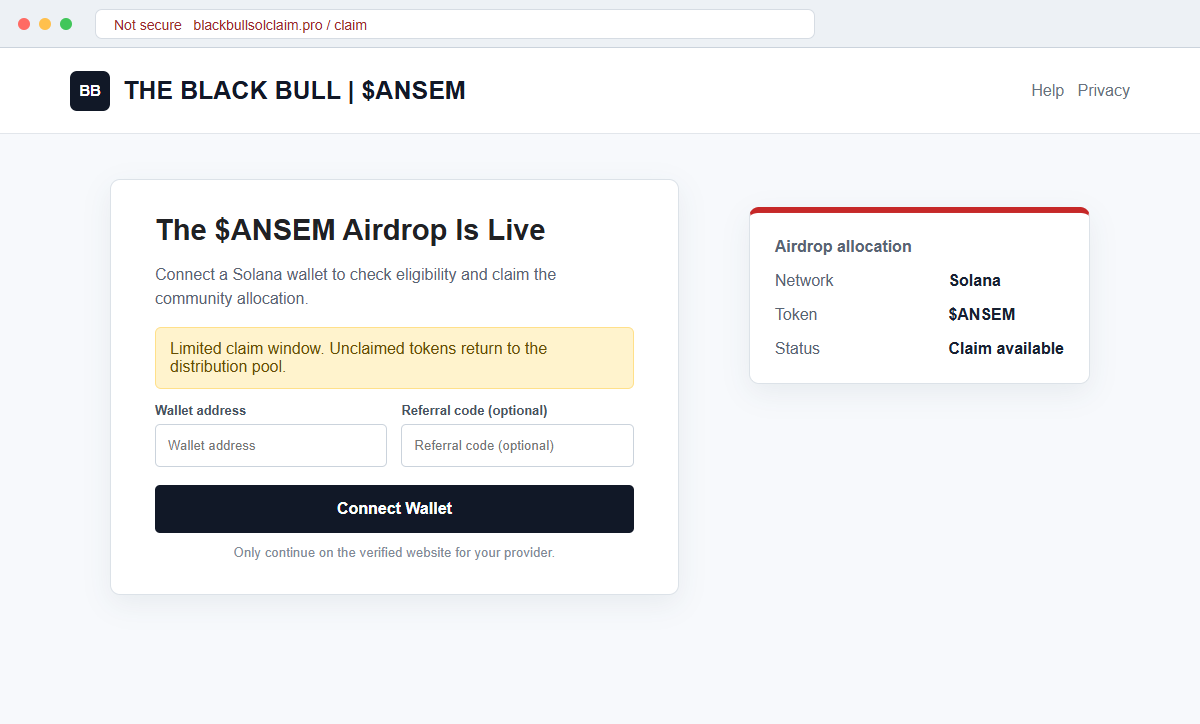
The Black Bull ANSEM Airdrop scam at blackbullsolclaim[.]pro is a wallet-draining scheme. It uses the promise of free tokens to make visitors approve a transaction or permission that benefits the attacker.
Connecting a wallet does not automatically transfer every asset, but the request that follows may. A confusing signature can authorize token movement, change account authority, or trigger a sequence the victim never intended.
Do not connect or approve anything on the site. Verify airdrop announcements through multiple established project channels and read the wallet's simulated balance changes before signing.
Overview
The page copies the shape of a real token claim
A token name, Solana branding, deadline, eligibility message, and wallet button make the page feel like a standard decentralized application. The visitor is told that connecting is needed to calculate an allocation.
The malicious domain blackbullsolclaim[.]pro is not made safe by polished design or a padlock. A domain can be registered and given HTTPS quickly, while the claim logic behind the button remains hostile.
The dangerous moment occurs inside the wallet prompt
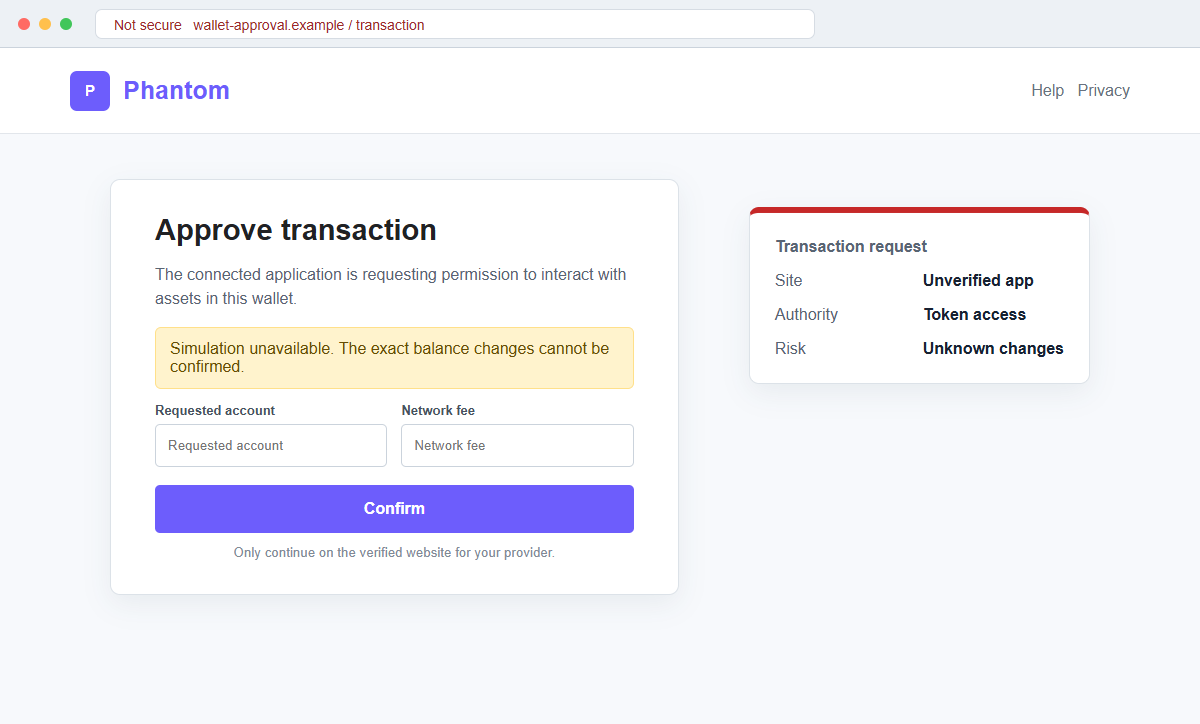
After connection, the site can request a transaction signature. The prompt may show program interactions, account addresses, or warnings that are difficult to interpret on a phone.
A drainer relies on the user approving that request. Depending on the transaction, assets may move immediately or an approval may allow later movement even after the website is disconnected.
Airdrop urgency discourages contract verification
The page may say the claim ends soon, unclaimed tokens will be returned, or early users receive a larger allocation. That framing turns careful review into a fear of missing free value.
An authentic token name can also be copied by unrelated groups. Verify the contract address and announcement independently; a matching name or ticker is not enough to identify a Solana asset.
- The page calls itself The Black Bull or uses $ANSEM branding.
- The malicious domain is blackbullsolclaim[.]pro.
- A limited airdrop claim window is advertised.
- Visitors are asked to connect a Solana wallet.
- The page may display an eligibility or allocation message.
- A wallet transaction follows the connection.
- The simulation may be unavailable or unclear.
- The request can grant token access or move assets.
- Disconnecting may not revoke an approval already granted.
- The same branding may reappear on new domains.
Why Free Token Claims Are Effective Wallet-Drainer Lures
Airdrops are a real part of cryptocurrency marketing and community distribution, so connecting a wallet to check eligibility is not inherently unusual. Scammers exploit that familiar workflow rather than inventing a completely foreign action.
Crypto communities move quickly across social posts, messaging channels, search results, and copied project websites. A malicious promotion can appear during a genuine token discussion and benefit from the attention without being part of the project.
Wallet interfaces protect private keys, but they still follow authorized signatures. If the user confirms a transaction that transfers tokens or delegates authority, the wallet may execute exactly what was approved even though the website's written explanation was false.
The phrase connect wallet can sound like read-only identification. A connection normally reveals public addresses and permits requests, while the separate signature or approval is the point where state and balances may change.
Search rankings, sponsored posts, and follower counts are not reliable proof. Scam pages can buy advertisements, compromise accounts, copy engagement, or use lookalike characters in usernames and domains.
Several Black Bull or $ANSEM pages may exist with different claims and affiliations. That confusion is a reason to avoid assuming which page is official.
Verify a specific domain, contract address, team statement, and transaction rather than trusting the shared name.
What a Solana Wallet Drainer Can Ask You to Approve
A malicious transaction can transfer SOL, tokens, or NFTs to addresses controlled by the attacker. It may combine several instructions so the visible network fee looks small while the balance changes are far larger.
A request can also change authority or delegate control over a token account. The immediate screen may not show a dramatic transfer, yet the granted permission can support movement afterward.
Phantom advises users who interacted with a suspicious application to review connections and revoke token approvals they do not recognize. It also explains that revoking permissions is different from merely disconnecting the application.
If a recovery phrase was shared, revocation is not sufficient. Phantom states that an attacker who has the Secret Recovery Phrase has full access, so the wallet should be treated as permanently compromised and remaining assets moved to a new seed.
Blockchain records are public and generally irreversible. A transaction signature can show what moved and where, but it does not give the victim a cancellation button after the network confirms the transfer.
The drainer may target only valuable assets and leave low-value tokens behind. A partial balance does not establish that the wallet is safe, especially when suspicious permissions or an exposed phrase remain active.
How the Black Bull ANSEM Airdrop Scam Works
Step 1: The airdrop is promoted through a link
The victim encounters blackbullsolclaim[.]pro through search, an advertisement, social media reply, messaging group, or direct message. The promotion says the $ANSEM claim is live or nearly finished.
A compromised or impersonated account may share the link, making it appear to come from someone already trusted in the community.
Step 2: The site imitates a legitimate token campaign
The landing page uses Black Bull imagery, Solana references, token figures, and a clear claim button. It may display a contract address or community links to create technical credibility.
Copied branding does not bind the domain to a project. The page must be verified through independent channels before any wallet interaction.
Step 3: Scarcity pushes the visitor to connect quickly
A countdown, deadline, limited pool, or bonus for early claimants creates fear of missing out. The user is encouraged to act while the wallet is already open on a mobile device.
Real opportunities survive a short verification pause. A claim that becomes unsafe when you check the domain and contract is not worth pursuing.
Step 4: Connect Wallet reveals the public address
The site requests a connection to Phantom or another provider. Connection can reveal public wallet addresses and allow the page to send transaction requests.
No token has been claimed at this point. The page may read the public balance and tailor the next request toward assets worth stealing.
Step 5: A signature request is presented as a claim
The wallet prompt may say approve, claim, verify, initialize, or confirm. Underneath, it can contain transfer, delegate, authority, or account instructions that do not match the visible promise.
If simulation fails, the risk is higher because the wallet cannot confidently explain the outcome. A deadline is never a reason to approve an unreadable transaction.
Step 6: Assets move or permissions remain available
Once signed, SOL, tokens, or NFTs may be transferred to attacker addresses. In another variation, suspicious approvals remain and can be exercised after the victim leaves the site.
Disconnecting the application stops ordinary interaction but may not revoke a permission already recorded on-chain. Both connections and approvals require review.
Step 7: Fake support or recovery offers continue the attack
The victim may ask for help publicly and receive direct messages from fake Phantom support, administrators, or recovery specialists. They request the recovery phrase, remote access, or a recovery fee.
Legitimate support does not need the seed phrase. Publicly share only the wallet address and transaction signature when reporting the theft.
Company and Checkout Checks
Confirm the exact domain through established channels
Navigate to the project's long-standing website and social accounts from bookmarks or independently verified profiles. Look for the exact claim domain announced consistently across more than one channel.
Do not rely on a search advertisement, reply under a popular post, or a link forwarded by an unknown group member.
Verify the token contract address
Compare the complete Solana mint address with a trusted project announcement and a reputable blockchain explorer. Token names, symbols, images, and prices can be copied.
A page that hides the mint, changes it across screens, or pressures users not to check it should not receive a wallet connection.
Read the wallet simulation and every requested change
Review SOL and token balance changes, recipient accounts, programs, authorities, and warnings. Reject the transaction if the simulation is unavailable, unexpected assets leave the wallet, or permissions exceed a simple claim.
Do not treat a small network fee as the total cost. The transaction instructions, not the fee, determine what can happen to assets.
Use a low-value wallet for uncertain interactions
A separate wallet with no valuable assets or important authority can reduce exposure during legitimate experimental use, but it does not make an unverified site trustworthy.
Never import a valuable recovery phrase into a new browser extension for an airdrop. Install wallet software only from the provider's official site or verified app store listing.
Warning Signs to Check Before You Act
- The airdrop appears through an unsolicited link or advertisement.
- The domain is blackbullsolclaim[.]pro or another unverified variation.
- A countdown or short claim window creates pressure.
- The token ticker is treated as proof of identity.
- The site asks to connect before explaining eligibility.
- A transaction is required to verify the wallet.
- Wallet simulation is unavailable or unclear.
- The approval shows unexpected token or authority changes.
- The page requests a recovery phrase or private key.
- Support contacts you first by direct message.
- A recovery service promises guaranteed reversal.
- The exact domain is absent from established project channels.
A real airdrop does not need blind trust. If you cannot verify the exact domain, mint address, and balance changes before signing, the safest claim is no claim at all.
What to Do if You Have Fallen Victim to This Scam
- Stop signing and close the airdrop page. Reject every pending request, close the browser tab, and do not reconnect to see whether the claim completed. A failed or blank result can be part of the scam and does not mean an earlier transaction was harmless.
- Disconnect the site and revoke suspicious approvals. Use the wallet's official connected-app controls and a trusted revocation tool recommended by the provider. Phantom notes that disconnecting alone is different from revoking token approvals, so review both connections and permissions.
- Move remaining assets when wallet authority may be compromised. Create a new wallet from the official application on a clean device and transfer remaining valuable assets if a recovery phrase, private key, or broad authority was exposed. Do not import the compromised seed into the new wallet.
- Protect the recovery phrase. If the 12 or 24-word phrase was entered anywhere, consider every account derived from it permanently compromised. Never type the phrase into an airdrop page, support chat, verification form, or browser prompt.
- Review transactions on a Solana explorer. Search the public wallet address and identify transfers, authority changes, token approvals, newly created accounts, and recipient addresses. Save transaction signatures and timestamps for reports and exchange tracing.
- Notify exchanges and wallet providers quickly. If stolen funds reached a known exchange, contact its fraud team with the transaction signature and recipient address. Blockchain transfers generally cannot be reversed, but an exchange may be able to flag or freeze assets still under its control.
- Scan the device if software was installed. Run a full scan with Malwarebytes or another trusted security product if the page delivered an extension, application, or file. Remove unknown wallet extensions and install browser and operating-system updates.
- Block known scam domains while staying cautious. AdGuard or another reputable DNS and content blocker can prevent some reported phishing domains from loading. New airdrop clones may appear before blocklists update, so a block is an extra layer rather than proof of safety.
- Change related account credentials. Secure the email, exchange, social media, and cloud accounts associated with the wallet. Replace reused passwords, enable strong multi-factor authentication, and revoke sessions that you do not recognize.
- Report the malicious page and recipient addresses. Report blackbullsolclaim[.]pro to the wallet provider, domain host, browser safe-browsing service, and relevant crypto security channels. Include public transaction evidence but never include the recovery phrase or private key.
- Ignore recovery scammers and fake support. No Phantom moderator, token team, or blockchain investigator needs the recovery phrase to help. Anyone who contacts you first and guarantees reversal for a fee is likely attempting another theft.
Frequently Asked Questions
Is the Black Bull ANSEM airdrop legitimate?
No. The campaign at blackbullsolclaim[.]pro is a wallet-draining scam that uses a fake $ANSEM claim to obtain dangerous wallet approvals.
Can connecting a wallet alone drain it?
Connection normally reveals public addresses and permits requests. The following signature or approval is usually the dangerous step, though users should still disconnect untrusted applications.
Why does the wallet show only a small network fee?
The network fee is not the value being authorized. Transaction instructions can move tokens or change authority while costing only a small amount of SOL to process.
Is disconnecting Phantom enough?
Not always. Phantom explains that disconnecting an app is different from revoking token approvals, so inspect and remove suspicious permissions as well.
What if I entered my recovery phrase?
Treat the wallet as permanently compromised. Create a new wallet with a new phrase on a clean device and move remaining assets without reusing the exposed seed.
Can stolen crypto be reversed?
Confirmed blockchain transfers are generally irreversible. Report quickly to wallet providers and any exchange receiving the funds, because an exchange may be able to flag assets under its control.
The Bottom Line
The Black Bull ANSEM Airdrop scam makes a wallet drainer look like an ordinary Solana token claim. The decisive risk appears in the transaction or authority request that follows Connect Wallet.
Avoid blackbullsolclaim[.]pro, verify exact domains and mint addresses independently, and reject any transaction whose balance changes or permissions are unclear.
If you signed, review connections and approvals immediately. If the recovery phrase was exposed, move remaining assets to a new seed and treat every message promising guaranteed recovery as another potential scam.








