

A security-looking email says your mailbox has been flagged for an important verification update. The warning sounds administrative, the task appears brief, and a single View button promises to keep incoming and outgoing mail working normally.
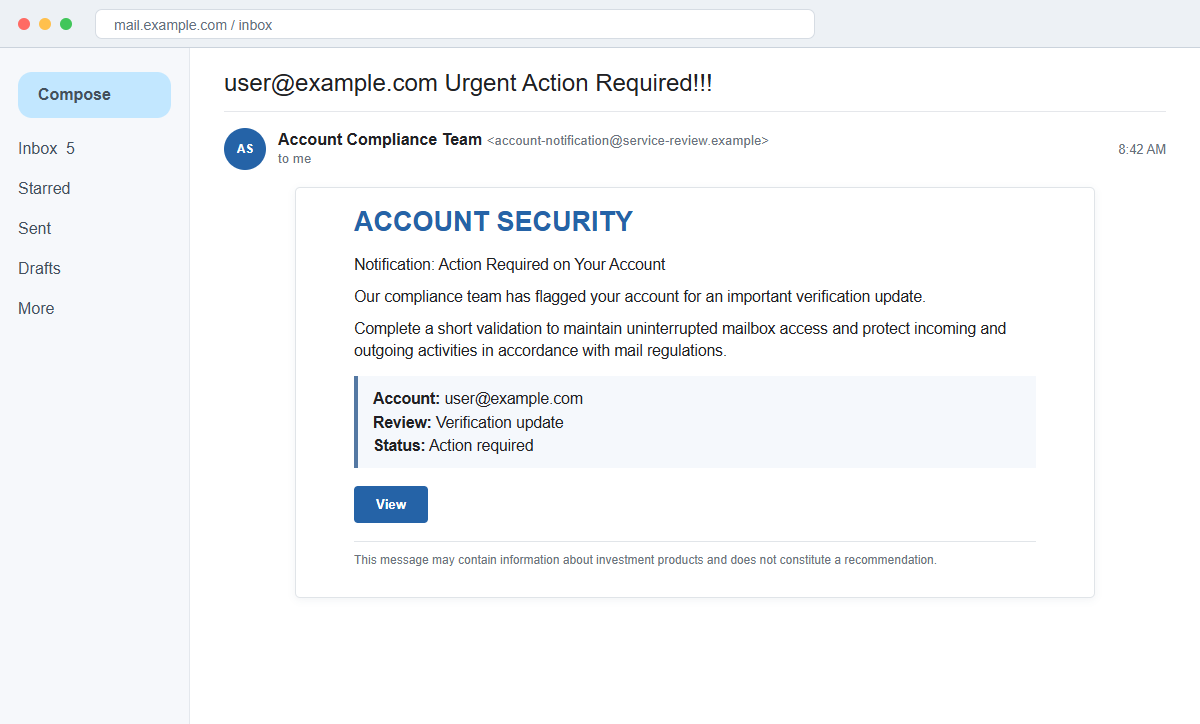
The Update Related to Account Verification email scam turns that routine-looking request into a password theft attempt. The button opens an unrelated website that imitates an email sign-in page and records whatever credentials the visitor submits.
The message does not need to name a well-known provider. Its deliberately generic branding lets the same campaign target people using many different business, school, hosting, and personal mail services.
Do not use the button or reply to the sender. Open the real mail service independently, check its security dashboard, and ask your administrator whether any verification action is actually required.
Overview
The email presents a vague compliance problem as an emergency
The subject may combine the recipient's address with the words Urgent Action Required. Inside, a heading such as Notification: Action Required on Your Account says a compliance team identified an important update.
No policy, incident, provider name, case number, or specific setting is explained. The lack of detail is intentional because a generic story can be delivered to thousands of unrelated mail domains.
A short validation supposedly protects mailbox access
The recipient is told that a brief validation is needed to maintain uninterrupted access and protect incoming and outgoing activity. Phrases about mail regulations make the instruction sound compulsory without naming a real rule.
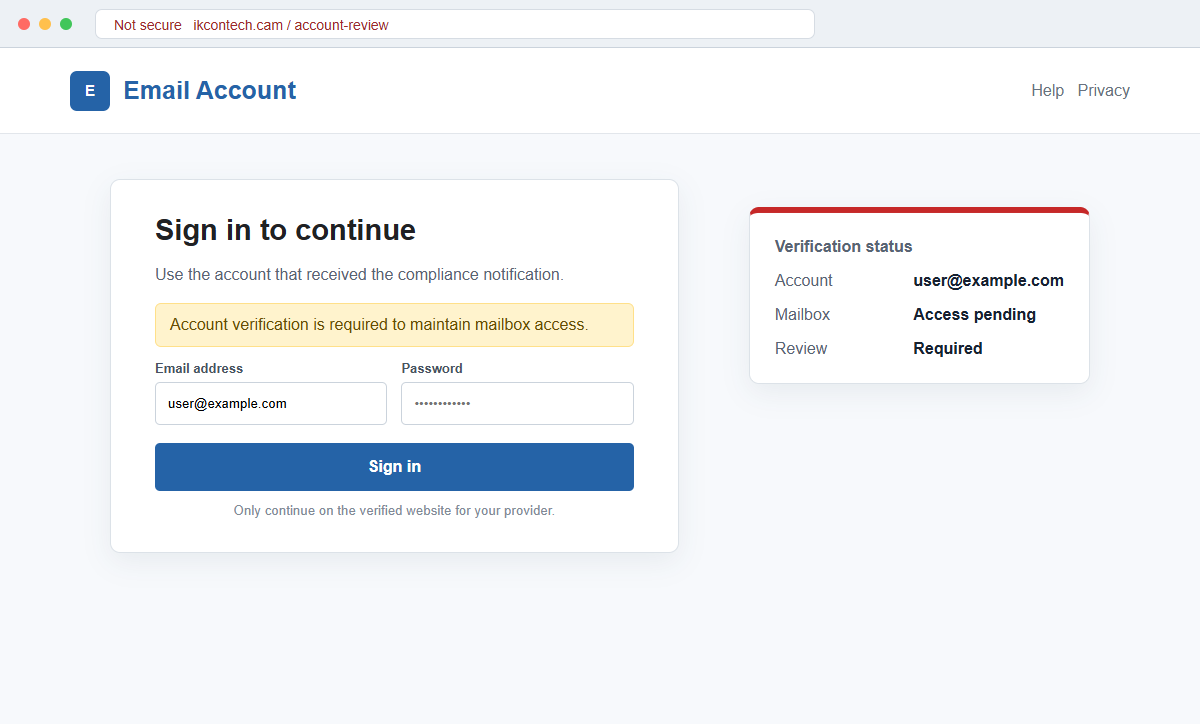
A View button leads away from the legitimate provider. In the observed campaign, the destination used an unrelated .cam domain and displayed a generic email login form with familiar visual elements.
The stolen password can unlock much more than email
A mailbox often controls password resets, billing notices, document shares, cloud accounts, and conversations with customers or coworkers. Criminals can search those messages for opportunities that are worth more than the original account.
They may create forwarding rules, impersonate the victim, request money from contacts, or reset passwords elsewhere. If the credential was reused, the attacker can also test it against other services.
- The subject uses the recipient's address and an urgent action warning.
- A supposed compliance team says the account needs an update.
- The provider is not clearly identified.
- The message refers vaguely to mail regulations.
- Mailbox access will supposedly be interrupted without validation.
- A View button is the only route offered.
- The destination uses a domain unrelated to the mail provider.
- A generic sign-in page asks for an email address and password.
- Recognizable branding may appear only as background decoration.
- An irrelevant investment disclaimer may be placed in the footer.
Why the Account Verification Story Feels Believable
Email providers do sometimes request security reviews, recovery updates, or acceptance of new terms. The scam begins with that ordinary experience, then removes the details that would let the recipient verify who sent the notice and what changed.
The phrase compliance team creates authority while avoiding a recognizable department. A real organization should be able to identify its policy, explain the affected setting, and display the same request after the user signs in through the official application.
The campaign also frames verification as protection. Instead of openly threatening deletion, it says the step helps safeguard mailbox activity. That softer language can feel more professional than obvious scare tactics while producing the same rush to click.
A short button label such as View hides the true destination on a phone. The visitor sees the promised action rather than the registered domain, and a padlock only confirms encryption to that domain, not ownership by the email provider.
The strange investment disclaimer is an especially useful clue.
Language about recommendations, trading decisions, or financial products has no logical relationship to mailbox verification and may have been copied from another template or compromised website.
Even a correctly displayed email address is not proof of integration. The attacker already knows the address because the lure was delivered there and can place it into the URL or page automatically.
What Happens After Credentials Are Entered
The fake page usually collects the email address and password through a normal-looking form. The data is sent to infrastructure controlled by the campaign rather than to the victim's mail provider.
A false error may ask the visitor to enter the password again. This can capture a corrected password when the first entry contained a typo, or collect a second credential from someone who tries another password.
The page may then redirect to a real sign-in service or display a generic success message. That redirect can make the interaction feel completed, but it does not reverse the credential submission.
Criminals often test the account quickly. They can read recent conversations, learn how the victim writes, identify high-value contacts, and search for invoices, payroll records, banking alerts, identity documents, or password reset messages.
Hidden forwarding and filtering rules can preserve access after the victim resumes normal use. Security alerts may be moved to another folder while copies of selected messages are sent outside the organization.
A workplace mailbox can create a chain reaction. One compromised employee may be used to deliver more convincing file-share, invoice, project, or password-reset messages to colleagues who already trust the sender.
How the Update Related to Account Verification Email Scam Works
Step 1: A generic account warning reaches the inbox
The attacker sends a mass email that inserts the recipient's address into an urgent subject or greeting. The provider is kept vague so the same template appears relevant to many mail systems.
Because verification notices are common, the recipient may initially treat it as another routine administrative message rather than an unknown request for a password.
Step 2: A compliance team claims an important update is pending
The body says the account was flagged and needs a brief validation under unspecified mail regulations. It does not describe suspicious activity, a policy name, or a date when the alleged rule changed.
This ambiguity prevents easy fact-checking while suggesting that an internal team has already reviewed the account.
Step 3: Continued mailbox access becomes the pressure point
The message says verification will maintain uninterrupted access and protect incoming and outgoing mail. The recipient is encouraged to picture missed work, delayed invoices, or lost personal messages.
A legitimate provider normally places important security actions inside the authenticated account. It should not require a password on a page reached only through an unsolicited message.
Step 4: The View button conceals an unrelated domain
The visible label offers no clue about the destination. Hovering on a computer or holding the link on a phone reveals a web address that does not belong to the provider or employer.
HTTPS and a padlock do not repair that mismatch. They encrypt the connection to the attacker's page and can be obtained for inexpensive or newly registered domains.
Step 5: A generic email login page removes brand inconsistencies
The landing page asks for an email address and password without clearly naming a service. Familiar colors, a Google-style image, or a simple envelope icon create enough recognition to keep the visitor moving.
A generic form is useful to the attacker because it does not need to reproduce every target's exact webmail portal.
Step 6: Submitted credentials are recorded and tested
Pressing the login button sends the values to the scam operator. An error, loading screen, or redirect may distract the victim while the credentials are tested against the real service.
If multi-factor authentication is enabled, a follow-up page, phone call, or push notification may ask for a code or approval. No unexpected sign-in should be approved.
Step 7: The mailbox is used for further fraud
The attacker searches messages, changes recovery settings, creates rules, and contacts people who trust the compromised address. Password resets can extend the intrusion to other accounts.
Business email compromise, invoice redirection, data theft, and identity fraud may follow. Changing only the mailbox password is not enough unless sessions, rules, recovery methods, and connected applications are also reviewed.
Company and Checkout Checks
Open the real provider without using the message
Use a saved bookmark, the official mobile application, or an address supplied by your employer. Check notifications, security alerts, and required actions after signing in normally.
If no matching verification request appears, treat the email as hostile. Do not return to its button to compare details.
Inspect the complete sender and link destination
Expand the From, Reply-To, and return-path information where available. Preview the button and compare the registered domain with the provider's documented login domains.
Display names, logos, and button text can be copied. The actual domain and authenticated account dashboard carry more weight.
Ask the administrator through a known channel
For a work, school, or hosted mailbox, contact IT or the provider using an existing ticket portal or telephone number. Forward the original message as an attachment so headers remain available.
Do not use contact details printed only in the warning. A fake help desk can continue the same credential theft by telephone.
Look for activity the victim did not create
Check sign-in locations, devices, sent messages, deleted mail, forwarding, filters, delegates, connected applications, and recovery settings. Review other accounts for password-reset emails or new-session alerts.
If the account belongs to an organization, ask security staff to inspect logs and other recipients. A campaign aimed at one employee often targets several people at the same domain.
Warning Signs to Check Before You Act
- An urgent subject inserts the recipient's email address.
- A compliance team is named but the provider is not.
- No specific policy, incident, or setting is explained.
- The message refers vaguely to mail regulations.
- Loss of mailbox access is used to create urgency.
- The only action is a button labeled View.
- The destination domain is unrelated to the provider.
- The page uses generic rather than provider-specific branding.
- A password is requested to complete a vague update.
- The footer discusses investments or trading for no reason.
- The official account dashboard shows no matching alert.
- The sender discourages normal verification by imposing a deadline.
A genuine security request should remain visible when you open the provider independently. If the alleged action exists only behind an email button, do not give the page a password.
What to Do if You Have Fallen Victim to This Scam
- Change the exposed password immediately. Open your email provider or company IT portal through a bookmarked address or official application through a saved bookmark or its official application, not through the Update Related to Account Verification message. Set a long password through the real provider after that update-related message. Change matching or closely related passwords on other accounts.
- Treat the password entered after the account verification alert as compromised. Set a long password through the real provider after that update-related message. Change matching or closely related passwords on other accounts. Audit the authentication methods registered after this update-related case. Remove unknown telephone numbers, recovery addresses, app passwords, and security keys.
- End the access created through the account verification alert. Sign out all other sessions from the email provider’s official sign-in page, revoke unfamiliar OAuth grants, and reconnect trusted mail applications only after the password change. This closes tokens that can survive a simple reset.
- Review the mailbox for changes connected with the account verification alert. Remove unknown forwarding addresses, delegates, inbox rules, filters, and automatic replies. The mailbox history surrounding this update-related incident may expose attacker activity. Inspect sent mail, deleted items, trash, and recovery messages.
- Protect the wider account chain. Prioritize email and every account that relies on it for recovery. The mailbox involved in that update-related message may unlock other accounts through reset links. Change those credentials before an intruder does.
- Check the mailbox and workplace account for unauthorized activity. Review recent sign-ins, devices, sent mail, deleted mail, forwarding rules, delegates, recovery details, app passwords, and connected applications. Ask the provider or IT administrator to preserve logs and remove any access you cannot identify.
- Check the device used to open the account verification alert. Use Malwarebytes after that update-related message whenever an attachment or browser add-on was opened. Review installed software before returning to banking or email.
- Reduce the chance of reopening a related page. AdGuard or another reputable DNS and content blocker may stop known phishing hosts and malicious advertisements tied to the account verification alert. Keep checking destination addresses after this update-related case. New campaign domains can appear faster than blocklists update.
- Report the phishing message. Use the mail provider's Report Phishing control and notify your email provider, employer or IT security team, and the organization being impersonated. Keep the original headers for this update-related incident, not only a cropped screenshot. Administrators can use them to trace and block related messages.
- Warn mail administrator and contacts who received recent messages through a separate channel. Explain that the account verification alert may have exposed the account and ask them to distrust recent file shares, password requests, invoices, payment changes, or urgent replies until the timeline is confirmed.
- Expect follow-up fraud based on the account verification alert. Anyone citing this update-related incident while promising recovery must be verified independently. A demand for money first is a warning sign. Seek support for this update-related phishing attempt through known channels. A provider or incident responder verified for this update-related phishing attempt is safer than an unsolicited fixer.
Frequently Asked Questions
Is the Update Related to Account Verification email legitimate?
No. The documented campaign uses a vague compliance notice and an unrelated login page to collect email addresses and passwords.
Why would an email provider ask me to verify my account?
Providers may request real security actions, but those actions should also appear inside the official account reached independently. An unsolicited link is not proof.
Does a padlock make the verification page safe?
No. A padlock means the connection to that particular domain is encrypted. It does not show that the domain belongs to your provider.
What if I clicked but did not enter anything?
Close the page and verify the account through its official service. Check for unexpected downloads or extensions, but password theft is less likely if nothing was submitted.
What if I entered my password and multi-factor code?
Change the password immediately, revoke sessions, remove unknown authentication methods, inspect mailbox rules, and contact the provider or IT team.
Can the attacker reach other accounts through my email?
Yes. A mailbox can receive password resets and security codes, and a reused password may work elsewhere. Secure linked services in order of financial and personal importance.
The Bottom Line
The Update Related to Account Verification email scam hides a direct credential request behind vague language about compliance, mail regulations, and uninterrupted access.
Ignore the View button and verify every security action inside the real provider account. The unrelated domain, generic login form, and irrelevant footer expose the message's true purpose.
If credentials were submitted, act as though the mailbox was accessed. Change the password, revoke sessions, inspect rules and recovery settings, secure linked accounts, and warn contacts before the stolen address is used against them.








