

A polished trading dashboard claims it can spot Solana memecoins before they surge. Animated terminal lines scroll across the screen, an AI confidence score reaches 94.7%, and a recent trade appears to have gained 142% in minutes.
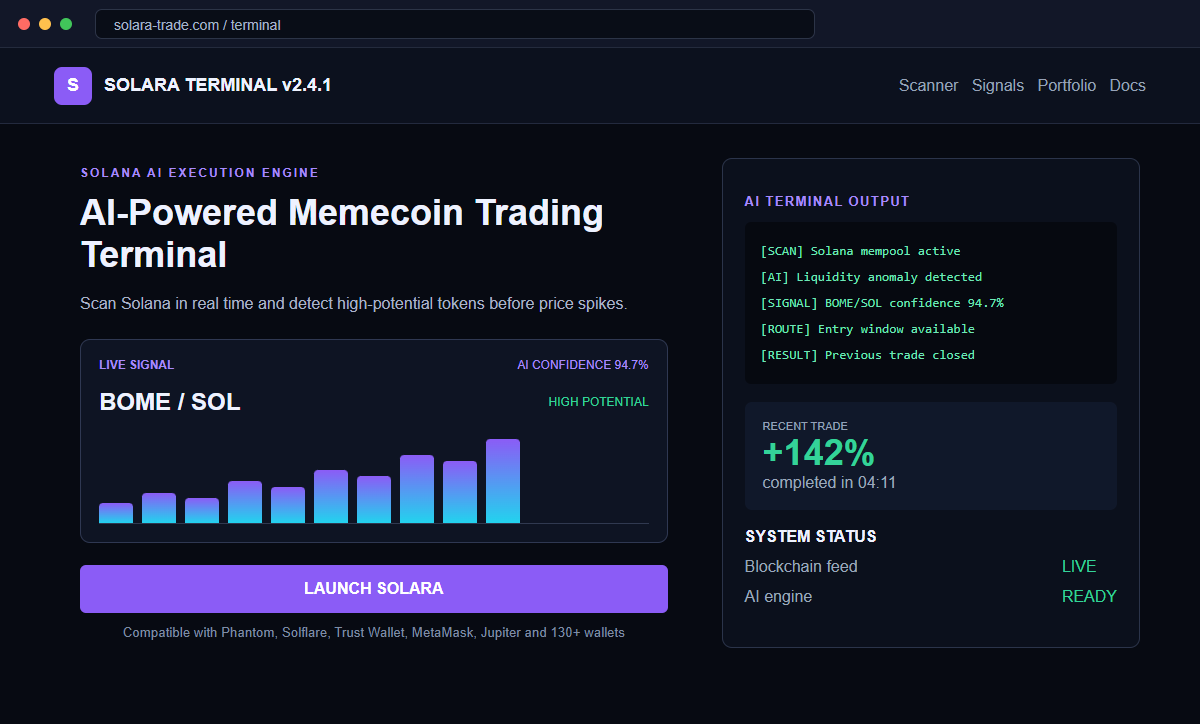
The SOLARA AI Memecoin Trading Terminal scam uses that performance theater to make one action feel reasonable: connect a crypto wallet and launch the free tool. The interface is not evidence of a profitable trading system.
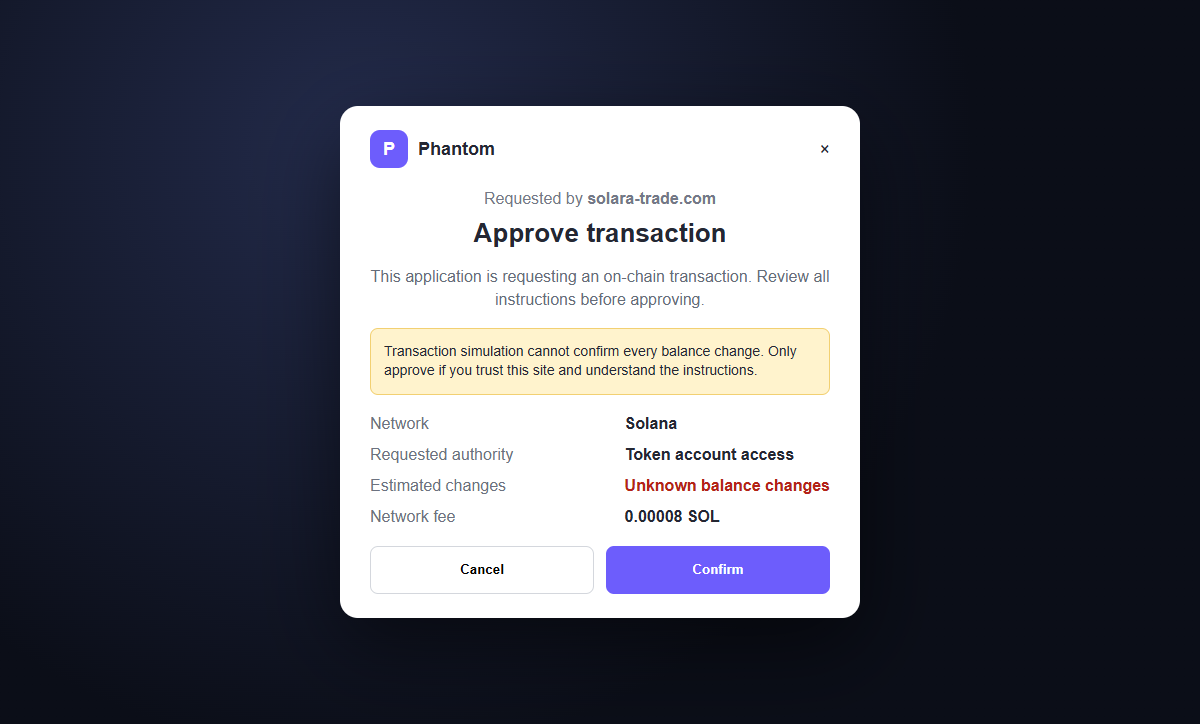
The real danger begins when the site asks the wallet to approve a connection, signature, transaction, or token authority. A deceptive request can give a malicious program the ability to transfer assets or create permissions the user did not understand.
Do not connect a funded wallet or approve a prompt to test the terminal. Treat guaranteed early signals, extraordinary returns, and urgent wallet access as signs of a wallet-draining campaign.
Overview
The website imitates a professional trading terminal
The page may identify itself as SOLARA TERMINAL v2.4.1 and describe a free AI-powered memecoin system. Dark panels, live-looking logs, charts, and blockchain terminology make the product resemble specialist software.
It claims to scan Solana in real time and detect high-potential tokens before price spikes. None of the animation proves that real market data, artificial intelligence, or an executable strategy exists behind the screen.
Invented signals turn curiosity into fear of missing out
A featured BOME/SOL opportunity may show 94.7% confidence, followed by a trade result of 142% after just over four minutes.
Precise figures make the simulation look measured even when the result was chosen by the site operator.
The visitor is encouraged to imagine the next signal arriving without them. The Launch button appears to remove the final obstacle between the user and effortless profits.
Wallet compatibility is used to widen the target pool
The page may claim support for more than 130 wallets and name Phantom, Solflare, Trust Wallet, MetaMask, and Jupiter. A long logo list borrows recognition from legitimate products that are not responsible for the site.
After a wallet is connected, the site can present a malicious transaction or approval. Crypto may be transferred immediately or remain exposed through permissions until the victim notices and revokes them.
- The site calls itself SOLARA TERMINAL v2.4.1.
- It claims to use AI to find Solana memecoins before price spikes.
- Animated terminal output simulates live blockchain analysis.
- A BOME/SOL signal displays 94.7% confidence.
- A recent trade supposedly returned 142% in minutes.
- The service is advertised as free.
- A Launch button asks the visitor to begin through a wallet.
- More than 130 compatible wallets are claimed.
- Legitimate wallet names and logos are used without proving affiliation.
- The connected wallet receives a signature, transaction, or approval request.
Why Fake AI Trading Terminals Are So Persuasive
Memecoin markets move quickly, and genuine traders do use scanners, liquidity tools, bots, and on-chain analytics. A fake terminal borrows that reality while promising to eliminate the uncertainty and work that real trading still requires.
The AI label makes unexplained results feel sophisticated. Visitors may assume a model has analyzed information they cannot see, even though a web page can display any confidence score or trade history chosen by its creator.
Precision is part of the illusion. A 94.7% score sounds more credible than a vague strong signal, while a 142% return in a little over four minutes creates urgency that a normal risk warning cannot overcome.
Calling the product free lowers suspicion. The criminal does not need a subscription payment if the connected wallet contains assets or can be persuaded to authorize access to them.
Wallet logos create borrowed trust but do not indicate a partnership. A decentralized application can request a connection from a supported wallet without being reviewed, endorsed, or guaranteed by the wallet's developer.
A connection request is not identical to a transfer, but it begins an interaction where the domain can ask for signatures and transactions. The wallet prompt, program address, permissions, and simulated effects matter more than the site's explanation.
What the Wallet Drainer Is Trying to Make You Approve
The least dangerous connection normally shares a public wallet address and allows the site to request actions. That access alone reveals balances and activity and gives the page a route to present more persuasive prompts.
A malicious transaction can contain transfers, swaps, token-account instructions, delegate authority, or program interactions. The site may describe the request as verification, bot activation, gas setup, or permission to begin trading.
Some prompts are intentionally difficult to read. Human-readable labels can be incomplete, and a victim who expects a harmless login may approve instructions that move tokens to an attacker-controlled address.
An approval may remain useful after the browser tab closes. Disconnecting a website from the wallet interface does not necessarily revoke an on-chain spending authority or permission created by an earlier transaction.
If a recovery phrase or private key is requested, the purpose is direct wallet takeover. No legitimate decentralized application needs the Secret Recovery Phrase to connect, trade, synchronize, repair, or verify a wallet.
Blockchain transfers are generally difficult to reverse. That makes prevention and rapid movement of remaining assets more important than waiting for the fake service to answer a support request.
How the SOLARA AI Memecoin Trading Terminal Scam Works
Step 1: An advertisement promises early memecoin access
The campaign may begin with a social post, sponsored ad, search result, direct message, or video that promises an AI advantage in the volatile Solana market.
Words such as free, real-time, automated, and early are chosen to attract people who want speed without paying for a professional tool.
Step 2: A convincing terminal simulates technical activity
The landing page displays scrolling logs, token pairs, transaction references, and status indicators. Animation creates the impression that live analysis continues while the visitor watches.
The display can be generated entirely in the browser. Movement and technical vocabulary do not prove that the data came from Solana or that any model produced it.
Step 3: Exceptional results create fear of missing out
A high-confidence signal and a 142% result make ordinary caution feel expensive. The visitor is led to believe that delaying the connection means missing the next profitable token.
Real trading systems cannot guarantee comparable outcomes, and a genuine performance record requires independently verifiable transactions, losses, methodology, and risk disclosures.
Step 4: The Launch button requests a wallet connection
The site presents many wallet options and may automatically detect an installed extension. Choosing one opens a legitimate wallet window, which can make the underlying site feel approved.
The wallet is only displaying a request from the domain. Its appearance does not certify that the application is safe or that the stated purpose matches the instructions.
Step 5: A signature or transaction is disguised as activation
The next prompt may be described as login, verification, bot deployment, trading authorization, or account synchronization. The user is encouraged to approve quickly so the terminal can begin.
The actual request may transfer assets, grant delegate authority, interact with a malicious program, or sign a message used in a later step. Cancel any prompt whose exact effect is unclear.
Step 6: Assets move or remain exposed through permission
When the transaction is confirmed, tokens can be sent to attacker-controlled addresses or swapped into assets that are easier to move. Some approvals may leave the wallet at risk until revoked.
The site can show an activation error or loading screen while the blockchain action completes. A failed terminal display does not mean the wallet transaction failed.
Step 7: Follow-up scammers target the same victim
The operator may request another approval, claim a fee is needed to unlock profits, or offer support. Later, a separate recovery account may promise to retrieve the stolen crypto.
Both paths seek more access or money. Transaction finality, not a support chat, determines what happened, so verify the wallet on a trusted explorer and secure it immediately.
Company and Checkout Checks
Verify the domain and project history
Check when the domain appeared, whether official developer identities are independently documented, and whether reputable communities link to the same address. Do not rely on profiles created by the project itself.
A version number, white paper, audit badge, or long compatibility list can be typed into a page. Confirm claims with the named auditor or partner through its own website.
Demand verifiable performance rather than screenshots
A trading tool should be able to explain its data source, risk, fees, methodology, and limitations. Screenshots of winning trades and animated logs can be manufactured without placing a single real order.
Look for complete on-chain history that includes losses, not a curated result displayed inside the sales page. Extraordinary returns deserve more verification, not less.
Read the wallet prompt as the authoritative request
Ignore the text beside the Launch button and examine the wallet's simulation, program, accounts, requested authority, and expected balance changes. Cancel when the action cannot be explained in plain language.
Use an empty testing wallet only when you fully understand the risks. Never expose a recovery phrase, private key, or funded primary wallet to an unverified application.
Search for independent warnings and impersonation
Look up the project name, exact domain, program address, and destination wallets alongside words such as scam, drainer, and review. Compare dates because a newly launched campaign may have little history.
Open wallet and exchange help pages from bookmarks. Criminals often place fake support accounts in search results and replies to people who report a theft.
Warning Signs to Check Before You Act
- A free AI tool promises to find memecoins before they spike.
- The terminal shows constant animated activity without a verifiable data source.
- A signal claims 94.7% confidence.
- A recent trade supposedly gained 142% in minutes.
- Only winning examples are visible.
- The project borrows many wallet logos without confirmed partnerships.
- Launching requires a funded wallet connection.
- The wallet prompt is described vaguely as activation or verification.
- The site pressures the visitor to sign immediately.
- The requested program or destination cannot be identified.
- A recovery phrase or private key is requested.
- Support promises that another payment or approval will restore funds.
A real trading advantage does not need you to ignore an unexplained wallet instruction. If the promised return is clearer than the transaction you are signing, cancel the request.
What to Do if You Have Fallen Victim to This Scam
- Disconnect the suspicious application. Open the connected-app settings inside your trusted wallet and disconnect the SOLARA site. Disconnecting stops the normal session but may not cancel token permissions that were already granted.
- Revoke suspicious token approvals. Use the wallet's official approval manager or a reputable Solana permission tool reached independently. Revoke permissions associated with the site, unknown programs, and tokens you did not intend to authorize. Confirm every transaction in the wallet before signing.
- Move remaining assets when compromise is possible. If you signed an unclear transaction, approved broad authority, or exposed a private key, create a fresh wallet with a new recovery phrase on a clean device. Transfer remaining tokens and NFTs promptly, beginning with the most valuable assets.
- Treat an exposed recovery phrase as permanent compromise. If the 12-word or 24-word Secret Recovery Phrase was entered on any website or shared with anyone, the old wallet cannot be made safe by changing a password. Move assets to a wallet generated from an entirely new phrase and stop using the old addresses.
- Review on-chain transactions and authorities. Use a trusted Solana explorer to examine transfers, token-account changes, delegate approvals, program interactions, and destination addresses. Save transaction signatures and wallet addresses before links or pages disappear.
- Contact exchanges immediately if funds reached them. Give the receiving exchange or platform the transaction signatures, destination addresses, time, token, and amount. A freeze is not guaranteed, but rapid reporting provides the best chance of identifying an account before assets move onward.
- Secure email, wallet apps, and exchange accounts. Change any exposed or reused passwords, revoke active sessions, and enable strong multi-factor authentication. Remove unknown browser extensions and verify that wallet software came from its official publisher.
- Scan the device for unwanted software. Run a complete scan with Malwarebytes or another trusted security product if the page delivered a file, extension, trading bot, or remote-support program. Install operating-system and browser updates before setting up the replacement wallet.
- Block repeat contact and malicious advertising. AdGuard or another reputable DNS and content blocker may stop some known drainer domains and malicious ads. It cannot judge a new signature request, so read every wallet prompt and verify the domain before approving it.
- Preserve evidence and report the theft. Save screenshots, URLs, advertisements, social posts, wallet prompts, transaction signatures, destination addresses, chat logs, and the time of each event. Report the domain to the wallet provider, hosting service, registrar, and national cybercrime authority.
- Ignore crypto recovery guarantees. Anyone who contacts you unexpectedly and promises to reverse a blockchain transaction for an advance fee, recovery phrase, or remote access may be running a second scam. Work only with verified providers and law enforcement.
Frequently Asked Questions
Is SOLARA AI Memecoin Trading Terminal legitimate?
No. The documented site uses simulated trading claims and a wallet connection flow associated with a crypto-draining scheme.
Can connecting a wallet alone steal crypto?
A basic connection generally shares the public address, but it lets the site request signatures and transactions. Theft usually follows a deceptive approval or exposed secret.
Does Phantom or another wallet approve the SOLARA project?
No affiliation is proven merely because a wallet appears in the connection list. Wallet software can display requests from untrusted websites.
What if I connected but rejected every prompt?
Disconnect the site, review connected applications and recent transactions, and monitor the wallet. Risk is lower if no signature, transaction, approval, or secret was provided.
What if I shared my Secret Recovery Phrase?
Create a new wallet with a completely new phrase on a clean device and move remaining assets. The old phrase remains permanently capable of controlling the old wallet.
Can a crypto transaction be reversed?
Blockchain transfers are usually difficult to reverse. Report destination addresses quickly to exchanges and authorities, but do not pay anyone who guarantees recovery.
The Bottom Line
The SOLARA AI Memecoin Trading Terminal scam sells the feeling of an exclusive trading advantage through animated data, precise confidence scores, and impossible-looking returns.
Its important moment is not the simulated trade. It is the wallet request that follows the Launch button. Read the exact transaction and permission, not the explanation written by the website.
If a prompt was approved, disconnect the application, revoke permissions, review on-chain activity, and move remaining assets when compromise is possible. An exposed recovery phrase requires a completely new wallet.








