

A monthly payroll notice says your latest payslip is ready in the employee portal. The task is familiar, the Login Here button is prominent, and most people want to confirm their salary and deductions quickly.
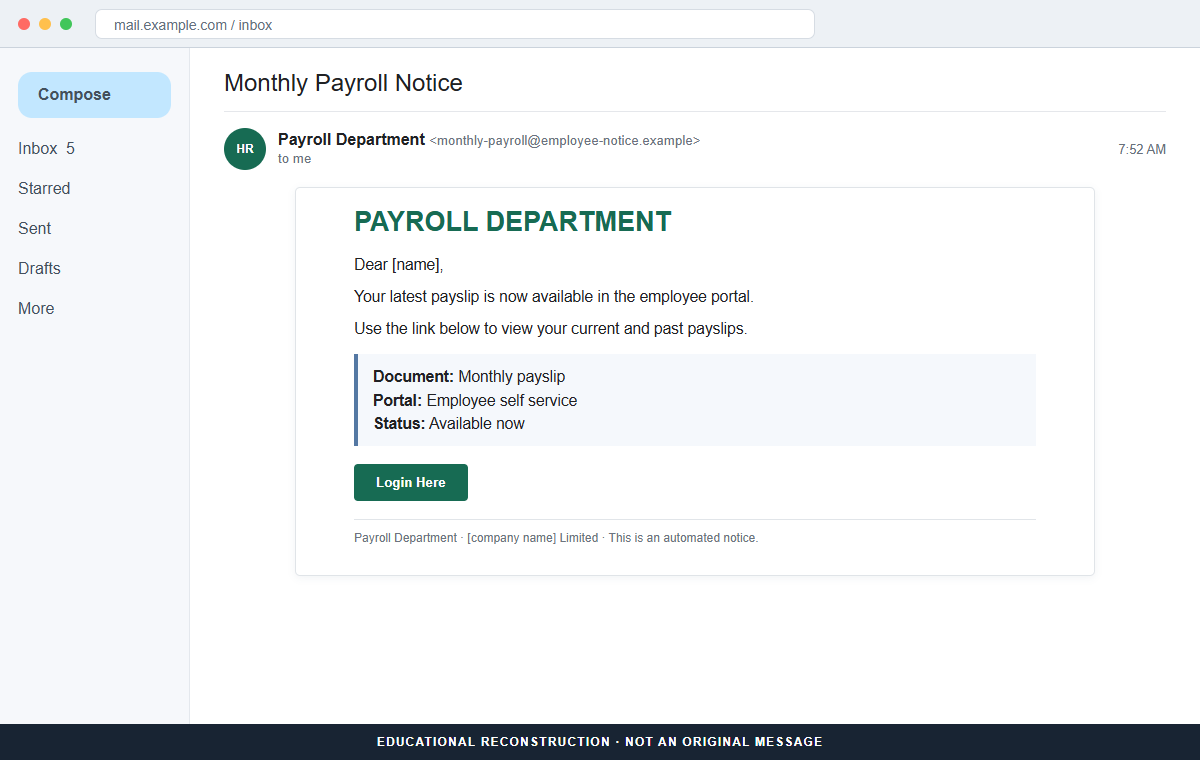
The Your Payslip Is Available email scam replaces that expected payroll destination with a copied cPanel Webmail page. The form collects the employee's email address and password but never provides a payslip.
The email may use placeholders such as [name] and [company name] Limited, or it may contain a real employer name collected from public information. Neither version proves that payroll sent it.
Do not use the button. Open the HR or payroll portal from your usual bookmark and ask payroll or IT whether it issued the notice.
Overview
A normal monthly event creates a reliable reason to click
Employees expect payslips on a regular schedule and may open the message without the suspicion triggered by an unusual invoice or security warning. The subject may say Monthly Payroll Notice.
The body says current and past payslips are available in an employee portal. It offers no pay period, employer identity, payroll provider, employee number, or authenticated portal address.
Generic placeholders reveal a campaign built for many employers
The greeting may say Dear [name], while the closing uses [company name] Limited. These unfinished fields show that the message was designed for mass personalization.
A more careful copy may insert the correct company name. Attackers can obtain an employer from professional profiles, corporate websites, breached data, or email-domain information.
The employee portal is actually a fake webmail login
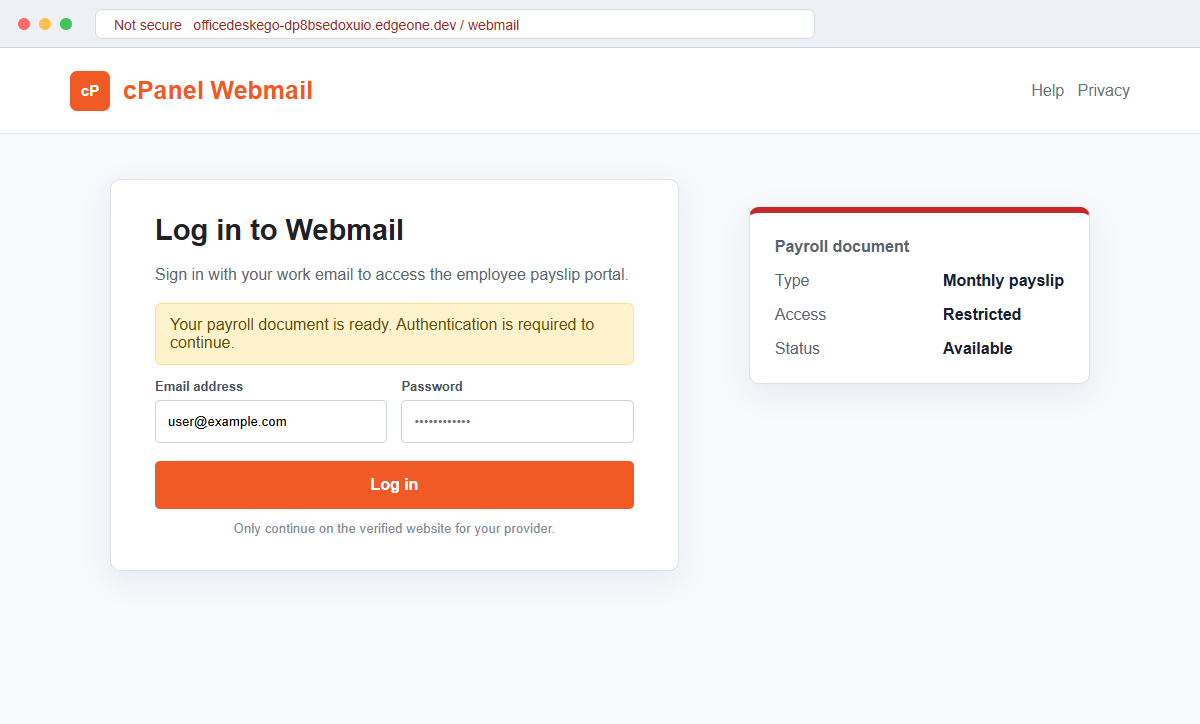
The Login Here button opens a page hosted on an EdgeOne developer subdomain and styled like cPanel Webmail. It asks for an email address and password rather than using the employer's real payroll identity system.
A stolen work mailbox can expose payroll correspondence, tax records, password resets, internal files, and coworkers who will trust messages sent from the genuine address.
- The subject says Monthly Payroll Notice.
- The email says the latest payslip is available.
- Current and past payslips are promised in an employee portal.
- A Login Here button supplies the only route.
- The sender is identified generically as Payroll Department.
- No pay period, amount, or employee number is shown.
- [name] and [company name] placeholders may remain.
- The link opens an EdgeOne developer subdomain.
- A cPanel Webmail-style page appears instead of payroll.
- The employee's email password is requested.
Why Payroll Messages Receive Fast, Emotional Attention
A payslip is not just another document. It affects rent, bills, taxes, overtime, benefits, and financial planning, so employees naturally want to see it as soon as it becomes available.
Payroll notices are also repetitive. Familiar monthly wording can train recipients to click before examining the complete sender address or destination.
The scam keeps the message short because the reader already understands the task. It does not need to invent a detailed story when Login Here appears to lead to an ordinary employee portal.
A cPanel Webmail page is a major mismatch. Payroll platforms may use company single sign-on, but an unrelated webmail form should not be required merely to view salary records.
The sender may exploit remote work and outsourced payroll. Employees do not always know every vendor name, which makes an unfamiliar portal seem plausible.
A real notice should still fit the employer's established process. Employees should recognize the portal, sign-in method, privacy language, and support route instead of being asked to trust a new domain because the message mentions salary.
Scammers may send the same template before a holiday, bonus period, or tax deadline. Those dates add curiosity and urgency even when the email contains no real knowledge of the recipient's pay or employment record.
Work email access can support payroll diversion. An attacker may study HR messages, impersonate the employee, or request changes to direct-deposit details after the original payslip lure is forgotten.
What a Payroll-Themed Credential Theft Can Expose
The fake page records the email address and password entered into its webmail form. It may report a login error, ask again, or redirect to a legitimate service to hide the theft.
A live attacker can test the credentials and request a multi-factor code or push approval. The page may describe that second factor as part of payroll verification.
Successful mailbox access reveals HR contacts, payroll schedules, direct-deposit discussions, tax forms, identity data, and the names of managers or coworkers who can approve changes.
Rules and forwarding can preserve quiet access. Security alerts or payroll replies may be hidden while messages containing payment information are copied outside the company.
The attacker may wait instead of acting immediately. Watching ordinary conversations helps identify who handles payroll, how identity is checked, which bank details are expected, and when a fraudulent request is least likely to be questioned.
The genuine account can send new payslip links or direct-deposit requests to coworkers and HR. A familiar sender address makes those messages more difficult to reject.
If the same password protects other workplace tools, cloud storage, VPN, or personal accounts, the compromise can spread beyond email. Every reuse must be addressed.
How the Your Payslip Is Available Email Scam Works
Step 1: The lure is timed around a normal pay cycle
A fake payroll notice may arrive near the end or beginning of a month when employees expect pay documents. Timing helps the generic message feel personally relevant.
The sender does not need real payroll access. A broad campaign will reach some people at the right moment by chance.
Step 2: A short message promises current and past payslips
The body says the latest document is available and that older payslips can also be viewed. This gives the button a useful, familiar purpose.
Important identifiers are missing, including the employer, pay period, payroll provider, employee number, and official portal name.
Step 3: Placeholders may reveal failed personalization
The greeting and company signature can contain [name] and [company name]. These are template fields that the sender failed to replace.
Even correctly inserted details are not authentication. Public employer data can be used to personalize the same phishing flow.
Step 4: Login Here conceals an unrelated domain
The button opens officedeskego-dp8bsedoxuio.edgeone.dev or another unrelated host. The address does not belong to the employer or payroll provider.
A developer hosting platform can provide HTTPS to user pages. The padlock protects the connection to the fake page, not the legitimacy of its operator.
Step 5: A copied cPanel page requests work email credentials
Instead of showing payroll single sign-on, the page displays a webmail form asking for email and password. That mismatch exposes the real target.
A legitimate employer should never need a password submitted to a domain outside its normal identity system.
Step 6: The password is tested while the payslip remains unavailable
Submitting the form sends the secret to the attacker. An error or loading message keeps the victim focused on document access rather than account security.
Unexpected multi-factor prompts should be denied. Contact IT immediately and report the destination before the account is accessed.
Step 7: The mailbox is used for internal fraud
The attacker searches HR and payroll conversations, changes recovery settings, creates rules, and contacts coworkers. Direct-deposit fraud may follow if the organization accepts email changes without independent confirmation.
The compromised address can also distribute new phishing notices inside the company, increasing the incident beyond one employee.
Company and Checkout Checks
Open the established payroll portal
Use the bookmark, company intranet, or HR application you normally use. Check whether the current pay period and notification appear there.
A real payslip should not depend on the button in an unsolicited email.
Ask payroll or HR through the directory
Contact the payroll team using the internal directory or a previous legitimate conversation. Ask whether the message was issued and what portal should be used.
Do not reply to the suspicious sender, because a criminal can confirm its own story.
Compare the identity domain
Preview the button and compare its registered domain with the employer, payroll vendor, and single sign-on addresses. Look beyond the page logo and padlock.
A cPanel login on a developer subdomain is not an employee payroll portal.
Check for payroll changes and mailbox persistence
If credentials were entered, inspect sign-ins, forwarding, filters, recovery methods, connected applications, and sent mail. Ask HR to review direct-deposit and tax-profile changes.
Security staff should search for the campaign across other employees and revoke sessions centrally where possible.
Warning Signs to Check Before You Act
- A payroll notice arrives outside the expected system.
- The sender is only Payroll Department.
- No employer or payroll provider is clearly identified.
- The pay period and employee number are missing.
- [name] appears as an unfinished greeting.
- [company name] remains in the signature.
- The only action is a Login Here button.
- The destination uses an EdgeOne developer subdomain.
- A cPanel Webmail page appears instead of payroll.
- The form requests an email password.
- The official HR portal shows no matching notice.
- An unexpected multi-factor prompt follows the visit.
A payslip may be private, but privacy does not require handing a work email password to an unfamiliar webmail page. Open payroll from the company route you already know.
What to Do if You Have Fallen Victim to This Scam
- Change the exposed password immediately. Open your employer's payroll system, HR portal, or company email service through a known bookmark or application through a saved bookmark or its official application, not through the Your Payslip Is Available message. Create a fresh, unique password for the account exposed by that payslip-available message. Replace similar passwords anywhere else they were reused.
- Start with the credentials exposed to the payslip notification. Create a fresh, unique password for the account exposed by that payslip-available message. Replace similar passwords anywhere else they were reused. Compare every sign-in method after this payslip-available case with the owner's devices. Unrecognized numbers, addresses, keys, and app passwords must go.
- End the access created through the payslip notification. Sign out all other sessions from the employer’s payroll and identity portals, revoke unfamiliar OAuth grants, and reconnect trusted mail applications only after the password change. This closes tokens that can survive a simple reset.
- Review the mailbox for changes connected with the payslip notification. Remove unknown forwarding addresses, delegates, inbox rules, filters, and automatic replies. Examine mail activity from the time of this payslip-available incident. Unfamiliar sent messages or deleted security alerts can reveal what followed this payslip-available incident.
- Protect the wider account chain. Prioritize work email, payroll, benefits, and direct-deposit settings. Reset credentials on services whose recovery messages reach the inbox exposed by that payslip-available message. Begin with financial and administrator accounts.
- Verify payroll and protect direct-deposit information. Open the established HR or payroll portal and review the current payslip, bank account on file, tax details, recent changes, and notifications. Ask payroll to freeze unauthorized direct-deposit changes and add a verbal or multi-person verification step.
- Check the device used to open the payslip notification. Run a complete Malwarebytes scan if that payslip-available message delivered a file, extension, or remote-support tool. Clean the device before changing sensitive passwords there.
- Reduce the chance of reopening a related page. AdGuard or another reputable DNS and content blocker may stop known phishing hosts and malicious advertisements tied to the payslip notification. Blocklists may not recognize the next domain used for this payslip-available case. Verify every address before entering account information.
- Report the phishing message. Use the mail provider's Report Phishing control and notify your employer's HR and security teams, payroll provider, and email administrator. The raw headers from this payslip-available incident should be preserved before reporting. They are especially valuable when the campaign reached multiple inboxes.
- Warn payroll, HR, and the security team through a separate channel. Explain that the payslip notification may have exposed the account and ask them to distrust recent file shares, password requests, invoices, payment changes, or urgent replies until the timeline is confirmed.
- Expect follow-up fraud based on the payslip notification. A supposed recovery expert mentioning this payslip-available incident may belong to the same operation. Work only with a professional you verify yourself. Choose recovery help for this payslip-available phishing attempt through organizations you contact independently. Avoid strangers who appear in messages or search ads.
Frequently Asked Questions
Is the Your Payslip Is Available email legitimate?
No. The documented campaign impersonates an employer payroll department and directs employees to a fake cPanel Webmail login.
Could my employer really email when a payslip is ready?
Yes, but the notice should point to the established payroll system and be verifiable with HR. Use a bookmark instead of the embedded link.
Why are [name] and [company name] visible?
They are unfilled personalization fields. Their presence shows that the sender used an unfinished mass-email template.
What if the message contains my real employer name?
That information can be public or leaked. Verify the sender domain, portal, and notification with payroll independently.
What if I entered my work password?
Change it immediately, revoke sessions, inspect mailbox rules and authentication methods, notify IT, and ask payroll to check direct-deposit changes.
Can this scam steal my salary?
The fake page targets email credentials, but a compromised mailbox may help criminals request direct-deposit changes or access linked payroll services.
The Bottom Line
The Your Payslip Is Available email scam hides a work-email theft attempt inside one of the most routine messages an employee receives.
The developer subdomain and cPanel login are not a payroll portal. Use the established HR application and verify notices with payroll through the company directory.
If credentials were submitted, involve IT and payroll immediately. Securing the mailbox and checking direct-deposit records together can prevent a password theft from becoming a salary diversion.








