

The invoice lands between a software renewal and a supplier statement. It has an account number, a due date, and just enough familiar language to look like routine paperwork. A fake business invoice scam does not always need to hack the company.
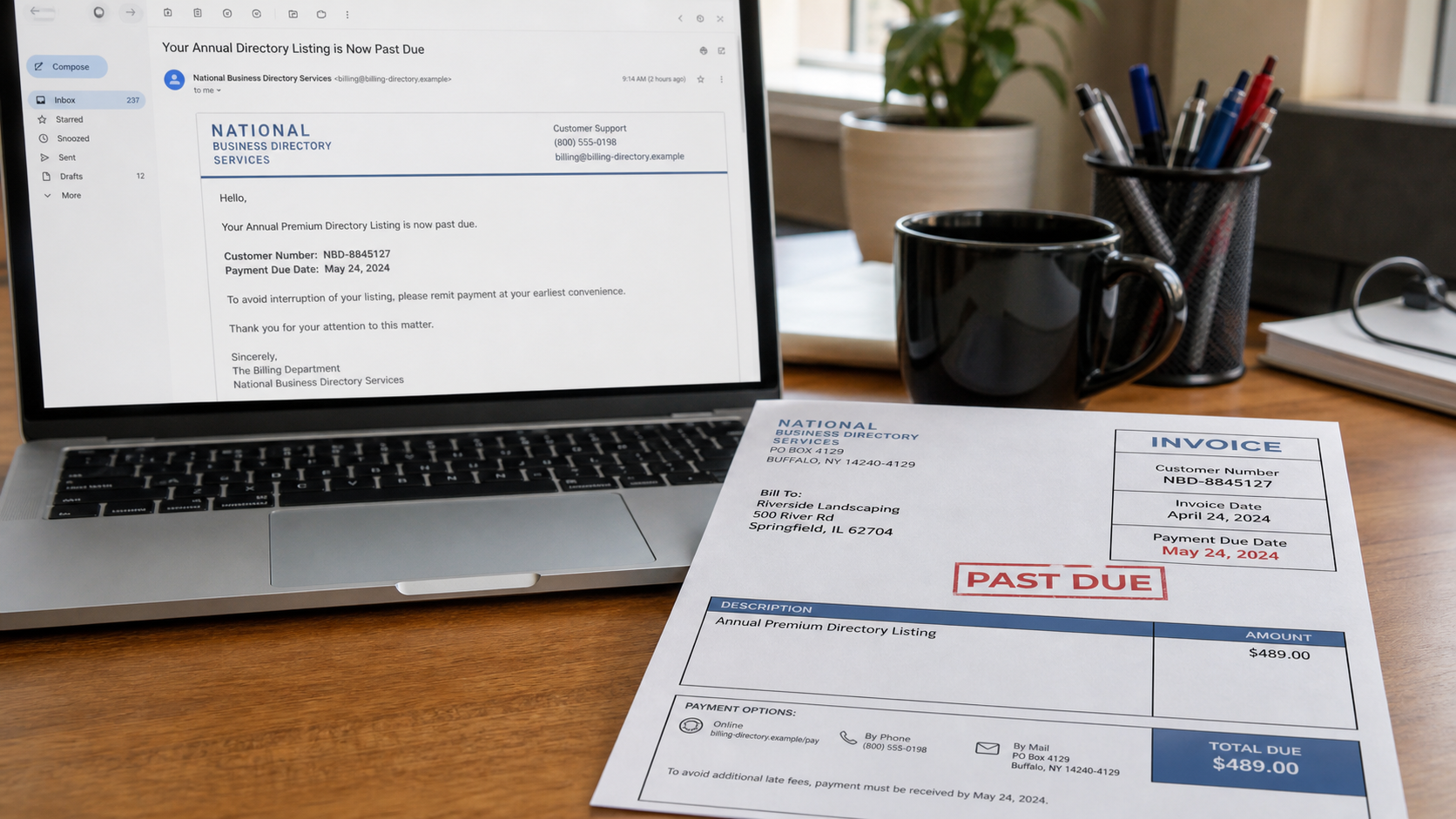
Scammers send bills for directory listings, search optimization, domain renewals, office supplies, tech support, compliance posters, and other products a business never ordered. Past-due language is used to make review feel late.
The amount may be intentionally ordinary. A $489 listing fee is less likely to receive executive scrutiny than a five-figure transfer, yet thousands of small payments can make the campaign profitable.
Some messages are simple payment traps. Others attach a malicious file or link to a fake portal, turning an invoice question into credential theft or network access.
Overview
Sometimes it only needs one busy employee to assume somebody else approved the purchase.
The document imitates an existing vendor process
Professional layout, invoice numbers, payment terms, remittance instructions, and the business's real address create the appearance of an established relationship. The sender hopes format will be mistaken for authorization.
Words such as renewal, annual listing, account continuation, or previous balance suggest that canceling might harm a service already in use. A real internal record should prove that history.
Different employees hold different pieces of the answer
The employee receiving mail may not know who orders advertising. Accounts payable may not manage domains. A scammer benefits when nobody wants to delay another team's subscription.
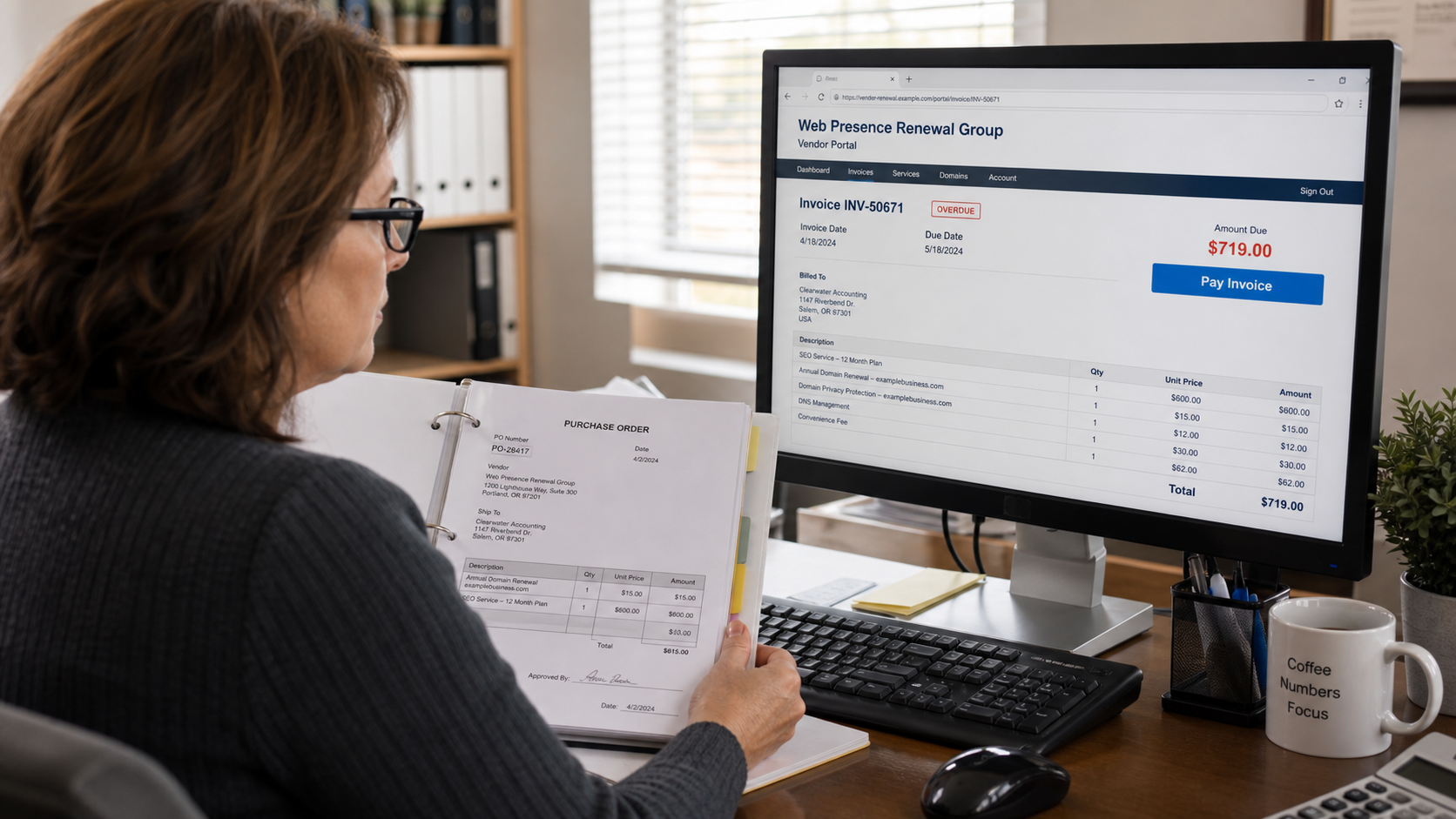
A convincing invoice can slip through if the company checks arithmetic but not the purchase order, requester, contract, delivery, and vendor identity.
The follow-up pressure turns doubt into a supposed debt dispute
After the business questions the charge, a caller may claim to possess a recording of verbal authorization or threaten collections. A previous call that merely confirmed an address can be presented as an order.
An aggressive demand does not create a contract. The business should require the original order, complete recording, identity of the authorized buyer, service evidence, and written terms.
- The vendor name is unfamiliar or resembles a known company.
- The invoice covers a listing, domain, SEO service, or supplies never requested.
- Renewal language appears without an original contract or purchase order.
- The amount is low enough to fit routine approval thresholds.
- The notice is already marked overdue when first received.
- Payment goes to an unfamiliar mailbox, bank account, or online portal.
- A caller cites a short recording as proof of an order.
- The emailed invoice contains a login link or unexpected attachment.
Why Small Businesses Pay Bills They Never Owed
Small companies often run with little separation between purchasing, receiving, and payment. One person may handle bookkeeping around customer calls, payroll, vendor questions, and dozens of daily interruptions.
Scammers exploit that normal workload. They choose services that are difficult to see, such as an online directory listing, search placement, data backup, or domain protection. There is no missing delivery truck to expose the lie.
The language is carefully bland. Instead of promising something outrageous, the invoice looks like an administrative continuation of work that another employee may have approved months ago.
A sender may research the company website, public registrations, and staff names. Addressing the bill to a real employee makes it feel internal even when that person never ordered anything.
The best defense is a process that separates a document asking for money from evidence that the business requested, received, and approved the underlying product.
What the FTC Says About Unexpected Business Invoices
The FTC warned in May 2026 that scammers send businesses invoices for products or services they did not order, including tech support, domain registration, and search engine optimization.
Some notices imitate well-known companies, while others use unfamiliar names.
The agency notes that past-due wording adds confusion and urgency. Scammers hope the employee handling finances will follow the payment instructions without checking the transaction.
The FTC also warns that emailed invoices can be phishing messages designed to gain access to business data and networks. The apparent billing question can therefore carry risk even before payment.
Older FTC small-business guidance describes directory listing schemes in which callers present a listing as free or as a renewal. A bill arrives later, sometimes backed by claims that the business agreed during the call.
Businesses are advised to check invoices carefully, use clear approval procedures, research unfamiliar companies, forward phishing messages to the Anti-Phishing Working Group, and report fraud to the FTC.
How the Fake Business Invoice Scam Works
Step 1: The scammer gathers public business details
Company names, addresses, phone numbers, domain records, employee roles, and industry information are widely available. The sender uses them to create a tailored invoice rather than obvious junk mail.
A previous marketing call may have collected the name of someone who handles advertising or simply confirmed how the business is listed.
Step 2: An invisible or plausible service is selected
Directory placement, domain renewal, SEO, cloud backup, technical support, trademark monitoring, and office compliance products are hard for accounts payable to verify at a glance.
The service description may resemble a real expense category while remaining vague enough that no specific work must be shown.
Step 3: A professional invoice arrives unexpectedly
The document includes a customer number, invoice date, payment deadline, business address, and remittance section. A logo and formal language supply the visual cues of an established vendor.
The first contact may already say past due or final notice, discouraging the recipient from asking why no earlier invoice exists.
Step 4: Renewal language invents a prior relationship
The invoice describes an annual continuation or automatic renewal, even though the business cannot locate an original purchase. A cancellation deadline may have supposedly passed.
If questioned, the sender points to a public directory entry as evidence that a paid service was delivered. Public information does not prove the business ordered it.
Step 5: Internal uncertainty helps the invoice pass
Accounts payable asks a manager, the manager assumes marketing ordered it, and marketing assumes the owner renewed it. Without a purchase-order requirement, uncertainty is treated as approval.
The modest amount and approaching deadline make paying seem easier than investigating. That is the decision the scam is designed to produce.
Step 6: Payment or login details are captured
A mailed invoice may route a check to a mailbox. An email may open a fake vendor portal that collects Microsoft 365, Google Workspace, banking, or card credentials.
A malicious attachment can contain code or direct the user to enable content. An invoice should never require weakening device protections to read it.
Step 7: Collections pressure and repeat billing follow
A company that pays may receive additional invoices under the same or related vendor names. The business has shown that its approval process accepts the format.
A company that refuses may receive calls threatening collections, legal action, or damage to its online listing. The correct response is documentation and verification, not payment to end the conversation.
Company, Address, and Fulfillment Checks
The vendor name may be a disposable billing identity
Look for the legal entity, registration, website history, tax information, and consistent contact details. A generic directory name can be replaced easily after complaints accumulate.
Search the exact company name, phone, email, and invoice language with terms such as scam, review, and complaint. Similar invoices sent to unrelated businesses are strong evidence of a campaign.
The address may be a mailbox, residence, or unrelated office
Search the remittance and corporate addresses separately. A postal box or commercial mail receiver can accept checks without revealing where the operation is managed.
An address belonging to another company or a virtual suite does not automatically prove fraud, but it does not support claims of a large publishing or technology business either.
The phone and email may exist only to pressure accounts payable
Call known vendors through contact details stored before the invoice arrived. Do not use the number in the suspicious document to verify whether it is genuine.
A support agent who cannot identify the original buyer, purchase date, complete service, and signed terms should not receive payment or additional internal information.
The service and delivery must be independently visible
Require the purchase order, contract, requester, approval, delivery record, and exact work product. For a directory, demand the live listing URL, traffic or distribution claims, and original authorization.
For domains or software, sign in through the provider's known portal and check the actual renewal status. A third party cannot create a debt by mailing a notice.
A Safer Invoice Approval Process
Every invoice should match an approved vendor, purchase order or documented exception, named requester, defined product, evidence of receipt, and authorized payment method. One missing element should pause the transaction.
Maintain a central vendor list with verified phone numbers, banking instructions, contract owners, and renewal dates. Changes to payment details should require a callback using the saved number.
Use role-based approval thresholds, but do not treat low-value invoices as automatically safe. Scam campaigns often choose amounts that fall just below secondary review.
Train staff to send suspicious invoices to one internal contact. A shared response prevents the scammer from calling another employee and obtaining a different answer.
For email, inspect the sender domain and link destination without opening attachments. Confirm cloud login prompts by opening the service through a bookmark, not through the invoice.
Document the rejection. A short record of the sender, amount, phone, reason, and related messages helps recognize repeat attempts under a new brand.
Warning Signs to Watch For
- No employee can identify who ordered the service.
- The invoice says renewal but no original contract exists.
- The service is vague, invisible, or difficult to measure.
- The notice is past due on its first appearance.
- The amount sits just under a normal approval threshold.
- The remittance address or bank account is new.
- The sender demands login credentials to view the invoice.
- A caller threatens collections but will not provide full authorization records.
- The company name, domain, phone, and payment recipient do not match.
An invoice is a request for payment, not proof of a debt. The proof is the order, authorization, delivery, and accountable vendor behind it.
What to Do if You Have Fallen Victim to This Scam
- Stop any pending payment. Contact the bank, card issuer, check processor, or accounts-payable platform immediately. Ask whether the transaction, check, or recurring authorization can be canceled or recalled.
- Do not negotiate through the suspicious contact details. Move all communication to a designated employee and require written documentation. Do not disclose staff names, approval limits, vendor lists, or banking procedures.
- Preserve the full invoice package. Save envelopes, headers, attachments, URLs, account numbers, remittance details, caller numbers, voicemails, recordings, and internal approval notes. Keep the original file isolated.
- Secure any account used on the fake portal. Change the password from a clean device, end active sessions, enable multifactor authentication, and alert the email or cloud administrator. Review forwarding rules and recent logins.
- Check computers for malicious files. If an attachment was opened or software ran, isolate the device according to company policy and perform a full Malwarebytes scan. A business with managed IT should contact its security provider immediately.
- Use safer browsing controls. AdGuard can reduce access to known phishing and malicious advertising domains. It is an additional layer, not a replacement for vendor and purchase-order verification.
- Review recent and future payments. Search for similar vendor names, recurring charges, changed bank details, and invoices with the same wording. Notify the bank of any additional transactions that may be related.
- Report the fake invoice. File with the FTC at ReportFraud.ftc.gov and forward phishing email to reportphishing@apwg.org. Also notify postal inspectors, state authorities, or local police when appropriate.
- Repair the approval gap. Identify why the invoice passed, then add a specific control such as verified vendor callbacks, purchase-order matching, dual approval, or centralized renewals. Train staff with the actual example.
Frequently Asked Questions
Is every invoice from an unfamiliar vendor a scam?
No. A new vendor may have a legitimate bill, but the business should locate the requester, order, delivery, contract, and independently verified company before paying.
Do I have to pay because the invoice says past due?
No. Past-due wording does not establish that a valid order exists. Request the underlying authorization and dispute unsupported demands in writing.
Can a recorded phone call create a real order?
Context and law matter. Demand the complete unedited recording and written terms, then obtain legal advice if the sender persists. A clipped confirmation is not reliable proof.
Why are directory listing scams still common?
The product is cheap to imitate, difficult to inspect, and plausible as a delegated marketing expense. A professional invoice can reach many businesses at low cost.
Should I open the attachment to see what I owe?
Not if the message is unexpected. Verify the sender first. Use a safe review process because fake invoices may carry credential-phishing links or malicious files.
Can security software decide whether an invoice is genuine?
No. Malwarebytes and AdGuard can reduce technical threats, but only business records and independent vendor verification establish whether a debt is valid.
The Bottom Line
A fake business invoice scam hides inside normal administrative work. Its success depends less on a perfect forgery than on uncertainty about who ordered what.
Require the purchase, approval, delivery, and vendor identity to agree before money leaves the company. A professional layout and urgent due date do not fill those gaps.
If the invoice was paid or opened, contact the payment provider, secure any exposed accounts, preserve the evidence, review related transactions, and strengthen the exact approval step that failed.








