

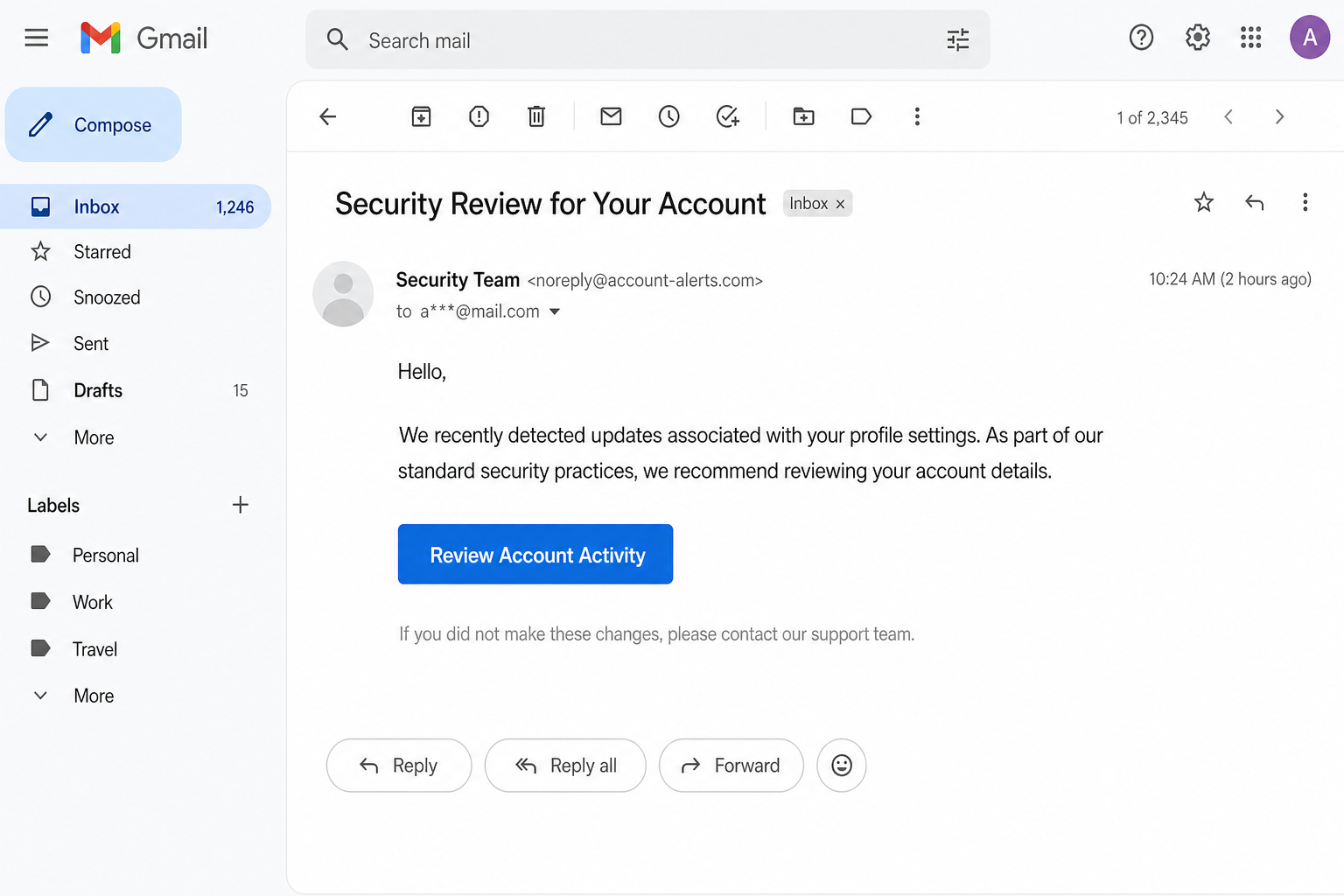
The inbox does not name a bank. It does not name a host. It does not even name the mail service you already pay for. The subject is Security Review Requested, or Security Review for Your Account. The From line says Security Team. The body talks about profile settings that were updated. In the middle of the page sits a blue button that says Review Account Activity.
That button is the trap. It does not open a security dashboard. It opens a login that looks like Roundcube Webmail. The page often lives on Google Firebase Storage, which is real cloud infrastructure run by Google. The login is not real. The people behind the mail want the password for the mailbox you are sitting in right now. Once they have that inbox, they do not need to guess how you bank, shop, or reset a social account. They can read the reset mail as it arrives.
Do not tap the button. Do not type the password on a page that arrived from a letter like this. If you already did, skip down to the recovery section and change the password on the real mail host you type yourself.
Overview
The trap is a vague security letter. It often refuses to name a company. It talks about “your account” and “your profile settings” as if you already know which desk is writing. That emptiness is not a mistake. The same mail can land in a Gmail inbox, a Yahoo inbox, a work address on a small host, or a domain you bought years ago and still open in a browser. If the letter named one brand, half the readers would delete it. If it names no brand, more people pause.
The ask looks small. Review Account Activity. Keep the mailbox secure. Confirm a change you do not remember making. The Federal Trade Commission has been describing this story for years. On its How To Recognize and Avoid Phishing Scams page, the FTC says scammers write as if they have noticed suspicious activity or a problem with your account. They have not. They want you to click so they can take a password, an account number, or enough identity data to walk into other doors.
In this costume the click is the whole product. The button opens a page that copies Roundcube, a real open-source webmail program. The page asks for a username and a password. The username may already be filled in. That pre-filled address is a courtesy from the thief, not a sign that your host built the form. Anything you type goes to the people who sent the mail.
Roundcube is not the scam. The project is real software. Hosting companies and offices install it so people can read mail in a browser. The official site is roundcube.net. In a public Phishing Alert that is still on that site, the project said the quiet part out loud: Roundcube is not a service, and you do not have an account with the project. It does not send mail about account suspension. It does not ask you to enter your email password anywhere. The people who wrote that alert were talking about a long-running pattern. Criminals pretend Roundcube is a company like Gmail. Then they ask for the password on a fake site.
Google Firebase is not the scam either. Cloud Storage for Firebase is a real Google product. Companies use it to store files for apps. Scammers like a recognizable host because a familiar name can slip past a hurried glance and, sometimes, past a filter. A page on Firebase Storage is still just a page. It is not your host. It is not Microsoft. It is not a security review.
Microsoft is not the crook in this story. Roundcube is not the crook. Google is not running a fake login desk. The crooks are the people who borrowed a calm subject line, a familiar webmail skin, and a real cloud shelf. If you use Outlook, Microsoft 365, or a host that happens to run Roundcube, that does not make this letter official. A real security team that already has a relationship with you can reach you in the product you already open. It does not need a nameless button in a cold mail.
The prize is the mailbox, not a one-off click. An inbox is a master key. Password-reset mail for banks, shops, payroll, social accounts, cloud drives, and even other mailboxes all land in the same place. If someone else can open that place, they can start those resets and finish them before you notice. They can also send mail that looks like you. Friends and coworkers trust a name they already know. That is how one stolen password becomes a week of damage.
CISA, the U.S. cybersecurity agency, puts the same habit in three short words on its Recognize and Report Phishing page: recognize, resist, delete. Urgent language is a sign. A request for a password is a sign. A link you did not go looking for is a sign. If the message might be real, CISA says not to use the number or the link in the message. Look up the company another way, or type an address you already trust.
How The Scam Works
The letter that refuses to name anyone
A lot of phishing mail tries to look like a bank, a shipper, or a software brand you already use. This one often does the opposite. It arrives as Security Review Requested. Sometimes the subject is Security Review for Your Account. The display name is Security Team, Account Security, or something just as empty. There is no logo you can match to a card in your wallet. There is no host name you pay each month. The body talks about updates to profile settings and about keeping access uninterrupted. The tone is polite. That politeness is part of the costume.
The vagueness does two jobs. First, it lets the same template travel. A person on a cheap domain host and a person on a giant free mail service can both believe the letter is “theirs.” Second, it stops you from doing the one check that kills most of these mails. If a letter claims to be from your bank, you can open the real app. If it claims to be from no one in particular, there is no app to open. The button becomes the only door in the room.
This article will not invent a sender domain for you to hunt. The From line changes. Sometimes it is a no-reply address on a generic alerts domain. Sometimes it borrows a lookalike of a host you actually use. Sometimes the display name is the only part that looks official, and the address behind it is junk. A familiar display name is not proof. A mail that refuses to say which company is writing is already telling you something. Real security mail is usually willing to name the product.
The FTC’s phishing page walks through a similar letter and points at the generic greeting, the claim that something is wrong with the account, and the invitation to click. Those three marks show up here. Hello. We detected updates. Review Account Activity. None of that is a ticket you can verify. It is a story built to make you finish a task before you ask who assigned it.
The button that feels like homework
The button is usually the only bright object on the page. Review Account Activity. Sometimes the wording shifts to Review Email Settings, Secure My Account, or Confirm This Change. The job is the same. It wants a click while you are still in the feeling of “I should deal with this.”
People click buttons like that because they are trying to be responsible. You have been told for years to review account activity. Banks say it. Shops say it. Your own host may say it inside the control panel you already use. The costume steals that good habit and moves it into a cold mail. Doing the right thing in the wrong place is how this theft works.
Hovering over the button, on a computer, can show a destination that has nothing to do with your host. On a phone, that hover is awkward, and many people never see the real address. Even when you do see it, a Google-owned host can look comforting. Comfort is the point. CISA tells people that if a message might be real, they should not use the link in the message. Type the address you already know, or open the app you already installed, or call a number you already have on a bill.
There is no official Security Review Requested portal to publish here. There is no official Review Account Activity page that belongs to this letter. If your host really needs you to look at a login, it will be a login you can reach by typing the address you have used for years, or by opening the bookmark you made yourself. A button that arrives with a nameless warning is not that door.
The fake Roundcube door
After the click, many people see a page that looks like Roundcube. The layout is familiar if your host actually uses Roundcube for webmail. There may be a Welcome to Webmail heading. There may be a username box and a password box. Your address may already be sitting in the first box. The skin looks like a real mail client because it is copying a real mail client.
That copy is the reason this costume works on people who are not careless. If you already log into Roundcube at work, or at the host that sold you a domain, a page that looks like Roundcube does not feel foreign. It feels like Tuesday. The difference is the address in the browser and the path that brought you there. A real Roundcube install lives on your host, or on the address your host printed in a welcome mail you can still find. A fake one lives wherever the sender parked it this week.
Roundcube’s own project has been trying to break this confusion for years. On the official Phishing Alert, the team wrote that attackers take advantage of a simple mix-up. A lot of people think Roundcube is a service like Gmail or Hotmail. It is not. It is free software that a hosting provider installed. The project does not hold your password. It cannot reset your mailbox. On the contact page, the first canned answers are almost blunt. The team is not responsible for your email account. It cannot restore your password. It cannot get you back in if you are locked out. You have to talk to the provider who actually runs the mailbox.
That is why a “Roundcube security review” mail is already wrong, even before you look at a button. There is no Roundcube account desk. There is no Roundcube password vault. If your host uses the software, your host is the one who can talk to you about the mailbox. A nameless Security Team that wants the password on a page you reached from a cold letter is not your host.
The same rule applies if you do not use Roundcube at all. The fake login does not care. It can show a Roundcube skin to a Gmail user, a Yahoo user, or someone who only ever opens mail in an app. The skin is a prop. The password field is the product. If you type the password for the inbox you are reading, you have handed over that inbox.
A real cloud shelf is still a fake counter
The fake login is often hosted on Google Firebase Storage. That sentence scares people for the wrong reason. Firebase is not a criminal brand. Google describes Cloud Storage for Firebase as a product for storing and serving files, the kind of thing an app uses for photos and other user content. It is ordinary cloud furniture. Criminals rent or abuse ordinary furniture all the time because it looks less dirty than a random domain they registered last night.
This article will not print a Firebase address for you to visit. Those addresses change. Publishing one would only send curious readers into a live trap. The pattern is enough. The page is a file on a storage host. It is dressed as webmail. It is not the webmail your host runs. A padlock in the browser does not fix that. Encryption only means the path is private. It does not mean the person at the other end is your host.
Google is not asking for your mailbox password on that page. Microsoft is not asking. The Roundcube project is not asking. The page is a prop that borrowed three true things: a real webmail look, a real cloud host, and a real fear that accounts get reviewed. The false thing is the one that matters. Nobody who already protects your mailbox needs you to type the password into a form that arrived from a letter with no company name.
What they do after they have the inbox
The first thing a stolen inbox is good for is more theft. Password-reset links are the obvious path. A bank, a shop, a payroll portal, a social network, a cloud drive, a crypto app, and a government account all tend to believe the person who can read the mailbox. The thief can request a reset, catch the mail, and change the password on a service you have not opened in months. You find out when a statement looks wrong, or when you cannot get in.
The second thing is control of the mailbox itself. A person who is inside can add a forwarding rule so a copy of every new message leaves for an address you will never see. They can change the recovery address. They can change the recovery phone. They can create a filter that hides the very alerts your bank will send. They can send mail as you. That last one is how a coworker gets a “quick favor” that is actually a wire, and how a family member gets a “I need a code” text that looks like it came from your usual address.
The FTC’s May 2026 alert about fake party invitations described the same second act. If scammers get into an email account, they may send the same scam to your contacts. The costume changes. The stolen inbox stays useful. A Security Review letter and a fake invite are different outfits. Both want the keys to the same room.
None of this requires malware on your computer. Some phishing pages do try to drop junk. This costume does not need that to succeed. A password is enough. If you also reuse that password on other sites, the thief does not even need the reset mail. They can try the same pair somewhere else and walk in.
CISA tells a short story about a man named Omar who clicked a payment link, typed a login on a lookalike page, and then spent hours with a bank and a shop. The lesson at the end is the habit this letter is counting on you not to have. Pause. Do not use the link in the unexpected mail. Type the real site yourself if you need to look at anything.
What To Do If You Already Typed the Password
If you already typed the password, you are not foolish. The letter is built for people who take security mail seriously. The next hour matters more than the click. Work in this order: lock the mailbox, lock the things the mailbox can reset, then report what happened.
Change the password on the host you type yourself
Open a new tab. Do not use the page that came from the button. Type the address of the mail host you actually use, the one you have typed before, or open the official app you already installed. If you use Gmail, type the Gmail address you already know. If you use Yahoo, Outlook.com, iCloud, or a host that sold you a domain, type that host. If your workplace runs its own mail, use the portal you already use for other work tools, or ask IT on a channel you already trust. The point is that you, not the letter, chose the door.
Sign in and change the password. Make the new one long and unique. Do not recycle the old one with a 1 on the end. If the fake page already has the old password, a tiny change is not a change. If you cannot sign in, the thief may have changed the password already. Use the official account-recovery path on the real host. Do not use a “reset” link from a second mail that arrived two minutes later. That second mail can be the same people, offering to help you “restore” the account they just took.
Roundcube’s project cannot do this step for you. The official support page says the same thing the phishing alert says. Roundcube is not a service. If you cannot log in, or mail is missing, you talk to the provider who installed the software. That is your host, your workplace, or the consumer mail service on the real site you typed.
Turn on a second lock
After the password change, turn on two-factor authentication if it is not already on. The FTC calls this multi-factor authentication on the same phishing page. A second lock can be an authenticator app, a security key, a prompt on a phone you already own, or, if that is all the host offers, a code by text. An authenticator app or a hardware key is stronger than a text. Any second lock is better than a password alone, because the thief who just caught the password still needs the other factor.
CISA makes the same ask in plain language. Turn on MFA. Use a strong unique password. Do not delay software updates. Those three habits will not erase a password you already typed. They make the next costume harder to finish.
If 2FA was already on and you typed only the password, change the password anyway. Then check the 2FA settings. Look for a new device, a new phone number, or a new authenticator you did not add. Remove anything you do not recognize. If the host shows active sessions, sign the others out.
Walk the mailbox they may already have
Once you are back in through a door you chose, look for the quiet changes. Open the settings that control forwarding, filters, and auto-forward. Delete any forward that you did not create. Open the recovery email and recovery phone. If either one is not yours, change it back, then change the password again. Look at Sent mail for messages you did not write. Look at the trash and the spam folder for reset mail you never requested. Look at filters that might hide words like “reset,” “invoice,” or a bank name.
If your host shows recent sign-ins, write down the times and places that are not you. You do not need those notes to be perfect. You need them for the bank, for IT, or for a report later. Then sign out other sessions if the host lets you.
Tell people who might trust mail from you. A short, boring message on a different channel is enough. Phone, chat, or a standing weekly meeting. Say that your inbox was stolen and that any urgent ask for money or a code is not you. Shame is part of the design. Talking to one other adult makes the next “please send a code” mail harder to sell.
Other accounts that use that inbox as a key
Treat every important account that uses that address as exposed. Start with money. Banks, cards, payment apps, payroll, tax accounts, and any shop that stores a card. Sign in on the real site or the real app, the one you type or already have. Change those passwords if they match the stolen one, or if you see a reset you did not request. Call the number on the back of a card if money already moved. Speed matters more than a perfectly written timeline.
Then do the accounts that can impersonate you or lock you out of the rest of your life: the other mailbox, the cloud drive, the social apps, the Apple or Google or Microsoft account that sits under a phone, the domain registrar, the hosting panel. If a password was reused, change it. If a recovery address pointed at the stolen inbox, point it somewhere you still control, after that inbox is locked.
If you want a second pair of eyes on old leaks, you can optionally check the address at Have I Been Pwned. That site tells you whether an address has shown up in public breach data. It will not tell you whether today’s thief is already inside. It is a useful extra, not a substitute for the password change you do on the real host.
If a Social Security number, a card number, a bank account, or another identity document went out in the same sitting, use the official recovery desk. In the United States that desk is IdentityTheft.gov. The FTC built it so you can see the next steps based on what was lost. It is also the place to start an Identity Theft Report. If you are outside the United States, use the consumer-protection or cyber-crime reporting path your own government publishes, and still lock the mailbox first.
Report the letter, then ignore the sequel
Report the mail even if you caught yourself in time. The FTC asks people to forward phishing emails to the Anti-Phishing Working Group at reportphishing@apwg.org, and to file a report at ReportFraud.ftc.gov. If you use a consumer mailbox, use the Report phishing or Report spam control in that product so the host can train its filters. If it is a work address, tell IT. They may need to warn other people who got the same template.
Then delete the letter. CISA says not to click an unsubscribe link in a suspicious message. Unsubscribe is still a click. Delete is enough.
Watch for the sequel. A second mail that offers to “restore access,” “reverse the review,” or “connect you with a specialist” is often the same operation with a softer voice. A caller who already knows you typed a password is not your host’s emergency desk. Recovery is a product they sell after the theft. Official help is the real mail host you type yourself, the bank on the back of the card, IdentityTheft.gov if identity data left, and the report pages above.
The Bottom Line
A letter titled Security Review Requested, or Security Review for Your Account, that will not name a company is wearing a costume. The button that says Review Account Activity is the trap. It leads to a fake Roundcube login, often parked on Google Firebase Storage. The password they want is the inbox itself. After that, other accounts are just reset mail.
Roundcube is real open-source webmail. Google Firebase is real cloud. Microsoft is a real company. None of them is running this desk. The Roundcube project has said it is not a service, you do not have an account with it, and it will not ask you to type your email password. Your host is the one who can talk to you about the mailbox. A nameless Security Team in a cold letter is not your host.
Do not tap the button. If you already typed the password, change it on the real mail host you type yourself. Turn on 2FA. Walk the forwarding rules and the recovery address. Change the other logins that share that inbox or that password. Optionally check the address on Have I Been Pwned. If identity data left, use IdentityTheft.gov. Report the mail to the Anti-Phishing Working Group and to the FTC. Then let the nameless review die in the trash, where it belongs.

Reviews & discussion
0 commentsShare a firsthand experience, or ask a question.
Community reviews
Security
Moderated reader experiences, not an editorial verdict.
Start the conversation
Have a question or something useful to share? Add the first comment.