

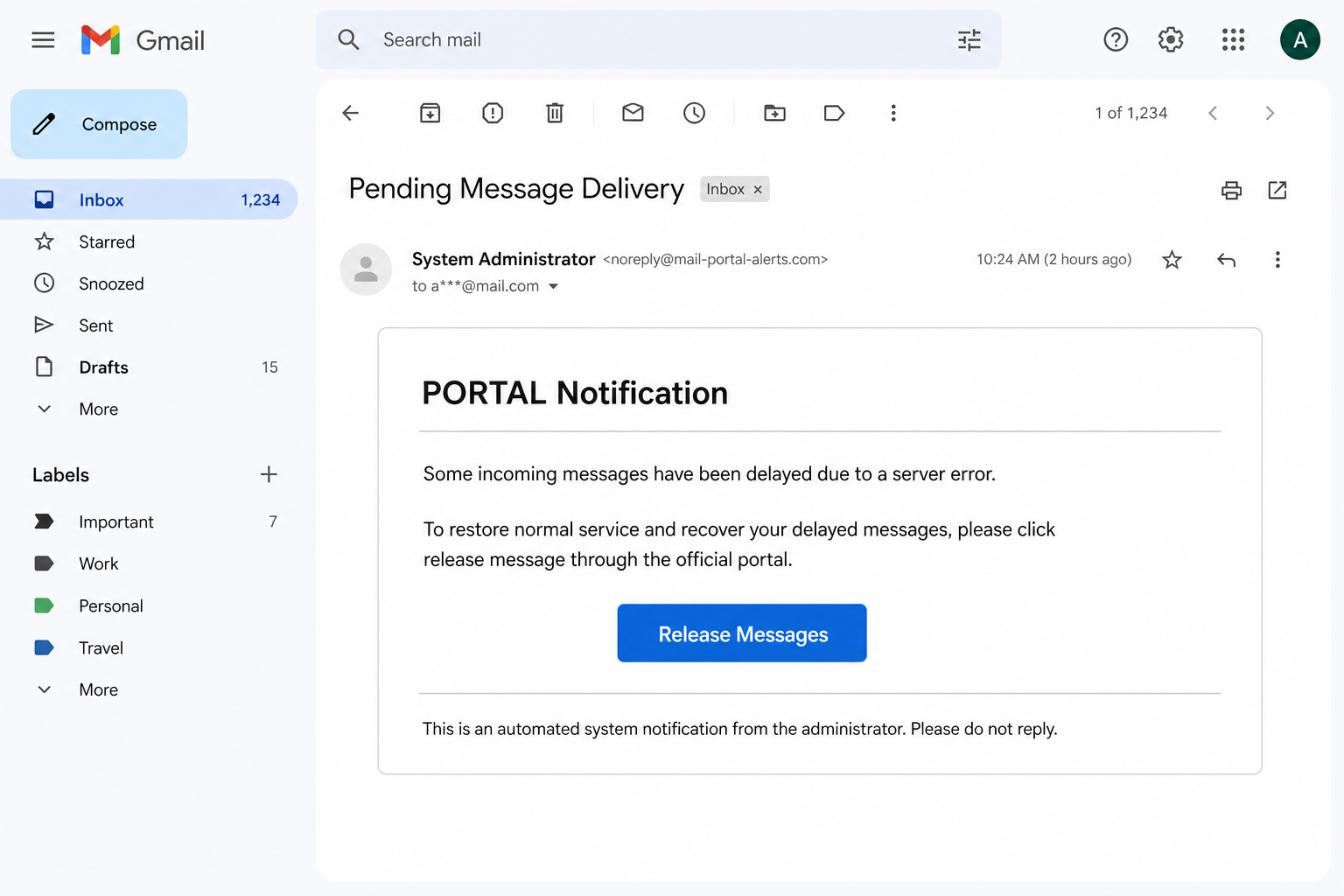
The notice arrives like a quiet apology from the mail system. Some of your incoming messages never landed because of a server error, and a blue button labeled Release Messages will put them back where they belong. The subject talks about pending delivery. The footer asks you not to reply because this is automated.
The wording stays vague on purpose. It does not name the missing senders. It does not show times or a ticket number you could read back to a help desk. “Some incoming messages” could be a client, a package, a school, or your sister.
Overview
A fake admin notice about mail that never existed
The trap is the Release Messages button, which does not unstick a queue. It opens a fake Zoho Mail login. The message presents itself as an automated system notification, often from something that sounds like a portal or a system administrator. The subject line talks about pending delivery. The body says some incoming messages have been delayed due to a server error. Then it tells you to restore normal service by clicking release through the official portal. There is a large Release Messages button in the middle, and a footer that asks you not to reply because this is automated.
None of that is how healthy mail systems talk to people. A real delay, when it happens, is boring. Messages retry on their own. If a provider truly holds mail, you already have a place to look: the webmail you booked yourself, the official app on your phone, or the admin console your workplace already uses. You do not need a stranger’s button to “unstick” delivery. You especially do not need to hand over a password to prove you want your own mail.
The wording is vague on purpose. It does not name the missing senders. It does not show times, message IDs, mailbox quotas, or a ticket number you could read back to a help desk. “Some incoming messages” could be a client, a package, a school, a bank, or your sister. That blank space is the hook. Your brain fills it with the one message you cannot afford to miss, and the button starts to look like a kindness.
Release Messages is not a mail tool
Read the button the way a tired person reads it at 10:24 in the morning. Release sounds like you are unlocking property that is already yours. Messages sounds like the system is holding something concrete. Official portal sounds like you are staying inside a service you pay for. Put together, the click feels like maintenance, not a login. That is the whole design.
What the button actually does is take you off the mail you already opened and onto a page the sender controls. In this campaign the next stop has been reported as the host logon.confirmation.vu. That name is doing costume work. “Logon” and “confirmation” sound like account language. The address is still just a lure host, not Zoho, not your workplace, and not a mail server that can release anything.
Once you are there, the page copies a Zoho Mail sign-in. It may already show your address, passed through the link, so the form feels like it recognizes you. Then it asks for the password. That is the product. Not a queue. Not a retry. Not a support ticket. The mailbox password.
If you type it, the people on the other side can try that password against the real Zoho Mail account, and against any other service where the same secret was reused. The fake page may then fail, reload, or dump you somewhere that looks normal so the theft feels like a glitch. By then the password has already left.
Zoho is real. The login in this path is not.
This part matters because a lot of people will see Zoho’s name and assume the whole chain is official. Zoho Mail is a legitimate product used by businesses and individuals all over the world. Real Zoho sign-in happens when you open the Zoho Mail app, a bookmark you saved yourself, or the address your administrator already gave you. Real Zoho staff do not need you to “release” delayed mail through a button in an unsolicited admin notice. Real Zoho will not ask for your password on a host that is not theirs.
Copying a real login is cheaper than inventing a fake brand. The colors, the layout, the habit of typing an email and a password, all of that is already in your muscles. The page does not have to be perfect. It only has to be familiar enough that you finish the form before you look at the address bar. HTTPS does not save you here. Encryption can wrap a stolen password just as neatly as a real one. A lock icon means the trip is private, not that the destination is honest.
If you do not even use Zoho Mail, the page can still work. Some people will type the password for Gmail, Outlook, Yahoo, or a company mailbox because the form is sitting there and the email said the mail is stuck. The criminals will try whatever you give them. A copied Zoho screen is a costume, not a limit on which inboxes they want.
What they can do with one inbox password
A stolen mailbox is a skeleton key. Password-reset messages for banks, payroll, cloud drives, shopping accounts, social apps, and admin panels all land in the same place. If the attacker can read those, they can take the accounts behind them. They can also change the mailbox recovery phone and recovery address so you have a harder time getting back in.
Then there is the mail you send. From the inside, a stranger can study how you talk to a supplier, a client, a landlord, or a family member. They can wait for a real thread and reply inside it. A $ invoice “correction,” a $ wiring change, a “quick favor” that asks for codes, all of that looks ordinary when it comes from your usual address. Workplace takeovers of this kind are not rare because people are foolish. They are common because the inbox is still the trust layer most offices never replaced.
Quiet sabotage is just as useful. Hidden forwarding can send a copy of every new message to the attacker. A filter can bury security alerts. A rule can delete replies from a bank. You may keep using the account for days and feel fine while the copy stream runs. That is why “I got back in, so it is over” is not a plan. The password change is the start.
How The Scam Works
Step 1. They only need an address that still gets opened
Campaigns like this do not begin with a hack of Zoho or of your office server. They begin with a list. Addresses come from old breaches, scraped websites, leaked newsletters, vendor directories, and simple guesses like info, sales, accounts, and admin at a company domain. The same template can go to a bakery, a clinic, a school office, and a person who only uses mail for bills. The delay story is generic enough to travel.
If you received it, that does not mean someone is inside your account already. It usually means your address is reachable. Treat the message as junk with a sharp hook, not as proof that a server really failed. A real outage would show up for many people at once, and it would show up in the tools you already use, not only in one sudden admin note.
Step 2. The story borrows a feeling you have already had
Almost everyone has waited on mail that was late. A client said they sent a file. A school said the form went out. A shop said the receipt is on its way. When a notice says the delay is a server error, it gives that familiar annoyance a technical costume. You are not being asked to investigate a stranger. You are being asked to help the system finish a job it claims it already started.
Work inboxes are especially tender here. A salesperson hears “incoming messages” and thinks of a purchase order. A bookkeeper thinks of a payment confirmation. A founder thinks of a signed contract. The email never has to name those things. You will name them yourself, and then the button feels like protecting the business instead of gambling the password.
Personal inboxes get a different movie. Maybe it is a delayed boarding pass, a delayed insurance letter, a delayed note from a parent. The scam does not need to know which fear is yours. “Some incoming messages” is a blank the reader completes. That is why the copy stays short. Long explanations give you time to doubt. Short ones leave room for your own panic.
Step 3. The admin voice lowers your guard
People are trained, badly, to treat “system administrator” as furniture. It is the voice that sends password-expiry notes and storage warnings. It is not a brand you love and it is not a brand you argue with. That neutrality is useful to a liar. There is no logo to inspect closely, no celebrity spokesperson, no storefront. Just a portal, a server error, and a request not to reply.
The “do not reply” line does extra work. It blocks the healthy habit of writing back to ask what messages, which server, and who is on duty. It also makes the note feel official, because a lot of real automated mail says the same thing. The difference is that real automated mail still leaves you a way home: an app, a bookmark, a person you already know. This one offers only the button.
Look at what is missing and the costume slips. No mailbox hostname you recognize. No ticket. No list of held items. No time the error started. No status page. No signature from a human who works at your company. A real admin who needed you would rather you open the system you already have than collect your password through a fresh page.
Step 4. The button moves you onto their ground
Hover over Release Messages, if you still have the message and you have not clicked. The destination will not be Zoho Mail. In reporting around this lure, the host has been logon.confirmation.vu. Read that name slowly. It is stitched from words that belong on a login page, then parked on a place that is not your provider. Do not visit it to “check.” Looking is how people accidentally finish the login on a phone, where the address bar is easy to ignore.
Phone mail is a gift to this design. The button is big and the address bar is small, so the Zoho-style form fills the screen with your address already waiting. The same person who would hesitate on a desktop will tap through on a commute because the screen looks like work they already do every morning.
Some versions of this pattern bounce through extra hops before the login appears. The last hostname is the one that matters. A company name in the path, a mailbox in the query string, a pretty word like portal or secure, none of that is ownership. Ownership is the registered host. If that host is not the mail you already use, you are not releasing anything. You are standing in someone else’s lobby.
Step 5. The fake Zoho page asks for the only secret that matters
The copied Zoho Mail screen is there to make the password feel routine. You have typed this kind of form a thousand times. The address field may already hold your mail, which people misread as proof that “the system knows me.” Passing an address through a link is trivial. It is not authentication. It is a prop.
Then comes the password field. That is the ask. Not a one-time code from an app you set up last year. Not a hardware key. The mailbox password, in full, on a page you reached from a button. If your real Zoho account uses two-factor authentication, the fake page may still collect the password first and then try it on the real service, waiting for a prompt or asking you to repeat a code. Treat any extra prompt that appeared only after this email as hostile until you are inside a login you opened yourself.
After the submit, the theater can go several ways. The page can say the password is wrong so you type it again, slower, and give them a clean copy. It can spin and then send you toward real webmail, so you assume you “got in” after a hiccup. It can go blank. None of those endings undoes the capture. If the password was typed on that host, treat it as burned.
Step 6. The inbox becomes a workshop
Once they can open the real mailbox, the work is quiet. They read. They search for bank, invoice, wire, password, statement, payroll, W-2, passport, and similar words. They look at who you trust. They look at how you greet people. They look at whether you reuse the same password elsewhere by trying it on the obvious crowd: cloud storage, shipping, social, admin panels, stores that already have a card on file.
Money damage often starts as a conversation, not a hacked store. A supplier gets a note from “you” with a new $ payment path. A client gets a revised $ bill. A coworker gets a request for gift cards because you are “in a meeting.” Those notes succeed because they come from the address people already whitelist. The delayed-mail button is just the cheap door into that privilege.
Identity damage is slower and meaner. Tax documents, school records, medical scheduling, legal threads, all of that can be copied out in an evening. Recovery then takes weeks of calls. If the mailbox is also the recovery address for a password manager or a domain registrar, the blast radius gets ugly. That is why this is not a “just change it later” nuisance. The password is the prize because the inbox is still how the internet believes you are you.
The last move is often patience. Criminals do not always empty an account the same hour they steal it. They may wait until a real invoice is due, or until you are on holiday, or until they have sold the login to someone who specializes in business mail. A quiet week after you clicked is not evidence that you got away clean. It is a reason to finish the cleanup anyway.
What To Do If You Already Clicked Release
- If you clicked and then stopped.
Close the tab or the in-app browser. Do not go back to “see what it was.” Do not type the password to test whether the page is still up. Do not forward the live button to a friend “so they can look.” If you need to show someone, send a screenshot with the link unclicked, or send the raw message as an attachment to a person you already know.
Open your real mail the long way. Use the Zoho Mail app if that is your service, or the bookmark you saved before today, or the webmail your company already trained you to use. Type nothing from the delayed-mail notice. Look at the inbox you actually have. If a server had truly held a pile of messages, the evidence would live there, or in spam, or with your admin. A queue that exists only behind a stranger’s button is not a queue.
Mark the notice as phishing if your provider offers that button. Then delete it from the inbox so a future tired you does not click it after all. If this is a work address, send the message to IT or to the person who actually runs mail, through the ticket path you already use. Do not call a number printed only in the lure, and do not chat with anyone who emails you out of nowhere offering to “release the backlog.”
- If you typed the password.
Change it now, from a login you opened yourself. For a real Zoho Mail user, that means the official Zoho Mail app or a bookmark you trust, not the page that followed Release Messages. Choose a new password that you have never used anywhere else. If you reused the old one on banking, shopping, payroll, cloud drives, social accounts, or admin panels, change those next. A reused mailbox password is a 100% match they can try on every other door that shares it, so start with money and with any account that can reset others.
Turn on two-factor authentication if it was off. Prefer an authenticator app or a hardware key over more SMS when you have the choice. Review the phone numbers and recovery addresses on the account. If a new one appeared after the click, remove it. That new destination is how someone keeps the mailbox after you think you have taken it back.
Sign out other sessions. Zoho Mail and most serious webmail let you see active logins or revoke them. Use that. Then open forwarding, filters, rules, delegates, and connected apps. Remove anything you did not create. Hidden forwarding is the quiet way a stolen inbox stays stolen after a password change. A filter that auto-deletes mail from your bank is the same idea with worse manners.
- Read the mailbox like a crime scene, then tell the people who trust it.
Check Sent, Trash, and Archive around the time you clicked. Look for mail you did not write. Look for replies in long threads you did not make. Look for “updated payment” notes, “new account” notes, or files you do not remember attaching. If this is a work inbox, ask an administrator to pull the sign-in log and the mail trace. They can see devices and places you cannot see from the regular screen.
Warn the people who would believe a note from you. Do that on a different channel: a known phone number, a chat you already use, a face-to-face if you share an office. Tell them to ignore payment changes, password requests, file links, and urgent favors until you confirm again. This feels awkward. Do it anyway. The person who pays a fake $ invoice because they trust your address will not care that you felt polite.
If money may already have moved, call the bank or the card issuer on a number from the back of the card or from a statement you already had. Say you think an invoice or a payment instruction may have been spoofed from your mail. Speed matters more than perfect language. Save copies of the phishing message, the time you clicked, and any pages you still have. Those details help a bank, an admin, and a report desk.
Watch the next week for a second act. Some crews come back as “security support” or “account recovery” and mention the same delayed-mail incident so they sound informed. They will ask for remote access, a fresh password, a code, or a $ cleanup fee. Hang up. Open support yourself through the company you already pay, or through your workplace help desk. A stranger who found you is not your incident responder.
Scan the device you used if the click also tried to push a download, a browser extension, a “mail plugin,” or a remote-help tool. A password typed into a webpage is the main theft here, but a bonus payload is not impossible. Use security software you already trust, then change the sensitive passwords again from a machine you believe is clean. If this happened on a shared or public computer, assume the password was seen and finish the reset somewhere else.
Report the message through the mail provider’s phishing control, and tell your workplace security people if it landed in a company inbox. Keep the headers if you know how to view them. Other inboxes in the same office may have the same lure sitting unopened. One report can stop a dozen later clicks, which is worth the two minutes it takes.
The Bottom Line
The delayed-mail notice is a password job wearing an admin badge. “Messages delayed due to a server error” is the story. Release Messages is the door. The copied Zoho Mail login is the collection point. Zoho Mail itself is a real service and is not the one asking you to unstick a fake queue.
You cannot release mail by typing a password into a page you met through an unsolicited button. You check a real inbox the same way you did last month: the app, the bookmark, the admin you already know. If the host in the chain is logon.confirmation.vu, you are not in Zoho and you are not in your office portal. You are in the lobby they built.
If you only opened the notice, delete it and move on. If you clicked and stopped, close the page and stay out. If you typed the password, change it on the real account, turn on a second factor, kill extra sessions, rip out forwarding and surprise recovery details, warn the people who trust that address, and tell your admin if this is work mail. The inbox is the prize. Do not pay for a delay that never happened.

Reviews & discussion
0 commentsShare a firsthand experience, or ask a question.
Community reviews
Messages Delayed
Moderated reader experiences, not an editorial verdict.
Start the conversation
Have a question or something useful to share? Add the first comment.