

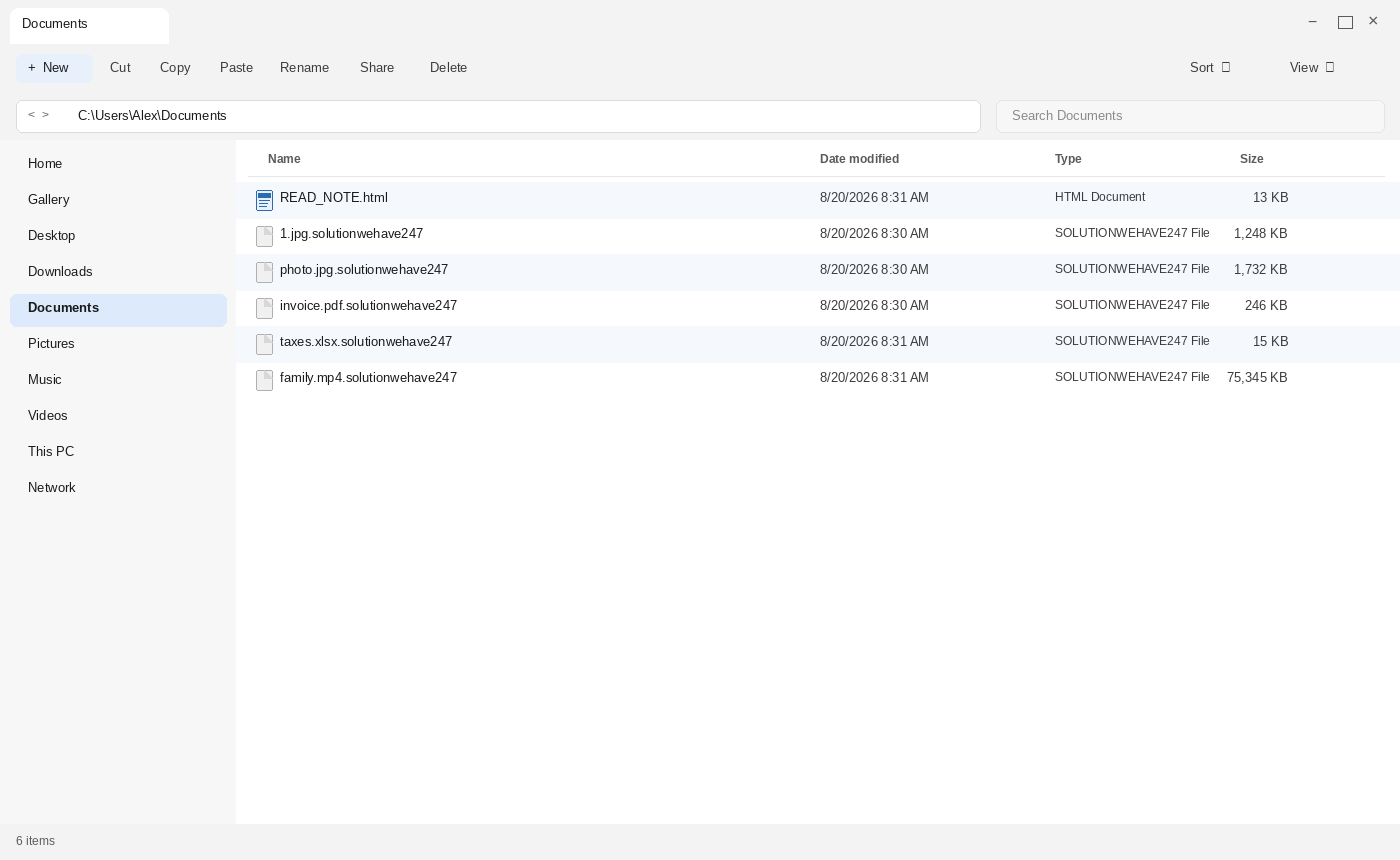
The name on the disk wants to be a help desk. SolutionWeHave. We have a solution. 247, like a hotline that never sleeps. Then you look at the files. The first photo should still be 1.jpg. It is 1.jpg.solutionwehave247. The invoice should still be invoice.pdf. It is invoice.pdf.solutionwehave247. A file named READ_NOTE.html is sitting in the same listing like a receptionist who already knows your name. The desktop wallpaper may already look like a billboard.
That is the trap, not a glitch.
This page is for the hour those names appear. It is not a miracle key. It is a map of the trap, so the note does not become your incident plan. The costume here is a recovery desk. The product is a locked folder and a 72-hour clock.
Overview
SolutionWeHave ransomware locks the files first. Then it keeps the old name and the old type, and hangs .solutionwehave247 on the end. Then it drops READ_NOTE.html, swaps the desktop wallpaper, and talks like an incident desk that already has your ticket. The note is a storefront. It shouts that your company network has been penetrated. It claims RSA+AES. It says your files are safe, only modified. It warns that a third-party restore will corrupt them. It says confidential data was stolen and will leak or be resold if you do not pay. It tells you to create a new Proton Mail account and write wehavesolution@onionmail.org or solution247days@outlook.com. It prints a Tox ID. It gives you 72 hours before the price goes higher. There is no printed $ amount. Personal ID is left blank. The site and Tor-chat lines are left blank. This page will not invent a Session ID, an onion, a wallet, or a victim $ figure to finish those lines.
If you are staring at a pile of .solutionwehave247 files and that HTML note, you are in a ransom incident, not a broken disk and not a Windows pop-up. The folder is the evidence. The note is a checkout. Stay with the folder, not with the script. A name that sounds like a help desk is still a locker.
The first tell is the rename. In the sample used for this page, 1.jpg becomes 1.jpg.solutionwehave247. photo.jpg becomes photo.jpg.solutionwehave247. invoice.pdf becomes invoice.pdf.solutionwehave247. taxes.xlsx becomes taxes.xlsx.solutionwehave247. You can still read what the file used to be. You cannot open it. Windows may call the type a SOLUTIONWEHAVE247 File and offer a useless “choose an app” box. An app cannot talk locked bytes back into a JPEG.
The second tell is the note. After the files are locked, the malware drops READ_NOTE.html into the same folders and changes the wallpaper so the whole screen is a billboard. READ sounds like a brief. NOTE sounds like paperwork. Put them together and the first English you can still read after the photos break is a sales flyer in a browser tab. The flyer is meant to be opened. It is not meant to be trusted.
That is the whole pitch. A locked folder of .solutionwehave247 names. A READ_NOTE.html file that talks like a recovery brief. A wallpaper change so you cannot miss it. Company-network language so a home PC feels like a breach report. RSA+AES as scare words. Two inboxes, one on OnionMail and one on Outlook. A printed Tox ID. A Proton Mail costume. A 72-hour price hike with no printed $ amount. A leak threat. A 2-3 file “free decrypt” tease. Blank Personal ID. Blank site. Blank Tor-chat. There is no public free decryptor known for this strain. There is no reason to mail those inboxes today because an HTML file told you to. There is no reason to add that Tox.
This strain is MedusaLocker-family. It is not the same storefront as Bear. Bear uses .bear26 and a different pair of recovery inboxes. SolutionWeHave uses .solutionwehave247, wehavesolution@onionmail.org, solution247days@outlook.com, and a Tox string printed on the flyer. Same family. Different shop. A helper who quotes Bear contacts for a .solutionwehave247 folder is standing in the wrong doorway.
The .solutionwehave247 name is the first warning
Most lockers pick an extension so you notice the change in seconds. SolutionWeHave uses .solutionwehave247. The extra cruelty is how readable the listing stays, and how much the extra ending wants to sound like a ticket number. You do not have to decode anything. You can still see 1.jpg inside 1.jpg.solutionwehave247. You can still see the word photo. You can still see the invoice. The familiar words are still in the folder. The files are not familiar anymore. The 247 on the end is branding. It wants to feel like 24/7 support. It is not support. It is a label glued onto a lock.
Do not treat that readable name as a fix. Do not strip .solutionwehave247 off the end and expect Photos or a PDF reader to open the file. Do not run a bulk “extension fixer” you found in an ad. The name is a label. The lock is in the content. Editing the label can make a later trusted tool have a harder time matching the file to what it was. Leave the locked copies as they are until you have a clean machine and a plan that does not start in a criminal inbox or a Tox chat.
The extra ending also does advertising. Anyone who sees photo.jpg.solutionwehave247 next to READ_NOTE.html can pretend they already have your case. A later fake helper will quote the extension back to you as if that were expertise. The extension is public. It is sitting in the folder. Quoting it proves nothing except that they can read a listing. Reciting 247 does not prove a key. It proves they can count.
READ_NOTE.html is a sales floor, not a help page
The ransom note is an HTML file with a name that sounds like documentation. READ_NOTE.html wants the first click after the panic. Plenty of real software drops a readme. This one uses that habit against you. It is meant to be the first English you can still read when the photos will not open. Double-clicking it opens a browser. That is why a panicked first click feels like opening the help page. It is not help. It is the demand, written so it looks official enough to follow. A help desk would not need to lock 1.jpg before it spoke.
The filename is built to look like paperwork. READ. NOTE. An .html ending Windows already trusts enough to hand to Chrome or Edge. Paperwork in a browser tab is easier to obey than a threat in Notepad. Keep the file on disk. Then close it. Do not treat it as a set of steps you should follow. Do not tidy the filename. Do not shorten it to “the note” when you write the incident down. Copy READ_NOTE.html the way you would copy a serial off a stolen laptop. That string is how a responder matches this locker. It is not a coupon you redeem by mailing wehavesolution@onionmail.org or solution247days@outlook.com.
If the same HTML is sitting in more than one folder, that is normal for this family. Lockers drop the same page in many places so you cannot miss it. Finding five copies is not five incidents. It is one incident with a loud flyer. Keep one clean copy as evidence. You do not need to open every copy. You do not need to compare them in mail to those inboxes, and you do not need to paste them into Tox.
The wallpaper is part of the storefront
SolutionWeHave does not stop at the Documents listing. It also changes the desktop wallpaper so the locked folder is not the only place the demand lives. A wallpaper swap is theater. It turns the whole screen into a billboard. You were supposed to notice the extra ending. The wallpaper is there in case you did not. It is there so a roommate walking past the desk sees “something is wrong” before anyone opens a file. A help desk does not redecorate your desktop. A locker does.
Do not treat the new wallpaper as a second incident. It is the same locker finishing the costume. Do not screenshot it into a group chat and ask strangers what to click. Do not hunt for a “wallpaper fixer” in ads. The picture on the desktop is not the lock. The lock is in 1.jpg.solutionwehave247. Change the wallpaper back later from a clean machine if you want the old photo of the kids. That does not unlock anything. It only removes the billboard.
A later helper who says “I already saw your wallpaper” has not proven a key. Anyone can describe a ransom wallpaper. Anyone can paste a screenshot you posted. The wallpaper is public once it is on your screen. It is not a case number. It is not a reason to write wehavesolution@onionmail.org. It is not a reason to add that Tox.
YOUR COMPANY NETWORK HAS BEEN PENETRATED is a shout, not a diagnosis
The sample opens with a line in capital letters: YOUR COMPANY NETWORK HAS BEEN PENETRATED. That is a headline, not a lab report. Company. Network. Penetrated. Those words are meant to make a home PC feel like a breach war room, and to make a small office feel like the building is already on fire. You are supposed to stop thinking and start obeying. A shout in all caps does the same job a fake breaking-news banner does on a supplement page. It names the disaster so the rest of the flyer feels like the only adult in the room.
The shout is also a brand. Later search ads will quote it. Later “helpers” will paste YOUR COMPANY NETWORK HAS BEEN PENETRATED so they sound close to your folder. Anyone can copy a headline. Copying that line does not mean they can reverse .solutionwehave247. It means they read the same note you did, or they read a screenshot of it. Keep the line as an identifier when you describe the incident. Do not treat it as a diagnosis you have to obey. A home folder full of photos is still ransomware if that sentence is sitting in READ_NOTE.html. The operators borrowed company language because it raises the temperature. It does not prove they walked your whole network. It does not prove they have a client list. It proves they wanted you scared enough to write.
RSA+AES and “files are safe” are a costume, not a lab report
The note claims RSA+AES. It also says your files are safe, only modified. That pair is a headline, not a diagnosis. Safe is a soothing word. Modified is a smaller word than locked. Together they try to keep you calm enough to follow the next line. Naming two ciphers sounds like a standard. It sounds like a lab. It sounds like something you cannot argue with at the kitchen table. It is still attacker copy.
What the note is actually selling is helplessness. If the lock is “impossible” without their key, then their mail is the only aisle. If the files are “safe,” then paying feels like a small correction instead of a crime. Naming RSA+AES does not put a key on your desk. It does not prove the implementation. It does not prove they still have a key. It does not prove they will send one if you write those inboxes. People hear AES and go looking for a matching decryptor in ads. That search is the next trap. A tool that promises to reverse RSA+AES because a ransom note printed the letters is selling the same fear in a different window. Leave the locked files alone. Do not feed them to a mystery app that asked for admin rights because an HTML file named two ciphers.
Third-party restore will corrupt is a scare line
The note warns that any attempt to restore files with third-party software will permanently corrupt them. It also tells you not to modify or rename the encrypted files. Part of that line is ordinary locker advice dressed as a threat. You should not bulk-rename .solutionwehave247 names, and you should not run a random “decryptor” from an ad. The rest of the line is a lock on the aisle. If every tool except theirs will “ruin” the files, then their inbox is the only remaining adult in the room. A help desk that locked the files first does not get to be the only adult.
That is still attacker copy. A trusted public decryptor, if one ever appears for this strain, does not arrive as a scare paragraph inside READ_NOTE.html. It arrives on an official project page that already existed before your incident. The note wants you afraid of every option that is not a payment. Fear of corruption is how they keep you from even looking. You can leave the locked files untouched without mailing the people who locked them, and without adding their Tox.
Do not “test” the scare by editing a copy of invoice.pdf.solutionwehave247 in a hex editor because a forum said to. Do not run a cracked repair tool that asks you to disable security. The warning on the note is not a lab result. It is a sales paragraph. Keep the files as they are. That is enough. You do not need their permission to wait.
wehavesolution@onionmail.org and solution247days@outlook.com are checkout, not support
The printed contacts are wehavesolution@onionmail.org and solution247days@outlook.com. Those are the aisle. Two private inboxes put you in a room they own, on accounts they can delete, with a thread they can screenshot and reuse. Email would feel like a ticket. This email is not a ticket. It is how a locked photo becomes a negotiation. One address sits on OnionMail. One sits on Outlook. That pairing is costume. Privacy mail plus an ordinary mailbox looks like a real office with a backup desk. It is still the same shop. Do not hunt for a “Solution We Have” company, a phone tree, or a 24/7 hotline. The 247 in solution247days@outlook.com is branding stolen from a help desk. The mechanism is impersonation-shaped mail, not a vendor you can call.
Do not write either address. Do not send a test file to prove you are a real victim. Do not paste a folder listing into a new message. Do not argue about the 72-hour hike as if a discount were available. Those addresses belong to the people who locked the files. Writing them is the product. The handle is branding, the same way .solutionwehave247 is branding. Anyone can stand up a lookalike inbox after a wave of locked folders. Writing the first message does not start a warranty. It starts a conversation you cannot enforce.
A later helper who says they “already emailed wehavesolution” has not proven a relationship. They read the same flyer. Reciting wehavesolution@onionmail.org is not a decryptor. It is proof they can copy. Keep the two addresses as identifiers in the incident record. Then leave them unused. OnionMail did not lock your photos. Outlook did not lock your photos. The people who printed those two strings did.
The Tox string is a chat aisle, not a case number
The sample prints a Tox ID: BA3779BDEE7B982BF08FC0B7B0410E6AE7CC6612B13433B60000E0757BDD682A69AD98563AEC. That is a second door. Mail is one aisle. A chat ID is another. A long string of letters looks like a case number. It is not a case number. It is a handle that puts you in a room they own, on an app they can abandon, with a transcript they can screenshot. Do not add that Tox. Do not paste it into a messenger “just to see if it resolves.” Do not photograph it into a family group and ask who knows how to use it. Adding it is checkout, the same way mailing those inboxes is checkout.
Keep the string as evidence. Copy it into an incident record. Then leave it unused. A later helper who recites the same Tox has not proven they called the crew. They read the flyer. Reciting BA3779BDEE7B982BF08FC0B7B0410E6AE7CC6612B13433B60000E0757BDD682A69AD98563AEC is not a key. It is proof they can copy a long line. Anyone can send you a different Tox and call it “the live one.” A new string is a new ask. Do not add the printed one. Do not add a replacement.
A new Proton Mail is not Proton Mail support
The note instructs you to create a new Proton Mail account and write them from it. That line is costume, not customer service. Proton Mail is a real mail provider. The people who locked photo.jpg.solutionwehave247 are not Proton Mail support. They are not a Proton recovery team. They are not a “privacy desk” assigned to your case. They want a fresh inbox because a throwaway thread is easier to control, easier to abandon, and easier to keep off the account you actually live in. A help-desk costume plus a privacy-mail costume is still a locker telling you how to queue.
Do not open a fresh Proton Mail because the note said to. Do not sign up “just to see if the form works.” Do not send a test from that new address to solution247days@outlook.com. Creating the account is already the first step of checkout. It tells them this victim still follows instructions. It also puts a second identity in a room they designed. If you already created the account before you found this page, stop there. Do not send the first message. Do not attach READ_NOTE.html as if they needed a copy.
A stranger who offers to “set up Proton for you” is still in the same funnel. A stranger who says Proton Mail will unlock the files is selling a second lie on top of the first. Keep Proton out of the incident except as a fact on the flyer: the note told victims to make a new account. That is an identifier. It is not a how-to. Proton Mail did not lock invoice.pdf.solutionwehave247.
72 hours is a price hike, not a clock you must meet
The note says that if you do not contact them within 72 hours, the price will be higher. That number is a fuse, not a court date. There is no printed $ amount on the sample used for this page, and this page will not invent one. A clock without a price is still a checkout trick. You are supposed to feel that waiting is already a mistake. You are supposed to write tonight so the “original” mystery figure does not jump. A help desk that starts a 72-hour clock after it locked the files is not doing you a favor. It is selling panic by the hour.
Do not treat 72 hours as a real clock you must meet. Do not set a phone alarm. Do not stay up to “beat” a deadline printed by the people who locked the files. The fuse belongs to them. It does not belong to your incident plan. Silence is not rude here. Silence is how you stay out of their queue. A relative, an insurer, or an incident lead can still talk on a phone. The people who locked the files do not get a seat in that call. A 100% recovery promise from a stranger who is watching that clock is still a second shop.
A later message that says “your 72 hours are almost up” is still the same shop, or a copycat standing in the same doorway. Anyone can count to three days. Counting does not prove they have a key. It proves they read the flyer. The CISA StopRansomware Guide is blunt about this kind of squeeze. Paying does not ensure the files come back, does not ensure the systems are clean, and does not ensure anyone on the other side keeps a promise.
Personal ID, the site, and Tor-chat are blank. Do not invent the rest
The sample leaves Personal ID blank. It leaves the site blank. It leaves Tor-chat blank. Those empty lines are not a puzzle you should finish. This page will not invent a Session ID. It will not invent an onion address. It will not invent a wallet. It will not invent a victim $ figure. A missing string in the copy you are reading is not a challenge. It is a blank. If your own file on disk still shows empty fields there, treat the blanks as evidence. Do not fill them because a comment said a “complete” note needs a chat site. The flyer already printed a Tox. That was enough of a chat aisle. The blank Tor-chat line is still blank. Leave it blank.
Empty fields also give copycats a job. They will sell the missing Personal ID. They will paste an onion and call it SolutionWeHave support. They will ask you to mail wehavesolution@onionmail.org first, then paste what they send. That is still the same shop, or a second shop standing in the same doorway. The published flyer left those lines blank. Do not finish them for them.
If your copy of READ_NOTE.html truly has more text in those fields than a blank, copy it only into an incident record. Do not type it into a chat app. Do not photograph it into a group. Do not paste it into a second site that offers to “check if the ID is real.” Anyone can send you digits. Digits do not open 1.jpg.solutionwehave247.
Stolen data, a leak threat, and a 2-3 file demo are the second squeeze
The note does not stop at locked photos. It claims the operators stole confidential and personal data. It says that data sits on a private server that will be destroyed after payment. It says that if you do not pay they will leak it or resell it. That is double extortion copy. Encryption is the first product. Shame is the second. You are supposed to pay twice in your head: once for the files, once for the silence. Neither purchase is a contract. The flyer even tries to sound reasonable. It says they only seek money, and that their goal is not to damage your reputation or prevent your business from running. That sentence is a smile on a locked folder. Kindness copy is still a ransom.
Do not pay this leak note. A threat to publish is not proof they have the family photos, the invoice archive, or a client list. Criminals copy leak language because it works on companies and on homes. Answering it still funds the locker. It still does not produce a warranty that a copy was deleted. You cannot audit a “private server” from a Proton Mail thread they told you to create, and you cannot audit it from Tox.
The same flyer offers to decrypt 2-3 non-important files for free, to prove they can give the rest back. That is bait, not kindness. A demo that unlocks a junk PDF does not prove they will unlock photo.jpg.solutionwehave247 after a payment. Anyone who already locked the disk can unlock a file they picked. Sending those 2-3 files is how they get a sample, a live inbox, and a victim who is already in the habit of obeying. Do not send the demo. Do not pick “unimportant” files to attach. The offer is the hook. Keep it as a line in the evidence. Do not redeem it.
This is MedusaLocker-family SolutionWeHave, not a help desk
The name is the first lie. SolutionWeHave sounds like a recovery firm. We have a solution. 247 sounds like a desk that answers at 2 a.m. It is MedusaLocker-family ransomware. It is the locker that appends .solutionwehave247, drops READ_NOTE.html, and changes the wallpaper. It is not a help desk. It is not a backup vendor. It is not OnionMail support. It is not Outlook support. It is not Proton Mail support. It is not Bear. Bear is the same family with a different extension and different mail. If a search result talks about .bear26 and recovery1@ addresses, that is a sibling locker, not this folder. If a result talks about pop-ups, a toolbar, or a gadget that never arrived, you are reading a different problem. The folder in front of you is this strain.
Keep the family name as an identifier, not as a shopping label. MedusaLocker-family is how responders group this locker. It is not a coupon. It is not a reason to buy a “Medusa decryptor” from the first ad. There is no public free decryptor known for this strain. Until a trusted project publishes one, treat any site that says “we already have the SolutionWeHave key” as a second sales pitch. A helper who starts from a generic MedusaLocker page and then asks you to mail solution247days@outlook.com is not close to your case. They are standing in a family doorway and pointing at a specific cash register.
How The Attack Works
The shop is simple once you stop reading it as a rescue. Lock the files. Brand the names with .solutionwehave247. Drop an HTML note that shouts about a company network, claims RSA+AES, and says the files are safe, only modified. Swap the wallpaper. Point the scared person at wehavesolution@onionmail.org and solution247days@outlook.com. Print a Tox ID. Tell them to create a new Proton Mail. Print a 72-hour price hike. Leave Personal ID, the site, and Tor-chat blank. Threaten a leak. Offer 2-3 free decrypts. Smile about reputation. Then wait for someone else to sell the missing strings.
1. The lock keeps the old name so you recognize the loss
SolutionWeHave encrypts the files it wants as leverage, then appends .solutionwehave247. That is why 1.jpg is still readable as 1.jpg.solutionwehave247, and why invoice.pdf is still readable as invoice.pdf.solutionwehave247. The operators want you to inventory the damage in seconds. They want you to see the photo, the invoice, the tax sheet, and the family video in one glance. A coded filename can confuse you. A readable filename makes you feel the theft. A long ending that sounds like a ticket makes you feel like someone already opened a case.
If only one folder looks wrong, do not assume the rest of the disk is safe. Ransomware walks trees. It hits Documents, Desktop, Pictures, Downloads, and any drive letter it can reach. Double-clicking a renamed file does not bring the photo back. The thumbnail may already look broken. A PDF reader may ask for a document that is still sitting in the same folder, only the bytes inside are no longer a document. That broken open is the first proof. The second proof is the extra ending. Together they are enough. You do not need to mail those inboxes to confirm what you are looking at. You do not need to add that Tox to confirm it either.
2. READ_NOTE.html turns a break-in into a ticket
Once the names are branded, the malware needs a voice. READ_NOTE.html is that voice. It sits in the same folders as the locked files so the first sort puts help next to harm. On many machines an HTML file with a name in capitals is the thing you click because it looks like the only file that still speaks English. The body is built to finish before a relative walks into the room. Company network penetrated. Encrypted. RSA+AES. Files are safe, only modified. Do not restore with third-party tools. Contact these two inboxes from a new Proton Mail. Here is our Tox. You have 72 hours. We stole data. We will leak or resell. Send 2-3 files for a free decrypt. We only want money. Each beat closes a door.
Notice what the note does not give you. It does not give you a company, a refund policy, or a way to prove the other side will ever send a key. It does not fill Personal ID. It does not fill the site. It does not fill Tor-chat. It does not print a wallet. It does not print a victim $ figure. It gives you a tone that says this is already decided. That tone is the product. Read the file as a sales flyer. Then close it. Keep it on disk.
3. The wallpaper makes the whole desktop the storefront
The HTML file can be closed. The wallpaper cannot, not without a few extra clicks while you are still panicked. That is the point. A changed desktop is a reminder that stays in the corner of your eye while you try to think. It is also a prop for screenshots. A later broker will ask you to send a photo of the desktop “to confirm the strain.” They already know the strain if they can see .solutionwehave247 and READ_NOTE.html. They want the photo because it keeps you in the conversation.
You do not owe them a desktop photo. You do not need to restore the old wallpaper tonight for the files to stay as they are. The wallpaper is costume. The locked names are the incident. Work from the folder, not from the picture behind the icons.
4. Company-network language makes a home PC feel like a breach report
YOUR COMPANY NETWORK HAS BEEN PENETRATED is how a locker borrows the temperature of a corporate incident. Even if the machine is a family desktop in the kitchen, those words make the room feel bigger than it is. You are supposed to imagine clients, regulators, and a leak site. You are supposed to write faster. The shout is useful to them on a home PC and on a small office alike. It is still a shout. It is not proof of a full network walk. It is not a reason to skip copies that were never mounted. It is not a reason to skip a trusted decryptor project later if one appears.
If this truly is a company machine, that is a fact for counsel and your incident lead. It is not a fact you owe to wehavesolution@onionmail.org. The flyer already decided you are a “company network.” You do not have to finish their sentence by mailing them a confirmation.
5. RSA+AES and “only modified” close the argument
After the shout, the note rests on RSA+AES as if famous ciphers were a receipt. “Your files are safe! Only modified” is meant to end the conversation you have not even started. Cipher plus private control sounds like math you cannot beat at the kitchen table. Safe plus modified sounds like a reversible edit. It is still a sales paragraph. It is not a lab report.
You do not need to argue cryptography with an HTML file. You need to stop treating the file as a technician. Leave 1.jpg.solutionwehave247 named as it is. Leave READ_NOTE.html where it is. The algorithm printed in that note is part of the pitch. It is not a recovery procedure.
6. The corrupt-warning blocks self-help
Telling you that third-party restore will permanently corrupt the files is how the shop removes every aisle except mail and Tox. Some of the caution is real in a narrow sense: random “unlockers” and bulk renames are a bad idea. The note does not say that because it cares about your photos. It says that because a scared person who still believes a local tool might work is a person who has not written yet. The warning is a push toward wehavesolution@onionmail.org.
Leave the locked files untouched. That matches the useful half of the warning without doing the rest of their job. You can refuse the random tools and still refuse the inbox. Those are not opposite choices. You can also refuse the Tox. That is still the same refusal.
7. Two inboxes are the door they want you to walk through
The recovery step in the sample is mail. Contact wehavesolution@onionmail.org or solution247days@outlook.com. Two addresses look like redundancy, like a real office with a backup desk. They are still the same door. A second inbox does not make the first one honest. It only gives them another account to abandon if the first one burns. OnionMail plus Outlook is a costume pairing. One looks careful. One looks ordinary. Both belong to the people who locked family.mp4.solutionwehave247.
Do not write those inboxes. Do not create a throwaway “just to see.” Do not send a screenshot of Explorer to prove the lock. They already chose the extension. They already chose the note name. A photo of READ_NOTE.html sitting next to 1.jpg.solutionwehave247 does not make you a verified customer. It makes you a person still following the flyer. If someone later says they will “talk to SolutionWeHave for you” through those same addresses, that is a broker pitch. Brokers need you in the same funnel. You do not owe them a seat.
8. The Tox ID is a second door, not a shortcut
Mail can feel slow. Chat feels faster. That is why the flyer prints a Tox ID. BA3779BDEE7B982BF08FC0B7B0410E6AE7CC6612B13433B60000E0757BDD682A69AD98563AEC is meant to look like a live agent already waiting. A live agent who locked your files is still not a help desk. Adding that Tox is how a panicked person skips the “should I write” step and goes straight into a conversation. Do not add it. Do not test it. Do not ask a friend who “knows Tox” to add it for you.
If a later message says the printed Tox is dead and hands you a new one, that is a new ask. If a later message says the printed Tox is only for “VIP cases,” that is still the same shop. The sample used for this page prints one Tox and leaves Tor-chat blank. Do not invent a second chat because the blank line looks unfinished.
9. Create a Proton Mail is how they hide the thread
Instructing you to create a new Proton Mail account is not a privacy gift. It is how they keep the negotiation off your real identity and inside a channel they suggested. Support teams at real companies do not tell ransomware victims to stand up a fresh Proton inbox and then write an OnionMail address and an Outlook address. That sentence should stall you. If it did not stall you the first time, stall now. The people behind solution247days@outlook.com are not Proton Mail. They are using Proton Mail as a costume so the first message feels careful instead of criminal.
A careful costume is still checkout. Do not sign up. Do not send the 2-3 file demo from a new address. Do not ask Proton Mail support to “reverse” a ransom note that named them. Proton Mail did not lock invoice.pdf.solutionwehave247. Naming Proton on a flyer does not make Proton part of the crew, and it does not make the crew a privacy company.
10. 72 hours is checkout pressure
Plenty of lockers hide the fuse until you write. This one prints 72 hours up front and says the price will be higher after that. That is not kindness. A printed fuse removes the last excuse for delay. You do not have to “ask how long you have.” You already know the number they want you to fear. The remaining step, in their script, is the Proton account, the mail, and maybe the Tox. The note has already done the quoting, even without a $ figure.
Do not convert 72 hours in your head into a reason to pay tonight. The number is theirs. The files are already locked. Another afternoon of panic will not change the bytes in photo.jpg.solutionwehave247. Do not “test” a smaller payment to see if they answer. A test payment is still a payment. It still tells them this victim pays. This page will not invent the $ amount they want. You should not invent one either. A clock with no price is not a bargain. It is a blank invoice they expect you to fill.
11. Blank Personal ID and blank Tor-chat keep you guessing
Empty ID, empty site, and empty Tor-chat lines look like a broken template. They are useful to the shop anyway. A blank makes you hunt. Hunting is how you land on a copycat who offers to fill the blank. Hunting is how you paste a Session ID from a stranger into a chat app. The published sample left those fields empty. Leave them empty. Do not complete a Tor-chat the flyer did not give you. Do not invent an onion because other MedusaLocker notes use one. This page will not invent those strings, and you should not either. The printed Tox is not a reason to invent a site to go with it.
A wallet string, a Session ID, or an onion that appears in a later email is not a missing piece you were owed. It is a new ask. Treat it as a new ask. Do not type it anywhere except an incident record.
12. Leak copy plus a 2-3 file demo is the second product
Claiming they stole confidential data, then threatening to leak or resell it, is how they sell silence on top of decryption. Offering to unlock 2-3 non-important files for free is how they make the silence feel testable. Together those lines turn a locked folder into a relationship. Relationships are how payments happen. You do not need that relationship. You need the folder left intact and a plan that does not start in their mail.
Do not attach “unimportant” files. Do not pick the smallest PDF as a demo. Do not pay to stop a leak you cannot verify. The smile about reputation is part of the same product. “We only seek money” is not a comfort. It is a price tag with the $ left off. If this is a company machine, tell counsel and your incident lead. If this is a home PC, tell the people whose files lived on it. Opening those inboxes again is not useful work. It is the checkout.
13. Third parties will sell a SolutionWeHave conversation
After a ransomware incident, search results fill up with companies that say they can decrypt SolutionWeHave or “all .solutionwehave247 files.” Some of those shops are ordinary overpriced consultants. Plenty are a second scam. They will quote READ_NOTE.html so they sound close to the case. They will mention RSA+AES. They will mention 72 hours. They will mention wehavesolution@onionmail.org as if they already called the original crew. They will paste the Tox. They will ask for a sample file, a remote-access session, or a deposit.
A demo that “unlocks one file” is not proof they can unlock the photo. Anyone can open one junk file they control. Anyone can send you a chat ID that makes a window appear. A chat window is not Photos opening photo.jpg again. If a later message skips the original inboxes and asks for coin over ordinary mail, that is still the same market, or a copycat standing in the same doorway. Do not answer. Do not help them fill Personal ID or Tor-chat the public copy left blank on purpose. Do not let them “correct” this folder into a Bear incident because they have a Bear playbook handy. .solutionwehave247 is not .bear26.
A real public decryptor, when one exists, shows up on an official project page that already existed before your incident. It does not need a Proton Mail signup. It does not need solution247days@outlook.com. It does not need that Tox. If the pitch is “we can decrypt, pay us first,” you are still in the market the ransomware created. There is no public free decryptor known for this strain. Until a trusted project publishes one, treat any site that says “we already have the SolutionWeHave key” as a second sales pitch.
14. Payment and mailing those inboxes close nothing
Paying a stranger for a private key is not a guarantee. The people who send the note can take the money and disappear. They can send a string that only makes a decryptor show an error. They can come back later and lock the same machine again. They can still leak, or still claim they will, after they are paid. A mail thread makes that outcome easier, not harder. A Tox chat makes it easier still. You cannot leave a review on a criminal inbox. You cannot leave a review on a Tox ID.
Mailing wehavesolution@onionmail.org or solution247days@outlook.com is the free version of the same dead end. Adding that Tox is the faster version. There is no public free decryptor known for this strain. Starting a thread does not rebuild a JPEG. It only keeps you in their story while the rest of the disk still needs a real plan. Change passwords from a clean device. Watch bank and email alerts. Opening that HTML file again is not useful work. It is the checkout, even when Personal ID and Tor-chat are blank, even when the $ amount was never printed, and even when the 72-hour line is still counting in your head.
What To Do If You Have Fallen Victim
Do not email wehavesolution@onionmail.org or solution247days@outlook.com. Do not add that Tox. Do not create a new Proton Mail because the note said to. Those two addresses are not Proton Mail support, not OnionMail support, and not Outlook support. Do not treat 72 hours as a real clock you must meet. Do not invent a Session ID, an onion, a wallet, or a victim $ figure to finish READ_NOTE.html. Do not send 2-3 files for a “free decrypt.” Do not pay this leak note. If you already sent a message before you found this page, stop there. Do not pay a deposit to “hold the original price” for anyone who quotes the flyer.
- STEP 1: Use Rkill to terminate suspicious programs.
- STEP 2: Use Malwarebytes to remove Ransomware and Unwanted Programs
- STEP 3: Use HitmanPro to remove Trojans and other Malware
- STEP 4: Use AdwCleaner to remove Malicious Browser Extensions and Adware
- STEP 5: Perform a final check with ESET Online Scanner
- STEP 6: Restore the files encrypted by ransomware
STEP 1: Use Rkill to terminate suspicious programs.
In this first step, we will download and run Rkill to terminate suspicious programs that may be running on your computer.
RKill is a program that was developed at BleepingComputer.com that attempts to terminate known malware processes so that your normal security software can then run and clean your computer of infections. When RKill runs it will kill malware processes and then removes incorrect executable associations and fixes policies that stop us from using certain tools.
-
Download Rkill.
You can download RKill to your computer from the below link. When at the download page, click on the Download Now button labeled iExplore.exe. We are downloading a renamed version of Rkill (iExplore.exe) because some malware will not allow processes to run unless they have a certain filename.
Download RKillOpens the BleepingComputer download page in a new tab. RKillStops malware processes so other tools can run
 -
Run RKill.
After downloading, double-click the iExplore.exe icon to kill malicious processes. In most cases, downloaded files are saved to the Downloads folder.
The program may take some time to search for and end various malware programs.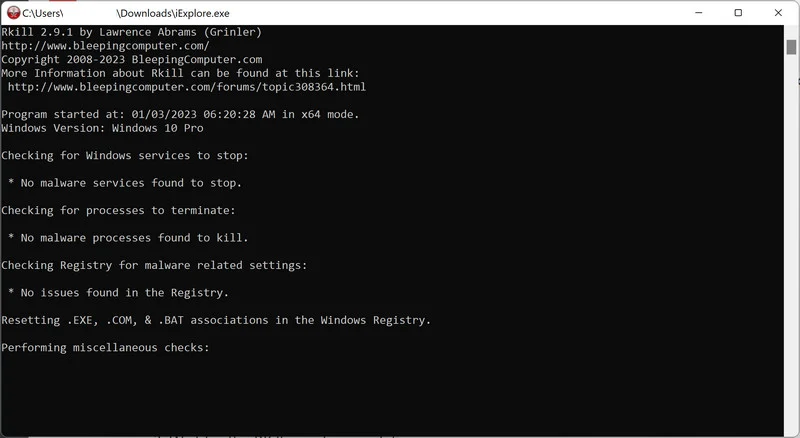
When it is finished, the black window will close automatically and a log file will open. Do not restart your computer. Proceed to the next step in this guide.
STEP 2: Use Malwarebytes to remove Ransomware and Unwanted Programs
In this second step, we will install Malwarebytes to scan and remove any infections, adware, or potentially unwanted programs that may be present on your computer.
Malwarebytes is one of the most popular and trusted anti-malware tools for Windows — and it’s completely free for removing infections. It catches threats that many antivirus programs miss, including adware, browser hijackers, and trojans. Follow the steps below to scan and clean your PC in just a few minutes.
Download Malwarebytes
Click the button below to download the latest version of Malwarebytes for Windows from the official source. The free version is all you need — it will scan your computer and remove adware, browser hijackers, and other malicious software at no cost.
Download MalwarebytesOfficial installer for Windows 11 and 10. Your download starts right away.Want real-time protection? See Malwarebytes Premium Malwarebytes Free for WindowsScans and removes malware at no cost
-
Install Malwarebytes
When the download finishes, open your Downloads folder and double-click the MBSetup file. If Windows shows a User Account Control pop-up, click “Yes” to allow the installation.

Follow the On-Screen Prompts to Install Malwarebytes
The setup wizard will walk you through a few quick screens:
-
Choose where you’re installing the program — “Personal Computer” or “Work Computer” — then click Next.

-
Malwarebytes will now install on your device. This usually takes under a minute.

-
When installation is complete, the “Welcome to Malwarebytes” screen will open automatically.

-
On the final screen, click Open Malwarebytes to launch the program.

-
Enable “Scan for Rootkits”
Before scanning, turn on rootkit detection so Malwarebytes can find even the most hidden threats. Click the Settings gear icon on the left side of the screen.

In the settings menu, find “Scan for rootkits” and click the toggle so it turns blue.

Done? Click “Dashboard” in the left pane to return to the main screen.
Start the Scan
Click the blue Scan button. Malwarebytes will automatically update its virus database and start checking your computer for malware.

-
Wait for the Scan to Finish
The scan checks your entire system for browser hijackers and other malicious programs, so it can take 5 to 20 minutes depending on your computer. Feel free to do something else — just check back occasionally to see the progress.

-
Quarantine the Detected Threats
When the scan is done, you’ll see a list of everything Malwarebytes found — malware, adware, and potentially unwanted programs. Click the “Quarantine” button to remove all of them at once.

Malwarebytes will now remove the malicious files and registry entries and move them safely into quarantine.

-
Restart Your Computer
Some threats can only be fully removed after a reboot. If Malwarebytes asks you to restart, click Yes. Once you’re logged back in, Malwarebytes has finished removing the threats it found.

STEP 3: Use HitmanPro to remove Rootkits and other Malware
In this third step, while the computer is in normal back, we will download and run a scan with HitmanPro to remove Trojans, rootkits, and other malicious programs.
HitmanPro is a second-opinion scanner — it’s designed to catch what your main antivirus might have missed. Instead of relying on a single detection engine, it checks the behavior of files in the locations where malware usually hides. Anything suspicious gets sent to the cloud, where it’s analyzed by two of the best antivirus engines available: Bitdefender and Kaspersky.
Good news: scanning is completely free, with no limits. You only need a license when it’s time to remove what was found — and even then, you can activate a free one-time 30-day trial to clean your PC at no cost. (A full license is $24.95 per year for 1 PC.)
-
Download HitmanPro
Click the button below to download HitmanPro. Remember — the scan is free, so you have nothing to lose by checking your PC.
Download HitmanProFree scan. Removing threats needs the free 30-day trial. Opens the official HitmanPro page in a new tab. HitmanProSecond-opinion malware scanner from Sophos
 -
Install HitmanPro
When the download finishes, open your Downloads folder and double-click the file: “hitmanpro.exe” on 32-bit Windows, or “hitmanpro_x64.exe” on 64-bit Windows.
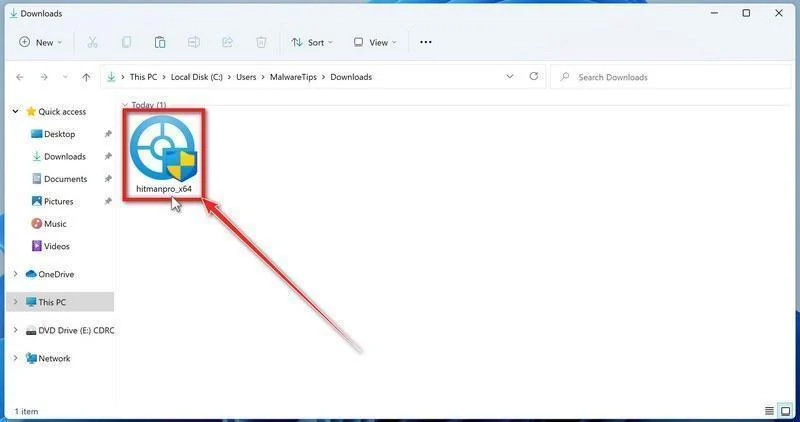
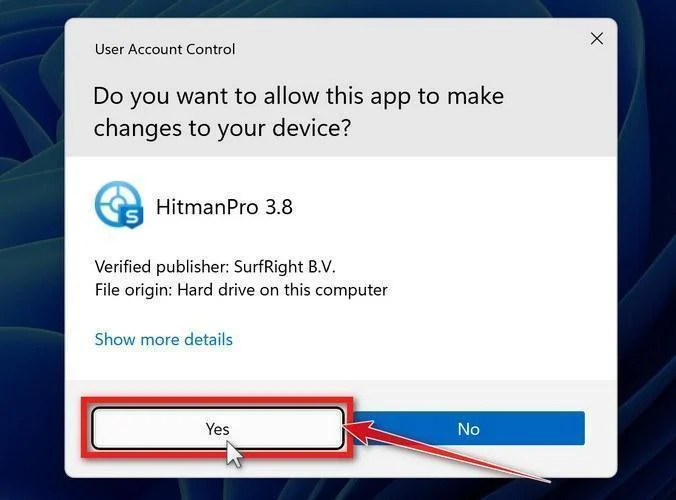
If a User Account Control pop-up asks whether HitmanPro can make changes to your device, click “Yes” to continue.
-
Follow the On-Screen Prompts
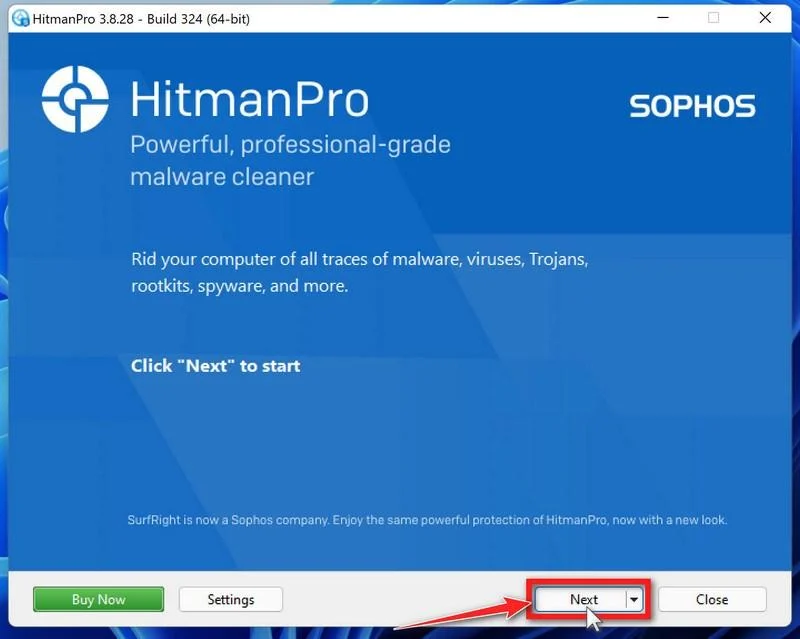
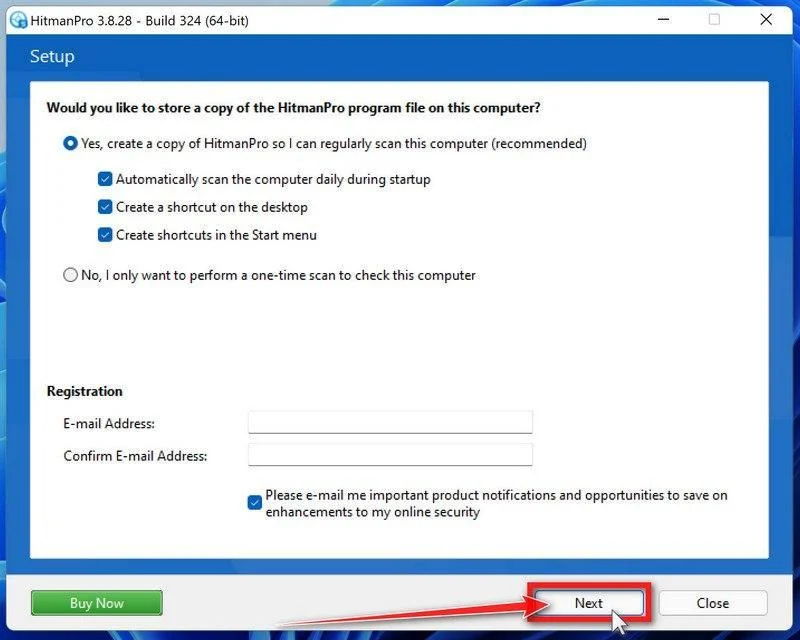
On the HitmanPro start screen, click “Next” to begin the system scan. No lengthy setup required — it goes straight to work.
-
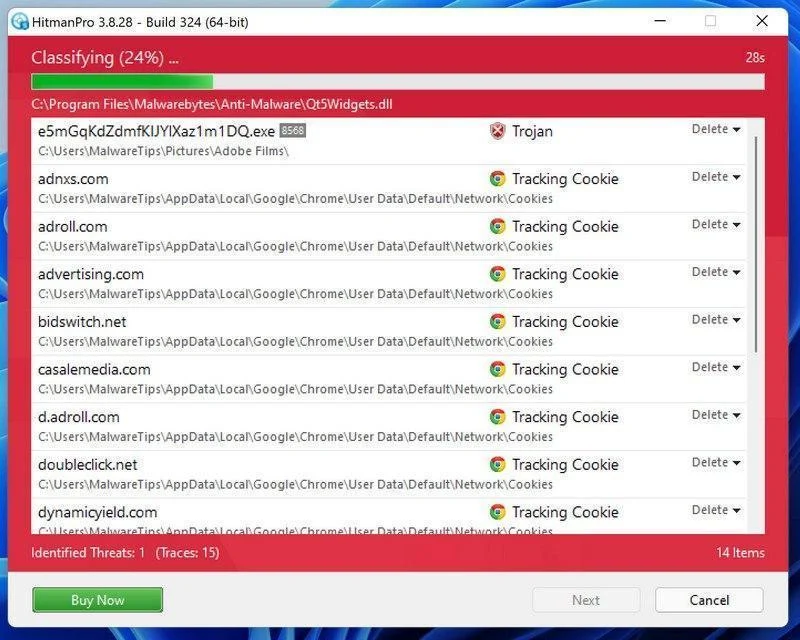
Wait for the Scan to Finish
HitmanPro will now check your computer for malicious programs. This usually takes just a few minutes thanks to its cloud-based scanning.
-
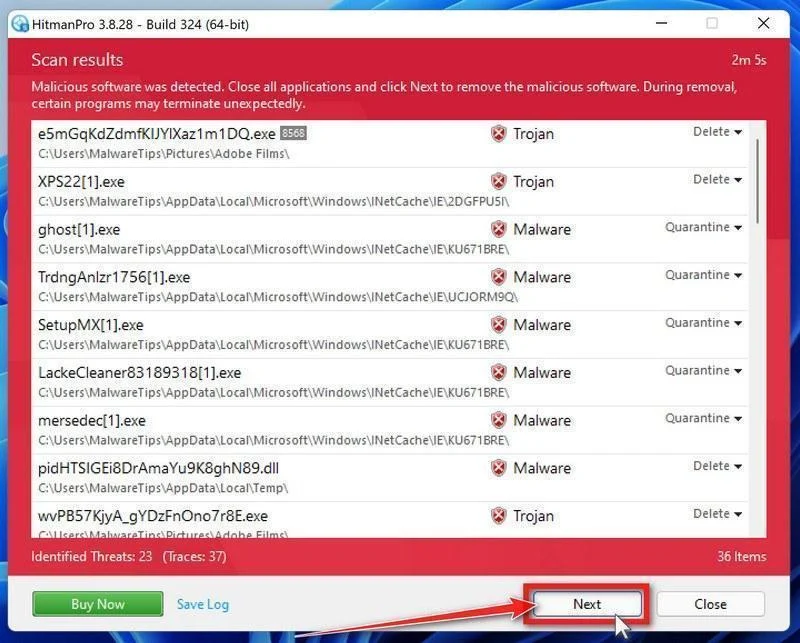
Review the Results and Click “Next”
When the scan is done, HitmanPro will show you everything it found. Click “Next” to remove the detected threats.
-
Click “Activate Free License”
To remove the malicious files, click the “Activate free license” button. This starts your free 30-day trial — no payment details needed — and unlocks the full cleanup.
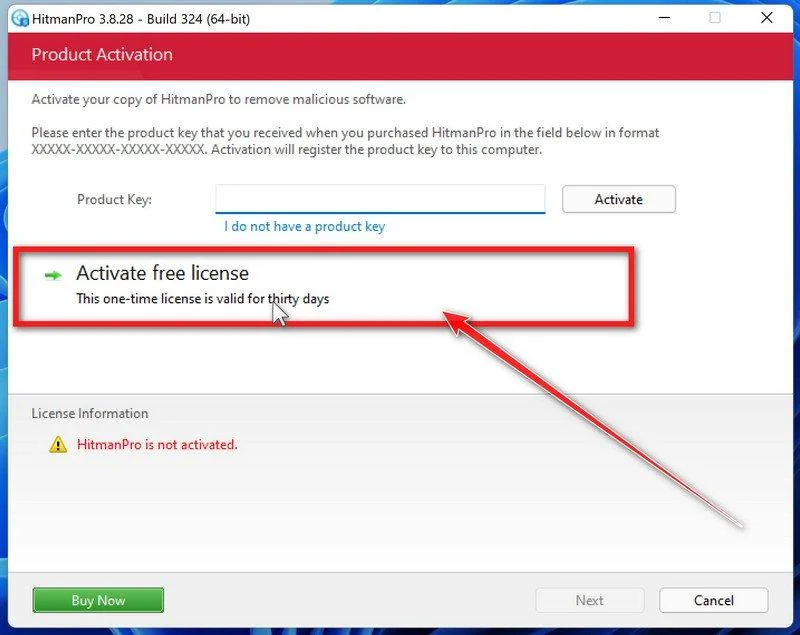
When the removal is complete, HitmanPro will show a summary of everything it cleaned. Click Next, then click Reboot if prompted. If there’s no reboot prompt, just click Close — your PC is clean.
STEP 4: Use AdwCleaner to remove Malicious Browser Extensions and Adware
In this next step, we will use AdwCleaner to remove malicious browser policies and unwanted browser extensions from your computer.
AdwCleaner is a free on-demand scanner that specializes in adware, browser hijackers, and unwanted toolbars — the exact threats that mainstream antivirus programs often miss. It also includes tools that repair the damage malware leaves behind, like hijacked browser settings and malicious policies. It’s a quick scan that’s well worth running.
-
Download AdwCleaner
Click the button below to download AdwCleaner — it’s free, portable, and requires no installation.
Download AdwCleanerOpens the official download page in a new tab. Malwarebytes AdwCleanerRemoves adware and unwanted programs at no cost
 -
Run AdwCleaner
Open your Downloads folder and double-click the file named “adwcleaner.exe“. There’s no installation — the program starts right away.
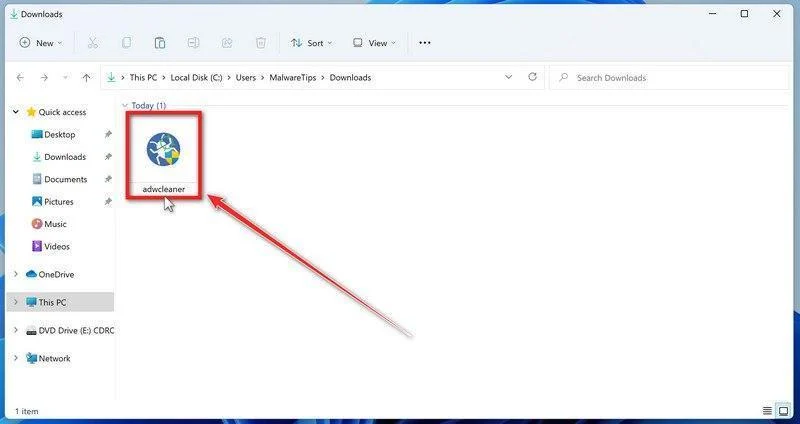
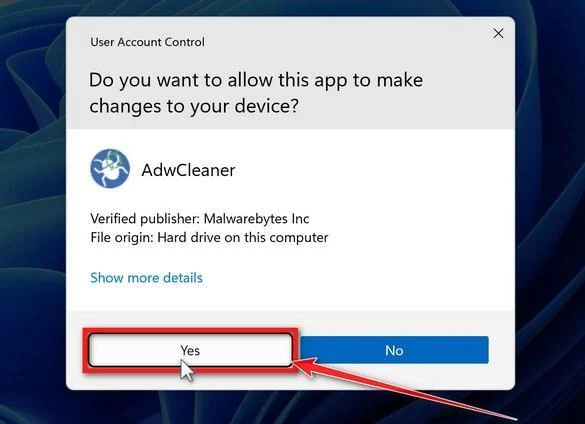
If Windows asks whether you want to allow AdwCleaner to run, click “Yes“. When the license agreement appears, click I agree to continue.
-
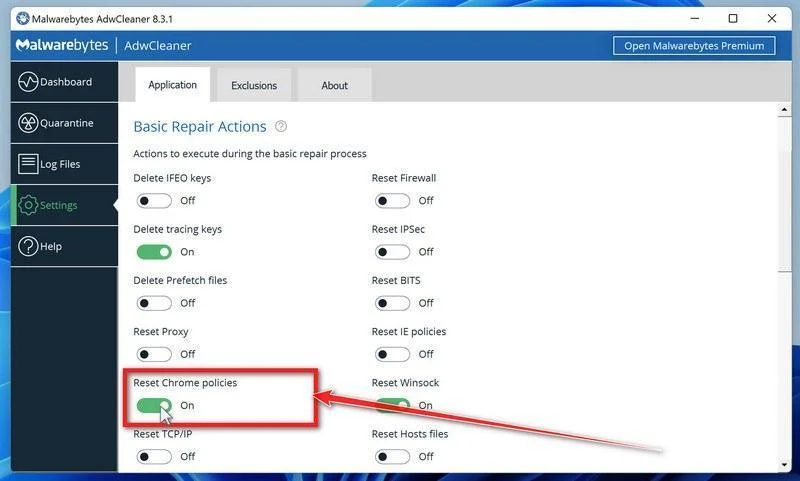
Enable “Reset Chrome policies”
This setting removes malicious browser policies — a trick malware uses to lock your browser settings so you can’t change them back. Click “Settings” on the left side of the window, then turn on “Reset Chrome policies“.
-
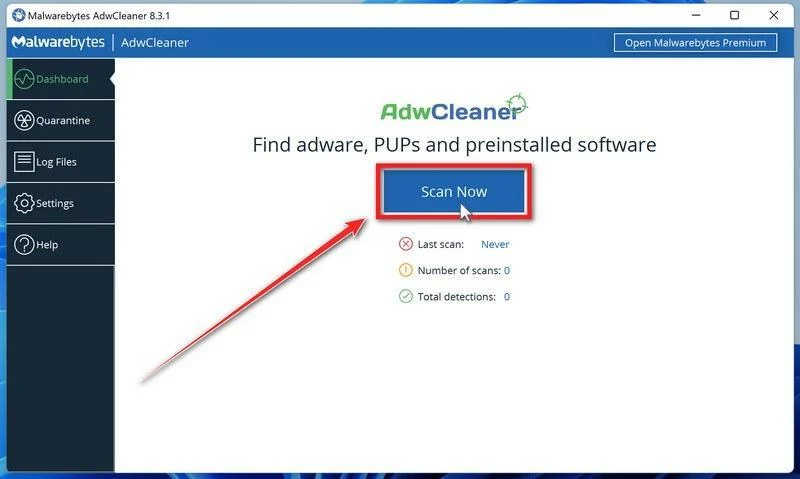
Start the Scan
Click “Dashboard” on the left side of the window, then click the “Scan” button.
-
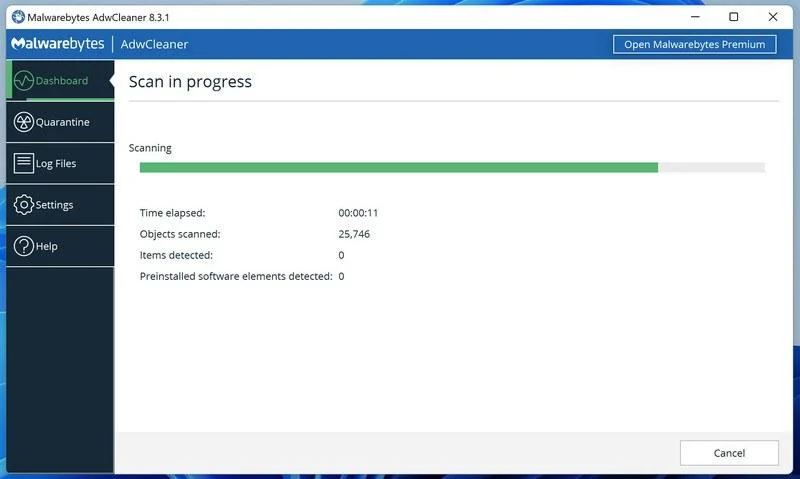
Wait for the Scan to Finish
AdwCleaner will now check your computer for adware and other malware. This usually takes only a few minutes — it’s one of the fastest scanners around.
-
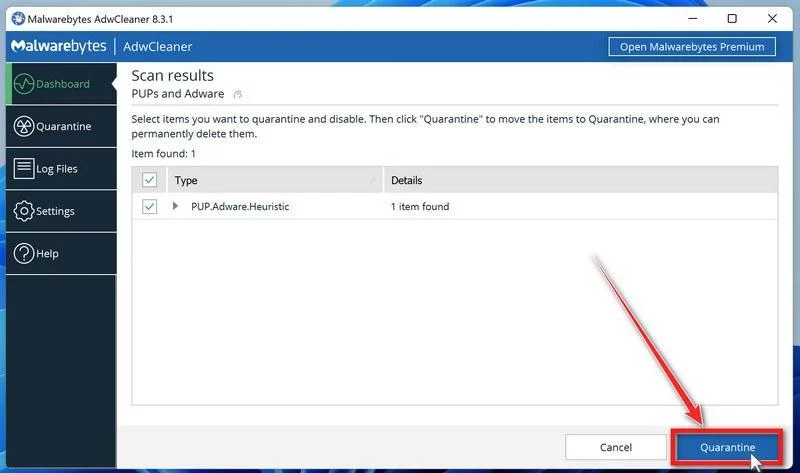
Quarantine the Detected Threats
When the scan finishes, AdwCleaner will list everything it found. Click the “Quarantine” button to remove all the malicious items at once.
-
Click “Continue” to Finish the Cleanup
Save any open work first — AdwCleaner needs to close your open programs before it can clean. When you’re ready, click the “Continue” button.
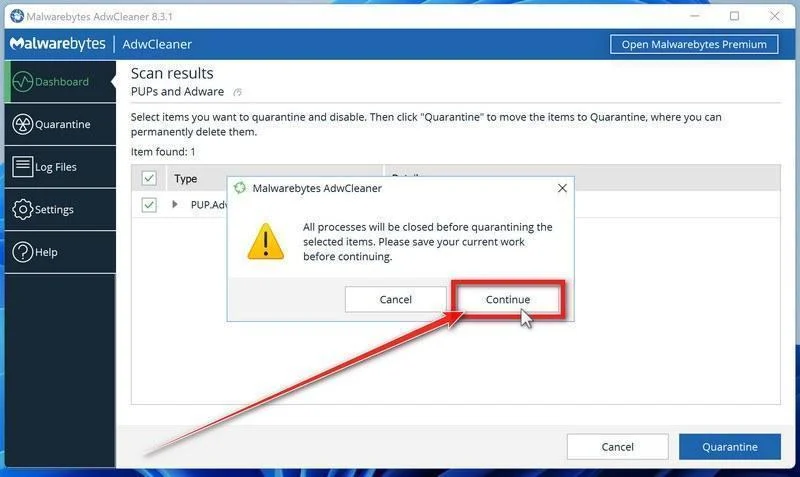
AdwCleaner will now delete all detected malware from your computer. If it asks you to restart your PC, allow it — your computer will be clean when you log back in.
STEP 5: Perform a final check with ESET Online Scanner
This final step involves installing and running a scan with ESET Online Scanner to check for any additional malicious programs that may be installed on the computer..
ESET Online Scanner is a free second-opinion scanner that performs a deep, full-system check for viruses, trojans, rootkits, and other malware. We use it as the final step because it’s thorough — if anything slipped past the previous scans, ESET will find it. A clean result here means your computer is malware-free.
-
Download ESET Online Scanner
Click the button below to download ESET Online Scanner.
Download ESET Online ScannerOpens the official download page in a new tab. ESET Online ScannerFree one-time malware scan from ESET
 -
Run the Installer
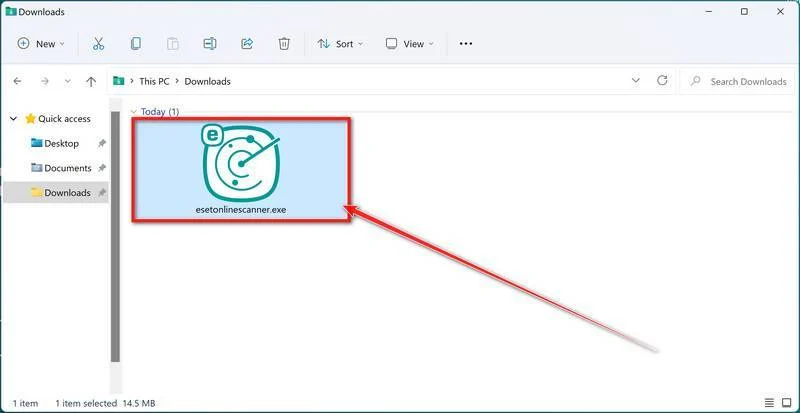
When the download finishes, open your Downloads folder and double-click “esetonlinescanner.exe“.
-
Install ESET Online Scanner
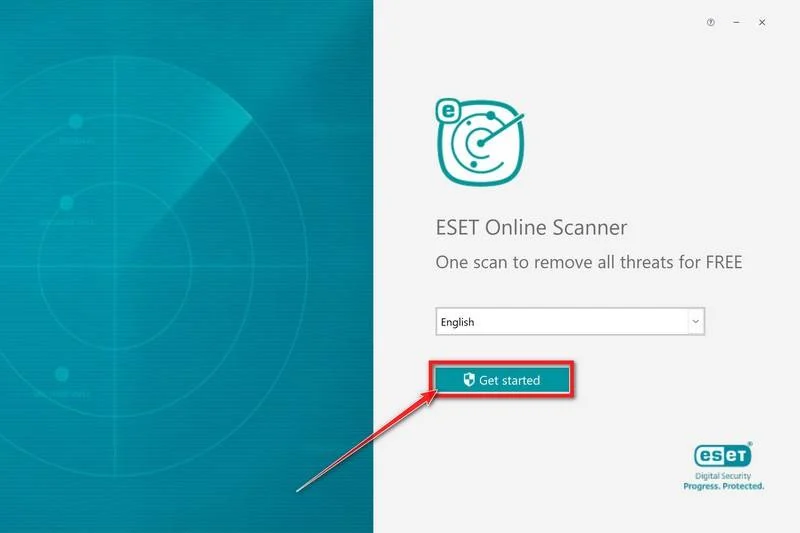
On the start screen, select your language from the drop-down menu and click Get started.
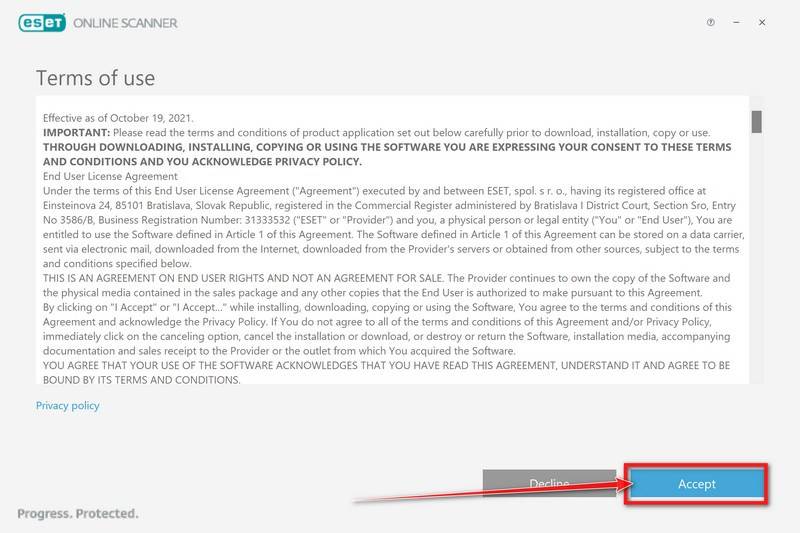
On the Terms of use screen, click Accept.
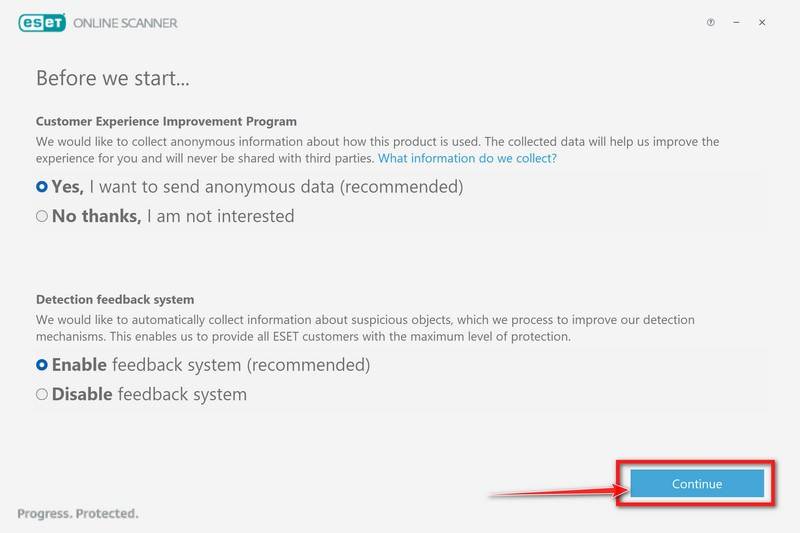
Choose your preferences for the Customer Experience Improvement Program and the Detection feedback system (either choice is fine), then click Continue.
-
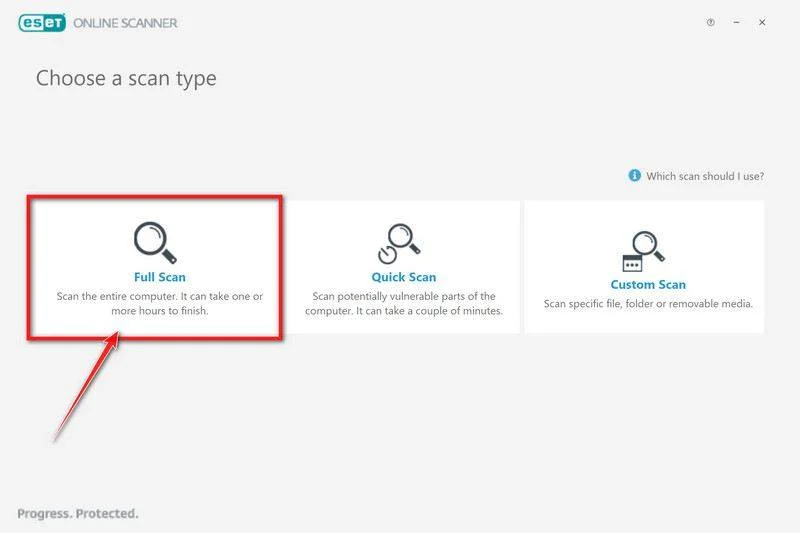
Start a Full Scan
Click Full Scan — this checks your entire computer, not just the common hiding spots.
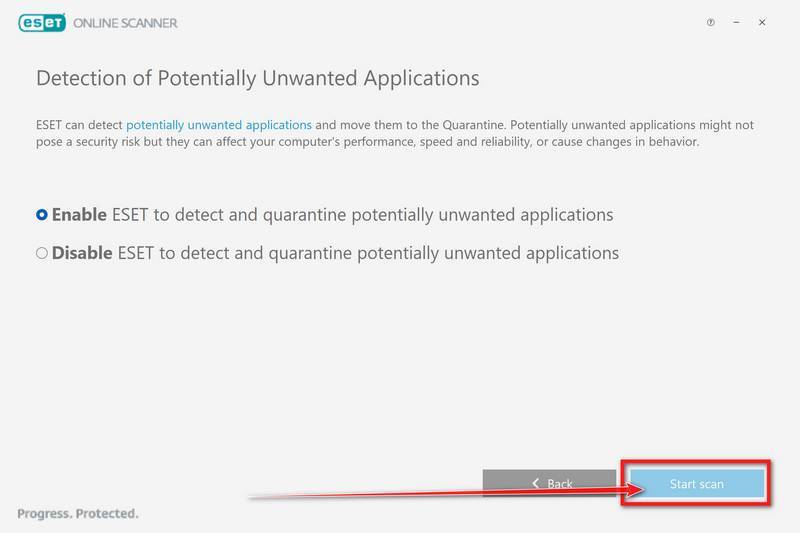
Select Enable for Detection of Potentially Unwanted Applications — this lets ESET catch adware and bundled junk programs, not just viruses. Then click Start scan.
-
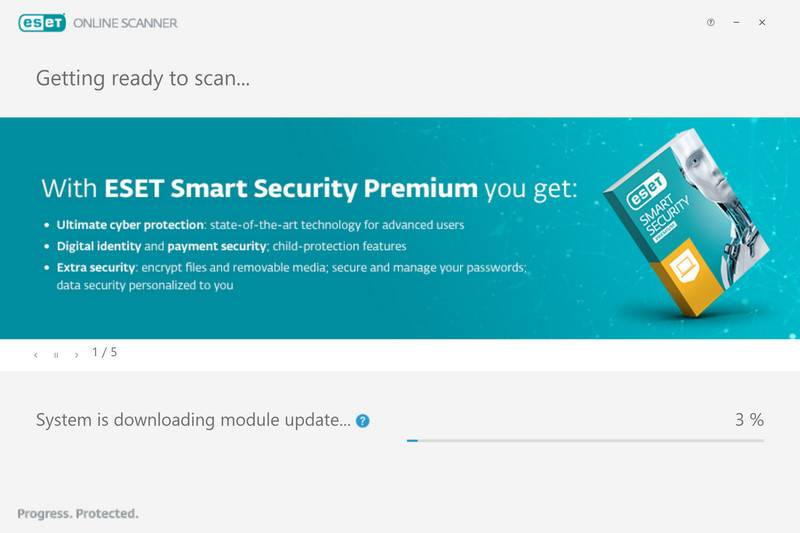
Wait for the Scan to Finish
ESET will now check every file on your computer. Because it’s a full scan, this can take a while — often an hour or more, depending on how much data you have. Leave it running in the background and check on it from time to time.
-
Review the Results
When the scan completes, the Found and resolved detections screen appears. Any threats found were automatically cleaned and quarantined — there’s nothing extra you need to do. Click View detailed results if you want to see exactly what was removed.
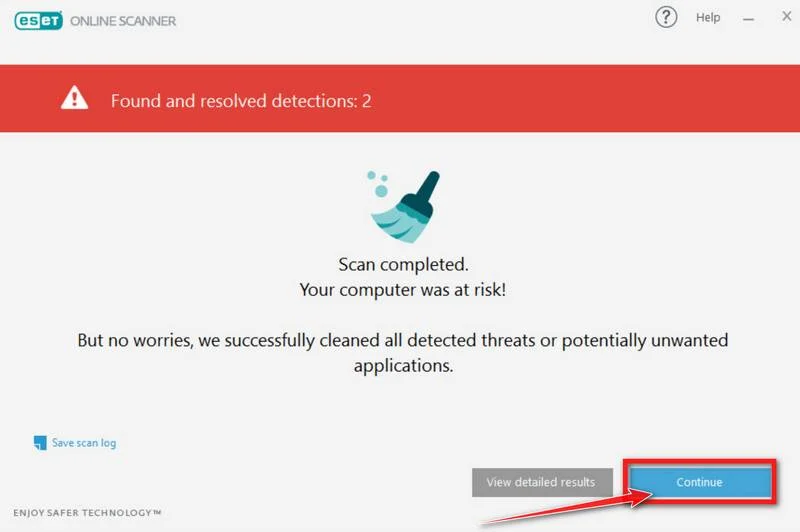
If ESET found nothing — congratulations, your computer has passed the final check and is malware-free.
STEP 6: Restore the files encrypted by ransomware
Unfortunately, in most cases, it’s not possible to recover the files encrypted by this ransomware virus because the private key which is needed to unlock the encrypted files is only available through the attackers. However, below we’ve listed three options you can use to try and recover your files.
Option 1: Search a decryption tool for this ransomware
The cybersecurity community is constantly working to create ransomware decryption tools, so you can try to search these sites for updates:
- https://id-ransomware.malwarehunterteam.com/
- https://decrypter.emsisoft.com/
- https://noransom.kaspersky.com/
- https://www.avast.com/ransomware-decryption-tools
Option 2: Use EaseUS Data Recovery Wizard Free to recover the encrypted files
EaseUS Data Recovery Wizard Free can restore files and repair corrupted files with simple clicks. Its powerful scanning algorithms can identify and retrieve huge file type library, including all of the popular video files, audio files, photos, and document formats.
While the free version only allows you to recover 2 GB of data, this can be helpful to see if the recovery is possible and restore back the most important files from your computer.
-
Download EaseUS Data Recovery Wizard Free.
You can download EaseUS Data Recovery Wizard Free by clicking the link below.
Download EaseUS Data Recovery WizardOpens the download page in a new tab. EaseUS Data Recovery WizardFile recovery tool with a free version
 -
Double-click on the EaseUS Data Recovery Wizard Free setup file.
When EaseUS Data Recovery Wizard Free has finished downloading, double-click on the setup file to install EaseUS Data Recovery Wizard on your computer. In most cases, downloaded files are saved to the Downloads folder.
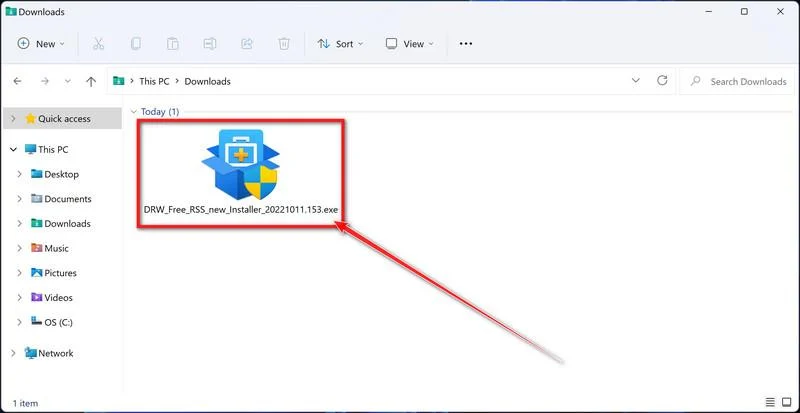
You may be presented with a User Account Control pop-up asking if you want to allow EaseUS to make changes to your device. If this happens, you should click “Yes” to continue with the EaseUS Data Recovery Wizard Free installation.
-
Follow the on-screen prompts to install EaseUS Data Recovery Wizard.
When the EaseUS Data Recovery Wizard installation begins, click on the “Install Now” as seen in the image below.
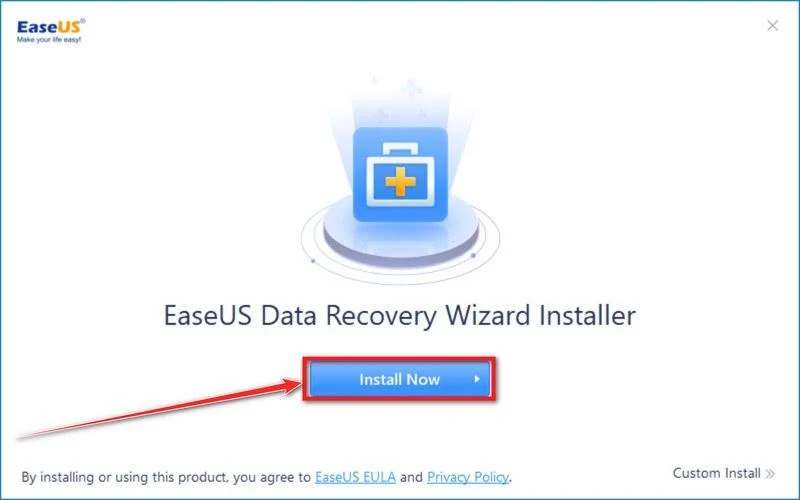
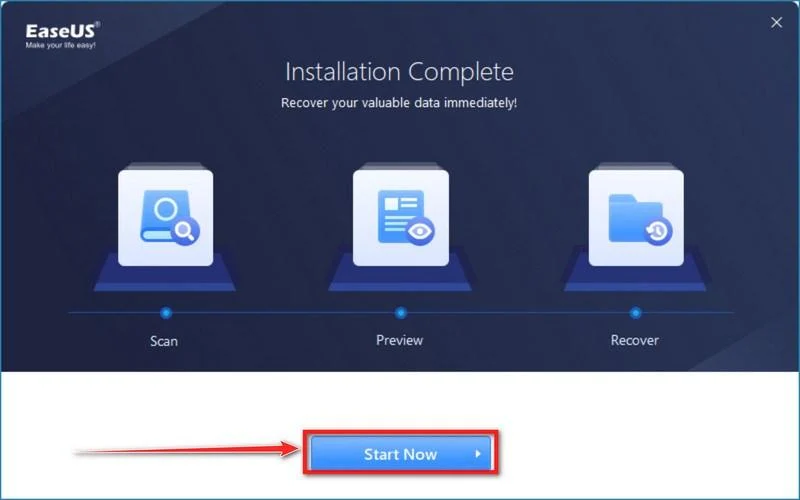
When your EaseUS Data Recovery Wizard installation completes, click the “Start Now” button to start the program.
-
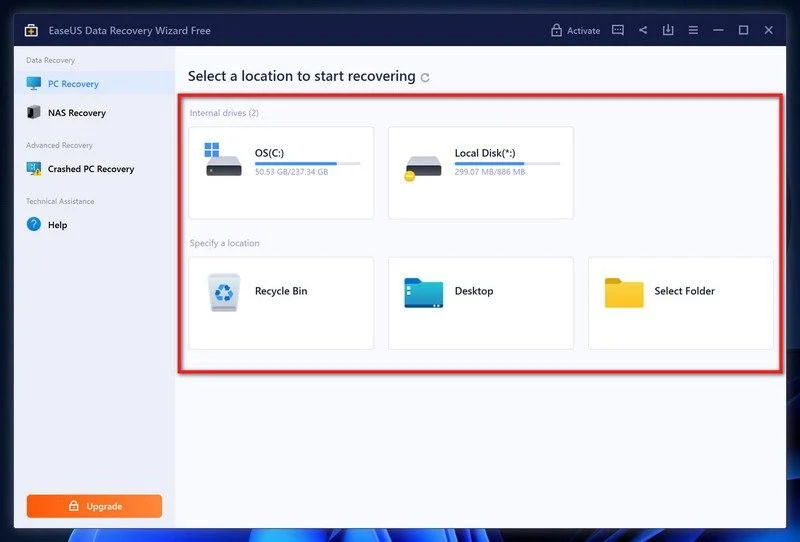
Select a location to start recovering the encrypted files.
Choose the drive or folder where you are the encrypted files that you want to recover and click “Scan“.
-
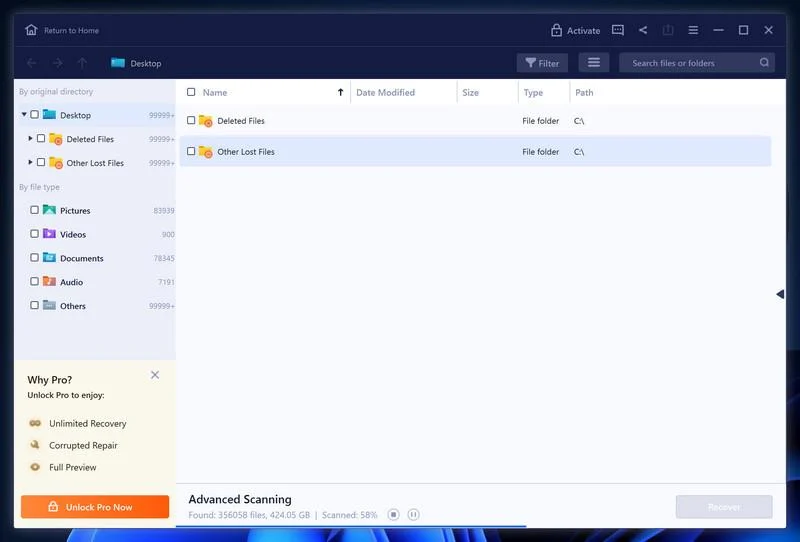
Wait for the EaseUS Data Recovery Wizard scan to complete.
EaseUS Data Recovery Wizard will now scan your computer files that can be restored. This process can take a few minutes, so we suggest you do something else and periodically check on the status of the scan to see when it is finished.
-
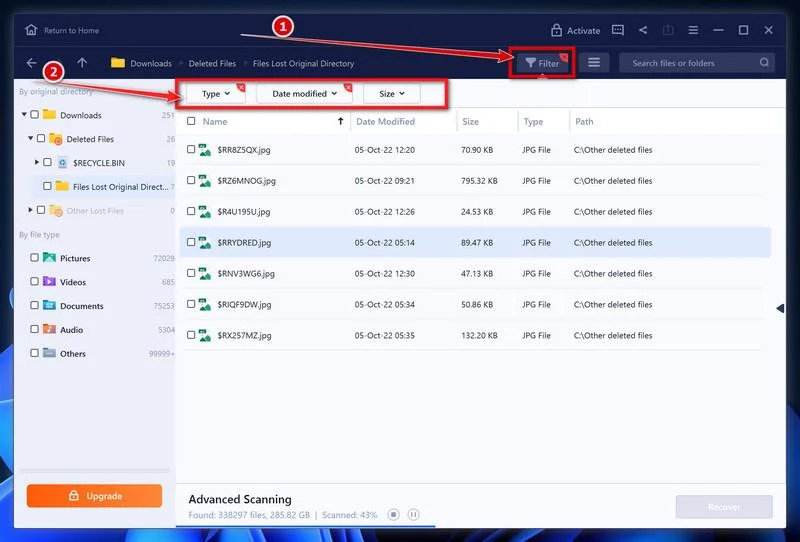
Find the files you want to recover.
When the EaseUS Data Recovery Wizard scan is finished scanning it will show a screen that displays the files that can be recovered. This tool can recover a lot of data, use the “Filter” button to quickly filter specific file types and find the files that you want to recover.
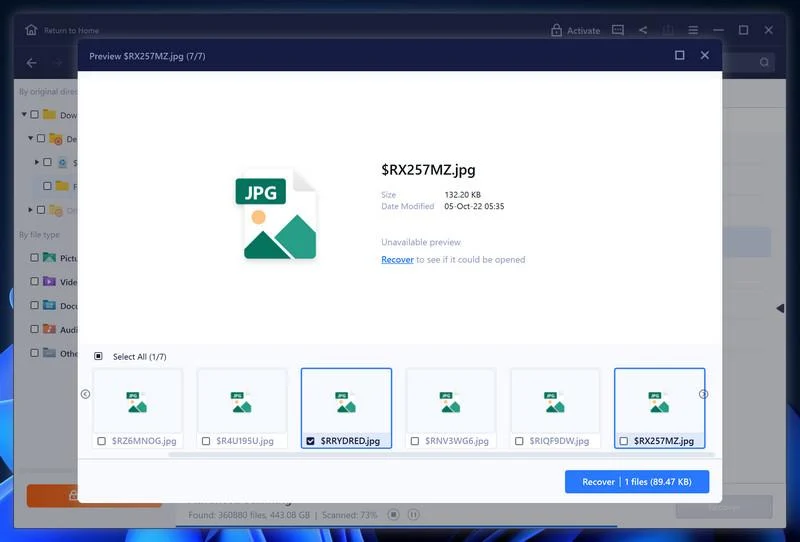
Click the “Preview” button or double-click on a file for a full preview.
-
Select your files and click “Recover”.
Finally, select the the files you want to recover and click “Recover“.
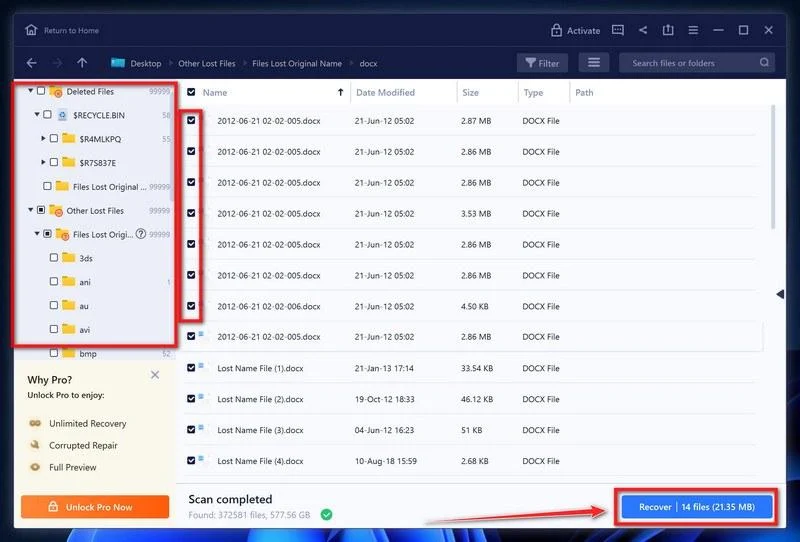
Choose a safe location to save all the files.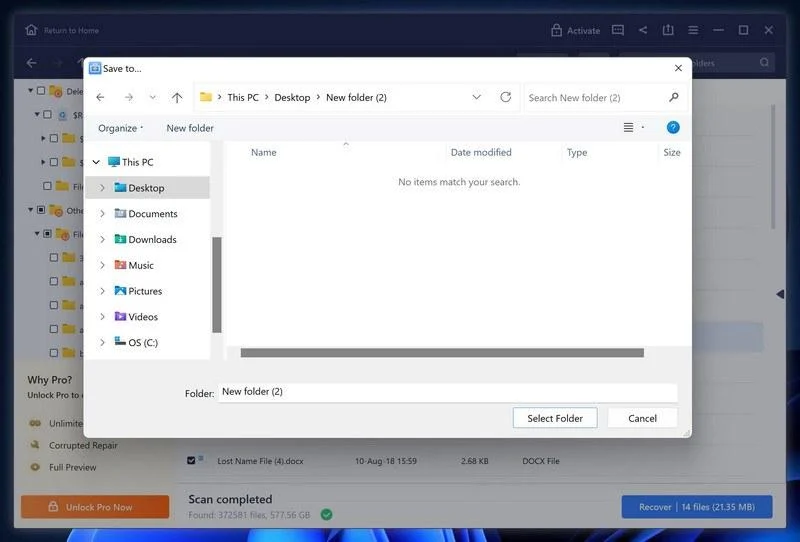
The free version only allow you to recover 2 GB of data, however, this will allow you to recover the most important files and see if EaseUS Data Recovery Wizard can correctly recover them.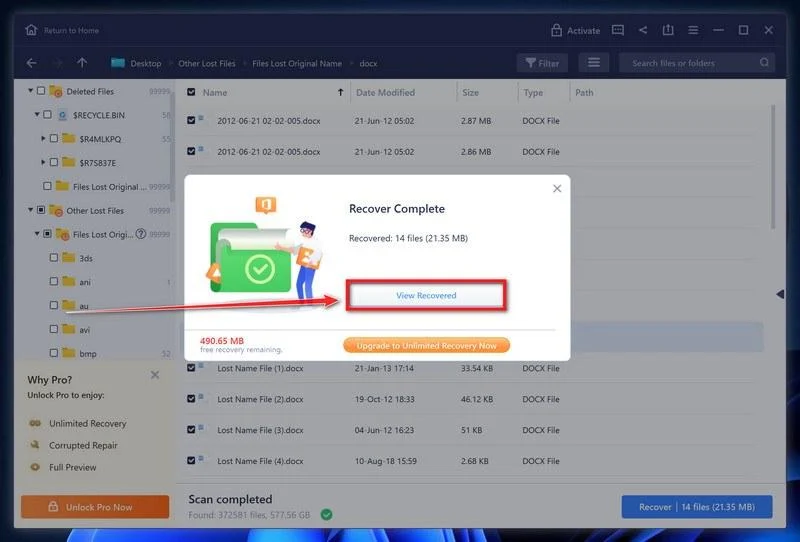
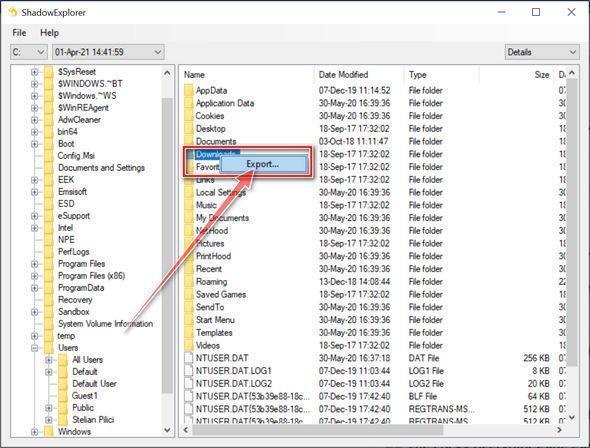
Option 3: Try to restore your files with ShadowExplorer
This ransomware will attempt to delete all shadow copies when you first start any executable on your computer after becoming infected. Thankfully, the infection is not always able to remove the shadow copies, so you should continue to try restoring your files using this method.
-
Download ShadowExplorer.
You can download ShadowExplorer from the below link.
Download ShadowExplorerOpens the official download page in a new tab.ShadowExplorerRestores files from Windows Shadow Volume Copies -
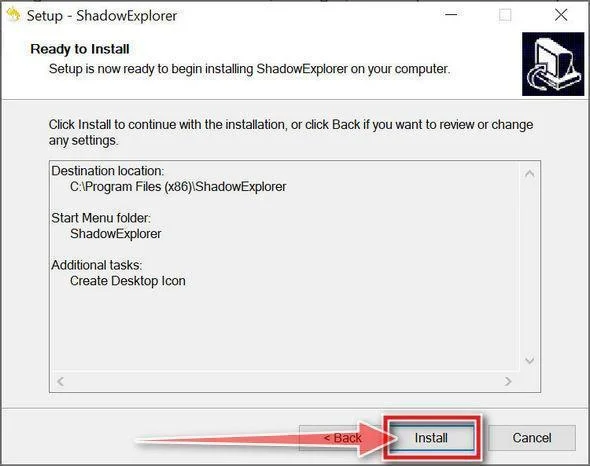
Install ShadowExplorer.
Double-click on the ShadowExplorer-x.x-setup file to start the installation process, then follow the on-screen promts to install this program.
-
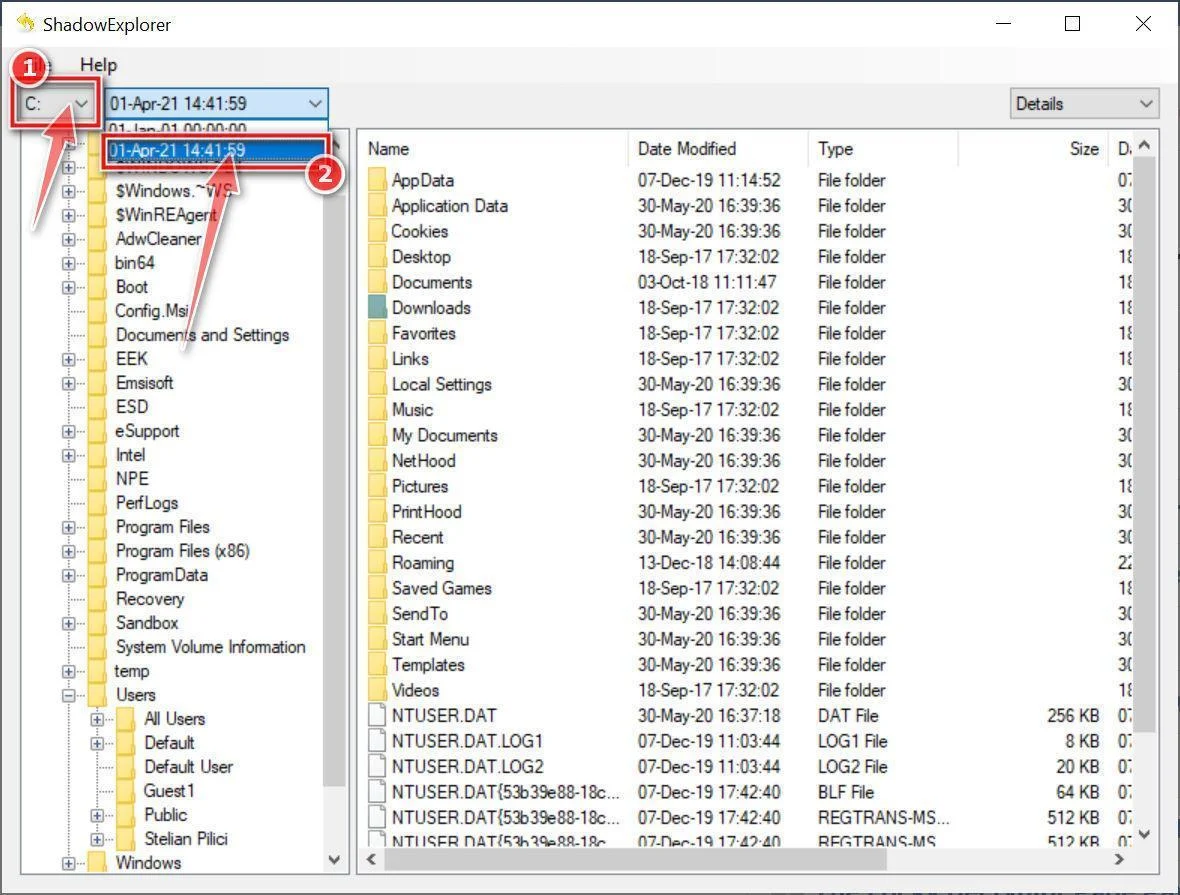
Select snapshot date.
Open ShadowExplorer and then from the top bar select the drive where the files that you want to save are located, then select from the snapshot available one previous to this infection.
-
Export the files that you want to recover.
Once you have found a copy of the original file or folder, right-click on it and the select “Export”. A window will prompt you where you want to save the file or folder.
Keep every .solutionwehave247 name exactly as it is. Do not bulk-rename 1.jpg.solutionwehave247 back to 1.jpg, or photo.jpg.solutionwehave247 back to photo.jpg, or invoice.pdf.solutionwehave247 back to a normal PDF, or taxes.xlsx.solutionwehave247 back to a spreadsheet, or family.mp4.solutionwehave247 back to a video. Stripping the extra ending is not a repair. It can make a later trusted tool worse, not better. The original name is already sitting in front of .solutionwehave247. You do not need to edit it to know what you lost.
Keep READ_NOTE.html with the locked files, and keep at least one .solutionwehave247 sample next to it. Do not “clean up” every copy of the note. Do not fill Personal ID, the site, or Tor-chat so the flyer looks complete. The blanks, or the extra text on your disk, are part of how you prove this was this strain and not a different locker that only sounds similar. Keep the contact marks as identifiers: wehavesolution@onionmail.org, solution247days@outlook.com, the Tox string, the RSA+AES line, the 72-hour hike, and the 2-3 file offer. Those artifacts are evidence. They are not instructions you should carry out.
Do not email those two addresses. Do not add that Tox. Do not ask a friend to write them “just to see.” A calm address is still the people who locked the files. A new Proton account is still their costume. If a later message quotes READ_NOTE.html and offers “the real chat ID,” that is still the same shop. If a later message skips the original inboxes and asks for coin over a different address, that is still the same shop, or a copycat standing in the same doorway.
Do not treat 72 hours as a clock you must meet. Do not pay this leak note. Do not send the 2-3 file demo. If someone claims they can already decrypt SolutionWeHave files for a fee because they can recite RSA+AES and the two inboxes, they are selling a report, not a key. If they mention MedusaLocker as proof they “already called the crew,” they read a family name. This is MedusaLocker-family SolutionWeHave, not a help desk, not a 24/7 recovery firm, and not Bear. Do not answer. Do not complete their checkout. Do not help them fix the flyer.
If Windows still offers to pick an app for the .solutionwehave247 type, decline it. There is no player for that ending.
The Bottom Line
SolutionWeHave ransomware is a MedusaLocker-family locker with a help-desk name, a readable filename, an HTML note, a wallpaper change, a printed Tox, and a 72-hour price hike. It keeps the old name and appends .solutionwehave247. 1.jpg becomes 1.jpg.solutionwehave247. The note is READ_NOTE.html. It shouts that your company network has been penetrated, claims RSA+AES, says the files are safe, only modified, warns that third-party restore will corrupt them, claims stolen data, threatens to leak or resell if unpaid, and offers 2-3 non-important files as a free decrypt. It points you at wehavesolution@onionmail.org and solution247days@outlook.com, prints Tox BA3779BDEE7B982BF08FC0B7B0410E6AE7CC6612B13433B60000E0757BDD682A69AD98563AEC, and tells you to create a new Proton Mail to write them. Personal ID is blank. The site is blank. Tor-chat is blank. This page will not invent a Session ID, an onion, a wallet, or a victim $ figure. There is no public free decryptor known for this strain.
Do not email those two addresses. Do not add that Tox. They are not a help desk. Do not treat 72 hours as a real clock. Do not pay this leak note. Do not rename the pile in bulk. Keep READ_NOTE.html and a .solutionwehave247 sample. If you take one sentence with you, take this. A folder of names ending in .solutionwehave247, plus READ_NOTE.html and a wallpaper change, is ransomware on the first sighting. It is MedusaLocker-family SolutionWeHave, not a 24/7 recovery firm. Treat it that way before anyone offers to fill the blank ID line.

Join the discussion
0 commentsShare your experience or ask a question about this article.
Discussion
Start the conversation
Have a question or something useful to share? Add the first comment.