

Java 8 is the leftover runtime that still opens the bank applet, the printer queue, and the old shop tool. Oracle’s August 2026 Critical Security Patch Update closed holes in JSSE, Networking, and Install on that train. The free fix for Java SE 8 is Update 503, dated 18 August 2026. On Windows, open Configure Java, Update, Update Now, install 8u503, and confirm About shows 8 Update 503 (1.8.0_503).
Overview
What broke
On 18 August 2026 Oracle published the Critical Security Patch Update for August 2026. The Java SE affected floor list names 8u501, 11.0.32, 17.0.20, 21.0.12, 25.0.4, and 26.0.2. The same day, the free Java Update page for Java SE 8 posted Version 8 Update 503. Oracle says the release addresses security concerns and strongly recommends that all Java SE 8 users upgrade.
For leftover Java 8 on a home or shop PC, three components lead the story. CVE-2026-70907 sits in JSSE, the TLS stack inside Java. CVE-2026-61308 sits in Networking, how Java talks HTTP. CVE-2026-62574 sits in Install, the code that puts Java on the disk and wires the Control Panel. One 8u503 install covers that set on the 8 train.
JSSE and Networking are everyday pipes a sandboxed client already uses. Install is the local disk path. Oracle notes several rows can be reached through component APIs, including sandboxed Java Web Start or applets. That is leftover bank and printer Java, not a new hobby runtime.
Oracle has not said these Java SE CVEs are being used in the wild. CISA has not listed 70907, 61308, or 62574 on the Known Exploited Vulnerabilities catalog. That is not a reason to leave 8u501 on the Start menu. The free Update 503 installer is already on java.com.
Who is in range
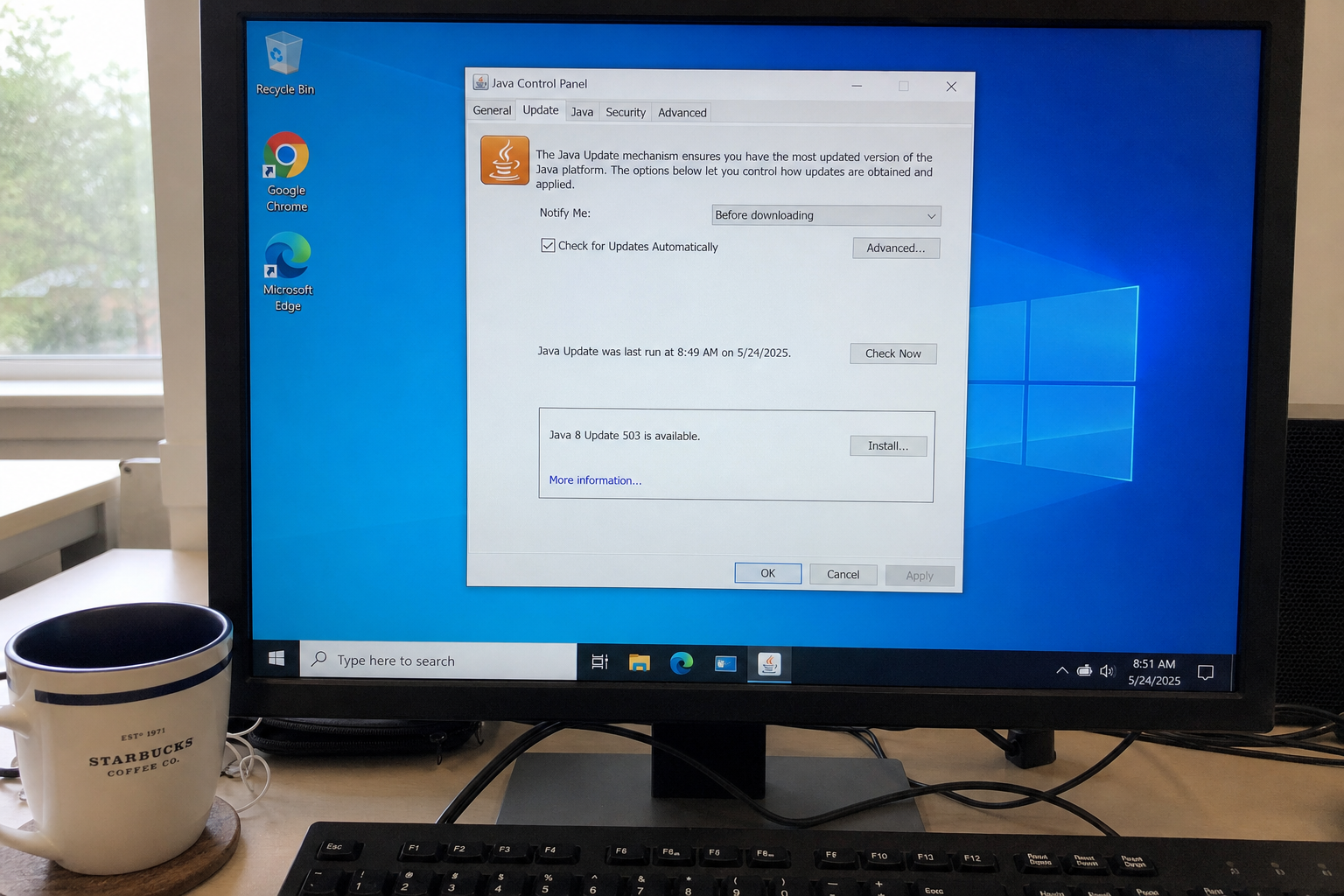
You. Especially leftover Java 8 for bank, printer, or legacy apps. If Java Control Panel, About, or java -version still reads 8 Update 501 (1.8.0_501) or any older 8u build, you are in range. The overview photo may show a wrong last-run date. Ignore that stamp. Use 18 August 2026 as the release day for 8u503.
A shop front-desk PC that still launches an old Java tool stays in range until About shows 8 Update 503. The machine that “only prints labels” still loads the JRE. Browser updates do not patch Java. They do not share an installer.
If the PC has Java 11, 17, 21, 25, or 26 instead of 8, you are on a different train. Take the matching CSPU build newer than the affected floors above (11.0.32, 17.0.20, 21.0.12, 25.0.4, 26.0.2). Do not install 8u503 on a machine that only runs those newer trains.
What the vendor shipped
- Java SE 8 free update, 18 August 2026: Version 8 Update 503 (1.8.0_503). This is the home number for leftover Java 8.
- Oracle CSPU August 2026 Java SE floors: 8u501, 11.0.32, 17.0.20, 21.0.12, 25.0.4, 26.0.2. Builds newer than those floors close the matrix for each train.
- Lead Java 8 components: JSSE (CVE-2026-70907), Networking (CVE-2026-61308), Install (CVE-2026-62574). One 8u503 install covers that set on the 8 train.
Windows path: Start, Configure Java (or Java Control Panel), Update tab, Update Now or Install, then finish 8u503. Or open the free Java Update page and install from there. Confirm Java Control Panel, About shows 8 Update 503 (1.8.0_503). Mac and Linux: use the matching Oracle or OpenJDK channel for the version you actually run. Do not grab a random “Java update” from a search ad.
What this is not
- Not a browser patch. Chrome, Edge, and Firefox updates do not move the JRE number.
- Not closed by staying on 8u501. 8u503 is the free Java 8 floor for this CSPU.
- Not the right installer if you only run Java 11, 17, 21, 25, or 26. Those trains need their own CSPU builds.
- Not on CISA KEV. Oracle has not said 70907, 61308, or 62574 is in the wild.
- Not CVE-2026-70906. That August row is 2D on Java SE 25.0.4 and 26.0.2, not the Java 8 JSSE story. JSSE on 8u501 is CVE-2026-70907.
- Not done if you downloaded the package and never finished the install, or never checked About.
- Not an invent-the-attack story. Bug details stay in Oracle’s matrix. The action is the Update tab.
The patch is out. Configure Java is already in the Start menu on many Windows boxes.
Do This Now
In range: You. Java 8 below Update 503 for bank, printer, or legacy apps. Other trains below their August 2026 CSPU floors.
Urgency: This week. The free 8u503 build is dated 18 August 2026. The Control Panel Update tab is already on the PC.
- Windows: Start, Configure Java, Update tab, Update Now or Install 8u503.
- Or open the free Java Update page and install Version 8 Update 503.
- Confirm Java Control Panel, About shows 8 Update 503 (1.8.0_503). Mac and Linux: use the matching Oracle or OpenJDK channel for the version you actually run. If you are on 11, 17, 21, 25, or 26, take that train’s CSPU build, not 8u503.
Who can skip
- No Java runtime installed on the PCs you use.
- Java Control Panel About already shows 8 Update 503 (1.8.0_503), or a newer 8u build after this CSPU.
- You only run Java 11, 17, 21, 25, or 26, and that train is already on a CSPU build newer than 11.0.32, 17.0.20, 21.0.12, 25.0.4, or 26.0.2.
- A locked shop image with no Java, and no user can install a JRE.
- OpenJDK-only machines already past the matching August 2026 security level for that train via your distro or vendor channel.
Why it matters
Java 8 sticks around for the tool that never got rewritten: the bank flow, the label printer, the old inventory JAR. That runtime still speaks TLS and HTTP and still has an installer path on disk. JSSE and Networking are everyday pipes. Install is a local privilege story once something can run as a normal user.
Oracle did not hang an exploited flag on these rows, and CISA has not added them to KEV. Waiting is how 8u501 sits under the Start menu while the bank bookmark keeps working. Browser updates do not move it. If you already migrated to Java 17 or 21, do not force 8u503 onto that box unless a legacy app still needs it. Patch the train you actually launch. The free Update page and Control Panel Update tab are the same floor: 8 Update 503.
The bottom line
On Windows
- Open Start and type Configure Java, or open Java in Control Panel.
- Open the Update tab. If the panel offers Update Now or shows Java 8 Update 503 is available, click Install or Update Now and finish the wizard.
- If the Update tab will not move, open the free Java Update page for Java SE 8 and install Version 8 Update 503 from Oracle’s page, not from a search ad.
- When the installer finishes, open Java Control Panel again. On the General tab, click About. The line you want is 8 Update 503, also written 1.8.0_503.
- If About still reads 8 Update 501 or older, stay on the Update tab or rerun the 8u503 installer. Do not trust the tray icon alone.
- If this PC has no Java 8 and instead shows Java 11, 17, 21, 25, or 26, stop. Take that train’s August 2026 CSPU build from Oracle or your OpenJDK channel. Do not install 8u503 as a substitute.
If Configure Java never moves
Quit browsers that may be holding a Java process. On Windows, check Task Manager for javaw.exe leftovers, then reopen Control Panel and try Update again. A download stuck at 0% is often a proxy, offline installer policy, or blocked java.com reach. Use the network you already trust. Do not download a “Java update” from a random results page. Oracle’s free Java Update page and the Control Panel updater are the installers.
A shop PC with Java frozen by Group Policy, an MDM catalog, or a golden image will not self-update from the Update tab. Ask whoever owns the image to push 8u503 for Java 8 fleets, or the matching CSPU build for 11, 17, 21, 25, or 26. Same security work, delivered by the shop’s tool.
On Mac, Linux, and the other PC
- Mac: use the Oracle Java update path you already trust for the version that
java -versionprints, or your managed OpenJDK channel. Confirm the build is newer than the August 2026 floor for that train. - Linux: use your distro or vendor OpenJDK package, or Oracle’s matching update for the version you actually run. Confirm the package moved past 8u501 or the listed 11, 17, 21, 25, 26 floors.
- The laptop in the bag, the shop front-desk PC, the machine that only opens the printer tool: same check tonight. One stale JRE is enough.
- Browsers are separate clicks. Updating Chrome or Edge does not change the Java About line.
What you should see
On Java Control Panel, About, the product version is 8 Update 503 (1.8.0_503). From a terminal, java -version should show 1.8.0_503 on a Java 8 box. If you still see 1.8.0_501 or an older build, stay on Update Now or rerun the installer. Ignore any old last-run stamp in the overview photo. The release date that matters is 18 August 2026.
When you are done
Java 8 About reads 8 Update 503 (1.8.0_503), or your non-8 train reads a CSPU build newer than its August 2026 affected floor. You finished the installer once. Browsers are separate. You do not need to clear history or remove the bank bookmark. You needed a current JRE on the train you actually run. You have it.