

Brave is the Chromium browser a lot of people keep for Shields and the cleaner defaults. On 21 August 2026 Brave shipped 1.93.138 and folded in Google’s Thursday Chromium train, 151.0.7922.173. That set closes a Critical use-after-free in Chromoting plus six Highs. Chrome’s own About screen does not update Brave. Open Help, About Brave, or type brave://settings/help in the address bar, wait for Brave 1.93.138, and Relaunch. Confirm Chromium 151.0.7922.173 on the same line.
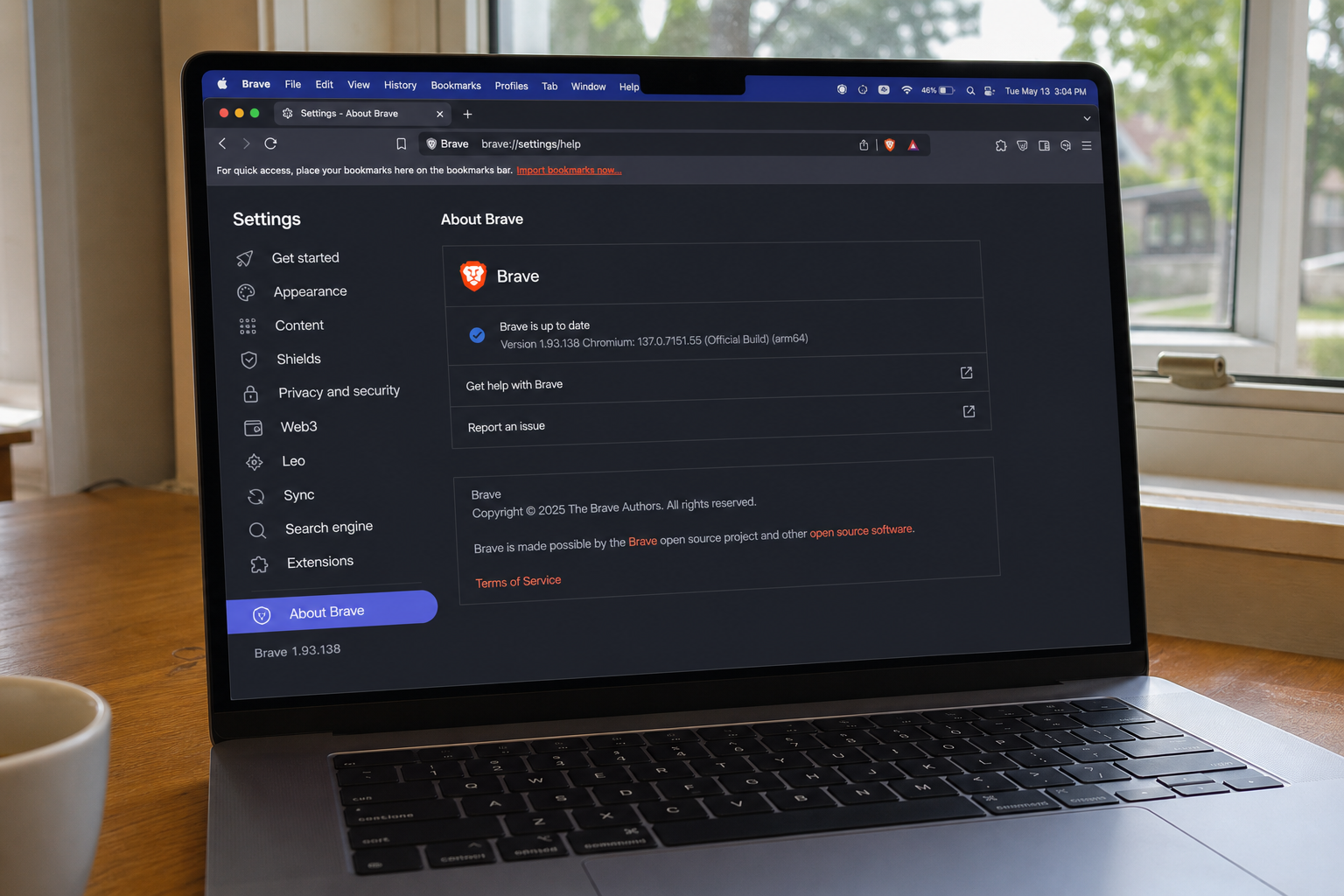
Overview
What broke
Brave does not invent this week’s Critical row. It absorbs Chromium. Google’s stable channel update for desktop on 20 August 2026 lists seven security fixes. The Critical one is CVE-2026-76017, a use after free in Chromoting. Chromoting is the remote-desktop code in the Chromium family. A use-after-free is the browser freeing a block of memory, then using it anyway. The leftover bytes can become instructions.
The same Google drop names six Highs that ride one installer: CVE-2026-76018 privilege elevation in Import, CVE-2026-76019 incorrect authorization in Workers, CVE-2026-76020 a race in V8, CVE-2026-76021 a use after free in the DOM, CVE-2026-76022 a buffer overflow in Network, and CVE-2026-76023 improper resource control in Linux Toolkit Theming. The DOM bug looks like a tab. Workers, V8, and Network ride everyday page work. One Brave rebuild closes the set for Brave users.
Brave’s own note is short and clear. The v1.93.138 release, published 21 August 2026, says desktop and Android both upgraded Chromium to 151.0.7922.173. That is the Thursday Google train, not Tuesday’s 169 line. Bug details on Google’s side stay locked until most people have the fix. That is the usual rule, not a hint the holes are already in use.
Google has not said any of these seven are being used in the wild. CISA has not listed 76017 through 76023 on the Known Exploited Vulnerabilities catalog. Waiting is still how a Critical Chromoting hole sits under the lion icon for another day while you keep clicking through Mail.
Who is in range
Anyone still launching Brave on Windows, Mac, or Linux below 1.93.138, or on Android below 1.93.138. If About Brave still reads 1.93.xxx from earlier in the week, a 1.92 build, or anything that still shows Chromium below 151.0.7922.173, you are in range. The floor for this brief is Brave 1.93.138 with Chromium 151.0.7922.173 on the same About line.
A shop PC with Brave pinned next to Chrome is in range on the Brave copy until About shows 1.93.138. Updating Chrome does not patch Brave. Updating Edge does not patch Brave. They share Chromium guts. They do not share the installer or the version string. Chrome-only readers already have a separate draft for Google’s 173 train. This number is not theirs.
Firefox-only and Safari-only households can skip if Brave is not installed on any PC or phone they click. If Brave is still the handler for Mail or Start links on one machine in the house, that machine is in range.
What the vendor shipped
- Brave desktop 1.93.138, 21 August 2026: upgraded Chromium to 151.0.7922.173.
- Brave Android 1.93.138, same release notes: upgraded Chromium to 151.0.7922.173.
- Google Chrome Stable security set behind that Chromium line: Critical CVE-2026-76017 plus Highs CVE-2026-76018 through CVE-2026-76023.
The floor is Brave 1.93.138. Do not stop at a Brave 1.93 build that still lists an older Chromium string. The in-app path is the three-dot menu, Help, About Brave. You can also type brave://settings/help in the address bar. Brave downloads the build itself. You wait, then Relaunch. Phone builds come from Google Play, then Brave’s own About screen for the same 1.93.138 confirm.
What this is not
- Not a Chrome update. Chrome readers take Google’s own About screen and Google’s own build numbers. Brave 1.93.138 is not Chrome’s floor.
- Not patched by updating Microsoft Edge, Opera, or Vivaldi. Same engine family, different installer, different About page.
- Not Tuesday’s Chromium 169 train. Brave 1.93.138 tracks 151.0.7922.173, the Thursday set with 76017.
- Not on CISA KEV. Google has not said 76017 through 76023 are in the wild.
- Not done if you downloaded the build and never hit Relaunch. The old process is still running until Brave restarts.
The patch is out. About Brave is already in the menu. That is the cheap window.
Do This Now
In range: You. Brave below 1.93.138 on Windows, Mac, Linux, or Android.
Urgency: Today. The Critical hole rides the Chromium stack inside Brave. The updater is already in Help, About Brave.
- Open Brave. Three dots, Help, About Brave. Or type brave://settings/help in the address bar.
- Wait until it shows Brave 1.93.138 with Chromium 151.0.7922.173, then Relaunch.
- On the phone: Google Play, update Brave, swipe it away, reopen it, then check Brave About for the same 1.93.138 build.
Who can skip
- About Brave already shows 1.93.138 or newer, Chromium reads 151.0.7922.173 or newer on that line, and you have relaunched once.
- Android Brave already shows 1.93.138, and no desktop Brave in the house is still below 1.93.138.
- Chrome-only. Chrome has its own updater and its own draft for the .173 set. Do not type Brave 1.93.138 into Chrome and call it done.
- Edge-only. Edge has its own About screen and its own number.
- Firefox-only, and you have confirmed Brave is not the handler for Mail or Start links.
- Safari-only on iPhone, and Brave is not installed on any PC you click.
Why it matters
Brave holds the same kind of session Chrome does when it is your daily driver: mail, the bank tab, the password door, the shop console. A use-after-free in Chromoting is how remote-desktop code in the Chromium family stops being a helper and starts being the process. A use-after-free in the DOM is how a nasty page stops being a tab. You do not need a second exploit story for that to be worth a restart.
People skip Brave updates because they already updated Chrome the same week. That habit leaves the lion icon on Thursday’s hole. Chromium is shared code. The installer is not. Brave’s release train is a day behind Google’s Stable note here, and that is normal. The cheap move is still the same: take the Brave build that names 151.0.7922.173.
Google did not put an exploited flag on these CVEs. CISA has not added them to KEV. Waiting is still how a Critical set sits under Shields for a week while you keep clicking. Tuesday’s Chromium 169 work is a different train. If your Brave is still on an older 1.93 that never absorbed 173, you are not on this floor.
A shop that images PCs once a quarter is the other half of in range. The machine that “only opens one site” still launches Brave if that is what is pinned. Chrome and Edge need their own About screens. Brave’s 1.93.138 is not their build number, and their numbers are not Brave’s floor.
The bottom line
On the PC
- Open Brave. Any tab is fine. You do not need a special page.
- Click the three dots in the top right.
- Click Help, then About Brave. Or paste brave://settings/help into the address bar and press Enter. The About page is a real Brave tab. It will say Brave and a version number, then start checking.
- Let it download. The line you want is Brave 1.93.138. On the same line, Chromium should read 151.0.7922.173. If Brave is still below 1.93.138, or Chromium still shows an older 151 build, stay on the page.
- Click Relaunch when the button appears. Brave will close every window and reopen them. That is expected. If there is no Relaunch button and the number is already 1.93.138 with Chromium 151.0.7922.173, you are done on this PC.
- Open About one more time after the restart and read both numbers. Do not trust the splash. Trust the About line.
If About Brave never moves
Quit Brave fully. On Windows, check the system tray and Task Manager for leftover Brave processes, then reopen Brave and try About again. A download that sits at 0% is often a store, proxy, or “metered connection” block. Use the network you already trust. Do not download Brave from a random “browser update” site. Brave’s own About page is the installer.
A shop PC with Brave managed by policy, an MDM tool, or a locked catalog will not self-update no matter how many times you open About. Ask whoever owns the image to push 1.93.138. That is the same build. It is just delivered by the shop’s tool instead of Help, About Brave.
On the phone and the other PC
- Android: Google Play, Brave, Update. Swipe the app away and open it once. Brave About should show 1.93.138. The release notes put the same Chromium 151.0.7922.173 upgrade on Android.
- The laptop in the bag, the shop front-desk PC, the machine that only opens Mail in Brave: same Help, About Brave path tonight. One stale Brave is enough.
- Chrome and Edge are different products with different About screens. Do not type Brave 1.93.138 into those screens and call it done. Do not tell a Chrome-only reader that Brave’s number is their floor.
What you should see
On the About tab, under the Brave heading, you want Brave 1.93.138. The Chromium string on that same line must read 151.0.7922.173. Ignore any older Chromium build string that might appear in a screenshot next to 1.93.138. The overview photo can show a mismatched Chromium label. Copy and the live About page are the source of truth: Brave 1.93.138 and Chromium 151.0.7922.173 only. A copyright year printed on the same screen is not a version. Stay on the page until both numbers match. The progress line is the download. The Relaunch button is the close. After Relaunch, the same About tab should show the new pair without asking again.
When you are done
Desktop About reads Brave 1.93.138 with Chromium 151.0.7922.173. Android About reads Brave 1.93.138 after a Play Store update and a force-close. Both have been relaunched or force-closed once. Chrome and Edge are separate clicks with separate numbers. This tab closes Brave. You do not need to clear history or sign out of anything. You needed a new Brave build that absorbed Chromium 151.0.7922.173. You have it.