

A letter carrying the IRS seal says your tax refund could not be deposited. It asks you to act within 30 days, points to an online account, and may include a QR code.
That combination is unsettling. The notice looks official, but it also asks you to deal with the kind of banking problem criminals routinely exploit.
Before scanning anything, calling a number, or entering account details, there are several details every taxpayer should check.
Overview
The real CP53E notice
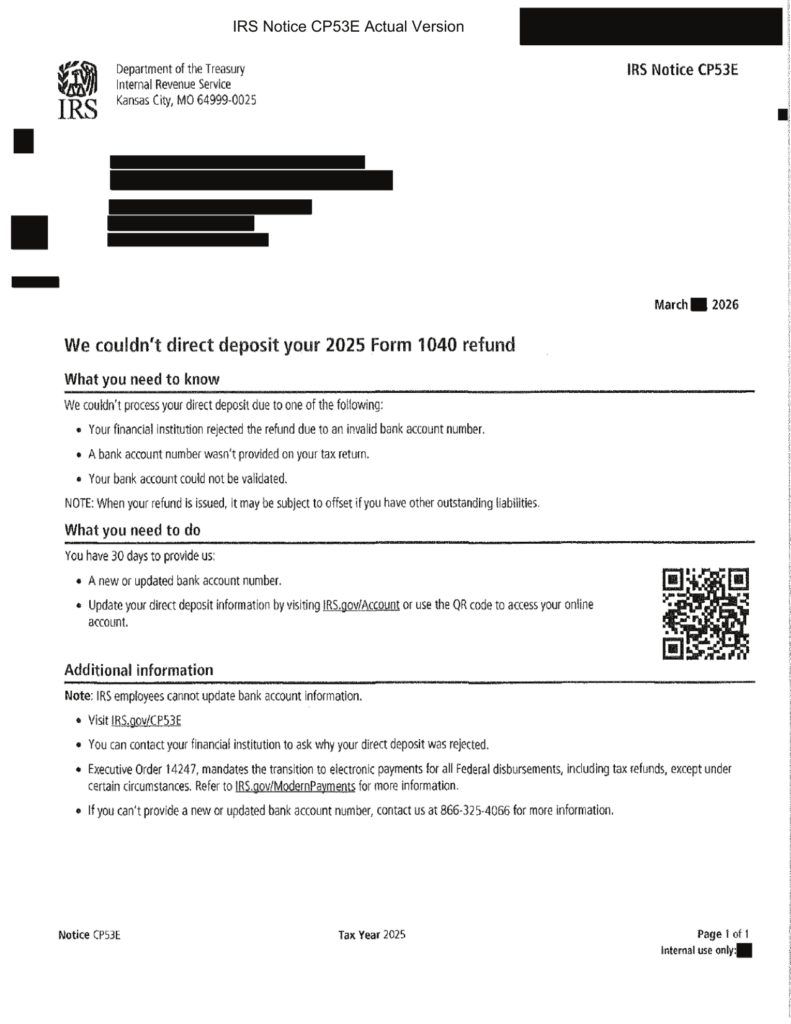
CP53E is a genuine IRS notice used when the agency cannot send a refund by direct deposit. The reason may be a missing bank account number, an invalid number, a rejected deposit, or a bank account the IRS could not validate.
The notice gives the taxpayer 30 days to update the account through an IRS Individual Online Account or choose an available paper-check exception. IRS employees cannot take or change the bank information by phone.
The criminal opportunity
A real notice about a delayed refund gives scammers an unusually convincing script. A fake letter, email, text, social ad, or phone call can copy the CP53E name and claim that money is waiting.
The trap begins when the recipient is sent to a lookalike sign-in page, asked to scan a substituted QR code, or pressured to reveal banking details to a supposed IRS representative.
The safest response
Do not use contact details supplied by an unexpected caller, text, or email. Type IRS.gov into the browser yourself, open your account, and check whether the notice appears there.
- CP53E is real, but criminals can imitate it.
- A legitimate notice may contain a QR code that leads to IRS.gov.
- The IRS does not collect banking details by phone, email, or text.
- The number 866-325-4066 is informational and cannot update an account.
- Your IRS Online Account is the safest place to verify the notice.
Why CP53E Created a Perfect Refund Scam Script
Most IRS impersonation scams invent a tax debt. CP53E offers criminals a more attractive story: the government already owes you money, but one small banking problem is holding it back.
That message lowers a victim’s guard. People are more willing to act when they believe they are recovering their own refund rather than paying a surprise bill.
The 30-day deadline adds urgency without sounding absurd. The request for updated bank information also matches the purpose of the real notice, so a fake version can appear plausible at first glance.
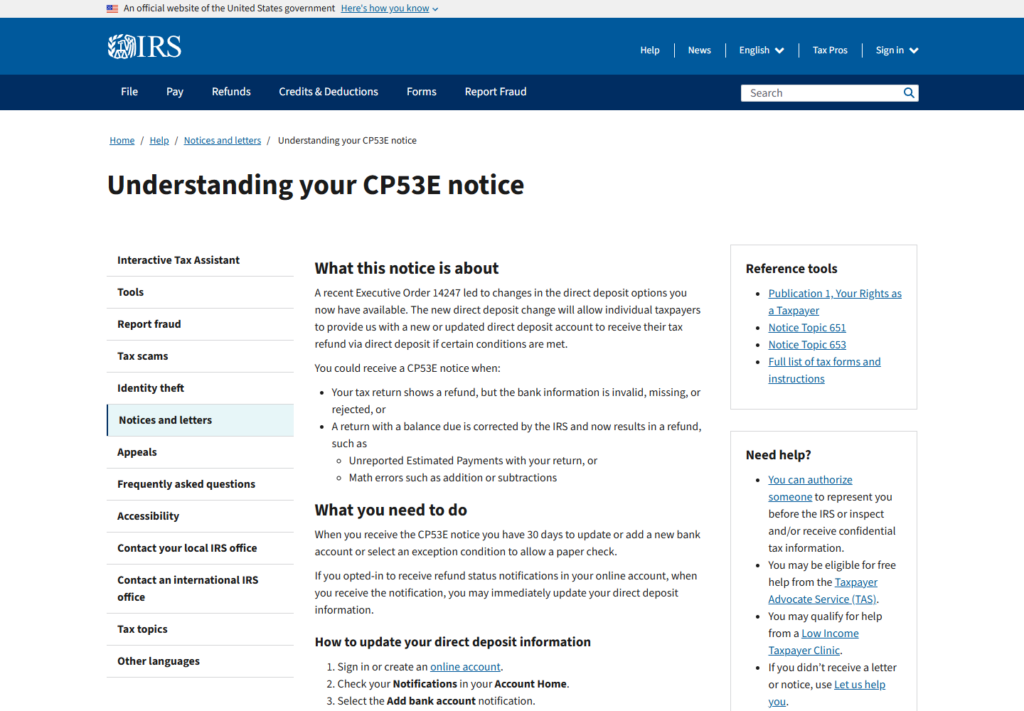
The IRS says CP53E can be issued when a return shows a refund but the bank information is missing, invalid, or rejected. It may also follow an adjustment that turns a return into a refund.
The official process stays inside the taxpayer’s IRS Online Account. A government employee cannot type the new routing or account number into the system during a call or office visit.
That boundary is the simplest test. Anyone who asks you to read banking details aloud, reply with them, or enter them on a non-IRS website is not following the CP53E process.
How the IRS CP53E Scam Works
Step 1: The message announces a blocked refund
The scammer says the IRS tried to deposit a refund but the bank rejected it. The amount may be large enough to create excitement but ordinary enough to sound believable.
The first contact could be a counterfeit letter. It could also be an email, text, phone call, voicemail, or social-media message referring to an alleged CP53E notice.
Step 2: Official details are copied
The fake may use the IRS logo, Department of the Treasury wording, Notice CP53E, a tax year, and the real informational number 866-325-4066.
A real number on a fake letter does not authenticate the rest of the document. Criminals often mix accurate public information with a malicious link or QR code.
Step 3: A deadline forces a quick decision
The recipient is told that the refund will be canceled, delayed for months, or converted to a paper check unless the bank details are updated immediately.
The genuine notice does give taxpayers 30 days, which makes this pressure harder to dismiss. The scammer’s goal is to prevent an independent visit to IRS.gov.
Step 4: The victim is moved to a lookalike portal
A QR code or short link opens a page designed to resemble an IRS sign-in screen. The address may contain words such as IRS, refund, account, secure, or gov while ending on an unrelated domain.
The page may request an email address, password, Social Security number, date of birth, home address, filing status, and bank account details.
Step 5: Identity and banking data are collected
With those details, criminals can attempt account takeover, tax identity theft, fraudulent credit applications, or unauthorized transfers.
Some fake portals also request a small processing fee. That payment exposes card information and gives the criminal an immediate return even if the larger identity-theft attempt fails.
Step 6: A second scam follows
Once a person responds, the same data can support follow-up calls from a fake bank, tax preparer, fraud department, or refund recovery service.
The caller may know the victim’s name, address, refund amount, or bank. Familiar details do not prove identity when those details came from the first phishing form.
A QR Code Does Not Automatically Make CP53E Fake
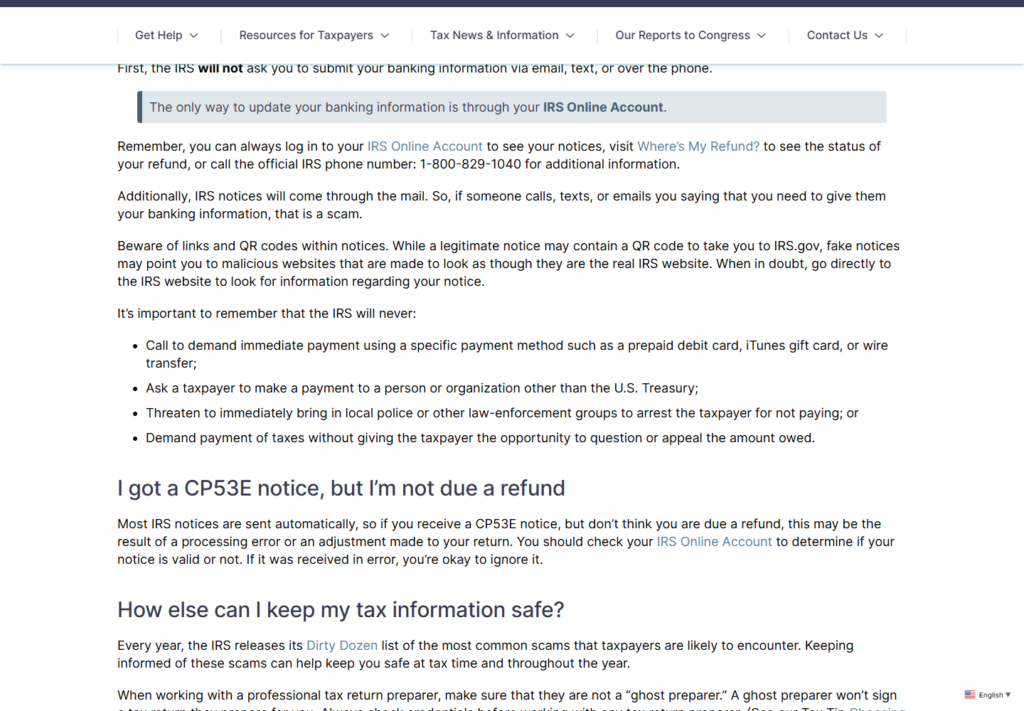
One dangerous oversimplification circulating online is that a real IRS notice will never contain a QR code. That is incorrect for CP53E.
The published sample notice directs taxpayers to IRS.gov/Account and includes a QR code. The Taxpayer Advocate Service also warns that both legitimate and counterfeit notices may contain one.
The right question is not whether a QR code exists. It is where the code leads and whether the same notice can be confirmed independently in the taxpayer’s official account.
A phone camera usually displays the destination before opening it. Even then, a deceptive address can be difficult to evaluate on a small screen.
The safest method is to ignore the code, type IRS.gov into the browser, sign in from there, and check the account notifications. That removes the code from the trust decision entirely.
Do not assume that a page is official because it has a padlock. HTTPS only encrypts the connection. Criminal websites can obtain certificates too.
Real CP53E Notice vs. a Refund Phishing Attempt
- Delivery: The real notice arrives by physical mail. An email, text, or unsolicited call demanding bank information is not the CP53E update process.
- Account update: The real process uses the IRS Individual Online Account. A caller cannot update the account for you.
- Website: The destination should be on IRS.gov. Similar-looking domains, extra words, misspellings, and unfamiliar endings are warning signs.
- Payment: CP53E concerns a refund deposit problem. It does not require a gift card, cryptocurrency payment, wire transfer, or processing fee.
- Threats: Police threats, arrest claims, secrecy demands, and immediate payment pressure do not belong in this process.
- Verification: A genuine notice should be reflected in the official online account or refund-status tools.
The notice may be genuine even when the taxpayer did not expect it. The IRS says an automated adjustment or processing error can create a refund that was not apparent on the filed return.
That is another reason to verify inside the account instead of deciding from appearance alone. A high-quality fake can look convincing, while a real government letter can look unfamiliar.
MalwareTips previously examined calls involving 866-325-4066. The number can appear in official CP53E material, but caller ID and printed numbers can be copied or spoofed.
Company, Address, and Fulfillment Checks
The agency name is easy to copy
Internal Revenue Service and Department of the Treasury are public names. A logo, envelope, barcode, or notice code does not prove who created a document.
Authentication comes from an independent channel, not the graphics on the page. Open IRS.gov separately and compare the account record with the letter.
The phone number has a narrow purpose
The official notice lists 866-325-4066 for more information when a taxpayer cannot provide a new bank account. The IRS says employees cannot update bank details through that call.
If someone answering or calling from that number asks for full banking credentials, stop. Caller ID can be spoofed, and fake letters can print a real number beside a malicious code.
The QR code is only a shortcut
A QR code should never become the sole proof that a notice is genuine. It is simply another way to encode a web address.
Typing IRS.gov yourself is slower by a few seconds and removes an entire layer of risk. The notice can still be handled without scanning the code.
The destination reveals the real operator
An authentic online update remains on an IRS.gov address and uses the established IRS sign-in flow. A redirect to another commercial domain, a file download, or a payment page breaks that chain.
Do not enter information to see what happens next. Save the address, take a screenshot, close the page, and report it.
What to Do if You Have Fallen Victim to This Scam
- Pause before scanning or calling. A 30-day response window does not require a decision in the next five minutes.
- Type IRS.gov into the browser. Do not use a link from an email, text, sponsored search result, or unexpected message.
- Open your IRS Individual Online Account. Check account notifications and notices for a CP53E entry.
- Check Where’s My Refund. Compare the refund status with the story in the letter.
- Use an official number if more help is needed. The main IRS individual line is 1-800-829-1040. Obtain it from IRS.gov, not from the message.
- Do not provide bank details by phone, email, or text. The legitimate CP53E update is completed in the online account.
- Preserve suspicious evidence. Photograph the envelope and letter, save the full email headers, record the sender, and copy the destination URL without opening it again.
- Report impersonation. Forward suspicious IRS-themed email to phishing@irs.gov and report identity theft at IdentityTheft.gov.
- Contact the bank immediately if details were exposed. Ask for account monitoring, new credentials, and instructions for disputing unauthorized activity.
If you entered information on a fake IRS page
Change the password for the affected email account first, then change any reused passwords. Turn on multi-factor authentication using an authenticator app where available.
Contact the bank using the number on the back of the card or a statement. Explain exactly what was entered, including routing numbers, account numbers, card data, and login credentials.
Create an IdentityTheft.gov recovery plan and consider a credit freeze with Equifax, Experian, and TransUnion. A freeze is stronger than routine credit monitoring because it can block new-account fraud.
If a file was downloaded or an unfamiliar app was installed, disconnect the device from sensitive accounts and run a full scan with Malwarebytes. A scan does not reverse data already submitted, but it can detect common payloads.
To reduce future exposure to malicious ad redirects and known phishing domains, a reputable content blocker such as AdGuard can add another layer. It is not a substitute for verifying IRS.gov manually.
Frequently Asked Questions
Is IRS Notice CP53E real?
Yes. CP53E is an official IRS notice about a refund that could not be delivered by direct deposit. Criminals can still copy the notice name and format, so verify it in your IRS Online Account.
Does a real CP53E notice contain a QR code?
It can. The published notice sample includes a QR code for IRS.gov/Account. Because a fake notice can substitute another code, typing IRS.gov yourself is safer than scanning.
Is 866-325-4066 an IRS number?
The number appears on official CP53E material for information. It cannot be used by an employee to update banking details. A printed number or caller ID can also be copied or spoofed.
Will the IRS ask for bank information by phone?
No. The IRS and Taxpayer Advocate Service state that CP53E banking updates are made through the IRS Individual Online Account, not by phone, email, or text.
What happens if I ignore CP53E?
The IRS says that if the taxpayer does not respond within 30 days, it will issue a paper check after six weeks. Delivery timing can be longer, so verify the current instructions on IRS.gov.
What if I received CP53E but expected no refund?
An IRS adjustment or processing error may have created a refund. Check the notice in the online account and review Where’s My Refund before assuming the letter is fake.
The Bottom Line
CP53E is real, and that is exactly why the scam version is dangerous. It gives criminals a believable reason to ask about a delayed refund and updated banking information.
Ignore the shortcut. Type IRS.gov yourself, verify the notice inside your account, and never give banking details to a caller, text sender, or email recipient.








