


The email lands at exactly the right moment. It announces a new Google AI feature, names products developers recognize, and describes capabilities that can be confirmed on Google’s own website.
That accuracy is what makes the Gemini 3.5 phishing email dangerous. One detail separates a legitimate announcement from a credential trap, but it is not the product name.
Overview
Gemini 3.5 Transcribe is a real Google product
Google’s official Gemini API release notes show that Gemini 3.5 Transcribe became generally available on August 26, 2026. The dedicated speech-to-text model supports language detection across more than 85 locales, speaker diarization, word-level timestamps, custom vocabulary, and smart transcription.
Those details closely match the claims shown in a recent suspicious email. A recipient could search the product name, find an official Google page, and reasonably conclude that the announcement itself must also be genuine.
The reported message copied the launch but failed sender checks
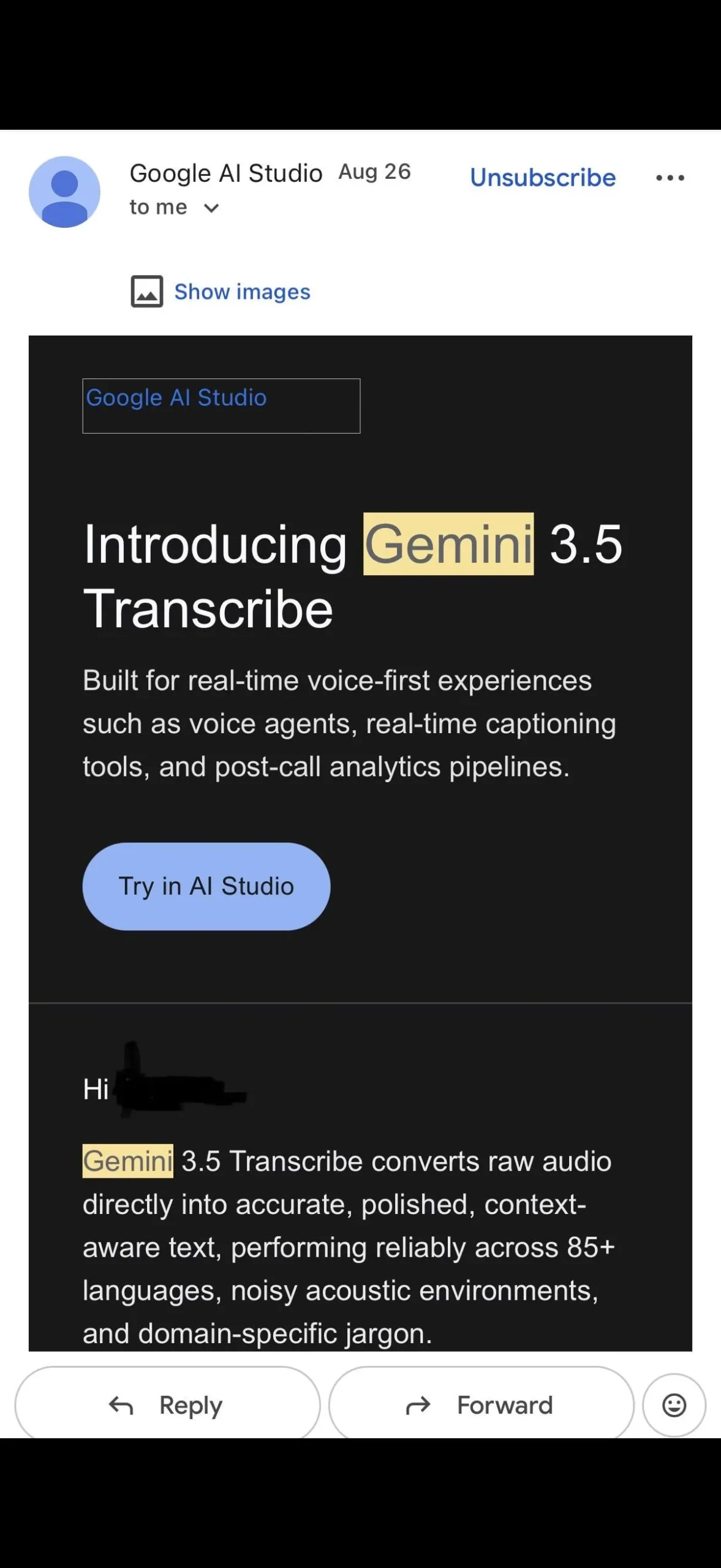
A recent consumer report included a mobile screenshot of an email titled “Introducing Gemini 3.5 Transcribe.” It used a Google AI Studio display name, described the real product, and included a blue “Try in AI Studio” button.
The recipient said Google reviewed the message and confirmed it was phishing. That report does not reveal the complete message headers or final link destination, so this article does not claim that every email with the same subject is fraudulent. It explains why accurate launch copy cannot authenticate a specific message.
The button destination decides what happens next
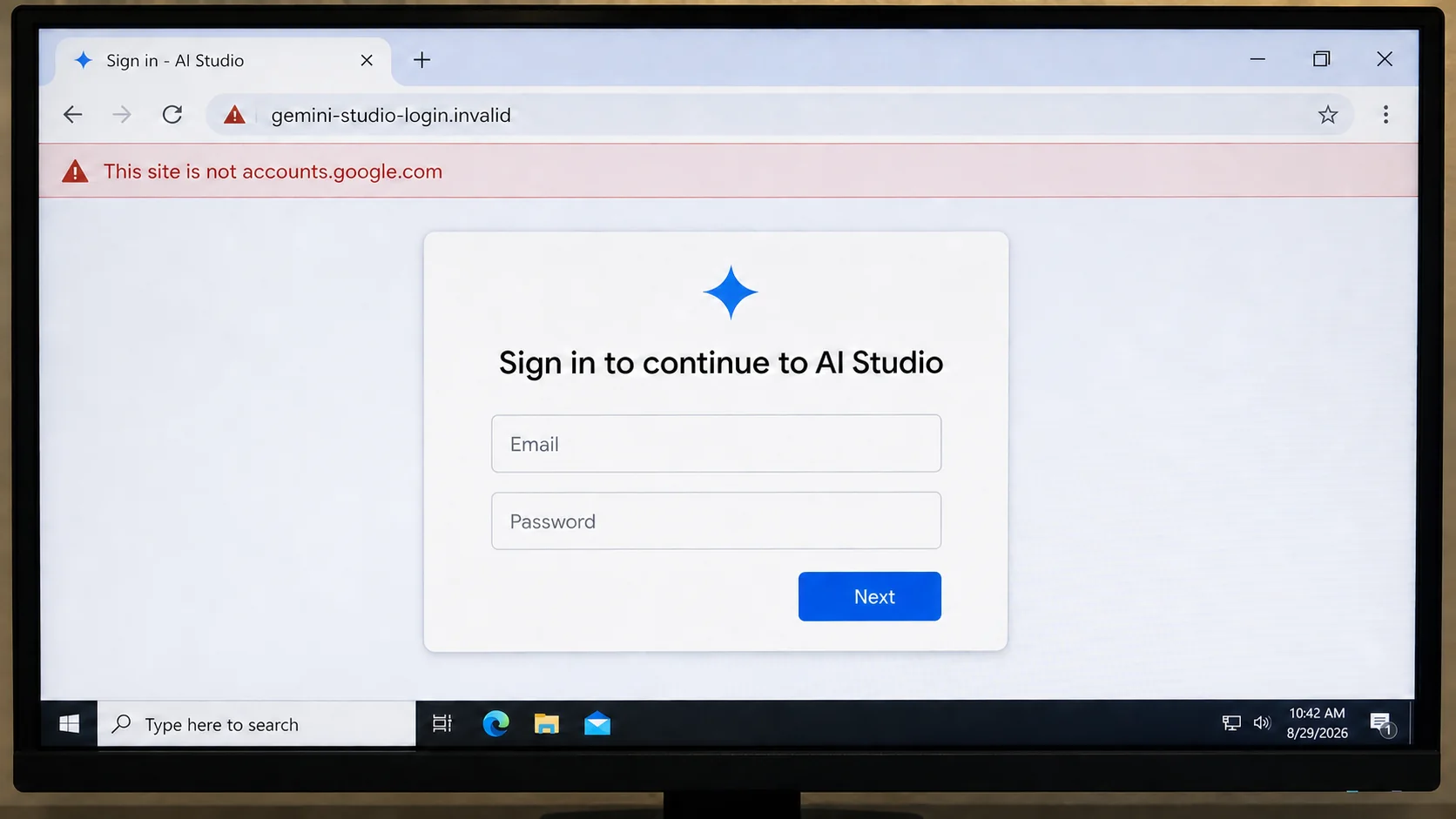
A display name and polished HTML can be copied. The dangerous element is the hidden URL behind the button. It may lead to an imitation Google sign-in page, an OAuth consent trap, a malicious download, or a redirect chain that changes according to the visitor.
The page can capture a password, recovery information, security code, API key, or workplace credentials. A successful sign-in prompt may also authorize an attacker-controlled app instead of opening AI Studio.
This pattern has several immediate warning signs:
- The message arrives unexpectedly after a real product announcement.
- The sender display name is trusted before the full address is checked.
- A large button hides the actual destination URL.
- The email asks the reader to sign in after clicking.
- The destination is not an exact Google domain.
- The message mixes real features with hard-to-verify extras.
- The recipient is urged to try a new tool before checking an official dashboard.
The Product Is Real, but the Email Can Still Be Fake
People often test suspicious messages by searching the headline. That works when a scammer invents a company, product, recall, or government program. It is much less useful when the attacker copies news published hours earlier.
Google’s documentation confirms the core Gemini 3.5 Transcribe claims. It is a non-streaming speech-to-text model, while Gemini 3.5 Transcribe Live supports low-latency streaming. The model can distinguish speakers, provide timestamps, detect languages, and clean up filler words and repetitions.
A criminal can reproduce those facts without access to Google systems. The official release notes and documentation are public. Marketing language, screenshots, button styles, color choices, and product names can be copied into a phishing template in minutes.
The scammer benefits from the short period when recipients have heard rumors of a launch but have not yet learned how Google presents it. Search results confirm enough of the message to lower suspicion, while the newness makes an unfamiliar link seem plausible.
A fake email may also include links that are genuinely safe. The footer, privacy policy, unsubscribe link, and documentation references can lead to Google, while only the main action button points elsewhere. Checking one harmless link does not validate every link in the message.
The right test is not “Does Gemini 3.5 Transcribe exist?” It is “Did this exact message come from an authenticated Google sender, and does this exact button go to the expected Google destination?”
How the Gemini 3.5 Phishing Email Works
Step 1: The attacker monitors a genuine launch
A new model, app, beta, browser feature, or developer tool creates immediate curiosity. Public documentation supplies accurate names, features, screenshots, and vocabulary.
The attacker does not need to predict the announcement. A campaign can be assembled after publication and sent while the topic is still trending.
Step 2: Official copy is rebuilt inside a marketing email
The message uses a trusted display name such as Google AI Studio and a subject that resembles a product update. It may repeat real phrases about language support, transcription cleanup, AI Studio, or enterprise access.
Visual accuracy changes the reader’s question from “Is this fake?” to “Do I want to try this?” That shift is the purpose of the design.
Step 3: The visible button conceals a different URL
“Try in AI Studio” sounds like a normal action. On a phone, the destination is not visible until the user presses and holds the link or opens a preview.
The URL may use words such as gemini, google, studio, cloud, developer, or access. Those words in the path or subdomain do not matter if the registrable domain belongs to someone else.
Step 4: A redirect adapts the attack to the visitor
The first site can check location, device, browser, and whether the visitor appears to be a security scanner. Some visitors are sent to a harmless page while selected targets receive the imitation login.
Short links and tracking services add more layers. The link shown by an email client may be a legitimate marketing or redirect domain, but the final destination still needs inspection.
Step 5: The fake page requests a Google or work sign-in
The landing page copies the layout of accounts.google.com or an organizational single sign-on portal. It may request an email first and show the password field only after recognizing the company domain.
A second page asks for a one-time code, passkey approval, recovery email, or security prompt. Each step is designed to look like normal authentication.
Step 6: Access is used immediately
Stolen credentials may be replayed while the victim is still on the page. The attacker can read email, reset other accounts, search for API keys, access cloud projects, or send the same lure from a trusted mailbox.
If the page used OAuth instead of a password form, the attacker may receive a token with permission to read mail, files, contacts, or profile information. Changing a password does not always revoke every connected app.
Step 7: The victim is redirected to the real product
After data is captured, the site can open Google’s actual AI Studio or Gemini documentation. The product works, so the visitor may assume the earlier login succeeded normally.
That clean ending reduces reports and gives the attacker time to use the stolen session. It is another reason to inspect account activity even when the final page is genuine.
How to Read the Sender and Link Correctly
The sender’s display name is only a label. “Google AI Studio” can be typed into an email account just as easily as a person’s name. Expand the sender details and inspect the complete address.
The part after the final @ matters. A domain that contains “google” somewhere is not automatically controlled by Google. Spelling substitutions, added words, unfamiliar country endings, and extra hyphens deserve caution.
Authentication adds stronger evidence. In Gmail, open the message menu and choose “Show original” to view the full header. Look for SPF, DKIM, and DMARC results, but remember that a pass only authenticates the domain shown in those fields. A scammer can authenticate a domain the scammer owns.
Domain alignment matters. The visible From domain should align with the authenticated sender expected for the campaign. A mismatch between the display name, From address, return path, and signed domain needs explanation.
On a computer, hover over the button without clicking. On a phone, press and hold to preview the link. Read the domain from right to left and identify the actual registered name before the first slash.
If the email concerns a Google product, the safest route is to close the message and navigate independently to ai.google.dev, aistudio.google.com, cloud.google.com, or the relevant official console. A legitimate launch remains available without the email button.
Why Developers and Work Accounts Are Valuable Targets
An AI product announcement naturally attracts developers, researchers, marketers, support teams, and business administrators. Many of those recipients already use a Google identity for several services, so one successful sign-in can expose more than a personal inbox.
A compromised mailbox can reveal password-reset messages, invoices, customer conversations, internal documents, and invitations to other systems. It can also be used to send a second wave of phishing from an address colleagues already trust.
Developer accounts may contain API keys, cloud project links, code repositories, model prompts, billing alerts, and test data. Even when secrets are not written directly in email, the inbox can identify where they are stored and who controls them.
Workspace accounts create another opportunity. An attacker can search the directory, study normal message style, and impersonate a manager or administrator. A copied AI launch is therefore both a credential trap and a possible starting point for business email compromise.
OAuth consent can be especially deceptive for technical users. The page may genuinely be hosted by Google while asking the user to authorize an attacker-controlled application. The important questions are who published the app, which permissions it requests, and whether the user intentionally started that workflow.
New tools also create installation expectations. A false page may claim that desktop software, a browser extension, or a command-line helper is required. Google’s official web documentation should be checked before running any installer or copying a terminal command from an email.
Organizations should route unexpected launch emails through security review, especially when they request authentication or software installation. Blocking one domain is useful, but teaching users to open new products independently protects against the next domain and the next copied announcement.
Company, Address, and Fulfillment Checks
The company name must match the authenticated sender
Google is the real developer of Gemini 3.5 Transcribe, but its name in an email does not prove that Google sent the message. Compare the From address and authentication results with the company’s official domains.
Do not rely on the avatar, logo, display name, or subject line. Those are message content, not identity controls.
The sender address must be expanded in full
Mobile email apps often show only a friendly name. Tap the sender area to reveal the complete address and reply-to value before interacting with a product announcement.
An unexpected consumer mailbox, newly created domain, or reply-to address unrelated to the From domain is a strong warning. Save the message as evidence instead of replying.
The registered domain matters more than familiar words
In a URL such as accounts.google.example-attacker.test, the owner is determined by the ending domain, not the word “google” near the beginning. A padlock shows encrypted transport to that site, not approval by Google.
Look for character substitutions and extra endings. If the domain is difficult to read, do not sign in. Open the official product from a bookmark or manually typed address.
The final destination must deliver the promised product
A real AI Studio session should open on an official Google property and use Google’s normal authentication flow. A page that downloads a desktop installer, browser extension, or “transcription codec” is not required to use the web service.
If a redirect eventually reaches a real Google page, review the earlier domains in browser history. The final destination does not erase a credential form or consent screen shown before it.
What the Screenshot Reveals
The reported email is effective because it is restrained. It does not threaten account closure, promise a prize, or demand immediate payment. It looks like a routine developer marketing message.
The heading, product description, blue call-to-action button, and feature list follow familiar email patterns. Long technical copy can increase credibility because a criminal message is expected to contain obvious spelling errors or a crude request.
The product claims also encourage verification in the wrong direction. A reader who checks only whether 85-plus language support and filler-word cleanup are real will find official confirmation and may stop investigating.
Some adjacent claims in a copied campaign may be altered, speculative, or mixed from separate Google products. That inconsistency can be useful, but it is not the main test. Marketing emails often mention related products, and attackers can update their copy.
The button remains the control point. If the recipient never uses it and instead opens AI Studio independently, the campaign loses its opportunity to insert a fake login or malicious download.
This is why a short, calm verification habit works better than memorizing every Google sender address. Treat unexpected launch email as a notification, not as the route into the product.
The timing deserves attention too. Messages sent within hours of a public release can feel like privileged or early access, even when the information is already public. A fast campaign gains credibility from the announcement while defenders, spam filters, and recipients are still learning the new product name.
What to Do if You Have Fallen Victim to This Scam
- Close the page and record the URL. Take a screenshot of the address bar and save the original email. Do not revisit the site to gather more evidence if the browser warned about it.
- Change the affected Google password from a trusted device. Go directly to your Google Account, create a unique password, and sign out unfamiliar sessions. Change reused passwords on other services too.
- Review recent security activity. Check devices, sign-ins, recovery details, forwarding rules, filters, app passwords, passkeys, and security alerts. Remove anything you do not recognize.
- Revoke suspicious connected apps. Review third-party access and OAuth grants. Remove unknown applications even if you changed the password, because a token may remain useful until revoked.
- Protect work and developer assets. If the account can reach Workspace, Cloud, AI Studio, source repositories, or API keys, notify the administrator and rotate exposed secrets. Review billing and project activity.
- Scan any device that received a download. Delete the file without opening it and run a full Malwarebytes scan. If software was installed, disconnect the device from sensitive accounts until it has been assessed.
- Block repeat delivery paths. AdGuard can block many known phishing domains, malicious redirects, and harmful ads. It cannot verify every new domain, so continue checking senders and opening products independently.
- Report the email as phishing. Gmail provides a “Report phishing” option in the message menu. If the account belongs to an employer, send the message to the security team without forwarding active links to other users.
Frequently Asked Questions
Is Gemini 3.5 Transcribe fake?
No. Google officially released Gemini 3.5 Transcribe on August 26, 2026. The scam risk comes from an email or link that impersonates the launch, not from the documented model itself.
Does accurate product information prove an email is genuine?
No. Product documentation and announcements are public. A phishing operator can copy accurate features, dates, screenshots, and terminology into a deceptive message.
How can I see where the Try button goes?
Hover over it on a computer or press and hold on a phone to preview the URL. Do not click if the registered domain is unfamiliar or does not match the expected Google service.
What if SPF and DKIM both pass?
A pass shows that the message was authorized by the domain in the authentication result. It does not prove that the domain belongs to Google. Check alignment and the actual domain name.
Can a phishing link end on a real Google page?
Yes. An attacker can collect information and then redirect the victim to AI Studio or official documentation. Review browser history and account activity if any intermediate page requested a sign-in.
What is the safest way to try a newly announced Google tool?
Ignore the email button and navigate independently through Google’s official developer documentation, AI Studio, or Cloud console. A legitimate launch does not depend on one promotional link.
The Bottom Line
The Gemini 3.5 phishing email works because most of its story can be true. Gemini 3.5 Transcribe exists, its capabilities are impressive, and Google really did announce it.
Only the sender and destination need to be false. Treat the email as a notification, open the product through an official address, and never let accurate marketing copy decide where you enter a password.

Join the discussion
0 commentsShare your experience or ask a question about this article.
Discussion
Start the conversation
Have a question or something useful to share? Add the first comment.