


A purchase order with a number already on it can feel like leftover paperwork rather than a new decision you have to make. Please find the attached purchase order PO-74029185 is the kind of subject that lands between two other vendor notes. You open it because a numbered order sounds like a file you are supposed to keep, not like a stranger asking you to hurry.
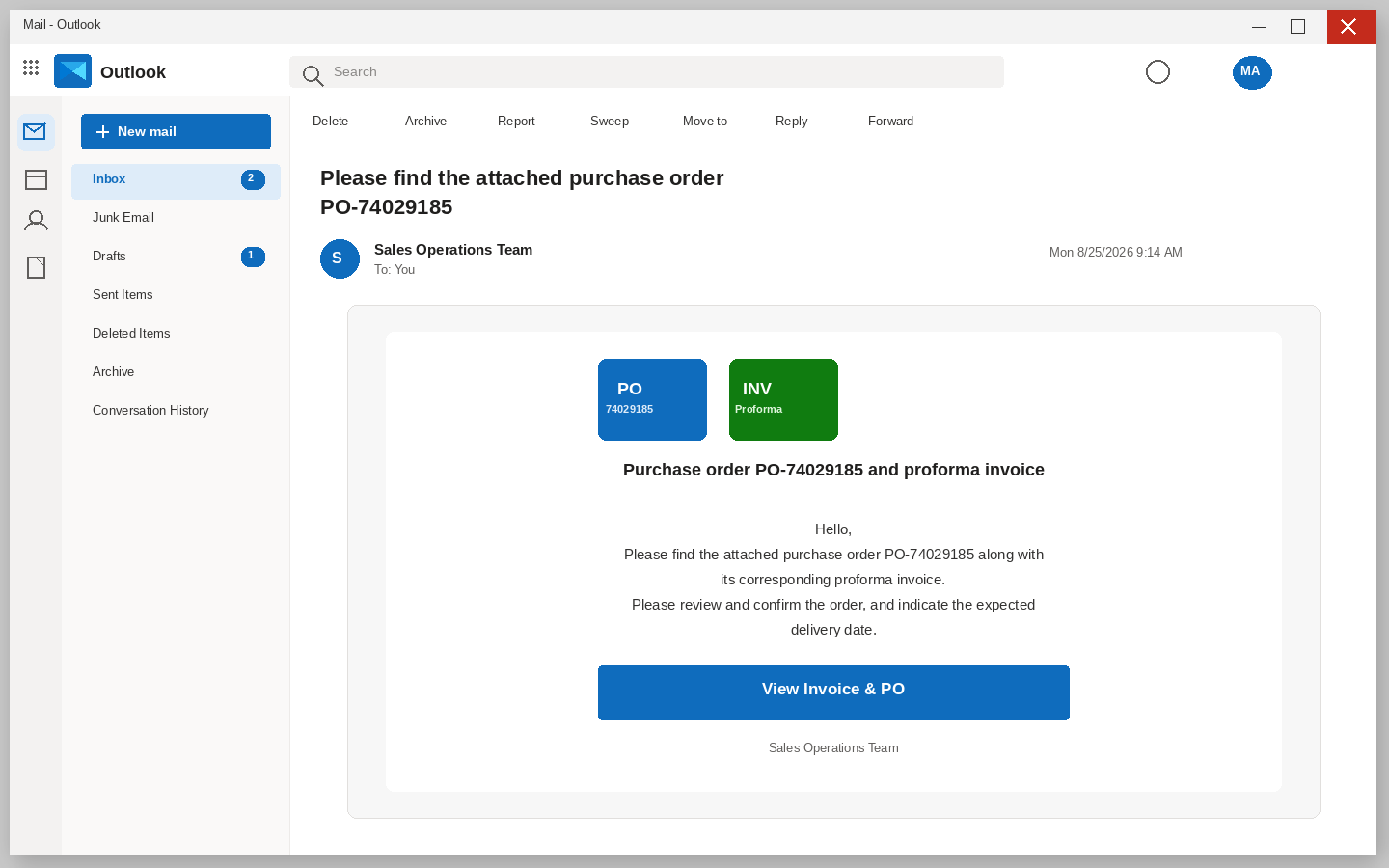
The letter writes as a Sales Operations Team and treats you like a supplier who already knows the file. It says please find the attached purchase order PO-74029185 along with its corresponding proforma invoice. Then it asks you to review and confirm the order at your earliest convenience, and to indicate the expected delivery date. Under that request sits one control labeled View Invoice and PO, as if both documents were already waiting behind a single click.
If a real purchase order is waiting, you get it from the buyer you already have, on a thread you already keep, or inside the purchasing tool your office already uses. You do not let a surprise invoice button choose the next page for you, and you do not treat a polite request for a ship date as proof that the order is real.
Overview
You are looking at a phishing letter that borrowed the language of sales operations so a purchase order would feel like ordinary Monday work. The pitch is a confirmation for PO-74029185 plus a proforma invoice that supposedly needs a delivery date, and the only action it offers is View Invoice and PO. What they take is the login for the inbox you are already sitting in, and after that they take the mailbox itself. That includes vendor threads, reset codes that land an hour later, and the people who already answer when your name is on the From line.
You click because the letter promised an invoice and a purchase order sitting behind one control, and the next page never shows those documents. It shows a sign-in form dressed as Gmail Webmail, with an address field, a password field, and a Proceed control waiting underneath the familiar layout. The form pretends the papers will appear once you sign in, which is how a careful person finishes a login they never meant to start.
The copied login was sitting on Firebase Storage, a file-hosting service that lets customers publish ordinary pages. A hosting platform is not a certificate that the page is honest, and a familiar logo is not a sender you can trust without reading the rest of the address. Google is not mailing you a purchase order, and Gmail is not holding PO-74029185 because a button in a surprise letter said so. People who steal inboxes put a copied login on ordinary file hosting so a workplace filter is less likely to stop the click.
The Federal Trade Commission describes this shape in ordinary language in its guide to phishing, where the FTC says scammers use email to steal passwords and other information, and that a common story is a problem with an account that is not actually a problem. A purchase order that was never issued is that story with a vendor number on it, and a proforma that only exists in the letter is that story with a delivery date glued on. The Commission tells you to contact the company or the person using a site or a number you already know is real, not the information in the unexpected message.
On avoiding social engineering and phishing, CISA tells people not to reveal personal or financial information in email, and not to use a link from a surprise message to reach a login they already have. If a purchase-order note feels off, you verify it without using anything in the note, which is the opposite of typing your mailbox password so a proforma can finish loading.
Why a numbered order feels like work
Read the subject the way a tired person reads it between two other alerts: please find the attached purchase order PO-74029185. Attached is a word that already sounds like a file, purchase order is a pile of goods and payment terms, and the number is doing the quiet work of looking like a record that already exists in someone else’s system. Together they make a cold letter feel like a chore you are already late for, rather than like a page you should refuse before the button gets a chance.
Sales desks live on that chore, because buyers send paper, operations wants a ship date, and accounts wants a proforma before anything leaves the dock. The lure is borrowing that Tuesday, and it does not need a long pitch to do the job. It needs you to feel behind before you have even hovered over View Invoice and PO, which is a much cheaper trick than inventing a real order.
At your earliest convenience is doing a second job, because convenience sounds polite, which is why people trust it on a busy morning. It also pretends a process is already in motion, the way a real order already has a buyer, a line list, and a person who will call if you stall. This letter has none of that supporting paper, only a number and a button, and the rest of the movie is the one you supply because you do not want to be the supplier who sat on a live PO.
A sales operations name is cheap to copy
Sales Operations Team is doing more work than a logo, because it does not name a person or a company and still names a desk every supplier already fears missing. If you sell parts, you fill in the buyer, and if you sell services, you fill in the client, without the letter ever having to get those names right. If you have no order at all, the words still sound like money, and money still makes a careful person look twice before deleting the note.
Display names are cheap, because anyone can set a From line to read like an operations desk and stamp PO-74029185 on a missing file. Microsoft’s guide to spotting phishing treats mismatched sending details as a warning, not as a footnote you can ignore because the card looks tidy. A message that wears the language of a purchase order and arrives as a surprise is using that language because it works on a desk that already lives on deadlines, not because a living buyer is on the other end.
The body even tells on itself if you let it, because there is no buyer named, no ship-to address, no SKU list, and no last four of an account you could match to last week. A system that truly knew your order would usually know a name, a contact, or at least one line item you could recognize from a quote you already sent. This one knows an address and a number, which is enough for a blast and not enough for a real confirmation that a living buyer would stand behind.
The delivery date is the hurry they added
The letter does not stop at the number. It asks you to review and confirm the order at your earliest convenience, and to indicate the expected delivery date. That second job is the clock, because a purchase order can wait until after lunch, while a ship date that someone else is waiting on feels like a problem that grows while you hesitate.
Almost everyone has missed a date that mattered, whether a buyer asked when the parts would leave, a warehouse asked when the truck would arrive, or a customer asked when the job would start. When a letter asks for an expected delivery date, it gives that familiar pressure a polite costume, so you are not being asked to investigate a stranger. You are being asked to help a deal finish a step it claims it already started, which is a much softer request than a threat and a much harder one to ignore.
The wording stays vague on purpose, because it does not name the goods, show quantities, or give you a ticket number you could read back to a buyer. Expected delivery date could be a pallet, a license key, a crew, or a sample, and that blank space is the hook that lets your brain fill in the one order you cannot afford to miss. Once you have filled it in, the button starts to look like a kindness instead of a request for the mailbox sitting under the letter.
A real confirmation, when it happens, is boring, because the order sits in the portal you already use, the buyer is on a thread you already have, and the proforma matches a quote you already sent. You do not need a surprise invoice button to invent a ship date, and you especially do not need to hand over a password to prove you want the work.
The button is not a viewer
View Invoice and PO sits in the middle of the card like a viewer control, which is why people press it without treating it as a separate request to sign in. It looks like the one thing you came to do: see the papers, type a delivery date if the letter is telling the truth, and get back to the rest of the inbox. That is a reasonable errand on a real order, and it is the errand this costume was built around.
There is no honest reason for a purchase order and a proforma that need your confirmation to live on a surprise page you reached from an unexpected letter. If the files were real, they would already be sitting in the thread with the buyer, in the purchasing portal you already use, or in the mail system you already signed in to this morning. A button that cannot show you a single line item without a fresh login is doing a different job than viewing a file.
CISA is blunt about attachments and links in unexpected mail, because you do not open them to see if they are real, and you verify the claim on a path you already trust. For a purchase order, that path is a phone number on last month’s invoice, a buyer you already have, or a portal you already open without help from a stranger’s button. The FTC says the same in consumer language: a problem that can only be solved by the link in the email is usually not a problem, it is a request for you.
How The Scam Works
1. A PO confirmation lands
It arrives in the same inbox you already trust, with the subject Please find the attached purchase order PO-74029185 sitting among the rest of the morning mail. The body is dressed as a sales operations notice rather than a pitch from a stranger, with a purchase order number, a corresponding proforma invoice, and a request to confirm the order and indicate an expected delivery date. There is no long story and no demand for a wire in the first line, and the whole card still fits on a phone screen. A short notice is easier to believe than a letter that asks for a routing number before you have had coffee.
If you are already signed in to Outlook on the web, the folders on the left and the search bar on the top make the fake card feel native to the product you opened yourself. You are not visiting a strange site yet, you are reading mail, and the costume only has to survive the three seconds between the subject and the button. CISA’s warning about surprise messages is aimed at exactly those three seconds, which is why the useful move is to slow down before the card chooses the next page for you.
2. The name copies sales ops
You get a desk called Sales Operations Team rather than a novel, and those words are enough to invent the rest of the story without the sender knowing your catalog. A buyer who said the PO would land today, a warehouse that is waiting on a ship date, and a finance person who will not release goods without a proforma all fit inside that one display name. People who would ignore a threat about a closed account will still press View Invoice and PO for a live order, because missing a PO feels like missing money.
The vagueness is useful, because the notice does not name the buyer, the company, or a vendor ID you can match to last week’s paper. You supply the faces, which is how a blast becomes personal without the sender knowing anything except your address. Delivery proves they knew the mailbox, and it does not prove they sit on the order they numbered or that a living buyer will answer if you call a number you already have.
3. An invoice waiting is the hurry
A purchase order alone can still lose to a busy morning, so a proforma waiting for a delivery date is the extra clock the letter added on purpose. We kindly ask you to review and confirm the order at your earliest convenience, and indicate the expected delivery date, which is a polite sequence that still tells you something you sell is already in motion. Waiting then feels like becoming the delay, which is a much stronger push than a prize and a much quieter one than a threat.
Work inboxes are especially tender here, because a salesperson hears proforma and thinks of a quote that finally converted, a shipper thinks of a dock slot, and a founder thinks of cash that is about to move. The email never has to name those things, because you will name them yourself, and then the button feels like protecting the business instead of gambling the password. Personal inboxes get a different movie, maybe a side job, a sample, or a one-off sale you forgot, and the letter does not need to know which fear is yours because an invoice waiting is a blank the reader completes.
4. View Invoice is the handoff
You click View Invoice and PO because that is what a confirmation notice is for, and the click is the moment the costume can drop. The next page is not a purchase order, not a proforma, and not a download that starts in the corner of the browser. It is a request to prove you are you so a pair of documents that do not exist can keep going, which is a door rather than a line-item table.
That request is the tell, because you are already in the inbox, and a real PO would open in the tool you already use or sit as a file on a thread you can answer. It would not need a cold button to carry you somewhere else so the paper can continue, which is why the FTC’s advice is to ignore that carry. Use a path you already have and leave the button alone, even if the subject still looks like a file you were supposed to keep.
5. The page copies Gmail
The page that follows is dressed as Gmail Webmail, and the colors, the layout, and the habit of typing an address and a password are already in your muscles. The page does not have to be perfect, it only has to be familiar enough that you finish the form before you look at the address bar. A lock icon does not save you here, because encryption can wrap a stolen password just as neatly as a real one, and a padlock means the trip is private rather than that the destination is honest.
Do not finish that form to see if the purchase order is real, because a fake login does not become safer when you only wanted a proforma or a ship date. Type the official site of the mail system you actually use in a new tab if you need to check the account, and keep that check on a path you already trust. If this mailbox is Gmail, open a new tab and type gmail.com yourself, then leave the invoice tab alone and close it. The address in that tab is not a clue you need to collect, it is a door you should stop using before a password goes into it.
6. They want the mailbox password
If you type the password, they have the first key, and if a text, an authenticator prompt, or an email code arrives while that tab is still open, they want the second key too. The story will be helpful: confirm so the invoice can load, approve so the purchase order can finish, or enter the code to verify your work account. Each of those lines is the same request for access to the mailbox you were already sitting in when the confirmation arrived.
Microsoft’s phishing page tells you to change the password on every affected account if you think you typed it on the wrong site, and to turn on multifactor authentication if it is not already on. The FTC says the same thing in consumer language, which means you treat the password as burned and treat the code as burned rather than testing them on the next page. Do not reuse either one on a screen that promises to unlock PO-74029185 or to accept a delivery date, because the order was never locked and it was never there.
7. A second crew sells recovery
The last move is often not even the same people, because stolen passwords get bundled and sold, and a second crew buys the access or the address and comes back as help. They may write as support, as a security desk, or as a cleanup team that offers to restore the purchase order, freeze the account, or walk you through a refund for a deal that never existed. The subject is softer and the form is the same, whether they want another password, another code, another remote session, or another fee to undo a theft they are still running.
That is why a quiet I already clicked, but I did not pay anyone is not the end of the story, because you may not have paid while the person who trusts you might, and the crew that buys the inbox later might. Tell the people who send you money and the people you pay, and tell the real buyer on a number you already have, not on a number that arrived after View Invoice and PO. A 30-second call from you is cheaper than a week of wires that look like your week, and cheaper than a cleanup invoice from a stranger who already has the keys.
What To Do If You Have Fallen Victim to This Scam
If you only opened the email and closed it, you are not finished, but you are not doomed, so delete it, report it, and do not go back to see whether the invoice loads later. If you pressed View Invoice and PO and then typed, treat the account as touched and move in this order, because speed helps and panic does not. The FTC and CISA both want you to change the login on a page you type yourself, not on the page that asked for it.
- Write down what you typed, then stop using that tab. Note the time, the subject Please find the attached purchase order PO-74029185, whether you entered a password, and whether you approved a code or an app prompt. Close the invoice page and do not keep checking it to see if a proforma appears or if a delivery date field finally lands. Do not send the link to a friend so they can tell you if it looks real, because that is how the next inbox gets hit.
- Open the real mailbox yourself and change the password. Use a new browser tab, type the official site, or use the app you already trust, and stay off the page that arrived from the letter. If this mailbox is Gmail, type the same address you always type, then follow Google’s steps in Gmail’s phishing help if the account still feels off. If this is a Microsoft account, follow Microsoft’s steps to recover a hacked or compromised account. Pick a password you have not used on anything else, and if you cannot sign in, use the official reset path rather than a link from the purchase-order letter. If this is a work mailbox, call IT before you spend an hour guessing, because they can dump sessions faster than you can.
- Sign out everywhere and turn the extra lock back on. On the Microsoft account security page, or the matching security page for the mail system you actually use, review recent activity and sign out of other sessions if that control is there. Confirm multifactor authentication is on, and if you approved a prompt you did not start, assume that session is not yours until you kill it. Remove devices and apps you do not recognize, because the extra lock is not optional after a copied mail login.
- Look for rules, forwarding, and mail that left without you. Check inbox rules, automatic forwarding, and the Sent folder, and look for a new mailbox delegate, a new app that can read mail, or a filter that hides replies. Delete what you did not create, then search for other purchase-order notices with the same PO-74029185 number or the same Sales Operations Team display name. If this is a work account, let IT pull the audit, because a forwarding rule that survives a password change is how they stay after you think you are done.
- Call the real buyer and the people who pay you. Use a number from last year’s invoice, a card in the drawer, or a listing you already trust, and stay off any callback printed inside the confirmation. Tell them a fake purchase-order letter tried to take the mailbox, and that they should not honor a new account number or a rushed updated wiring note that arrives this week. If you were in the middle of a real order, say that out loud, because the lure picked that word for a reason, and do not use a callback number that arrived inside the confirmation letter.
- Tell the bank if the mailbox sits next to money. If invoices, payroll, or shipping files live in that inbox, call the bank and any freight or payroll vendor the same day and ask them to watch for a change-of-account request. A charge you did not make and a transfer you approved because you asked for it are different problems, and time still matters on both. If a card number or a routing number went into the copied login, treat those as burned and say so when you call.
- Report the email, then scan the device if you downloaded anything. In Outlook, use Report and then Report phishing, the path Microsoft publishes on its phishing help page. Forward a copy to the Anti-Phishing Working Group at reportphishing@apwg.org, then file a consumer report at ReportFraud.ftc.gov. If a password, a bank account, or a Social Security number went into that page, use IdentityTheft.gov for the next steps. You can also file with IC3 if the mailbox is a work account or money already moved. If View Invoice and PO saved a file or pushed a helper, run a full scan with Malwarebytes or the antivirus you already keep updated. The scan does not get a password back, and the password change is the step that does that work.
If nothing was typed and nothing was downloaded, still report the message so the next person in the company does not become the test. A purchase-order lure is built to travel, and the same card can sit in a sales inbox, a warehouse inbox, and a personal inbox on the same morning. The fastest help you can give a coworker is a warning that does not include the original button, because forwarding the click is how the costume keeps working.
The Bottom Line
The Sales Operations Team letter about PO-74029185 is a purchase-order costume over a password request, and View Invoice and PO does not open a proforma. It carries you to a copied Gmail Webmail form so you will type the login the letter could not steal from the inbox you were already inside. Confirm real orders with the buyer you already have, on a path you already type, and treat a surprise delivery date as a reason to slow down rather than a reason to hurry.
If you already typed, change the password on a page you open yourself, kill the other sessions, and tell the people who send you money before a second crew writes back as help. A numbered purchase order is easy to invent, and a mailbox is the thing the letter was built to take, which is why the useful close is to keep the mailbox and leave the button alone.

Join the discussion
0 commentsShare your experience or ask a question about this article.
Discussion
Start the conversation
Have a question or something useful to share? Add the first comment.