

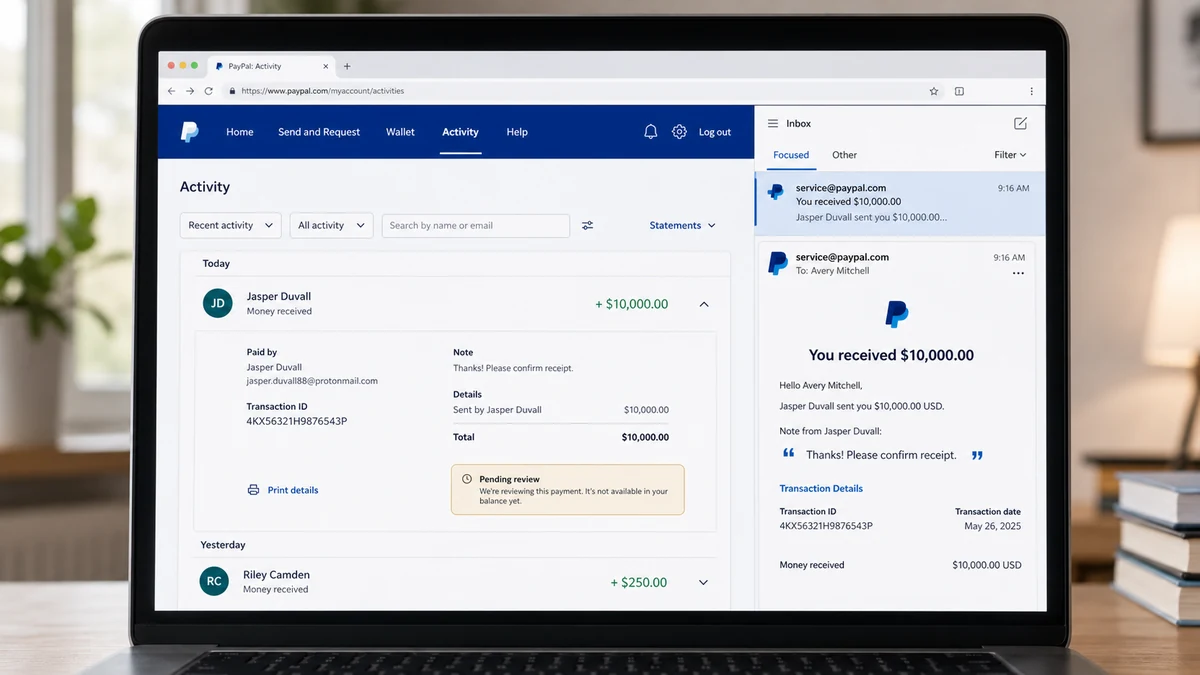
An email says $10,000 has appeared in your PayPal account. You did not sell anything, request a payment, or recognize the sender.
The money looks real inside a trusted platform. Moving it, spending it, or “returning” it can turn the mystery into a real loss.
Overview
An unexplained deposit appeared inside PayPal
In a reported case, an account owner received a notification that $10,000 had been deposited into PayPal. There was no matching sale, invoice, personal arrangement, or recognized sender.
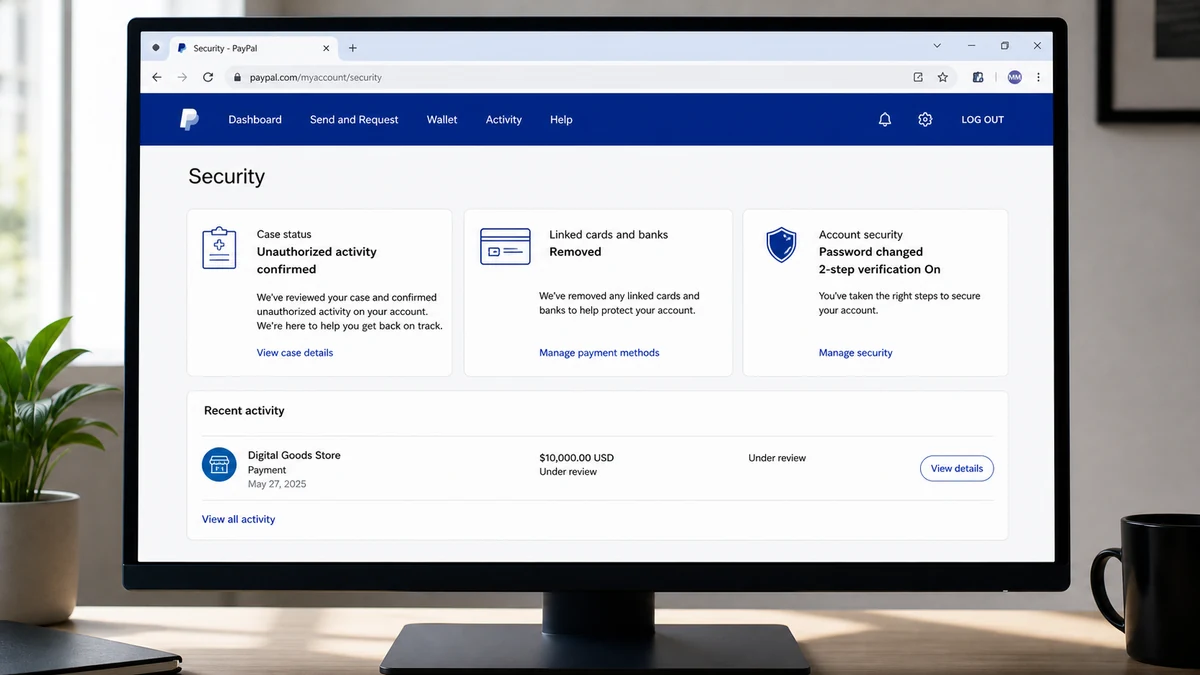
The owner removed linked cards and bank accounts, changed the password, and reported the transaction. A later update said PayPal closed the case in the owner’s favor and classified the activity as unauthorized.
A positive balance can still be reversed
A PayPal balance is an account status, not a guarantee that the underlying funding is final. A payment can be reviewed, disputed, reversed, or recovered when the true owner of the funding source reports unauthorized activity.
If the recipient withdraws or forwards the money first, the incoming transaction may later disappear while the outgoing transaction remains. The account can be left negative by thousands.
The exact account-takeover path was not established
The report supports unauthorized PayPal activity. It does not show whether a password was stolen, a session was hijacked, a linked authorization was abused, or another party initiated a disputed transfer to the account.
Warning signs include:
- The payment has no matching sale, invoice, or personal reason.
- The amount is unusually large.
- The sender is unknown or uses an unrelated business name.
- A message asks for an immediate refund to a different account.
- The payment is pending, under review, or subject to authorization.
- An email asks the recipient to sign in through a link.
- Linked banks, cards, addresses, or settings changed unexpectedly.
- The recipient is urged to use the balance before PayPal confirms it.
Leave the funds untouched and let PayPal resolve the original transaction. Do not create a second payment to fix the first.
How the PayPal $10,000 Deposit Scam Works
Step 1: A large payment creates excitement and confusion
An unexpected charge produces fear. An unexpected deposit can produce curiosity or temptation, which may lower the recipient’s caution.
The first impulse may be to click the notification, contact the sender, or move the money somewhere “safe.” Each action can help the attacker.
Step 2: The transaction appears on a real platform
If the payment is visible after the user opens PayPal independently, the record itself is real. It may show a sender, transaction ID, amount, and status.
That record proves PayPal received an instruction. It does not prove the sender owned the funding source or that the transaction cannot be challenged.
Step 3: The recipient is encouraged to act before review ends
A person may claim the payment was a mistake and plead for a quick return. Another version offers a reward or threatens legal action if the money is not sent back immediately.
The urgency keeps the recipient from opening a PayPal case and waiting for the platform to handle the original transaction.
Step 4: The “refund” goes through a separate route
The sender asks for Friends and Family, a different PayPal address, bank transfer, gift card, or cryptocurrency. The new destination may have no connection to the account that funded the deposit.
Even sending money back to a familiar name as a new payment creates a separate transaction. It is not the same as PayPal reversing the original payment.
Step 5: The incoming funding is disputed
The true cardholder or bank reports that the $10,000 transfer was unauthorized. PayPal investigates and may reverse the deposit.
The scammer has already received the recipient’s separate repayment, so the victim loses access to both amounts.
Step 6: The PayPal account is left negative
If the balance was withdrawn or spent, the reversal can produce a large negative balance. The platform may restrict the account and seek repayment while the user tries to prove what happened.
This is why the correct action is to preserve the original balance, not move it out of the way.
Step 7: Remaining account access is reused
If the incident involved account takeover, the operator may change addresses, add cards, create invoices, or message other users. Securing the password alone may not revoke every session or linked service.
The entire account needs review after the transaction is reported.
Is the Email Real, the Transaction Real, or Both?
A phishing email can invent a $10,000 payment and direct the recipient to a fake PayPal login. The message may copy PayPal’s design, sender name, and transaction language without any activity occurring in the real account.
Do not use the link, reply address, or phone number in the notification. Open the official PayPal app or type paypal.com yourself and inspect Activity and the Resolution Center.
If no transaction appears after signing in independently, the email is likely the scam. Delete it after reporting and change the password if credentials were entered on the linked page.
If the payment does appear, the email may also be genuine. The transaction still needs investigation because a real notification does not make the underlying transfer authorized or final.
Check the exact status. “Pending,” “on hold,” “under review,” “authorization,” and “completed” describe different stages, but none is permission to refund a stranger through a separate transaction.
The Safe Way to Handle a Mistaken Payment
Leave the $10,000 untouched. Take screenshots of the transaction and status, but do not withdraw it, purchase with it, send it to another account, or add your own money to cover a supposed fee.
Open a case with PayPal through the official app or website. PayPal’s unauthorized-activity guidance explains how to report account activity you do not recognize.
If the sender contacts you, do not negotiate. Tell them to work through PayPal, then stop replying. Do not accept a shipping label, refund address, or alternate payment method.
PayPal can review and reverse the original record so the accounting remains connected. A manual repayment breaks that connection and gives the scammer a second transaction to keep.
Document every message and contact attempt. A genuine mistaken sender should also want the platform to correct the error rather than demand money through a less protected route.
How to Secure the PayPal Account Properly
Change the PayPal password from a clean device and make it unique. If it was reused, change the same password everywhere else, beginning with the email account.
Review PayPal activity, linked cards and banks, shipping addresses, phone numbers, automatic payments, permissions, and logged-in sessions. Remove anything unfamiliar.
Secure the email account because password resets and transaction notices pass through it. Revoke unknown sessions, check forwarding rules, confirm recovery details, and enable strong multi-factor authentication.
Follow PayPal’s account-protection guidance and call linked banks if their cards or accounts may have been exposed.
A similar MalwareTips investigation involving an unfamiliar PayPal Airbnb charge shows why one strange transaction should prompt a complete account review.
What PayPal Closing a Case Does Not Automatically Fix
A favorable case decision can remove the unauthorized transaction. It does not tell the account owner how access was obtained or guarantee that every stolen session has expired.
Review security alerts and email around the first suspicious activity. Look for password resets, new-device notices, unfamiliar invoices, changes to account details, and messages sent without permission.
Linked banks and cards should be checked separately. Removing them from PayPal stops some future use but does not replace exposed card details or secure the bank login.
Continue monitoring the account after the balance is corrected. Attackers sometimes wait and return through another payment, invoice, or phishing message that refers to the closed case.
If You Already Returned or Spent the Money
Contact PayPal immediately and explain both transactions: the incoming $10,000 payment and the separate outgoing transfer or purchase. Do not describe only the negative balance.
Provide the messages that caused you to act, including any request to refund another account. The connection between the transactions helps show that the outgoing payment was induced by deception.
Call the bank or card issuer funding the outgoing payment. Ask whether it can stop, recall, or dispute the transfer and whether the receiving institution can be notified.
Do not cover a negative PayPal balance by borrowing or sending more money before understanding the case. Work through PayPal’s official resolution process and keep written records of every decision.
If goods were shipped, contact the carrier immediately about interception. Preserve the label, destination, tracking, buyer messages, and proof that the order had no legitimate origin.
Report the recipient account, phone number, email, wallet, and shipping address. Those details may connect the event to other unauthorized-payment cases.
Expect someone to offer a guaranteed refund or claim to be assigned to the case. Verify every caller by ending the contact and opening PayPal or calling the bank yourself.
Check whether the outgoing transaction used Goods and Services, Friends and Family, a bank, card, or PayPal balance. Each route has a different dispute process and deadline.
Keep screenshots of the balance before and after reversal. They help explain why the recipient believed funds were available and how the negative amount developed.
If PayPal sends a collection notice, respond through the official account and attach the case history. Do not ignore legitimate correspondence, but verify it without using links from an unexpected email.
Ask PayPal to note that any separate repayment was induced by the original unauthorized deposit. Keep the representative’s name, case number, date, and written response.
For a large loss, consider qualified legal advice chosen independently. Do not rely on a “PayPal recovery specialist” who found you through social media.
Company, Address, and Fulfillment Checks
PayPal is the platform, not proof about the sender
A real PayPal record does not establish that the true funding owner authorized it. Let PayPal investigate the sender and funding source.
The displayed sender name may be misleading
Save the exact account, email, transaction ID, and funding details. A display name can differ from the legal owner or from the person requesting repayment.
A shipping address does not explain the deposit
Do not ship anything or treat the payment as a sale unless it matches a real order. Unsolicited addresses can be added to complicate the story.
Fulfillment means the transaction survives review
Money is not safely yours because it appears in a balance. The case must be resolved and any underlying authorization or dispute completed.
What to Do if You Have Fallen Victim to This Scam
- Do not touch the balance. Stop withdrawals, purchases, manual refunds, bank transfers, and cryptocurrency payments connected to it.
- Open PayPal independently. Type the address or use the app, confirm whether the transaction exists, and report unauthorized activity.
- Call linked financial institutions. Tell them PayPal activity may involve account takeover and ask them to review cards, accounts, and transfers.
- Save all evidence. Preserve emails, transaction status, sender details, messages, case numbers, account changes, and any repayment request.
- Secure PayPal and email. Use unique passwords, revoke sessions, enable multi-factor authentication, and remove unfamiliar addresses or permissions.
- Scan if a phishing file or app was opened. Use Malwarebytes on the affected device and change credentials from a clean one.
- Block malicious pages. AdGuard can reduce exposure to phishing and scam advertising domains, but it cannot decide whether a PayPal transaction is final.
- Report the sender. Use PayPal’s Resolution Center and report any impersonating emails, phone numbers, or crypto wallets.
- Report financial loss. File with ReportFraud.ftc.gov, IC3.gov, and local police when appropriate.
- Ignore recovery promises. Work only with PayPal and financial institutions you contact yourself.
Frequently Asked Questions
Can I keep an unexpected $10,000 PayPal payment?
Do not treat it as spendable. Leave it untouched and ask PayPal to determine whether it was authorized and final.
Should I refund the sender through a new transaction?
No. A separate refund can remain after the incoming payment is reversed. Let PayPal correct the original transaction.
Does a real PayPal email mean the money is final?
No. It may confirm a real transaction record, but the funding can still be unauthorized, reviewed, disputed, or reversed.
Was the account definitely hacked?
The reported activity was unauthorized, but the published facts do not prove the technical path. Secure the account and investigate all sessions and settings.
Why remove linked cards and banks?
It can reduce further PayPal use while the account is secured. The banks must still review whether the underlying credentials were exposed.
What if the payment is absent after I sign in?
The notification may be phishing. Do not click it. Report the message and change credentials immediately if you entered them on its page.
The Bottom Line
An unexpected $10,000 deposit is not a windfall and should not become a do-it-yourself refund. The safest move is to leave it exactly where it appeared.
Open PayPal independently, report the transaction, and secure the full account. If the payment is genuine but mistaken, PayPal can reverse the original record. Creating a second payment gives the scammer the only money in the story that may be final.

Join the discussion
0 commentsShare your experience or ask a question about this article.
Discussion
Start the conversation
Have a question or something useful to share? Add the first comment.