

A stranger says they reported your Discord account by mistake. Unless you contact a specific “support agent” immediately, the account may be banned.
The apology sounds helpful. Its real purpose is to make you begin a private verification process that Discord never asked for.
Overview
The warning starts on Tumblr and moves to Discord
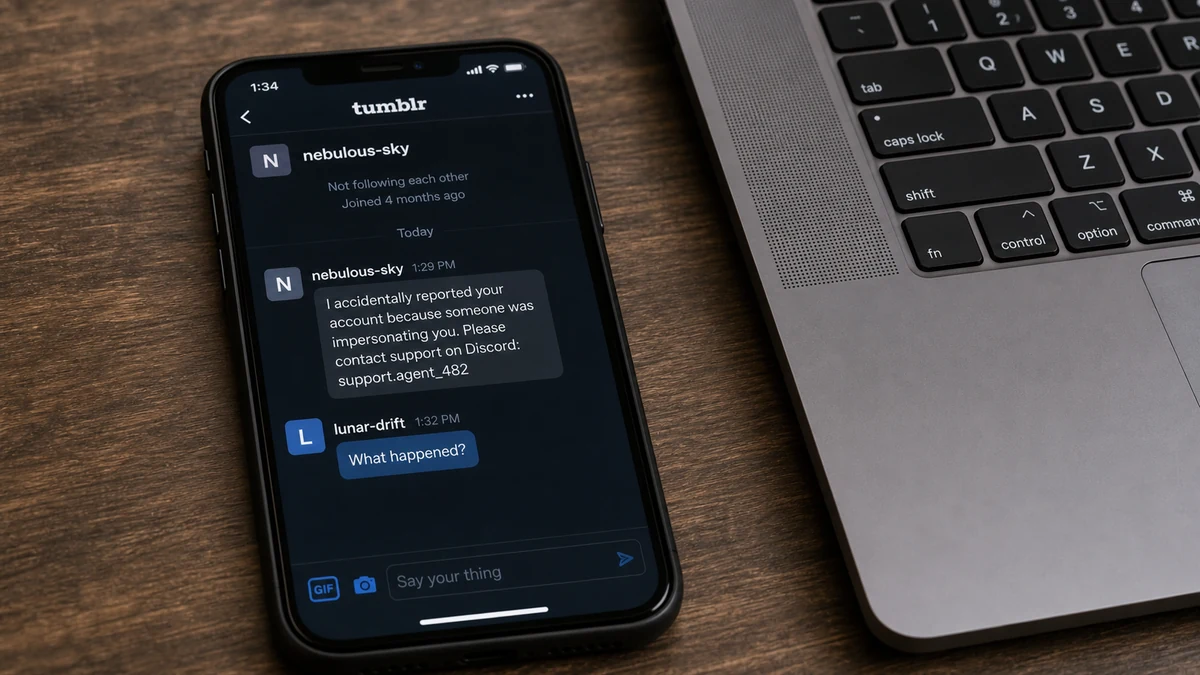
In a reported case, a Tumblr user said the recipient had been falsely reported because someone was impersonating them. The sender supplied a Discord username and instructed the target to contact it.
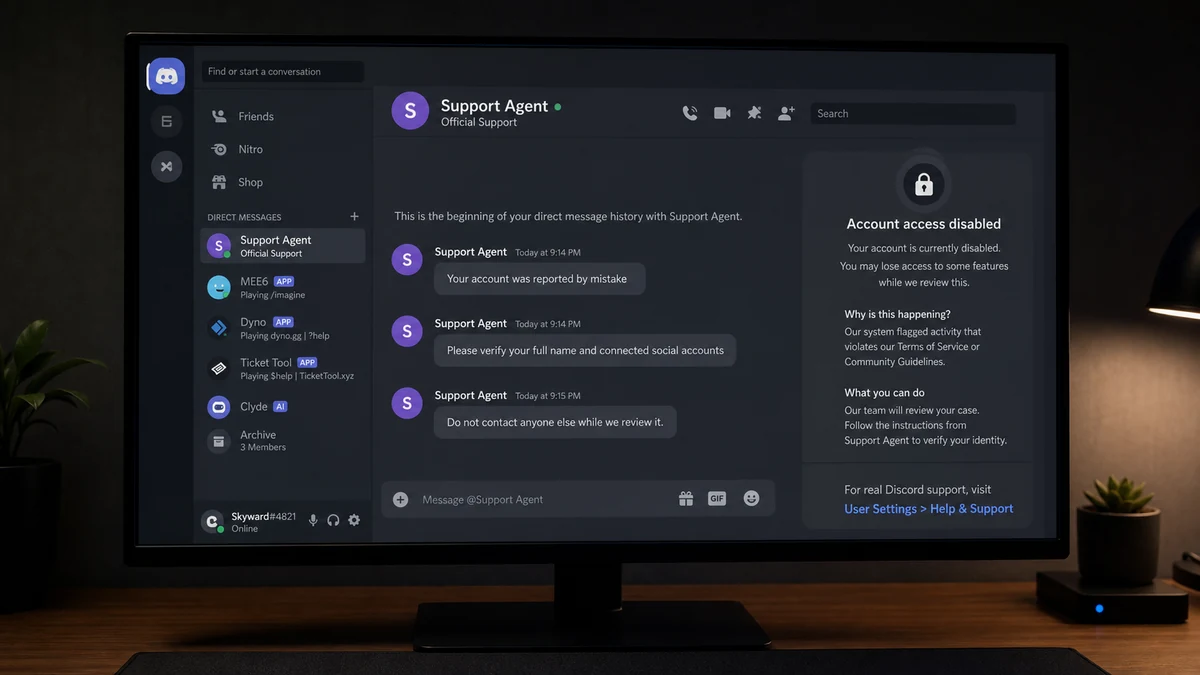
The supposed support conversation collected the victim’s name and social-media details. The victim later said the Discord account had been deactivated and worried about what the disclosed information could be used for.
Discord support does not work through a stranger’s chosen username
Discord has in-app reporting and official support routes. Another user cannot create a private case that forces the target to add a named support account to prevent punishment.
A display name can contain Support, Safety, Admin, Moderator, or Developer without belonging to Discord. The account’s instructions, logo, and professional tone do not create authority.
The first questions prepare a larger takeover
The fake agent may start with a name, age, region, or connected social profile. Once the victim becomes comfortable answering, the requests can escalate to an email change, password reset, QR code, one-time code, identity document, or payment.
Watch for these signs:
- A stranger says they accidentally reported your account.
- The alleged report involves fraud, impersonation, or illegal purchases.
- You are told to add a particular Discord username.
- The “agent” handles the case entirely through direct messages.
- A short deadline is placed on account deletion or suspension.
- Personal details and connected profiles are requested.
- The agent asks for a password, token, QR scan, code, or email change.
- You are told not to contact anyone else during the review.
Do not argue with the sender or test the agent. Report both accounts and use only support reached through Discord’s own site or app.
How the Discord False Report Scam Works
Step 1: A friendly account announces an alarming mistake
The opening message says, “I accidentally reported you,” or claims friends reported the wrong person. An apology makes the sender appear responsible rather than threatening.
The accusation is serious enough to create panic: fraud, stolen items, impersonation, or illegal activity.
Step 2: A deadline prevents normal verification
The sender claims the report will be reviewed soon and the account could be deleted permanently. The target is encouraged to act before checking whether Discord recognizes the process.
A real platform may enforce its rules, but it does not make users negotiate with a stranger’s private contact.
Step 3: The target is sent to a fake support identity
The username contains official-sounding words and copies Discord’s branding. The Tumblr sender and fake agent may be one operator playing two roles.
The handoff makes the second account feel independent, even though all proof still comes from the same story.
Step 4: Harmless questions create cooperation
The agent asks for the username, name, region, email, or screenshots. These requests feel like ordinary identity checks and establish a pattern of answering quickly.
Public information can later be used to impersonate the victim or make more targeted password-reset messages.
Step 5: Control of the account is requested
The target may be told to change the account email to one supplied by support, scan a QR code, share a one-time code, reveal a token, or approve a login.
Each action can transfer access directly to the scammer. Discord’s scam safety guidance warns users not to share passwords or authentication tokens and to be cautious with unknown QR codes, files, and links.
Step 6: The account is locked or reused
After changing the email and password, the operator removes the original owner and messages friends from a trusted account. The same false-report story spreads through existing communities.
The victim may believe Discord deactivated the account when the impostor actually changed or deleted access.
Step 7: Payment or another scam follows
The fake agent may demand a refundable security deposit, gift card, cryptocurrency payment, or purchase to clear the report. A stolen account can also promote fake investments, game items, or cheap Robux offers.
Account recovery never requires paying a private support username.
Why “I Reported You by Mistake” Works
The first sender appears to be helping undo their own error. That cooperative role lowers suspicion and gives the target a reason to trust the support contact they provide.
Most users do not know how another person’s report appears internally. The scammer fills that knowledge gap with screenshots, fake ticket numbers, and a deadline.
The allegation also attacks something people value: an account holding friends, communities, purchases, messages, and years of history. Fear of losing it can make a strange process feel worth following.
Moving from Tumblr to Discord adds a small sense of legitimacy because the issue supposedly concerns Discord. In reality, the operator is simply choosing the platform where the target has more to lose.
A nearly identical trust transfer appears in the Minecraft Discord verification scam, where a familiar community leads users into an account-verification path controlled by someone else.
How Real Discord Reporting Differs
Discord’s reporting guidance explains how users report content through the app. The person being reported does not resolve it by adding a staff member named by the reporter.
If Discord needs information, use a ticket or notice reached through an official Discord domain. Open the app or type the support address yourself rather than following a private link.
Real support does not need your password, authentication token, backup codes, or ownership of your email address. It will not tell you to change the account email to an address it controls.
A QR code can approve a login. Treat it like a password. Do not scan one because a person claims it links the account to a case.
Discord may take enforcement action without negotiating in direct messages. Ignoring an unknown “agent” does not make a fabricated support process real.
What the Shared Information Can Be Used For
A name and public social profile may support impersonation, harassment, or targeted phishing. They do not automatically give the scammer control of Discord.
An email address adds password-reset and credential-stuffing risk. If the same password was reused, change it everywhere and secure the email account first.
A QR scan, login approval, authentication token, or one-time code can provide direct access. Act immediately by changing credentials, revoking sessions, and contacting official support.
An identity document creates longer-term risk. Record exactly what was shared, consider fraud alerts where appropriate, and watch for new accounts or verification attempts.
If remote-access software or a file was installed, disconnect the device from sensitive accounts until it has been examined.
How One Stolen Discord Account Spreads the Scam
A message from a known friend receives more trust than one from a new account. The attacker uses existing relationships to repeat the false-report story or promote another scheme.
Community roles make some accounts especially valuable. A compromised moderator can post links, change channels, or direct members toward fake verification.
Warn friends through another platform as soon as access is lost. Tell server owners to remove the compromised account’s roles temporarily and delete malicious links.
Do not trust a later message saying the account is recovered until the owner confirms it through a separate channel. The operator may continue using the same voice and history.
MalwareTips has also documented cheap Robux scams on Discord, another example of stolen trust turning into payments and account theft.
Recovery Depends on What You Shared
If you shared only a display name and public profile, block the accounts and prepare for impersonation or targeted messages. Review privacy settings and tell close contacts how to verify you.
If you shared the Discord email address, secure that mailbox and expect password-reset phishing. The email password must be unique and protected with multi-factor authentication.
If you changed the Discord email to one supplied by the “agent,” contact official support immediately. Preserve the old address, new address, time of change, and any confirmation emails.
If you scanned a QR code or approved a login, assume another device may be authorized. Change the password, sign out sessions, rotate backup codes, and review connected applications.
If you copied an account token or ran code in the browser, explain that precisely to support. Tokens can bypass the protection a password change was meant to provide until sessions are revoked.
If you installed a file, isolate the device before using email, gaming, or financial accounts. Information-stealing malware can collect browser sessions far beyond Discord.
If you paid a refundable “verification” charge, contact the payment provider rather than the fake agent. Another transfer will not restore the account.
If threats or intimate information are involved, preserve the evidence and contact local authorities. Do not pay for silence or deletion.
Check the Discord account’s authorized applications and connections. Remove bots, integrations, and services you do not recognize, especially anything approved during the fake review.
Review email trash and forwarding rules for deleted security notices. An attacker may hide the password-reset and address-change messages that would explain the loss of access.
Server owners should inspect recent moderation actions, webhook changes, new bots, deleted channels, and links posted by the compromised account. Restoring the user does not automatically undo those changes.
Friends who entered credentials on a shared link need their own recovery steps. Warning the server is not only reputation management; it can prevent a chain of new account takeovers.
Use Discord’s official report tools on the malicious messages themselves where possible. Message links and user IDs are much more durable evidence than display names, which can change quickly.
Company, Address, and Fulfillment Checks
The Discord username is not a company identity
A support-style name and logo can be chosen by anyone. Verify cases only through Discord’s official app or domain.
Tumblr is the delivery route, not the authority
A Tumblr sender cannot assign a Discord employee. Report the first account for directing users into impersonation.
No physical address is needed to clear a report
Requests for home address, ID, payment, or bank information have no place in resolving a private Discord report.
Fulfillment means access through official recovery
A case is resolved when the real owner controls the account through Discord’s documented process, not when a private agent says verification is complete.
What to Do if You Have Fallen Victim to This Scam
- Stop replying to both accounts. Do not share another code, scan another QR image, change the email, or pay a security deposit.
- Change Discord and email passwords. Use a clean device, choose unique passwords, enable multi-factor authentication, and save new backup codes securely.
- Revoke active sessions. Remove unfamiliar devices and authorized apps. Reset tokens through the official recovery process where available.
- Contact Discord support officially. Explain the false-report story, accounts involved, changes made, and whether access was lost.
- Warn friends and server owners. Use another platform. Ask them to ignore links, remove risky roles, and report messages from the compromised account.
- Preserve evidence. Save Tumblr messages, Discord usernames, ticket images, QR codes, email changes, payment demands, and timestamps.
- Scan affected devices. Use Malwarebytes if you opened a file, installed software, or granted remote access. Change secrets from a clean device.
- Block malicious routes. AdGuard can reduce exposure to known scam pages and advertising domains, but it cannot recover a Discord account.
- Protect identity data. Monitor for impersonation or new-account fraud if you shared documents or private personal information.
- Report payments and threats. Contact the payment provider, ReportFraud.ftc.gov, IC3.gov, and local police when appropriate.
Frequently Asked Questions
Can someone accidentally report my Discord account?
They can submit a report, but that does not require you to add a private support username or prove yourself to the reporter’s contact.
Will Discord delete my account if I ignore the stranger?
A stranger’s deadline is not an official notice. Check the account and support routes directly through Discord.
Does Discord support contact users through DMs?
Do not trust unsolicited private support identities. Use official tickets and documentation reached from Discord’s own site or app.
What can a scammer do with my name and profiles?
They may impersonate you or create targeted phishing. Direct account takeover usually requires credentials, tokens, codes, or an approved login.
What if I scanned a QR code?
Change the Discord password immediately, revoke sessions, secure email, enable multi-factor authentication, and contact official support.
Why was my Discord account deactivated?
The published case does not establish the exact cause. The attacker may have changed access or triggered deletion. Official support can inspect the account state.
The Bottom Line
The false-report scam begins with an apology because help is easier to trust than a threat. The stranger creates the problem, then supplies the only person who can supposedly fix it.
Do not follow that route. A Discord report is handled inside Discord’s official systems, not through a username chosen on Tumblr. Keep your codes, QR logins, email, and account access out of private support chats.

Join the discussion
0 commentsShare your experience or ask a question about this article.
Discussion
Start the conversation
Have a question or something useful to share? Add the first comment.