


The server has thousands of members, the invitation seems connected to a familiar Minecraft community, and the verification page opens a genuine Microsoft sign-in flow.
One Authenticator approval later, the recovery email changes and the Minecraft account disappears with the Microsoft account behind it.
Overview
The victim followed a link that appeared to come from a trusted community
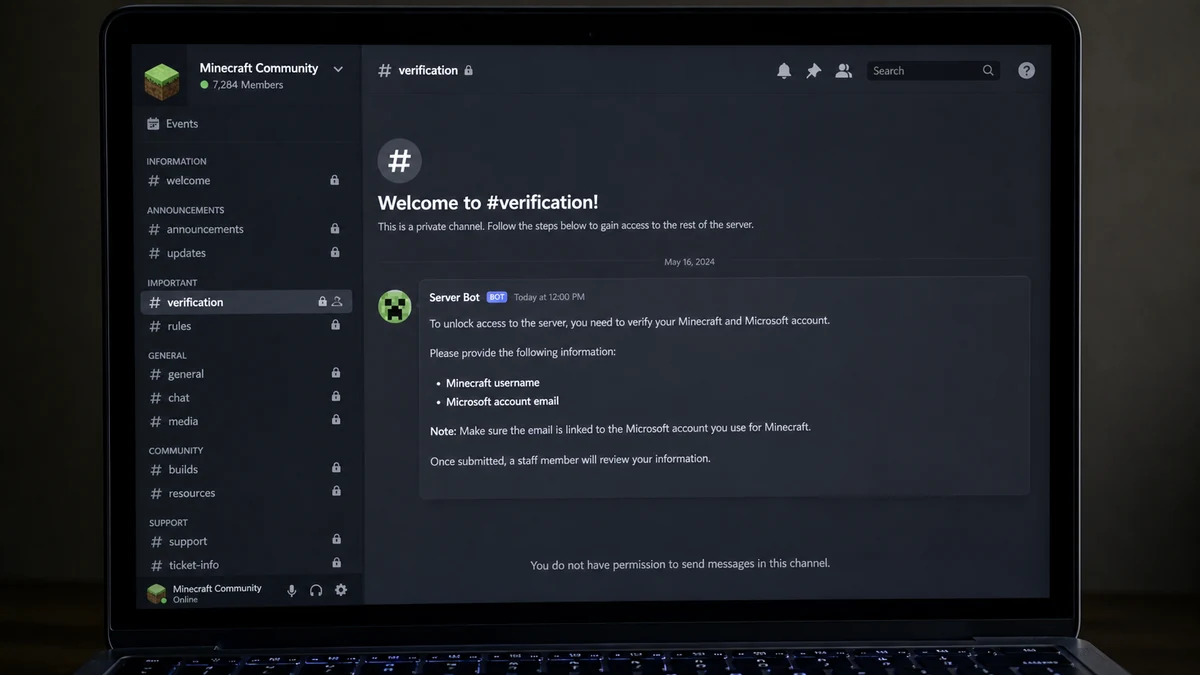
A recent consumer report described a Minecraft player who joined what they believed was a creator’s official SMP Discord server. An older link in an information channel led to another server with more than 7,000 members but very little visible conversation.
The second server’s verification process asked for a Minecraft username, the email connected to the Minecraft account, and an approval or code through Microsoft Authenticator.
The player approved the request. Soon afterwards, the Microsoft account’s email or security information appeared to change, and access to both Microsoft and Minecraft was lost.
The official-looking Microsoft page was part of the trap
Many victims expect phishing to happen only on a fake login page. Device-code and approval scams can send the target to a legitimate Microsoft screen while the attacker controls the session being authorised.
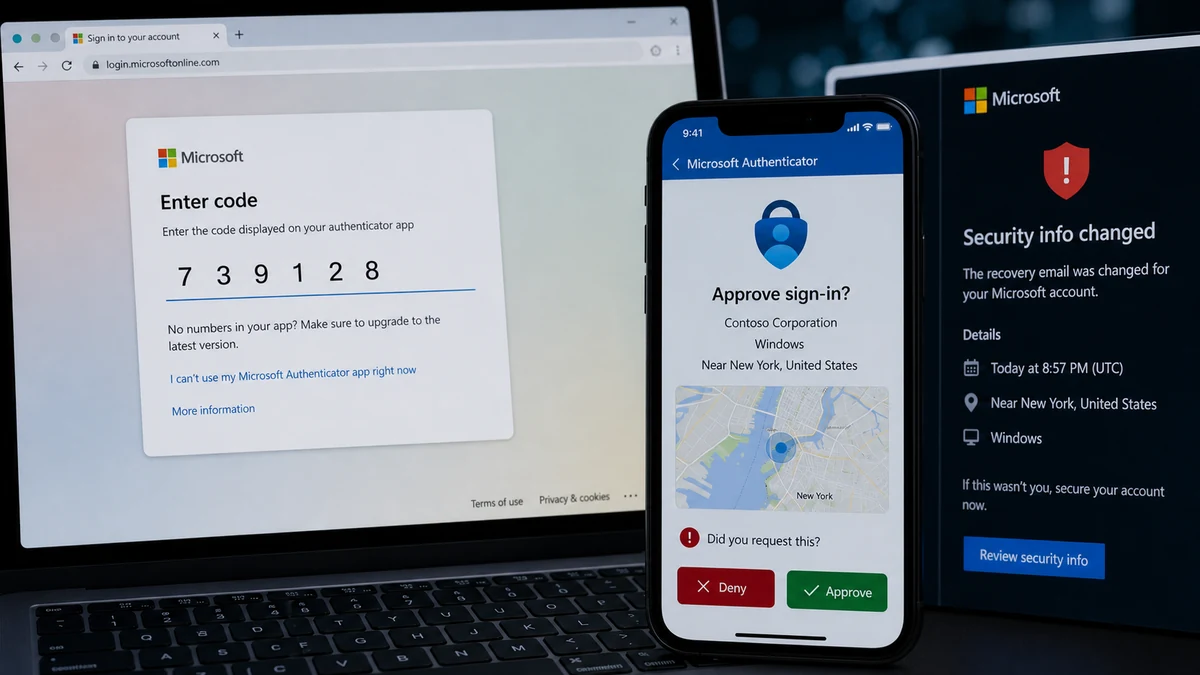
Microsoft’s device-code phishing research explains the key mechanism: the attacker starts a sign-in request and gives the victim a code. When the victim enters or approves it, the victim can unknowingly authenticate the attacker’s session.
The password does not need to be typed into a fake page for the attacker to receive access. A real domain and a valid Authenticator prompt do not make a request safe when someone else initiated it.
The creator named in the report should not be blamed without evidence
The poster questioned why the link appeared in an official-seeming server but explicitly said they did not know what happened. The invite could have been outdated, hijacked, posted by a compromised moderator, present in an imitation server, or misunderstood.
MalwareTips has not verified that the named creator controlled the malicious server or authorised the link. The useful lesson is to verify the invite through a current official channel and to judge every authentication prompt by who initiated it.
Before completing Minecraft Discord verification, ask:
- Why does a Discord server need my Microsoft email?
- Did I personally begin this Microsoft sign-in?
- Which app or device is requesting access?
- Does the location and device match mine?
- Is the server invite linked from a current official source?
- Are most channels empty despite a huge member count?
- Can I join with a normal role reaction instead?
- What access will the verification bot receive?
If a server asks you to approve a Microsoft request it generated, cancel it.
How a Real Microsoft Login Can Authorise an Attacker
Device-code authentication exists for devices that cannot easily display a full sign-in interface. A television, console, or command-line application can show a short code that the user enters on another device.
The legitimate flow depends on one critical assumption: the person entering the code understands which device or application they are connecting.
In a phishing version, the attacker initiates the device flow. The scammer’s server gives the victim the code and tells them it is Minecraft or Discord verification.
The victim visits a real Microsoft address, signs in, and completes multifactor authentication. Microsoft then issues tokens to the session that requested the code, which may be running on the attacker’s system.
This is why the domain can be genuine and the result still harmful. Authentication confirms the account holder approved a request; it cannot always determine whether the explanation given by a stranger was honest.
Modern prompts may show the application, device, or location. Read those details. If the request mentions an unfamiliar organisation, operating system, region, or app, deny it.
Never enter a code supplied by another person unless you independently understand and initiated the device connection. Never approve repeated prompts just to make an error disappear.
How the Minecraft Discord Verification Scam Works
Step 1: A server invite borrows trust
The target follows an invite that appears in a creator community, YouTube description, social post, old message, search result, or friend’s account.
The invite may lead to a clone with a similar name, icon, channel structure, and member count. It can also point to a once-legitimate server that changed hands.
Step 2: Empty channels make verification feel normal
Most of the server is locked. The target sees only welcome, rules, and verification, so there is no opportunity to ask established members whether the process is legitimate.
A large member count and polished bot embed create institutional trust even when meaningful activity is absent.
Step 3: The bot collects account identifiers
The page asks for the Minecraft username and Microsoft email. Those details confirm the account exists and help the attacker target the correct identity.
A normal Minecraft server may ask for an in-game username to manage a whitelist. It does not need your Microsoft password, one-time code, recovery email, or Authenticator approval.
Step 4: The victim receives a legitimate code or prompt
The scam backend starts a Microsoft device sign-in and displays the resulting code. The instructions label it verification, account linking, anti-bot protection, or whitelist access.
The victim’s trust remains anchored to the Discord server, so the Microsoft page is interpreted as confirmation rather than a new security decision.
Step 5: Approval grants the attacker’s session
After the victim signs in and approves, the attacker can receive valid access tokens. Multifactor authentication has not failed; it has been socially redirected.
The victim may see a success page and return to Discord expecting channels to unlock.
Step 6: Recovery information changes
The attacker attempts to add or replace security details, change aliases, create recovery methods, access email, or maintain sessions.
If the Microsoft account is used by a parent and shared with a child’s Minecraft profile, the damage extends beyond the game to mail, files, subscriptions, and other connected services.
Step 7: The stolen account supports the next lure
A compromised Discord or Microsoft identity can message friends, promote the server, sell the Minecraft account, or target saved payment methods.
The victim’s trusted name becomes new social proof.
Server Size Is Not Verification
A Discord member count shows how many accounts joined, not how many are active, independent, or satisfied. Accounts can be bots, purchased members, dormant users, victims who never completed verification, or people imported through promotions.
Locked channels can hide the absence of a community. If 7,000 members produce no ordinary chat, events, moderation history, or support conversations, the number should not carry much weight.
Server boosts, custom emojis, role colours, ticket bots, and branded graphics are controlled by the server operators. They are presentation, not external certification.
Look for a current invite published on the creator’s known website or verified social account. Old invites deserve extra care because a server or vanity link can change.
Check the server ID and owner information where possible, not just the displayed name. Imitation servers can copy every visible word and image.
Ask moderators in the known community whether Microsoft device-code verification is required. Do not ask inside the suspect server, where every visible administrator may be part of the same operation.
Discord’s scam guidance tells users not to click suspicious links, download unknown programs, share passwords or tokens, or scan unverified QR codes.
What Legitimate Minecraft Verification Usually Needs
A server may need an in-game username for a whitelist. Some communities use a bot that asks the player to place a short code in Minecraft chat or join the game temporarily.
That method proves control of the game profile without giving the server access to the Microsoft account behind it.
OAuth account linking can also be legitimate, but the consent screen should identify a known application and clearly state the permissions requested. Start the process from a verified official page.
No moderator needs your password or Authenticator number. No helper needs you to approve a login from their device. No bot needs a recovery code.
A verification system should not demand that a child use a parent’s Microsoft email in a public channel or direct message. Sensitive details should never be posted to server staff.
When a process feels unusual, leave the server and navigate independently to the creator’s official channels. A legitimate community will still exist after a short security check.
Parents can reduce shared-account risk by giving each family member an appropriate account, using unique recovery methods, and reviewing connected services together.
Recovering a Microsoft Account Quickly
Begin with Microsoft’s official compromised account recovery guidance. Use a clean device and go directly to Microsoft Support rather than following a link from Discord.
If you can still sign in, change the password, review security information, remove unknown methods, and inspect recent activity. Sign out unfamiliar sessions and review connected applications.
If the primary alias or recovery email changed, use Microsoft’s sign-in helper and recovery form. Supply old passwords, account history, billing details, and other information only through Microsoft-owned pages.
Secure the email account that was originally connected. A compromised inbox can defeat password resets for Microsoft, Discord, banking, and other services.
Review purchases, subscriptions, Xbox activity, Minecraft profile changes, OneDrive files, forwarding rules, and sent mail. Account theft can involve more than the visible game.
Contact Minecraft Support through the official help site with the username, transaction records, migration history, and Microsoft recovery case.
Do not pay a Discord “recovery expert.” Anyone promising to hack the account back for a fee is likely running a recovery scam against an already distressed victim.
Why Shared Family Microsoft Accounts Increase the Damage
In the reported case, the Minecraft profile used a parent’s Microsoft email. That arrangement is common, especially when a game was purchased years earlier, but it means a child-facing community can expose an adult account with a much wider digital footprint.
The same identity may control Outlook mail, OneDrive files, Xbox purchases, subscriptions, Windows recovery, saved contacts, and password-reset messages for other services. Losing Minecraft can therefore be the first visible symptom of a broader takeover.
Families should map which game belongs to which Microsoft account before an incident. Record the Minecraft username, purchase receipt, original email, recovery methods, and device history in a secure place. Recovery becomes harder when nobody knows whose credentials were used.
Do not share one password across family members or send it in chat for convenience. Use separate profiles and age-appropriate family controls where possible, and teach every player that Authenticator approval belongs to the account owner.
If a child sees a sign-in prompt, the correct response is not to approve first and ask later. Stop and bring the device to the adult who owns the account. The verification channel can wait.
After an incident, avoid blame. Shame makes young victims delete evidence or hide follow-up messages. A calm review of the exact link, code, and prompt improves recovery and helps the family recognise the next attempt.
Review the parent’s inbox for deleted messages, new forwarding rules, unfamiliar sent mail, and password-reset requests. An attacker who reached the Microsoft account may use email access to expand into other services.
Remove saved payment methods where appropriate while the account is being recovered. Contact the card issuer about alerts or replacement if unauthorised purchases appear.
Tell friends and server moderators that the account was compromised. A warning sent through another verified channel can stop the stolen identity from recruiting more players.
Keep the original recovery case numbers and write down every ownership detail submitted. If support asks for more evidence, a consistent chronology of account creation, purchases, devices, aliases, and the exact takeover time is easier to assess than fragmented messages from several family members.
Company, Address, and Fulfillment Checks
Verify the real Discord destination
Use a current invite from the creator’s verified website or social account. Compare the server ID, owner, moderators, creation history, and announcements with known channels.
A familiar name and icon are easy to copy.
Inspect the Microsoft consent context
Read the application, device, location, and permissions on every sign-in prompt. Cancel if they do not match an action you started.
An official Microsoft domain authenticates Microsoft, not the Discord operator’s explanation.
Separate game identity from account ownership
A Minecraft username may be reasonable for a whitelist. The Microsoft email, password, Authenticator approval, recovery code, and security methods are not needed for ordinary server access.
Use the least information necessary.
Define what verification should deliver
The process should unlock a clearly identified community role. It should not trigger payments, downloads, remote support, or changes to Microsoft security information.
If nothing unlocks after approval, do not repeat the request. Begin account recovery.
Warning Signs of a Minecraft Verification Server
- The invite comes from an old or unverified source.
- The server copies a creator’s name and branding.
- Thousands of members produce almost no conversation.
- Every useful channel is locked behind one bot.
- The bot asks for the Microsoft account email.
- A stranger supplies a device sign-in code.
- Authenticator shows a location or device you do not recognise.
- The instructions say repeated approval is normal.
- Moderators ask for screenshots of security codes.
- The process asks for a QR scan, password, or recovery code.
- Support exists only inside the suspect server.
- The victim’s security information changes after verification.
Microsoft’s Authenticator guidance warns users not to share verification codes and to deny unexpected requests. Treat every unrequested prompt as an attempted sign-in, not a routine server task.
MalwareTips’ Microsoft Account Protection email scam investigation explains another route to the same approval danger: a fake alert starts the conversation, then a real code or Authenticator prompt helps the attacker complete access.
What to Do if You Have Fallen Victim to This Scam
- Start Microsoft recovery immediately. Use the official compromised-account help page and a clean device.
- Change the password if access remains. Use a unique password and remove unfamiliar security methods, aliases, sessions, and connected apps.
- Secure the original email. Change its password, review forwarding rules and recovery options, and enable strong multifactor authentication.
- Review recent Microsoft activity. Record unfamiliar devices, locations, purchases, and security changes before removing them.
- Contact Minecraft Support. Provide ownership and purchase evidence through the official help channel.
- Secure Discord. Change the password, revoke unknown applications, review sessions, and enable multifactor authentication.
- Preserve the server evidence. Save the invite, server ID, channel, bot, messages, code instructions, and timestamps without exposing private codes publicly.
- Report the server and bot. Follow Discord’s reporting guidance and send the creator a concise warning through a verified route.
- Review payment methods. Check Microsoft, Xbox, and linked card activity and contact the provider about unauthorised charges.
- Scan devices. Run Malwarebytes if any executable, archive, extension, or unofficial Minecraft client was downloaded.
- Block malicious redirects. AdGuard can reduce exposure to known phishing domains, but it cannot stop a user from approving a real device-code request.
- Warn contacts. Tell friends not to trust invitations sent while the account was compromised.
Frequently Asked Questions
Can a real Microsoft page be used in a phishing scam?
Yes. In device-code phishing, the attacker starts the session and the victim completes it on Microsoft’s real page. The approval can authorise the attacker.
Does a Minecraft server need my Microsoft email?
An ordinary whitelist usually needs only a Minecraft username or an in-game proof step. A request for the Microsoft email and Authenticator approval is a major warning.
Did the creator named in the Reddit report run the scam?
There is no verified evidence of that. The link could have been outdated, compromised, copied, or posted in an imitation server. Verify through current official channels.
Why did multifactor authentication not stop the takeover?
The victim was tricked into approving the attacker’s request. Multifactor authentication worked technically, but the human decision was manipulated.
Can Microsoft restore a changed recovery email?
Recovery depends on the account state and available proof. Use Microsoft’s sign-in helper and recovery process immediately, and secure the original email first.
Should I pay someone on Discord to recover the account?
No. Recovery scammers target people who have already lost access. Work only with Microsoft, Minecraft, Discord, and your payment providers through official channels.
The Bottom Line
The Minecraft Discord verification scam turns a real Microsoft security flow into an account-takeover tool. The victim is not asked to hand over a password; they are persuaded to authorise the attacker’s session themselves.
Verify server invites independently, deny every sign-in you did not start, and begin Microsoft recovery as soon as security information changes. A large Discord community and a real login page cannot replace context.

Join the discussion
0 commentsShare your experience or ask a question about this article.
Discussion
Start the conversation
Have a question or something useful to share? Add the first comment.