

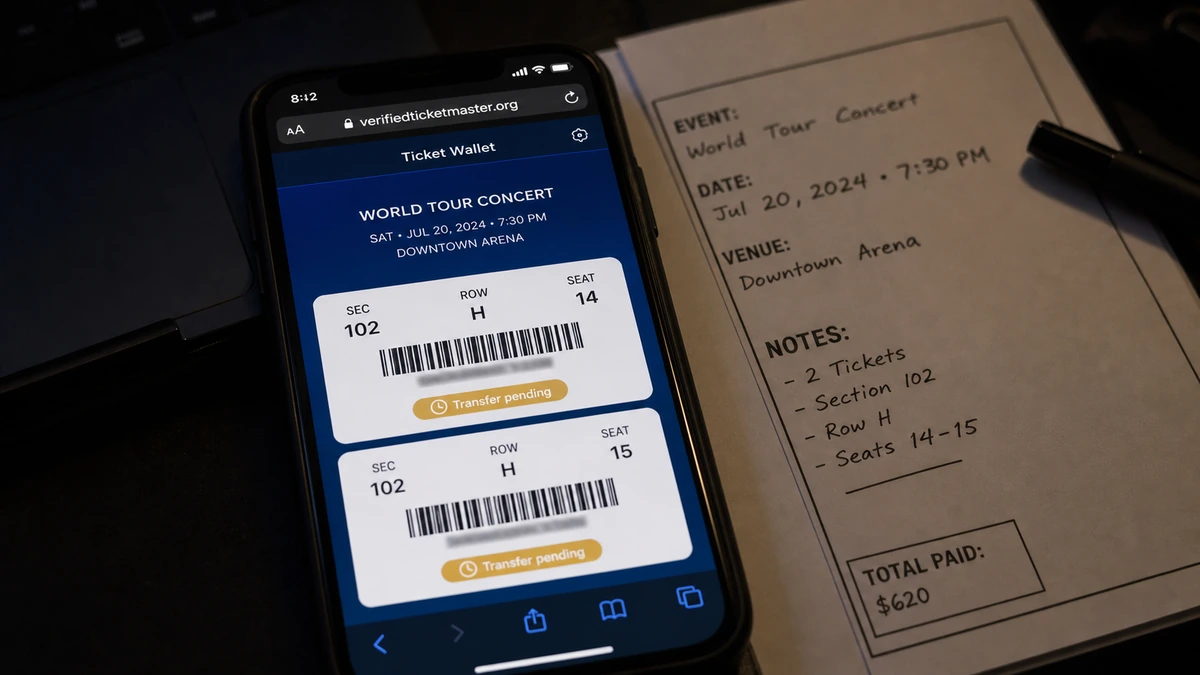
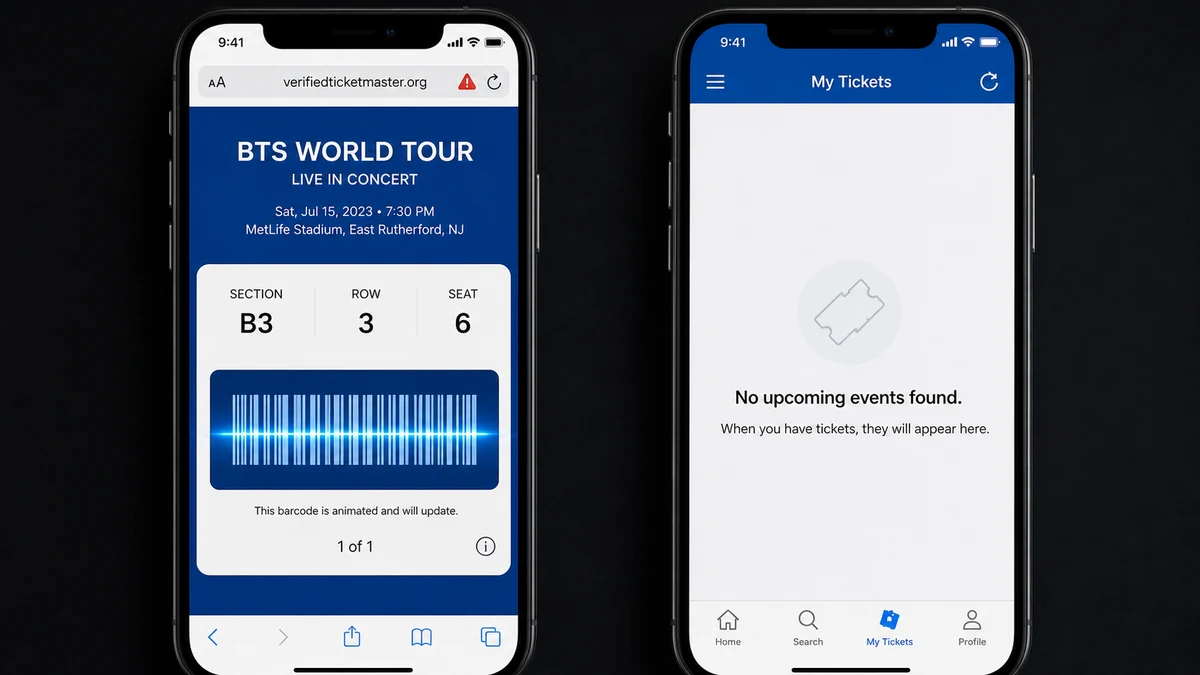
The BTS ticket is sitting in your phone wallet. It has the event, section, row, seat, and a barcode that looks ready for the gate.
The seller is still answering messages and says everything will update soon. Yet the one place where the ticket should appear remains empty.
Overview
The ticket looks more complete than it really is
The case examined here began with a last-minute purchase from a Facebook seller. The seller appeared friendly, supplied supposed proof of purchase, and sent digital BTS tickets that the buyer accepted.
The passes appeared in the phone wallet with convincing event and seating details. The interface felt unusual, but the buyer had more experience sending ticket transfers than receiving them.
That uncertainty gives a fake pass room to survive. Once something is stored on the phone and displays a barcode, it feels owned even when it is not connected to the issuer’s system.
The official Ticketmaster account stays empty
The accepted tickets did not appear in the buyer’s Ticketmaster account. That absence matters more than the wallet colors, barcode animation, receipt image, or seller’s explanation.
Ticketmaster’s transfer instructions say accepted tickets can be viewed under “My Tickets” after the recipient signs into the account associated with the transfer.
A pass outside that account may be a web clip, image, copied barcode, or file created by another issuer. It does not establish ownership of a valid seat.
The domain name says “verified” without proving anything
The ticket was associated with verifiedticketmaster.org. That name places a reassuring word directly before the brand, making a separate website sound like an official verification service.
It is not ticketmaster.com. Public registry information reviewed for the original investigation showed the lookalike domain was registered in June 2026 for one year.
Watch for this combination of warning signs:
- A private social-media seller offering high-demand tickets.
- A price far below comparable seats.
- Proof supplied only through screenshots or messages.
- A transfer that opens on a separate domain.
- A pass visible in Wallet but absent from Ticketmaster.
- A domain that adds a word to a familiar brand.
- A seller who says the official account will update later.
- Reassurance offered in place of verifiable delivery.
How the Fake BTS Ticket Scam Works
Step 1: High demand pushes buyers into private messages
Popular concerts sell out, official resale prices rise, and fans post exactly what event, quantity, and budget they need. Scammers can approach people who are already motivated to buy quickly.
A last-minute sale also limits verification time. The buyer worries that someone else will take the seats while they are checking the seller.
Step 2: A friendly profile tells a believable story
The seller claims a friend canceled, travel plans changed, illness intervened, or duplicate tickets were purchased. Patient conversation makes the account feel like another fan rather than a professional scammer.
Profile age and family photographs are not proof. Social accounts can be stolen, purchased, or maintained for months before they are used for fraud.
Step 3: Screenshots stand in for live ownership
The seller sends receipts, order emails, seating maps, ticket screenshots, or screen recordings. Any of them can be edited, copied from a genuine owner, or reused with several buyers.
Even a genuine-looking order proves only that similar tickets exist. It does not prove the seller controls them, has not sold them twice, or can transfer them to you.
Step 4: The transfer moves to a lookalike domain
verifiedticketmaster.org can copy brand colors, icons, menus, and barcode effects. The buyer may be asked to enter an email, create an account, or press an accept button.
Those actions belong to the lookalike site’s process. They do not create a Ticketmaster transfer simply because the brand name appears in the hostname.
Step 5: A wallet pass creates false possession
Adding the pass to Apple Wallet or another wallet makes it feel stored securely on the device. Wallets can display passes created by many issuers, including untrusted ones.
A barcode can contain random data, a copied code, or a link. Animation is a visual feature, not evidence that the venue’s access database recognizes the seat.
Step 6: The missing official ticket is explained away
The seller says Ticketmaster is slow, the event organizer delayed delivery, the ticket will refresh on show day, or Wallet is all the buyer needs.
Some real events delay usable barcodes, but the order or accepted transfer should still have a verifiable state in the correct official account or venue app.
Step 7: Reassurance continues until the gate
The seller may remain friendly after payment so the buyer does not dispute it. Every concern receives another screenshot or promise that the pass will update.
At the venue, the barcode may fail or show as already used. By then, the profile, domain, and payment account can be gone, and replacing the ticket is expensive.
Why a Phone Wallet Cannot Authenticate the Ticket
A mobile wallet is a container. Airlines, stores, schools, event companies, and independent developers can create compatible passes with logos, dates, locations, and barcodes.
The wallet displays the information supplied by the pass issuer. It does not independently ask Ticketmaster to certify every field.
A copied real barcode is not safe either. The genuine owner or another buyer may reach the gate first, causing later copies to be rejected.
Open the Ticketmaster app or type the official domain yourself. A legitimate accepted transfer should be associated with the correct email account and event.
If the venue uses another official app, confirm that requirement on the venue or Ticketmaster page. Do not rely on a seller’s private instructions.
Do not allow the seller to guide the check through screen sharing. They can steer you back to the fake site or watch you enter account credentials.
How to Read verifiedticketmaster.org
The registered domain is verifiedticketmaster.org. It is not a page underneath ticketmaster.com, even though it contains the complete brand name.
The word “verified” is part of the sales pitch. It states the conclusion the buyer wants before any independent verification has taken place.
The .org ending does not make a site nonprofit, official, or trustworthy. It is simply part of the registered name.
A browser padlock means the connection to that domain is encrypted. It cannot confirm that Ticketmaster owns the site or that the ticket is genuine.
The June 2026 registration was unusually recent for a site implying a formal role with a major ticketing company. That short history should trigger an immediate check through official channels.
Do not test the page with a real password. If credentials were already entered, change them on Ticketmaster and every other account where the same password was reused.
How to Buy Resale Tickets More Safely
Use an official resale marketplace or a platform with clear buyer protection. Read the deadlines, exclusions, and evidence requirements before paying.
Keep the listing, payment, conversation, and delivery inside the protected platform whenever possible. Moving everything into private messages removes records and safeguards.
Confirm the event, date, venue, section, row, quantity, and any transfer restrictions. Compare the offer with the official seating map and current listings.
Use a payment method that provides protection for goods. A protected payment is not a guarantee, but an irreversible transfer leaves fewer recovery options.
Never pay a separate charge to unlock, rename, insure, verify, or release a transfer. Ticketmaster says it does not charge a fee for ticket transfers or name changes.
Accept the ticket only through the official service. Sign in through the app or a typed domain and confirm that it appears under “My Tickets.”
A dramatically low price can be tempting, but it should not require abandoning every normal protection. The bigger the bargain, the stronger the verification should be.
For an event that requires travel, verify the ticket before booking flights, hotels, parking, or childcare. Those secondary losses can exceed the ticket price.
What Seller “Proof” Can and Cannot Show
An order email can be edited or forwarded from someone else’s purchase. Check the live account, not only the message.
A screen recording can show a cloned interface or a real ticket the seller does not own. Video is still not the same as completed delivery.
A driver’s license or selfie may belong to another victim. Accepting identity documents from a stranger creates privacy risk without guaranteeing the ticket.
An established Facebook account can be compromised. Look for abrupt changes in language, new marketplace posts, and payment names unrelated to the profile.
A barcode screenshot is especially weak evidence because it can be duplicated. Modern rotating-ticket systems keep the usable credential inside the official app for a reason.
A friendly seller may simply be delaying a dispute. Judge the transaction by official account delivery, not by how warm or responsive the conversation feels.
Ask the decisive question: is the accepted ticket visible in the official account associated with my email? If the answer is no, more screenshots do not solve the problem.
The Loss Can Spread Beyond the Ticket Price
A fake portal can collect the buyer’s Ticketmaster email and password. Reuse may expose email, social media, shopping, and other ticket accounts.
The page may request card information for a transfer, verification, or refundable hold. That creates a second payment risk beyond money sent to the seller.
A downloaded app, profile, or extension can request unusual permissions. No software should be needed to make a legitimate ticket “refresh.”
Travel magnifies the damage. Flights, hotels, parking, time away from work, and a replacement ticket may all depend on a pass that never becomes valid.
At the venue, another last-minute seller can exploit the panic with an even more expensive fake. Do not let the first loss force a rushed second purchase.
If identity images were exchanged, they can be reused as proof in future scams. The document shown by your seller may have come from an earlier victim in exactly the same way.
Preserve the fake pass as evidence but stop opening its links after screenshots are saved. Do not allow it to keep updating from an untrusted server.
Company, Address, and Fulfillment Checks
Ticketmaster is a real company being imitated
The ticket design and transfer language borrow trust from Ticketmaster. The Facebook seller and separate domain were not verified as company channels.
Use the official app, help center, and account for delivery checks.
verifiedticketmaster.org is not ticketmaster.com
The name contains the brand but remains a separately registered domain with a short public history.
No brand word inside a hostname transfers ownership from the company being imitated.
A real venue address does not verify the pass
A fake ticket can copy a genuine stadium, date, section, row, and seat. Those fields describe an event but do not prove database validity.
Confirm which ticketing system the venue accepts through its official website.
Fulfillment means a ticket in the official account
A wallet image, screenshot, PDF, or lookalike portal is not equivalent to an accepted transfer visible in the correct Ticketmaster or venue account.
Do not let “it will appear later” carry the transaction beyond payment-protection deadlines.
What to Do if You Have Fallen Victim to This Scam
- Stop sending money. Do not pay a verification, release, insurance, transfer, or name-change fee.
- Check the official account. Open the Ticketmaster app or type the official site and look under “My Tickets.”
- Contact the payment provider. Report the fraudulent sale immediately and ask about a dispute or reversal.
- Save the evidence. Preserve the listing, profile URL, messages, payment details, pass, and lookalike-domain address.
- Report the social profile. Do this after saving evidence, because the account may disappear.
- Change reused credentials. Secure Ticketmaster, email, and every account that shared the submitted password.
- End unknown sessions. Review Ticketmaster, email, and social-media logins and enable strong multi-factor authentication.
- Run a full Malwarebytes scan. Do this if the site downloaded an app, profile, extension, or file.
- Use AdGuard as preventive support. It can block many scam domains, but it cannot validate a wallet barcode.
- Contact the venue. Ask which app and transfer method are accepted using independently found contact information.
- Report the fraud. U.S. victims can use ReportFraud.ftc.gov and IC3.gov; other countries have local reporting services.
- Ignore recovery sellers. Nobody can turn a fake barcode into a real seat for another payment.
Frequently Asked Questions
Is verifiedticketmaster.org an official Ticketmaster domain?
No. It is a separate domain. Start every account check in the Ticketmaster app or by typing ticketmaster.com.
Does adding a ticket to Apple Wallet prove it is real?
No. Wallet displays passes from many issuers. The ticket must also be valid in the official ticketing and venue system.
When should an accepted transfer appear?
Ticketmaster says accepted transfers can be viewed under “My Tickets.” The barcode may be delayed, but the official account should show the ticket state.
Can a seller show a real receipt and still scam me?
Yes. A receipt can be edited, stolen, reused, or show a ticket the seller never transfers. Official delivery matters more.
What if the barcode scans with my phone camera?
That only confirms the image contains data. It does not prove that the venue database will accept it.
Can I recover money sent to the seller?
Possibly, depending on the payment method and timing. Contact the provider immediately and preserve all evidence.
The Bottom Line
The fake BTS ticket looks convincing because it combines a friendly seller, proof images, seat details, a polished wallet pass, and a domain that calls itself “verified.” None replaces the check that matters.
If the accepted transfer is not visible in the official Ticketmaster or venue account, do not treat the wallet image as a ticket. Stop payment and act before dispute deadlines expire.

Reviews & discussion
0 commentsShare a firsthand experience, or ask a question.
Community reviews
verifiedticketmaster.org
Moderated reader experiences, not an editorial verdict.
Start the conversation
Have a question or something useful to share? Add the first comment.