


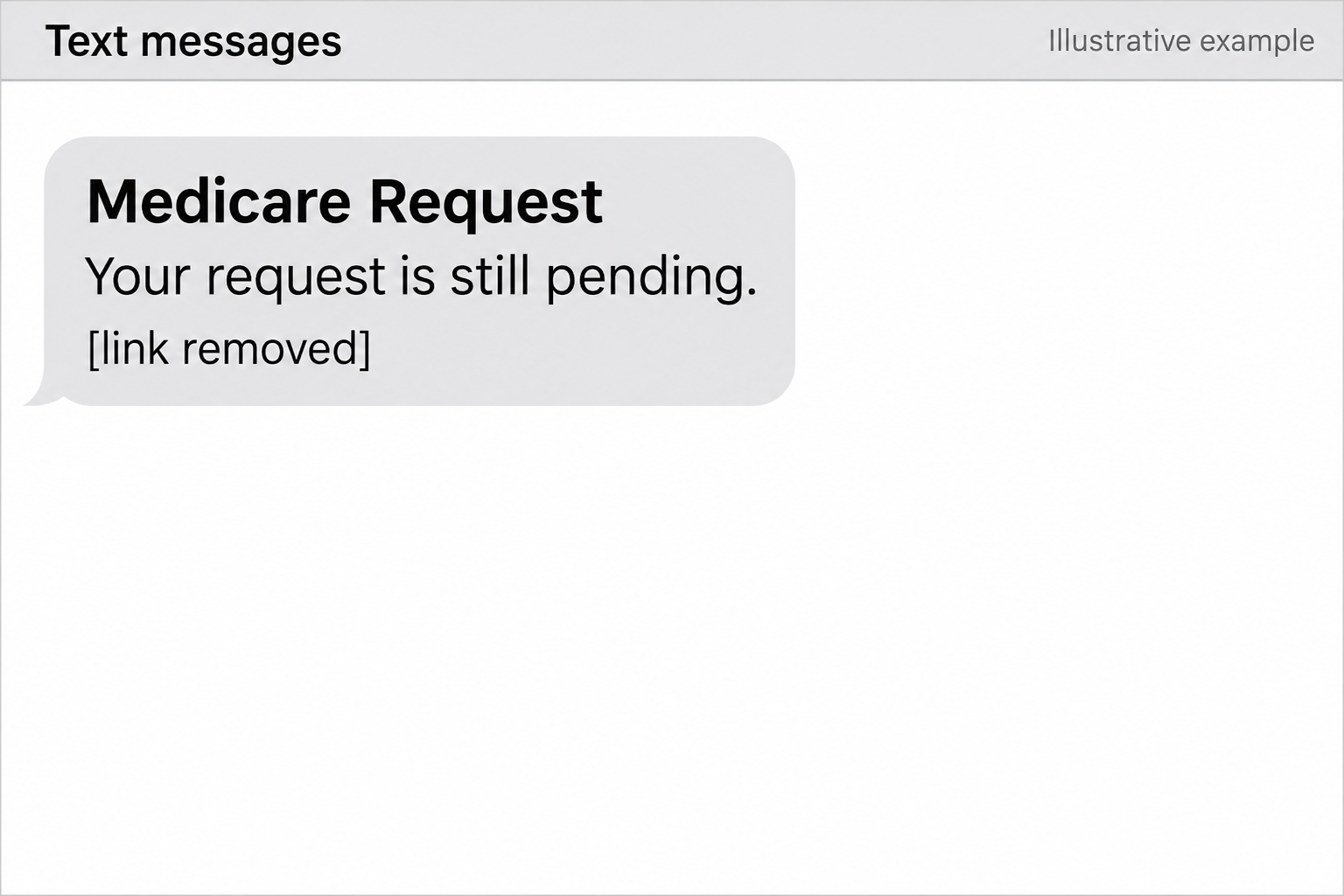
A text says there’s a Medicare request waiting for you. It doesn’t say which appointment, application, or call prompted it. There’s just a link to verify the details.
If you’ve been dealing with a plan or helping a parent with coverage, that little gap is enough to make the message hard to dismiss.
Overview
The text invents a reason to verify something
The Medicare Request text scam poses as a status update. It gets your attention by suggesting there’s a request you forgot about, didn’t finish, or need to review.
In one example reviewed in October 2026, the sender label appeared as PNational.
The message said the recipient had been notified of a Medicare request and offered a verification link.
That’s how the label appeared in a reported text, not proof of who sent it.
Other suspicious messages in the investigation appeared under names that included a real insurer’s brand.
The goal is to put an unknown sender in charge
The fraud works when the text replaces the channel you normally use to check a request. Instead of calling your health plan, you follow a link the sender chooses.
Companion lures in the research used surveys and supposed benefits. They don’t all request the same information.
The risk depends on whether they collect contact details, insurance identifiers, or something else.
A name in the opening line doesn’t prove Medicare gave the sender access to your file.
The message itself doesn’t establish a breach or confirm the sender can change your coverage.
Unwanted texts and impersonation aren’t interchangeable
The October investigation examined 12,740 messages mentioning Medicare between January and July 2026. It classified about 18% of that sample as impersonation or fake-benefit messages.
Much of the rest consisted of political fundraising or sales messages.
That sample is not a count of all texts sent to Medicare beneficiaries, nor does it make every advertisement fraudulent.
You don’t need to classify the sender to make a safe decision. Check the claim independently, particularly if you spot these clues:
- There is a request but no recent conversation or application you can match it to.
- The text says to verify details without explaining what the request is about.
- A survey or benefits offer asks for a Medicare Number or other identifying data.
- A display name resembles an insurer, but the message routes you elsewhere.
- You are pushed to respond before you can ask Medicare or your plan.
How the Medicare Request Text Scam Works
Step 1: An ordinary status update gets your attention
A benefit pitch can be easy to ignore. A notice that appears to be about a request already in progress feels different.
You may worry that ignoring it delays your coverage.
This works even when you never made a request.
A parent might have called a plan, a clinic might have filed something, or a letter may have arrived earlier that week.
In the documented example, the text didn’t need to identify an actual application. The reader could fill that gap with whatever Medicare business they already had on their mind.
A genuine request is something you can ask about through a known number.
You don’t have to remember every phone call before deciding whether to use the number on your card.
Step 2: Sender names borrow credibility
Most messages show something above the text: a number, a saved contact, or a short name.
Those labels help you navigate conversations. They don’t independently establish who authorized a Medicare request.
An unfamiliar label can look like the name of a contractor. A familiar plan name can make the same message seem routine. Neither replaces confirmation from the organization.
Think about the difference between seeing your plan’s name and hearing your plan confirm a request when you call it.
One is a label; the other is an independently opened conversation.
Don’t rely on a sender label even if similar names appear in old messages.
Use the card or official site you already have instead of starting with the inbox entry.
Step 3: A link or survey turns a notice into a data request
The first link is where the message tries to choose the next step for you.
Instead of looking up the request yourself, you’re sent to a page outside your usual process.
Some fake benefits messages ask simple survey questions before asking for health-plan information.
The modest first questions make later ones feel like part of a routine screening, not a new decision.
Don’t assume every page in the campaign displayed the same form.
The example shows the hook and link; other material describes related tactics. Your exposure depends on what you actually entered.
A page can look convincing and still have no authority to handle your insurance.
Leave if you’re asked to identify yourself before anyone can tell you what request they’re referring to.
Step 4: The answers can create a second problem
A telephone number and ZIP code might be enough to make a later pitch sound personal.
A Medicare Number can carry a different risk, including billing for supplies or services you didn’t receive.
A follow-up caller may repeat information you entered in the survey. That isn’t necessarily an independent confirmation.
It may mean the caller already has the answers from the first interaction.
If a person presses you to confirm whether a particular identifier is correct, you don’t owe them an answer.
End the call and start a new one using a trusted number.
There’s no evidence in a text alone that anyone has enrolled you in a plan or filed a claim.
Verify those possibilities directly rather than relying on what a caller says.
How to Check a Medicare Request Safely
Match the message to something you actually started
Write down the action you remember: an appointment, a plan enrollment, a coverage question, or a call about a claim.
If there wasn’t one, you can still contact Medicare without following the text.
Use the number printed on your current plan card for plan-specific issues.
Go to Medicare’s contact page for Medicare questions, or sign in through Medicare.gov to check an account independently.
Have the date of the application or earlier call nearby if you know it.
Ask whether the organization has a pending action and how it normally verifies you on a call you placed.
Distinguish a real deadline from an inbox deadline
Medicare’s annual Open Enrollment period runs from October 15 through December 7. That schedule doesn’t validate a particular text or give the sender authority to process your choice.
A real plan question may still need timely attention. Contact the plan before the applicable deadline, not because an unknown sender says a link will stop working tonight.
If you want unbiased help comparing what you already have with an offer, ask Medicare about your State Health Insurance Assistance Program.
Don’t let a text pick a plan for you.
Allow for legitimate messages without granting trust to this one
Medicare can send texts to numbers provided for certain communications. Its plan marketing rules also describe situations where a plan can contact someone about an Extra Help application.
So “Medicare never texts” isn’t a useful test. The better test is whether you can confirm the exact action through Medicare or your plan without touching the link.
If you assist a relative, ask them to show you the message without forwarding the link around.
Sit with them while they make the call and use your normal authorization arrangements.
What to Do if You Have Fallen Victim to This Scam
Start with what you shared. Someone who read the message needs a different response from someone who provided a Medicare Number, a password, or a card.
-
Close the message or page. Don’t finish the form or use its callback number. Save the time and sender label before reporting and blocking the text.
-
If you gave your Medicare Number, call 1-800-MEDICARE (1-800-633-4227) from the official listing. Explain what you disclosed and ask how to check your claims and protect the account.
-
Call your insurer separately if the text involved your plan. Ask whether there’s any application or changed coverage you don’t recognize. Note who you spoke with and when.
-
Change a password you submitted using the real website. If the same password protects your email or other accounts, change it there too and review recent activity.
-
If you supplied card or bank details, contact the institution through its official app or published number. Explain whether you entered card information, authorized a transaction, or noticed a charge.
-
If you shared your Social Security number or suspect broader identity theft, use IdentityTheft.gov for a recovery plan. Don’t post private identifiers when asking for help.
-
Check your claims and plan notices for activity you don’t recognize. Report suspicious records through Medicare’s fraud reporting channel and keep track of the dates.
Compare claim dates with care you actually received
If you have Original Medicare, check the claims in your secure account or on your Medicare Summary Notice.
For plan coverage, use your plan’s claims records or explanation of benefits.
Look for providers, services, or delivery dates you don’t recognize.
A claim entry can be unfamiliar without being fraudulent. Contact the provider or your plan to confirm what it represents.
Keep notes on what you’ve verified and what remains disputed. Saving dates, provider names, and the plan’s reference number makes it easier to follow up on a particular item.
A clean review today is helpful, not conclusive. Check future statements for the dates Medicare or your plan recommends.
You don’t need to wait for an unusual claim to report exposure.
If you opened the link but didn’t fill out the form
Close it and think through whether you typed anything, agreed to browser notifications, or downloaded a file. Don’t assume all three happened just because the link loaded.
Remove any unfamiliar browser notification permission if you allowed it.
If a page supplied an app or attachment you opened, contact device support or scan with a trusted tool such as Malwarebytes.
A trusted blocker such as AdGuard may stop some known dangerous destinations. It won’t verify a benefits request or prevent an unfamiliar site from displaying a convincing form.
Tell the next caller you’re going to call back
A later call can be the most persuasive part. It may refer to the text or address the exact worry that led you to open it.
You can tell the caller you’re going to contact the plan using your card. There’s no need to confirm your number, birthday, or coverage before ending an unsolicited call.
If you’ve already reported the incident, keep the case number where you can find it.
Locate the official reporting number again rather than trusting an incoming number that looks like it.
Ask for a case number you can use later
If Medicare or your plan opens a case, make a note of the reference number and the direct number you called. Keep them with your coverage records.
If someone later calls claiming to handle the investigation, don’t provide more information just because they mention that case. Call the original number and ask for an update yourself.
Families can pick one place to keep those notes. That saves a parent or caregiver from having to reconstruct several separate conversations while a caller waits on the line.
If no investigation is open, you can still ask how to record the incident and what counts as a meaningful change to report. A new plan card is one example.
Use official correspondence already on file to check any unfamiliar plan card. Never use a return envelope or a callback number supplied by the text to send sensitive information.
Frequently Asked Questions
Is a “Medicare Request” text always from Medicare?
No. Those words identify a claim within the message. A documented fake used that wording. Verify any request directly through Medicare or the plan you contacted.
Does Medicare ever send legitimate texts?
Yes, for some communications. A text doesn’t make it safe to submit health identifiers through an unexpected link.
Use the official account or call back through a number you trust.
Is a text from a name that includes Aetna proof that Aetna sent it?
No. The October research noted suspicious texts using that display name.
If you’re a member, call the official number on your Aetna card rather than a number in the text.
Is every Medicare Advantage allowance offer a scam?
No. Specific plans may offer extra benefits under their own rules.
Compare the offer with the plan documents through Medicare or the insurer, not a survey sent by an unknown party.
Should I ask for a new Medicare card after sharing my number?
Call Medicare and describe what happened. Ask whether the number needs to be replaced and how to check for fraud. Don’t request a replacement through the text.
Can the link cancel my insurance if I ignore it?
An unsolicited link doesn’t decide your coverage. If you are expecting a change or nearing a real deadline, confirm its status with Medicare or your insurer directly.
The Bottom Line
The Medicare Request text gets its force from a question you might already have: did someone need me to finish something? The link is not the place to answer it.
Use the number on your card or reach Medicare independently.
If you gave anyone your insurance information, report it, check claims and enrollment, and verify any follow-up through the same trusted channel.

Join the discussion
0 commentsShare your experience or ask a question about this article.
Community experiences
Did this happen to you?
Your experience could help someone recognize the same scam. Submit a private report for our team to review.
I experienced this tooReports are reviewed before publication. Sharing publicly is always your choice.
Discussion
Start the conversation
Have a question or something useful to share? Add the first comment.