

A page announces that $951.98 is already waiting in your name, even though you never opened the account displaying the balance.
The number is oddly specific, the timer is moving, and a confident financial storyteller says only a tiny activation step remains.

Overview
The original pitch begins with money you never earned
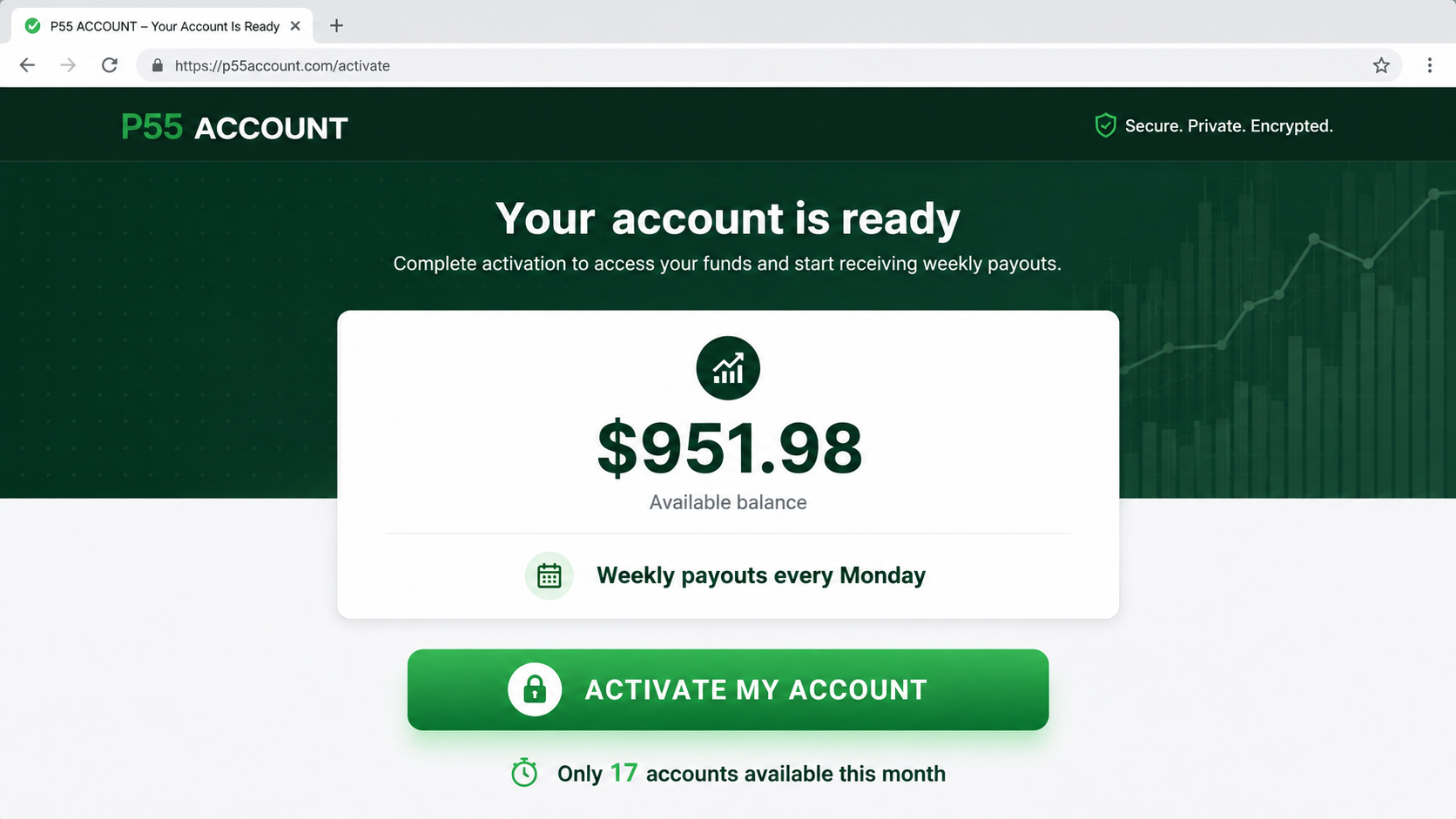
The P55 Account campaign told viewers they had a preloaded balance of $951.98 ready for activation.
It extended that figure into a weekly promise, claiming another $951.98 could arrive each Monday.
Sales material translated the claim into $135.99 per day and $3,983.92 per month, making the account sound like dependable secondary income.
A visitor supposedly needed only to secure the balance before a small number of available accounts disappeared.
The current public page tells a different story
When we checked P55Account.com, the preloaded-balance presentation was no longer the main explanation visible on the homepage.
The current page promotes software, training, templates, automation, and digital-product methods for a one-time $97 payment.
Its disclaimer says the average buyer of “how to” information gets little or no results, and that outcomes vary.
That warning conflicts sharply with an advertisement implying $951.98 has already been assigned to the visitor.
- The initial story described a preloaded $951.98 account.
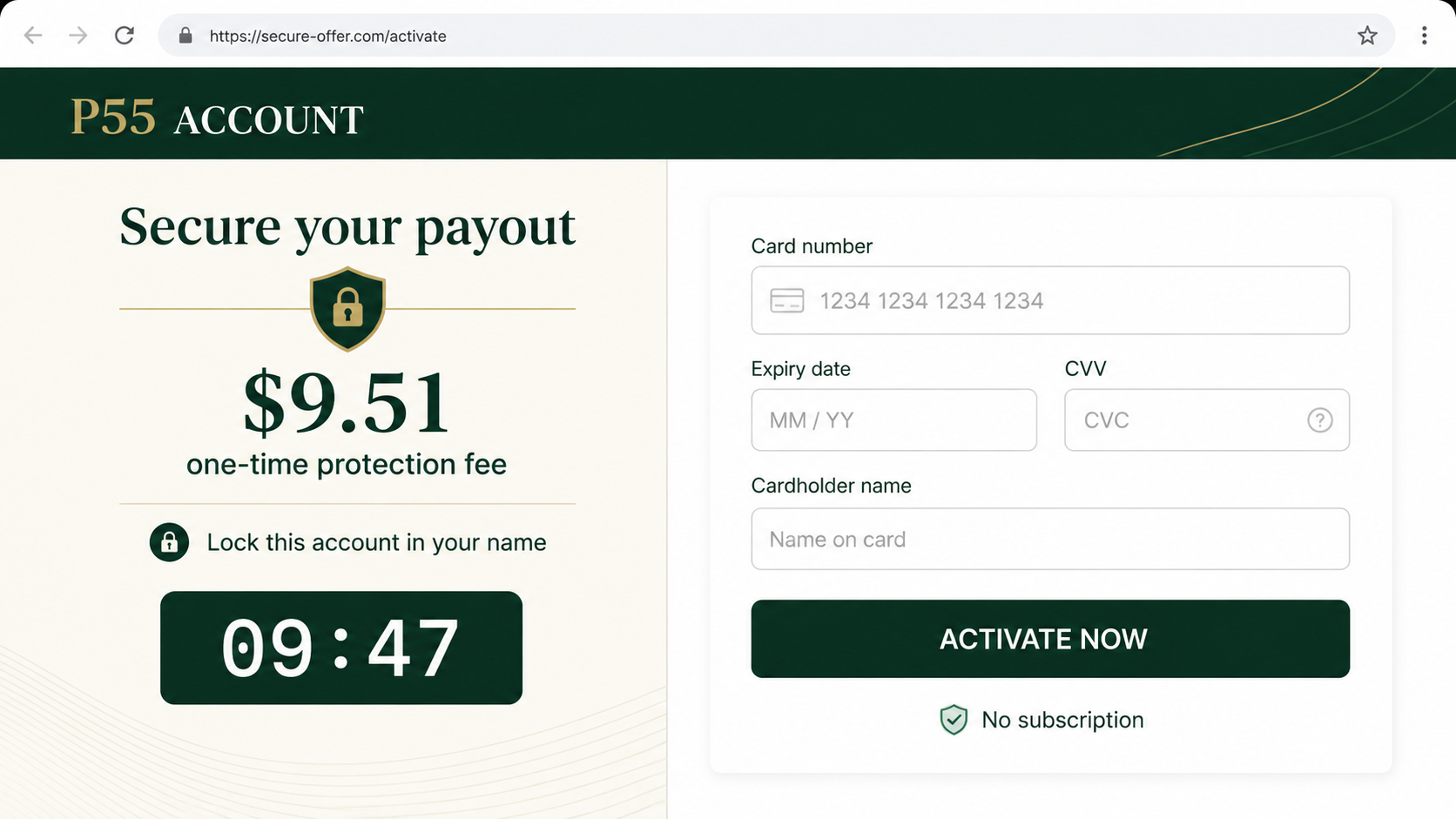
- A supposed $9.51 protection fee appeared in the earlier activation flow.
- The current public offer asks $97 for digital-business resources.
- The footer sends users to policy pages associated with Mobile AI Monopoly.
- No reliable evidence shows ordinary purchasers receive the promised weekly amount.
The offer is selling possibility, not an existing balance
No legitimate income account becomes yours merely because a web page assigns your browser a number.
Money has a traceable source, contractual basis, account owner, custodian, and withdrawal process. The original P55 story established none of those essentials.
The current description reveals that customers are buying information and tools intended to help them attempt an online business.
That is not equivalent to receiving a funded account, guaranteed weekly payment, or passive income.
Who Is the Supposed Former Banker?
The sales story used a spokesperson called Michael Diamond, presented as a former Goldman Sachs banker sharing a special income method.
We found no reliable professional record connecting that identity, biography, and pictured presenter to the claimed offer.
The accompanying portrait appeared consistent with generic commercial imagery, while the narration showed characteristics commonly found in AI-generated promotional audio.
A polished headshot and financial job title can be assembled without the depicted person participating in the campaign.
Viewers should demand a verifiable employment history, corporate identity, and direct public profile before accepting such credentials.
Even a genuine former banker could not make an unexplained balance appear in a stranger’s name without a lawful financial arrangement.
How the Scam Works
Step 1: The advertisement announces a preselected account
The approach starts by telling the viewer they are unusually fortunate. A funded account has supposedly been reserved before they requested it.
This reverses normal financial logic. Instead of applying and qualifying, the visitor begins with a displayed reward and fears losing it.
The exact $951.98 amount makes the story seem calculated rather than invented. Specific numbers often feel more credible than round promises.
No evidence is provided showing where the funds came from or why this particular visitor owns them.
Step 2: A financial authority figure explains the opportunity
A presenter with banking credentials describes the arrangement as a discovered method, institutional loophole, or private system now available to ordinary people.
The job title replaces proof. Viewers are encouraged to trust experience that cannot be independently connected to the speaker.
Artificial voices and stock portraits let promoters produce many versions without placing a real accountable founder before customers.
The story may also contain personal hardship, moral purpose, or resentment toward large banks to build emotional alignment.
Step 3: Repeated calculations normalize an impossible promise
The presentation repeats $951.98 as a weekly payment, then breaks it into daily and monthly figures.
Repetition encourages the viewer to mentally budget money they have not received.
Once someone imagines paying rent or clearing debt with $3,983.92 monthly, a small activation charge feels inconsequential.
The arithmetic may be correct while the assumption behind it remains completely unsupported.
Step 4: Scarcity threatens to remove the imaginary balance
The campaign says only 17 accounts remain or displays a ten-minute countdown before the opportunity expires.
Neither device proves real scarcity. A webpage can reset a timer and generate the same warning for every visitor.
Urgency prevents the basic question: why would a legitimate account containing $951.98 vanish because someone spent ten minutes reading the terms?
A genuine financial provider would explain custody and eligibility, not punish careful verification.
Step 5: A small protection fee unlocks payment details
The earlier funnel requested $9.51 as a one-time protection or activation fee to secure the account in the visitor’s name.
That amount is psychologically effective because it appears tiny compared with the displayed $951.98 balance.
The reconstructed screen above illustrates how easily a payment request can be framed as protecting money rather than purchasing a product.
Entering card details gives the merchant a real payment while the visitor receives no proof the larger balance exists.
Step 6: The underlying product changes after the hook
The current P55 page no longer centers the same $9.51 activation. It offers digital-product tools and training for $97.
This shift shows why searching only the current homepage can miss the advertisement that shaped a buyer’s expectations.
Sales funnels can vary by advertisement, location, device, or visit. Different users may see different prices and follow-up offers.
A seller may provide educational content, but that does not substantiate the preloaded account that produced the purchase.
Step 7: The seller relies on disclaimers when results fail
At the bottom of the current page, the earnings message becomes far more cautious than the original advertisement.
The disclaimer acknowledges that typical purchasers of how-to information often obtain little or no result.
Such language protects the seller’s position while the prominent sales story creates a much stronger expectation.
During a dispute, screenshots showing both messages help demonstrate the distance between the initial representation and the delivered opportunity.
The Three Different Things a Visitor May Think They Are Buying
The P55 presentation blurs several concepts that should remain separate.
First is a funded account, meaning money already held for the customer. We found no verified evidence of such custody.
Second is income-producing software, which would require clear functionality, operating costs, realistic risks, and proof of customer outcomes.
Third is educational material about selling digital products. That is what the current page describes most directly.
A course can teach useful information without guaranteeing profit. Its value depends on content quality, support, required spending, and the buyer’s execution.
Before paying, write down which of those three things you expect. Then compare that sentence with the checkout description and governing terms.
Company, Address, and Fulfillment Red Flags
The ownership trail is not clear enough
P55Account.com was registered in October 2025 using a privacy service, which hides the registrant from the public domain record.
Privacy alone does not prove misconduct. However, an income offer needs a clearly disclosed legal seller somewhere in the transaction.
Buyers should find that entity before payment, not reconstruct it later from an unfamiliar statement descriptor.
The policy links point to another brand
The current page sends visitors to terms, privacy, and support resources associated with Mobile AI Monopoly.
That relationship may reflect a shared operator or platform, but the page should explain who contracts with the customer.
Save both domains, every policy page, and the exact footer because branding can change independently of the billing entity.
Support should explain every advertised price
Ask support whether $9.51, $97, or another amount applies, what each payment purchases, and whether any upsells or renewals follow.
Request the answer in writing before entering card details. A vague response cannot resolve a later disagreement.
If representatives cannot explain the preloaded balance, do not accept a new description invented after you paid.
Digital delivery can conceal the original mismatch
The merchant may instantly provide training files or dashboard access and treat the transaction as completely fulfilled.
That delivery does not answer whether the buyer was induced by a fictional funded account or misleading weekly-income claim.
Record what the members area actually contains. Compare its modules, tools, and required expenses with the sales presentation line by line.
How to Test a Preloaded Account Claim
A genuine account holding money should survive ordinary verification. Ask simple questions before paying any activation fee.
- Which regulated institution holds the $951.98?
- What legal agreement made the visitor the owner?
- Where can the account number and custodian be verified independently?
- Why must a payment be made before funds can be withdrawn?
- Are the weekly payments wages, investment returns, commissions, or sales revenue?
- What work, expenses, and customer activity produce each payment?
- What percentage of purchasers received the advertised amount?
- Why do the current page and original advertisement describe different offers?
If the response returns to motivation, secrecy, or scarcity, the financial claim remains unanswered.
Never provide identity documents solely because an unverified page says a preexisting balance needs release.
Why a Small Fee Is Such an Effective Hook
The $9.51 request looks modest beside $951.98, representing only 1% of the supposed balance.
That comparison is deliberate. The visitor evaluates the fee against imaginary winnings instead of asking what the fee actually purchases.
A small first payment also lowers emotional resistance. Once card details are entered, accepting another offer can feel like continuing an existing decision.
This tendency is known as commitment escalation. People protect earlier choices by spending more, especially when promised funds seem almost available.
The important calculation is not $9.51 versus $951.98. It is $9.51 versus the verified value of what the seller delivers.
If the larger balance cannot be independently established, its value for that calculation is $0.
Watch for a Second Sales Layer
Digital-income funnels frequently introduce coaching, traffic packages, premium software, or “done-for-you” stores after the first payment.
We did not confirm every possible P55 upsell, so buyers should inspect their own checkout rather than assume a fixed sequence.
Never authorize another purchase because a representative says the initial package cannot work without it.
Ask why an essential component was omitted from the price used to obtain the original sale.
Write a ceiling for total spending before speaking with support. Do not let projected income replace money already leaving your account.
If a coaching call becomes a high-pressure sales call, end it and request all proposals by email.
What the Current Disclaimer Really Means
The statement that average how-to buyers achieve little or nothing is not a minor technical note.
It acknowledges that purchasing access alone is unlikely to create the prominent income suggested elsewhere.
Read disclaimers alongside headlines. The most cautious sentence often reveals the uncertainty that bold graphics deliberately minimize.
A fair offer would place typical results near the earnings claim, using equally visible text and understandable numbers.
What to Do if You Have Fallen Victim to This Scam
- Capture both versions. Save the preloaded-balance claim, current $97 offer, $9.51 fee, disclaimers, timer, and every page describing what you purchased.
- Identify all charges. Check the statement for the merchant descriptor and record separate amounts for the initial order, upgrades, and renewals.
- Cancel in writing. Tell the seller you reject further billing and request a refund because the delivered product differs from the funded-account representation.
- Contact your card issuer. Explain the sequence accurately, provide screenshots, and ask about dispute rights before the applicable deadline passes.
- Protect personal information. Change reused passwords, enable multifactor authentication, and watch for calls referencing the supposed balance or previous payment.
- Report the advertisement. Notify the FTC and the platform where it appeared. Include the advertiser account, domains, prices, and presenter claims.
- Scan the device. Use Malwarebytes if anything was downloaded, and use AdGuard to reduce malicious redirects and repeated income advertisements.
- Avoid recovery fees. Do not pay anyone claiming they can unlock the $951.98 or recover losses through a second activation payment.
A payment dispute is stronger when it identifies a specific misrepresentation. Explain that you expected a funded account but received training or information instead.
Keep copies outside the members area. Access may disappear after cancellation, taking important descriptions and invoices with it.
Frequently Asked Questions
Is the $951.98 P55 balance real?
We found no verified financial institution, account record, or lawful source showing that amount was actually held for each visitor.
Why is the amount so specific?
Specific figures can appear calculated and believable. Precision does not prove that the underlying balance or payment exists.
What does P55Account.com currently sell?
The current public page describes a $97 package containing digital-product training, tools, templates, software, and automation resources.
Who is Michael Diamond?
We found no reliable evidence verifying the campaign presenter’s claimed former-banker identity and role in the offer.
Will paying $9.51 release $951.98?
There is no reliable evidence that the small fee unlocks a genuine funded account. Do not send further payments to prove eligibility.
Can I dispute the purchase if training was delivered?
Ask your payment provider. Preserve proof that the advertised funded account materially differed from the information or tools actually delivered.
The Bottom Line
The $951.98 preloaded account story presents unverified future earnings as money already belonging to the visitor, then introduces a real payment request.
The current $97 digital-products offer and cautious earnings disclaimer expose a very different proposition from the original account-activation narrative.
Do not pay to release unexplained money. If you already paid, document the mismatch, cancel quickly, and take the evidence to your payment provider.








