

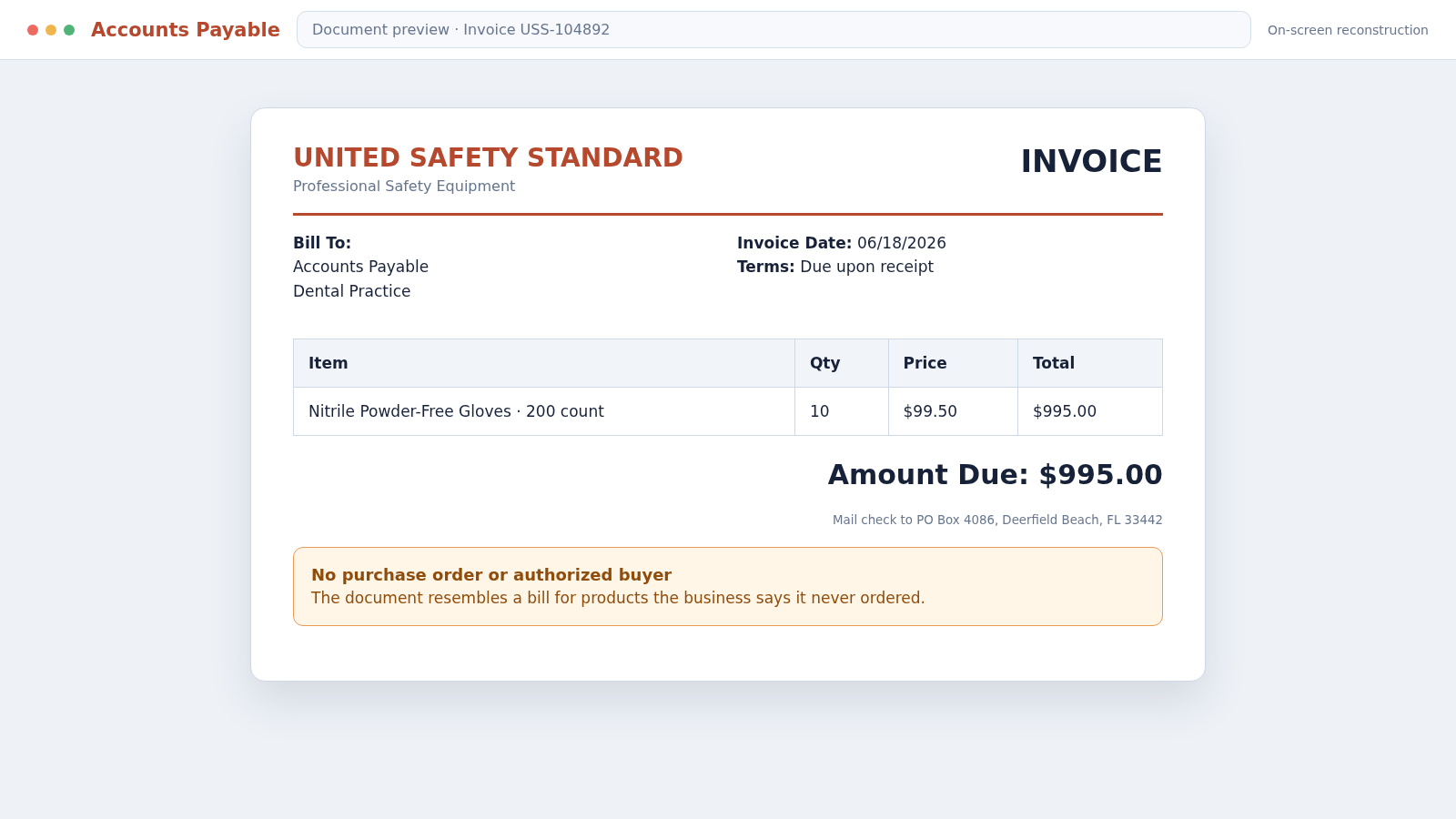
A $995 document arrives at a dental office or small business and looks ready for accounts payable. It lists nitrile gloves, an invoice number, a due date, and a mailing address, although nobody remembers placing the order.
The United Safety Standard scam reports describe a familiar unordered-supplies tactic: make a solicitation resemble a bill and hope one busy employee approves it before another checks the purchase records.
Overview
The mailer resembles an invoice for safety supplies
Businesses report receiving paperwork under the names United Safety Standard or U.S. Safety Standard for nitrile examination gloves they say they did not order. A commonly reported total is $995, with quantities and unit prices formatted like an ordinary vendor bill.
The recipient may be a dental practice, medical office, construction company, or another workplace that could plausibly purchase gloves. That makes the document easy to mistake for a routine expense.
Small-print solicitation language can be easy to miss
Some complaints describe wording such as “not an invoice” or “order form solicitation” printed far less prominently than the amount, product table, and payment instructions. The visual hierarchy can leave a different impression from the fine print.
This is sometimes called invoice solicitation or unordered office-supplies fraud. The sender relies on an accounting gap rather than a dramatic story.
The target is an organization’s payment process
The operation succeeds when the employee opening the mail is not the person who orders supplies. A document can travel from reception to bookkeeping without anyone matching it to a purchase order or delivery record.
Reported warning signs include:
- No employee recognizes the order
- No valid purchase-order number appears
- Glove prices are far above normal vendor pricing
- The payment is requested by mailed check
- The contact number reaches a full or unhelpful mailbox
- The bill uses a generic accounts-payable recipient
- Fine print describes the document as a solicitation
- No receiving record shows that products arrived
Do not pay solely because the document looks formal. Treat every unexpected invoice as unverified until an authorized employee, purchase record, vendor file, and delivery record agree.
What Businesses Have Reported
Public consumer complaints describe invoices for boxes of nitrile powder-free gloves at totals around $995. Recipients said the company had never been an approved vendor and that neither the order nor the goods could be found.
One reported document priced 10 boxes at $99.50 each. Other complaints describe a solicitation that looked like an invoice while a less visible disclosure said it was not a bill.
Several recipients said attempts to call led to a full voicemail box or no useful response. A weak contact path matters because an authentic supplier should be able to identify who ordered the goods, when, through which purchase order, and where they were delivered.
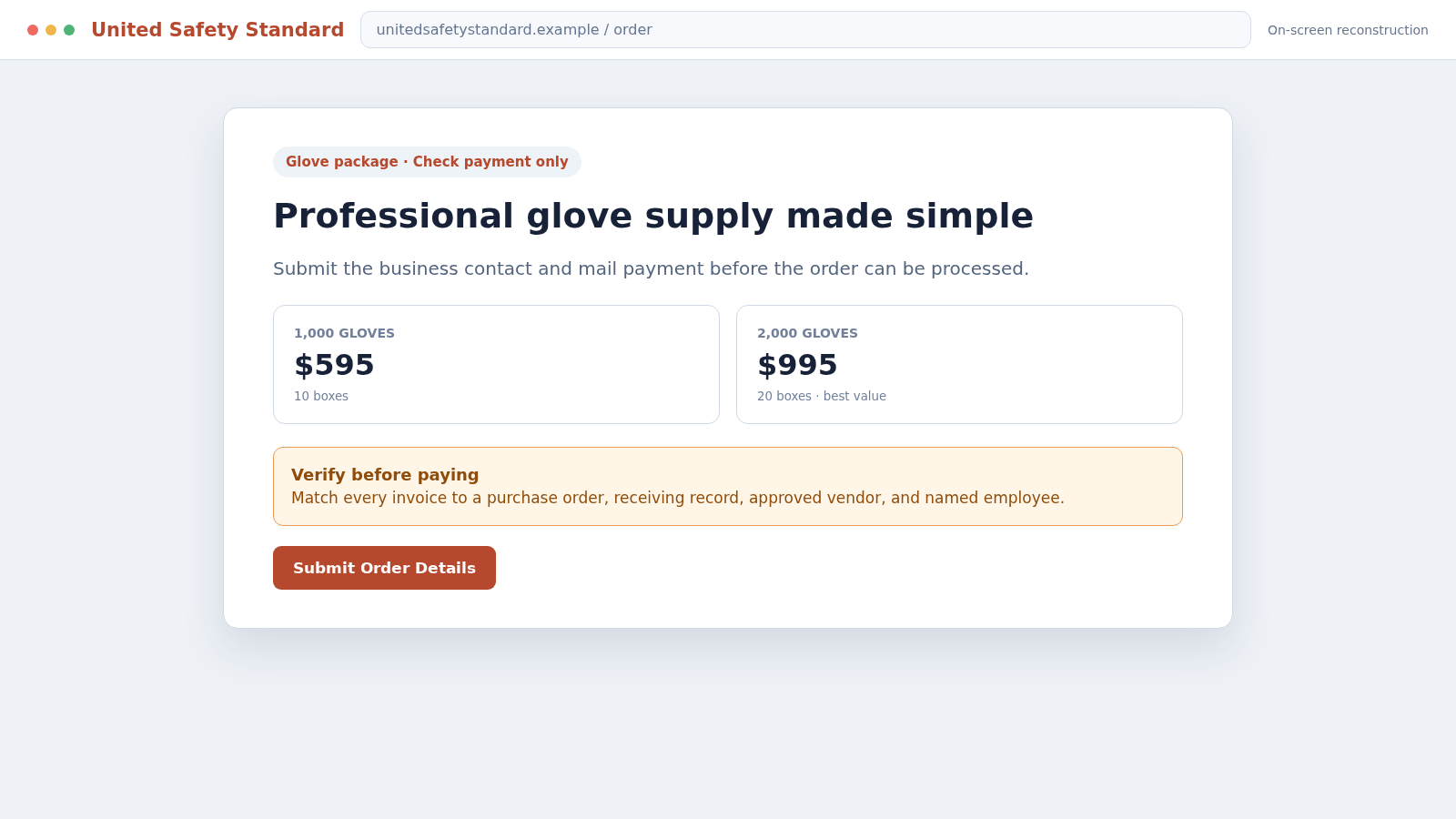
The name and address alone do not settle the question. A website may describe glove packages and check payments, but a web page cannot prove that a particular recipient authorized an order.
These reports are allegations from recipients and complaint records, not a substitute for a court judgment. The practical response does not require making a legal conclusion: if your business did not order or receive the products, do not approve the document as a payable invoice.
Keep the original envelope and paperwork. Postal markings, dates, contact details, fine print, and payment instructions help investigators compare complaints and help the business dispute any later collection demand.
How the United Safety Standard Scam Works
Step 1: The sender selects businesses that use common supplies
Medical, dental, industrial, food-service, and construction organizations regularly buy gloves and safety equipment. A bill for those products can blend into normal accounts-payable traffic.
Business names and mailing addresses are easy to collect from licensing records, directories, websites, and marketing databases. The sender does not need access to the company’s real vendor system.
Step 2: A document is formatted to look payable
The mailer uses an invoice-style layout with product descriptions, quantities, unit prices, total amount, reference number, and remittance instructions. The amount due receives more visual attention than any qualification.
An accounting clerk who sees familiar office supplies may assume another department placed the order.
Step 3: Generic details reduce the chance of an immediate contradiction
The bill may be addressed to “Accounts Payable” rather than naming an authorized buyer. It can omit a purchase-order number or use an internal-looking code that belongs only to the sender.
Without a named buyer, the document invites staff to guess who might have approved it rather than forcing the sender to prove authorization.
Step 4: Fine print changes the document’s claimed purpose
Wording such as “this is not an invoice” or “solicitation” may appear in small type. The sender can later point to that disclosure, even though the main design encouraged the recipient to treat the paper as an existing obligation.
Employees should read the complete document, but businesses also need controls that do not depend on one person noticing a small sentence.
Step 5: The amount is routed through ordinary payment
A mailed check can seem less suspicious than gift cards or cryptocurrency. That is precisely why an invoice solicitation may use it.
The payment method does not validate the debt. A check should be issued only after the underlying purchase and receipt are confirmed.
Step 6: Weak vendor controls turn the solicitation into a payment
If the company does not require a matching purchase order, invoice, and receiving record, a single employee may approve the document. Another employee then signs or mails the check without ever seeing the goods.
Small offices are especially vulnerable when one person covers reception, ordering, and bookkeeping during busy periods.
Step 7: Questions can meet a dead-end support channel
Recipients report full voicemail boxes or limited assistance. A caller may be told to email, return the solicitation, or wait while the due date creates pressure.
Do not let an unresponsive sender convert uncertainty into approval. The absence of a verified purchase record is reason to stop payment, not hurry it.
Step 8: Payment can trigger more solicitations
A business that pays may be identified as having weak controls. Its address and accounts-payable process can become more valuable for future office-supply, directory-listing, toner, compliance-poster, or domain-renewal solicitations.
The best long-term response is to correct the control failure, alert staff, and require vendor verification for every unfamiliar bill.
The Three-Way Match That Stops Fake Supplier Bills
A strong accounts-payable process compares three independent records before payment: the approved purchase order, the supplier’s invoice, and proof that the goods or services were received.
The purchase order answers who authorized the expense, what was requested, how much could be spent, and which vendor should fulfill it. An invoice without that reference should be routed for review.
The receiving record shows whether the shipment arrived, where it went, how many units were received, and who accepted it. A packing slip should not be created merely because a bill appeared.
The invoice should match both records on product, quantity, price, legal vendor name, and payment destination. A mismatch requires investigation before a check is issued.
Very small businesses may not have formal purchasing software, but the same principle can be applied with a numbered approval email, shared order log, named buyer, and photo or scan of the packing slip.
New or changed vendors deserve a separate callback. Use a phone number already held in the approved vendor record or found through an independent source, not a number printed only on the suspicious invoice.
Company, Address, and Fulfillment Checks
Find the employee who supposedly ordered the gloves
Ask for a name, date, method, and authorization. Search purchasing emails, telephone logs, requisitions, and card records rather than sending a broad “does anyone know this?” message.
If the sender cannot identify a buyer and no employee confirms the order, keep the document out of the payment queue.
Check the vendor record and payment destination
Compare the legal name, tax information, website, telephone number, remittance address, and bank or check payee with the organization’s approved vendor file.
Do not create a new vendor solely from information supplied on an unexpected bill. Require independent onboarding and approval.
Inspect the address and contact channel
Determine whether the stated location is an operating business, mailbox, residence, or unrelated entity. Call through independently found information and document whether anyone can explain the order.
A domain and website are not proof of a purchase. The sender still must establish authorization and fulfillment for this specific transaction.
Confirm receipt and reasonable pricing
Check loading areas, supply rooms, packing slips, delivery logs, and staff who accept shipments. Compare the unit price with established suppliers.
Even delivered unordered merchandise does not automatically create the obligation claimed on a mailer. Get legal or postal guidance for your jurisdiction before returning goods or communicating further.
How to Handle the Document Inside the Office
Stamp or mark the paper “verification required” as soon as it is identified. That prevents a second copy, reminder, or scanned version from entering the payment queue as though it were a new obligation.
Assign one person to contact purchasing, receiving, and the department named on the document. Keep the questions factual: who ordered it, which purchase order covers it, what arrived, and where the approved vendor record is stored.
Do not call simply to provide the sender with more employee names. If contact is necessary, use a business line that does not reveal personal mobile numbers and record what identification or order evidence was offered.
If the document is a solicitation, store it separately from real invoices. Training staff with an actual example is useful because the layout, not the product, is the trick. The next version may advertise toner, workplace posters, directory listings, or domain renewals instead of gloves.
What to Do if You Have Fallen Victim to This Scam
- Put the invoice on hold. Mark it disputed and prevent duplicate entry while you verify the order, vendor, and receiving records.
- Stop or recall the check. Contact the bank immediately if payment was mailed or deposited and ask what protective action remains available.
- Do not provide more business data. Refuse requests for bank forms, employee names, tax documents, signatures, or card details until the vendor is independently verified.
- Preserve the original materials. Keep the envelope, solicitation, fine print, website captures, voicemail, emails, canceled-check image, and internal approval trail.
- Review who approved the payment. Focus on the process, not blame. Identify which missing check allowed an unverified document to reach the bank.
- Alert accounts payable and reception. Share the sender names, product description, amount, address, and warning signs with staff who handle mail, supplies, and invoices.
- Lock down vendor changes. Require a second person and an independently placed callback for every new vendor, remittance-address change, or bank-detail update.
- Report the solicitation. File at ReportFraud.ftc.gov and contact the postal or consumer-protection authority that handles deceptive business mail in your location.
- Protect exposed accounts. If banking credentials or online-payment access were shared, change passwords, rotate approvals, and ask the bank to monitor the account.
- Scan suspicious attachments. If the bill arrived by email with a file or portal link, run a full Malwarebytes scan on affected devices.
- Block deceptive destinations. AdGuard can help block known phishing pages, malicious redirects, and tracking links used in email versions of supplier fraud.
- Watch for follow-up invoices. A paid or answered solicitation can produce new bills under different names. Apply the same three-way check every time.
Frequently Asked Questions
What is the United Safety Standard scam?
The phrase refers to reports of invoice-like solicitations for nitrile gloves that recipients say they never ordered. The practical danger is an accounts-payable employee mistaking the mailer for a valid bill.
Is the $995 document a real invoice?
Do not treat it as payable unless your organization can match it to an authorized buyer, purchase order, approved vendor, delivery record, and agreed price.
Why would the document say “not an invoice” in small print?
That wording may identify the document as a solicitation, while the larger layout still resembles a bill. Staff should read the full page and rely on purchasing records rather than appearance.
What if the gloves actually arrive?
Do not assume delivery proves a valid contract. Preserve the goods and records, avoid using or returning anything without documentation, and obtain guidance applicable to your jurisdiction.
Should I call the number printed on the document?
You can preserve it as evidence, but independent verification is stronger. Research the entity separately and never provide sensitive account information to a number that appeared only on the disputed mailer.
How can a small business prevent similar payments?
Require a three-way match among purchase order, invoice, and receiving record. Add two-person approval for new vendors and independently confirm every payment-detail change.
The Bottom Line
The United Safety Standard scam reports show how an ordinary-looking $995 glove document can exploit the space between the person who opens mail, the person who orders supplies, and the person who pays bills.
Do not decide from the logo, invoice number, website, or due date. Match the paper to a real buyer, approved purchase, fair price, and received shipment. If those records do not exist, hold payment, preserve the evidence, and report the solicitation.








