

An unfamiliar NFT lands in a Hedera wallet. Its memo says a community reward is waiting, and the claim link appears beside a transaction that already exists on-chain.
The Hedera airdrop scam uses that unexpected delivery to make a stranger’s website feel like part of the wallet itself.
The reward looks free. The permission requested to collect it can be anything but free.
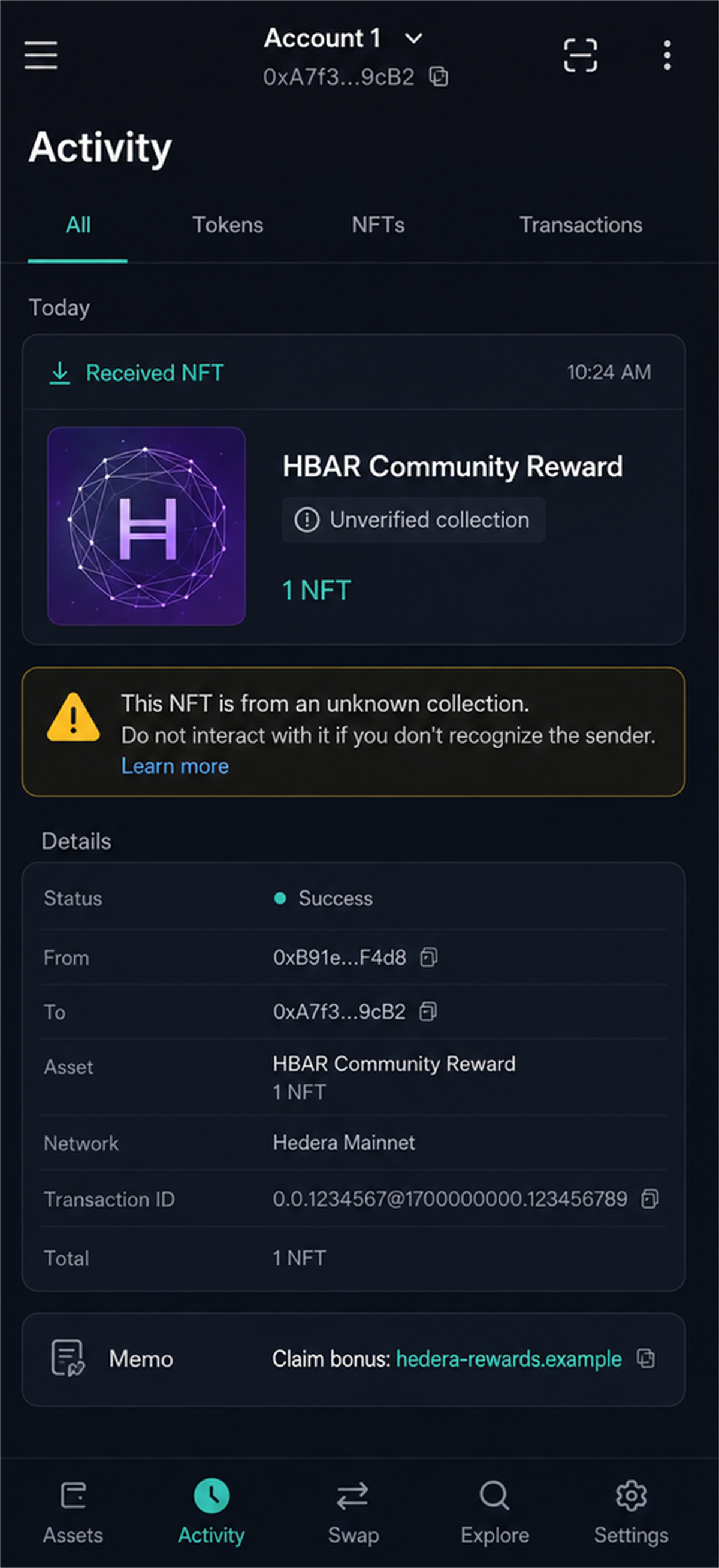
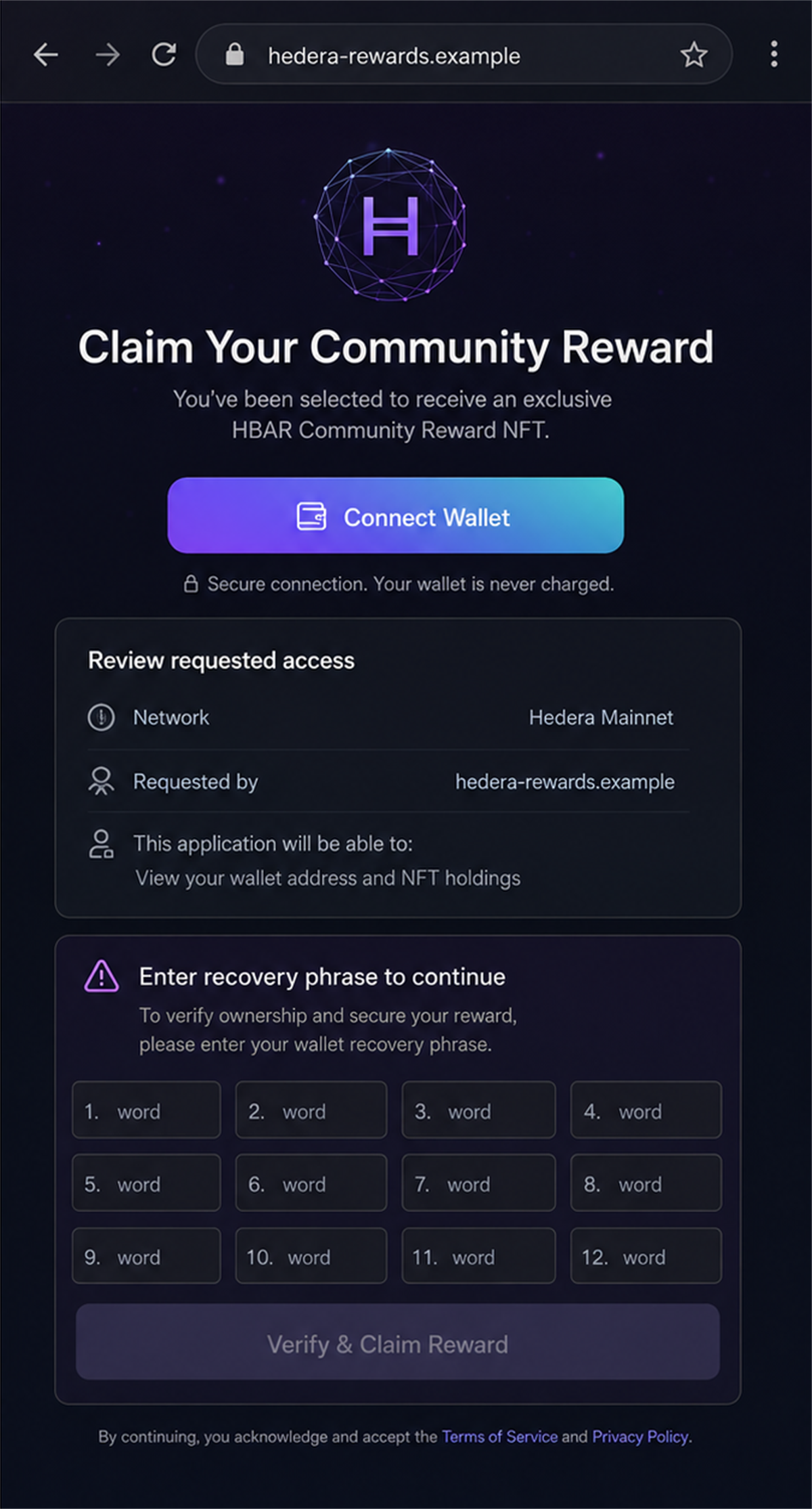
The link can open a polished claim page that copies the language of a real token campaign. It may ask the visitor to connect a wallet, sign a transaction, enter a password, or reveal a recovery phrase.
Those requests do not verify eligibility. They give the operator information or authority that can be used to move cryptocurrency.
The FBI has specifically warned Hedera Hashgraph users about malicious NFT airdrops disguised as free rewards. The same links can also arrive through social posts, third-party sites, and phishing emails.
Hedera and legitimate wallet providers are not the scam. Criminals are abusing familiar wallet features and copied project branding to reach people who already hold digital assets.
Overview
The bait can appear inside the wallet
A scammer can send an unsolicited token or NFT to a public wallet address. The transaction memo then advertises a supposed reward and supplies a link to claim it.
Because the item appears in real transaction history, the message can feel more trustworthy than an ordinary email. The blockchain records the delivery, but it does not certify the sender or the link.
The claim page asks for dangerous access
The destination may request a wallet connection, token approval, contract signature, password, one-time code, or seed phrase. Each request creates a different level of risk.
A connection can reveal the public address and holdings. A malicious approval can expose tokens. A recovery phrase gives complete control over every asset derived from that phrase.
The campaign travels through several channels
The wallet memo is only one delivery method. Criminals can reuse the same fake reward through social media replies, direct messages, search results, advertisements, and email.
- An unsolicited NFT says a reward must be claimed.
- A memo contains a shortened or unfamiliar link.
- A social post announces a limited HBAR bonus.
- A fake support account offers help with the claim.
- The page asks to connect before showing eligibility.
- A signature is described only as verification.
- A form requests a password or recovery phrase.
- Assets move to an attacker-controlled wallet after approval.
The FBI Warning Behind This Report
In June 2025, the FBI Internet Crime Complaint Center warned about NFT airdrops targeting Hedera wallet users.
The advisory explains that victims may receive unsolicited promotional tokens or rewards in a non-custodial wallet. A plain-text memo can contain a URL telling the recipient to accept or collect the offer.
The link leads outside the wallet to a third-party website or decentralized application. The site may request login information, security details, a seed phrase, or a wallet connection.
The FBI also identified phishing emails, social media promotions, and third-party websites as ways criminals distribute the fraudulent reward links.
After obtaining access or authorization, the criminal can transfer cryptocurrency to a wallet they control. That is why this is a confirmed fraud pattern, not speculation about one unusual NFT.
The warning does not mean every Hedera airdrop is fraudulent. It means an unsolicited asset, memo, or claim page must be authenticated independently before any wallet action is approved.
Why an On-Chain Message Can Still Be Fraudulent
Public blockchains let strangers transfer assets to an address. That openness is useful, but it also means the wallet owner did not necessarily request, approve, or recognize everything that appears in the activity feed.
A successful transaction proves only that an item moved from one address to another. It does not prove the attached name, artwork, memo, website, or promised benefit is genuine.
Scammers exploit the difference between technical validity and human trust. The wallet accurately displays a real transaction while the memo tells a false story about why it happened.
The tactic resembles spam email placed in a mailbox. Delivery is real. The sender’s promise is not automatically real merely because the message reached its destination.
Token names and artwork can be copied. A malicious asset may use a familiar ticker, project color, or event name without any authorization from the project it imitates.
The memo link can also use a lookalike domain. Extra words such as rewards, community, bonus, foundation, or claim make a newly registered address sound official.
HTTPS is not an endorsement. It encrypts the browser connection to the scam site while the site asks for the very permission needed to steal the visitor’s assets.
What the Wallet Prompts Actually Mean
Connecting a wallet is not identical to sending funds, but it establishes a session and exposes the public address. The page can inspect visible balances and prepare a request tailored to valuable holdings.
A transaction prompt may transfer an asset immediately. A contract approval may authorize a spender to move tokens later, sometimes up to an unlimited amount.
An NFT operator approval can cover more than one collectible. A typed signature may authorize a permit or other action even when the page labels it as a harmless eligibility check.
Wallet software displays the request received from the website. It does not guarantee that the website’s button accurately described the request.
If the simulation shows an unknown contract, broad spending authority, unexplained balance changes, or no clear output, cancel. A free reward should not require access to unrelated assets.
A seed phrase is more serious than any single approval. It is the master secret from which wallet access is derived. Anyone who receives it can rebuild the wallet elsewhere.
No airdrop, moderator, support agent, sync process, or verification page needs the recovery phrase. Entering it into a website should be treated as a complete wallet compromise.
How the Hedera Airdrop Scam Works
Step 1: Criminals collect public wallet addresses
Wallet addresses and transaction activity are visible on the ledger. Operators can identify active accounts or distribute low-cost spam broadly without knowing the owner’s real name.
Existing holdings can help them choose a believable reward theme. Public visibility does not expose the recovery phrase, but it gives the scammer a target and a story.
Step 2: An unsolicited token or NFT arrives
The wallet receives a small asset presented as a bonus, promotional NFT, eligibility marker, or community reward. The name is designed to make the item feel beneficial rather than unwanted.
The owner may assume that receiving it means a real project has already selected the wallet. In reality, distribution alone can be cheap and permissionless.
Step 3: The memo supplies the claim link
A plain-text memo says the reward must be accepted on a website. The address may resemble Hedera terminology or a known project while remaining unrelated to official channels.
The message creates curiosity and urgency. A deadline or limited allocation discourages the recipient from checking where the link was announced.
Step 4: A cloned page borrows legitimacy
The website copies colors, token art, wallet buttons, community statistics, and security language. Fake counters and testimonials suggest thousands of people have already claimed safely.
The site may display the visitor’s public address and balance after connection. That information is public, but seeing it personalized can make the page appear authenticated.
Step 5: The user is asked to approve access
The button triggers a signature, contract call, token allowance, or form requesting secrets. The page calls this verification, synchronization, validation, or proof of ownership.
The actual effect depends on the request shown by the wallet. The marketing label does not limit what the contract or attacker can do.
Step 6: Cryptocurrency is stolen
A malicious transfer can move funds immediately. A dangerous allowance may remain available for later use, allowing the criminal to wait until the wallet contains more valuable assets.
If the recovery phrase was entered, the operator can access all accounts derived from it. Disconnecting the website does not remove that knowledge.
Step 7: Recovery impostors approach the victim
After a theft becomes visible on-chain or is discussed online, another account may promise tracing, reversal, or wallet restoration. It demands a fee, remote access, or the same recovery phrase.
Cryptocurrency transfers are difficult to reverse. A stranger guaranteeing recovery for an upfront payment is usually attempting a second theft.
Identity, Address, Support, and Traceability Checks
The reward must appear in official project channels
Start from the project’s known website or verified account, not from the memo. Look for a matching announcement, dates, eligibility rules, contract address, and support documentation.
A claim that exists only on the page asking for a connection has no independent support.
The web address must match exactly
Read the registered domain, not just the words before it. Hyphens, added reward terms, unexpected subdomains, and free hosting pages can imitate a familiar name.
Use a bookmark or manually typed official address. Never use the suspicious link to verify itself.
The requested permission must match the reward
A claim should not need unlimited access to unrelated tokens, NFT operator rights, a transfer to an unknown address, or a blind signature.
Review the network, contract, spender, asset, amount, and simulated balance changes inside the wallet before approving anything.
Support will never need the recovery phrase
Real support can explain a transaction and point to public documentation. It cannot require a private key, seed phrase, password, or one-time code to investigate an unsolicited NFT.
A direct message from someone calling themselves an administrator is not a verified support channel.
Warning Signs That the Reward Is a Trap
- You did not enter or qualify for the promotion.
- The only announcement is inside an unsolicited wallet memo.
- The claim link uses an unfamiliar or newly seen domain.
- The page creates a short deadline or limited allocation.
- Connecting is required before eligibility is explained.
- The wallet cannot clearly simulate the requested action.
- A signature is described only as login or verification.
- The contract requests broad or unlimited spending approval.
- The site asks for a recovery phrase, password, or one-time code.
- A support account contacts you privately after you ask questions.
One recovery-phrase request is enough to close the page. No additional investigation is needed before refusing that demand.
How to Check an Airdrop Without Risking the Main Wallet
Begin by searching official project announcements independently. Compare the exact domain, contract address, eligibility dates, supported network, and claim instructions.
Do not interact with the unsolicited asset merely to hide, burn, swap, or inspect it. Some operations can open links or create authorization requests.
Use a block explorer to view transaction details without visiting the memo website. Viewing public information does not require connecting the wallet to a stranger’s application.
If a real claim exists, reach it from an official bookmark and read every prompt. Hardware wallet screens still require human review; the device cannot know whether a request matches the promise.
A separate empty wallet limits the value exposed during research, but it does not make a malicious contract safe. Never import the main wallet’s recovery phrase into a test browser.
Take screenshots and copy transaction hashes before reporting. Do not paste private keys or seed words into a support ticket.
What to Do if You Have Fallen Victim to This Scam
- Stop all interaction. Close the claim page, reject pending prompts, and do not answer accounts offering private support or guaranteed recovery.
- Determine what you exposed. Record whether you only visited, connected, signed, approved a contract, entered a password, or revealed the recovery phrase.
- Move remaining assets when the seed is exposed. From a clean device, create a new wallet with a new recovery phrase and transfer uncompromised assets promptly.
- Review and revoke approvals. Use a trusted network explorer or wallet tool reached independently. Disconnecting a site is not the same as revoking an on-chain allowance.
- Notify providers quickly. Contact any exchange receiving stolen funds and provide transaction hashes, timestamps, wallet addresses, asset types, and amounts.
- Secure connected accounts. Change reused passwords, enable strong multifactor authentication, revoke active sessions, and protect the email account linked to wallet services.
- Check the device. If you installed software or a browser extension, run a full Malwarebytes scan and remove unknown applications before entering new credentials.
- Reduce repeat exposure. AdGuard can block some known phishing domains and malicious ads, but it cannot revoke blockchain permissions or recover transferred cryptocurrency.
- Preserve evidence. Save the NFT name, memo, URL, screenshots, contract address, approval transaction, theft transaction, messages, and account handles.
- Report the crime. File a detailed complaint with the FBI IC3 and report the malicious domain and social accounts to the services involved.
Frequently Asked Questions
Can receiving an unsolicited NFT drain my wallet?
Receipt alone generally does not grant spending authority. The danger begins when the owner follows its link, signs a transaction, approves a contract, or reveals wallet secrets.
Does an on-chain memo prove the reward is official?
No. A blockchain records the message or transaction but does not verify the truth of promotional claims placed in the memo.
Is connecting a wallet the same as approving a transfer?
Not always. A basic connection can expose the public address, while later signatures or approvals may authorize transfers. Read every separate prompt.
What if I connected but rejected every signature?
Disconnect the site, review recent approvals and transactions, and monitor the address. Risk is lower if no secret or authorization was supplied.
Can I save the wallet after sharing the recovery phrase?
The phrase itself cannot be made secret again. Move remaining assets to a newly created wallet with a new phrase and stop using the compromised seed.
Is Hedera responsible for these fraudulent airdrops?
No. The FBI warning concerns criminals abusing wallet and airdrop features. It is not an allegation that Hedera or legitimate wallet providers operate the scam.
The Bottom Line
The Hedera airdrop scam turns a real on-chain delivery into advertising for a fake reward. The transaction may be genuine while the memo, claim page, and requested permission are malicious.
Ignore unsolicited claim links, verify campaigns through official channels, and never enter a recovery phrase into a website. In a self-custody wallet, one careless approval can cost far more than any promised free token.








