

Terms and conditions notices are easy to dismiss, which is exactly why a mandatory confirmation can feel plausible. Nobody wants an overlooked policy update to close email.
This message uses calm administrative language rather than an obvious threat. Its mismatched identities tell a much more interesting story.
Overview
What the Webmail Optimum email says
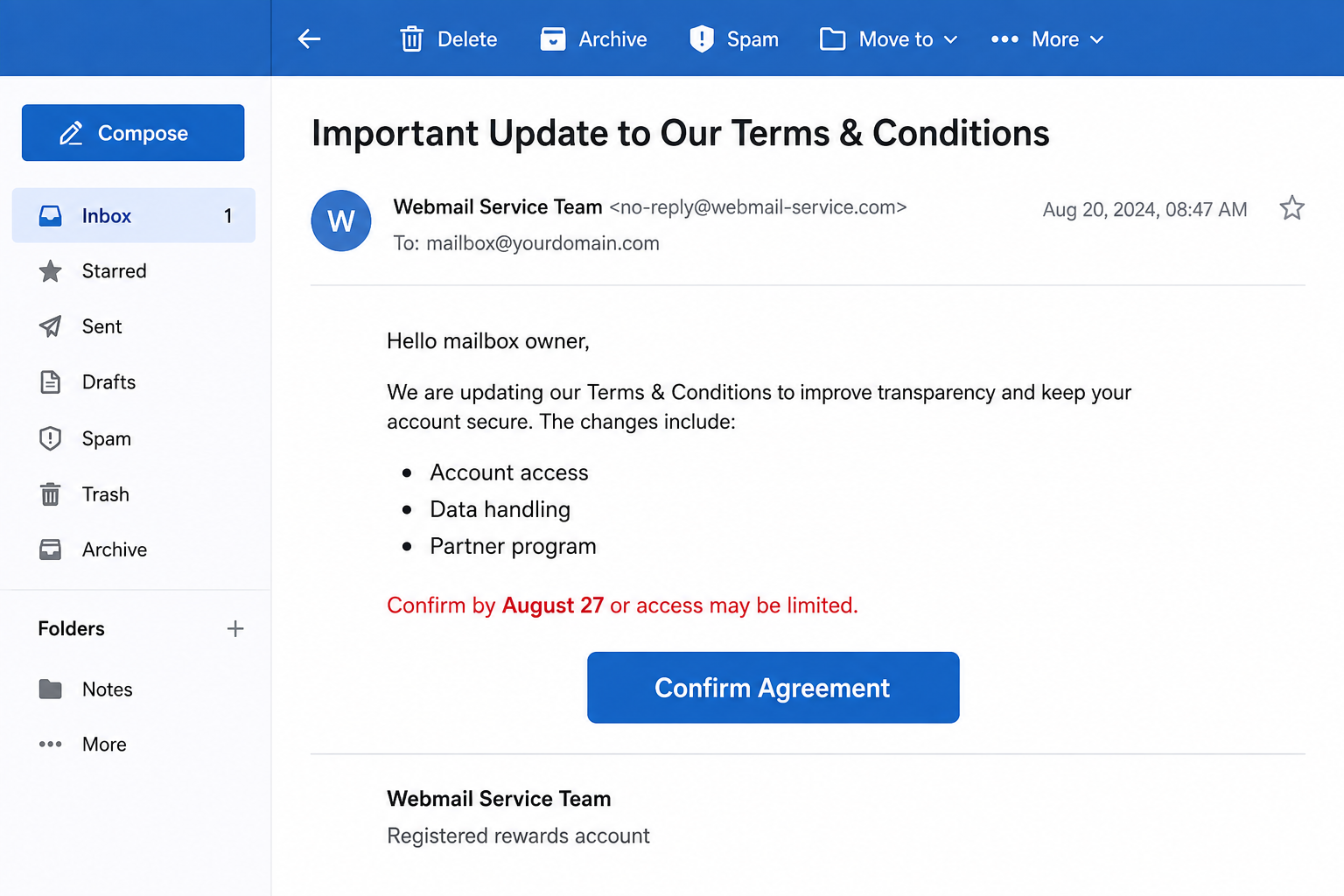
The Webmail Optimum Terms and Conditions Update scam claims that a mailbox provider changed policies covering access, privacy, loyalty points, and partner programs.
Recipients are told to review and accept the new rules before a deadline. Failure to confirm supposedly causes restricted access to the email account.
The button is labeled “Confirm Agreement,” making the action resemble a legal acknowledgment rather than a security login.
Where the confirmation really goes
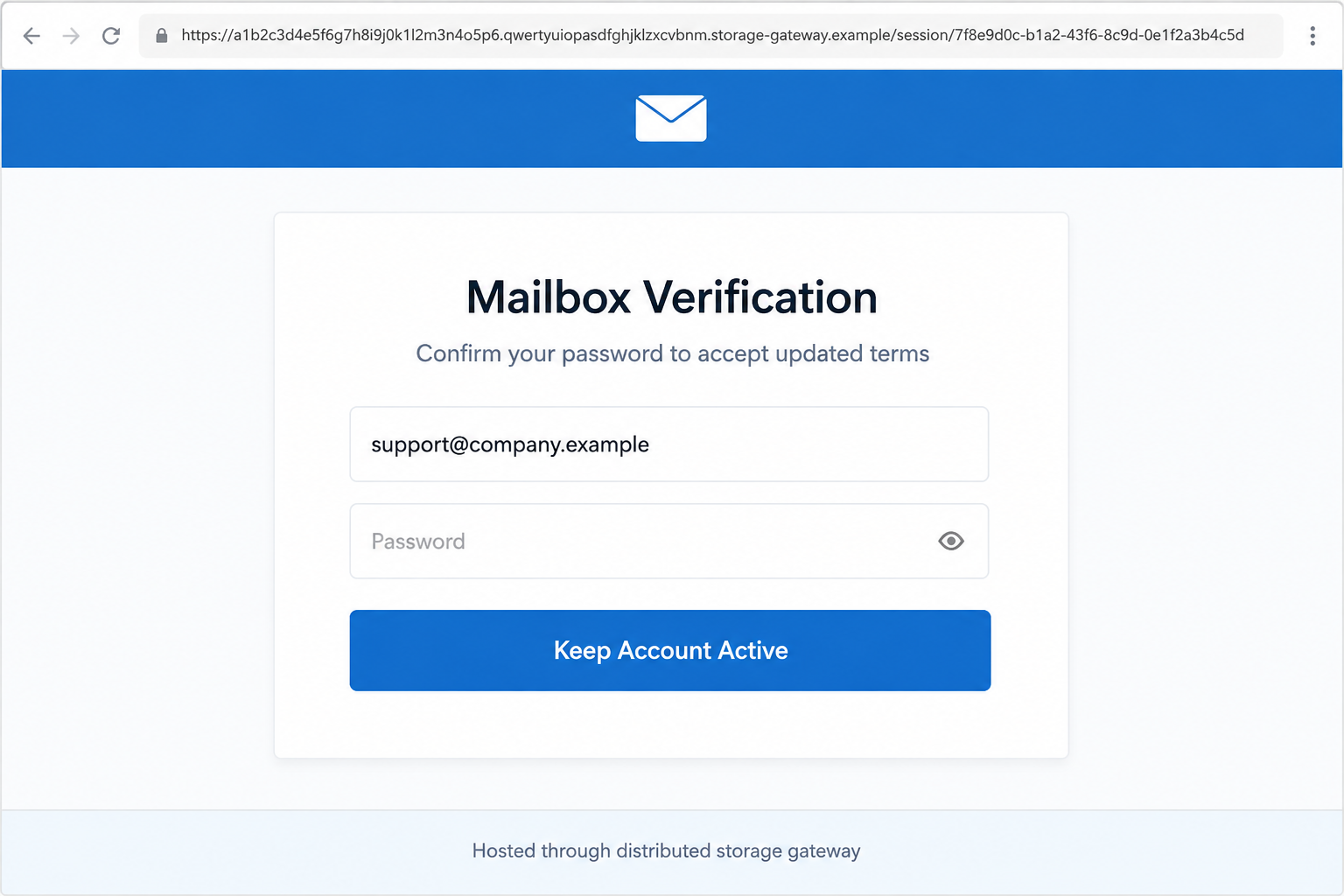
The link leads to a counterfeit webmail page that asks for the recipient’s email address and password. The submitted information can be captured by attackers.
An observed destination used a long address delivered through an IPFS gateway. Distributed storage technology is legitimate, but criminals can misuse public gateways to host phishing content.
The page may resemble a generic cPanel mailbox screen. It is not an authorized sign-in merely because it uses familiar webmail words.
Contradictions that expose the message
- “Webmail Optimum” is presented without a clear provider identity.
- The signature invokes a cPanel team without verified cPanel delivery.
- Loyalty points and partner programs seem unrelated to ordinary webmail.
- The footer mentions a different rewards account.
- The confirmation link opens an unfamiliar storage gateway.
- A policy acknowledgment unexpectedly requires the mailbox password.
cPanel is a legitimate hosting-control platform and has no reason to hide behind unrelated account names. Its terminology has simply been borrowed for credibility.
A genuine provider may update legal terms. The safe response is to enter the known hosting portal independently and look for the same notice there.
If the provider dashboard contains no alert, contact the hosting company using a number or ticket system already on record.
How the Webmail Optimum Terms Update Scam Works
Step 1: The email borrows the language of compliance
Businesses regularly receive privacy, policy, and service notices. Staff may not know which acknowledgments are optional and which affect continued access.
The scam exploits that uncertainty. It lists broad policy areas so the update appears substantial without explaining any actual contractual change.
Legal-sounding language also discourages casual deletion. A recipient may click because refusing terms seems more consequential than ignoring ordinary spam.
The campaign does not need an exact hosting provider. Generic “webmail” wording can apply to thousands of small-business and personal domains.
Step 2: Several borrowed identities create false familiarity
The message mixes names such as Webmail Optimum, cPanel Webmail Team, and a rewards account. Each label sounds plausible when read quickly.
Together, they do not describe one coherent service. Genuine legal notices identify the contracting company, service, effective date, and location of the changed terms.
Phishing templates are often recycled from other campaigns. Leftover references can survive when criminals replace the headline but not every footer line.
Those inconsistencies are valuable clues. Read the complete message, including the dull text at the bottom, before acting on the urgent sentence.
Step 3: A deadline converts paperwork into an access emergency
The email says confirmation must occur before a specific date or mailbox access may be limited. This makes delay feel risky.
For a business user, lost email could mean missed orders, support requests, or invoices. The attacker lets the victim imagine the operational damage.
A date does not authenticate the notice. Criminals can choose yesterday, tomorrow, or a rolling deadline generated whenever the page loads.
Legitimate providers normally place critical account notices inside the customer portal. They also explain consequences through documentation reachable from the official website.
Step 4: The button sends the victim to a disposable location
The visible invitation suggests a normal help center. Its underlying address may instead use a long content identifier and an unrelated gateway domain.
IPFS stores content across a distributed network. A gateway converts that content into a web page that ordinary browsers can display.
That system has legitimate uses, but the gateway operator does not vouch for every uploaded page. Attackers value infrastructure that can be replaced quickly.
Check the entire hostname before the first slash. Words such as secure, login, cpanel, and webmail elsewhere in the address do not control the domain.
Step 5: The fake login turns consent into credential theft
A real terms page should let users read the changes before requesting an agreement. The scam instead places a password field at the center.
The recipient may believe the password confirms identity. Submitting it sends the secret to the phishing operator, not to the normal hosting provider.
Some pages request the password twice or show “incorrect password.” That response may simply be a collection tactic, not a genuine authentication result.
The page can then redirect to a real control panel. Seeing the legitimate provider afterward does not undo the earlier submission.
Step 6: Attackers quietly reconfigure the mailbox
After gaining access, an intruder can read private correspondence, reset linked accounts, and learn how the owner communicates with customers or colleagues.
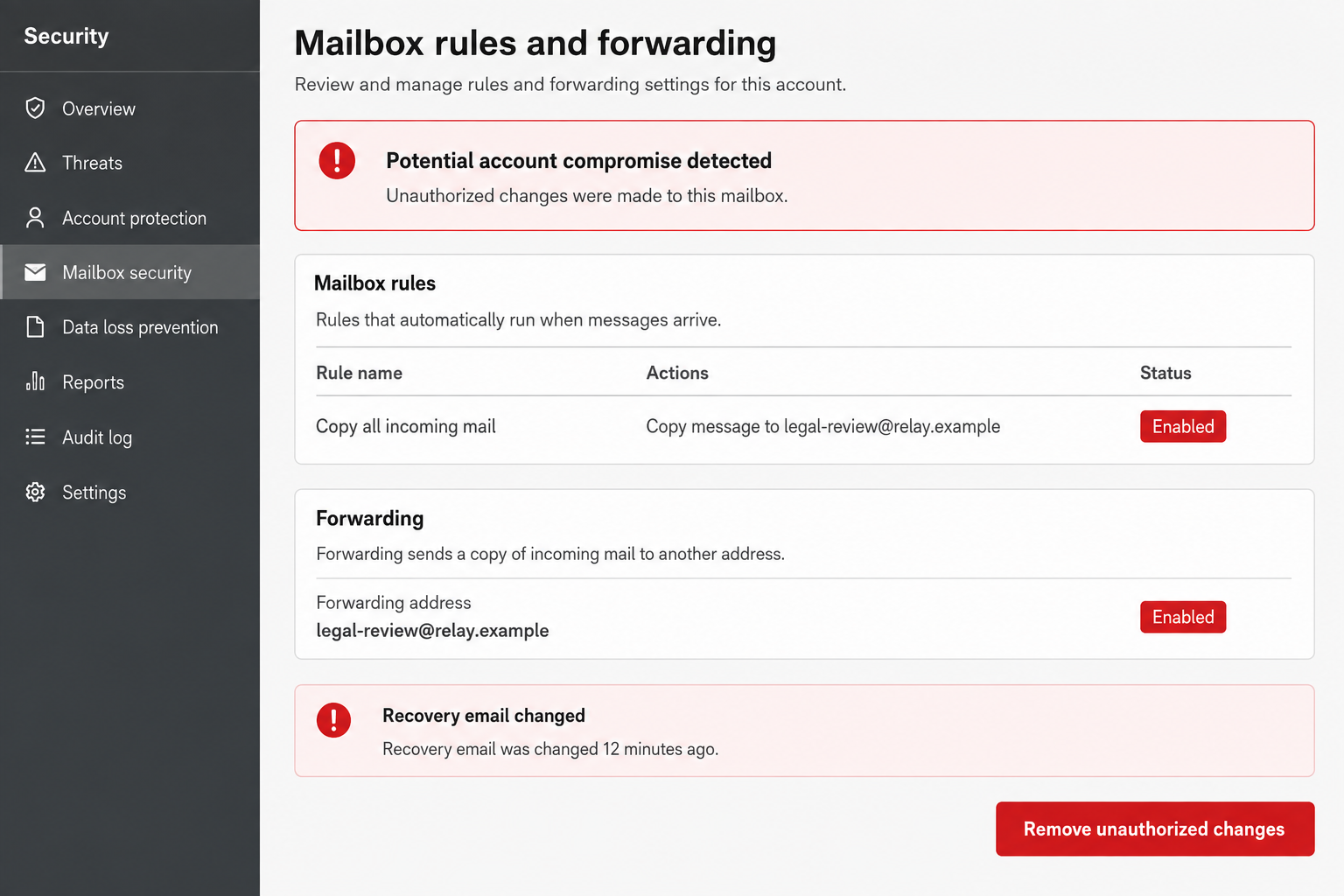
Forwarding rules are especially valuable. They send copies of new mail elsewhere while leaving the original inbox apparently normal.
A rule can target words such as payment, password, bank, or invoice. Other filters may hide security alerts and replies from concerned contacts.
The intruder may add recovery addresses, application passwords, or delegated access. A password change alone may not remove those alternate paths.
Step 7: The stolen mailbox supports more personalized fraud
Email contains names, signatures, invoices, schedules, and relationship history. Criminals can reuse those details in messages that sound genuinely familiar.
They may request changed banking instructions, send malicious documents, or reset shopping and social accounts connected to the mailbox.
A business domain can also lend credibility to attacks against clients. The next phishing message may come from the real address with a copied conversation underneath.
Rapid containment matters because harm grows after the credential theft. Every hour of unnoticed access gives the intruder more context and more targets.
How to Verify a Real Terms Update
Identify who actually provides the mailbox
Small-business email may be supplied by a web host, workplace administrator, Microsoft, Google, or another provider. Determine which company holds the account.
Old invoices, setup records, and saved bookmarks can identify the correct service. Do not let an unsolicited email define your provider for you.
Look inside the known customer portal
Open the portal from a bookmark or manually typed address. Check notifications, billing messages, legal notices, and support announcements.
If acceptance is required, the same process should appear after a normal login. An email-only deadline deserves verification.
Ask the hosting administrator
Employees may not manage their own hosting accounts. Forward the message as an attachment to IT or the domain administrator for header inspection.
Administrators can compare the sender with authenticated notices and confirm whether any policy change affects the organization.
Why IPFS Gateway Links Need Context
An IPFS address is not automatically malicious. Developers, archivists, and publishers use distributed storage for legitimate content delivery.
However, a webmail provider asking customers to sign in through an unrelated public gateway is highly suspicious. The location does not match the claimed relationship.
Gateway hostnames can be long enough to hide important differences on a small screen. Attackers add familiar words inside the path to distract from the true host.
Security filters may block one gateway while the same content appears through another. Users still need to judge why a credential form is hosted there.
Never enter an email password because a page looks polished. Password managers offer another clue because they usually refuse to autofill on an unfamiliar domain.
The Difference Between a Policy Notice and a Security Check
A policy notice explains what changed. It links to complete terms, identifies the contracting entity, and provides an effective date with usable support information.
A security check verifies account ownership through a recognized portal. It does not suddenly move authentication to an unrelated host.
The scam blends these activities. The legal explanation supplies importance, while the password prompt collects the valuable information.
Recipients should pause whenever a routine document changes into authentication. Ask why the current page needs a secret and which organization receives it.
If the answer cannot be established from the official service, leave the page. No deadline makes an unexplained password request safer.
Mail Server Checks for Administrators
Review message headers for sending servers, authentication results, reply addresses, and return paths. A copied display name offers almost no assurance.
Search the mail system for identical subjects and URLs. One report may reveal dozens of recipients who received the same campaign.
Block confirmed destinations at mail, DNS, and web-security layers where appropriate. Preserve evidence before removing the message from user mailboxes.
For anyone who submitted credentials, examine login logs, administrator actions, token creation, recovery changes, and forwarding rules.
Resetting a password should accompany session revocation. Otherwise, a stolen session token may remain active until expiration.
Finally, contact the hosting provider and gateway abuse team with the full link and screenshot. Avoid publishing active credentials or sensitive mailbox details.
What Attackers May Search for After Login
Billing messages reveal merchant accounts and renewals. Password-reset emails provide routes into services that use the compromised address as recovery.
Business correspondence exposes customers, suppliers, and the vocabulary used in real requests. This lets fraudsters write messages that escape simple suspicion.
Tax documents, identity scans, contracts, and medical messages can create privacy risks. The mailbox may hold years of information even when the password was recently changed.
Sent folders are equally useful. They show how the owner greets contacts, signs messages, and handles unusual payment questions.
Assume access may have exposed content, not just the account itself. The response should match the sensitivity of the information stored there.
Company, Address, and Fulfillment Checks
Several service names do not equal one real company
The email combines generic webmail, cPanel language, and a rewards-account reference. A legitimate notice should identify one accountable provider consistently.
Check the legal name on hosting invoices and prior support tickets. Do not infer a relationship because familiar technology names appear together.
Support details inside the email may be part of the trap
Links, reply addresses, and telephone numbers can all be controlled by the sender. Retrieve support information from the verified provider’s website or account portal.
Ask whether the exact notice and deadline are genuine. A real support agent should not request the mailbox password through email.
A gateway address is hosting, not business identity
The server delivering a page may belong to a storage or hosting service. That provider is not automatically the creator or endorser of the content.
What matters is whether the account provider intentionally uses that domain for authentication. In this campaign, the mismatch is a major warning.
Physical fulfillment has no role here
No product is being shipped, so warehouse addresses and tracking numbers cannot validate the message. This attack seeks digital account access.
Verification should focus on provider identity, authenticated domains, portal notices, email headers, and account logs.
What to Do if You Have Fallen Victim to This Scam
- Disconnect from the gateway page. Record the URL and time without submitting more information. Keep the original email for your provider or employer.
- Change the mailbox password. Enter the official portal independently and choose a new, unique secret that is not a variation of the exposed one.
- Terminate existing sessions. Sign out every device, revoke unknown tokens, and remove application passwords or connected apps you did not authorize.
- Restore authentication settings. Check recovery addresses, telephone numbers, security questions, multi-factor methods, and backup codes.
- Remove malicious mailbox rules. Inspect forwarding, filters, delegates, aliases, blocked senders, automatic replies, and deleted-message behavior.
- Notify the responsible administrator. Your host or workplace should review logs, search for related messages, and protect other accounts targeted by the campaign.
- Secure connected services. Change reused passwords and prioritize banking, cloud storage, social media, shopping, and domain-management accounts.
- Check the device. If the page delivered a file or extension, remove it and scan with Microsoft Defender and Malwarebytes.
- Block repeat destinations. AdGuard can reduce visits to known phishing hosts, while organizational filters can block the campaign’s domains.
- Monitor for impersonation. Review sent mail, password resets, invoices, and contact reports for several weeks after the compromise.
Frequently Asked Questions
Is the Webmail Optimum update legitimate?
No. The examined message directs recipients to a counterfeit login and mixes unrelated service identities. Delete it after preserving any required evidence.
Is cPanel responsible for this email?
No. The campaign borrows cPanel terminology. Verify genuine hosting notices inside the known provider portal.
Does an IPFS address mean a page is malicious?
Not by itself. IPFS is legitimate technology, but an unrelated gateway is not an appropriate place to enter a webmail password.
Why does the email mention loyalty points?
That detail appears unrelated to normal mailbox terms and may be leftover text from another template. It is a useful inconsistency.
What if I entered the password twice?
Assume every submitted version was captured. Change exposed and reused passwords, revoke sessions, and inspect all recovery methods.
Can my email remain compromised after a password change?
Yes. Active sessions, forwarding rules, application passwords, and malicious recovery methods can persist until they are separately removed.
The Bottom Line
The Webmail Optimum Terms Update scam disguises credential theft as routine legal administration. Its deadline and borrowed names are designed to suppress a simple domain check.
Read real policy notices through the known provider portal. If a password reached the counterfeit page, reset the account completely, including sessions, rules, recovery, and connected services.

Join the discussion
0 commentsShare your experience or ask a question about this article.
Discussion
Start the conversation
Have a question or something useful to share? Add the first comment.