

An email says your Uphold account was exposed in a data breach, accessed from an unfamiliar location, or selected for a loyalty payment. Each story seems to demand a quick response.
The Uphold email scam turns that concern into a route controlled by someone else. The message may look polished, but the important clues appear in what it asks you to do next.
Overview
Several email stories lead to the same account-takeover trap
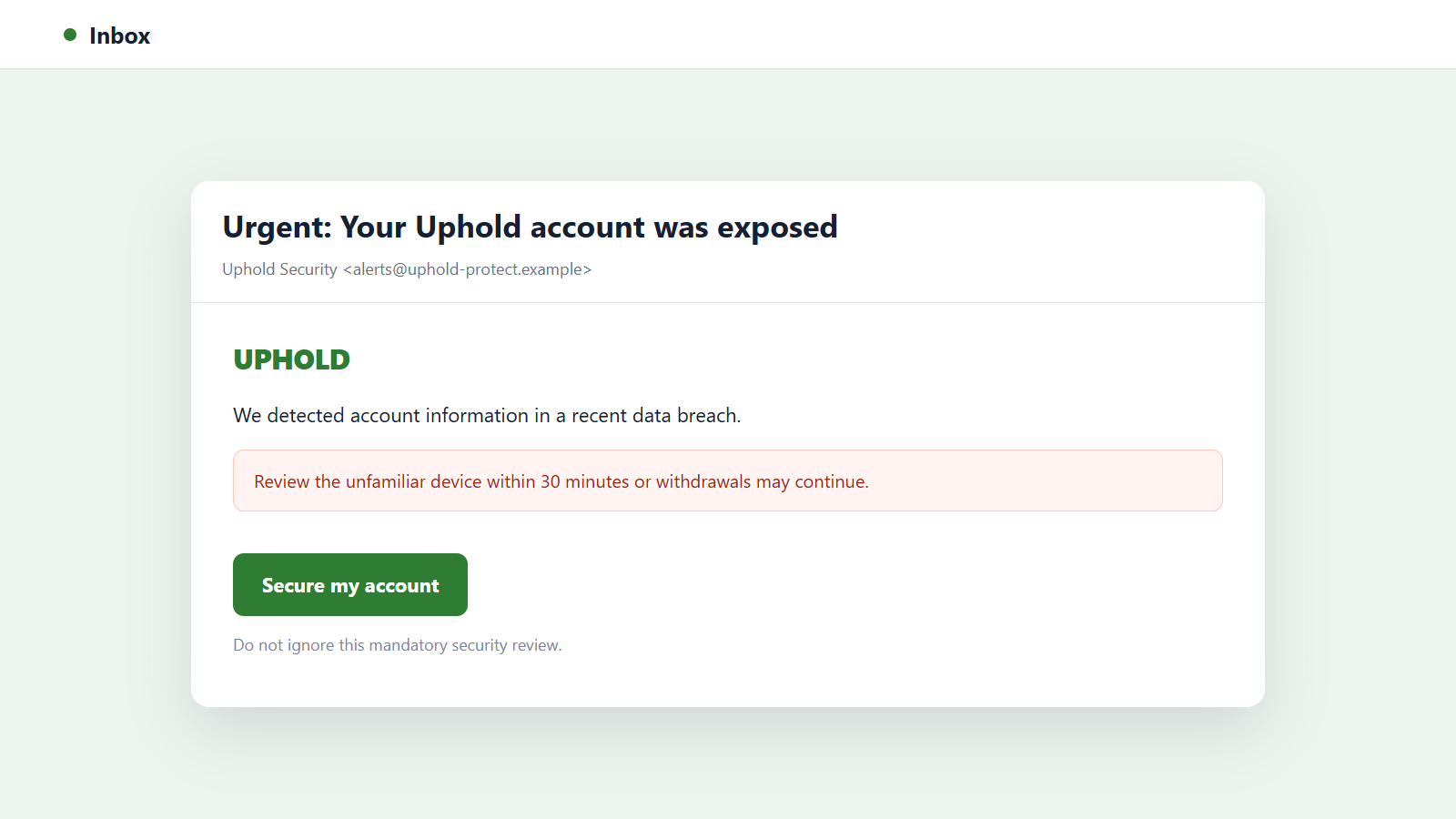
The Uphold email scam can arrive as a security warning, unauthorized-login alert, new-device notice, loyalty reward, or supposed breach notification. The subject changes, but the sender always creates a reason to leave the inbox and act immediately.
A security version says cryptocurrency is at risk and offers a button to protect it. A reward version promises a payment that must be claimed. Both can lead to the same copied sign-in page.
The real target is access to cryptocurrency and identity data
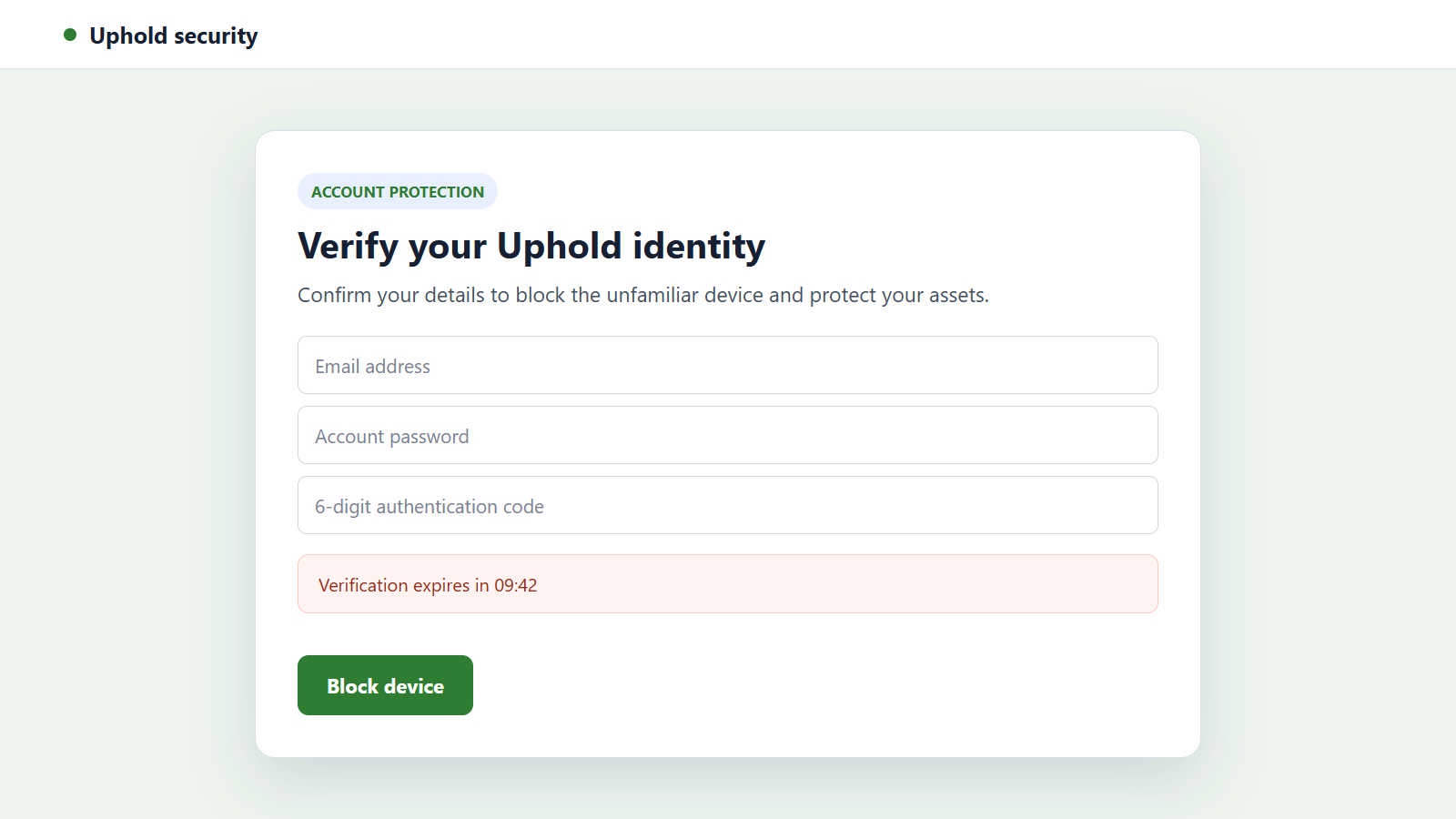
The fraudulent page may request an email address, password, two-factor authentication code, recovery phrase, card information, or identity documents. Any one of those items can be valuable, and several together can provide control over the account.
Cryptocurrency transfers are especially attractive to criminals because funds can be moved quickly through several wallet addresses. A victim may discover the theft only after the withdrawal has been completed.
Uphold is a real service, but the message is an impersonation
The campaign does not show that Uphold itself sent the email. Criminals routinely copy the names, logos, colors, and security language of recognizable financial services.
The most useful facts to remember are:
- Uphold says it will never call and ask a customer to move funds.
- A real representative will not ask you to forward or read out a 2FA code.
- The visible sender name can be forged and is not enough to authenticate an email.
- A genuine security concern can be checked by opening the official app or site independently.
- A claimed data breach should be confirmed through official announcements, not the email itself.
- A reward that requires credentials, a deposit, or a wallet connection is not free money.
The correct response is the same whether the warning is completely invented or was timed to coincide with a real login attempt: do not use the message’s path.
The Main Versions of the Fake Uphold Message
A data breach supposedly exposed the account
The email claims customer records were leaked and says the recipient must secure the account before a deadline. A large red warning box and a countdown can make the message feel like an official incident response.
A real breach notice should identify what happened, what information was affected, and how customers can verify the announcement. A vague alert that sends directly to a login form deserves suspicion.
An unfamiliar login or withdrawal needs approval
This version lists a location, device, cryptocurrency amount, or wallet address the recipient does not recognize. The message provides buttons to approve or reject the activity.
Both buttons may lead to the same phishing site. Labels such as “Not me” and “Secure account” do not make a destination safe.
A loyalty payment or reward is waiting
The sender promises a bonus for long-term users, a promotional airdrop, or compensation connected to an account event. The recipient must sign in, connect a wallet, or pay a small network charge to receive it.
The displayed balance is bait. A legitimate credit would appear in the real account without requiring a recovery phrase or an unrelated cryptocurrency deposit.
A fake support agent follows the email
A telephone number in the message may connect to someone claiming to be from fraud prevention. The caller sounds informed because the victim supplies details while describing the alert.
The agent may instruct the victim to reveal a 2FA code, install remote-access software, create another wallet, or transfer funds to a supposedly safe address. Those actions hand over control rather than protecting the account.
Why a Convincing Email Still May Be Fraudulent
Branding is easy to copy. A scammer can reproduce a logo, button style, footer, privacy language, and even parts of a genuine security message without having any connection to the company.
The “From” line is also only a label until the complete sending address and authentication details are examined. Lookalike domains may add a word, replace a letter, or place “uphold” somewhere before an unrelated ending.
Some messages can appear in the same conversation thread as genuine alerts. Uphold’s own guidance warns that suspicious texts may look similar to real communications and may appear beside legitimate messages.
A valid 2FA code does not authenticate the person asking for it. It can mean a criminal has already entered a correct password and needs the final factor to complete the login.
Likewise, knowing the recipient’s name or email address does not prove access to the account. Contact information can come from unrelated breaches, marketing databases, malware, or previous phishing campaigns.
How to Inspect the Email Without Taking Its Bait
Start by expanding the sender details. Compare the complete address with the authorized domains listed in Uphold’s guidance for suspicious messages.
Then inspect the link destination without opening it. On a computer, move the pointer over the button. On a mobile device, press and hold only if that action shows a preview without loading the page.
Read from the end of the hostname toward the left. A name such as uphold.security-review.example belongs to example, not Uphold. HTTPS encrypts a connection but does not prove that the operator is trustworthy.
Notice whether the message asks for a secret that support should never need. Passwords, 2FA codes, private keys, and recovery phrases must stay private even during a supposed emergency.
Finally, close the email and open Uphold yourself. Review recent activity, devices, profile changes, and security notifications from the authenticated account.
How the Uphold Email Scam Works
Step 1: The attacker obtains an email address connected to cryptocurrency
The address may come from an unrelated data leak, public profile, mailing list, malicious browser extension, or earlier scam. The criminal may not know whether the person actually uses Uphold.
Sending thousands of targeted-looking messages allows a small number of accurate matches to support the operation.
Step 2: A security problem or reward creates a reason to act
The email claims an unknown login, pending withdrawal, exposed account, or expiring benefit. Fear and opportunity are different emotions, but both can shorten the time spent checking details.
A deadline discourages the recipient from opening the real service or asking another person to inspect the message.
Step 3: The button opens a copied account page
The page uses familiar colors and a convincing sign-in panel. Its address may contain the brand name while ending in a domain controlled by the attacker.
Anything typed into that form can be sent directly to the criminal, even if the page later displays an error.
Step 4: Credentials are tested against the real account
The attacker enters the captured email and password into Uphold. If the password was reused, the same pair may also be tested against the victim’s email and other financial services.
The genuine platform can now send a real two-factor code or approval notification to the account owner.
Step 5: The phishing page or caller collects the second factor
The fake page asks for the new code and may claim it is verifying identity or canceling a withdrawal. A caller can request the same number while pretending to guide a security review.
Once supplied, the code can complete the attacker’s login. The warning printed beside a code matters more than the caller’s explanation.
Step 6: Security and recovery settings are changed
The criminal may add a device, change contact details, alter authentication, or attempt to weaken recovery options. Control of the linked email account makes those changes easier to hide.
The attacker can also gather account history and identity details to make later impersonation attempts more convincing.
Step 7: Cryptocurrency is moved to an external address
Available assets may be converted into a currency the operation prefers and withdrawn. Another variation tells the victim to perform the transfer personally to an address falsely described as safe.
No legitimate fraud team needs a customer to move funds to an address supplied during an unsolicited call or email.
Step 8: Follow-up scams target the same victim
The stolen profile can support fake recovery services, tax demands, wallet investigations, or additional account alerts. Someone who already paid may be approached with a promise to retrieve the loss for another fee.
The operation may also target contacts or other services found through the compromised email account.
Company, Address, and Fulfillment Checks
The sender address must match an authorized email route
A display name that says Uphold is not enough. Check the complete address, reply-to field, and domain ending against the company’s current official guidance.
An unfamiliar sender should not be trusted because the email contains correct branding or personal information.
The web address must remain on an official domain
Open the service independently rather than trying to repair a suspicious URL. Extra words, hyphens, subdomains, and secure-looking paths can hide the domain that actually owns the page.
Do not enter credentials after arriving through advertising, a shortened link, a QR code, or a message button.
The support conversation must survive independent contact
End the incoming call and start a new support request from inside the real account or official help center. Do not use a ticket portal or telephone number provided by the suspicious sender.
A real case remains visible through a trusted route. A scam depends on keeping the victim inside the attacker’s conversation.
The promised protection or reward must exist in the account
An actual restriction, login, withdrawal, or promotion should leave a verifiable record in the authenticated service. A screenshot inside an email is not account evidence.
Never pay a fee, connect a separate wallet, or share a recovery phrase to receive an unsolicited reward.
Warning Signs That Deserve an Immediate Pause
- The message announces a breach but provides no independently verifiable incident details.
- A button promises to cancel a withdrawal or reject a device outside the official account.
- The sender asks for a password, 2FA code, private key, or recovery phrase.
- A caller instructs you to transfer cryptocurrency to a safe or protected wallet.
- The reply address differs from the visible sender or uses a newly created lookalike domain.
- A loyalty payment requires a deposit, wallet connection, or network charge.
- The email threatens permanent loss within minutes unless you follow its exact route.
- Support asks for remote access to the device used for the account.
One unusual detail may have an innocent explanation. Several of these signs together are enough reason to stop and verify through a separate channel.
What to Do if You Have Fallen Victim to This Scam
- Freeze the Uphold account immediately. Use the official app or site, not the email link. Uphold provides account-freezing options and a fraud-prevention contact for suspected compromise.
- Contact official support. Report the suspicious activity through the genuine help center and give the times, transaction IDs, wallet addresses, sender details, and actions taken.
- Secure the linked email account. Change its password from a clean device, enable strong authentication, remove unknown recovery methods, review forwarding rules, and sign out unfamiliar sessions.
- Replace reused passwords. Change the same or similar password anywhere else it was used. Start with financial, email, mobile-carrier, and cloud-storage accounts.
- Preserve blockchain and payment evidence. Save transaction hashes, destination addresses, exchange records, screenshots, email headers, URLs, and support case numbers before anything disappears.
- Notify any connected financial institution. Contact the bank or card issuer if card details, bank information, or unauthorized purchases are involved. Ask what can be blocked or disputed.
- Check the device for unwanted software. Run a full scan with Malwarebytes if you opened an attachment, installed software, or allowed remote access during the incident.
- Reduce exposure to malicious pages. AdGuard can help block known phishing domains and deceptive redirects, but it cannot recover funds or erase details already submitted.
- Report the fraud. Send the suspicious message to Uphold’s published fraud-prevention address and file reports with the relevant national fraud authority or police when money or identity documents were taken.
- Reject recovery offers. Do not pay anyone who guarantees that cryptocurrency can be recovered. Investigators may trace funds, but an unsolicited recovery agent demanding a fee is often another scammer.
Frequently Asked Questions
Did an Uphold data breach cause this email?
Not necessarily. A message can falsely claim a breach, and an address can come from many unrelated sources. Check current incident information through official Uphold channels.
Can a real Uphold code arrive during a scam?
Yes. An attacker using stolen credentials can trigger the genuine two-factor system. Never give the code to a caller or enter it on a page opened from the message.
Will Uphold ask me to move funds to protect them?
Uphold says it will never call and ask a customer to move funds. End the conversation and contact support through the official account.
Is a loyalty payment from Uphold automatically fraudulent?
A promotion must be verified inside the official service and current company announcements. Do not claim it through an unsolicited link, wallet connection, deposit, or fee.
What if I clicked but did not enter anything?
Close the page and review the device for unexpected downloads or permission requests. The risk is lower if no information was entered, but the link should still be reported.
Can cryptocurrency sent to a scammer be reversed?
Blockchain transfers normally cannot be canceled like card payments. Report the destination and transaction quickly to Uphold, any receiving service, and law enforcement so available tracing or freezing options can be explored.
The Bottom Line
The Uphold email scam can use fear, a fake reward, or even a genuine security code to pull the recipient into an attacker-controlled sign-in and support process.
Leave that process before responding. Open Uphold independently, keep passwords and 2FA codes private, and never move cryptocurrency to a wallet supplied by an unsolicited caller or email.

Join the discussion
0 commentsShare your experience or ask a question about this article.
Discussion
Start the conversation
Have a question or something useful to share? Add the first comment.