

A text appears to come from Lloyds and asks whether you approved a large payment. Before you have time to think, a polite fraud specialist calls and says your savings are in immediate danger.
The Lloyds Bank scam is convincing because every part of the story seems connected. The alert, caller ID, security code, and urgent instructions can all be pieces of the same carefully staged theft.
Overview
Criminals imitate a familiar bank at the moment fear takes over
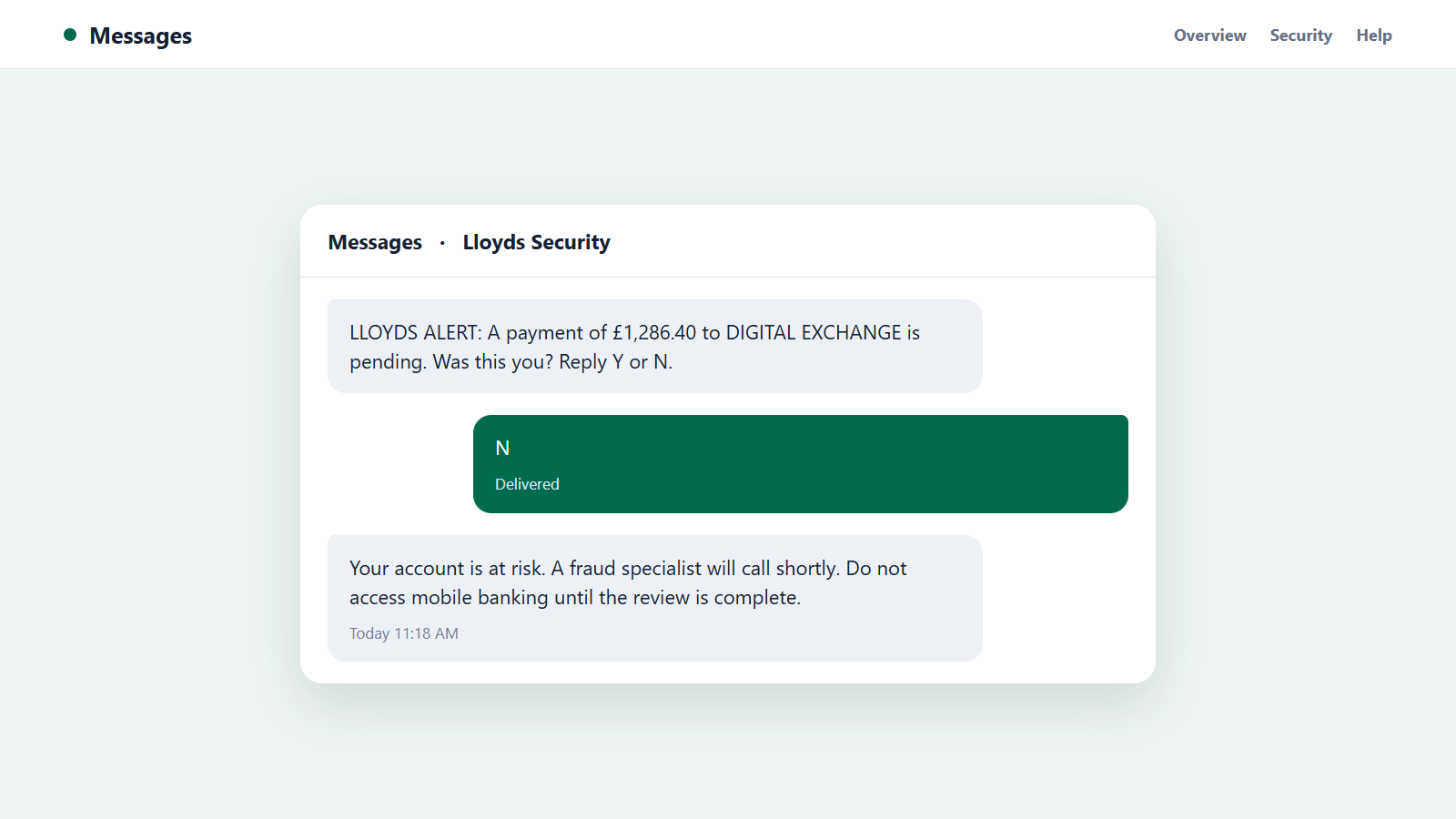
The Lloyds Bank scam usually arrives as a text, call, email, or social-media advertisement. It claims there is a suspicious card payment, new recipient, compromised device, or urgent security review.
A message may be followed by a spoofed call that displays Lloyds or a genuine-looking UK number. Caller ID is easy to falsify, so the name on the screen does not prove who is speaking.
The fake solution gives the scammer control
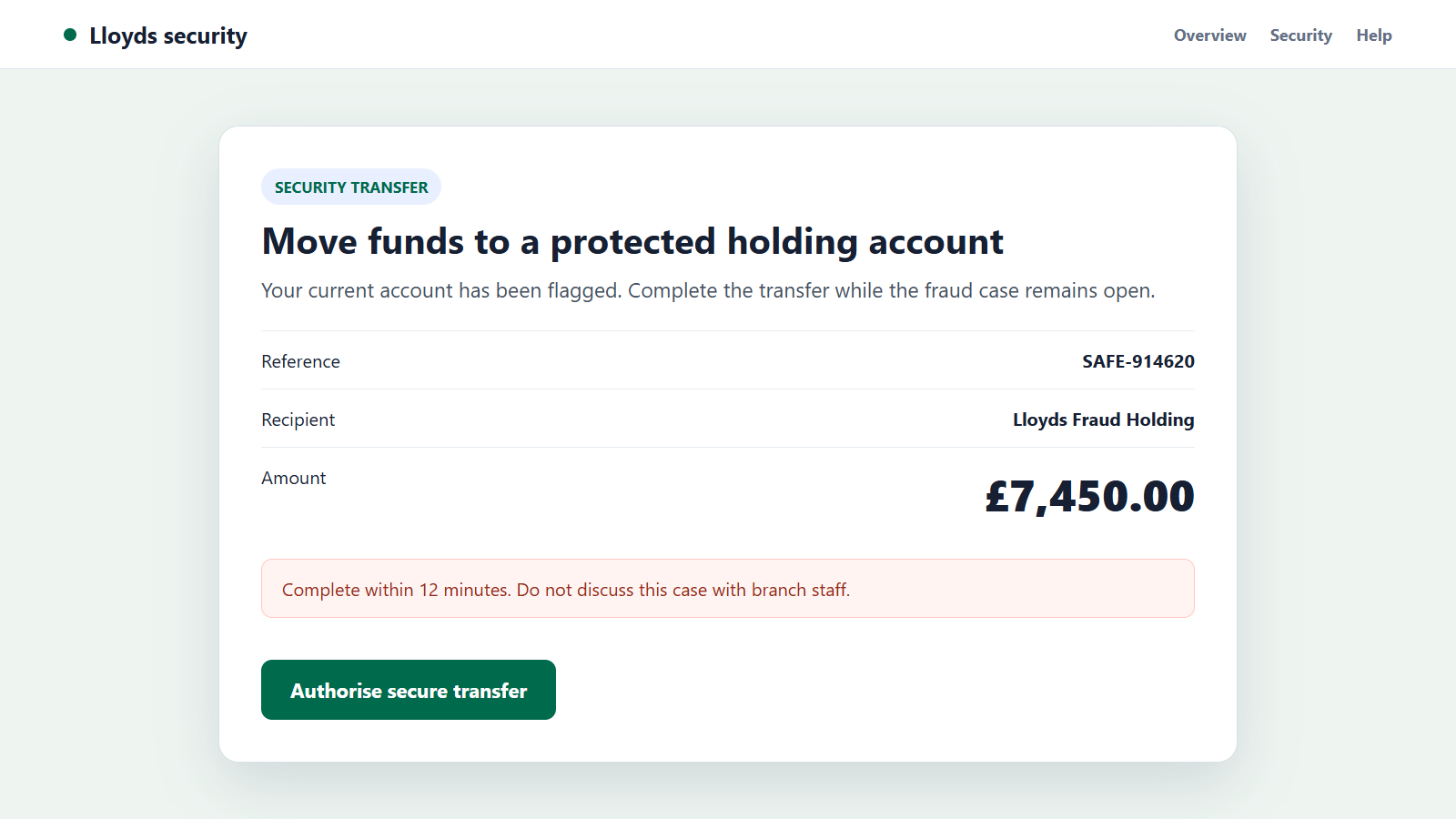
The caller may ask for online-banking details, card information, a one-time passcode, or approval inside the mobile app. Another script tells the victim to move money to a temporary safe account.
There is no protected holding account waiting to receive the funds. The transfer goes to a money mule, cryptocurrency exchange, or account controlled by the criminal.
A real Lloyds message can appear during the attack
Once the fraudster attempts a genuine login or payment, the bank may send an authentic warning or code. The caller then lies about what that code will approve.
Remember these points when an unexpected Lloyds contact creates urgency:
- Never move money because an incoming caller says it will be safer elsewhere.
- Never read out a passcode or approve an action you did not begin.
- End the call before checking the account through the official app.
- Use the number on the back of the card or call 159 in the UK.
- Do not trust a search advertisement for bank support.
- Question any request for secrecy, remote access, or cryptocurrency.
The safest response is deliberately simple: stop the conversation and start a new contact with the bank yourself.
Common Lloyds Impersonation Stories
A payment or transfer needs to be cancelled
The text lists a purchase the recipient does not recognize and asks for a reply. A caller then offers to reverse it, but needs a code or app approval to complete the cancellation.
That approval can authorize the attacker’s login, device registration, recipient, or payment rather than cancel anything.
Your account must be moved away from an internal threat
A supposed investigator claims a branch employee is involved, so the victim must not speak to staff. Money must be transferred to a safe account while the investigation remains confidential.
Secrecy prevents a real employee or relative from exposing the lie. A bank can protect an account without sending the balance to a stranger.
A loan, investment, or refund is waiting
Other Lloyds-branded messages promise a low-rate loan, investment opportunity, cashback payment, or tax refund. A copied login page collects the credentials needed for account takeover.
An advance-fee version requests a processing payment before funds can be released. More charges usually follow once the first one is paid.
A courier needs to collect the compromised card
The criminal says the card must be examined and arranges a courier. The victim may also be asked to place the PIN in an envelope or type it into the telephone keypad.
The collected card can then be used before the customer realizes the caller and courier belonged to the same operation.
Why the Lloyds Bank Scam Feels Believable
Bank fraud is a problem people reasonably want to stop at once. The scammer uses that instinct to prevent a calmer check in the app or a separate call.
Some criminals already know the victim’s name, mobile number, address, bank, or recent purchase. Information can come from data breaches, stolen mail, fake forms, or earlier phishing campaigns.
The attacker may send a small card verification first. Mentioning that genuine activity on the call creates the impression that the person is watching the bank’s systems.
Professional details add weight. Background call-center sounds, a case number, staged transfers to another department, and confident banking language are all easy to reproduce.
The real power comes from controlling the explanation. When an authentic passcode arrives, the impostor says it is needed to block a payment, even if the message warns that it will approve one.
Victims are often kept on the line while funds move. The caller may say that opening the app, visiting a branch, or speaking to another person will alert the criminal employee.
A second impostor can join as police, a regulator, or the bank’s senior investigator. Multiple voices do not provide independent verification when the original caller controls the call.
Finally, authorised push payments move quickly. Once the recipient account receives the transfer, money may be split, withdrawn, or converted, leaving the bank less time to intervene.
How to Check a Lloyds Message or Call Safely
Do not use the link, telephone number, or reply option in the suspicious message. Close it and open the Lloyds app from the normal icon or type the official address into a fresh browser window.
Review pending payments, new payees, card controls, contact details, and recent logins. A screenshot or transaction reference sent by a caller is not proof that activity exists.
If you need to speak with Lloyds, use the number on the back of the card or inside the official app. In the UK, 159 can connect callers to participating banks through a safer route.
Lloyds’ fraud guidance advises customers to log on through the official site rather than a link in an unexpected message.
Use another telephone if the suspicious caller asked you to stay connected. Some landline frauds keep the line open briefly and play a fake dial tone when the victim thinks a new call has begun.
Read every code and approval screen from beginning to end. The bank normally identifies the action, amount, or recipient, and may state that staff will never ask for the code.
Ask the real bank representative to confirm whether a case exists and which event generated any warning. Do not simply repeat the case number supplied by the fraudster as proof.
How the Lloyds Bank Scam Works
Step 1: The criminals assemble a target list
Names, numbers, email addresses, and banking clues are collected from breached databases, marketing lists, stolen devices, or phishing pages. Some messages are sent broadly and simply guess the bank.
A reply tells the operation that the recipient uses Lloyds and is concerned enough to engage.
Step 2: An alarming transaction creates a reason to respond
The first message names a card payment, transfer, or account lock. The amount is large enough to cause worry but plausible enough to avoid looking absurd.
The text offers one immediate path: reply, open a link, or wait for the fraud team to call.
Step 3: Spoofed caller ID supplies borrowed authority
The incoming call may show a number associated with Lloyds. The fraudster knows that many people will treat caller ID as confirmation.
A rehearsed introduction, employee number, and security questions make the interaction resemble a normal banking call.
Step 4: The attacker gathers whatever access is still missing
The victim may be asked for a username, card digits, date of birth, passcode, or security answer. A copied website can collect the same information quietly.
Each response helps the criminal sign in, reset access, or pass a later identity check.
Step 5: A real banking action is started in the background
While talking, the attacker attempts to register a device, add a payee, make a card payment, or send a transfer. That action triggers a genuine Lloyds notification.
The scammer immediately reframes the code or approval as the step that stops the original fake transaction.
Step 6: The victim is induced to authorize the theft
Reading the code can complete an action on the attacker’s device. In safe-account fraud, the victim signs in personally and sends the money under false instructions.
The transaction can appear technically authorized even though manipulation caused it.
Step 7: The money is moved beyond the first recipient
Mule accounts receive the transfer and pass it along rapidly. Funds may be divided among several accounts, withdrawn as cash, or exchanged for cryptocurrency.
This movement is why an immediate report gives the bank a better chance than waiting for the promised refund.
Step 8: Follow-up contact tries to take more
The same group may claim the first payment failed, another account is compromised, or tax is due before a refund. Recovery scammers may later promise to trace the funds for an upfront fee.
Knowledge of the original loss does not make a new caller trustworthy. It may mean the victim’s details were retained or sold.
Company, Address, and Fulfillment Checks
The conversation must be restarted through a trusted Lloyds channel
Hang up and make a fresh call using the official app, card, bank statement, or 159. Do not let the caller transfer you internally to another supposed department.
A genuine employee can find a real fraud case without the callback details in the suspicious message.
The website address must end at the real Lloyds domain
A lookalike can place words such as Lloyds, secure, or fraud before an unrelated domain. HTTPS only encrypts the connection; it does not prove that the site belongs to the bank.
Type the bank address yourself and avoid sponsored support results when the account may be at risk.
The recipient details must describe a person or business you chose
Labels such as safe account, fraud holding, or customer protection can be typed by the criminal. The account name does not transform a new payee into an internal Lloyds destination.
If you did not independently choose and verify the recipient, do not authorize the payment.
The promised protection must work without money leaving your control
Lloyds can block a card, restrict an account, reject a transfer, or investigate activity without asking you to buy cryptocurrency or move your balance elsewhere.
A security process that requires secrecy, a courier, gift cards, remote access, or a new recipient fails this check immediately.
Warning Signs That the Lloyds Contact Is Fake
- An unexpected message includes a sign-in link or urgent callback number.
- The caller asks for a one-time passcode or app approval.
- You are told to transfer money to keep it safe.
- The supposed investigator insists that branch staff may be involved.
- A courier is offered to collect your card or cash.
- The representative wants remote access to your device.
- The solution uses cryptocurrency, gift cards, or a personal account.
- You are discouraged from ending the call and checking independently.
Any one of these signs is enough to pause. Several appearing together make the impersonation especially clear.
What to Do if You Have Fallen Victim to This Scam
- Contact Lloyds immediately. Use the official app, the number on your card, or 159. Say clearly that an impersonator obtained information or persuaded you to authorize a payment.
- Ask the bank to contain the account. Block affected cards, review new payees and devices, remove unauthorized access, and stop pending payments when possible.
- Request a payment recall. Give the amount, time, recipient, and reference. Explain the deception accurately so the receiving bank and fraud team can act quickly.
- Replace exposed credentials. From a clean device, change online-banking and email passwords, reset security answers, and verify that recovery details still belong to you.
- Secure the mobile number. Ask the carrier to check for SIM changes, account takeovers, forwarding, or an unauthorized replacement SIM. Add a strong account PIN.
- Remove remote-access software. Disconnect the device from the internet, uninstall any program the caller requested, and review installed browser extensions and accessibility permissions.
- Scan the affected device. Run Malwarebytes to look for malicious software that may have been installed during the call.
- Reduce repeat exposure. AdGuard can help block known phishing pages and deceptive advertisements, though it cannot undo a bank transfer.
- Preserve the evidence. Save texts, emails, call times, account details, receipts, and screenshots. Report the incident to the bank and the appropriate national fraud-reporting service.
- Reject recovery offers. Do not pay anyone who guarantees the money can be returned. Continue only with Lloyds, law enforcement, the receiving provider, or a lawyer you selected independently.
Frequently Asked Questions
Can a Lloyds scam call show the bank’s real number?
Yes. Caller ID can be spoofed. End the call and start a new one from a trusted number instead of using the recent-calls list.
Does Lloyds ever ask customers to move money to a safe account?
No legitimate fraud investigation needs that transfer. Someone who says your money must be moved for protection is directing it toward the scam.
What if a genuine Lloyds passcode arrived during the call?
It means a real account action was attempted, not that the caller was genuine. Do not share the code and ask Lloyds which action triggered it.
Is calling 159 safer than returning the number in a text?
Yes. In the UK, 159 connects callers to participating banks through an independently started route. You can also use the number printed on your card.
Can an authorised transfer caused by a scam be recovered?
Recovery is not guaranteed, but immediate reporting matters. Ask Lloyds to recall the payment and explain that impersonation caused the authorization.
Should I trust a caller who knows my personal information?
No. Correct details may come from a breach, stolen mail, or earlier phishing. Identity must be verified through a channel the caller did not provide.
The Bottom Line
The Lloyds Bank scam combines a frightening alert, spoofed caller ID, and sometimes a real bank code to turn fraud prevention into the mechanism of theft.
End the contact, check the account independently, and never move money or reveal a code on an incoming call. If anything was shared or sent, contact Lloyds before the criminal can move the funds farther.

Join the discussion
0 commentsShare your experience or ask a question about this article.
Discussion
Start the conversation
Have a question or something useful to share? Add the first comment.