

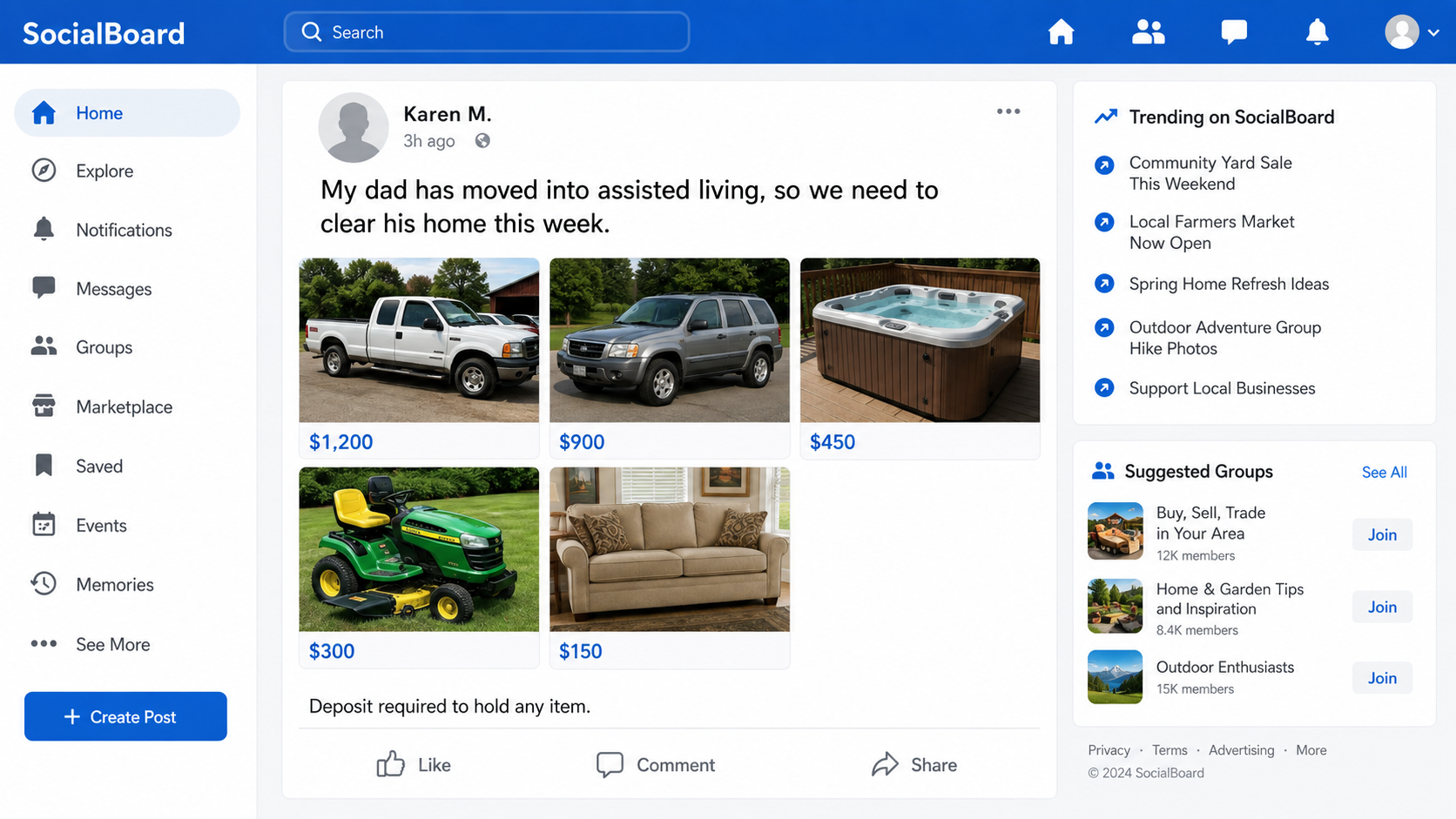
A friend suddenly posts a garage full of bargains. There is a nearly new SUV, a pickup truck, a hot tub, and expensive furniture, all priced to move because a parent has entered assisted living.
The Facebook assisted living sale scam feels safe for the same reason. The profile is familiar, the story is personal, and other buyers are supposedly waiting.
Before you send a deposit to hold anything, contact your friend somewhere else.
Overview
A hacked account supplies instant trust
The Facebook assisted living sale scam does not usually begin with a brand-new seller profile. Criminals take over a real person’s account, then use that person’s name, photos, history, and friend list to advertise vehicles and household goods that are not actually for sale.
The post commonly says a parent, uncle, or other relative has moved into assisted living or a care facility. The family supposedly needs to clear the home quickly, which explains both the large number of items and the unusually low prices.
Because the post comes from someone the reader knows, the usual suspicion attached to an anonymous Marketplace seller drops away. The scammer is borrowing years of genuine social history for a sale that may have been created that morning.
The bargain is used to collect a deposit
The fake inventory often includes items that generate quick interest: trucks, SUVs, campers, tractors, power tools, hot tubs, furniture, and electronics. Prices are low enough to feel urgent but not always so low that every buyer immediately walks away.
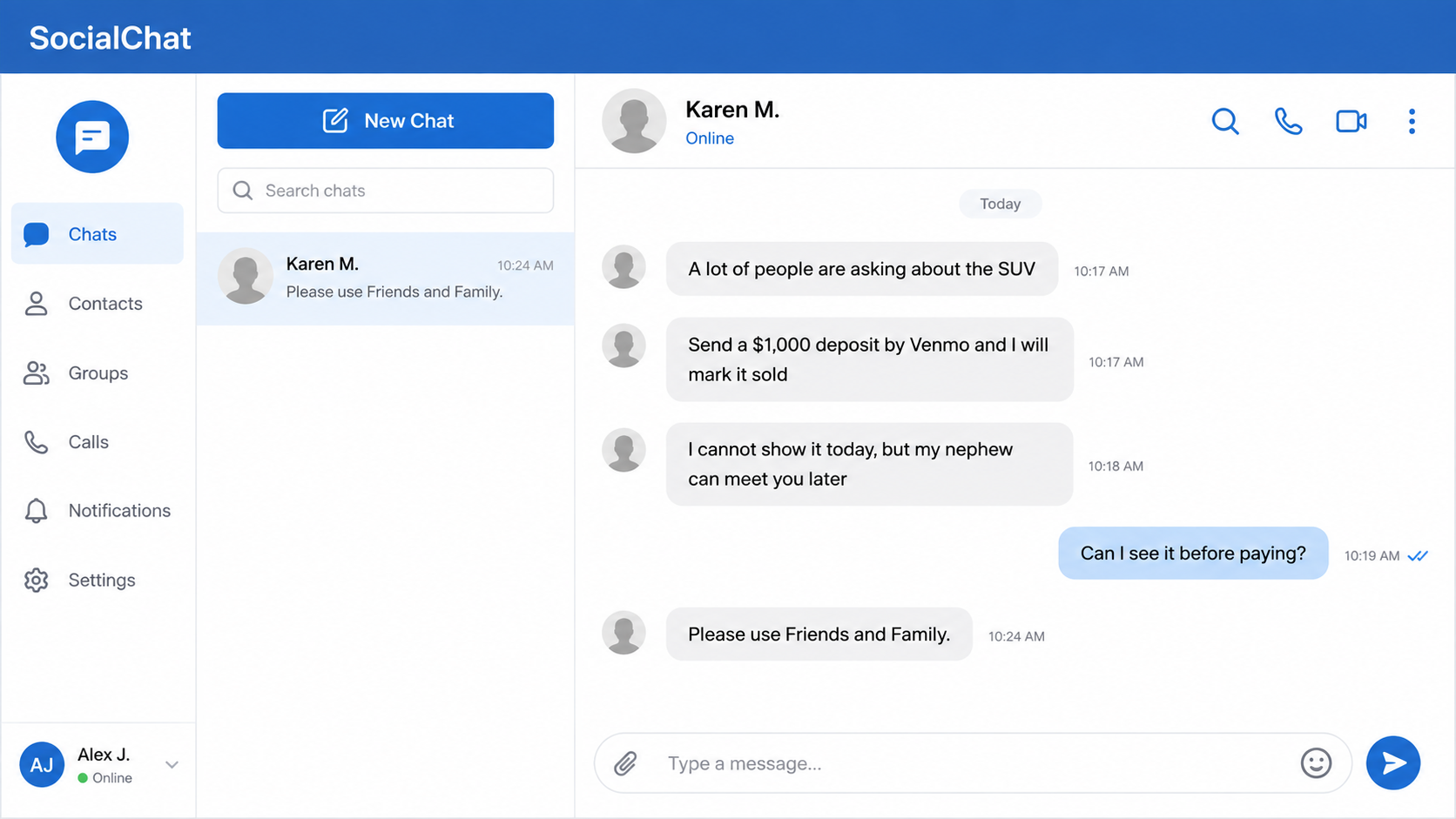
When someone asks to view an item, the account replies that the owner is out of town, helping the relative, meeting an attorney, or dealing with the care facility. A deposit is needed to reserve the item until a viewing can be arranged.
That deposit is the entire point. Once it is sent by a payment method with weak purchase protection, the criminal delays, asks for more, or disappears. There is no truck to collect and no family sale to complete.
This is a documented repeat campaign
The wording is not merely a suspicious anecdote. Arizona’s Family documented a matching case: a hijacked Facebook account, a false story that the owner’s father entered assisted living, cheap high-value items, deposits sent to the hacker’s Venmo account, and buyers arriving at the real owner’s home.
The pattern reaches well beyond that one account. In 2024, the Pueblo County Sheriff’s Office warned about the same script: a hacked friend’s profile, a parent supposedly entering assisted living, bargain items, and a request for a deposit before any meeting.
In 2025, KMBC documented another matching case. Two friends sent a combined $5,000 through Venmo after a hijacked account claimed an uncle was entering assisted living. The names and inventory change, but the trust-and-deposit mechanism remains recognizable.
Common warning signs include:
- A friend unexpectedly posts many high-value items in one sale.
- The story says a parent or relative has moved into assisted living.
- Vehicles, hot tubs, tools, and furniture are priced far below normal.
- The seller claims many people are interested and asks for a quick deposit.
- You cannot inspect the item before paying.
- The writing style does not sound like the person you know.
- Payment is requested through Venmo, Zelle, Cash App, Apple Cash, gift cards, cryptocurrency, or a transfer marked for friends and family.
- The payment recipient’s name differs from the Facebook profile.
- The seller has a new excuse each time you ask to meet.
- A direct phone call to your friend reveals that the account was hacked.
How the Facebook Assisted Living Sale Scam Works
Step 1: Criminals take over a genuine Facebook account
The account may be stolen through a phishing link, reused password, fake copyright warning, malicious browser extension, or a request for a login code. Once inside, the criminal changes recovery details or creates enough persistence to keep using the profile.
A real account is valuable because its friends already recognize the name and face. Old posts, mutual connections, and years of activity make the scam look safer than a fresh profile with no history.
Step 2: A sympathetic downsizing story appears
The scammer posts that an older relative is entering assisted living, a nursing home, or long-term care. The family must supposedly sell most belongings quickly to make room, pay care costs, or empty a property.
The story answers the questions a buyer might otherwise ask. Why are there so many unrelated items? Why are they cheap? Why is the owner unavailable? The same emotional explanation covers all three.
Step 3: Stolen photos become a fake inventory
Vehicle and product photos may be copied from old Marketplace listings, dealerships, auction sites, or other victims. One post can display a whole catalog that was assembled from different locations.
A clean photo is not proof that the seller owns the item. Reverse-image search may expose an older listing, but scammers also crop, mirror, or lightly edit images to make matches harder to find.
Step 4: Familiarity replaces normal verification
Friends comment or send direct messages because they think they are speaking with someone they know. The criminal may read the stolen account’s messages and use names or personal details to keep that assumption alive.
If the buyer asks an unusual question about the friendship, the scammer may dodge it, claim to be overwhelmed, or shift the conversation back to the bargain. The urgency of the sale does the rest.
Step 5: A small deposit is framed as reasonable
The seller says another buyer is ready, so a deposit will hold the vehicle or item. For an expensive purchase, $200, $500, or $1,000 can feel modest enough to risk, especially when the apparent seller is a friend.
The payment is usually pushed outside any checkout that offers buyer protection. A “friends and family” transfer is particularly attractive to the criminal because it is designed for people who already trust each other.
Step 6: The scammer invents reasons to delay the viewing
After payment, the meetup moves. The relative is unwell, the nephew with the keys is busy, the seller is driving back tomorrow, or another fee must be paid for delivery. Each excuse buys time before the account owner recovers the profile.
Some operators send a fake address. Victims may arrive at a home where the resident has no idea why strangers keep asking about a truck or hot tub. The address is another borrowed detail, not proof of ownership.
Step 7: The account and payment route disappear
Once enough deposits have arrived, the post is deleted, the profile goes silent, or the criminal loses access when the owner recovers it. The payment recipient may be a mule whose account is also temporary.
A later message offering to recover the deposit for a fee is another fraud. Neither a hacker in the comments nor a supposed payment investigator has a secret route to reverse the transfer.
The Fastest Way to Test the Story
Do not challenge the seller in Messenger first. Call or text your friend using a number you already had before the sale appeared. Ask whether the post is theirs. A single conversation outside the compromised account can collapse the entire setup.
If you do not have another contact route, ask a mutual friend to verify it. Do not use a new phone number provided by the Facebook account, because the scammer controls that channel too.
For the item itself, insist on seeing it in person before paying. Confirm the vehicle identification number on the actual vehicle, compare the title to the seller’s identification, and meet somewhere safe. A photograph of a title can also be stolen or altered.
The FTC recommends using safer payment methods and warns that paying outside a marketplace’s system can remove the protection the platform offers. A personal payment app is not an escrow service simply because the recipient promises to refund the deposit.
Why the Fake Sale Can Look Completely Normal
A stolen account does not suddenly lose its old photographs, birthday messages, local groups, or mutual friends. Everything that made the profile believable yesterday is still visible today. The criminal needs to add only one false post and answer a few messages.
Comments can strengthen the illusion without proving anything. Friends may tag relatives, ask whether an item is available, or say the prices look amazing. Those are genuine reactions to a fraudulent post, not endorsements from people who inspected the goods.
The scammer may also delete skeptical comments and keep the enthusiastic ones. A buyer arriving later sees a busy sale with familiar names and assumes other people have already checked the story. In reality, everyone may be relying on the same compromised profile.
Even the payment recipient can be made to sound reasonable. The account may say a nephew is handling deposits, a caregiver is organizing pickups, or a sibling owns the payment app. That explanation prevents the mismatched name from ending the sale.
Photographs deserve the same skepticism. A dozen sharp images do not equal a dozen owned products. Search several of them, look for inconsistent backgrounds or climates, and ask for a live photo containing a harmless detail you choose.
Still, do not treat a custom photo as a substitute for an in-person inspection of a vehicle or another expensive item.
The safest mindset is simple: a familiar Facebook account can introduce a sale, but it cannot complete the verification. Identity, ownership, condition, and payment protection must each be checked separately.
Company, Address, and Fulfillment Checks
Confirm the person through an older contact route
Use a saved phone number, known email, or an in-person conversation. Do not treat a reply from the same Facebook account as independent confirmation.
Verify ownership before discussing payment
For vehicles, compare the physical VIN, title, seller identity, and registration. For other goods, request a live viewing where you can inspect the exact item, not another collection of photos.
Check the payment recipient’s identity
A request to pay a spouse, cousin, assistant, business partner, or unrelated username adds another unverified person. Stop if the recipient cannot be connected to the owner in a way you can confirm yourself.
Treat the posted address as unproven
Criminals can copy an address from public records or the hacked profile. Never send a deposit merely because a real house appears on a map. Arrange a viewing and obtain clear proof that the seller owns the item.
What to Do if You Have Fallen Victim to This Scam
- Stop sending money. Do not pay a delivery fee, refundable insurance charge, balance, or recovery fee after the deposit.
- Contact the payment provider immediately. Report an unauthorized or scam-induced transfer and ask whether the payment can be frozen, recalled, or disputed. Be precise about how it was sent.
- Call your bank or card issuer. If a bank account or card funded the payment, ask what protections and replacement steps apply. Do not describe the purchase as unauthorized if you approved it; explain the fraud accurately.
- Save the evidence. Keep screenshots of the post, messages, profile URL, payment handle, receipts, promised address, item photos, and timestamps.
- Warn the real account owner. Contact them outside Facebook. Point them to Facebook’s hacked-account recovery page and tell them which posts or messages you saw.
- Report the profile and listings. Use Facebook’s reporting tools, then notify any buy-and-sell groups where the post was shared.
- Protect your own accounts. If you clicked a login link or shared a code, change the affected password, end unfamiliar sessions, and enable two-factor authentication.
- Scan devices if anything was installed. Remove suspicious extensions or apps and run a complete Malwarebytes scan.
- Add web protection after cleanup. AdGuard can block many known phishing and malicious-ad pages, but it cannot verify that a familiar Facebook profile is still controlled by its owner.
- File fraud reports. Report the loss to the FTC at ReportFraud.ftc.gov, local law enforcement when appropriate, and the payment service.
- Watch for recovery scams. Anyone asking for money, cryptocurrency, or account access to “trace” the deposit is trying to take more.
Frequently Asked Questions
Is every assisted living sale on Facebook a scam?
No. Real families do sell belongings while a relative moves into care. The scam pattern is the combination of a hacked or unverified account, an unusually large bargain inventory, no viewing, and pressure to send a deposit.
Why does the seller’s profile look completely real?
It may be real but stolen. A long history and genuine friends tell you who created the account, not who controls it today.
Can a deposit through Venmo or Zelle be reversed?
Recovery depends on the service, funding method, timing, and investigation. Report it immediately, but do not trust anyone who guarantees a reversal for a fee.
What if the seller gives me a home address?
An address can belong to the hacked account owner or an unrelated person. It does not prove that the item is there. Do not travel alone to an unverified location or send money before a safe inspection.
How can I tell my friend’s account was hacked?
Contact the person outside Facebook. Changes in writing style, unusual payment requests, new phone numbers, and refusal to answer a personal question are useful clues, but only independent contact confirms it.
Should I comment that the post is a scam?
Warn others if it is safe to do so, but first preserve evidence and contact the account owner and group administrators. The criminal may delete comments or block you once challenged.
The Bottom Line
The Facebook assisted living sale scam wraps a deposit request in a familiar face and a sympathetic family story. The goods look real because the photographs are real; the seller looks real because the account was stolen.
Do not reserve a bargain you cannot inspect. Call your friend outside Facebook, verify ownership in person, and keep payment inside a process that offers meaningful buyer protection.

Join the discussion
0 commentsShare your experience or ask a question about this article.
Discussion
Start the conversation
Have a question or something useful to share? Add the first comment.