

You find a Frost Buddy sale while browsing and spot the drinkware you wanted at a much lower price. The store looks familiar enough, so you add an item and head toward checkout.
The Frost Buddy fake store scam can be difficult to notice until that checkout behaves strangely. Before trying your card again, take a closer look at which store you actually reached.
Overview
The warning concerns copycat stores, not the real brand
Frost Buddy is a real drinkware brand with an official store at frostbuddy.com. This article concerns lookalike storefronts that use the brand’s identity without establishing an authorized relationship.
A complaint about shipping or customer service at a genuine retailer is a separate matter from an impersonation site. Before evaluating an order, establish the exact domain where you entered your information. The name displayed at the top is not enough.
The real store also has promotions. A sale by itself is not evidence of fraud. The problem arises when an unrelated operator presents a familiar brand, collects payment details, and leaves the shopper unable to verify the transaction.
Reports describe a failed-payment pattern
A June 2026 BBB Scam Tracker report describes a Frost Buddy lookalike at frostbuddyusstore[.]com that appeared to fail after card information was entered. The reporter did not know whether money would subsequently be taken.
A separate August 2026 report describes a similar experience involving a misspelled lookalike address. The shopper contacted their card issuer and replaced the card despite finding no charge at that point.
These are consumer reports, not independent proof of every transaction or the identity of an operator. They support a practical warning about impersonation and card exposure. They do not establish that every affected shopper lost money or received the same outcome.
What to look for before placing an order
- The domain differs from the official brand address, even if the page heading matches.
- An ad or search result takes you somewhere different from the store you intended to visit.
- The checkout reports a failure and encourages another card attempt.
- Contact details, order confirmation, and merchant information do not fit together.
- The offer cannot be confirmed through the brand’s genuine website or support route.
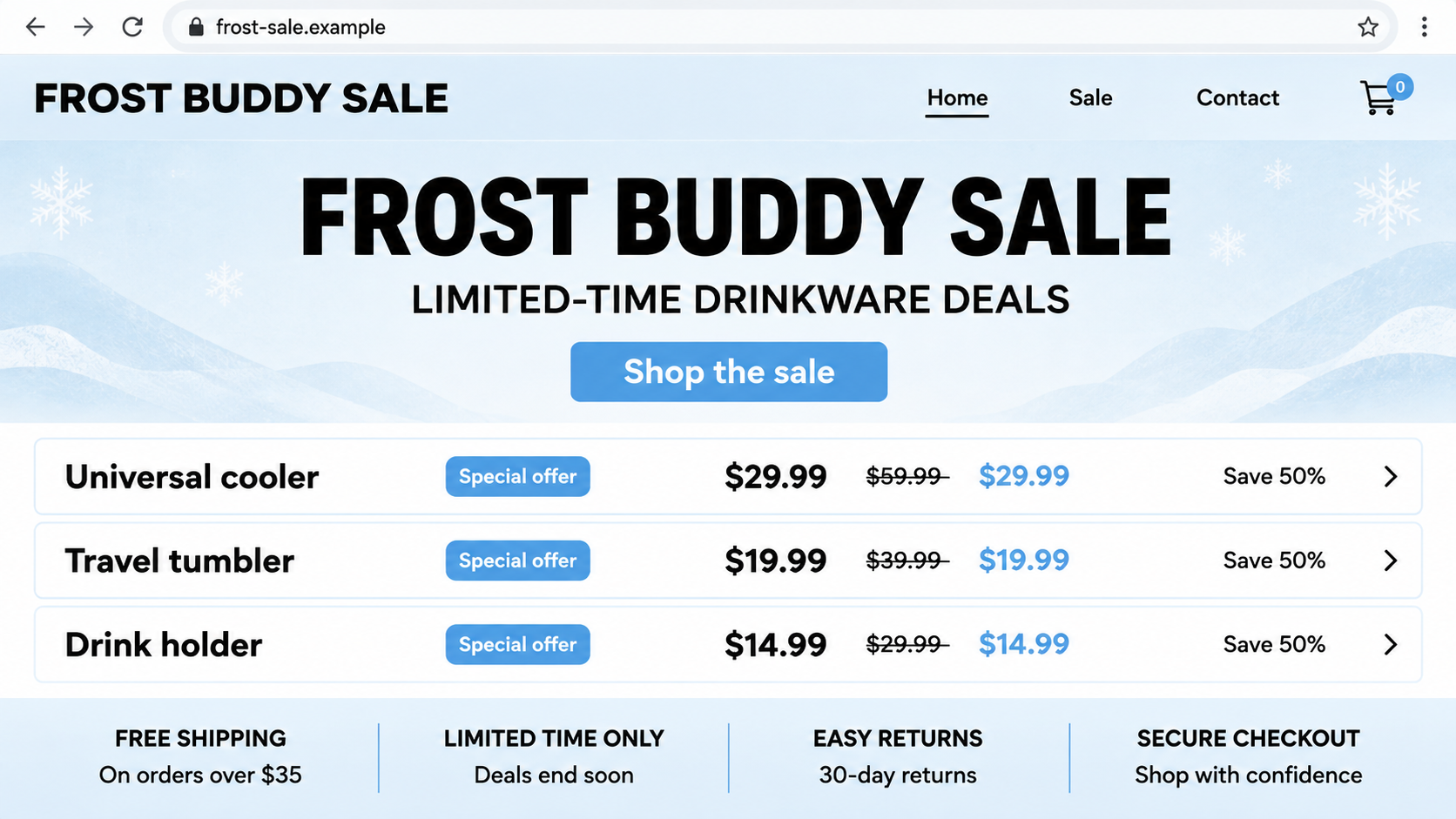
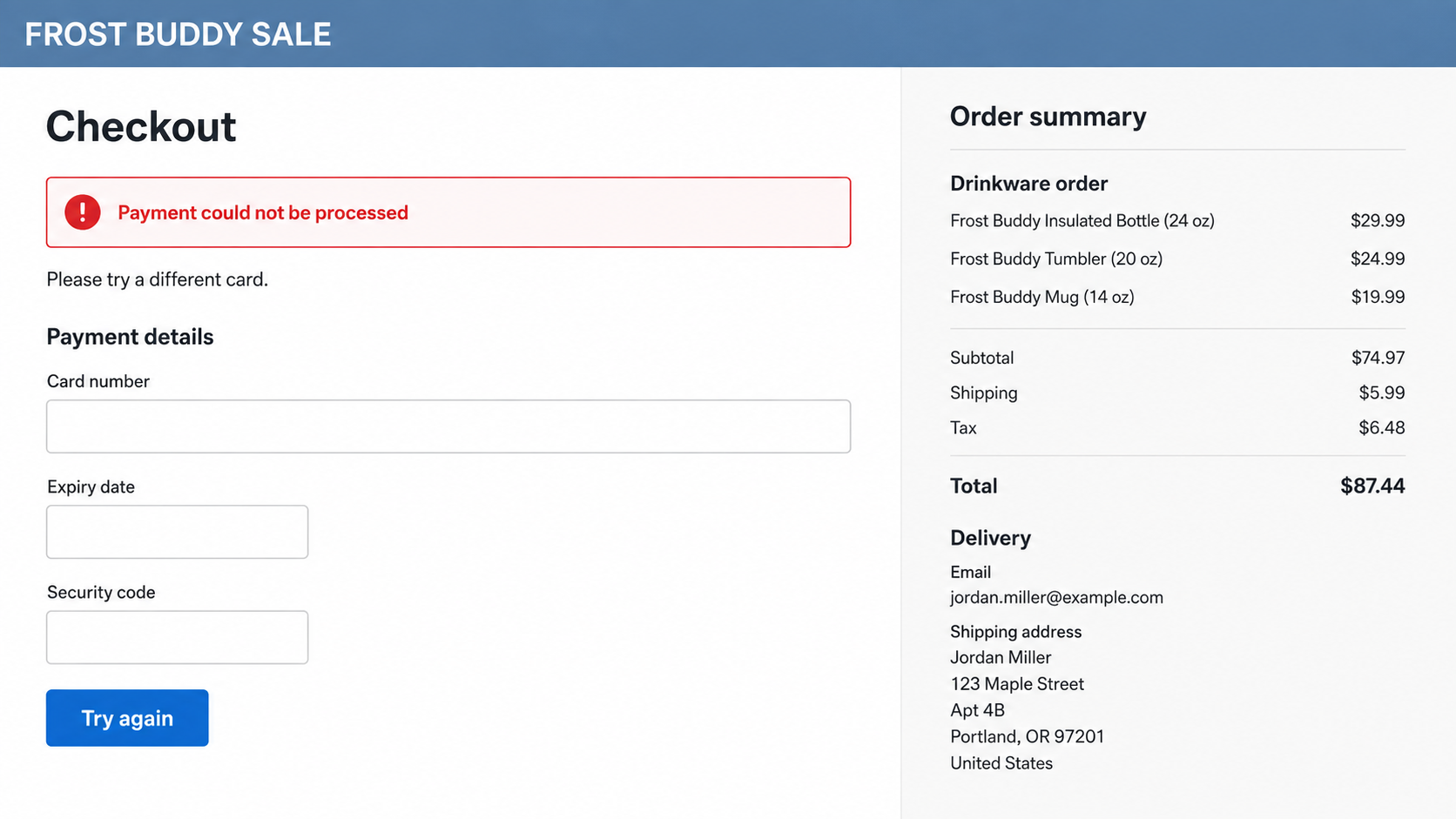
The article’s images are illustrative, nonfunctional reconstructions using fictional details. Displayed prices and layouts are examples, not verified terms from a particular reported store. They show the shopping and checkout stages without encouraging visits to suspect domains.
Why a Familiar Storefront Can Hide the Wrong Seller
Online shopping trains people to recognize layouts quickly. A clean header, organized menu, sale badge, and reassuring checkout wording can feel like evidence that a store is established. Those elements are also easy to reproduce.
It helps to separate three questions. Is the brand real? Is this website operated or authorized by that brand? Has this particular order been accepted by a merchant you can identify? A yes to the first question does not answer the other two.
Search results can complicate the check. Looking up the brand after seeing an ad is sensible, but you still need to inspect the result you open. A prominent placement or paid advertisement is not proof of authorization.
A counterfeit storefront also does not have to offer an absurd discount. A modest price difference can be enough when the buyer already wants the product. Domain and merchant verification are more reliable than deciding whether a bargain feels too generous.
How the Frost Buddy Fake Store Scam Works
Step 1: A sale catches someone already interested in drinkware
The entry point can be an advertisement, shared link, or search result. The pitch uses an existing interest rather than asking the shopper to consider an unfamiliar product. Recognizing the brand shortens the time spent questioning the store.
Record where the offer came from if you later need to report it. The ad account, landing page, and payment operator may be different. Seeing one name throughout the shopping experience does not prove that one verified company controls all of it.
Do not assume that the real brand approved every promotion using its name. Before making a purchase, open the official store independently and see whether you can find the same offer there.
Step 2: The lookalike domain receives the brand’s trust
The shopper arrives on a site that presents itself as the familiar store. An extra word, missing letter, or altered ending in the address may go unnoticed because attention is already on colors, products, and prices.
Words such as official, sale, outlet, or store do not prove a relationship. They can be placed inside a domain by an unrelated operator. The complete address is the useful check, not the most reassuring word within it.
For example, frostbuddy.sale-check.example would belong to the fictional sale-check.example domain. It would not become the brand’s website simply because frostbuddy appeared at the beginning.
Step 3: Ordinary shopping details make checkout feel routine
The page can provide menus, product descriptions, quantity controls, and a cart. These features make the transaction look like the checkout flows shoppers use every day. Their presence says little about who will receive the card information.
A store may display return promises or secure-payment wording. Treat them as claims until you can connect them to an identifiable merchant. A copied policy does not provide customer service, a warehouse, or a recoverable payment.
At this point, leave the cart if the seller remains unclear. You do not need to submit a test order or enter partial card information to investigate a suspicious storefront.
Step 4: The checkout requests personal and payment information
Checkout naturally asks for information that is useful to an impersonator: name, address, contact details, and card data. A shopper may supply it without hesitation because those fields are expected when ordering something.
The question is not whether the form looks normal. It is whether the recipient is legitimate. An imitation store can use perfectly ordinary field labels while sending the information somewhere you never intended.
If you created a store account using a password reused elsewhere, that password may also be exposed. A questionable purchase can therefore create an account-security issue even before any transaction appears on a statement.
Step 5: A failed payment invites another attempt
The reported failure message is especially important. A shopper’s first reaction may be to correct a field, retry, or use a second card. That makes sense on a trusted store, but it is risky when the site’s identity is uncertain.
A page can display an error after information has been submitted. The error does not prove the data was discarded. It also does not prove that the bank declined a genuine transaction, because the message comes from the page itself.
Do not enter another card just to see what happens. Close the checkout and contact the issuer using an independent channel. Explain that the concern is possible card-data exposure, even if no charge is currently visible.
Step 6: Order confusion can lead to more contact with the impostor
A shopper may search for an order confirmation, contact the site’s support, or respond to a follow-up message. The lack of clarity can give the same unverified operator another chance to request information.
A supposed refund, delivery correction, or verification request should be checked separately. Do not provide banking login credentials, one-time codes, or remote access to resolve a drinkware order. Those requests are not ordinary shipping support.
Outcomes can differ. There may be no immediate charge, an unauthorized transaction, a missing order, or an unresolved merchant dispute. Record what actually happened rather than assuming every report describes the same payment mechanism.
Company, Address, and Fulfillment Checks
The brand name must match a verifiable merchant
Compare the domain, order email, payment receipt, and card-statement descriptor. A mismatch is a reason to investigate, although legitimate businesses sometimes use different legal or payment names. Ask the real brand or issuer to explain the relationship.
Do not make accusations against an unrelated company merely because a similar name appears in search results. Keep the exact suspect address and transaction details in the report.
A return address does not prove ownership
A warehouse, return depot, or office address printed on a website is not proof that the website operator is located there. Addresses can be copied, and legitimate fulfillment businesses can serve multiple merchants.
We have not verified a common operating address for the reported lookalikes. Do not travel to or confront anyone at an address found on a suspect page. Use the platform, issuer, and verified brand contact to investigate.
Contact the real store outside the suspicious checkout
Use contact information reached from frostbuddy.com to ask about authorization or an order you believe belongs to the real store. Avoid telephone numbers placed only in the questionable site’s confirmation page or a search advertisement.
The real brand may have no record of a purchase made through an impersonator. That absence can help clarify where you ordered, but it does not by itself identify who received the payment.
Trace delivery without trusting a screenshot
If a seller claims an order shipped, check the carrier through its own website. A tracking screenshot is not the same as a carrier record connected to your order and delivery address.
A package arriving does not settle every dispute either. Compare its contents with what was actually ordered. Keep packaging and records if you need to report non-delivery, a wrong item, or suspected counterfeiting to the payment provider.
What a Payment Error Can and Cannot Tell You
A real checkout can fail for ordinary reasons. The problem here is not that every error message is fraudulent. It is that an error on an unverified store gives you no reliable assurance about what happened to submitted information.
- No visible charge: This tells you about the current account activity, not whether card data was captured.
- A pending charge: Ask the issuer what it represents and how to respond.
- A store confirmation: Verify the merchant behind it before trusting further instructions.
- A successful replacement-card attempt: This does not authenticate the original store.
The safest time to resolve uncertainty is before another submission. Let the card issuer assess exposure, and let the genuine brand confirm its own selling channels. Neither check requires another purchase through the questionable page.
What to Do if You Have Fallen Victim to This Scam
- Stop retrying the checkout.
Do not enter a second card or resend the same details. Close the page after saving the address and visible error if you can do so without further interaction.
Write down the time, information entered, and whether the site produced an order number. Keep the distinction between a failed page message and a confirmed bank decline.
- Tell the issuer that card details may be exposed.
Contact the card provider through its official app or the number on the card. Explain that you entered details on a suspected brand-impersonation store, even if there is no charge.
Ask about blocking the card, replacement, and monitoring. The issuer can advise based on the actual exposure; do not rely on a reassurance from the questionable store.
- Preserve the order and advertising evidence.
Keep confirmation emails, receipts, the full website address, ad details, and any support replies. If you received goods, retain packaging and photographs relevant to the dispute.
Do not publish card numbers, your full address, or complete order documents in a public warning. Give sensitive records only through verified reporting channels when needed.
- Dispute the actual problem accurately.
If a charge appears, describe whether it was unauthorized, connected to an undelivered order, or linked to goods that differed from the purchase. The correct dispute depends on what occurred.
Ask your issuer about deadlines and necessary evidence. A refund is not guaranteed, and sending a request to the seller does not necessarily preserve every payment-provider deadline.
- Replace reused account passwords.
If you registered on the store using a password you also use for email or another retailer, change it on those legitimate services. Use distinct replacements and enable available account protections.
Watch for order-related phishing using the information you entered. Knowing your product interest or delivery address does not make a follow-up message trustworthy.
- Assess device exposure only where relevant.
If the store persuaded you to install a tracking app, extension, or other download, check the device. Malwarebytes can help identify malicious or unwanted software associated with that download.
A card-entry incident without an installation is primarily a payment-data concern. A security scan cannot retrieve card details from the page operator or replace contacting the issuer.
- Report the copycat through genuine channels.
Notify Frost Buddy using the official site, report the advertising account or search ad, and submit a report to the appropriate consumer-fraud authority. U.S. readers can use ReportFraud.ftc.gov.
Include the precise domain because similarly named lookalikes can change. Reports help distinguish the genuine brand from unauthorized pages using its identity.
- Protect the next shopping session.
Bookmark the genuine store and verify future promotions there. AdGuard can help filter unwanted advertisements and known malicious pages, though new impersonation domains may not yet be blocked.
Do not pay a recovery agent or a supposed refund-processing fee after the incident. Work through the payment provider and established reporting routes you reached yourself.
Frequently Asked Questions
Is the real Frost Buddy brand a scam?
This warning is about impersonation websites, not a finding that the legitimate brand is fraudulent. Start at frostbuddy.com to verify its selling channels. Separate an ordinary order dispute from a purchase made through a lookalike domain.
Does a failed checkout mean my card information was not saved?
No. A page’s error message cannot establish what happened to information already submitted. Contact the issuer if you entered card details on a suspected fake store, even when no transaction currently appears.
Should I try another card to complete the sale?
Not while the merchant is unverified. A second attempt can expose another card without answering who controls the site. Leave the checkout and verify the store independently first.
Are all discounted Frost Buddy listings fake?
No. The real brand can offer sales, and authorized selling arrangements should be checked on their own merits. A discount is only context. Domain ownership, merchant identity, and independently confirmed authorization are more useful checks.
Can a professional design prove the site is official?
No. Store layouts, policy text, logos, and product descriptions can be copied. A complete-looking website may still be operated by somebody unrelated to the brand. Verify the address and merchant before giving it payment information.
What if I paid but never received anything?
Preserve the order evidence and contact the payment provider about the appropriate dispute process. Use verified brand support to clarify whether it recognizes the order. Do not pay another shipping or refund fee to an unconfirmed seller.
The Bottom Line
The Frost Buddy fake store scam exploits recognition of a real brand. A familiar page heading and a tempting sale do not establish who receives your card details.
If an unfamiliar checkout fails, stop before trying again. Verify the store through the genuine brand and discuss any submitted card information with your issuer. No immediate charge does not mean there is nothing to protect.

Join the discussion
0 commentsShare your experience or ask a question about this article.
Discussion
Start the conversation
Have a question or something useful to share? Add the first comment.