

An email says somebody has been trying to access your Ubisoft account. You were not playing anything, and the thought of losing your games makes the warning difficult to ignore.
The Ubisoft email scam starts with that uncomfortable moment. Before following its account-review button, look closely at what the message is actually asking you to do.
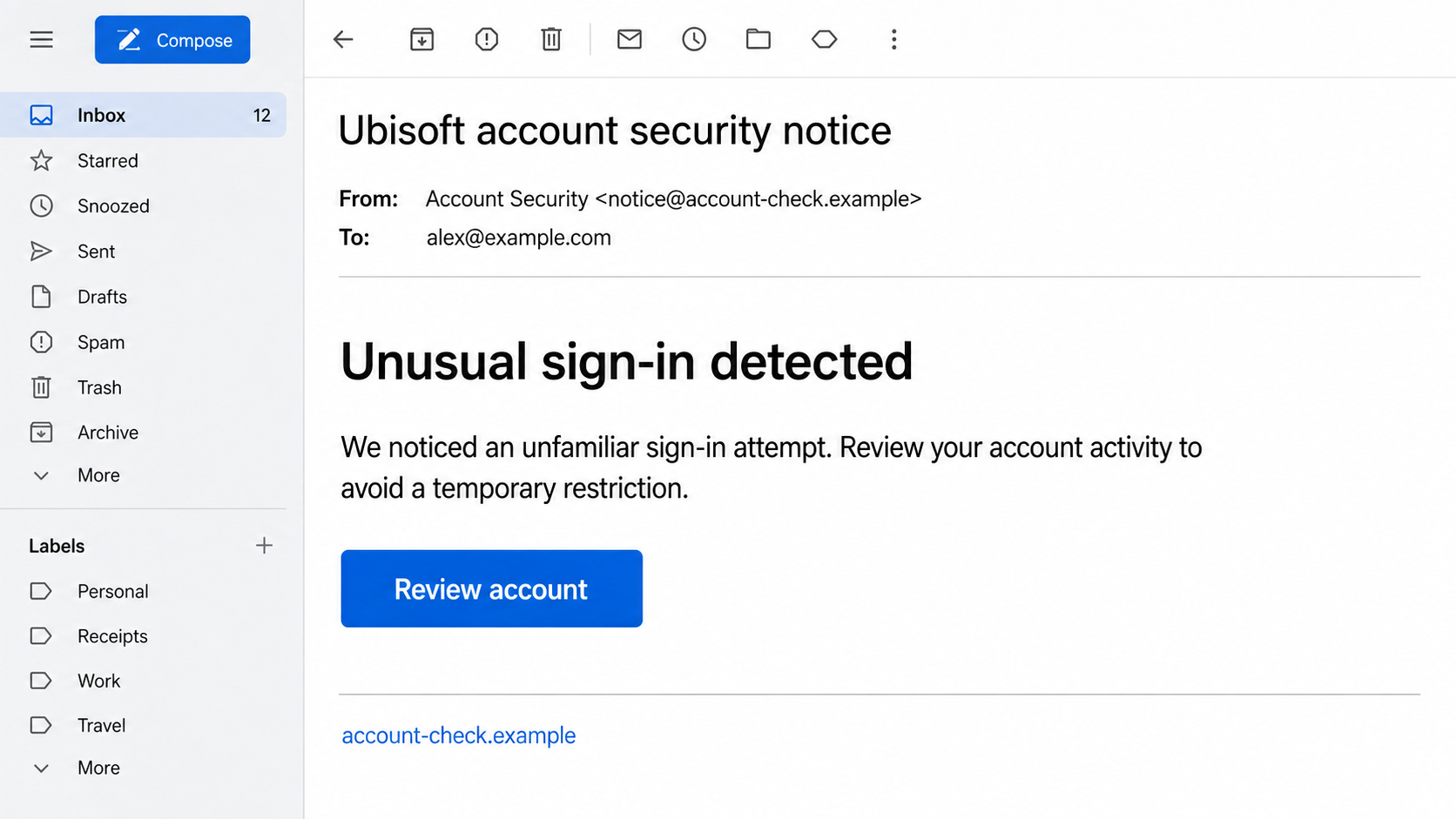
Overview
A security warning that borrows a familiar name
Ubisoft is a real game publisher with genuine account notifications and support services. This scam is an impersonation of those services, not evidence that every Ubisoft email is fraudulent or that Ubisoft itself has stolen anyone’s information.
The suspicious message typically presents an account problem that needs your attention: an unfamiliar login, a temporary restriction, or a request to confirm ownership. A button offers a quick way to resolve the issue.
The danger is the destination behind that button. A page can repeat the Ubisoft name while having no authorized connection to the publisher. What looks like an account check can become a request for information that gives someone else access.
The risk depends on what you submit
Receiving a message does not mean your account has been compromised. Clicking without entering information is also different from handing over a password, approving a login, or running a downloaded file. Those distinctions matter when deciding what to do next.
- Login details: A copied sign-in form can collect your email address and password.
- Verification codes: A follow-up prompt can ask you to approve an access attempt you did not start.
- Downloads: A supposed repair tool or game invitation can introduce a separate device risk.
- Repeated passwords: Reusing the same password elsewhere can extend the problem beyond your games.
What is established, and what is illustrative
Ubisoft’s account-protection guidance warns against sharing credentials with outsiders and using non-Ubisoft sites that request account information. That is the central distinction: authenticate through the publisher’s own route, not a stranger’s substitute.
The screens in this article are nonfunctional reconstructions using fictional details. They illustrate how the impersonation can look; they are not captures from a verified current attack domain. No particular malware family or stolen-account count has been established here.
Why a Gaming Account Alert Can Feel So Convincing
A game account holds more than a username. It may represent purchases, years of progress, friends, and access to linked services. A short warning about losing that access can feel more urgent than a routine marketing email.
Scammers take advantage of the fact that real security messages sometimes arrive unexpectedly. You do not need to be using a service at the moment it sends a legitimate alert. Timing alone cannot settle whether an email is real.
That creates a useful middle course. You can take the possibility of an account problem seriously without trusting the message’s instructions. Open Ubisoft independently and investigate there. A real issue does not require you to use an unverified button.
A polished layout is similarly inconclusive. Fonts, colors, signature lines, and account-related wording are easy to imitate. Even your correct email address proves little when it is also the address used to deliver the message.
How the Ubisoft Email Scam Works
Step 1: The message introduces a problem worth fixing
The email frames your next action as protection rather than a purchase. You are asked to review a sign-in or restore access, not openly asked to give a stranger your password. That framing makes the requested click sound responsible.
A warning might mention a restriction if you delay. The exact deadline is less important than its purpose: getting you to act before checking the source. A reader who would question a random giveaway may react quickly to a threatened account.
Some fraudulent messages arrive at addresses with no Ubisoft account attached. That mismatch is a strong reason to ignore the supplied instructions. Still, a message reaching the right person is not proof of legitimacy either.
Step 2: Familiar presentation hides an unfamiliar destination
The sender’s display name and the link’s destination are separate pieces of information. A display name can say Account Security while the underlying address belongs to an unrelated domain. The clickable button can hide a different site again.
On a computer, hovering can reveal a destination without opening it. On touch interfaces, a preview may be available. Neither step is necessary if you are unsure how to inspect a link safely; opening the official service independently is simpler.
Lookalike spelling matters, but do not reduce the check to a single word. An address such as ubisoft.account-check.example belongs to the fictional account-check.example domain, not to Ubisoft. A familiar name at the beginning does not establish ownership.
Step 3: A copied account page asks for your credentials
The destination can imitate a normal login screen, with familiar labels and a reassuring security message. The request feels like a continuation of the email: enter your details so the account can be checked.
Entering a password into an attacker-controlled form gives the attacker that password. The page does not have to display an obvious error or a malicious-looking result. It may simply show a loading screen or return you to a real website afterward.
A padlock does not change who owns the form. Encryption can protect the connection between you and the wrong site. It does not certify that the person receiving the information is the company you intended to contact.
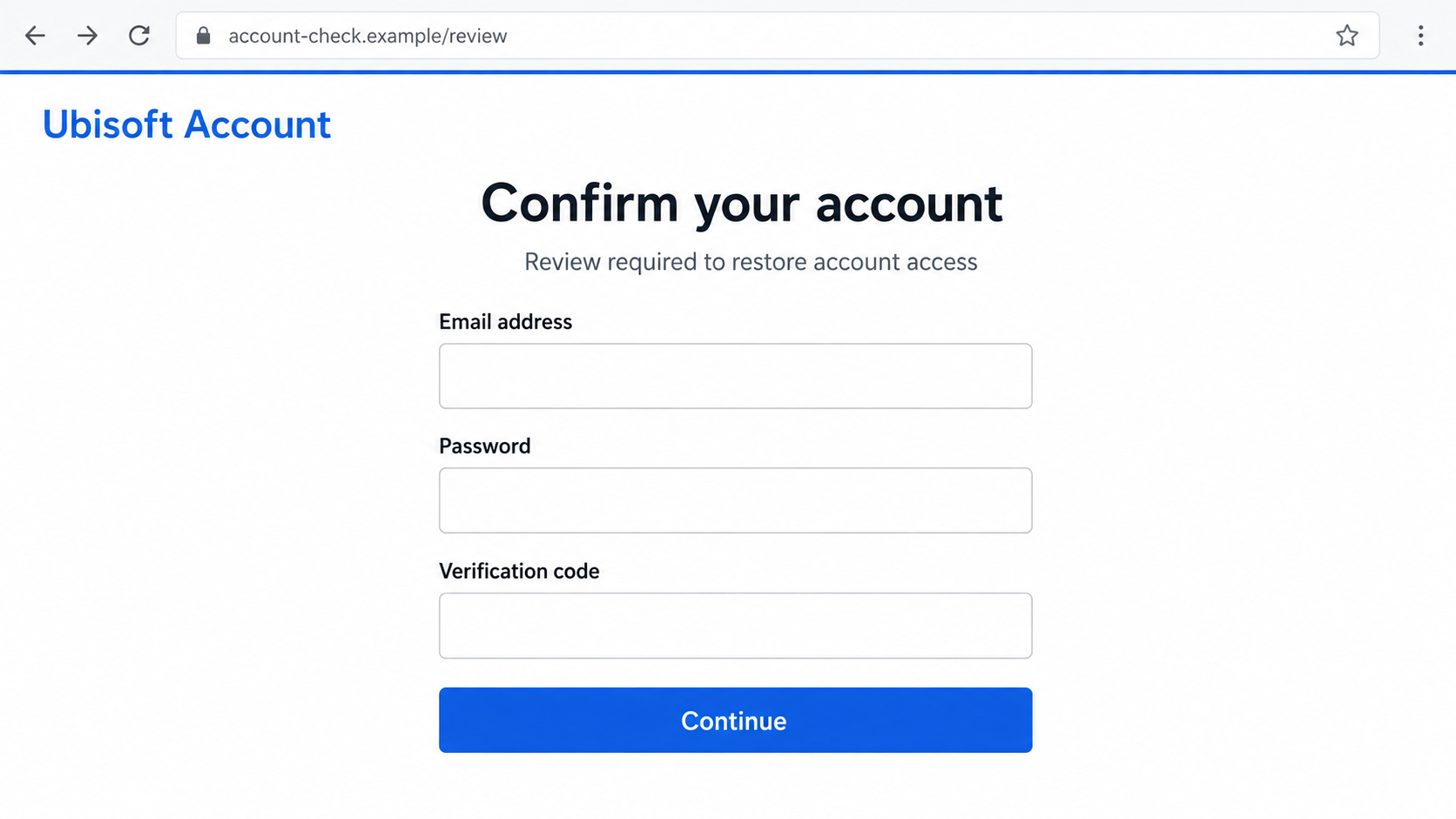
Step 4: A second prompt can ask for a live security code
Some phishing attempts stop at passwords. Others try to continue while the victim is still on the page, asking for a verification code or approval. Treat this as a possible escalation, not a feature of every Ubisoft-themed email.
Read any genuine code message carefully. A code may authorize a login or account change rather than the account review described by the suspicious page. If you did not initiate that exact action through a trusted route, do not approve it.
Two-step verification remains worthwhile. It adds protection, but it is not permission to approve unexpected requests. A scam that persuades you to hand over the second factor is trying to defeat that protection through your actions.
Step 5: Access to one account creates additional opportunities
With valid credentials, an intruder may attempt account changes or misuse any features available to that account. What they can actually do depends on the service’s protections, the information obtained, and whether the owner acts quickly.
Password reuse creates a separate problem. Someone who learns one email-and-password combination can try it on other services. Your mailbox deserves particular attention because control of email can make password resets elsewhere easier.
Do not assume that every linked account is automatically lost. Review each one through its own settings. Confirm its recovery information, recent activity, and available session controls rather than making changes through the suspicious email.
Step 6: The attacker may offer a second supposed solution
If the first page fails to produce access, a scammer may suggest a recovery agent, special download, or alternate verification form. The new instruction can sound helpful because it refers to the same unresolved problem.
A genuine recovery process should begin with official support. A stranger demanding payment, backup codes, remote access, or your mailbox password has not proved they can restore a gaming account.
If the message instead promotes a beta or downloadable game tool, verify the release through official channels. Do not assume every invitation is malicious, but never install an unfamiliar file merely because an email uses a publisher’s name.
Company, Address, and Fulfillment Checks
The publisher’s identity does not authenticate the sender
The real company is easy to identify. The person operating an imitation login page usually is not. Copying a business name, legal footer, or support signature establishes no relationship between that page and the publisher.
Compare the route you normally use with the route the message proposes. If they differ, use the normal route and ask official support to confirm the communication. Do not let the sender provide all the evidence of their own identity.
The relevant address is the web address
There is no physical shipment to trace in a login scam. The useful address check concerns the complete destination domain. A copied office address in the footer cannot make an unrelated login form safe.
Likewise, a browser warning should not be bypassed to complete verification. If your password manager does not recognize the page, stop and examine the address. That signal is helpful, though autofill behavior alone is not a final verdict.
Support must be reached independently
Start support requests from the official Ubisoft website or the service’s established application. Avoid numbers, chat handles, and search ads supplied by the suspicious message. A professional-sounding reply from those channels is still part of the same unverified conversation.
Keep any case reference issued through genuine support. It helps you follow the recovery process without trusting unsolicited messages claiming to know about your problem.
Trace the requested action, not just the branding
For digital services, traceability means being able to connect an action to your real account. What login are you approving? What file are you installing? What change will this code authorize?
If those answers are unclear, there is no reason to proceed. A security message should lead to a check you understand, not an expanding series of permissions and secrets.
A Quick Check Before You Touch the Account
Close the email and open your usual Ubisoft route. Check whether you can sign in, whether your recovery details are unchanged, and whether anything requires your attention. Do not make an unnecessary purchase or pay an account-unlocking fee.
- Use a saved bookmark or type the known official address yourself.
- Check the mailbox tied to the account for changes you did not request.
- Compare any suspicious notice with information available inside your account.
- Ask official support if the warning cannot be explained.
Do not reply to the suspicious email to ask whether it is genuine. That gives the same sender another opportunity to reassure you. Independent confirmation means leaving their channel, not asking them to repeat the claim.
What to Do if You Have Fallen Victim to This Scam
- Stop the interaction and record what happened.
Close the suspicious page without submitting anything else. Save the email, sender address, destination if already visible, and approximate time. Write down whether you entered a password, submitted a code, downloaded a file, or approved a login.
Those details are more useful than a general statement that you clicked something. Preserve evidence without reopening the page or reproducing the attack.
- Replace the exposed Ubisoft password.
Use the official service from a trusted device. Choose a new password that you do not use anywhere else. If you cannot sign in, start account recovery through official Ubisoft support rather than a person advertising recovery services.
Review account and recovery details for unfamiliar changes. If an option to remove sessions or trusted devices is available, use it and follow support’s account-specific instructions.
- Protect the email account and reused passwords.
Change the same exposed password wherever you reused it, prioritizing your mailbox and other sensitive accounts. Check email forwarding rules and recovery details if there is any sign that the mailbox was accessed.
Use a password manager to keep replacements distinct. You do not need to remember a slightly different version of one weak password for every service.
- Review verification and linked-account settings.
Enable two-step verification through the genuine account settings. Check for unfamiliar security methods or recovery information. Keep backup codes private and store them somewhere you control.
Inspect linked platforms separately. Explain any code or approval you shared to official support so they can assess what account changes may have occurred.
- Address downloads without assuming infection.
If you ran an unfamiliar file, disconnect the affected device from the network while arranging a security check. Use another trusted device for urgent password changes.
Malwarebytes can help scan for malware and unwanted software associated with the download. A clean scan does not replace changing exposed passwords. Merely receiving the email is not a reason to assume your device is infected.
- Investigate actual charges through the payment provider.
If payment information was entered or an unauthorized transaction appears, contact the card issuer through its official app or the number on your card. Describe the actual event and ask about card replacement and disputes.
Do not pay a new fee to cancel a supposed charge. A threatening email alone is not evidence that your bank has processed a transaction.
- Report the impersonation and warn affected contacts.
Use your email service’s phishing-report option and contact Ubisoft through its genuine support route. If messages were sent from a compromised account, tell affected friends through another channel.
Share the warning without forwarding a clickable scam link. Keep full evidence for support or investigators, but remove private details from any public post.
- Reduce repeat exposure.
Consider AdGuard for filtering unwanted ads and known malicious destinations. Filtering can reduce some encounters, but it cannot guarantee that a fresh phishing page will be blocked.
Be especially wary of follow-up offers to recover your account for money. Continue through the support case you opened yourself, and never supply a recovery agent with your password or security codes.
Frequently Asked Questions
Does an unexpected Ubisoft alert mean my account was hacked?
No. It may be a fake message, a genuine alert, or a notification triggered by an attempt that did not succeed. Check through Ubisoft independently. The message’s arrival alone does not establish what happened to the account.
Can the sender name say Ubisoft even when the email is fake?
Yes. A display name is not a reliable identity check. Examine the actual address and destination, but do not rely on appearance alone. Independent account access is safer than trying to authenticate an urgent email from its styling.
Is an account-review page safe if it has a padlock?
Not necessarily. A padlock concerns the connection, not the business identity behind the page. An encrypted phishing form can still send your password to someone who should not have it.
What if I clicked but did not type anything?
Close the page and check whether anything downloaded or any permission was granted. Clicking is not the same as surrendering credentials. Keep your browser updated, and investigate further if you ran a file, approved a prompt, or notice unusual activity.
Will two-step verification prevent every version?
It helps protect the account, but you must not share codes or approve unexpected requests. An attacker may try to persuade you to provide the additional proof. Always read what the legitimate verification prompt says you are authorizing.
Should I use a recovery service recommended in a reply?
No. Use Ubisoft’s official recovery process. A stranger’s confidence, claimed contacts, or screenshots do not establish that they can restore access. Requests for fees, passwords, backup codes, or remote control are reasons to stop.
The Bottom Line
The Ubisoft email scam turns a reasonable desire to protect your games into an invitation to trust the wrong page. Take the possible security issue seriously, but investigate it through the account service you already know.
If you shared information, focus on the access you actually exposed: passwords, verification, email, downloads, or payment details. Calm, specific recovery steps are more useful than following another urgent instruction from the same sender.

Join the discussion
0 commentsShare your experience or ask a question about this article.
Discussion
Start the conversation
Have a question or something useful to share? Add the first comment.