

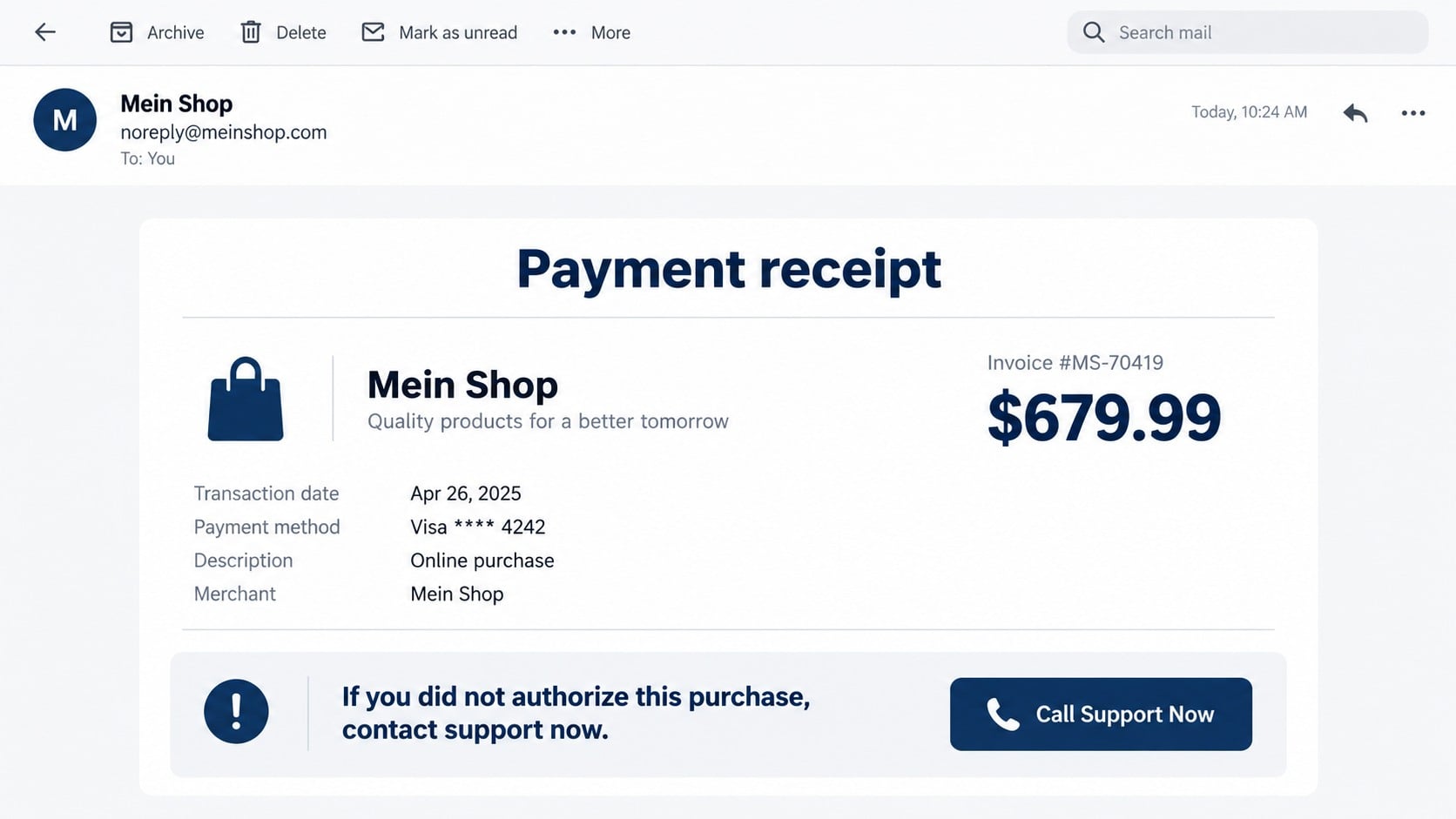
An unexpected receipt says “Mein Shop” charged $679.99 through PayPal. You do not recognize the merchant, and the message places a cancellation number exactly where a worried buyer will look first.
The amount is there to create panic, but the fake purchase is only the opening move. The real transaction can begin when the recipient calls the number and reaches the people who sent the warning.
Overview
The invoice uses an unfamiliar merchant to manufacture alarm
The Mein Shop PayPal invoice scam is a fake receipt or money-request scheme. The recipient is told that a purchase from “Mein Shop,” meaning “my shop” in German, has been completed or is waiting for confirmation.
The merchant name is generic enough to sound like a marketplace seller while remaining difficult to identify. The message may mention PayPal, a shopping app, bank transfer, cryptocurrency, or another expensive item to make the transaction feel urgent.
The telephone number is the central trap
The message tells anyone who did not authorize the purchase to call immediately. That number does not provide independent proof of a PayPal charge. It routes the frightened recipient to a scammer posing as billing or fraud support.
The caller may be asked for account information, a one-time code, card details, remote access, or a payment needed to “reverse” the invoice. The invented receipt becomes a reason to surrender access voluntarily.
A genuine platform notification can still contain a fraudulent request
Some invoice scams abuse legitimate money-request features. The surrounding notification may therefore be delivered by a real platform even though the invoice, seller note, and telephone number were created by an unknown requester.
- The recipient did not buy anything from Mein Shop.
- The message highlights an alarming amount and short deadline.
- The cancellation route is a telephone number inside the invoice.
- The caller may request remote access or authentication codes.
- Account activity must be checked through PayPal opened independently.
Why a Real-Looking Invoice Is Not Proof of a Charge
An invoice asks for payment; it does not always prove that money moved. A money request can also be created by another user and sent to an email address. Scammers exploit the formal layout because recipients often read it as a completed card transaction.
Look inside your PayPal account through the official app or a manually typed address. Check Activity, notifications, wallet settings, and automatic payments. If the claimed transaction is absent, the email does not become more credible because it contains an invoice number.
If an unwanted invoice does appear, do not pay it and do not use the telephone number in its note. Report or cancel it using the controls available inside the official account.
PayPal’s official invoice-scam guidance warns that alarmist notes may ask recipients to call fake customer service numbers and advises users to verify requests inside their accounts.
What the Fake Support Agent May Ask You to Do
The first request may sound harmless: confirm your name, repeat the invoice number, or say whether you use PayPal. Each answer helps the caller build a profile and adapt the script.
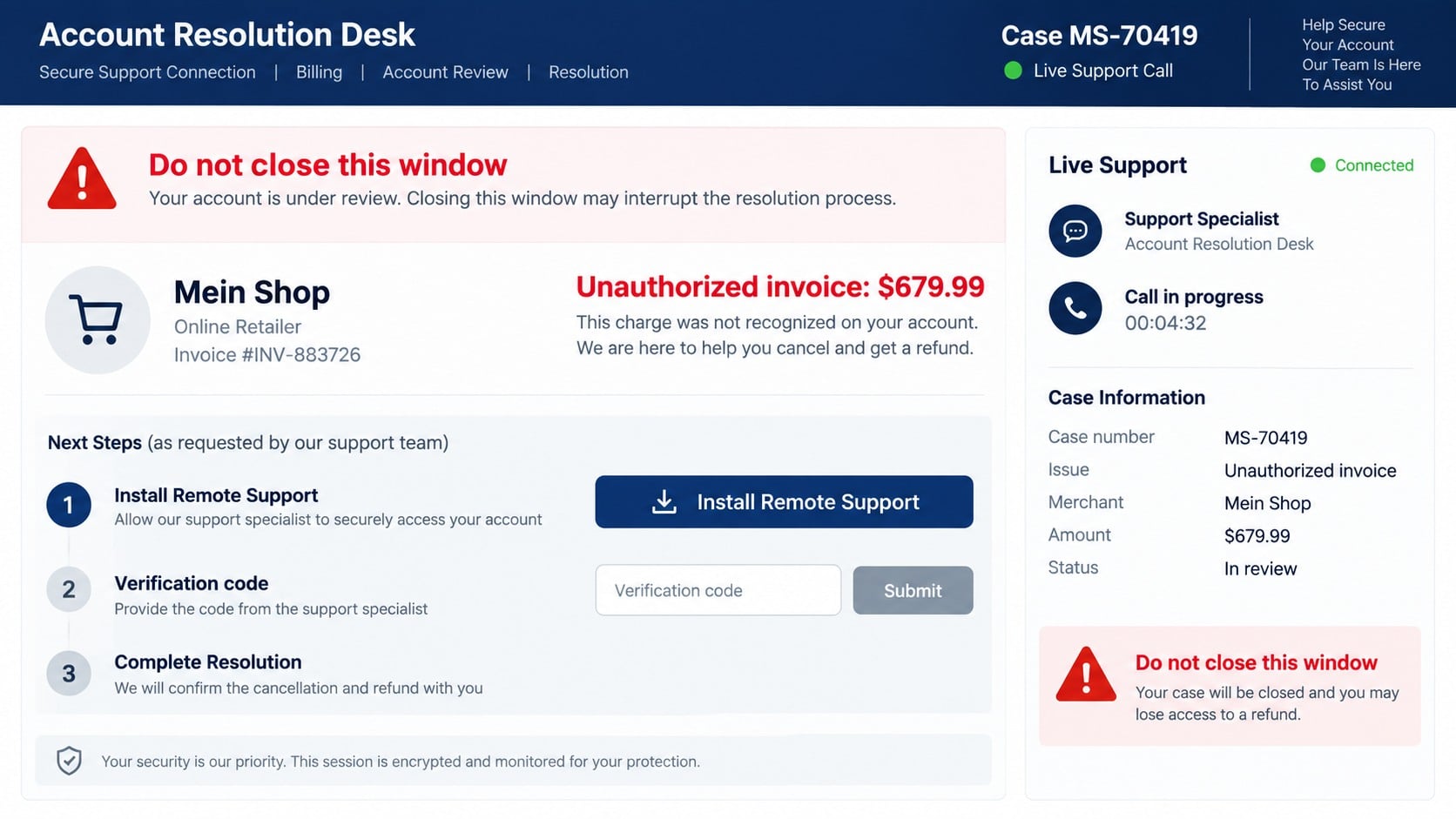
Next, the agent may direct you to install screen-sharing or remote-control software. They can claim this is necessary to connect to a secure refund server, inspect the transaction, or complete a cancellation form.
Remote access gives the caller a view of whatever appears on the device. The scammer may watch you sign into email or banking, hide windows, alter what is displayed, move files, or persuade you that a refund error created a debt.
No legitimate cancellation requires paying with gift cards, cryptocurrency, wire transfer, or a separate “verification purchase.” A refund also does not require revealing the full card number or reading an account sign-in code to an unsolicited agent.
Invoice, Money Request, and Completed Payment Are Different
A completed PayPal payment normally appears in account activity with a status, recipient, amount, funding source, and transaction details. An invoice or money request asks someone to pay; receiving one does not automatically remove $679.99 from a card or bank account.
This distinction is why the scammer wants the recipient to call before checking the account. Once a frightened person believes the money has already gone, instructions that would otherwise sound suspicious can be framed as urgent recovery steps.
Read the status inside PayPal, not the wording chosen by the requester. A note that says “paid,” “processed,” or “auto debit” cannot change the platform’s real transaction record.
The Sender May Know Only Your Email Address
An unexpected invoice does not necessarily mean the sender entered your PayPal account. A scammer may need only an email address to direct a request toward you, then rely on the official-looking notification to create credibility.
If account activity shows no unauthorized payment and security settings are unchanged, that is different from an account takeover. Report the request, review recent sessions, and strengthen the password if it was reused, but do not let the invoice note define what happened.
How the Mein Shop PayPal Invoice Scam Works
Step 1: An invoice arrives without a matching purchase
The email or app alert names Mein Shop and shows a large amount, item, invoice reference, and payment language. The sender expects the recipient to react to the amount before deciding whether the notice represents a completed payment or merely a request.
The message may include PayPal-like formatting or be generated through a legitimate request function. Neither possibility proves that the merchant is known to the recipient.
Step 2: A seller note supplies fake customer support
The invoice states that unauthorized purchases must be canceled by telephone. The number may be placed in a note field where the platform normally allows a requester to describe the bill.
This is the crucial substitution. Instead of contacting PayPal through its official site, the victim is encouraged to contact the unknown invoice sender’s chosen number.
Step 3: The caller confirms the frightening story
A person answering as the “fraud department” says the account is compromised. They may invent additional purchases, claim that hackers are connected, or warn that the $679.99 payment will settle within minutes.
The caller uses confidence and urgency to stop the victim from opening PayPal independently or contacting a bank.
Step 4: Remote access is presented as a refund tool
The victim is guided to a remote-support website or app. The scammer may describe the connection code as a secure case number, then ask the victim to approve permissions that allow viewing or controlling the screen.
Once connected, the attacker can see login activity and manipulate the session. A blank or dark screen may be used while the criminal opens other accounts in the background.
Step 5: A fake refund error creates a demand for money
The scammer may edit a webpage or transaction display to make it appear that too much money was refunded. The victim is told that returning the difference is necessary to save the agent’s job or prevent legal action.
Payment instructions often use gift cards, cash, wire transfer, or cryptocurrency because those methods are difficult to reverse. The supposed $679.99 invoice has now become real financial loss.
Step 6: Account codes and identity data support further theft
The agent may trigger genuine password resets and ask the victim to read back the codes. Those codes can authorize access to email, PayPal, banking, shopping, or mobile accounts.
Information collected during the call can fuel later attacks. Follow-up callers may pose as a bank investigator, police officer, or recovery specialist who already knows the victim’s name and invoice story.
Company, Address, and Fulfillment Checks
“Mein Shop” does not identify a legal merchant
The phrase is generic and may appear as a label, store name, or account note. It does not reveal the legal company, account holder, or person operating the support number.
An invoice address may be copied or meaningless
A postal address in a receipt template does not prove that the merchant operates there. Compare it with the legal name, payment recipient, official website, and business records before treating it as a return or dispute address.
Support controlled by the invoice sender is not independent
The same party that created the warning should not be trusted to verify it. Use PayPal’s official app, Message Center, or Help area, and use your bank’s published contact route for card questions.
No shipment should be assumed from the receipt
A product description, tracking claim, or order number can be typed into a template. Confirm any genuine shipment through the retailer account and carrier site you opened independently.
Signs That the Receipt Is Trying to Start a Support Scam
- You do not recognize the merchant, item, or amount.
- The message says calling is the only way to stop the charge.
- The telephone number appears inside a seller note.
- The caller wants a remote-control application installed.
- You are asked to move money to protect it from hackers.
- The agent requests a one-time password or screen-sharing code.
- A refund supposedly requires gift cards, cryptocurrency, or cash.
- The caller discourages you from contacting PayPal or your bank.
A genuine unauthorized charge can still exist, so do not ignore your account. Verify it through a route that the message did not provide, then let the payment provider or card issuer handle the dispute.
What to Do if You Have Fallen Victim to This Scam
- Cut off the fake agent’s access to the device. End the call, then turn off Wi-Fi or unplug the network cable if the caller still controls the screen. Do not argue with the agent or follow instructions to reconnect.
- Use another trusted device for account recovery. Change the primary email, PayPal, banking, and shopping passwords. Use unique replacements and sign out other sessions. Enable multi-factor authentication through official settings.
- Contact PayPal independently. Open the official app or type the address yourself. Report the invoice or money request, review Activity and automatic payments, and tell support if a code or login was shared.
- Call the bank or card issuer. Use its official number and describe every payment, card detail, and remote-access event. Ask about card replacement, transfer recall, account monitoring, and disputes for transactions you did not authorize.
- Remove remote-control tools. Uninstall software the caller requested, revoke unattended access, and review recently installed extensions and applications. If the scammer had administrator access, consider professional help or a clean system reset.
- Run a full Malwarebytes scan. Malwarebytes can detect remote-access tools, downloaders, browser modifications, and other unwanted programs that may have been installed during the fake refund session. Update it before scanning and quarantine confirmed findings.
- Check the device and accounts for changes. Review email forwarding, recovery contacts, browser-saved passwords, new payees, linked cards, bank beneficiaries, and recent sessions. Remove anything you do not recognize.
- Add a browsing-protection layer. AdGuard can block many known scam domains, malicious ads, and tracking requests that lead to fake invoices or support pages. Continue verifying all support contacts independently.
- Document and report the incident. Save the invoice, full headers, telephone number, remote-access app, payment instructions, receipts, and chat history. Report the scam to PayPal, the platform that delivered it, and the relevant fraud authority.
- Be ready for recovery scammers. Criminals may claim they can recover the transfer or identify the caller for another payment. Do not provide more access or money. Work through the bank, platform, police, and established consumer agencies.
Frequently Asked Questions
Was I really charged $679.99 by Mein Shop?
Not necessarily. Check PayPal Activity and your bank independently. A fake email or unpaid invoice can display an amount without moving money.
Can a scam invoice arrive through a real PayPal email?
Yes. A scammer may abuse a legitimate invoice or money-request feature. The platform can deliver the notification while the request and telephone number remain fraudulent.
Should I call the number to cancel the invoice?
No. Use contact options inside the official PayPal app or site. A number supplied by the invoice sender routes verification back to the untrusted party.
What if I called but shared nothing?
Risk is lower if you installed nothing, shared no code, and disclosed no account or payment information. Block the number, verify PayPal activity, and remain alert for tailored follow-up calls.
Why does the caller want remote access?
Screen control lets the scammer watch logins, manipulate what you see, and direct payments while pretending to process a refund. PayPal does not need control of your device to review an invoice.
Can I safely ignore an unwanted invoice?
Do not pay or call its number. Review and report it inside the official account. If no matching charge exists, the request itself does not create a debt.
The Bottom Line
The Mein Shop PayPal invoice scam uses a frightening $679.99 receipt to make a fake support number feel like the fastest escape. Calling gives the invoice sender control over both the problem and the proposed solution.
Check PayPal Activity through the official app or a manually entered address. Report an unwanted request there, and contact the bank separately if a real unauthorized charge appears.
Never install remote-access software, share a one-time code, or send money to correct a supposed refund error. Those requests reveal what the invoice was built to achieve.

Join the discussion
0 commentsShare your experience or ask a question about this article.
Discussion
Start the conversation
Have a question or something useful to share? Add the first comment.