

Lottery advertising has always sold possibility, but a supposed artificial-intelligence breakthrough makes the old dream sound newly scientific and almost within reach.
LottoCash AI builds its invitation around that feeling, surrounding a costly digital system with famous faces, newsroom styling, and extraordinary winning stories.
Overview
The promise behind the lottery loophole
LottoCash AI was promoted as software capable of studying past drawings and predicting numbers likely to win upcoming lotteries.
Advertisements claimed users could repeatedly match four, five, or even six numbers without depending on ordinary luck.
The story credited a supposed former NASA developer named Dr. Thomas Davis with discovering a weakness that lottery operators allegedly wanted hidden.
That dramatic biography was presented without verifiable professional records establishing the person, research, algorithm, or claimed series of wins.
How borrowed authority sells the claim
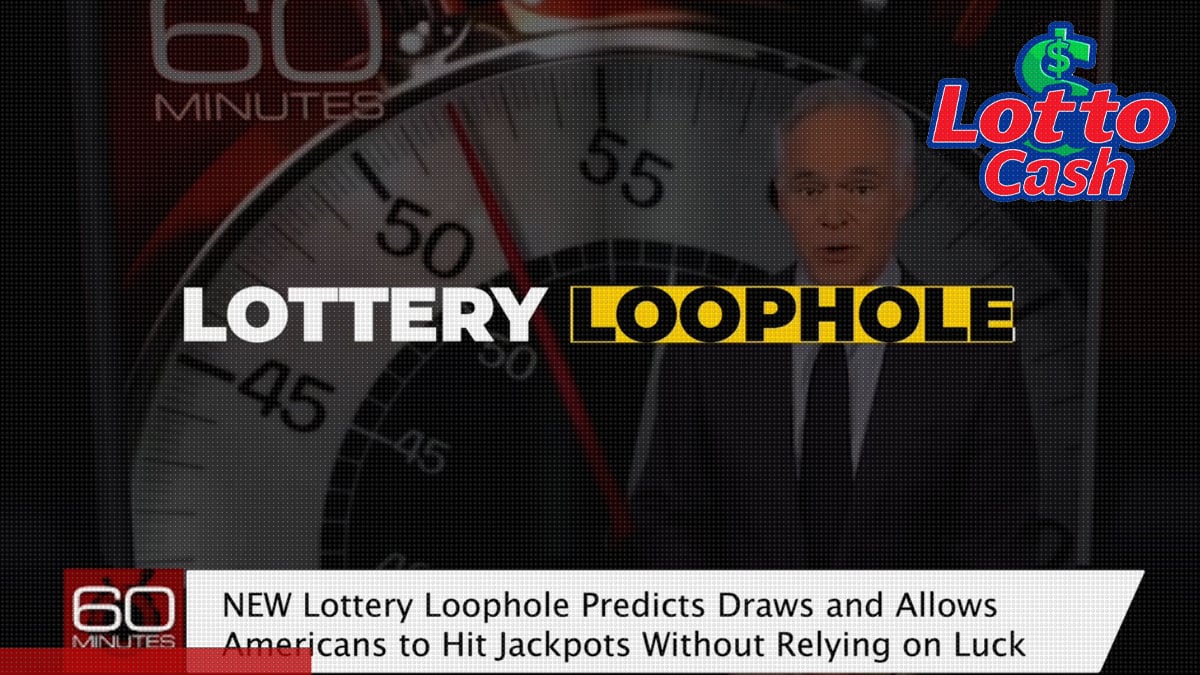
Campaign videos used manipulated celebrity appearances and synthetic voices to make the system seem publicly endorsed.
Names and likenesses connected to the pitch included Dwayne Johnson, Scott Pelley, Donald Trump, Elon Musk, and a genuine Powerball winner.
Fake broadcast visuals and familiar news names gave an invented commercial narrative the appearance of independent reporting.
None of those presentation choices demonstrates that LottoCash can predict a random drawing.
What our investigation found
The documented funnel moved from paid social advertisements to lottomania.online or lottocash.online, then toward a $197 digital checkout.
The seller offered a guarantee but provided little transparent information about the individuals responsible for creating the alleged technology.
The largest warning signals are:
- Unauthorized celebrity likenesses and artificial voices presented as endorsements.
- A fictional-looking expert whose credentials could not be independently confirmed.
- Claims of repeated lottery success without verifiable tickets, dates, or audited results.
- A fake-news presentation borrowing trust from recognizable broadcasters and networks.
- A $197 price for an unexplained prediction method.
- Anonymous creators and thin company information behind the offer.
- Pressure suggesting buyers must act before officials close the loophole.
Why Past Drawings Cannot Reveal the Next Winning Combination
Legitimate lottery drawings are designed so each valid number combination has the same chance of appearing.
Previous outcomes can describe history, but they do not provide a reliable signal for the next independent drawing.
A number appearing frequently does not become safer, and a number absent for months is not automatically due.
Both assumptions arise from pattern-seeking, a normal human instinct that random sequences often exploit.
Artificial intelligence can summarize old results, identify repetitions, and generate combinations quickly.
It cannot access information that does not exist, such as a dependable causal link between independent past and future draws.
If a system genuinely produced near-certain wins, public sales for $197 would make little economic sense.
The owner could use the claimed advantage privately, document the results, and submit the method for serious mathematical review.
Instead, lottery prediction schemes usually prove their power through testimonials, animations, hypothetical wins, and carefully selected screenshots.
Those materials may look impressive while revealing nothing about failed predictions or overall performance.
How the LottoCash AI Lottery Loophole Scam Works
Step 1: A celebrity deepfake stops the scroll
A paid Facebook or Instagram video appears to show a well-known public figure guaranteeing unusually strong lottery results.
The altered clip may combine authentic footage with fabricated audio and lip movement, creating a statement the person never made.
Viewers recognize the face before noticing unnatural cadence, mismatched expressions, or language inconsistent with a genuine endorsement.
Step 2: The ad introduces a hidden mathematical breakthrough
The script claims an expert analyzed major winners and uncovered a legal weakness inside the lottery system.
Words such as algorithm, artificial intelligence, NASA, data, and prediction give the story a technical surface.
However, the promotion supplies no reproducible method, peer review, source code, or independently audited prediction history.
Step 3: A fake broadcast turns promotion into apparent news
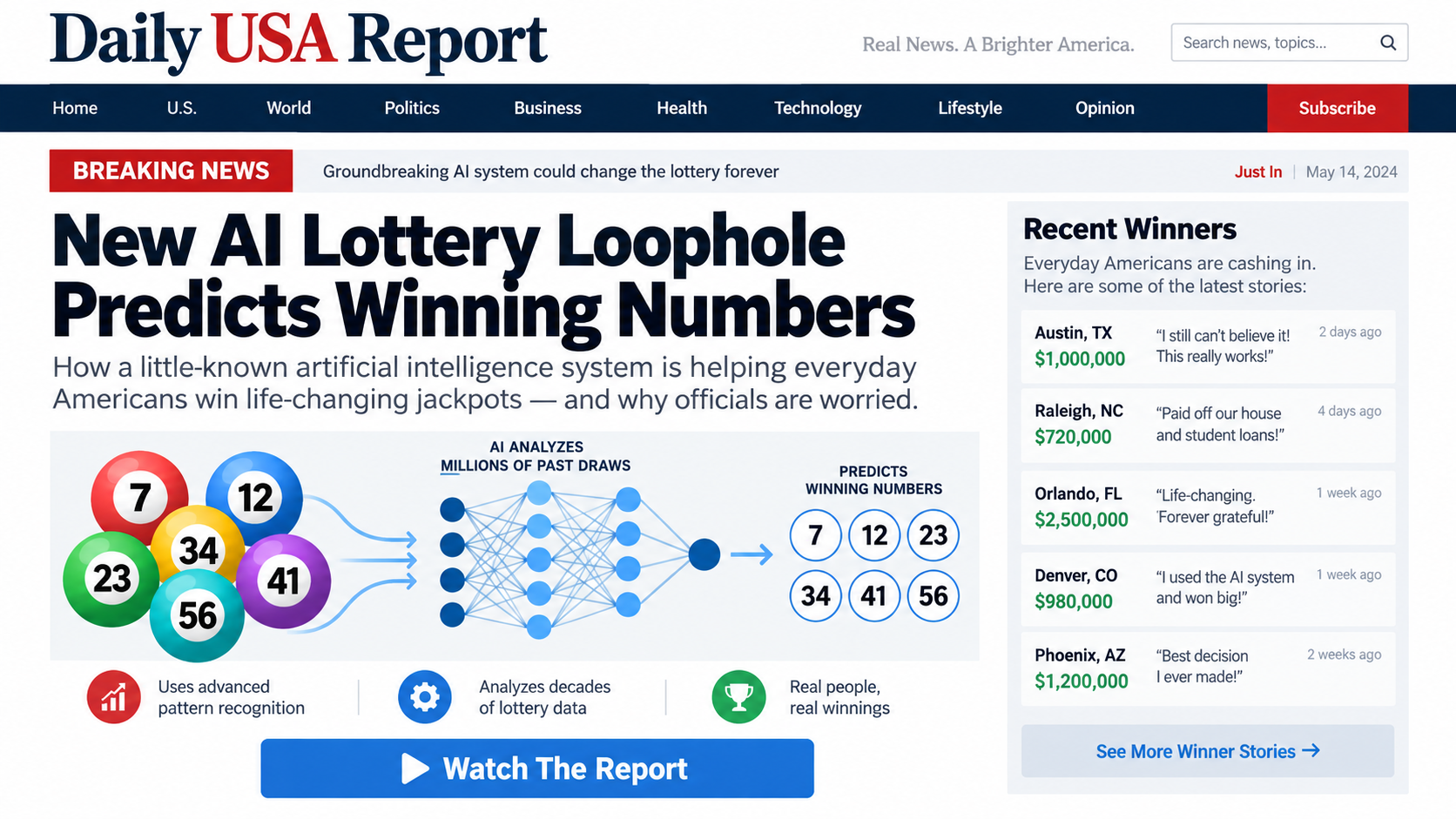
After the click, viewers meet a long report styled to resemble a respected television segment or national newspaper.
Network names, studio graphics, breaking-news labels, and a recognizable correspondent can make the page feel editorial.
The address bar remains the decisive clue because the page is hosted on a marketing domain, not the outlet being imitated.
Step 4: The story invents opposition from powerful institutions
The video suggests lottery officials or political leaders know about the discovery and may soon stop ordinary players from using it.
This conspiracy angle explains why independent outlets have not validated the system while simultaneously creating urgency.
It also reframes healthy skepticism as evidence that the secret must be valuable.
Step 5: Testimonials make exceptional wins feel routine
Purported users describe paying debts, buying homes, or matching several numbers shortly after activating the software.
These stories rarely include unedited tickets, purchase records, drawing dates, legal names, or permission for independent verification.
A row of stars is not a substitute for transparent performance data covering every prediction.
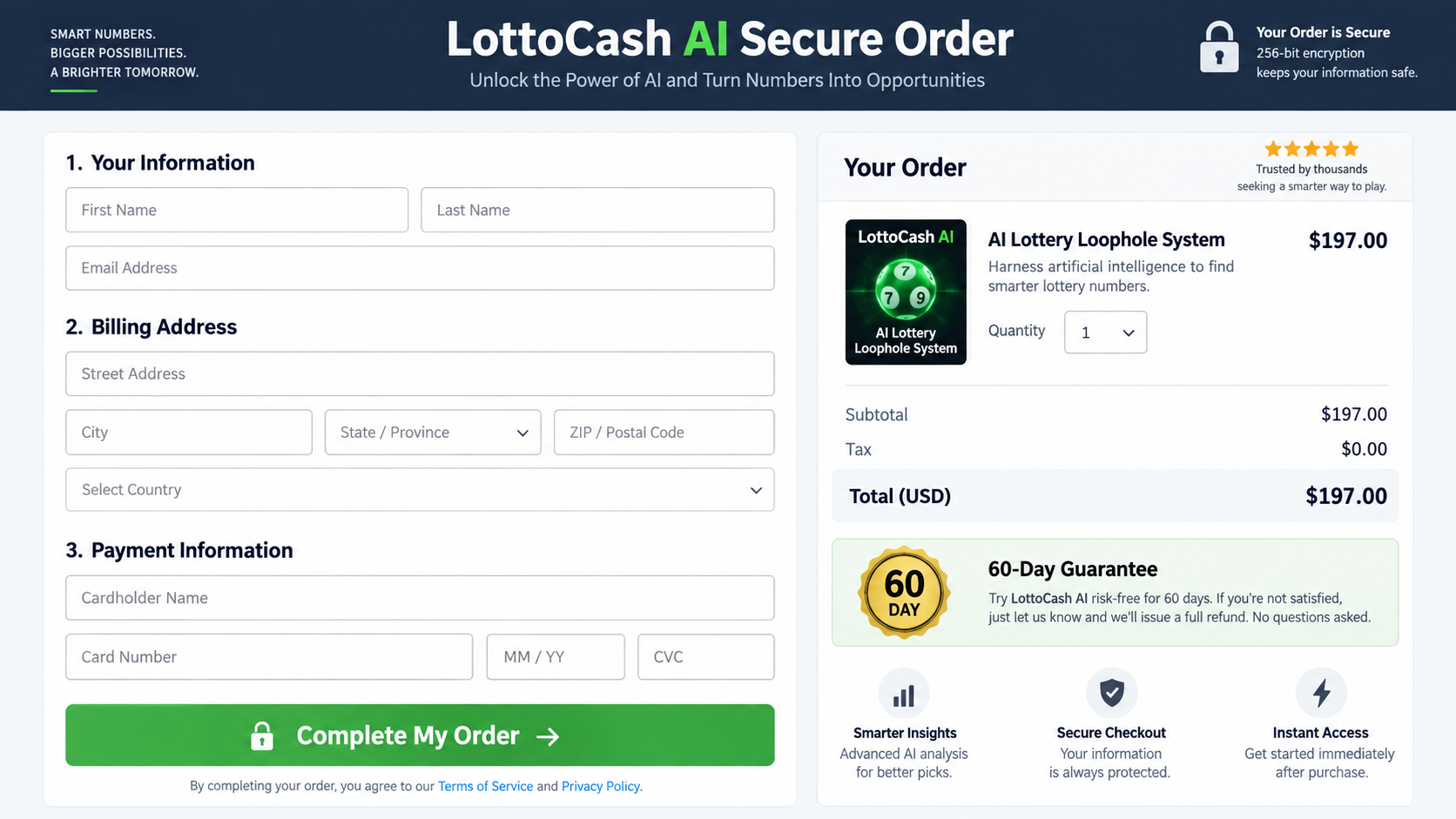
Step 6: The visitor reaches a $197 digital checkout
The price is positioned as tiny beside the jackpots and guaranteed-looking results discussed during the presentation.
A guarantee badge reduces hesitation, although buyers still need a real seller, reachable support, and workable refund procedure.
Checkout security only protects data transmission. It does not prove that a product’s claims are true.
Step 7: Delivery cannot match the near-certain prediction story
The purchaser may receive number suggestions, probability explanations, random combinations, or access to a simple digital tool.
Any such output can look sophisticated while remaining unable to change the underlying odds.
When the numbers lose, the promoter can blame timing, settings, user error, or insufficient use rather than the central claim.
The Deepfake and Fake-News Warning Signs
Start with the wording. Public figures rarely guarantee lottery results or promise personal compensation when strangers fail to win.
Listen for flattened emotion, odd emphasis, clipped breathing, inconsistent room sound, and pronunciation that changes within one sentence.
Watch the mouth closely. Synthetic movement may lag behind consonants or soften around teeth and tongue positions.
Do not rely on visual quality alone because modern manipulation can appear convincing on a small screen.
Open a new tab and search the celebrity’s official website, verified social accounts, and reputable news coverage.
A revolutionary lottery announcement involving several major figures would leave evidence beyond one sponsored video.
Examine the fake-news domain letter by letter. A familiar masthead can be copied in minutes, while the URL exposes the separation.
Look for navigation links that do nothing, a recent publication date that never changes, and comments impossible to sort or verify.
Another warning appears when every path leads toward the same order page instead of other genuine reporting.
Real journalism identifies authors, editors, corrections, ownership, and contact information that can be independently confirmed.
What the $197 Checkout Does Not Prove
A professional checkout can process a card accurately while selling a product supported by misleading claims.
Encryption, padlock symbols, and generic security badges address payment handling, not the scientific validity of a lottery predictor.
Likewise, a sixty-day refund promise matters only when buyers can identify the seller and successfully complete the stated process.
Before paying, capture the full policy and note exclusions involving downloads, usage, support contact, or time limits.
Check whether the merchant name matches LottoCash AI, LottoMania, the payment processor, and the descriptor expected on the statement.
Conflicting identities can complicate cancellation and make an unfamiliar charge harder to recognize.
Digital-product platforms may host checkout services for many independent vendors.
The platform’s presence does not mean it created, tested, or endorsed every sales claim used by a vendor.
Buyers should judge the seller and evidence separately from the technical company processing payment.
Lottery Mathematics in Plain Language
Suppose a game requires choosing several numbers from a larger set. Every additional choice creates many more possible combinations.
The odds published by the official lottery already account for the game’s complete combination space.
Choosing birthdays can affect whether a jackpot is shared because many people select similar numbers.
It does not make the selected combination more likely to be drawn.
Buying additional tickets increases the number of combinations held, but it also increases the amount spent.
No software can truthfully erase that tradeoff without evidence of a compromised drawing or a rule-based promotion.
Legitimate syndicates sometimes pool money to buy more tickets. They still cannot guarantee a profit or predict random balls.
Some historical lottery strategies exploited unusual prize structures, not mystical number forecasts.
A seller who blends those rare stories with modern AI language may create credibility by association.
Consumers should insist on details about the exact game, legal rules, total spending, complete result history, and independent verification.
The Fictional Expert Problem
The sales narrative depends heavily on Dr. Thomas Davis, described as a former NASA developer with exceptional analytical ability.
A title and prestigious employer can sound authoritative even when the audience receives no verifiable employment dates or professional biography.
Real specialists normally leave traces through publications, patents, conference programs, employer directories, interviews, teaching records, or technical projects.
An invented expert exists only inside promotional videos, duplicated articles, and affiliate pages repeating the same supplied biography.
Search results are therefore not automatically independent confirmation.
Several websites can reproduce one marketing package and create the illusion that many reviewers discovered the person separately.
Check whether profiles predate the product and whether professional claims connect with institutions through their genuine websites.
Photographs deserve reverse-image examination because a stock portrait can be renamed for multiple offers.
Voice narration deserves similar caution when the speaker never appears in an unedited interview answering unpredictable questions.
A real mathematical breakthrough should be explainable without requiring trust in one mysterious authority.
The seller should show assumptions, testing procedure, complete results, failure rate, and a method another qualified person can reproduce.
LottoCash instead asks the supposed expert’s status to carry an extraordinary claim that the disclosed evidence cannot support.
That reversal is important: credentials do not validate missing mathematics, and unverified credentials provide even less value.
Even a genuine data scientist cannot promise information that a properly random drawing has not yet created.
The famous-job story distracts from that fundamental limitation by asking viewers to admire status instead of examine probability.
Company, Address, and Fulfillment Checks
Find the creator, not the fictional scientist
A narrated character named Dr. Thomas Davis is not adequate company disclosure.
Locate the contracting business, jurisdiction, responsible officers, and verifiable history behind the digital product.
If ownership remains hidden, the buyer may have nobody accountable when the method fails.
Compare every business name in the funnel
Inspect the landing domain, order form, privacy policy, terms, support email, receipt, and card descriptor.
All roles should be explained clearly, especially when a checkout processor appears beside an unrelated marketing brand.
A processor’s reputation cannot fill gaps left by an anonymous product publisher.
Confirm contact details before surrendering a card
Send a precise question about historical prediction accuracy, refund steps, and the legal seller.
Marketing replies that avoid those points suggest support may be designed for conversion rather than accountability.
Never use contact information copied from an imitation news page without checking the formal order terms.
Treat digital delivery as fulfillment
Although nothing physical ships, the seller still owes a clear description of what access includes and how long it lasts.
Verify whether updates, coaching, software, recurring fees, or bonus products are part of the transaction.
Save the delivery screen because vague access later can make a refund dispute harder to document.
How to Check Any Lottery Prediction Offer
First, search the alleged inventor through professional registries, academic publications, patents, conference records, and previous businesses.
A prestigious employer should be verifiable through more than the seller’s own narration.
Second, request predictions published before drawings, with timestamps that cannot be edited afterward.
Winning numbers highlighted after the event reveal selection bias rather than forecasting skill.
Third, demand a complete record including every loss, ticket cost, tax impact, and prize.
A few winners cannot show profitability when thousands of unsuccessful combinations disappear from view.
Fourth, verify endorsements through the public figure’s genuine channels.
Do not accept clips embedded by the seller as confirmation of consent or participation.
Finally, compare the promise with official game odds and responsible-gambling information.
Software cannot transform an independent random drawing into a dependable personal income stream.
What to Do if You Have Fallen Victim to This Scam
- Preserve the pitch. Capture the deepfake advertisement, imitation news page, pricing, guarantee, order confirmation, and delivered prediction material.
- Stop further spending. Do not buy upgrades, additional number packages, coaching, or special access offered as the reason earlier predictions failed.
- Submit a written refund demand. Cite the unsupported winning claims and unauthorized endorsements, then keep delivery evidence for that message.
- Speak with the card issuer. Describe the digital purchase honestly and ask whether misleading representation qualifies under its dispute rules.
- Inspect connected accounts. Review the card, email, and payment wallet for unexpected charges or password-reset messages.
- Secure exposed credentials. Replace duplicated passwords, activate multifactor protection, and distrust anyone offering paid recovery services.
- Run a safety check. Use Malwarebytes if the funnel installed software, requested a browser extension, or delivered an executable file.
- Reduce repeat exposure. Configure AdGuard to block known malicious advertising paths while continuing to verify every financial offer manually.
- File reports. Notify the FTC, the social network carrying the advertisement, and the official lottery whose name was misused.
Is Your Device Infected? Run a Free Malware Scan
Slow performance, constant pop-ups, or strange behavior? These are classic signs of a malware infection. The fastest way to find out is to scan your device with Malwarebytes Free — one of the most trusted malware removal tools available.
The free version detects and removes the most common threats, including:
- Adware — the cause of those annoying pop-ups
- Browser hijackers — unwanted redirects and changed homepages
- Trojans and spyware — hidden programs stealing your data
- Potentially unwanted programs (PUPs) — software you never asked for
👉 Select your device below — Windows, Mac, or Android — then follow the simple steps to download Malwarebytes, scan your system, and remove any threats it finds. The scan usually takes 5 to 20 minutes.
Run a Malware Scan with Malwarebytes for Windows
Malwarebytes is one of the most popular and trusted anti-malware tools for Windows — and it’s completely free for removing infections. It catches threats that many antivirus programs miss, including adware, browser hijackers, and trojans. Follow the steps below to scan and clean your PC in just a few minutes.
Download Malwarebytes
Click the button below to download the latest version of Malwarebytes for Windows from the official source. The free version is all you need — it will scan your computer and remove adware, browser hijackers, and other malicious software at no cost.
Download MalwarebytesOfficial installer for Windows 11 and 10. Your download starts right away.Want real-time protection? See Malwarebytes Premium Malwarebytes Free for WindowsScans and removes malware at no cost
-
Install Malwarebytes
When the download finishes, open your Downloads folder and double-click the MBSetup file. If Windows shows a User Account Control pop-up, click “Yes” to allow the installation.

Follow the On-Screen Prompts to Install Malwarebytes
The setup wizard will walk you through a few quick screens:
-
Choose where you’re installing the program — “Personal Computer” or “Work Computer” — then click Next.

-
Malwarebytes will now install on your device. This usually takes under a minute.

-
When installation is complete, the “Welcome to Malwarebytes” screen will open automatically.

-
On the final screen, click Open Malwarebytes to launch the program.

-
Enable “Scan for Rootkits”
Before scanning, turn on rootkit detection so Malwarebytes can find even the most hidden threats. Click the Settings gear icon on the left side of the screen.

In the settings menu, find “Scan for rootkits” and click the toggle so it turns blue.

Done? Click “Dashboard” in the left pane to return to the main screen.
Start the Scan
Click the blue Scan button. Malwarebytes will automatically update its virus database and start checking your computer for malware.

-
Wait for the Scan to Finish
The scan checks your entire system for browser hijackers and other malicious programs, so it can take 5 to 20 minutes depending on your computer. Feel free to do something else — just check back occasionally to see the progress.

-
Quarantine the Detected Threats
When the scan is done, you’ll see a list of everything Malwarebytes found — malware, adware, and potentially unwanted programs. Click the “Quarantine” button to remove all of them at once.

Malwarebytes will now remove the malicious files and registry entries and move them safely into quarantine.

-
Restart Your Computer
Some threats can only be fully removed after a reboot. If Malwarebytes asks you to restart, click Yes. Once you’re logged back in, Malwarebytes has finished removing the threats it found.

That’s it — your Windows PC is now clean of trojans, adware, and other malware, and should be back to running smoothly.
If you are still having problems with your computer after completing these instructions, then please follow one of the steps:
- Run a computer scan with ESET Online Scanner
- Ask for help in our Windows Malware Removal Help & Support forum.
Run a Malware Scan with Malwarebytes for Mac
Malwarebytes for Mac is a free on-demand scanner that removes the malware other security software tends to miss — adware, browser hijackers, and unwanted programs included. Cleaning an infected Mac with Malwarebytes has always been completely free, and it’s our go-to recommendation. Follow the steps below to scan and clean your Mac in just a few minutes.
-
Download Malwarebytes for Mac
Click the button below to download the latest version of Malwarebytes for Mac.
Download MalwarebytesOfficial installer for macOS. Your download starts right away.Want real-time protection? See Malwarebytes PremiumMalwarebytes Free for MacScans and removes malware at no cost -
Open the Malwarebytes setup file
When the download finishes, open your Downloads folder and double-click the setup file to begin the installation.

-
Follow the On-Screen Prompts to Install Malwarebytes
The Malwarebytes for Mac Installer will guide you through a few quick screens. Click “Continue” and keep following the prompts until the installation completes.



When the installation is complete, Malwarebytes opens to the Welcome to Malwarebytes screen. Click “Get started“.
-
Select “Personal Computer” or “Work Computer”
Malwarebytes will ask what type of computer you’re installing it on. Click either Personal Computer or Work Computer, whichever applies.

-
Start the Scan
Click the “Scan” button. Malwarebytes will automatically update its detection database and begin checking your Mac for malware.

-
Wait for the Scan to Finish
Malwarebytes will scan your Mac for adware, browser hijackers, and other malicious programs. This can take a few minutes, so feel free to do something else — just check back occasionally to see the progress.

-
Quarantine the Detected Threats
When the scan is done, you’ll see a list of everything Malwarebytes found. Click the “Quarantine” button to remove all the threats at once.

-
Restart Your Mac
Malwarebytes will now remove all the malicious files it found. Some threats can only be fully removed after a reboot — if Malwarebytes asks you to restart, allow it. Once you’re logged back in, your Mac is clean.

That’s it — your Mac is now free of adware, rogue browser extensions, and other potentially harmful software.
If you are still experiencing problems while trying to remove a malicious program from your computer, please ask for help in our Mac Malware Removal Help & Support forum.
Run a Malware Scan with Malwarebytes for Android
Malwarebytes for Android automatically detects and removes dangerous threats like malware and ransomware so you don’t have to worry about your most-used device being compromised. Aggressive detection of adware and potentially unwanted programs keeps your Android phone or tablet running smooth.
-
Download Malwarebytes for Android.
You can download Malwarebytes for Android by clicking the link below.
Get Malwarebytes for AndroidOpens Google Play in a new tab.Want real-time protection? See Malwarebytes Premium for AndroidMalwarebytes for AndroidScans your phone and removes malware at no cost -
Install Malwarebytes for Android on your phone.
In the Google Play Store, tap “Install” to install Malwarebytes for Android on your device.

When the installation process has finished, tap “Open” to begin using Malwarebytes for Android. You can also open Malwarebytes by tapping on its icon in your phone menu or home screen.

-
Follow the on-screen prompts to complete the setup process
When Malwarebytes will open, you will see the Malwarebytes Setup Wizard which will guide you through a series of permissions and other setup options.
This is the first of two screens that explain the difference between the Premium and Free versions. Swipe this screen to continue.
Tap on “Got it” to proceed to the next step.
Malwarebytes for Android will now ask for a set of permissions that are required to scan your device and protect it from malware. Tap on “Give permission” to continue.
Tap on “Allow” to permit Malwarebytes to access the files on your phone.
-
Update database and run a scan with Malwarebytes for Android
You will now be prompted to update the Malwarebytes database and run a full system scan.

Click on “Update database” to update the Malwarebytes for Android definitions to the latest version, then click on “Run full scan” to perform a system scan.

-
Wait for the Malwarebytes scan to complete.
Malwarebytes will now start scanning your phone for adware and other malicious apps. This process can take a few minutes, so we suggest you do something else and periodically check on the status of the scan to see when it is finished.

-
Click on “Remove Selected”.
When the scan has been completed, you will be presented with a screen showing the malware infections that Malwarebytes for Android has detected. To remove the malicious apps that Malwarebytes has found, tap on the “Remove Selected” button.

-
Restart your phone.
Malwarebytes for Android will now remove all the malicious apps that it has found. To complete the malware removal process, Malwarebytes may ask you to restart your device.
That’s it — your Android phone is now clean — no more malicious apps, adware, or browser redirects.
If you are still having problems with your phone after completing these instructions, then please follow one of the steps:
- Restore your phone to factory settings by going to Settings > General management > Reset > Factory data reset.
- Ask for help in our Mobile Malware Removal Help & Support forum.
Stay Protected: Block Ads and Malicious Sites
Now that your device is clean, keep it that way. Most infections start with a malicious ad or a fake download button — so blocking them at the source is your best defense.
We recommend AdGuard, which blocks malicious ads, phishing pages, and dangerous redirects before they can reach you.
👉 Download AdGuard and browse safely
Frequently Asked Questions
Can AI predict winning lottery numbers?
AI can analyze historical drawings and generate selections, but it cannot reliably forecast independent random outcomes from patterns that do not determine the future.
Did Dwayne Johnson endorse LottoCash AI?
No verified endorsement supports that claim. The documented promotion used manipulated visuals and synthetic audio to place words into recognizable mouths.
Was LottoCash AI featured on 60 Minutes?
The campaign imitated a television-news presentation, but that styling should not be confused with a genuine editorial investigation or network endorsement.
Why does the offer mention NASA?
NASA language supplies scientific prestige to the fictional expert story.
Consumers should require traceable employment records and research rather than accepting a biography written by the seller.
What did LottoCash AI cost?
The documented checkout displayed $197. Prices, domains, and product names can change as advertisers rebuild the same underlying pitch.
Does a refund guarantee make the purchase safe?
No. A guarantee depends on clear terms, an identifiable merchant, responsive support, and actual compliance when a customer requests repayment.
The Bottom Line
LottoCash AI dresses an impossible advantage in deepfakes, fake journalism, technical vocabulary, and a $197 order page.
Lottery results remain random, and no anonymous digital system should be trusted because celebrities appear to praise it inside a sponsored video.

Join the discussion
0 commentsShare your experience or ask a question about this article.
Discussion
Start the conversation
Have a question or something useful to share? Add the first comment.