1 Percent AI App Exposed: Fake or Real? Complete Money Scheme Investigation
Written by: Lapain Epuran
Published on:
An app that earns shopping commissions while artificial intelligence performs the work could sound timely, practical, and far less suspicious than an old envelope-stuffing pitch.
1 Percent AI uses that modern vocabulary to introduce a familiar wealth story, complete with luxury imagery, daily-income figures, and a rapid setup promise.
Overview
What the campaign claims
1 Percent AI is presented as software that combines artificial intelligence with commissions generated through major shopping websites.
Video advertisements have claimed ordinary users can set up the system in two minutes and earn thousands every day.
A longer presentation described monthly income reaching $40,000 or even $80,000 while requiring only five to ten minutes of daily attention.
Those amounts were not supported by complete, independently audited customer records.
What the sales presentation reveals
The main video reportedly opens with a disclaimer stating that testimonials, scenarios, names, events, and dialogue are fictionalized.
That disclosure disappears quickly, while the remainder of the presentation uses confident language and luxury scenes to create emotional certainty.
The unnamed spokesperson describes an automated opportunity but reportedly leads buyers toward work involving websites and additional setup.
The offer has also appeared under different names, including InfinitAI, NexusAI, FusionAI, and AI Revolution.
Why we consider the funnel deceptive
Promotional clips promise effortless results that do not match the practical work purchasers describe after entering the system.
A Texas contact address listed in historical terms did not correspond with a real Elm Avenue in DeSoto.
The most important warning signs are:
Income claims reaching $3,933 per day without typical-results evidence.
Advertisements using manipulated testimonials and synthetic-looking speakers.
A three-second disclaimer contradicting the emotional message that follows.
An alleged free system that reportedly begins with a $67 payment.
Upsells presented as necessary for faster or more complete results.
The same underlying pitch recycled through several product names.
Terms referring to Cyprus beside a nonexistent Texas street address.
The Arithmetic Behind the Shopping Commission Story
Affiliate commissions are real, but they arise when a tracked referral produces an eligible purchase under a merchant’s published program.
The affiliate must attract interested visitors, publish useful material, follow disclosure rules, and compete with established websites and advertisers.
A retailer may pay a small commission rate, depending on product category and customer behavior.
Earning $3,933 daily would therefore require substantial qualified traffic or very large transaction volume.
Software cannot simply claim commissions from shopping activity it did not refer.
Artificial intelligence can assist with research, drafts, analysis, and repetitive tasks.
It does not create a guaranteed audience, merchant approval, buyer trust, or profitable advertising economics.
Any honest business demonstration must show where visitors originate and how much acquiring those visitors costs.
Revenue dashboards without traffic expenses and refund rates can make an unprofitable operation look successful.
How the 1 Percent AI App Scam Works
Step 1: A short-form video displays impossible revenue
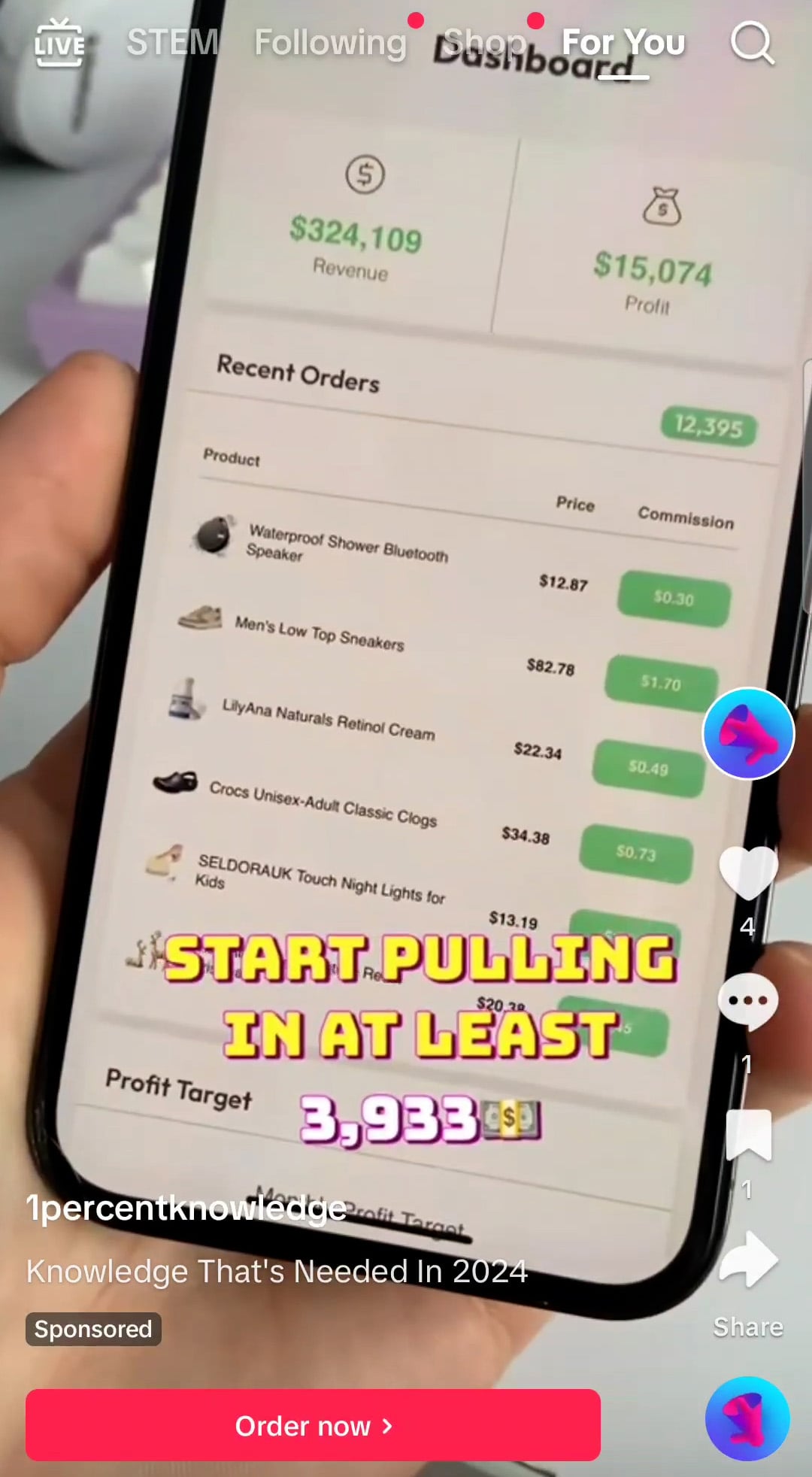
TikTok advertisements show a phone dashboard containing enormous revenue and profit totals beside ordinary retail products.
The visual implies that commissions accumulate automatically while the user watches.
No full account history proves ownership of the dashboard or connects the displayed totals with the person presenting them.
Step 2: A synthetic testimonial supplies instant credibility
One clip featured a man claiming to have earned more than $250,000 after discovering the application.
His appearance and speech reportedly showed signs of deepfake alteration, meaning the depicted speaker may not have participated voluntarily.
Personal success becomes the evidence, even though the identity and financial records remain unavailable.
Step 3: The click opens a long lifestyle presentation
Visitors reach 1percentaisite.com or another rotating domain and see an unidentified presenter surrounded by cash and luxury scenery.
The script discusses inflation, financial fear, expensive homes, cars, travel, and freedom from ordinary work.
This keeps attention on imagined outcomes instead of the business inputs needed to generate sales commissions.
Step 4: A fleeting disclaimer quietly contradicts the pitch
For approximately three seconds, text reportedly admits that testimonials are fictional, actors are compensated, and results are not representative.
The presentation then resumes with specific monthly figures and statements suggesting dramatic earnings can begin the following day.
A disclosure that viewers cannot comfortably read does not create meaningful understanding.
Step 5: The “free” opportunity becomes a paid entry
Reported buyers paid $67 despite advertisements framing the artificial-intelligence tool as free.
The initial charge feels affordable beside promised five-figure income and luxury purchases.
Once payment occurs, the customer becomes more likely to spend again rather than accept the first amount as a loss.
Step 6: The supposed app requires ordinary online-business tasks
Purchasers describe being told to build websites and complete more work than the few-button advertisement suggested.
That reality resembles affiliate marketing, content creation, or ecommerce setup rather than hands-free artificial intelligence.
The software label disguises a workload that should have been explained before checkout.
Step 7: More purchases are offered as the missing solution
Additional products may promise faster implementation, better traffic, complete setup, premium support, or exclusive automation.
Each upsell implies that the previous level remains incomplete, moving the finish line after money has already been spent.
One documented customer described multiple $30 charges and total losses reaching about $300.
The Three-Second Disclaimer Is Not the Main Message
Disclaimers matter because they show what the promoter understands about the limitations of its own presentation.
Here, the wording reportedly admits that scenes and testimonials are fictionalized and not representative of ordinary customers.
That is difficult to reconcile with repeated statements about predictable monthly earnings beginning almost immediately.
Consumers do not experience advertisements as isolated sentences.
They receive the combined impression created by narration, images, pacing, music, testimonials, buttons, scarcity, and displayed numbers.
A brief legal caveat cannot be allowed to disappear while a much longer emotional story supplies the actual purchasing motivation.
When evaluating any offer, pause the video and photograph the disclaimer.
Compare every later income promise with the limitations admitted at the beginning.
If the promoter calls the examples fictional, do not treat them as proof during the rest of the pitch.
Ask for a written typical-results statement showing the complete customer population and relevant time period.
Why Renaming the System Matters
A legitimate software product can rebrand, merge, or release new versions for ordinary commercial reasons.
Repeated renaming becomes concerning when the sales video, spokesperson, pricing, testimonials, and unrealistic income mechanism remain essentially unchanged.
Fresh names prevent an advertisement from inheriting every complaint attached to an older version.
New domains also make the operation look recently discovered, even when the script has circulated for years.
Search the spoken phrases rather than relying entirely on the current product label.
A distinctive sentence about commissions, shopping sites, or income on autopilot can expose earlier campaigns using the same material.
Compare video backgrounds, checkout layouts, testimonial photos, support numbers, policy language, and merchant descriptors.
Those operational fingerprints often survive after the logo changes.
Consumers should also preserve the version they encountered because support may later claim a complaint concerns another program.
What Buyers Are Actually Expected to Do
Affiliate activity starts by selecting a topic, joining suitable programs, understanding restrictions, and creating material people can discover.
Websites need hosting, design, useful pages, privacy notices, disclosures, security, maintenance, and reliable analytics.
Traffic can require months of publishing, a strong existing audience, or advertising purchased at financial risk.
Conversion rates vary, commissions can be reversed, and merchants may close programs without preserving an affiliate’s business.
AI-generated pages do not automatically rank in search or persuade visitors.
Low-quality automation can create inaccurate claims, duplicate material, policy violations, and reputational damage.
A real operator reviews every output and remains responsible for consumer protection, copyright, privacy, advertising, and tax obligations.
That can become a genuine small business, but it bears no resemblance to five effortless minutes daily.
The missing explanation is central because buyers cannot compare the course with free affiliate education until they understand the actual task.
The Earnings Display Leaves Out the Hardest Numbers
A sales dashboard can look persuasive while revealing almost nothing about whether the underlying activity produced a genuine profit.
The visible total may represent gross sales, estimated commissions, simulated results, selected transactions, or figures entered for a demonstration.
None of those possibilities establishes what an ordinary purchaser can withdraw after paying every expense.
A meaningful record would begin with dated deposits from identifiable affiliate networks, not a large number floating inside an unfamiliar interface.
It would also show advertising costs, hosting fees, software subscriptions, refunds, chargebacks, taxes, and commissions later reversed by merchants.
The offer does not place that complete accounting beside its spectacular daily-income claim.
Consider a hypothetical program paying a 3% commission on eligible purchases.
Generating $3,933 would require $131,100 in attributed daily sales before expenses, reversals, and program restrictions enter the calculation.
Even a generous 10% commission would require $39,330 in qualifying orders every day.
Those volumes demand a sizeable audience with buying intent, a stable conversion rate, and merchant relationships that accept the traffic.
If advertisements supply visitors, acquisition costs can consume the commission before the operator earns $1 in actual profit.
If search traffic supplies them, useful content and authority usually take sustained work to develop.
Returns create another gap because an apparent commission may vanish weeks after the dashboard first records it.
Retail platforms can also reject questionable referrals, suspend accounts, change rates, or exclude certain product categories without preserving projected income.
The promised automation cannot control those decisions because retailers, customers, payment processors, and advertising platforms remain independent parties.
Ask the seller to reconcile one displayed day from customer click through final bank deposit.
The explanation should identify traffic volume, advertising spend, order value, commission rate, cancellations, refunds, processing time, and net proceeds.
When a presentation offers luxury images instead of that reconciliation, it is selling aspiration without showing the economics needed to support it.
Independent payment records matter because impressive screen animations can be recreated easily, while completed bank transfers require a traceable source, date, amount, and recipient.
Company, Address, and Fulfillment Checks
The physical address appears defective
Historical terms listed 30 SW Elm Ave., DeSoto, Texas 75115, yet mapping checks found no matching Elm Avenue in that city.
A nonexistent street removes one of the simplest routes for identifying an accountable seller.
Do not substitute nearby addresses or assume a typographical error without written confirmation.
Cyprus references require a clear contracting entity
Terms reportedly mentioned Cyprus while presenting the Texas mailing address to customers.
International structure is not inherently suspicious, but buyers need the exact company, registration, jurisdiction, and dispute procedure.
Ambiguity becomes especially serious when the advertised earnings are already unsupported.
The support number should identify the business
An older page displayed 1-888-793-3429, although current campaigns may use different contacts.
Ask the representative for the legal merchant name, complete price, cancellation method, and statement descriptor before sharing account details.
A call center handling several brands may be a contractor rather than the product owner.
Digital delivery still needs precise fulfillment
The receipt should state whether the buyer receives software, a course, website setup, coaching, or access lasting for a particular term.
Vague promises of automation are not enough to measure whether delivery occurred.
Record each unlocked feature and every additional payment request.
How to Test an AI Income Offer Before Paying
Request a live demonstration using a new account, ordinary budget, and complete screen recording without skipped setup.
Require the presenter to show traffic acquisition, merchant approval, commission reversals, expenses, withdrawals, and time spent.
Verify whether the alleged app appears in a reputable marketplace under the same developer name.
Search the exact domain, support number, address, checkout descriptor, and memorable lines from the video.
Calculate what transaction volume would be necessary to produce the claimed commissions.
If the arithmetic requires thousands of daily buyers, ask where those customers come from and who funds acquisition.
Read the refund policy before viewing upsells because post-purchase excitement can weaken careful judgment.
Close the page when the seller will not describe the product plainly before collecting money.
What to Do if You Have Fallen Victim to This Scam
Save the complete funnel. Capture the TikTok clip, long video, disclaimer, $67 payment, upgrade pages, dashboard, policies, and merchant emails.
List every debit. Separate the original order from later $30 charges, service upgrades, hosting, coaching, or tools purchased through the program.
Cancel in traceable form. Send written notice to each merchant involved and retain delivery confirmation or ticket numbers.
Open disputes before deadlines. Tell the card provider exactly how promised automation differed from the tasks and products supplied.
Revoke account access. Disconnect integrations, API permissions, browser extensions, analytics accounts, and advertising profiles created during setup.
Harden your email. Change any repeated password and enable multifactor authentication because the funnel collected identity and payment information.
Check for unwanted software. Run Malwarebytes after installing executables, plugins, or remote-support programs connected with the course.
Control hostile redirects. AdGuard can reduce exposure to dangerous advertising domains, while manual offer verification remains necessary.
Warn the proper agencies. Report income claims to the FTC and send the advertisement identifier to TikTok or Meta.
Is Your Device Infected? Run a Free Malware Scan
Slow performance, constant pop-ups, or strange behavior? These are classic signs of a malware infection. The fastest way to find out is to scan your device with Malwarebytes Anti-Malware Free — one of the most trusted malware removal tools available.
The free version detects and removes the most common threats, including:
Adware — the cause of those annoying pop-ups
Browser hijackers — unwanted redirects and changed homepages
Trojans and spyware — hidden programs stealing your data
Potentially unwanted programs (PUPs) — software you never asked for
👉 Select your device below — Windows, Mac, or Android — then follow the simple steps to download Malwarebytes, scan your system, and remove any threats it finds. The whole process takes about 5 minutes.
Malwarebytes for WindowsMalwarebytes for MacMalwarebytes for Android
Run a Malware Scan with Malwarebytes for Windows
Malwarebytes is one of the most popular and trusted anti-malware tools for Windows — and it’s completely free for removing infections. It catches threats that many antivirus programs miss, including adware, browser hijackers, and trojans. Follow the steps below to scan and clean your PC in just a few minutes.
Download Malwarebytes
Click the button below to download the latest version of Malwarebytes for Windows from the official source. The free version is all you need — it will scan your computer and remove adware, browser hijackers, and other malicious software at no cost.
(The link opens in a new page where your download will start)
Install Malwarebytes
When the download finishes, open your Downloads folder and double-click the MBSetup file. If Windows shows a User Account Control pop-up, click “Yes” to allow the installation.
Follow the On-Screen Prompts to Install Malwarebytes
The setup wizard will walk you through a few quick screens:
Choose where you’re installing the program — “Personal Computer” or “Work Computer” — then click Next.
Malwarebytes will now install on your device. This usually takes under a minute.
When installation is complete, the “Welcome to Malwarebytes” screen will open automatically.
On the final screen, click Open Malwarebytes to launch the program.
Enable “Scan for Rootkits”
Before scanning, turn on rootkit detection so Malwarebytes can find even the most hidden threats. Click the Settings gear icon on the left side of the screen.
In the settings menu, find “Scan for rootkits” and click the toggle so it turns blue.
Done? Click “Dashboard” in the left pane to return to the main screen.
Start the Scan
Click the blue Scan button. Malwarebytes will automatically update its virus database and start checking your computer for malware.
Wait for the Scan to Finish
The scan checks your entire system for browser hijackers and other malicious programs, so it can take several minutes. Feel free to do something else — just check back occasionally to see the progress.
Quarantine the Detected Threats
When the scan is done, you’ll see a list of everything Malwarebytes found — malware, adware, and potentially unwanted programs. Click the “Quarantine” button to remove all of them at once.
Malwarebytes will now remove the malicious files and registry entries and move them safely into quarantine.
Restart Your Computer
Some threats can only be fully removed after a reboot. If Malwarebytes asks you to restart, click Yes. Once you’re logged back in, your PC is clean and you can continue with the next steps in this guide.
When the scan finishes, click Quarantine to remove everything Malwarebytes found. That’s it — your Windows PC is now clean of trojans, adware, and other malware, and should be back to running smoothly.
If your current antivirus allowed this malicious program on your computer, you may want to consider purchasing Malwarebytes Premium to protect against these types of threats in the future. If you are still having problems with your computer after completing these instructions, then please follow one of the steps:
Malwarebytes for Mac is a free on-demand scanner that removes the malware other security software tends to miss — adware, browser hijackers, and unwanted programs included. Cleaning an infected Mac with Malwarebytes has always been completely free, and it’s our go-to recommendation. Follow the steps below to scan and clean your Mac in just a few minutes.
Download Malwarebytes for Mac
Click the button below to download the latest version of Malwarebytes for Mac.
When the download finishes, open your Downloads folder and double-click the setup file to begin the installation.
Follow the On-Screen Prompts to Install Malwarebytes
The Malwarebytes for Mac Installer will guide you through a few quick screens. Click “Continue” and keep following the prompts until the installation completes.
When the installation is complete, Malwarebytes opens to the Welcome to Malwarebytes screen. Click “Get started“.
Select “Personal Computer” or “Work Computer”
Malwarebytes will ask what type of computer you’re installing it on. Click either Personal Computer or Work Computer, whichever applies.
Start the Scan
Click the “Scan” button. Malwarebytes will automatically update its detection database and begin checking your Mac for malware.
Wait for the Scan to Finish
Malwarebytes will scan your Mac for adware, browser hijackers, and other malicious programs. This can take a few minutes, so feel free to do something else — just check back occasionally to see the progress.
Quarantine the Detected Threats
When the scan is done, you’ll see a list of everything Malwarebytes found. Click the “Quarantine” button to remove all the threats at once.
Restart Your Mac
Malwarebytes will now remove all the malicious files it found. Some threats can only be fully removed after a reboot — if Malwarebytes asks you to restart, allow it. Once you’re logged back in, your Mac is clean.
Once the scan is done, remove every threat it detected. Your Mac is now free of adware, rogue browser extensions, and other potentially harmful software.
If your current antivirus allowed a malicious program on your computer, you might want to consider purchasing the full-featured version of Malwarebytes Anti-Malware to protect against these types of threats in the future. If you are still experiencing problems while trying to remove a malicious program from your computer, please ask for help in our Mac Malware Removal Help & Support forum.
Run a Malware Scan with Malwarebytes for Android
Malwarebytes for Android automatically detects and removes dangerous threats like malware and ransomware so you don’t have to worry about your most-used device being compromised. Aggressive detection of adware and potentially unwanted programs keeps your Android phone or tablet running smooth.
Download Malwarebytes for Android.
You can download Malwarebytes for Android by clicking the link below.
In the Google Play Store, tap “Install” to install Malwarebytes for Android on your device.
When the installation process has finished, tap “Open” to begin using Malwarebytes for Android. You can also open Malwarebytes by tapping on its icon in your phone menu or home screen.
Follow the on-screen prompts to complete the setup process
When Malwarebytes will open, you will see the Malwarebytes Setup Wizard which will guide you through a series of permissions and other setup options. This is the first of two screens that explain the difference between the Premium and Free versions. Swipe this screen to continue. Tap on “Got it” to proceed to the next step. Malwarebytes for Android will now ask for a set of permissions that are required to scan your device and protect it from malware. Tap on “Give permission” to continue. Tap on “Allow” to permit Malwarebytes to access the files on your phone.
Update database and run a scan with Malwarebytes for Android
You will now be prompted to update the Malwarebytes database and run a full system scan.
Click on “Update database” to update the Malwarebytes for Android definitions to the latest version, then click on “Run full scan” to perform a system scan.
Wait for the Malwarebytes scan to complete.
Malwarebytes will now start scanning your phone for adware and other malicious apps. This process can take a few minutes, so we suggest you do something else and periodically check on the status of the scan to see when it is finished.
Click on “Remove Selected”.
When the scan has been completed, you will be presented with a screen showing the malware infections that Malwarebytes for Android has detected. To remove the malicious apps that Malwarebytes has found, tap on the “Remove Selected” button.
Restart your phone.
Malwarebytes for Android will now remove all the malicious apps that it has found. To complete the malware removal process, Malwarebytes may ask you to restart your device.
After the scan, tap Remove Selected to delete all detected threats. Your Android phone is now clean — no more malicious apps, adware, or browser redirects.
If your current antivirus allowed a malicious app on your phone, you may want to consider purchasing the full-featured version of Malwarebytes to protect against these types of threats in the future. If you are still having problems with your phone after completing these instructions, then please follow one of the steps:
Restore your phone to factory settings by going to Settings > General management > Reset > Factory data reset.
Now that your device is clean, keep it that way. Most infections start with a malicious ad or a fake download button — so blocking them at the source is your best defense.
We recommend AdGuard, which blocks malicious ads, phishing pages, and dangerous redirects before they can reach you.
The marketing calls it an application, but buyer accounts describe website building and additional tasks rather than a self-running commission engine.
Can it really earn $3,933 each day?
No independently verified typical-results record supports that amount.
Affiliate income requires traffic, eligible purchases, merchant approval, work, and expenses.
Why does the video include a disclaimer?
The documented notice says testimonials and scenarios are fictionalized, actors may be compensated, and portrayed outcomes are not representative.
Is the system free?
Although some advertisements used free language, documented purchasers described a $67 entry charge followed by attempts to sell additional products.
Are InfinitAI and NexusAI connected?
Those names, along with FusionAI and AI Revolution, have appeared with a very similar underlying presentation and automated-income story.
What is wrong with the DeSoto address?
The listed Elm Avenue could not be located in DeSoto, Texas.
That inconsistency weakens confidence in the merchant information supplied by the terms.
The Bottom Line
1 Percent AI repackages demanding affiliate work as a nearly automatic application, then uses fictionalized testimonials and extreme earnings to sell the transformation.
AI can assist a real business, but it cannot remove customers, costs, labor, platform rules, or accountability from the equation.
10 Rules to Avoid Online Scams
Here are 10 practical safety rules to help you avoid malware, online shopping scams, crypto scams, and other online fraud. Each tip includes a quick “if you already got hit” action.
Stop and verify before you click, log in, download, or pay.
Most scams win by creating urgency. Verify using a trusted method: type the website address yourself, use the official app, or call a known number (not the one in the message).
If you already clicked: close the page, do not enter passwords, and run a malware scan.
Keep your operating system, browser, and apps updated.
Updates patch security holes used by malware and malicious ads. Turn on automatic updates where possible.
If you saw a scary “update now” pop-up: close it and update only through your device settings or the official app store.
Use layered protection: antivirus plus an ad blocker.
Antivirus helps block malware. An ad blocker reduces scam redirects, phishing pages, and malvertising.
If your browser is acting weird: remove unknown extensions, reset the browser, then run a full scan.
Install apps, software, and extensions only from official sources.
Avoid cracked software, “keygens,” and random downloads. During installs, choose Custom/Advanced and decline bundled offers you do not recognize.
If you already installed something suspicious: uninstall it, restart, and scan again.
Treat links and attachments as untrusted by default.
Phishing often impersonates delivery services, banks, and popular brands. If it is unexpected, do not open attachments or log in through the message.
If you entered credentials: change the password immediately and enable 2FA.
Shop safely: research the store, then pay with protection.
Be cautious with brand-new stores, “closing sale” stories, and prices that make no sense. Prefer credit cards or PayPal for dispute options. Avoid wire transfers, gift cards, and crypto payments.
If you already paid: contact your card issuer or PayPal quickly to dispute the transaction.
Crypto rule: never pay a “fee” to withdraw or recover money.
Common patterns include fake profits, then “tax,” “gas,” or “verification” fees. Another is a “recovery agent” who demands upfront crypto.
If you already sent crypto: stop paying, save evidence (wallet addresses, TXIDs, chats), and report the scam to the platform used.
Secure your accounts with unique passwords and 2FA (start with email).
Use a password manager and unique passwords for every account. Enable 2FA using an authenticator app when possible.
If you suspect an account takeover: change passwords, sign out of all devices, and review recent logins and recovery settings.
Back up important files and keep one backup offline.
Backups protect you from ransomware and device failure. Keep at least one backup on an external drive that is not always connected.
If you suspect infection: do not connect backup drives until the system is clean.
If you think you are a victim: stop losses, document evidence, and escalate fast.
Move quickly. Speed matters for disputes, account recovery, and limiting damage.
Stop payments and contact: do not send more money or respond to the scammer.
Call your bank or card issuer: block transactions, replace the card if needed, and start a dispute or chargeback.
Secure your email first: change the email password, enable 2FA, and remove unfamiliar recovery options.
Secure other accounts: change passwords, enable 2FA, and log out of all sessions.
Scan your device: remove suspicious apps or extensions, then run a full malware scan.
Save evidence: screenshots, emails, order pages, tracking pages, wallet addresses, TXIDs, and chat logs.
Report it: to the payment provider, marketplace, social platform, exchange, or wallet service involved.
These rules are intentionally simple. Most online losses happen when decisions are rushed. Slow down, verify independently, and use payment methods and account controls that give you recourse.
Hello! I'm Lapain Epuran, your go-to source for detailed and honest product reviews. From tech gadgets to miracle cures, I provide insights to help you make informed choices. Join me as we discover what's truly worth your time and money.