


A service notification says your mailbox needs a security patch. It even provides a reference number and explains that the change requires your consent.
The message sounds like something meant to protect your email, rather than threaten it. Before accepting that update, check what the sender actually wants you to approve.
Overview
A patch reference makes the request sound technical
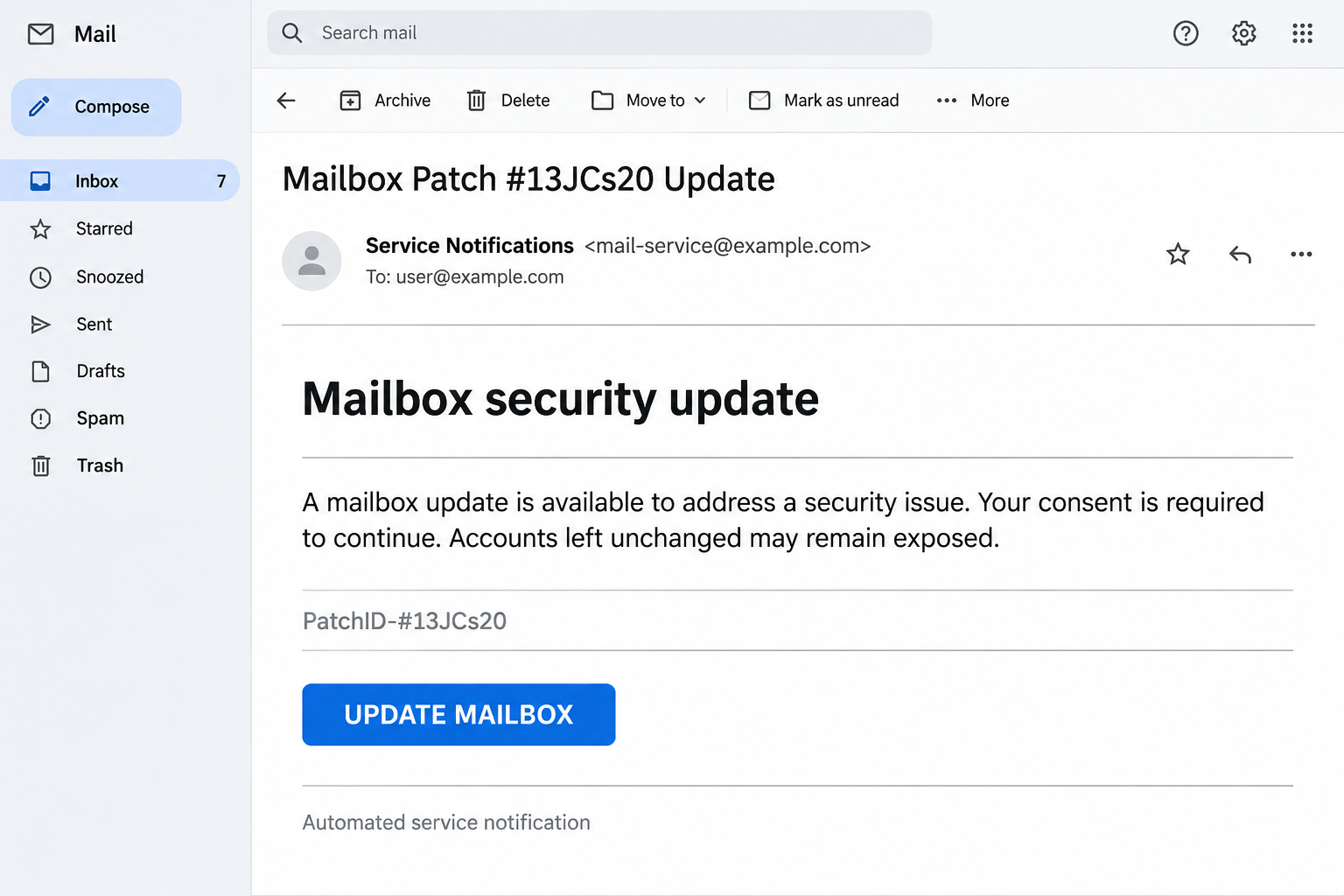
The Mailbox Patch #13JCs20 email scam presents a supposed security fix for an email account. A patch identifier gives the notice the appearance of routine maintenance.
The message claims the update addresses a vulnerability and asks the recipient to consent. It also shifts responsibility for later security problems onto users who do not continue.
The supplied update link leads to a fraudulent website seeking account information. The technical-looking reference and permission request disguise credential phishing as a small piece of protective maintenance.
Consent language can hide an unsafe account request
Asking permission sounds respectful, but consent is only useful when you understand who is asking and what the action does. The email itself cannot establish either point.
An unfamiliar page reached through a security notice should not receive your mailbox password. Verify the maintenance request through your actual provider or workplace administrator instead.
Watch for this combination rather than relying on one spelling mistake.
- A technical-looking patch code appears without a separately verified maintenance notice.
- The sender says your approval is needed to preserve mailbox security.
- The update button opens a destination chosen by the email’s sender.
- A liability warning pressures you to accept the proposed remedy quickly.
Genuine updates should remain under your control
Keep your email apps and devices updated through their normal settings or approved management tools. An unsolicited patch message is not a reason to abandon those trusted routes.
The illustration recreates a patch-consent notification with placeholder addresses. It depicts the email’s premise rather than a captured mailbox or a working update.
Why a Patch Number Can Feel More Convincing Than a Warning
A reference code looks like something an administrator would use. It gives you a concrete detail to recognize without necessarily giving you anything meaningful to verify.
Most readers cannot tell whether an unfamiliar patch number belongs to their mail service. That gap can make a technical-looking identifier feel more authoritative than it deserves.
The number also helps the message sound precise while leaving important questions unanswered. Which product needs fixing, who published the update, and where is the provider’s advisory?
You do not need to answer those questions by researching the suspicious page. Ask the real administrator or provider whether the described maintenance belongs to your account.
For a work mailbox, a service desk can compare the notice with approved changes. For a personal account, use the provider’s support resources and normal account settings.
The correct response is still to maintain security updates. Separate that useful habit from a stranger’s claim that one email button is the only way to protect you.
How the Mailbox Patch #13JCs20 Scam Works
Step 1: The notice frames the interaction as protection
The sender starts with a problem readers already understand: email accounts need security. That makes a maintenance notice seem useful before its source has been checked.
Rather than offering a prize or asking for an obvious payment, the message invites you to avoid a technical failure. The requested action appears responsible and modest.
This framing can reach people who normally ignore promotional email. Someone cautious about account safety may be especially motivated to complete what looks like a security task.
Check who actually manages the service before continuing. A provider’s name displayed inside an email is a claim that needs verification, not an established connection.
Step 2: The identifier supplies an impression of precision
The patch code makes the notice look specific to a maintenance process. It can distract from the absence of a clear, trusted explanation of the affected software.
A genuine technical notice may contain identifiers too, so the presence of a code is not the problem. The problem is treating that code as proof of authorization.
If you forward the message to your help desk, include the subject and reference. They can compare it with real changes without accepting the email’s premise.
Avoid following search results that simply repeat the same patch wording. A page copying the notification would not independently establish that the update exists.
Step 3: Consent and blame push you toward the button
The email says the change will not happen without your agreement, then warns about consequences if you decline. That combination makes the next click feel like your responsibility.
You may think that ignoring the notice would mean knowingly leaving a vulnerability unfixed. The sender has made its own proposed action sound like the careful choice.
Permission language does not change the need to identify the destination. Before approving any account action, understand the service, the requested access, and the party receiving it.
A genuine administrator can explain a required change through your organization’s normal process. You can request that explanation without accepting instructions from the unsolicited message.
Step 4: The promised update becomes a credential request
The dangerous handoff is from a supposed maintenance task to a page that seeks account information. You arrived expecting a fix, which can lower scrutiny of the form.
An account password is not a harmless confirmation that you read the notice. Providing it to a fraudulent page gives the operator information usable against the real service.
Stop if the update flow unexpectedly asks for a mailbox login. Open the provider separately and check whether there is a relevant request inside your account.
If the page also asks for a code or a new approval, do not supply it. Tell your provider exactly which information or permissions you already gave.
Step 5: An apparently unfinished update can conceal disclosure
You might leave the page believing the patch failed because no confirmation appeared. That does not establish that information typed into the form remained private.
Treat submitted credentials as exposed even if the page returns an error or nothing seems to change. Waiting for email problems is not a reliable way to assess disclosure.
A criminal with successful access could misuse the mailbox or attempt access elsewhere using the same password. Account controls and your actions determine the actual impact.
Do not repeat the update using another password to see whether it works. That experiment can expose additional credentials without helping you establish the sender’s legitimacy.
A Mailbox Update Is Not the Same as an App Update
Email involves several components that can make a vague maintenance message confusing. There is the provider’s service, your account, the mail app, and the device running it.
An app update normally belongs in that app’s established update process or your device’s approved software channel. A work device may receive changes through central management.
An account-setting change may require authentication, but the actual provider should explain it through a trusted route. Do not assume every login prompt performs software maintenance.
Likewise, a third-party site cannot become your mail administrator simply by naming the server. Knowing an address or domain is different from having authority over its settings.
Ask which component needs attention before making changes. This prevents a vague email from persuading you to install software when the alleged problem concerns an online account.
If support confirms an app update is needed, ask which approved channel provides it. That answer should be specific enough to follow without returning to the suspicious notification.
If the matter concerns account settings instead, request instructions for the existing customer portal. A change to authentication or recovery deserves a clear explanation of its purpose.
Keep the confirmed instruction separate from the original email when sharing it with colleagues. Otherwise, someone may mistake the phishing button for the update route that support approved.
Do not disable browser warnings or account protections to finish the process. If the supposed fix requires bypassing a safeguard, stop and consult the genuine support team.
Keep ordinary updates enabled while you investigate the message. Rejecting this phishing request should not become a reason to leave your real browser or mail app outdated.
What to Do if You Have Fallen Victim to This Scam
- Leave the update page and stop further approvals.
Close the tab and disregard follow-up messages pressing you to finish the patch. Do not enter another password, recovery code, or authentication approval.
If you only received the notice, report it through your mail application. The message does not prove that a vulnerability was found in your account.
- Tell the provider or administrator which account was exposed.
Use support details from your existing records or the genuine service. Explain that a patch notice led you to an unfamiliar form and describe what you submitted.
For an employer-managed account, contact the help desk promptly. Give the approximate time and any visible destination already recorded, without reopening the suspicious page.
- Replace compromised credentials through the real service.
Choose a new password from a trusted device and update any other accounts where you reused the old one. Do not reuse the replacement between services.
If account access no longer works, use the provider’s official recovery process. Ignore people introduced through the patch message who offer to restore access.
- Inspect sessions and account changes with qualified support.
Review unfamiliar sign-ins, recovery contacts, authentication methods, and connected applications. Check forwarding and mailbox rules where relevant, because unauthorized access may extend beyond the initial password.
Google’s compromised account guidance explains the settings to review for a Google account. Work account administrators should use their provider’s corresponding process.
- Check what happened after the supposed patch.
Look for unexpected outgoing messages, password resets, or complaints from contacts. Describe actual findings to your provider instead of assuming every later email is connected.
Warn affected contacts through a different channel if someone used your account to message them. Ask them to disregard the specific unauthorized request.
- Preserve evidence and report additional actions separately.
Keep the original notice and screenshots already available. If you downloaded or installed anything, tell your security team the file name and actions you remember.
A separate installation may need device investigation alongside account recovery. Do not accept a second unsolicited repair service that claims it can finish the original patch.
Verify Future Maintenance Without Becoming Your Own Technician
You do not have to understand every patch identifier to handle a suspicious notice safely. You need a reliable way to reach the people already responsible for the service.
Save the genuine support route or workplace reporting instructions before the next urgent message arrives. Familiar records reduce the temptation to use whatever contact the warning provides.
When a notice is unclear, ask a simple practical question: how do I complete this task through my existing account or approved app without following the email link?
A genuine support team should be able to explain that route or the reason a change is needed. An unsolicited sender’s insistence is not a substitute for that explanation.
Avoid handing over your password so someone can apply the patch for you. Authorized support should use the service’s proper assistance process rather than collecting your secret credentials.
Google’s account security recommendations also emphasize avoiding unexpected requests for sensitive information. Apply that principle even when the request is presented as a protective action.
For shared accounts, make sure other authorized users know the notice is under review. Otherwise, one person can decline the request while another unknowingly completes it.
Once the genuine provider confirms the situation, follow its actual instructions and retain the case reference. There is no need to return to the original message.
Frequently Asked Questions
Is Mailbox Patch #13JCs20 a legitimate email update?
The documented notice is a phishing campaign using a supposed patch to obtain account information. Verify any real maintenance requirement through the provider or administrator you already trust.
Does a patch identifier prove the message came from support?
No, a sender can put a technical-looking reference into ordinary email. The identifier needs confirmation from the real provider before it carries any authority over your account.
Should I stop installing email updates after receiving this?
Keep installing genuine updates through approved application and device channels. Reject the unsolicited credential request while continuing the normal maintenance that protects your real software.
Why does the message say it needs my consent?
Permission language makes the interaction feel controlled and legitimate. It does not identify the sender or prove that the button performs the security fix it promises.
What if I typed my password but never finished the update?
Treat any submitted password as exposed and replace it through the real service. The absence of an update confirmation does not establish that the form collected nothing.
Do I need to pay someone to check my mailbox?
Use your genuine provider or employer’s support process before considering outside assistance. Do not pay a stranger who contacts you through the suspicious notice or promises guaranteed account recovery.
The Bottom Line
Do not approve this mailbox patch through the email’s update link. Confirm genuine maintenance through your existing provider and keep using approved software update routes.
If you entered credentials, secure the affected account and contact legitimate support promptly. Review unauthorized access, and report any separate download or installation as an additional exposure.

Join the discussion
0 commentsShare your experience or ask a question about this article.
Community experiences
Did this happen to you?
Your experience could help someone recognize the same scam. Submit a private report for our team to review.
I experienced this tooReports are reviewed before publication. Sharing publicly is always your choice.
Discussion
Start the conversation
Have a question or something useful to share? Add the first comment.