


A document notification says an invoice has been waiting for you. There is a file name, a status count, and a button to open it.
Nothing looks especially dramatic, which makes the message easy to handle between other tasks. Before opening that invoice, look at where the notification wants to take you.
Overview
An invoice notification gives you unfinished business
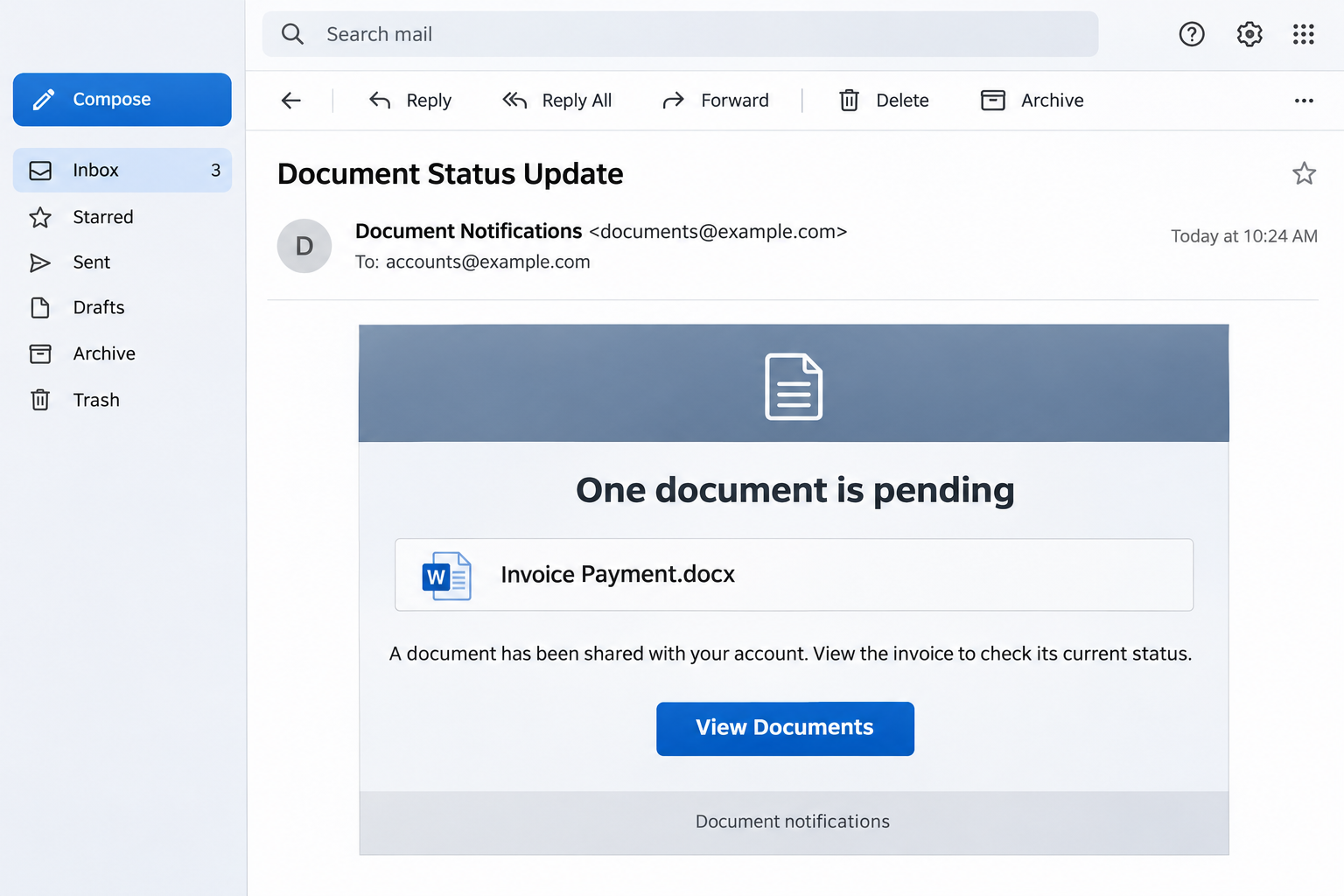
The Document Status Update email scam presents an ordinary administrative task: a shared document apparently needs attention. The message names Invoice Payment.docx and supplies a viewing button.
Its status wording suggests something has been sitting unresolved. For someone handling customer accounts or supplier invoices, checking a pending document can feel like part of the job.
The message leads into a counterfeit sign-in screen seeking email credentials. A Gmail-style presentation can make that destination look familiar, but it does not authenticate the invoice.
The supposed document becomes an account sign-in
The important change happens after the click. A request to read an invoice becomes a request to identify yourself through a page supplied by the sender.
That distinction matters because an email password can unlock far more than a document. It can expose conversations, recovery messages, and accounts connected to the mailbox.
Look for the combination of a vague document notification and an unfamiliar authentication request.
- The notification arrives without a supplier or colleague explaining the invoice.
- A file name appears inside the message without proving an attachment exists.
- The button opens a website that wants your email account credentials.
- The message treats a pending status as enough reason to continue.
Your usual document route provides the safer check
Ask the expected sender about the invoice using contact details you already have. Open your normal accounting or document service separately if the file should be there.
A real invoice can still need investigation or payment. This warning concerns the deceptive notification and credential request, rather than every email mentioning an outstanding document.
What the File Name Does and Does Not Tell You
A familiar extension can make a message feel concrete. Seeing a Word-style file name encourages you to imagine an actual document waiting behind the button.
However, text inside an email can describe any file the sender chooses. An icon and a listed size do not establish that a Word file was attached.
Check the difference between an attachment in your mail application’s attachment area and a picture or label embedded in the message body.
That distinction is useful when explaining what happened afterward. Opening a website, downloading a file, and running downloaded content create different problems for your security team.
You should not download the item merely to settle that question. A screenshot of the message and the browser’s existing download history can help reconstruct your actions.
The campaign also uses an automatic-notification footer to suggest a business portal. A portal name in a footer does not identify whoever controls the destination.
If the named service is unfamiliar, ask why it would be delivering an invoice to you. Do not create a new account to investigate an unexpected billing message.
When a real invoice is involved, compare its supplier, purchase reference, and amount against your own records. The sender’s claim that a document is pending settles none of those checks.
Keep any bank-detail change subject to your normal approval process. An urgent file notification should not be allowed to bypass controls that protect genuine supplier payments.
The image recreates this invoice-notification format for illustration, using invented contact addresses. It is not a captured message from a reader’s inbox.
How the Document Status Update Email Scam Works
Step 1: A pending document catches your attention
The sender gives you something small to finish. Unlike a dramatic fraud warning, an invoice notification can blend into the routine work already filling your inbox.
You may reasonably want to know whether a payment is late or whether a colleague needs approval. The scam depends on that ordinary sense of responsibility.
The first useful question is who actually requested your attention. A document title is not a substitute for a known person or an expected business process.
If nobody can explain the underlying transaction, the notification has not earned your trust. You can leave the message untouched while checking the business context.
Step 2: The viewing button supplies the route
The email makes its own button the easiest way to resolve the supposed task. That convenience is where the sender begins controlling your next steps.
Instead of opening a service you chose, you follow a route selected by someone whose identity remains uncertain. The browser may then display something reassuringly familiar.
Do not judge the destination solely by its page title or a familiar logo. Those are parts of the page that its operator can reproduce.
When checking a link, inspect the actual address without opening it. On a work account, your reporting tool or IT team can examine it more safely.
Step 3: A counterfeit login replaces the invoice
At this point, the missing invoice becomes an excuse to collect account information. The page asks you to authenticate before allowing you to see the promised material.
A genuine cloud service can also require authentication, so a password prompt alone is not a verdict. The service, destination, sender, and expected document must agree.
Open the provider through your established bookmark or app instead. If the share is genuine, use its normal access process or ask the sender to resend it properly.
Do not test a questionable form using a password you consider unimportant. You may accidentally reuse a credential or reveal information that helps the next attempt.
Step 4: Entered credentials become the real prize
Once a password goes into a fraudulent form, treat it as exposed. An error screen or a return to the inbox does not undo the disclosure.
Attackers with working access could search existing conversations for useful contacts or payment details. They could also try the same password against other accounts you use.
Those are possible consequences of mailbox compromise, not established outcomes for every person receiving this campaign. Your response should follow the information you actually disclosed.
An unexpected request for a verification code deserves the same caution. Stop rather than approving another action to make the document finally appear.
Why an Invoice Can Be Useful Even When Nobody Pays It
The email does not need to persuade you to transfer money immediately. A working mailbox can be valuable because it contains the relationships behind future payments.
For example, a criminal reading an existing supplier conversation could learn the people involved and the payment timetable. A later request might therefore sound unusually well informed.
That possibility explains why finance staff should report a credential disclosure promptly, even if their bank balance looks normal. The immediate problem may be unauthorized access.
For a personal mailbox, the same concern applies to password resets and stored correspondence. Protecting the inbox can help protect services that rely on it for recovery.
Keep the suspected invoice separate from any genuine unpaid bill. Contacting a supplier to verify a transaction is sensible; paying a new destination from the suspicious email is not.
If an attacker already sent messages from your account, warn affected contacts through another channel. Tell them which request to disregard without forwarding a working phishing link.
Check the Notification Without Entering Its Login
Start with the business relationship rather than the message’s appearance. Find the purchase order, expected invoice, or colleague who should know why the document exists.
Ask a precise question: did that person share this specific document using that particular service? A vague confirmation that they recently emailed you is less useful.
For a supplier, use the phone number from your established records. A number added to the same unexpected notification has not been independently verified.
Check the full sender address and reply address, but remember that a compromised legitimate mailbox can also distribute fraudulent links. A recognizable address does not settle the request.
Google recommends going directly to the relevant website instead of entering a password after following an unexpected message link. Its phishing guidance also explains reporting options.
If the message reached a shared finance inbox, tell colleagues before someone else processes it. Record that the notification is under review rather than marking an invoice paid.
Avoid posting the complete email publicly. Customer references, addresses, and private links can expose information belonging to people who had nothing to do with the scam.
What to Do if You Have Fallen Victim to This Scam
- Stop using the supplied document page.
Close the tab and leave any further login requests unanswered. Do not approve a phone prompt or provide another code because the invoice still seems unavailable.
If you only read the email, report it through your mail application. Receiving this message alone does not establish that your account was accessed.
- Tell your employer what you actually entered.
For a work mailbox, contact the help desk through its established number or reporting channel. Include whether you typed a password, entered a code, or downloaded anything.
Give the approximate time and the device used. These details help administrators examine the relevant activity without guessing which part of the encounter needs attention.
- Replace an exposed password through the real provider.
Use a trusted device and open the provider independently. Choose a new, unique password, then change any other account where you reused the disclosed one.
If you can no longer sign in, start the provider’s official recovery process or ask your administrator for help. Ignore recovery contacts introduced by the suspicious sender.
- Check access beyond the password itself.
Review unfamiliar sessions, recovery information, connected applications, and forwarding settings with your provider or administrator. Remove unauthorized changes after preserving the details needed for investigation.
Microsoft’s compromised mailbox guidance explains why forwarding rules and active access need attention. Changing a password is only one part of restoring control.
- Protect any payment conversation the mailbox contained.
Tell your finance team if the account handled invoices or payment instructions. Ask them to independently verify recent bank-detail changes and any unexpected outgoing requests.
If money moved, contact the bank or payment service immediately through a verified route. Ask what can be stopped or recalled, without assuming recovery is guaranteed.
- Keep evidence and report the actual impact.
Preserve the original message, relevant screenshots, and any transaction references. Your workplace may want the original email as an attachment rather than an ordinary forwarded copy.
Report financial fraud to the appropriate national authority, including the FBI’s IC3 in the United States. Avoid anyone charging an advance fee to recover access.
If You Downloaded Something While Looking for the Invoice
Check your download history without reopening the item. Note its name and whether you actually opened or ran it, then give that information to your security team.
A file extension shown in the email does not establish what downloaded. Likewise, finding a downloaded file does not by itself establish that it executed successfully.
For an employer-managed device, follow the help desk’s instructions before deleting files or changing settings. They may need evidence that disappears when software or browser data is removed.
Do not install a document viewer suggested by the suspicious page. Get any genuinely required application through your organization’s approved software process or the real vendor.
The documented mechanism here is credential phishing, so a working computer does not rule out account exposure. Conversely, a phishing email is not proof of a device infection.
Explain any separate download or installation to your provider or IT team. That additional action may require a device investigation alongside the account recovery described above.
Frequently Asked Questions
Is the Document Status Update email a real invoice notice?
The campaign described here is a phishing notification. Verify any underlying invoice through the expected sender or your usual accounting service before opening the supplied route.
Does the .docx name prove a Word file was attached?
No, a file name inside the message can be ordinary text or an image. Your mail application’s attachment area helps distinguish that from an actual attached file.
Why would an invoice page ask for my Gmail password?
A counterfeit document viewer can use a familiar login design to collect credentials. Confirm the genuine service independently before entering information into an unexpected authentication page.
What if I entered my password but the page rejected it?
Treat the password as disclosed and replace it through the real account provider. A rejection message does not show that the form failed to collect your information.
Should I tell my supplier about the message?
Contact the supplier through your existing records if their identity or invoice is involved. Ask whether they sent it, and alert your security team to any impersonation.
Can I safely ignore a real unpaid invoice after receiving this scam?
Verify the genuine business obligation separately and follow your normal payment process. Rejecting the phishing message does not cancel an invoice that a real supplier legitimately issued.
The Bottom Line
Do not enter your email password through the Document Status Update message. Verify the supposed invoice using the sender and service you already know.
If you already disclosed credentials, contact your provider or workplace immediately. Replace the password, review account access, and check whether related payment conversations were exposed.

Join the discussion
0 commentsShare your experience or ask a question about this article.
Community experiences
Did this happen to you?
Your experience could help someone recognize the same scam. Submit a private report for our team to review.
I experienced this tooReports are reviewed before publication. Sharing publicly is always your choice.
Discussion
Start the conversation
Have a question or something useful to share? Add the first comment.