


An email says your account has been flagged for breaking a security policy. It sounds serious, but the warning never quite explains what you supposedly did.
The sender offers a portal to sort things out before access disappears. For anyone relying on that mailbox for work, leaving the warning unanswered feels uncomfortable.
Overview
A vague policy violation puts your mailbox at risk
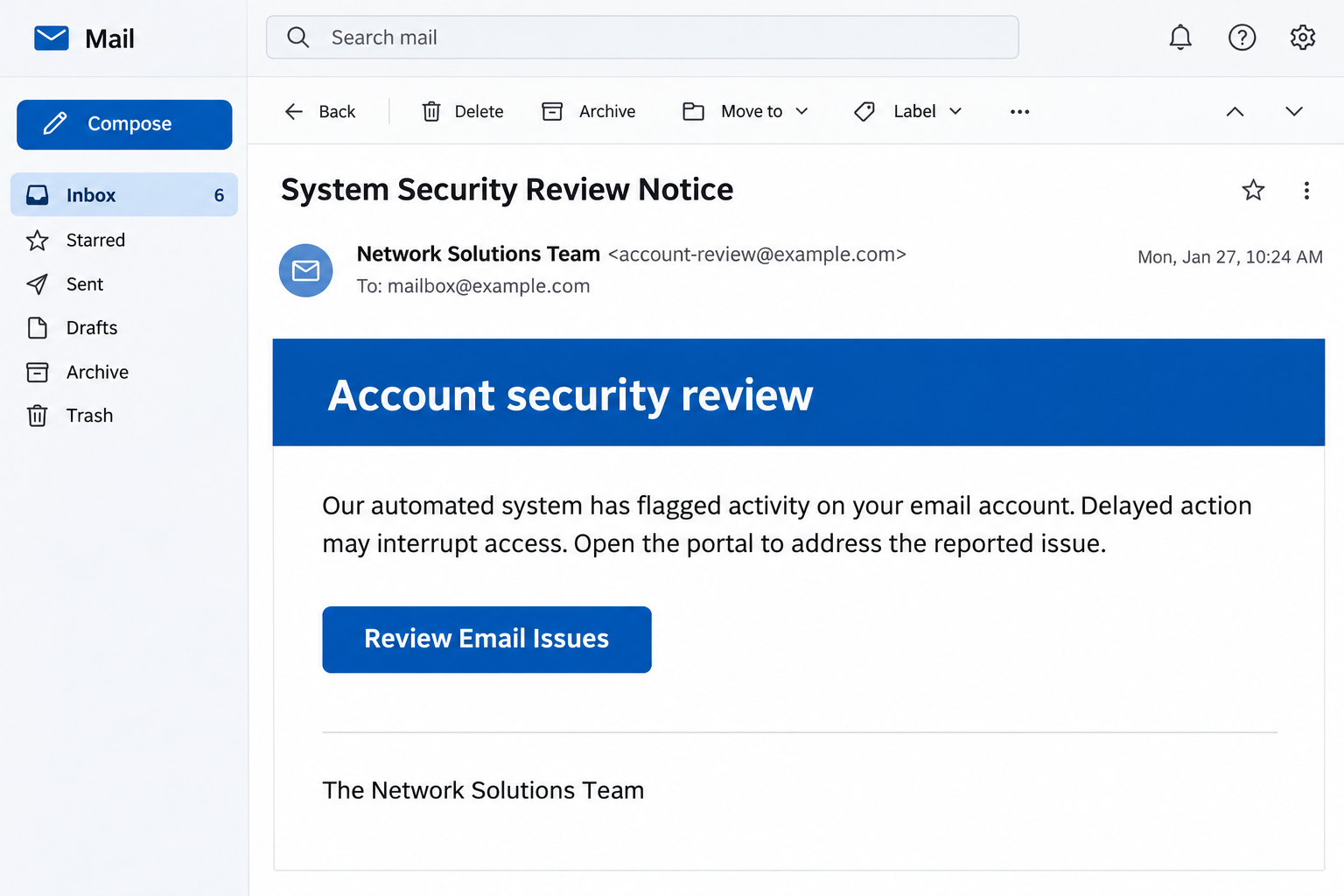
This phishing campaign uses a System Security Review Notice to suggest that an automated check found improper account activity. The message borrows the Network Solutions name.
It asks the recipient to follow a supplied portal link to address the problem. The threatened consequence is losing access if the recipient waits too long.
The fraudulent notice uses a supposed security-policy conflict to push recipients toward an outside remedy. Its destination was unavailable in the documented case, leaving its exact later screens unverified.
The claimed review is different from a verified account notice
Network Solutions is a real provider being impersonated. Its own phishing guidance warns about fake abuse emails and directs customers to verify unusual requests through Account Manager.
A real account problem deserves attention through the provider you already use. The suspicious email does not get to decide which portal or contact you must trust.
These details make the request worth stopping before you interact.
- The accusation describes a policy conflict without identifying a concrete incident.
- The message connects continued access to a link that it supplies itself.
- A recognizable provider name substitutes for independently verified account information.
- The warning discourages delay before you can confirm the underlying complaint.
Check the account without accepting the sender’s route
Open your established provider account separately or contact support using previously verified details. Ask whether there is a genuine restriction affecting your particular service.
Reject the impersonation while checking any genuine account issue through legitimate support. Network Solutions is being imitated here, rather than sending the deceptive portal request.
Why the Accusation Can Work Without Saying Much
A message accusing you of a policy violation creates two problems at once. You want to keep the mailbox working, and you want to clear your name.
That combination can pull your attention toward fixing the accusation instead of checking its source. The email offers relief before you understand whether anything actually happened.
A business owner may imagine missed orders, customer complaints, or a website affected by an account restriction. An employee may worry about explaining a security incident to management.
The sender does not need to describe those consequences in detail. A vague access warning lets readers supply their own reasons to feel worried.
Treat that discomfort as a reason to verify the issue independently. You do not have to prove your innocence to the person who delivered an unverified accusation.
The pictured security notice was generated to illustrate the reported format. Its contact details are placeholders, and its wording is abbreviated.
How the System Security Review Notice Scam Works
Step 1: The email borrows a provider’s authority
The notice presents itself as routine account administration. A provider name and an official-sounding team signature encourage you to read it as an obligation rather than unsolicited contact.
That is especially effective if you recognize the company from an old purchase or a business service. Familiarity with a brand can arrive before scrutiny of the sender.
Check whether that provider actually manages the affected mailbox. A company may register your domain while another company handles your email, with different account credentials and support routes.
You can ask your administrator to clarify that arrangement. There is no need to follow the message’s link just because the relationships between services are confusing.
Step 2: An unspecified violation creates urgency
The message claims an automated system found a problem, then links delay to interrupted access. It gives you a consequence before giving you useful details to verify.
Legitimate providers can investigate abuse, and real restrictions can affect service. That possibility explains the hook; it does not establish that this particular warning is authentic.
Look for a verifiable account reference in your normal customer portal. If the issue is real, trusted support should be able to explain the service and required response.
Avoid replying with examples of your recent activity to defend yourself. Those details could reveal customers, internal systems, or business information to someone impersonating support.
Step 3: The message supplies its own remedy
After creating the worry, the email offers a button or portal link as the route back to normal. Following it gives the sender control of your destination.
The wording can make the interaction feel like routine housekeeping. You are supposedly correcting a compliance issue, rather than deciding whether a stranger should receive sensitive information.
Stop at that handoff and open the provider yourself. Do not use a phone number or support address from the same message as independent confirmation.
If you already have an active support case, compare its reference through your existing account. Scammers can refer to an investigation without actually participating in one.
Step 4: The request can turn into credential disclosure
Credential collection is the central phishing risk when an account warning sends you to an untrusted portal. A password entered there can be used against your real account.
The destination for the documented sample was unavailable, so its exact screens cannot be described as observed. That gap does not make the deceptive notice a trustworthy support request.
If your version asks for a password or verification code, do not provide it. If it asks you to change recovery details, stop and contact the genuine provider.
A later error, blank page, or broken link does not establish that previously entered information stayed private. Recover an exposed account through its legitimate service.
Which Account Was the Message Trying to Reach?
Email, hosting, and domain registration may sit under different logins. Sorting them out matters when deciding what to protect after entering information into a questionable page.
Start with what you typed rather than what the email claimed to manage. Was it your mailbox password, customer-account password, or a password you also use elsewhere?
Write down the answer privately for your provider or administrator. Do not send the actual password in a report, screenshot, or support conversation.
If the password protects a domain registrar account, tell support that account access may be exposed. Ask them to check unauthorized changes affecting ownership or service settings.
If it protects only a mailbox, focus on email sessions, forwarding, recovery options, and suspicious outgoing messages. Avoid making unrelated changes to website settings yourself.
For an employer’s service, let the responsible administrator handle account controls. Well-intended changes can interrupt legitimate email delivery or complicate the investigation.
If several people share administrative responsibility, tell them which login may be exposed. Another authorized user should not unknowingly approve an unexpected change while recovery is underway.
Ask support to distinguish a current restriction from an old or unrelated notice. The specific account, service, and case reference should agree before anyone takes corrective action.
If the mailbox is your only route into support, use an established alternative contact while it is being recovered. Avoid the replacement address proposed by the suspicious sender.
For a managed business account, keep the responsible owner informed about urgent service decisions. That helps prevent an impersonator from obtaining approval through a different colleague.
These are exposure-specific precautions, not evidence that every recipient lost a domain or business mailbox. The information entered determines which accounts need attention first.
How to Verify a Real Security or Abuse Complaint
Use the account entry point you established before receiving the notice. A saved bookmark, billing record, or administrator-maintained help link is preferable to an unexpected portal button.
Check for relevant notices inside the account, then contact support if the issue remains unclear. Some matters require clarification even when the dashboard appears normal.
Ask which service is affected, what action is required, and how to complete it through the genuine account. You can request a case reference for your records.
Do not ask the suspicious sender to confirm that they work for the company. Anyone impersonating a support team can simply repeat the claim.
Inspect the sender and reply addresses for discrepancies, but do not rely on spelling alone. A convincing address or familiar signature cannot replace independent verification.
Network Solutions provides a Newfold abuse reporting route for questionable messages using its name. Reporting preserves a useful lead without making the sender your support contact.
Your own mail application’s phishing report also helps distinguish a malicious message from an ordinary unwanted advertisement. Use the reporting option before deleting the notice.
What to Do if You Have Fallen Victim to This Scam
- Stop the portal interaction and ignore follow-up pressure.
Close the page and decline any new authentication request. You do not need to complete the process to keep a promise made by the suspicious sender.
If you only received the email, report it and verify the claimed restriction separately. The accusation itself does not show that your account was compromised.
- Identify the credentials or permissions you exposed.
Record which account password you used and whether you entered a code or approved a sign-in. Keep the password itself out of your incident notes.
If you reused that password for other accounts, identify those accounts too. Replacing only the mailbox password would leave the other reused credentials exposed.
- Contact the actual service provider through a trusted route.
Explain that an impersonation email directed you to a portal. Ask support to verify any real account issue and help protect the affected service.
For business accounts, alert the person responsible for hosting, email, or domain management. They can involve the right provider without changing unrelated services.
- Restore account control and inspect unauthorized changes.
Change exposed credentials through the genuine account interface. Review available session controls, recovery details, and authentication methods with support or your administrator.
For email exposure, also check unfamiliar forwarding and connected access. For registrar exposure, ask the registrar to investigate suspicious changes rather than attempting unfamiliar repairs alone.
- Check business activity that depended on the account.
Look for unexpected outgoing messages, changed payment instructions, or customer reports linked to the exposure. Ask colleagues to independently verify unusual requests coming from the affected account.
If a payment followed the impersonation, contact your bank or payment provider promptly. Give the actual transaction details and ask which protective or recovery options remain available.
- Preserve the notice and report any continuing misuse.
Keep the original email, the time you interacted, and screenshots already available. Do not revisit the suspicious site to collect additional material.
Use official reporting channels and retain their case references. Reject anyone who promises to remove an imaginary violation or restore your account for an advance payment.
A Real Account Problem Still Needs a Real Response
If your email genuinely stops working, investigate that through the provider rather than treating it as proof the warning was legitimate. Two events can coincide without sharing a cause.
Check whether colleagues are affected and whether your normal account remains accessible. These observations can help support distinguish a service problem from an individual access issue.
Do not pay the sender to lift a restriction. Any genuine charge or account requirement should be confirmed through the customer relationship you already have.
If an outside IT contractor manages the account, contact that contractor through your usual records. A new person appearing in the email chain has not earned equivalent trust.
Keep records of real support advice so everyone working on the account follows the same instructions. This reduces the chance that a later impersonator redirects the recovery process.
Frequently Asked Questions
Is the System Security Review Notice from Network Solutions?
The documented campaign impersonates the provider using a false account warning. Verify your own account separately rather than treating its signature as confirmation of a genuine support request.
Does the email prove I violated a security policy?
No, an accusation in an unsolicited message does not establish a violation. Ask your real provider or administrator whether there is an identifiable issue requiring action.
Are all account security or abuse emails fraudulent?
Legitimate providers do send important account notices, so verify the underlying issue independently. The safe response is to use trusted support and account access rather than the suspicious route.
What if the supplied portal no longer opens?
A broken destination does not authenticate the message or reverse earlier disclosures. If you entered credentials before the page disappeared, protect those accounts through their real providers.
Should I change my domain settings after clicking?
Do not make unfamiliar service changes simply because you clicked a link. Tell your provider what happened, especially if you disclosed credentials controlling domain registration or hosting.
Who should receive a report about this impersonation?
Use your employer’s security channel where relevant, your mail application’s reporting option, and the provider’s published abuse route. Include evidence without sharing passwords or private account secrets.
The Bottom Line
Do not use the portal supplied by this security-policy warning. Check the alleged problem through your actual provider, using account details and contacts you already trust.
If you disclosed account information, tell the provider or administrator immediately. Secure the affected login and check for unauthorized changes before returning to ordinary business.

Join the discussion
0 commentsShare your experience or ask a question about this article.
Community experiences
Did this happen to you?
Your experience could help someone recognize the same scam. Submit a private report for our team to review.
I experienced this tooReports are reviewed before publication. Sharing publicly is always your choice.
Discussion
Start the conversation
Have a question or something useful to share? Add the first comment.