


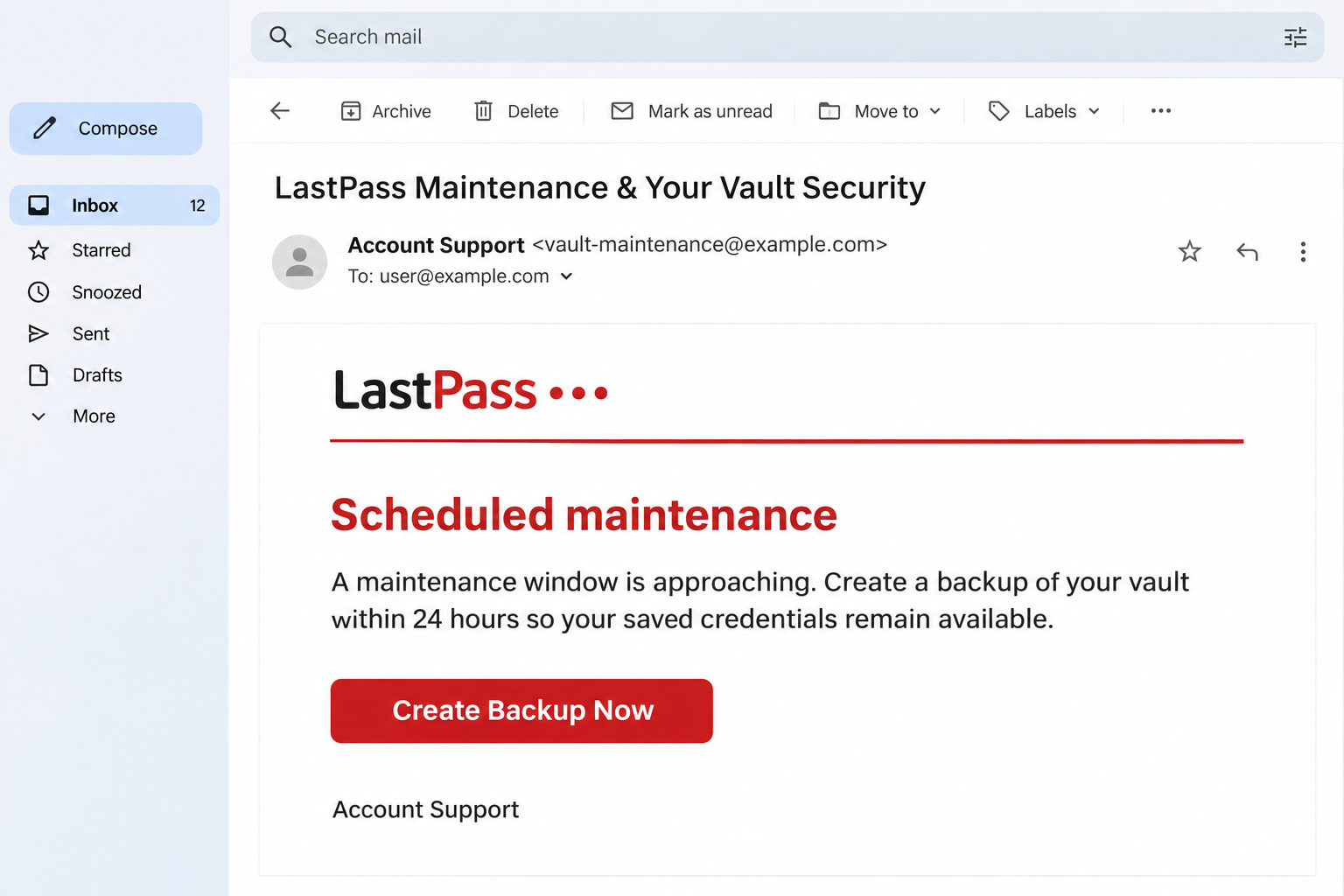
An email says LastPass is preparing maintenance and recommends backing up your vault within 24 hours. Protecting your saved passwords sounds like a sensible precaution.
The message offers a button to get everything ready before the work begins. Before using it, check who is asking you to handle your most sensitive account.
Overview
A backup deadline turns good security habits into bait
The LastPass backup email scam uses a maintenance story to create urgency around a password vault. Recipients are pushed toward an external route presented as a protective measure.
LastPass’s own TIME advisory confirms a campaign beginning around January 19, 2026. The company explicitly rejected the supposed requirement to back up within 24 hours.
This is documented brand impersonation, rather than a complaint about a legitimate subscription or product. LastPass is the organization being imitated, and its customers are the targets.
The destination seeks the account protecting other accounts
The company’s warning describes a route through externally hosted content to mail-lastpass[.]com. That lookalike address is an indicator from the reported campaign, not a recommended destination.
Independent coverage of the campaign describes the maintenance lure and the risk of disclosing a master password. The target is the account protecting your password collection.
The warning signs concern the request, even when the message looks professionally designed.
- A short deadline ties continued access to an unexpected maintenance message.
- A backup button moves you away from your independently opened LastPass account.
- An unfamiliar destination borrows the identity of the password manager you trust.
- The process encourages disclosure of information protecting an entire password collection.
Use your established app and protect anything already disclosed
Do not follow this email to sign into LastPass or export your vault. Open the official app, extension, or established account bookmark independently.
If you entered a master password, treat that as a serious disclosure. Secure the vault account and assess the accounts inside it with legitimate support or your employer.
Why the Backup Story Deserves Special Attention
Backups are normally associated with keeping information safe. That gives this request a different emotional appeal from a prize offer or a threat to collect an unpaid bill.
The sender does not ask you to disregard security. Instead, it tells you that a hurried action is necessary to preserve the security work you have already done.
For a password manager, the concern is especially personal. Losing access might affect email, banking, work tools, subscriptions, and other services you use throughout the day.
You can therefore feel pressure without the email mentioning a financial penalty. The prospect of being locked out of your own digital life supplies a reason to move quickly.
The sensible response is to separate a genuine backup plan from an unsolicited instruction. You can prepare for account recovery without trusting a newly supplied button.
The lead image is an editorial reconstruction with a substitute sender address and simplified wording. It illustrates the maintenance message rather than a genuine LastPass notification.
How the LastPass Backup Email Scam Works
Step 1: The message announces a maintenance window
The email gives a familiar provider a supposedly urgent operational task. Maintenance is plausible enough that readers may begin thinking about preparation before questioning whether it was announced.
The relevant advisory concerns a specific documented phishing wave. It should not be interpreted as proof that every later maintenance message uses the same infrastructure or operator.
If a notice worries you, check the service independently. You should not need to reveal a secret credential to the person who delivered the warning.
For a business-managed account, ask the team responsible for your password manager. They can establish whether there is a real maintenance requirement affecting the organization.
Step 2: The backup request makes the click feel protective
The sender connects the deadline to preserving access to your saved information. Clicking the button begins to feel like avoiding a preventable problem, rather than taking a new risk.
That is the central reversal in this campaign. A tool used to reduce password risk becomes the reason someone might disclose the credential protecting the tool itself.
Slow down at the point where the email asks you to take action. A backup should be a process you understand, initiated through a service you independently trust.
Do not assume a reassuring statement about encryption guarantees safety. A fraudulent message can describe its own process using the same security vocabulary as a legitimate provider.
Step 3: A familiar name masks an external route
The documented redirect path used outside hosting before reaching a lookalike domain. A familiar hosting company in part of a URL does not authenticate the content it serves.
Likewise, a domain containing a brand name is not automatically controlled by that brand. Read the actual destination rather than the button’s label or the page’s title.
You do not have to investigate the redirect chain yourself. The safer choice is to leave it untouched and use the account access route you already established.
If your browser or extension shows a warning, do not bypass it to finish the backup. A task presented as protective should not require surrendering an existing safeguard.
Step 4: A counterfeit sign-in puts the vault at risk
The high-value information is the master password. LastPass says its staff will never ask for it, and you should not send it to support or enter it through unsolicited links.
An attacker may still face additional account protections, so disclosure does not prove the vault was successfully opened. That uncertainty is a reason for prompt investigation, not reassurance.
If you entered an authentication code or approved a prompt as well, tell support exactly that. Additional approval can materially change the exposure compared with a password alone.
Do not turn off multifactor authentication to make the backup proceed. A sender asking you to weaken protection has supplied another reason to leave the process.
If the account belongs to a business, preserve any prompt details for the administrator. They can compare the approval with legitimate access instead of relying on the sender’s explanation.
A later error page does not establish that the attempt failed. Treat what you submitted as known to the phishing operator and secure the genuine account.
Your Master Password and Saved Passwords Need Separate Attention
The master password protects entry to the password manager. The individual passwords stored inside it protect separate accounts, each controlled by its own service.
Replacing the master password does not automatically replace those other credentials. If someone copied information from the vault, changing its entrance cannot erase copies already obtained.
That is why recovery needs a prioritized plan rather than one reassuring password reset. Start with accounts that control recovery or have the greatest consequences if misused.
Your main email account deserves early attention because many services send recovery messages there. Financial, work, and administrator accounts may also require prompt, coordinated action.
The exact order depends on what the vault contained and what the investigation finds. Do not assume every possible secret was exposed merely because you received the email.
Secure notes and other stored information may need a different response from ordinary passwords. For example, a copied recovery code cannot be protected simply by changing a website password.
If work credentials were stored, involve the responsible security team before trying to handle everything alone. They may need to revoke access or replace secrets centrally.
Do Not Create a New Exposure While Trying to Recover
A rushed export can produce another sensitive copy of your information. Know the format, storage location, and protections before making a backup for a legitimate reason.
LastPass’s privacy information explains that exporting unencrypted vault contents requires the user to log into their own account. A backup file is sensitive information in its own right.
Never upload a vault export to a stranger’s support page or send it by email to prove ownership. That could expose saved credentials regardless of the original phishing attempt.
You also do not need to paste a master password into a scam checker. A report can identify the suspicious subject, sender, and link without revealing your secret.
Keep your incident notes focused on what you disclosed and when. Write the names of affected accounts, rather than making a document containing all their passwords.
If you need help, use LastPass support reached independently or your employer’s established team. A new private message promising immediate vault recovery is another unverified request.
What to Do if You Have Fallen Victim to This Scam
- Stop the backup flow and use trusted account access.
Close the suspicious page and leave further prompts unanswered. Open the official app, extension, or established bookmark from a device you trust.
If you only read the message, report it without completing the backup request. The email alone does not establish that anyone accessed your vault.
- Replace a disclosed master password immediately.
Use the genuine account settings and choose a strong, unique replacement. If you cannot access the account, reach support through LastPass’s independently opened website.
For an employer-managed account, notify your administrator immediately and follow the organization’s recovery process. Do not send the old or new master password in a support message.
- Ask support to help review account access.
Check available session controls, recent activity, recovery details, and authentication settings. Tell support if you entered a code, approved a prompt, or changed anything during the interaction.
Follow the current instructions for your account type. Avoid relying on an old menu path or an unsolicited caller claiming to have already located the problem.
- Prioritize credentials that could have been copied.
Assess the vault’s contents and replace exposed account passwords through each genuine service. Start with recovery email, financial access, and important work accounts according to the actual risk.
Review relevant recovery codes and other stored secrets as well. Where employer systems are involved, let the security team coordinate revocation and replacement.
- Contact financial providers if relevant details were exposed.
If the vault contained payment information or you see an unauthorized transaction, contact the issuer through a verified number. Explain the specific disclosure or transaction without guessing.
Ask what account protections or payment recovery options apply. An investigation or fraud report does not guarantee that every transaction can be reversed.
- Preserve the email and report the impersonation.
LastPass’s advisory identifies abuse@lastpass.com as its reporting address for suspicious branded email. Submit the message without attaching vault exports, master passwords, or other account secrets.
Also use your mail application’s phishing report and your employer’s channel where applicable. Retain case references and update the relevant team if further suspicious activity appears.
Build a Manageable Recovery List
If the vault held many accounts, the recovery work can feel overwhelming. Make a private checklist of account names, contact routes, actions completed, and items still needing attention.
Group accounts by consequence rather than alphabetical order. A forgotten shopping login and an email account controlling password resets should not receive identical priority simply because both are stored.
For each affected service, check its recovery information and active access after replacing the password. A credential change does not answer every question about earlier unauthorized activity.
Watch for messages claiming that a new support team can recover everything in one step. Do not pay an advance fee or grant access based on that promise.
Keep important evidence before removing suspicious messages, but avoid publicly sharing account details. A useful report should help investigators without distributing another copy of sensitive information.
If you share access to financial or household accounts, tell the other authorized users what happened. They need to recognize unusual requests and avoid approving unexpected prompts.
Once the urgent accounts are protected, return to the checklist and finish lower-priority items. A clear record reduces the chance of overlooking an account during a stressful recovery.
Frequently Asked Questions
Did LastPass ask customers to make an emergency vault backup?
LastPass explicitly rejected the 24-hour backup demand in its January 2026 advisory. Verify any genuine account requirement through the official service rather than the maintenance email’s button.
Does the LastPass name inside a domain make it official?
No, a lookalike domain can contain the brand’s name without belonging to the company. Use your established app or bookmark instead of trusting wording inside an unfamiliar address.
Is receiving the email proof that my vault was stolen?
No, receiving or reading the message does not establish vault access. Tell legitimate support what you entered or approved so the account exposure can be investigated accurately.
Is changing the master password enough after a successful theft?
It does not replace individual passwords or erase information already copied. If vault contents were exposed, assess those credentials and replace them through the affected services.
Should I send support an exported copy of my vault?
Do not send a vault export to prove ownership or diagnose phishing. Use legitimate support’s current assistance process while keeping master passwords and stored credentials private.
Does this campaign mean every LastPass maintenance message is fraudulent?
No, the warning concerns a documented impersonation using a backup deadline. Check uncertain notices through independently opened account access and legitimate support rather than trusting the supplied route.
The Bottom Line
Do not use this maintenance email to back up your vault or enter a master password. LastPass identified the emergency backup demand as phishing, so open your account independently.
If you disclosed credentials, secure the genuine vault account immediately and assess the information stored inside. Contact legitimate support or your employer, then work through the affected accounts by priority.

Join the discussion
0 commentsShare your experience or ask a question about this article.
Community experiences
Did this happen to you?
Your experience could help someone recognize the same scam. Submit a private report for our team to review.
I experienced this tooReports are reviewed before publication. Sharing publicly is always your choice.
Discussion
Start the conversation
Have a question or something useful to share? Add the first comment.