


An alert about oversized attachments is easy to believe when you are waiting for an important reply that has not arrived.
Before trying to release anything, it helps to separate a real mailbox problem from a message that only describes one.
Overview
The warning offers an explanation for missing mail
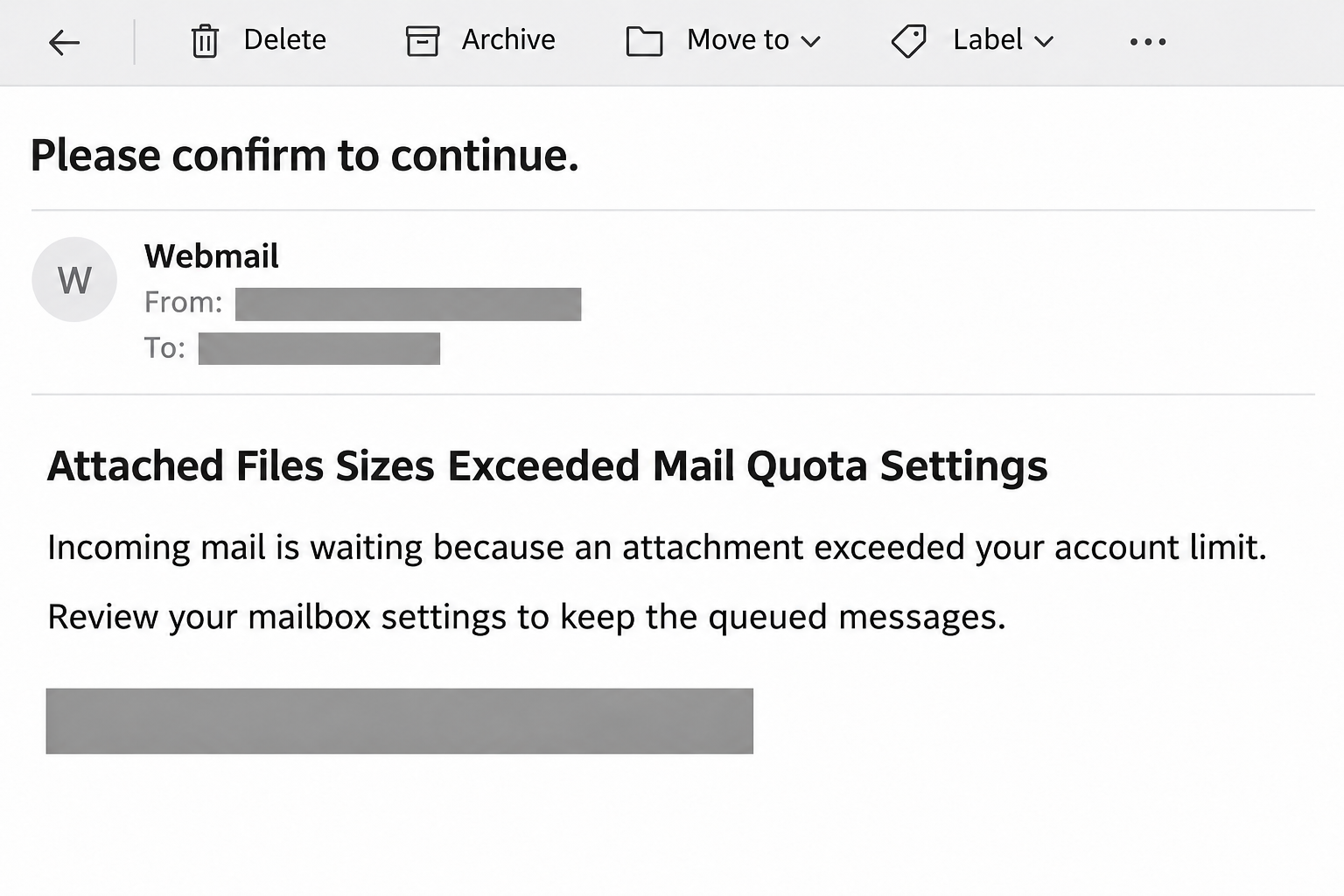
The mail quota settings email scam tells recipients that incoming correspondence was held because attachments exceeded an allowed limit. It then threatens permanent removal unless the recipient intervenes.
The campaign uses a generic webmail identity and an account-settings invitation. Its purpose is credential theft, not repairing the recipient’s mail service.
This is persuasive because delayed mail is frustrating. A notice that supplies both a cause and a quick solution can interrupt the instinct to check independently.
Three different mail issues are being blurred together
An attachment-size limit concerns a particular message. Mailbox capacity concerns the storage already used by an account. Quarantine concerns messages held for review by a filtering system.
Those conditions can exist in real systems, but they are not interchangeable. A vague warning cannot establish which condition applies or whether your account has any problem.
In particular, signing into a new website does not by itself make an oversized file smaller. A genuine remedy should match a verifiable fault in the actual service.
The relevant clues are the request and the route
The image recreates the notification style using concealed destinations. It is an editorial illustration rather than a captured example from a real customer’s inbox.
- The alert claims that incoming messages need your intervention before they disappear.
- The sender identity does not clearly identify the hosting relationship being discussed.
- The requested account-settings visit leads away from your normal mailbox workflow.
- The meaningful check is the account’s actual storage and delivery status.
The original destination was already unavailable in the discovery report. There is no basis to describe a current live page or claim every copy uses identical branding.
How the Scam Works
Step 1: A technical-sounding notice supplies a believable problem
The message begins with a condition that does not sound especially dramatic. Files are too large, mail is on hold, and the recipient supposedly needs to review settings.
That ordinary framing can work better than a spectacular threat. Someone who would ignore a prize notification may still respond to a routine account problem.
The notice does not need to know whether you are expecting anything. Many readers can think of a quotation, invoice, or personal attachment they have recently requested.
Any connection to those real conversations must be checked separately. The alert’s arrival does not prove that the sender can see your mailbox or pending correspondence.
Step 2: The possibility of deletion turns uncertainty into urgency
The warning makes inaction sound costly by suggesting that held messages could disappear. The reader is encouraged to solve the problem before investigating who announced it.
For a small business, that can mean fear of missing an order. For somebody managing personal paperwork, it may mean losing a document they cannot easily replace.
These are examples of why the message can feel urgent, not evidence that the campaign really held orders or personal records on a server.
A threat inside an email cannot delete messages merely because you refuse its instructions. Any genuine retention rule must belong to the actual provider’s system.
Step 3: The account-settings label redirects the reader’s trust
A settings invitation sounds like a maintenance task rather than a request for a secret. It encourages readers to treat the next page as part of their existing account.
But the label describes what the sender wants you to believe, not where the link goes. A familiar phrase can point to an unrelated destination.
If you need settings, open the mail application or provider website you normally use. There is no need to rely on the questionable notice to find them.
On a work account, a known support portal can provide the same independent starting point. Do not create a new support relationship through an unsolicited warning.
Step 4: A false authentication request targets the mailbox password
Credential phishing tries to turn the login step into the price of solving a problem. The visitor supplies account information while believing it is being sent to the provider.
A page can look familiar without belonging to that provider. Styling, a prefilled address, or a matching logo cannot establish who receives the form submission.
Because the reported destination is unavailable, the exact behavior of its form cannot be independently retested here. Do not use that limitation as a reason to try replacements.
The safe decision is already clear: do not provide an inbox password through this notice. A genuine quota concern can be investigated through the established account instead.
Step 5: Access to email could expose more than missing attachments
If stolen credentials let an intruder sign in, the mailbox becomes a source of conversations and account-recovery messages. Other services may then need attention as well.
That does not mean every service using the address is automatically compromised. Prioritize according to reused passwords, suspicious recovery messages, and evidence of unfamiliar access.
The attacker may also exploit the account’s existing reputation when contacting others. A message from your real address can appear more convincing than the warning that started everything.
This is why deleting the original alert is not sufficient after password exposure. Recovery must address the account and any access or settings changed inside it.
How to Check a Genuine Storage Problem
Read the quota from the real account
Use a saved bookmark, your normal mail application, or a known hosting dashboard. Look for the storage information associated with the correct mailbox.
Compare the account name as well as the number. Shared hosting can contain several mailboxes, and a warning about one account does not establish a problem with another.
cPanel’s Email Disk Usage documentation describes a real interface for inspecting folders and usage. Your hosting provider controls which features are available.
The documentation also notes that cached usage may lag behind recent changes. A delayed figure is not an instruction to follow a separate email’s release link.
Do not delete valuable records to satisfy an unverified warning
Check what is actually consuming space before removing anything. Business mail, attachments needed for a dispute, and records subject to retention rules may require an approved archive.
A permanent-delete control deserves more caution than moving a message between folders. Ask the mailbox owner or administrator which records can safely be removed.
If you need more capacity, request it through the provider’s established billing or support process. Do not buy a storage upgrade from a stranger’s warning page.
Ask about a particular missing message
Contact the sender through a known channel and ask when the message was sent. Request the subject, recipient address, and any delivery-failure notice they actually received.
Those details give IT something concrete to investigate. They are more useful than accepting an unsolicited claim that unspecified files are waiting somewhere.
If an attachment exceeded a real limit, the sender may need an approved file-sharing method instead. Avoid encouraging them to keep resending sensitive material to unverified addresses.
What to Do if You Have Fallen Victim to This Scam
-
Leave the purported settings page and stop responding to the notice. Keep a copy for your provider or IT team before using your mail client’s phishing-report option.
Do not reply asking the sender to release the mail. That treats the sender’s invented authority as though it were a genuine support relationship.
-
Work out which action you took: reading the alert, opening its destination, entering a password, approving authentication, or downloading a file.
Record approximately when you took each action. A precise account helps support staff contain the incident without assuming damage that has not occurred.
-
If you entered your password, replace it using a trusted device and the provider’s normal sign-in route. Choose a new password that no other account uses.
Do not return to the false form to see whether the new password works. It is not a recovery tool and should receive no further information.
-
For a managed mailbox, contact the administrator promptly. Ask for review of active access, unusual forwarding, recovery changes, and suspicious sent messages.
For a personal Google account, Google’s recovery and security guidance provides the official route for suspicious activity or lost access.
-
Replace a reused password on other services, starting with financially sensitive and recovery-related accounts. Inspect important account notices rather than assuming the email account was the only target.
If a bank or payment account shows activity you did not authorize, contact that institution directly. Keep the transaction details and any support reference it provides.
-
If you downloaded or ran something beyond the login page, tell IT what it was. Malwarebytes is a suitable option for investigating suspected malicious software.
AdGuard can help limit some harmful web content during browsing, but blocking software does not retract credentials already submitted or repair account settings an intruder changed.
-
Warn people who received suspicious messages from your account, if there is evidence it was used that way. Share a correction without forwarding active phishing destinations.
Keep the warning focused on the actual message or request. Avoid announcing that every attachment or every message from the company is dangerous.
When Missing Mail Still Needs Investigation
After reporting the scam, you may still have a genuine delivery problem. Deal with that independently rather than assuming the false notice explained the original delay.
Confirm that the sender used the correct address and that the message was actually sent. A draft, typo, or rejected attachment can look like silence from the recipient’s side.
Check the real junk folder and any approved quarantine portal. Let your administrator review filtering and delivery records instead of changing security settings at random.
Do not disable filtering simply to make an expected file arrive. Ask the sender and administrator to agree on a safe transfer method for the particular document.
If your work depends on time-sensitive files, record a backup contact method in advance. A quick phone check through a known number can resolve uncertainty without a new login.
Once the real issue is identified, tell affected colleagues which explanation was confirmed. That prevents the fraudulent quota notice from becoming accepted office advice.
What to Ask Your Actual Hosting Provider
A useful support request identifies one mailbox and one missing message. You do not need to supply your password to explain a possible capacity or delivery issue.
Ask support to distinguish these questions rather than requesting a general reset. Each answer points to a different practical remedy and avoids unnecessary account changes.
- Is this mailbox at its storage limit, or is the entire hosting account short of space?
- Did the particular message exceed an attachment limit, and did the sender receive a rejection?
- Was the message accepted but filtered, and where can the authorized user review that decision?
- Is any confirmed message scheduled for deletion, and what retention rule actually controls that deadline?
Keep the provider’s reply with the incident record. It can separate the real technical finding from the false explanation supplied by the phishing email.
When a provider recommends archiving, ask where the archived copy will live and how you can restore it. Moving records is not helpful if nobody can retrieve them.
If a larger storage plan is proposed, confirm the recurring cost through the normal account. A real capacity discussion should not turn into payment through an emailed login shortcut.
For an employer-owned mailbox, let the authorized account owner approve changes. The employee who received a suspicious message should not need to alter company retention or billing policies.
Frequently Asked Questions
Can oversized attachments really cause delivery problems?
Yes, services can limit message sizes. That does not authenticate this warning or establish that its linked website has any authority over your email.
Is a full mailbox the same as an oversized message?
No, mailbox capacity and individual message-size limits measure different things. Check the actual account and any real failure notice before deciding which issue needs attention.
Will ignoring the warning delete my legitimate messages?
The fraudulent message cannot establish that outcome. Verify any genuine retention or storage problem through your known provider instead of accepting the sender’s threat.
Does my email address in the notice prove it is genuine?
No, knowing an address is not proof of account access or provider authority. The message still needs to match a real, independently verified service notification.
Should I clear storage immediately to be safe?
First check whether storage is actually full. Avoid permanently deleting important mail because an unverified notice claims that cleaning up will prevent an unspecified loss.
Is a password change enough after sharing credentials?
It is an important first action, not the entire review. Check unfamiliar access and mailbox changes, and involve your administrator when the account belongs to work.
The Bottom Line
Do not use the mail quota settings warning to release messages or sign in. Check capacity and delivery through the mailbox or hosting service you already use.
If a password was supplied, secure the account promptly. Resolve any genuine missing-mail problem separately, without giving the fraudulent notice another opportunity to direct you.

Join the discussion
0 commentsShare your experience or ask a question about this article.
Community experiences
Did this happen to you?
Your experience could help someone recognize the same scam. Submit a private report for our team to review.
I experienced this tooReports are reviewed before publication. Sharing publicly is always your choice.
Discussion
Start the conversation
Have a question or something useful to share? Add the first comment.