


A shipping notice can look perfectly ordinary when your day already revolves around invoices, deliveries, and messages from suppliers.
Before you open the documents, take a closer look at what the message actually asks you to do.
Overview
A familiar freight name creates the opening
The Mediterranean Shipping Company email scam borrows the identity of MSC, a real shipping business. The fraudulent notice is not evidence that MSC is running a scam.
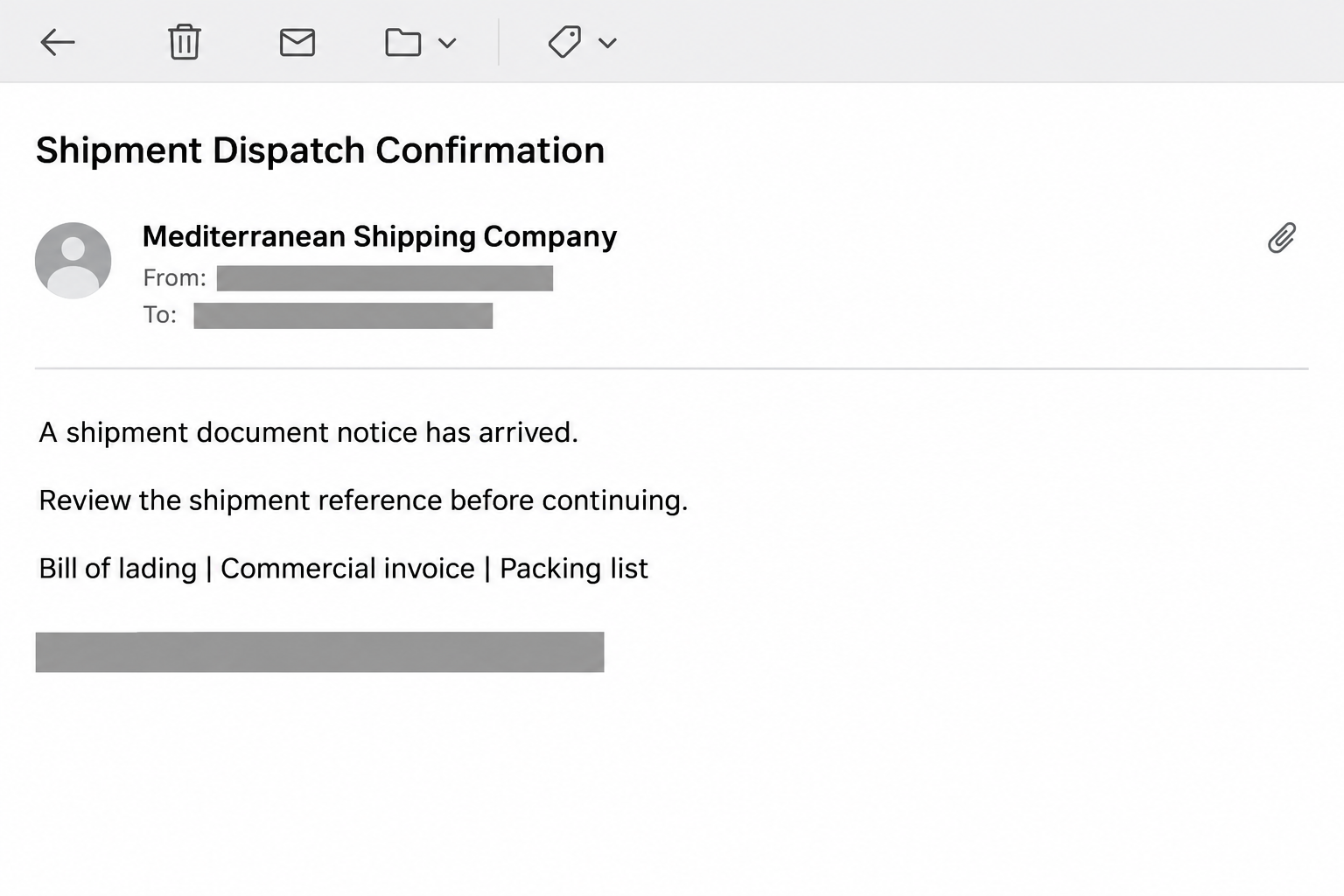
Examples of this campaign announce shipment documents, including an invoice and bill of lading. One version uses an arrival notice, adding pressure about release arrangements and possible charges.
That setting matters because shipping paperwork genuinely requires attention. Someone expecting freight may read the message as an unfinished task rather than an unexpected sales pitch.
The valuable account is your mailbox
The reported credential-harvesting route presented a OneDrive-style document page. Its request for an email login turned a supposed freight task into an account-access problem.
A carrier’s name and a cloud-storage logo answer neither question that matters: who sent the request, and who receives the password entered on the next page.
An email account can contain supplier conversations, invoices, and password-reset messages. That makes it useful to an intruder even when the original shipping claim was entirely invented.
What readers should recognize in this campaign
The illustration above recreates the message format without preserving a working destination. It is not an original email recovered from a reader’s inbox.
- The sender claims to represent MSC and supplies a document-related reason to continue.
- The listed paperwork sounds relevant to freight handling rather than ordinary parcel tracking.
- A later page asks for mailbox credentials instead of resolving the shipping question.
- The safest verification route is the shipping relationship you already know.
The former destination reported for one sample was demo.fivetn[.]com. Treat it as a historical indicator, not a complete list of addresses used by later copies.
How the Scam Works
Step 1: A document notice lands beside real shipping correspondence
The approach starts with a plausible business event. A dispatch or arrival notification can fit naturally among messages about a purchase, supplier, forwarder, or container booking.
The recipient does not need to be the person who booked transport. Shared finance and operations mailboxes also receive paperwork that somebody else is expected to handle.
This gives the sender room to exploit uncertainty. A colleague might assume another department knows the shipment, while forwarding the notice makes it appear internally relevant.
Do not treat that accidental fit as verification. A message can arrive during a genuine delivery without having any connection to the carrier or your order.
Step 2: Recognizable paperwork encourages a quick handoff
A bill of lading, packing list, and commercial invoice each sound like something a shipping team might need. Listing several documents gives the request practical weight.
For example, an accounts employee might want an invoice while a logistics colleague needs the transport record. The same notice can therefore appeal to different workplace roles.
That example explains the lure’s appeal, not an independently verified incident. The document labels alone do not establish that any real shipment or payable invoice exists.
Before passing the request along, match it to your own booking or purchase record. Ask the responsible person whether those particular documents were expected.
Step 3: The delivery task becomes a sign-in request
Following the document invitation moves the conversation away from freight handling. The reported false sharing page asks the visitor to authenticate before seeing the supposed content.
A protected-file explanation can make that detour feel reasonable. Readers are accustomed to signing in for workplace documents, so the new request may not immediately seem unrelated.
But a familiar-looking screen is not an authenticated sharing transaction. The page must belong to the actual service and make sense for the account being requested.
Stop when a document request unexpectedly asks for the password to your whole inbox. Verify the sharing arrangement elsewhere rather than using the page to test it.
Step 4: Submitted credentials create a different kind of exposure
A false login form can send its contents to somebody other than the email provider. Seeing an error afterward does not mean the submission was harmless.
Likewise, receiving no document does not undo information already entered. The important question becomes whether a password, verification code, or access approval left your control.
A password alone does not guarantee an attacker can complete every login. Extra authentication and other protections may intervene, but exposed credentials still require prompt replacement.
Tell your administrator what you actually supplied. Reporting a password, a code, and an approved sign-in as different actions helps the team choose the right containment.
Step 5: A trusted conversation could become the next target
If an intruder gains mailbox access, existing correspondence can provide context for another approach. A payment request inside a familiar thread may look more convincing than cold spam.
This is a potential consequence of account compromise, not proof that every recipient loses money. The original notice does not itself establish an unauthorized transfer.
For a shipping business, practical follow-up includes checking whether invoice instructions changed. Compare any new bank details with previously verified records before another payment goes out.
A recovered password is only part of that work. Someone must also establish whether business messages were read, altered, forwarded, or sent during the exposure.
Check the Shipment Without Using the Email
Start with a booking you can identify
Locate the purchase order, container reference, or forwarder conversation in your own records. A shipment number copied into an unsolicited notice is not independent confirmation.
Use the carrier or forwarder contact already associated with that booking. Do not replace it with a new phone number supplied by the questionable message.
If nobody recognizes the consignment, leave the document unopened. There is no business reason to authenticate an unknown file merely to discover whether it concerns you.
Separate transport records from account ownership
A genuine shipping document can contain sensitive commercial details. Sharing it may require an approved portal, but that does not justify handing a mailbox password to another site.
Ask which organization is sharing the file, which account should receive it, and why this particular route is being used. The answers should fit your established workflow.
For a legitimate external share, open the known storage service independently and check the invitation there when available. Ask the sender to resend through the approved channel.
Inspect the address, not just the branding
Expand the sender details to see the actual address and any different reply destination. A display name can say MSC without proving that MSC sent the message.
When inspecting a link, read the hostname rather than a brand word buried elsewhere. A shipping name in a path or page title does not control the site.
Forward unusual headers and the original message to IT through your reporting process. Do not paste private shipment links into public scanners without your organization’s approval.
Keep approval of payment separate
A document notice is not authorization to pay a new beneficiary. Neither a delivery deadline nor a threatened storage charge should bypass your existing approval process.
If charges might be genuine, confirm them against the booking and an independently contacted representative. Record who confirmed the amount and the account receiving it.
That pause protects both sides of the transaction. It helps distinguish actual freight costs from an unrelated message trying to redirect attention or funds.
What to Do if You Have Fallen Victim to This Scam
-
Stop using the document page and preserve the original notice. Keep the subject, sender details, destination, and time you interacted with it for your security team.
If you only read the message, report it and remove it from your normal workflow. Receiving a fraudulent notice does not establish that your device was infected.
-
If you supplied a password, change it through the provider’s known website using a trusted device. Replace that password wherever else you reused it.
For a company account, notify IT immediately rather than waiting to see whether anything happens. An administrator may need to disable access or investigate more than one account.
-
Review unfamiliar sessions, connected applications, recovery details, and mailbox forwarding. Ask the administrator to revoke access that cannot be accounted for.
Google’s compromised-account guidance also covers security activity and changes to Gmail settings. Use the instructions for your actual provider rather than copying another platform’s controls.
-
If you lost access to a Microsoft account, follow Microsoft’s official recovery process. Keep recovery codes and identity checks away from anyone contacting you through the suspicious email.
Use an existing administrator or a known support route for managed workplace accounts. Personal-account recovery and an employer’s managed recovery process are not always interchangeable.
-
Check the transactions and conversations that were active during the incident. Give particular attention to supplier bank changes, release instructions, unexpected forwarding, and messages sent in your name.
Warn affected colleagues or trading partners through a separate trusted channel. Explain the specific message they should disregard without circulating a working phishing link.
-
If money moved, contact the bank or payment provider immediately and request its fraud-response procedure. Supply the payment reference and destination rather than guessing what happened.
A recall or dispute is not guaranteed, but delaying the report removes opportunities to act. Keep the bank’s reference number alongside the original shipping correspondence.
-
If the notice led you to install software or open an unexpected executable, get the device checked. Malwarebytes can help assess suspected malicious software.
AdGuard may reduce exposure to some malicious web content. Neither tool changes a stolen password, revokes account sessions, or confirms that a freight document is genuine.
-
Use your organization’s incident-reporting process and the appropriate fraud-reporting channel for your country. Preserve records before deleting routine copies of the message.
Reject unsolicited recovery offers that promise guaranteed access or repayment for a fee. The original exposure is not a reason to trust another stranger with credentials.
A Better Routine for Shipping Teams
Make the safe route easier to use than an unfamiliar emailed button. Keep current carrier contacts and approved document portals in a shared, maintained internal directory.
Give staff a clear way to report a doubtful notice without deciding whether it is definitely malicious. A useful report can simply say the booking does not match.
For shared inboxes, record who owns the booking before forwarding document requests. That prevents a chain of internal forwards from becoming the only reason somebody trusts a message.
When a real supplier changes its sharing system, confirm that change with an established contact. Update the internal directory once, rather than teaching everyone to accept unfamiliar portals.
Finally, treat a security report as a request for help, not a confession to punish. Fast reporting is far more useful than silence while an employee feels embarrassed.
When the Carrier Confirms the Shipment Is Real
A real booking does not settle whether the email belongs to it. Ask the representative to identify the specific document request, not simply confirm the container exists.
Have them explain where the documents should appear in your established account. If they describe a different process, preserve that distinction in your report to IT.
Do not send your password to help a representative investigate. A legitimate investigation can use the message, booking reference, and destination without needing your private login secret.
For sensitive commercial records, share only what the investigator needs through an approved channel. Container information, customer details, and invoice attachments should not become public warning posts.
Once the correct documents arrive, continue the shipment through the verified workflow. Resolving the business task separately prevents the fraudulent email from remaining an unfinished item someone reopens later.
Tell the people who received internal forwards which copy to disregard. Otherwise, a colleague may repeat the same mistaken document check after your own mailbox has been secured.
Frequently Asked Questions
Is Mediterranean Shipping Company itself a scam?
No, MSC is a genuine shipping business. This warning concerns messages impersonating it, not a finding that the carrier operates the credential-stealing pages.
What if I really have a shipment arriving?
Check through your existing booking or forwarder contact. A genuine delivery can coincide with a fraudulent notice, so timing alone cannot authenticate the document invitation.
Does a OneDrive logo prove the documents are safe?
No, a logo can be copied onto another page. Verify the actual service and expected sharing arrangement before giving any account permission or login information.
Did entering my email address alone expose my password?
Not by itself, but it can confirm an address or supply context for later messages. Report exactly what you entered, including any password or code submitted afterward.
Should I pay a charge mentioned in the notice?
Do not pay from the email alone. Confirm any genuine shipping charge and beneficiary through established records and an independently verified carrier or forwarder contact.
Does deleting the email secure a compromised mailbox?
No, deletion removes a message rather than an intruder’s access. Exposed credentials, active sessions, forwarding, and connected applications need their own review and containment.
The Bottom Line
Do not use this MSC document invitation to sign into your email. Verify the shipment through the relationship and portal you already trust.
If you entered credentials, act on the mailbox exposure now. Contact your provider or IT team, contain access, and check any affected shipping and payment conversations.

Join the discussion
0 commentsShare your experience or ask a question about this article.
Community experiences
Did this happen to you?
Your experience could help someone recognize the same scam. Submit a private report for our team to review.
I experienced this tooReports are reviewed before publication. Sharing publicly is always your choice.
Discussion
Start the conversation
Have a question or something useful to share? Add the first comment.