


A monthly HR report arrives with the promise of performance reviews, leave summaries, and a promotion list. Even during a busy day, that is tempting to open.
The email sounds like routine office administration, with a director’s signature underneath. Before checking where you stand, take a closer look at the route into that report.
Overview
The message promises information employees care about
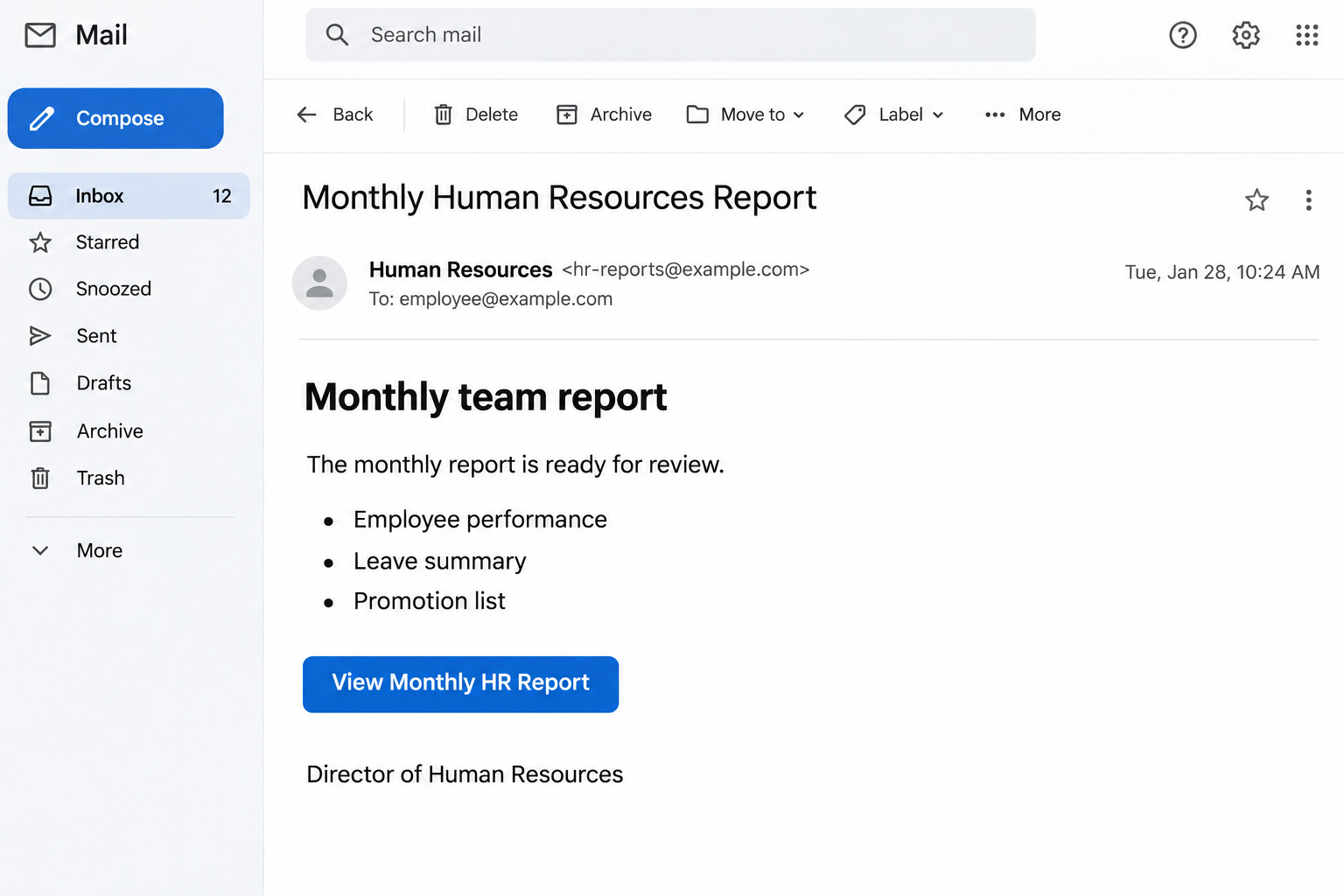
The Human Resources Report email scam offers access to a monthly workplace report. Its contents supposedly include employee performance, time off, activity summaries, and promotions.
Those topics give different employees different reasons to click. Someone awaiting a review may look for feedback, while someone arranging leave may want to check their records.
The notification leads to a counterfeit Excel-style document portal that seeks email credentials. The promised personnel information gives employees a reason to overlook an unexpected sign-in request.
A familiar office task becomes a password request
The scam uses a work-related promise to move you toward an account sign-in. Its supposed connection to your employer supplies the authority that the unknown sender lacks.
Microsoft and the employee’s real HR department are not responsible for this impersonation. A copied document interface does not show that either organization approved the message.
The relevant warning signs concern the request and its context, rather than whether the email looks polished.
- A broad employee report arrives outside the process your workplace normally uses.
- Promotion and performance information supplies a reason to open an unfamiliar portal.
- The destination asks for mailbox credentials before producing the promised material.
- A management-style signature encourages you to treat the request as internal business.
Verify the report through your employer’s normal process
Ask HR using the company directory or your established internal channel. If a report genuinely exists, open it through the approved service your employer identifies.
Our illustration uses a reconstructed HR email with placeholder contact details and condensed wording. It contains no genuine personnel records or employee inbox data.
Why Performance Reviews Make Effective Bait
An employee does not need to be careless to find this message interesting. Performance and promotion decisions can affect income, confidence, and plans for the coming months.
The email makes those concerns available through one convenient button. It encourages you to resolve curiosity before asking whether this is how your workplace normally shares sensitive information.
An approaching review period can make the timing feel right even when the sender knows nothing about you. A broadly distributed message can match some recipients’ circumstances by chance.
That coincidence should not become proof of insider knowledge. Ask whether the message identifies a real review process and whether your employer confirms the particular document.
The report’s promised scope is also worth examining. A single file covering performance, leave, and promotions may concern information that employees should not all access equally.
Workplaces differ, so there is no universal rule that an HR spreadsheet must be fraudulent. The important question is whether this specific sharing arrangement belongs to your employer.
If a message appears to reveal coworkers’ private information, avoid opening it out of curiosity. Ask HR to confirm the intended audience through a separate channel.
Do not send identity documents or a recent pay statement to the sender to confirm your employee status. Those records would give an impersonator more sensitive information.
If you need to correct a leave balance, use the actual staff system or HR contact. A phishing notice should not become a new route for submitting personnel records.
Keep questions about a possible promotion with the people responsible for that decision. The email’s promise is not evidence that a promotion list exists or includes your name.
How the Human Resources Report Email Scam Works
Step 1: A management signature makes the request feel internal
The email presents the report as something already prepared by the organization. You are invited to complete a familiar task rather than evaluate an offer from a stranger.
A title such as HR director can influence how seriously employees take the message. A copied signature, however, is still part of the sender’s own claim.
Check the actual address and the business context. If your organization has an internal reporting button, use it instead of circulating the suspicious email among colleagues.
A message appearing to come from a familiar coworker can still need verification. Accounts can be compromised, and display names can be copied without controlling the real mailbox.
Step 2: The report promises several reasons to continue
The offer combines career information with practical staff records. That broad appeal helps the message reach people who would ignore a notice about only one department’s paperwork.
Someone might click because they expect a promotion, because a leave balance seems wrong, or because they want to finish an administrative task before a meeting.
These are understandable motives, and the sender exploits them by making access look simple. You do not need to resolve those concerns through the provided link.
If you actually have a leave or review question, contact the person already handling it. Keep that legitimate issue separate from the unexplained document notification.
Step 3: The button opens a counterfeit document portal
The apparent destination uses a spreadsheet-related presentation to make the transition feel consistent. After an HR report email, a familiar office-document screen may seem unsurprising.
The visual match is the trap’s useful part. Seeing an Excel-style page does not establish that your employer shared a file through a legitimate Microsoft service.
Instead of continuing, open your usual employee portal or document app independently. If you cannot locate the report, ask HR whether it was actually shared with you.
Do not request broader access through the unknown page. A permission problem should be resolved through your organization’s normal sharing process, rather than a stranger’s sign-in form.
Step 4: The portal asks for the account behind your work
The fraudulent form seeks the credentials protecting your mailbox. That account may also be connected to documents, contacts, calendars, and password recovery for other workplace tools.
A criminal with successful access could use existing conversations to impersonate you more convincingly. They could also attempt further account access, depending on your organization’s controls.
These are risks following credential disclosure, not proof that every recipient suffered a wider breach. Your security team can investigate whether the information was successfully used.
If the page produces an error after submission, do not keep trying. Another attempt can expose an additional password if you switch between personal and work credentials.
Step 5: The damage can continue beyond the original message
Even if the promised report never appears, the attacker may have obtained what they wanted. They do not need to deliver convincing performance information after receiving working credentials.
That is why reporting matters before obvious problems develop. Waiting for an unusual payroll change or a colleague’s complaint gives unauthorized access more time to cause harm.
Your employer can also use the report to identify other recipients. Quietly deleting the email after entering a password leaves the organization without that warning.
Explain what happened factually and promptly, without minimizing or exaggerating it. A clear account of the actions taken is more useful than guessing whether the computer was hacked.
How to Check a Workplace Document Request
Start with the communication path you already use for sensitive staff information. That might be an employee portal, a known HR mailbox, or a documented manager-led process.
Ask whether the specific report was issued and whether you are supposed to receive it. Confirm the service and document title, rather than accepting a general reassurance.
If someone says the file is genuine, have them identify its location in the approved system. You can open that system independently without using the original email button.
A real cloud document can require authentication, so do not rely on the presence of a login box alone. Confirm the destination and expected sharing relationship together.
Be especially cautious if the page wants a password for an account unrelated to the sharing service. The reader should understand which account is being authenticated and why.
Google’s phishing guidance advises contacting familiar people through established details when a message seems suspicious. The same principle applies to an apparent internal document.
For remote workers, use the company directory or previously established chat. A new support contact introduced by the suspicious message is not an independent source of confirmation.
What to Do if You Have Fallen Victim to This Scam
- Report the message through your workplace’s security channel.
Tell the help desk that the email offered an HR report and led to an unexpected login. Include the sender, approximate time, and device used.
If you entered a password or approved an authentication request, say so directly. Do not include the password itself in the report or send it to HR.
- Replace any credential entered into the counterfeit portal.
Open the real account service from a trusted device and use its normal password-change process. Your administrator can assist if your organization centrally manages access.
Change other accounts where you reused the same password. If you attempted several passwords on the page, treat each of those attempted credentials as potentially disclosed.
- Have account access and recovery settings reviewed.
Ask administrators to check suspicious sessions, authentication methods, and connected applications. They should also examine forwarding or mailbox rules that could conceal or redirect messages.
Microsoft’s compromised account guidance covers these concerns. Let the responsible team perform administrative changes rather than attempting unfamiliar repairs on a managed account.
- Check whether any actual employee information changed.
Use the genuine employee portal or contact HR to review unexpected profile, payment, or contact changes. A suspicious email alone does not establish that those records changed.
If you find a discrepancy, report the specific item through your employer’s existing process. Do not send payroll records back to the person claiming to have issued the report.
- Warn affected coworkers without spreading the link.
Tell your security team if anyone else received the same notification or messages from your account. They can coordinate a warning and remove related messages where appropriate.
Use a short description or an approved screenshot rather than forwarding a live phishing link to a large group. Keep personal employee information out of general announcements.
- Preserve evidence and flag any additional interaction.
Keep the original email if your security team requests it, along with screenshots already available. Mention any download, installation, or information entered beyond the account credentials.
Those additional actions may require separate investigation. Do not install a tool recommended by the suspicious page to finish opening the supposed report.
Reporting Quickly Helps More Than Waiting for Proof
You may worry that reporting an accidental click will attract attention you would rather avoid. A delayed report, however, makes it harder to establish what happened.
Give the team the facts you know: which button you clicked, what appeared, and what you submitted. It is acceptable to say you do not remember a detail.
Do not delete browser history to hide the mistake. Existing records can help the investigators identify the destination and determine the period of possible account exposure.
Likewise, do not search a suspicious page for more evidence after leaving it. Your team can decide which additional checks are necessary without putting the account at further risk.
The response should also protect employee privacy. If genuine personnel records were visible, tell the appropriate internal team rather than copying them into a public scam report.
Once access is restored, ask whether any legitimate HR task remains outstanding. Completing that task through the real process closes the loop without returning to the phishing message.
Frequently Asked Questions
Is the monthly Human Resources Report message legitimate?
The documented campaign is a phishing email offering a nonexistent report through a counterfeit portal. Confirm any actual HR document with your employer through its established communication process.
Does the Excel-style page mean Microsoft verified the report?
No, a spreadsheet-style interface can be copied by someone outside Microsoft. Verify the actual service and sharing request before using any login form reached from an unexpected message.
What if my employer really publishes monthly HR reports?
That makes the subject plausible but does not authenticate the message. Ask your HR team whether this particular file was issued and open the approved service separately.
Is my computer infected because I read the email?
Reading this notification alone does not establish an infection. Report any credentials you disclosed and separately describe whether you downloaded, opened, or installed additional content.
Should I contact HR or the IT department first?
Report a credential disclosure to your security team or help desk promptly. HR can confirm the supposed report and address any genuine personnel or payroll concern.
Can a rejected login still expose my password?
Yes, a counterfeit form can collect a password while displaying an error. Replace any credential you entered through the real provider and tell your workplace what happened.
The Bottom Line
Do not use this HR report link to sign into your email account. Check the document with your employer and access genuine personnel information through the approved service.
If you already entered credentials, report the disclosure immediately and secure the account. Your security team should review access, while HR confirms whether any real staff task remains.

Join the discussion
0 commentsShare your experience or ask a question about this article.
Community experiences
Did this happen to you?
Your experience could help someone recognize the same scam. Submit a private report for our team to review.
I experienced this tooReports are reviewed before publication. Sharing publicly is always your choice.
Discussion
Start the conversation
Have a question or something useful to share? Add the first comment.