


A document marked secure can feel more important than an ordinary attachment, especially when it arrives during a busy working day.
The delivery wording deserves attention before you decide whether the file belongs in your workflow or somebody else’s investigation.
Overview
The invitation changes, but the document remains unverified
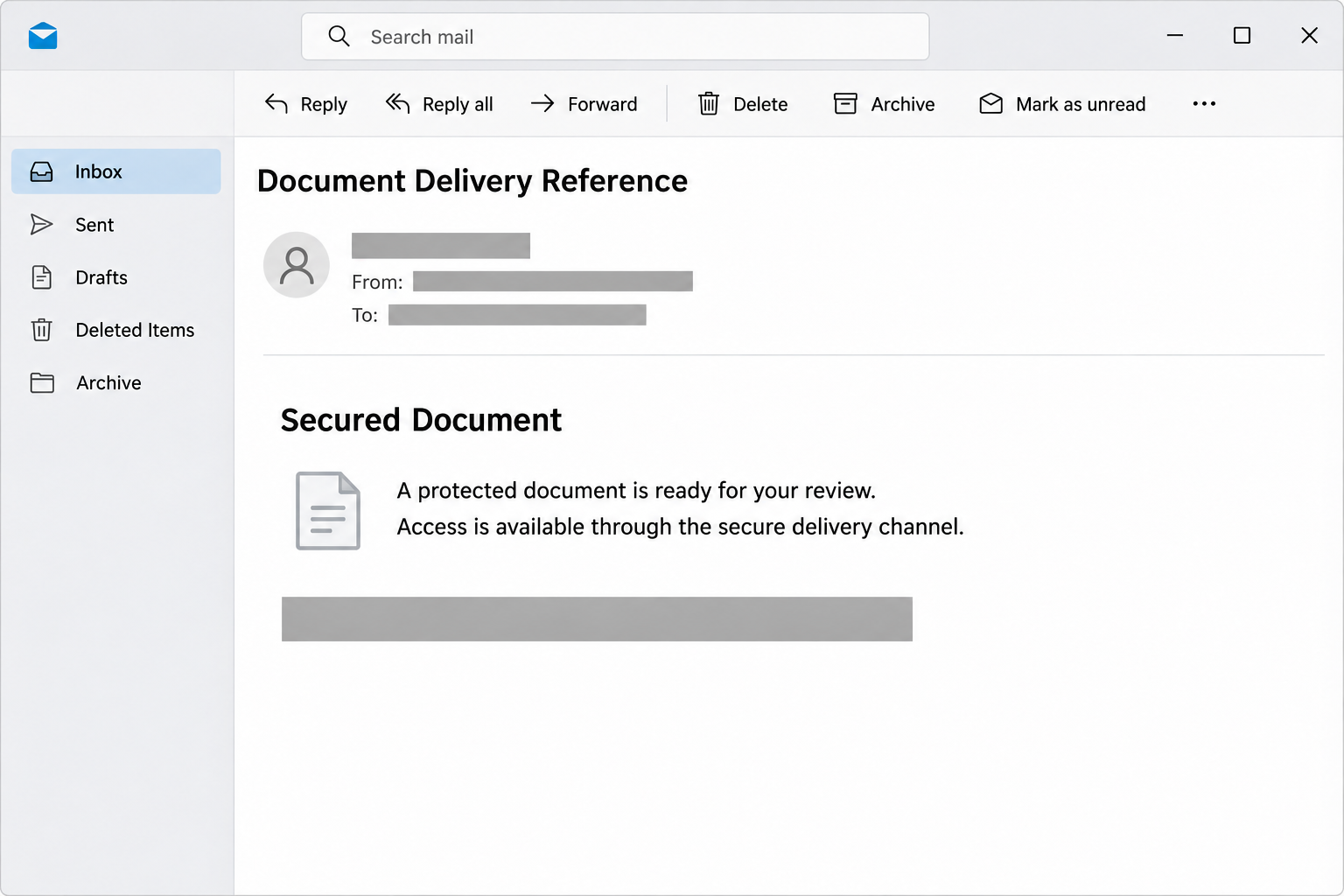
The Secured Document email scam presents an unexpected file as protected business correspondence. Its wording can suggest a finished contract, a review request, or a formal delivery reference.
Recorded variants include a February 2026 notice invoking new security procedures. An earlier version led to a counterfeit Sender.net-style login page rather than the promised contract.
Those are different samples, not proof that every later message opens the same website. The central problem is the unverified request for account information to retrieve supposed paperwork.
Security language is being used as persuasion
Words about encryption and protected delivery can make an unfamiliar process sound mandatory. The reader may assume the sender is being careful rather than asking for unnecessary access.
Actual document protection needs a trusted sender, an identifiable service, and appropriate permissions. Describing a file as secure establishes none of those things by itself.
A filename ending in PDF is also just a label when it appears inside an email. It does not establish what the linked page actually contains.
What this warning covers, and what it does not
The lead illustration is a simplified reconstruction of the notice format. It does not reproduce a real reader’s document or show a captured login screen.
- The message introduces paperwork that the recipient has not independently authenticated.
- The invitation treats document access as a reason to continue elsewhere.
- A credential request creates risk beyond the supposed file.
- A genuine sharing service is not fraudulent merely because its appearance is copied.
This is a phishing warning, not a finding that somebody signed a binding agreement in your name. Nothing in the notice alone proves a completed contract exists.
How the Scam Works
Step 1: The sender invents an unfinished document task
The message gives you a reason to leave your normal routine and inspect a file. Business language makes that request sound like existing work rather than a new proposal.
An employee may wonder whether a colleague arranged the contract, or whether a client sent something without a separate explanation. That uncertainty creates an opening for the invitation.
Do not resolve uncertainty by opening the unknown file first. Look for the related transaction in your own records or ask the person responsible for the project.
If nobody can identify the document, it does not become your responsibility simply because a notice names your address. A sender can address mail without proving a business relationship.
Step 2: Protective wording lowers resistance to an unfamiliar route
The secure-delivery explanation makes additional steps sound normal. Instead of questioning why a document is unavailable, the reader may assume a new verification procedure protects confidentiality.
That reasoning reverses the order of trust. The identity of the sender and service must be established before you accept their explanation for extra authentication.
A real organization can introduce a different document platform, but you should be able to confirm that change through an existing contact or published internal process.
The phishing notice provides its own reassurance. Repeating that reassurance on the destination page does not supply the independent confirmation missing from the email.
Step 3: The supposed file moves behind a login
The visitor follows the invitation expecting a document and encounters an account-access request instead. The original business task makes supplying credentials seem like a minor intermediate step.
In the earlier reported sample, the page borrowed another service’s appearance. A copied interface can suggest the right relationship without actually being operated by that service.
Do not assume your normal inbox password belongs in a document-delivery form. Determine which account is being requested and why that account would have access to the file.
If the route cannot be verified, leave it and contact the sender separately. You do not need to complete authentication to find out whether the invitation is legitimate.
Step 4: Information leaves before the promised document appears
Submitting a password can expose it even if the page later shows an error or remains blank. A convincing document is not required for a credential form to work.
Do not interpret a request to try again as harmless troubleshooting. Repeated attempts may simply provide additional passwords or more information about the account.
If you supplied a code or approved a sign-in after entering credentials, include that in your report. It may change the urgency and the access IT needs to revoke.
These are exposure scenarios, not claims that every sample collected codes or captured sessions. The documented campaign establishes credential phishing, not every possible technique used afterward.
Step 5: The mailbox can become a source of real documents
Once somebody gains access, actual correspondence may help them identify clients, contracts, and payment conversations. The false file can therefore lead toward information far more valuable than itself.
A convincing follow-up could refer to a genuine project after the intruder reads the inbox. That possibility makes a specific business review important after confirmed account compromise.
Ask whether unusual messages were sent, forwarding was added, or sensitive files were shared. Avoid assuming that restoring your password answers every question about what happened.
For an organization, the right response may include security, legal, or privacy staff. Let the responsible team assess exposure rather than contacting everyone in the address book indiscriminately.
Check the Sharing Arrangement Before the File
Find a sender who can explain the document
Use a phone number, email thread, or internal directory entry you already trust. Ask what the document is, why you need it, and which service should deliver it.
Do not use a new contact address supplied by the questionable invitation as your only check. That would let the same sender authenticate its own claim.
A real sender can identify the business purpose without asking you to reveal a password. If necessary, request another copy through the organization’s approved sharing system.
Recognize legitimate access without accepting every imitation
Some genuine sharing arrangements require an organizational account, guest access, or a separate verification step. It would be wrong to label all document authentication as fraud.
The distinction is whether the invitation, service, account, and purpose fit together. A familiar login on an unrelated site does not provide that connection.
When possible, open the known service independently and locate the item there. If it is absent, ask the sender to verify the recipient and sharing permissions.
Read the complete address and file type
A document name in an email can be clickable text rather than an attachment. Previewing the destination helps distinguish a website invitation from a file actually included with the message.
On a managed device, use the organization’s approved inspection process instead of downloading unknown material to investigate it yourself. Preserve the original message so IT can examine the relationship.
Do not upload confidential contracts or individualized sharing links to public checking services without permission. A well-intended investigation should not create a second disclosure.
Keep signing and downloading as separate decisions
A notice that refers to a completed contract does not authorize you to accept new terms. Check whether an actual agreement exists and who is entitled to handle it.
If the next page unexpectedly asks for payment, software installation, or account recovery information, stop. Those requests need their own explanation and approval, not the email’s secure-delivery label.
Likewise, do not send identity documents just to make an unsolicited file available. A name and a delivery reference are not enough to establish a legitimate verification need.
What to Do if You Have Fallen Victim to This Scam
-
Close the document destination and keep the original email for reporting. Note whether you opened a link, downloaded a file, or provided information.
If your only action was reading the notice, report the phishing and leave the invitation unused. That alone is not evidence that someone accessed your account.
-
After password exposure, use a trusted device to reach the actual email provider and change the credential. Replace the same password on any other account that used it.
Tell company IT about work credentials even if you changed them yourself. The administrator may need to contain access and investigate activity you cannot see.
-
Review account access and recovery settings through the real provider. Remove unfamiliar sessions, linked applications, or forwarding arrangements with administrator assistance where needed.
Google’s compromised-account instructions include checking security events and unexpected changes across connected products. Follow the appropriate platform’s process rather than a stranger’s recovery link.
-
If Microsoft account access has been lost, begin with Microsoft’s account-recovery guidance. Use your organization’s support route when it manages the affected account.
Do not pay a person who claims they can bypass the provider’s identity checks. A recovery promise does not establish that the person has authority over your account.
-
Identify real documents or conversations that could have been exposed if access occurred. Give IT the relevant project names and sensitivity, without forwarding everything to an outside party.
Keep any affected client’s genuine contact details separate from the suspicious message. Follow the organization’s notification process if a security review confirms that notification is necessary.
-
If you installed a viewer or opened an unexpected executable, treat that as an additional device incident. Malwarebytes can help investigate suspected malicious software.
AdGuard may help reduce some malicious browsing exposure, but neither program authenticates a contract. Account recovery still requires the provider’s controls and a review of unauthorized access.
-
Warn colleagues if the invitation was forwarded internally or a compromised account sent follow-up messages. Provide the subject and reason to stop without distributing live destinations.
If a payment or identity document was also supplied, contact the relevant institution promptly. Explain the actual disclosure instead of assuming every possible consequence has already occurred.
Make the Legitimate Document Easy to Find
After resolving the suspicious invitation, finish any real business task through a verified channel. Otherwise, an unanswered document request can remain in somebody’s inbox and be reopened later.
Ask the genuine sender to identify the final filename, intended recipients, and approved storage location. Those details give colleagues a concrete alternative to the fraudulent invitation.
For recurring external work, agree on the sharing platform before sensitive material is sent. A known process makes unexpected changes easier to question without delaying every exchange.
Keep document permissions limited to the people who need them. A convenient public link is not necessarily the right replacement for a suspicious private sharing request.
If a sender’s account was compromised, confirm that its access has been restored before trusting a replacement invitation. The appearance of a familiar name is not enough.
Finally, record which version is authoritative when several copies circulate. Clear document ownership prevents both accidental reliance on outdated files and repeated exposure to the original lure.
Handle Sensitive Documents Without Creating Another Exposure
A contract, personnel record, or financial document may need a restricted audience even when the original invitation was fraudulent. Keep the genuine material within its approved handling process.
When asking for help, start with the invitation’s subject and the business context. Let the responsible team decide whether it needs the actual file or only message headers.
Do not send a full client folder to somebody offering to verify one notice. The volume of information requested should fit a legitimate investigation.
If you uploaded a genuine document to the questionable page, report that separately from password exposure. Identify the file, its contents, and who normally has permission to receive it.
Likewise, distinguish a copied filename from an actual upload. Seeing your company’s name in a notice does not establish that its documents were already taken.
Ask security staff how to preserve evidence without reopening the destination. A saved email and an accurate timeline can be more useful than another risky visit.
This approach keeps the response proportionate. It addresses the information that actually left your control while avoiding unnecessary circulation of the same sensitive records.
Frequently Asked Questions
Does the email prove a contract was signed?
No, an unsolicited notice cannot establish a completed agreement. Check the actual transaction and authorized signing process before treating the message as a business record.
Is every protected-document invitation a scam?
No, legitimate services protect files and verify recipients. This campaign abuses that expectation, so confirm the particular sender, service, and access request rather than rejecting all secure sharing.
Does a PDF filename make the link safe?
No, visible text can describe a PDF while pointing somewhere else. Check the real destination and use the approved sharing route for the expected document.
Is Sender.net responsible for the earlier phishing page?
The reported page imitated that service’s appearance. That does not establish that Sender.net operated it or authorized the request for the victim’s email credentials.
What if the page rejected my password?
Treat the submitted password as exposed. An error message does not prove the form discarded it, and another attempt could provide additional information to the attacker.
Should I forward the notice to my client?
Contact the client through an existing channel instead. Describe the request without circulating its active link, and let security staff preserve the original for investigation.
The Bottom Line
Do not supply an email password to retrieve this unsolicited Secured Document. Verify the business purpose and sharing route with the actual sender first.
If you already provided credentials, secure the mailbox and report the exposure. Then obtain any genuine paperwork separately, without returning to the fraudulent invitation.

Join the discussion
0 commentsShare your experience or ask a question about this article.
Community experiences
Did this happen to you?
Your experience could help someone recognize the same scam. Submit a private report for our team to review.
I experienced this tooReports are reviewed before publication. Sharing publicly is always your choice.
Discussion
Start the conversation
Have a question or something useful to share? Add the first comment.