


A notice from the service desk can feel like an instruction you are meant to follow, not another message you need to investigate.
When it mentions delayed mail, the details deserve a slower read before you try to put everything back on schedule.
Overview
The sender borrows authority from workplace support
The Service Desk email scam pretends that a technical problem has interrupted delivery. It directs the recipient toward a supposed support portal to restore or review messages.
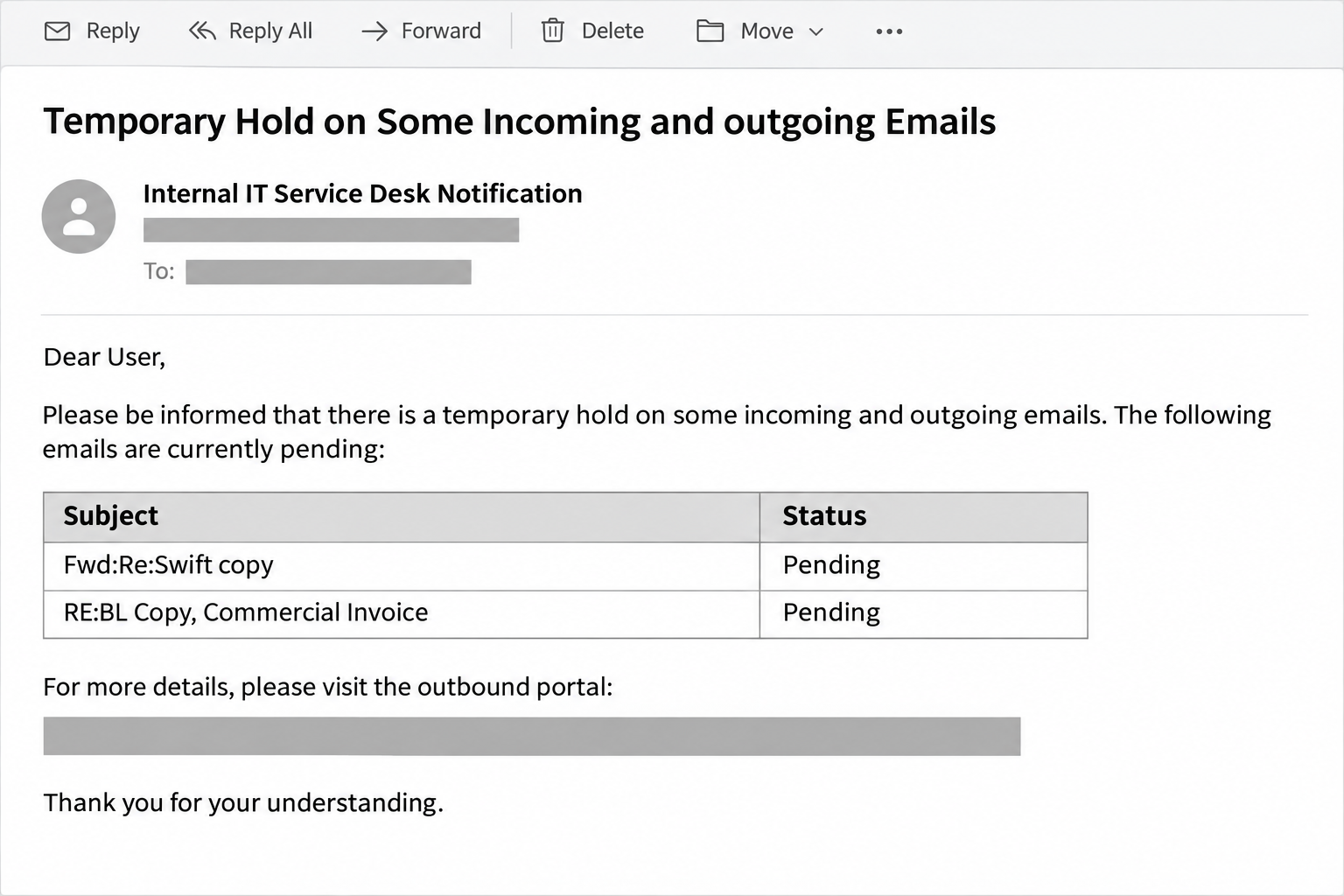
A December 2025 example uses an internal-IT identity and lists pending business messages. The requested response is reauthentication, turning a delivery concern into an opportunity to steal credentials.
Real service desks and mail administrators exist. This warning concerns the impersonating message, not a claim that genuine support teams or every maintenance notification are fraudulent.
A queue table makes the problem feel concrete
Instead of only saying that email is delayed, the notice supplies a short list. Payment and commercial-paperwork subjects can look relevant to an ordinary office mailbox.
But a table in an email is not a live view of your provider’s queue. Its rows can be typed into a message without access to the server.
The question is not whether those subjects sound plausible. It is whether your actual support system confirms the delivery issue and recognizes the proposed way to fix it.
The destination and the pretext may not agree
An earlier recorded version led to a blurred spreadsheet with a password prompt. That was a document lure, despite the email’s story about pending correspondence.
The earlier page should not be projected onto every subsequent copy. What matters across variants is an unverified support request steering the reader into account disclosure.
- The notice claims an internal technical role without independently establishing that authority.
- Its delivery problem is presented as requiring an account-access action.
- A believable list does not prove the listed messages exist.
- A genuine IT team can be contacted outside the questionable email.
The illustration above recreates the table format without a working portal. It is not a captured support ticket or evidence that anyone’s actual mail was queued.
How the Scam Works
Step 1: The message presents itself as an internal instruction
Support language carries a different kind of pressure from a sales pitch. Staff may feel that complying is part of keeping company systems working.
The sender can exploit that expectation without naming an individual technician. A departmental identity may be enough to make the email resemble a routine automated notice.
Look at the actual sender address and the reporting route your organization normally uses. A department label is not evidence that the message came through those channels.
When uncertain, contact support using the number or portal in your existing directory. Do not let the new email replace the directory it should match.
Step 2: Pending-message rows create a reason to act now
A list of apparently delayed correspondence makes the issue personal. Readers may recognize the kind of invoice, remittance, or commercial document they handle every week.
That recognition can be misleading even when no private information appears. Familiar business categories are easy to reuse across many recipients and organizations.
For example, an employee awaiting payment paperwork might assume an ordinary-looking row explains the missing reply. That is an illustration of the pressure, not a verified victim account.
Check the relevant conversation through a trusted channel. Ask the genuine sender whether a message was sent and whether any rejection or delay notification came back.
Step 3: A server problem is reframed as your authentication problem
The notice encourages the recipient to believe that signing in will complete the repair. That moves responsibility from an administrator’s system to the employee’s next click.
Some real services do require renewed authentication after changes. However, that possibility does not authenticate a portal introduced by an unverified email.
A technical explanation should fit a known account and a confirmed service event. If support cannot identify either, there is no reason to supply credentials through the notice.
Opening your usual mailbox independently is a useful distinction. If it works, you can continue legitimate work while asking support to assess the doubtful request.
Step 4: The next screen borrows another familiar context
A sign-in screen may be presented as access to held mail or a document. The earlier reported spreadsheet version illustrates how the claimed task can change midstream.
A message-delivery fault does not explain why an unrelated document needs your general email password before anything can be repaired.
Blurring content can also encourage curiosity because the visitor expects a login to reveal the useful information. A blurred background does not authenticate what is behind it.
Leave when the request stops matching the original task. You do not need to inspect the hidden document to establish that the account request lacks a trusted basis.
Step 5: Entered credentials may be used away from the false portal
Once a password has been submitted, the relevant exposure is no longer confined to the page. An attacker can attempt to use the information at the genuine service.
Extra authentication may block that attempt, but it should not become a reason to keep the exposed password. Replace it and report any code or approval you supplied.
If the same password protects other accounts, those accounts need attention too. Do not test whether the attacker has reached them by reusing that credential again.
The original notice does not establish that every account was entered successfully. Separate confirmed exposure, suspicious activity, and verified compromise when explaining the incident.
Step 6: The false support problem could become a genuine business incident
With mailbox access, an intruder may gain visibility into ongoing work and trusted relationships. A later request can then use details unavailable in the original generic notice.
This possibility is particularly relevant to payment discussions and shared operational inboxes. It is not evidence that the listed pending messages were genuine in the first place.
Security staff may need to review changes to forwarding, account recovery, and sent correspondence. The employee should explain the sequence accurately rather than trying to investigate every possibility alone.
A quick report can also help protect colleagues who received the same notice. Waiting for proof of financial loss leaves a useful warning unshared.
Verify Real Delivery Trouble Through Known Support
Ask for an incident that can be identified
Check your organization’s established status page or contact IT independently. Ask whether there was maintenance affecting the specific mailbox and whether an employee action is actually required.
A ticket number printed in a message is only a claim until it matches the real support system. Do not use the email’s own reply address as the sole check.
If there is an actual incident, let support provide the approved next step through the known portal. The suspicious message need not be part of the repair.
Give administrators information they can use
Identify the mailbox, approximate time, sender, recipient, and subject of a genuinely missing message. Include any failure notice the real sender received.
cPanel’s Webmail documentation describes delivery-related features available in supported setups. The administrator or hosting provider can tell you what applies to your account.
Do not assume your employer uses cPanel because the false page resembles webmail. Matching a familiar interface is part of the persuasion, not a platform inventory.
Avoid creating a wider mail problem
Do not disable spam protection, change forwarding, or remove account safeguards merely because a notice promises easier delivery. Those changes can create real exposure without fixing a real fault.
Keep customer documents inside approved channels while the issue is investigated. Sending everything to a personal address or an unknown support contact can introduce another problem.
If time-sensitive work must continue, agree on a verified alternative with your administrator and the sender. That is safer than improvising around an unverified portal.
What to Do if You Have Fallen Victim to This Scam
-
Stop interacting with the portal and report the message through your normal IT route. Preserve the original email instead of forwarding only a screenshot of its heading.
Include the moment you first opened it and what the page requested. The team needs the actual sequence, not an assumption that every possible attack occurred.
-
If you entered a work password, tell the administrator immediately and replace it through the established service from a trusted device.
Explain whether that password protected any other accounts. Delivery troubleshooting and credential containment are separate tasks after this kind of exposure.
-
Report any verification code you supplied or sign-in you approved. An administrator may need to revoke active access as well as reset the password.
If the account is a personal Microsoft account, start with Microsoft’s official recovery guidance. Managed company accounts may require a different support process.
-
Review unexpected forwarding, recovery information, connected applications, and sent messages with the appropriate account owner. Record suspicious changes before the team removes them.
Do not delete unfamiliar business correspondence indiscriminately. It may help establish what happened, and an administrator can determine which records need to be preserved.
-
Ask whether colleagues received messages from your account during the exposure. If a false request was sent, correct it through a trusted channel.
Focus on the exact request that needs to be disregarded. Avoid forwarding an active portal link as a warning or encouraging colleagues to open it for comparison.
-
If the page persuaded you to install software, request a device assessment. Malwarebytes can help investigate a suspected malicious installation rather than merely deleting the initiating email.
AdGuard can reduce some harmful browsing exposure, but it cannot recover mailbox access. Neither tool replaces account containment or a review of changes made after a stolen login.
-
If money or confidential information was also supplied, report that additional action promptly. Contact the payment institution through a known route when a transfer requires urgent attention.
Keep the response proportionate to the evidence. Sharing a password, uploading a document, and authorizing a payment are separate facts that should not be mixed together.
How to Make a Useful Incident Handoff
You do not need technical terminology to report this well. A short factual account is more helpful than describing the whole mailbox as hacked without knowing whether access occurred.
State which device you used, what information you entered, and whether anything was downloaded or approved. Tell support if the portal displayed a document instead of mail settings.
Keep your report in an approved system rather than a public forum. Original messages can contain private addresses, individualized links, and business references that should not be republished.
Ask who will confirm when the account is safe to use again. That creates a clear handoff between the person reporting and the team handling containment.
Continue using a verified communication route while the review is open. A follow-up from an unfamiliar person claiming to be support deserves the same identity check as the first notice.
Afterward, agree on how genuine IT announcements are identified. A maintained support directory and a consistent reporting process help staff pause without having to become phishing analysts.
Do Not Let the False Ticket Remain Open
Once IT confirms the notice was fraudulent, remove it from the ordinary work queue. Preserve evidence in the approved incident record rather than leaving a portal shortcut in the inbox.
If colleagues received an internal forward, correct that thread as well. A trusted coworker’s forwarded message can outlive the original warning and restart the same confusion.
For any genuinely delayed invoice or shipment record, ask the actual sender to resend it through the verified channel. Keep that request separate from the false support conversation.
Close the business task when the correct message arrives. Staff should not have to choose between ignoring an important document and trusting a portal nobody has authenticated.
A useful final update says which support route was confirmed and whether another action is needed. That prevents speculation from becoming the next unofficial instruction circulated around the office.
Frequently Asked Questions
Can an internal Service Desk name be forged?
Yes, a display name or departmental heading can be copied. Confirm the actual sender and support route through your existing workplace directory.
Does the pending-message table prove those emails are waiting?
No, rows inside a message are not server records. Ask your real administrator to check a particular expected message using its genuine sender and timing.
Are all reauthentication requests fraudulent?
No, legitimate services can require another sign-in. The problem here is an unverified notice introducing the portal, not the existence of authentication itself.
Why would a delivery notice open a spreadsheet?
The earlier reported version used a different lure at the destination. That mismatch is a reason to stop, not a reason to provide a password.
Am I infected just because I read the email?
Reading the notice does not establish an infection. Report any additional link visits, downloads, installations, or information submissions so support can assess the actual exposure.
Should I reply to ask whether the message is genuine?
Use a separate established support route instead. Replying only lets the sender answer its own authenticity question, which does not provide independent verification.
The Bottom Line
Do not use the unsolicited Service Desk portal to release mail or reauthenticate. Verify delivery problems with the IT team and system you already know.
If you supplied credentials, report them promptly and contain account access. Fixing a real mail delay can wait for the verified process; an exposed password should not.

Join the discussion
0 commentsShare your experience or ask a question about this article.
Community experiences
Did this happen to you?
Your experience could help someone recognize the same scam. Submit a private report for our team to review.
I experienced this tooReports are reviewed before publication. Sharing publicly is always your choice.
Discussion
Start the conversation
Have a question or something useful to share? Add the first comment.